change time KIA CADENZA 2019 Owners Manual
[x] Cancel search | Manufacturer: KIA, Model Year: 2019, Model line: CADENZA, Model: KIA CADENZA 2019Pages: 518, PDF Size: 11.08 MB
Page 3 of 518
Kia, THE COMPANY
Thank you for becoming the owner of a new Kia vehicle.
As a global car manufacturer focused on building high-quality vehi-
cles with exceptional value, Kia Motors is dedicated to providing you
with a customer service experience that exceeds your expectations.
All information contained in this Owner’s Manual was accurate at the
time of publication. However, Kia reserves the right to make changes
at any time so that our policy of continual product improvement can
be carried out.
This manual applies to all trims of this vehicle and includes images,
descriptions, and explanations of optional as well as standard equip-
ment. As a result, some material in this manual may not be applicable
to your specific Kia vehicle. Some images are shown for illustration
only and may show features that differ from those on your vehicle.Drive safely and enjoy your Kia!
Page 4 of 518
i
Thank you for choosing a Kia vehicle.
When you require service, remember that your Kia dealer
knows your vehicle best. Your dealer has factory-trained tech-
nicians, recommended special tools and genuine Kia replace-
ment parts. It is dedicated to your complete customer satisfac-
tion.
Because subsequent owners require this important information
as well, this publication should remain with the vehicle if it is
sold.
This manual will familiarize you with operational, mainte-
nance and safety information about your new vehicle. It is sup-
plemented by a Warranty and Consumer Information manual
that provides important information on all warranties regarding
your vehicle.
We urge you to read these publications carefully and follow the
recommendations to help assure enjoyable and safe operation
of your new vehicle.
Kia offers a great variety of options, components and features
for its various models. Therefore, some of the equipment
described in this manual, along with the various illustrations,
may not be applicable to your particular vehicle.
The information and specifications provided in this manual
were accurate at the time of printing. Kia reserves the right to
discontinue or change specifications or design at any time
without notice and without incurring any obligation. If you
have questions, always check with your Kia dealer.
We assure you of our continuing interest in your motoring
pleasure and satisfaction in your Kia vehicle.
© 2018 Kia MOTORS AMERICA, Inc.
All rights reserved. May not be reproduced or translated in
whole or in part without the written consent of Kia Motors
America, Inc.
Printed in Korea
Foreword
Page 24 of 518

37
Safety features of your vehicle
Wrinkles may appear naturallyfrom usage. It is not a fault of the
product.
✽ ✽
NOTICE
Wrinkles or abrasions which appear
naturally from usage are not cov-
ered by warranty.
Front seat adjustment - power
The front seat can be adjusted by
using the control switches located on
the outside of the seat cushion.
Before driving, adjust the seat to the
proper position so you can easily con-
trol the steering wheel, pedals and
switches on the instrument panel.
When in operation, the power seat-
consumes a large amount of electri-
cal power. To prevent unnecessary
system drain, don’t adjust the power
seat longer than necessary while the
engine is not running.
WARNING- Unattendedchildren
Do not leave children unattend-
ed in the vehicle. Children might
operate features of the vehicle
that could injure them.
CAUTION- Power seat adjustments
The power seating controlsfunction by electronic motor.
Excessive operation may causedamage to the electrical equip-ment.
CAUTION- Power Seating
Do not operate two or morepower seat control switches atthe same time. Doing so maydamage the power seat motor orelectrical components.
CAUTION
Belts with metallic acces- sories, zippers or keys insideyour back pants pocket maydamage the seat fabric.
Make sure not to wet the seat. It may change the nature ofnatural leather.
Jeans or clothes which con- tain bleach may contaminatethe surface of the seat cover-ing fabric and cause damageor discoloration.
Page 97 of 518
415
Features of your vehicle
Theft-alarm stage
The alarm will be activated if any of
the following occurs while the system
is armed.
A front or rear door is opened with-out using the smart key.
The trunk is opened without using the smart key.
The engine hood is opened.
The horn will sound and the hazard
warning lights will blink continuously
for approximately 27 seconds, and
repeat the horn 2 times unless the
system is disarmed. To turn off the
system, unlock the doors with the
smart key.
Disarmed stage
The system will be disarmed when
The doors (and trunk) are unlocked with the smart key.
After depressing the unlock button,
the hazard warning lights will blink
and the chime will sound twice (in
smart key) to indicate that the sys-
tem is disarmed.
After depressing the unlock button, if
any door (or trunk) is not opened
within 30 seconds, the system will be
rearmed.
Avoid trying to start the engine while the alarm is activated. The
vehicle starting motor is disabled
during the theft-alarm stage.
If the system is not disarmed with
the smart key, open the doors by
using the mechanical key and start
the engine by directly pressing the
engine Start/Stop button with the
smart key.
If you lose your keys, consult your authorized Kia dealer.
✽ ✽ NOTICE
Malfunctions caused by improper
alterations, adjustments or modifi-
cations to the theft-alarm system are
not covered by your vehicle manu-
facturer warranty.
CAUTION - Adjusting
alarm system
Do not change, alter or adjust the theft-alarm system becauseit could cause the theft-alarmsystem to malfunction.
Page 106 of 518
Features of your vehicle
24
4
Power Trunk Non-Opening or
Closing Conditions:
The power trunk will not open or close automatically, when the vehi-
cle is moving more than 1.8 mph (3
km/h).
The power trunk can be operated when the engine is not running.
However, the power trunk opera-
tion consumes large amounts of
the vehicles battery power. To pre-
vent the battery from draining, do
not operate it excessively (e.g.,
more than approximately 10 times
repeatedly).
Do not modify or repair any part of the power trunk by yourself. This
must be done by an authorized Kia
dealer.
Before jacking up the vehicle to change a tire or repair the vehicle,
open the power trunk. Do not oper-
ate the power trunk when the vehi-
cle is raised or this could cause the
power trunk to operate improperly. If there are obstacles such as
snow on the power trunk, it may
not open automatically. After
removing the obstacle, try to open
it again.
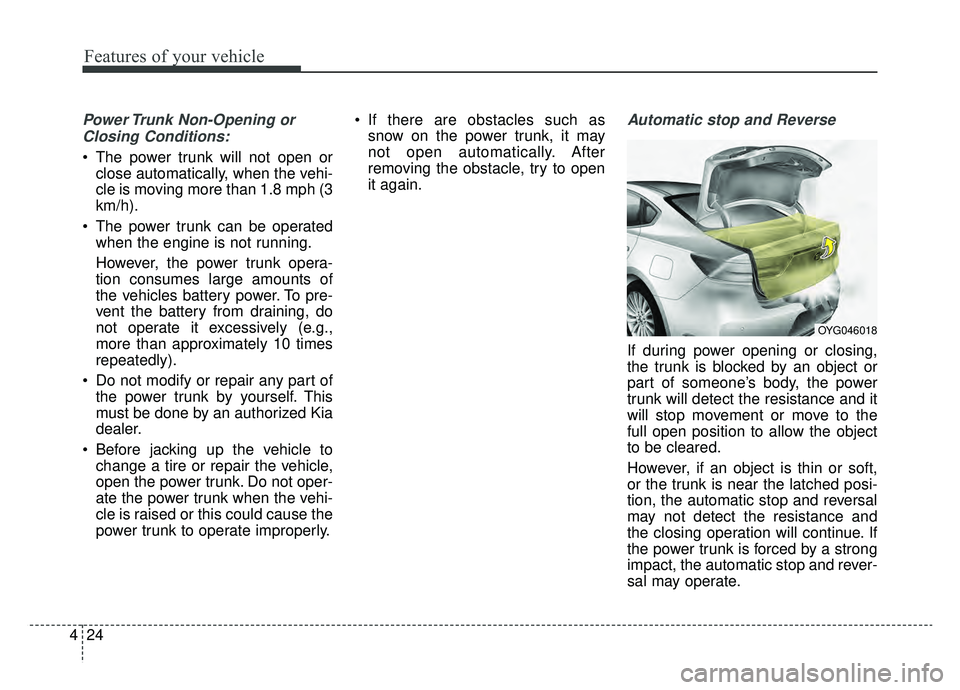
Automatic stop and Reverse
If during power opening or closing,
the trunk is blocked by an object or
part of someone’s body, the power
trunk will detect the resistance and it
will stop movement or move to the
full open position to allow the object
to be cleared.
However, if an object is thin or soft,
or the trunk is near the latched posi-
tion, the automatic stop and reversal
may not detect the resistance and
the closing operation will continue. If
the power trunk is forced by a strong
impact, the automatic stop and rever-
sal may operate.
OYG046018
Page 131 of 518
449
Features of your vehicle
Electric power steering (EPS)
The power steering uses a motor to
assist you in steering the vehicle. If
the engine is off or if the power steer-
ing system becomes inoperative, the
vehicle may still be steered, but it will
require increased steering effort.
The motor driven power steering is
controlled by a power steering con-
trol unit which senses the steering
wheel torque and vehicle speed to
command the motor.
The steering becomes heavier as the
vehicle’s speed increases and
becomes lighter as the vehicle’s
speed decreases for optimum steer-
ing control.
Should you notice any change in the
effort required to steer during normal
vehicle operation, have the power
steering checked by an authorized
Kia dealer. When you operate the steering
wheel in low temperature, noise
may occur. If temperature rises, the
noise will likely disappear. This is a
normal condition.
When the vehicle is stationary, and the steering wheel is turned all the
way to the left or right continuous-
ly, the steering wheel becomes
harder to turn. The power assist is
limited to protect the motor from
overheating.
As time passes, the steering wheel
will return to its normal condition.
✽ ✽ NOTICE
The following symptoms may occur
during normal vehicle operation:
• The EPS warning light does not
illuminate.
• The steering gets heavy immedi- ately after turning the ignition
switch on. This happens as the sys-
tem performs the EPS system
diagnostics. When the diagnostics
are completed, the steering wheel
will return to its normal condition.
• A click noise may be heard from the EPS relay after the Engine
Start/Stop button is turned to the
ON or OFF position.
• A motor noise may be heard when the vehicle is at a stop or at a low
driving speed.
• If the Electric Power Steering System does not operate normally,
the warning light will illuminate on
the instrument cluster. The power
steering system will not operate
and steering effort can increase.
Take your vehicle to an authorized
Kia dealer and have the vehicle
checked as soon as possible. (Continued)
STEERING WHEEL
Page 142 of 518
Features of your vehicle
60
4
FCC ID: NZLZTVHL3
IC: 4112A-ZTVHL3
This device complies with part 15
of the FCC Rules.
Operation is subject to the following
two conditions:
1. This device may not cause harmful
interference, and
2. This device must accept any inter- ference received, including inter-
ference that may cause undesired
operation.
The transceiver has been tested and
complies with FCC and Industry
Canada rules. Changes or modifica-
tions not expressly approved by the
party responsible for compliance
could void the user's authority to
operate the device.Electric chromic mirror (ECM) with HomeLink®system and com-
pass (if equipped)
Your vehicle may be equipped with a
Gentex Automatic-Dimming Mirror
with a Z-Nav
®Electronic Compass
Display and an Integrated
HomeLink
®Wireless Control
System.
During nighttime driving, this feature
will automatically detect and reduce
rearview mirror glare while the com-
pass indicates the direction the vehi-
cle is pointed. The HomeLink
®
Universal Transceiver allows you to
activate your garage door(s), electric
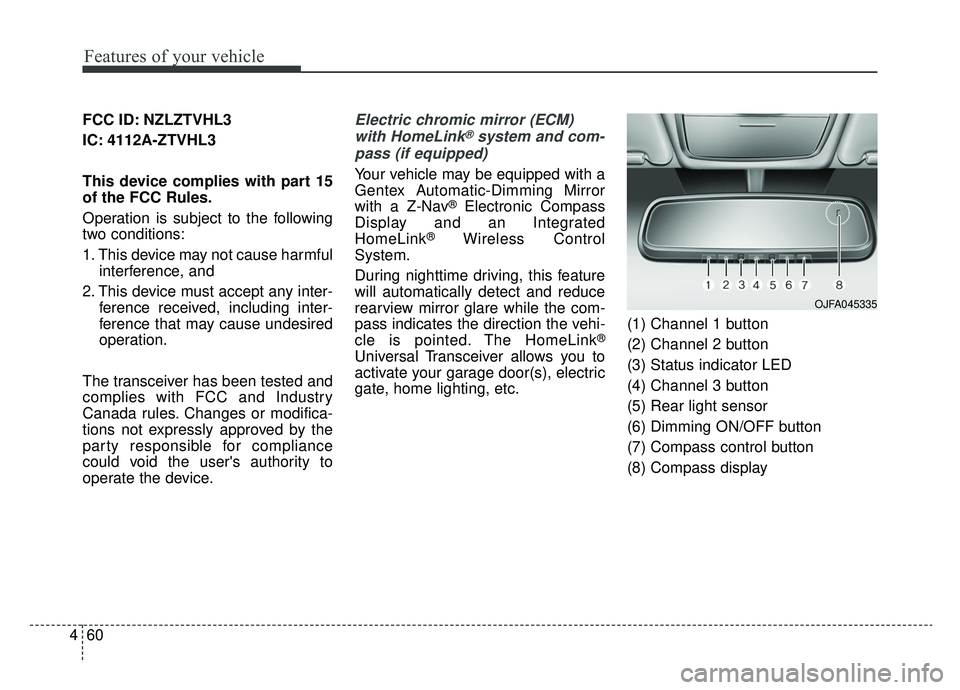
gate, home lighting, etc. (1) Channel 1 button
(2) Channel 2 button
(3) Status indicator LED
(4) Channel 3 button
(5) Rear light sensor
(6) Dimming ON/OFF button
(7) Compass control button
(8) Compass display
OJFA045335
Page 167 of 518
485
Features of your vehicle
Driver Assistance (if equipped)
Smart Cruise Control with Stop
& Go Reaction (if equipped) :
Choose the sensitivity
(Slow/Normal/Fast) of the smart
cruise control.
❈ For more details, refer to “Smart
Cruise Control with Stop & Go” in
chapter 5.
Forward Collision-Avoidance Assist (FCA, if equipped) :To
activate or deactivate the FCA sys-
tem.
❈ For more details, refer to “Forward
Collision-Avoidance Assist(FCA)”
in chapter 5
Forward Collision Warning (FCW, if equipped) : Choose the
sensitivity of the for-ward collision
warning. (Late/Normal/Early)
❈ For more details, refer to “Forward
Collision-Avoidance Assist(FCA)”
in chapter 5.
LCA (Lane change assist) (if
equipped) : To adjust the initial
warning alert time for the Lane
Change Assist.
❈ For more information, refer to “Blind
Spot Detection System” in chapter 5.
Rear Cross Traffic Alert (if
equipped) : If this item is checked,
the rear cross traffic alert function
will be activated.
❈ For more details, refer to “Blind Spot
Detection System” in chapter 5.
Blind Spot Collision Warning
Sound (if equipped) : If this item
is checked, the blind spot collision
warning sound function will be acti-
vated.
❈ For more details, refer to “Blind spot
Collision Warning” in chapter 5. Door
Automatically Lock
- Enable on Speed : All doors will be automatically locked when the
vehicle speed exceeds 9.3 mph
(15 km/h).
- Enable on Shift : All doors will be automatically locked if the
transaxle shift lever is shifted from
the P (Park) position to the R
(Reverse), N (Neutral), or D (Drive)
position.
Automatically Unlock
- Off : The auto door unlock opera- tion will be canceled.
- Vehicle Off/On key out : All doors will be automatically unlocked
when the Engine Start/Stop button
is set to the OFF position.
- On Shift to P : All doors will be automatically unlocked if the
transaxle shift lever is shifted to the
P (Park) position.
Page 168 of 518
Features of your vehicle
86
4
Two Press Unlock (if equipped)
- Off : The two press unlock function
will be deactivated. Therefore, all
doors will unlock upon one press of
the button.
- On : Only the driver's door will unlock when unlock button is
pressed once and all doors will
unlock when the same button is
pressed again within 4 seconds.
Door Lock Sound (if equipped) :
If this item checked, the door lock
sound function will be activated
when locking doors.
Smart Trunk (if equipped) :To
activate or deactivate the Smart
Trunk system.
❈ For more details, refer to “Smart
Trunk” in this chapter. Lights
One Touch Turn Signal
- Off : The one touch turn lamp func- tion will be deactivated.
- 3, 5, 7 Flashing : The lane change signals will blink 3, 5, or 7 times
when the turn signal lever is
moved slightly.
❈ For more details, refer to “Lighting”
in this chapter.
Headlamp escort (if equipped) :
If this item checked, the headlamp
escort function will be activated.
Welcome Light (if equipped) :If
this item checked, the welcome
light function will be activated. Sound
Park Assist System Vol. (if
equipped) : Adjust the Park Assist
System volume. (Level 1~3)
❈ For more details, refer to “Parking
Assist System” in this chapter.
Cluster voice guide Vol. (if
equipped) : Adjust the cluster
voice guide volume. (Level 0~3)
Welcome Sound (if equipped) :If
this item checked, the welcome
sound function will be activated.
Page 181 of 518
499
Features of your vehicle
Electronic Parking Brake(EPB) Warning Light(if equipped)
This warning light illuminates:
Once you set the Engine Start/Stop Button to the ON posi-
tion.
- It illuminates for approximately 3seconds and then goes off.
When there is a malfunction with the EPB.
In this case, have your vehicle
inspected by an authorized Kia
dealer.
✽ ✽ NOTICE- Electronic Parking
Brake (EPB) Warning Light
The Electronic Parking Brake
(EPB) Warning Light may illumi-
nate when the Electronic Stability
control (ESC) Indicator Light comes
on to indicate that the ESC is not
working properly (This does not
indicate malfunction of the EPB).
Master Warning light (if equipped)
This warning light informs the driver of the following situations
- Blind Spot Detection fail
- Advanced Smart Cruise Control fail
- Blind Spot Detection automatic can-celation
- Advanced Smart Cruise Control radar fail
- Lamp wire disconnection and so on
The Master Warning Light illumi-
nates when more than one of the
above warning situations occur. At
this time, the LCD Modes Icon will
change from ( ) to ( ).
If the warning situation is solved, the
master warning light will be turned off
and the LCD Modes Icon will be
changed back to its previous icon ( ).
Autonomous Emergency Braking (AEB) Warninglight (if equipped)
This indicator light illuminates:
When there is a malfunction with the AEB.
In this case, have the vehicle inspect-
ed by an authorized Kia dealer.
EPB