lane assist KIA CADENZA 2019 Owners Manual
[x] Cancel search | Manufacturer: KIA, Model Year: 2019, Model line: CADENZA, Model: KIA CADENZA 2019Pages: 518, PDF Size: 11.08 MB
Page 15 of 518
Your vehicle at a glance
42
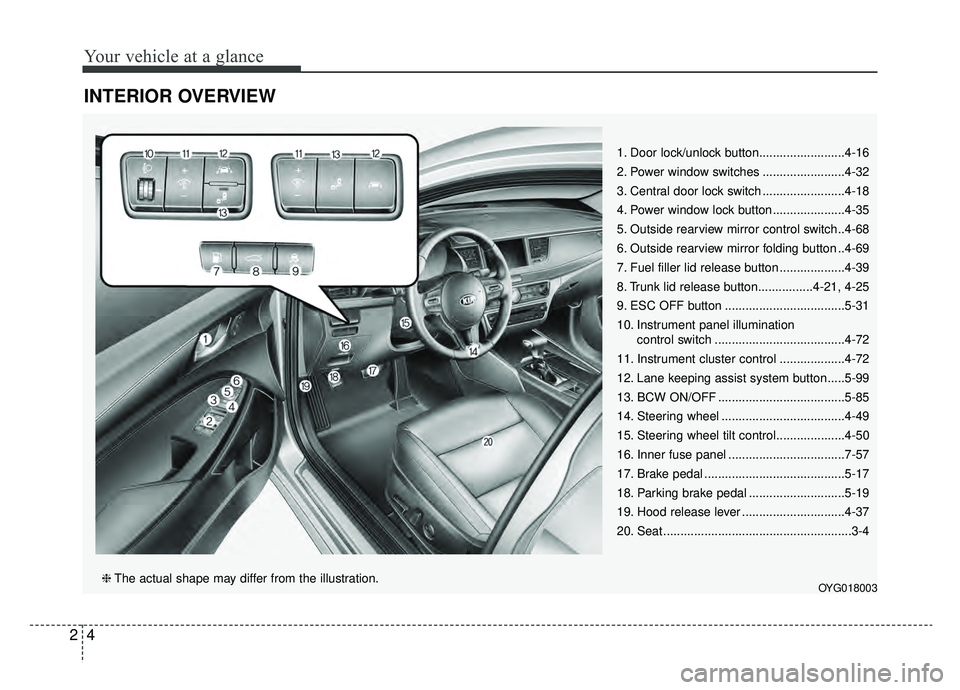
INTERIOR OVERVIEW
1. Door lock/unlock button.........................4-16
2. Power window switches ........................4-32
3. Central door lock switch ........................4-18
4. Power window lock button .....................4-35
5. Outside rearview mirror control switch..4-68
6. Outside rearview mirror folding button ..4-69
7. Fuel filler lid release button ...................4-39
8. Trunk lid release button................4-21, 4-25
9. ESC OFF button ...................................5-31
10. Instrument panel illumination control switch ......................................4-72
11. Instrument cluster control ...................4-72
12. Lane keeping assist system button .....5-99
13. BCW ON/OFF .....................................5-85
14. Steering wheel ....................................4-49
15. Steering wheel tilt control....................4-50
16. Inner fuse panel ..................................7-57
17. Brake pedal .........................................5-17
18. Parking brake pedal ............................5-19
19. Hood release lever ..............................4-37
20. Seat .......................................................3-4
OYG018003❈ The actual shape may differ from the illustration.
Page 84 of 518

Mirrors . . . . . . . . . . . . . . . . . . . . . . . . . . . . . . . . . . 4-54\
• Inside rearview mirror . . . . . . . . . . . . . . . . . . . . . . . . 4-54
• Erasing programmed HomeLink buttons. . . . . . . . . 4-58
• Automatic-dimming function . . . . . . . . . . . . . . . . . . . 4-61
• Compass function . . . . . . . . . . . . . . . . . . . . . . . . . . . . 4-62
• Programming HomeLink
®. . . . . . . . . . . . . . . . . . . . . 4-64
• Standard programming . . . . . . . . . . . . . . . . . . . . . . . 4-64
• Rolling code programming . . . . . . . . . . . . . . . . . . . . . 4-65
• Gate operator & Canadian programming . . . . . . . . 4-66
• Operating HomeLink
®. . . . . . . . . . . . . . . . . . . . . . . . 4-66
• Reprogramming a single HomeLink®button. . . . . . 4-67
• Erasing HomeLink®buttons . . . . . . . . . . . . . . . . . . . 4-67
• Outside rearview mirror. . . . . . . . . . . . . . . . . . . . . . . 4-68
Instrument cluster . . . . . . . . . . . . . . . . . . . . . . . . . 4-71
• Instrument cluster control . . . . . . . . . . . . . . . . . . . . . 4-72
• LCD display control . . . . . . . . . . . . . . . . . . . . . . . . . . 4-72
• Gauges . . . . . . . . . . . . . . . . . . . . . . . . . . . . . . . . . . . . \
. 4-73
• Transaxle Shift Indicator . . . . . . . . . . . . . . . . . . . . . . 4-76
LCD windows . . . . . . . . . . . . . . . . . . . . . . . . . . . . . 4-77
• Over view . . . . . . . . . . . . . . . . . . . . . . . . . . . . . . . . . . 4-77\
• Trip information (Trip computer) . . . . . . . . . . . . . . . 4-77
• LCD modes. . . . . . . . . . . . . . . . . . . . . . . . . . . . . . . . . . 4-81\
Warning and indicator lights . . . . . . . . . . . . . . . . 4-93
• Warning lights . . . . . . . . . . . . . . . . . . . . . . . . . . . . . . . 4-93
• Indicator lights. . . . . . . . . . . . . . . . . . . . . . . . . . . . . . 4-100
Head Up Display (HUD) . . . . . . . . . . . . . . . . . . . 4-105
• Description . . . . . . . . . . . . . . . . . . . . . . . . . . . . . . . . . 4-105
• Head up display on/off . . . . . . . . . . . . . . . . . . . . . . . 4-106
• Head up display information . . . . . . . . . . . . . . . . . . 4-106
• Head up display setting. . . . . . . . . . . . . . . . . . . . . . . 4-106
Parking Distance Warning-Reverse (PDW-R) . 4-107
• Operation of the parking distance warning-reverse . . . . . . . . . . . . . . . . . . . . . . . . . . . . 4-107
• Non-operational conditions of parking distance warning-reverse . . . . . . . . . . . . . . . . . . . . . . . . . . . . 4-108
• Parking distance warning-reverse precautions . . . 4-109
• Self-diagnosis . . . . . . . . . . . . . . . . . . . . . . . . . . . . . . . 4-110
Rear view monitor . . . . . . . . . . . . . . . . . . . . . . . . 4-111
Surround view monitoring system (SVM) . . . . . 4-112
Lighting . . . . . . . . . . . . . . . . . . . . . . . . . . . . . . . . . 4-113
• Battery saver function . . . . . . . . . . . . . . . . . . . . . . . . 4-113
• Lighting control . . . . . . . . . . . . . . . . . . . . . . . . . . . . . 4-113
• High beam operation . . . . . . . . . . . . . . . . . . . . . . . . . 4-115
• High beam assist . . . . . . . . . . . . . . . . . . . . . . . . . . . . 4-116
• Turn signals and lane change signals. . . . . . . . . . . . 4-118
• Front fog light . . . . . . . . . . . . . . . . . . . . . . . . . . . . . . 4-118
• Check headlight . . . . . . . . . . . . . . . . . . . . . . . . . . . . 4-119
• Headlight leveling device . . . . . . . . . . . . . . . . . . . . . 4-119
4
Page 163 of 518
481
Features of your vehicle
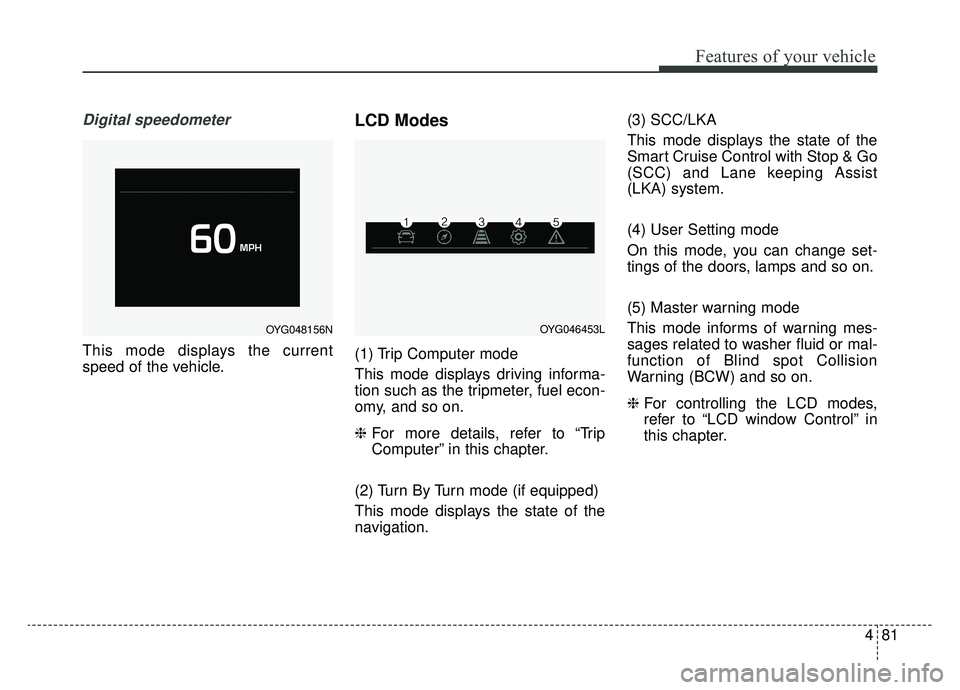
Digital speedometer
This mode displays the current
speed of the vehicle.
LCD Modes
(1) Trip Computer mode
This mode displays driving informa-
tion such as the tripmeter, fuel econ-
omy, and so on.
❈For more details, refer to “Trip
Computer” in this chapter.
(2) Turn By Turn mode (if equipped)
This mode displays the state of the
navigation. (3) SCC/LKA
This mode displays the state of the
Smart Cruise Control with Stop & Go
(SCC) and Lane keeping Assist
(LKA) system.
(4) User Setting mode
On this mode, you can change set-
tings of the doors, lamps and so on.
(5) Master warning mode
This mode informs of warning mes-
sages related to washer fluid or mal-
function of Blind spot Collision
Warning (BCW) and so on.
❈
For controlling the LCD modes,
refer to “LCD window Control” in
this chapter.
OYG048156NOYG046453L
Page 164 of 518
Features of your vehicle
82
4
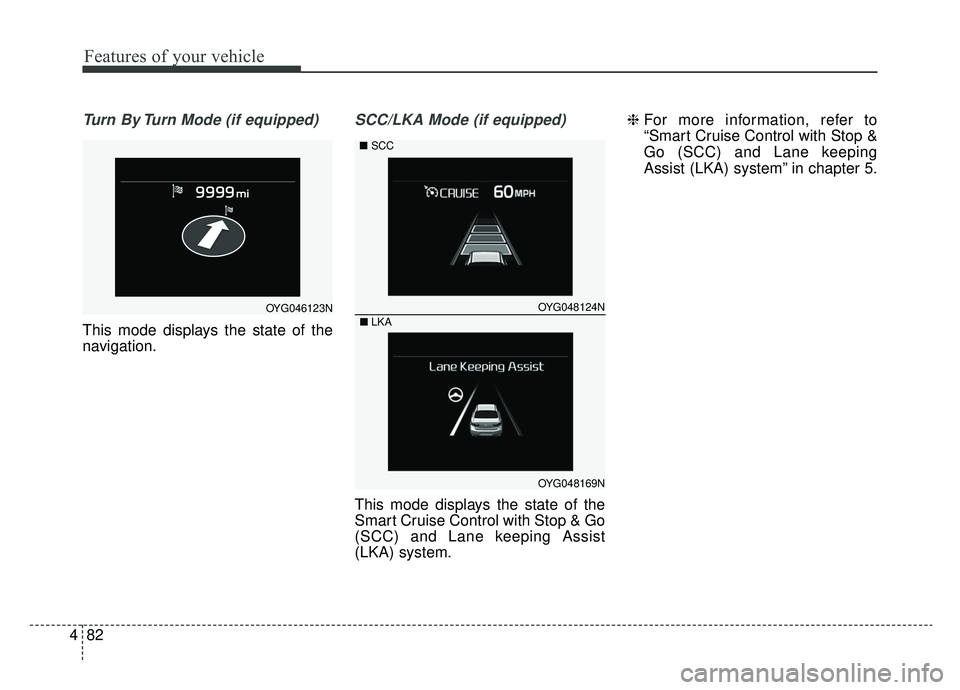
Turn By Turn Mode (if equipped)
This mode displays the state of the
navigation.
SCC/LKA Mode (if equipped)
This mode displays the state of the
Smart Cruise Control with Stop & Go
(SCC) and Lane keeping Assist
(LKA) system. ❈
For more information, refer to
“Smart Cruise Control with Stop &
Go (SCC) and Lane keeping
Assist (LKA) system” in chapter 5.
OYG046123NOYG048124N
OYG048169N
■LKA
■SCC
Page 167 of 518
485
Features of your vehicle
Driver Assistance (if equipped)
Smart Cruise Control with Stop
& Go Reaction (if equipped) :
Choose the sensitivity
(Slow/Normal/Fast) of the smart
cruise control.
❈ For more details, refer to “Smart
Cruise Control with Stop & Go” in
chapter 5.
Forward Collision-Avoidance Assist (FCA, if equipped) :To
activate or deactivate the FCA sys-
tem.
❈ For more details, refer to “Forward
Collision-Avoidance Assist(FCA)”
in chapter 5
Forward Collision Warning (FCW, if equipped) : Choose the
sensitivity of the for-ward collision
warning. (Late/Normal/Early)
❈ For more details, refer to “Forward
Collision-Avoidance Assist(FCA)”
in chapter 5.
LCA (Lane change assist) (if
equipped) : To adjust the initial
warning alert time for the Lane
Change Assist.
❈ For more information, refer to “Blind
Spot Detection System” in chapter 5.
Rear Cross Traffic Alert (if
equipped) : If this item is checked,
the rear cross traffic alert function
will be activated.
❈ For more details, refer to “Blind Spot
Detection System” in chapter 5.
Blind Spot Collision Warning
Sound (if equipped) : If this item
is checked, the blind spot collision
warning sound function will be acti-
vated.
❈ For more details, refer to “Blind spot
Collision Warning” in chapter 5. Door
Automatically Lock
- Enable on Speed : All doors will be automatically locked when the
vehicle speed exceeds 9.3 mph
(15 km/h).
- Enable on Shift : All doors will be automatically locked if the
transaxle shift lever is shifted from
the P (Park) position to the R
(Reverse), N (Neutral), or D (Drive)
position.
Automatically Unlock
- Off : The auto door unlock opera- tion will be canceled.
- Vehicle Off/On key out : All doors will be automatically unlocked
when the Engine Start/Stop button
is set to the OFF position.
- On Shift to P : All doors will be automatically unlocked if the
transaxle shift lever is shifted to the
P (Park) position.
Page 168 of 518
Features of your vehicle
86
4
Two Press Unlock (if equipped)
- Off : The two press unlock function
will be deactivated. Therefore, all
doors will unlock upon one press of
the button.
- On : Only the driver's door will unlock when unlock button is
pressed once and all doors will
unlock when the same button is
pressed again within 4 seconds.
Door Lock Sound (if equipped) :
If this item checked, the door lock
sound function will be activated
when locking doors.
Smart Trunk (if equipped) :To
activate or deactivate the Smart
Trunk system.
❈ For more details, refer to “Smart
Trunk” in this chapter. Lights
One Touch Turn Signal
- Off : The one touch turn lamp func- tion will be deactivated.
- 3, 5, 7 Flashing : The lane change signals will blink 3, 5, or 7 times
when the turn signal lever is
moved slightly.
❈ For more details, refer to “Lighting”
in this chapter.
Headlamp escort (if equipped) :
If this item checked, the headlamp
escort function will be activated.
Welcome Light (if equipped) :If
this item checked, the welcome
light function will be activated. Sound
Park Assist System Vol. (if
equipped) : Adjust the Park Assist
System volume. (Level 1~3)
❈ For more details, refer to “Parking
Assist System” in this chapter.
Cluster voice guide Vol. (if
equipped) : Adjust the cluster
voice guide volume. (Level 0~3)
Welcome Sound (if equipped) :If
this item checked, the welcome
sound function will be activated.
Page 185 of 518
4103
Features of your vehicle
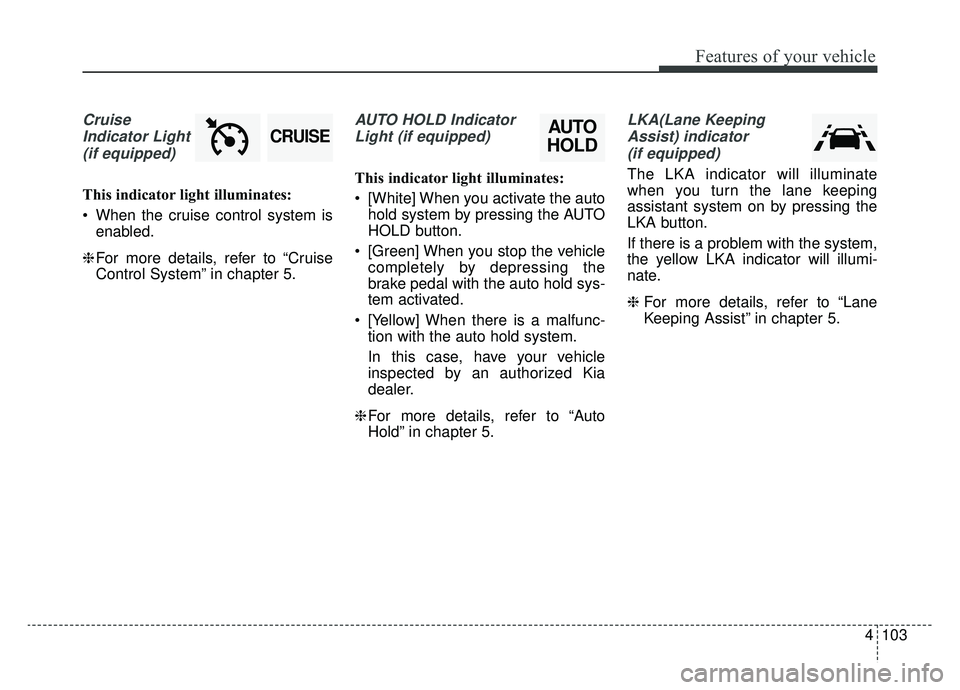
CruiseIndicator Light (if equipped)
This indicator light illuminates:
When the cruise control system is enabled.
❈ For more details, refer to “Cruise
Control System” in chapter 5.
AUTO HOLD Indicator
Light (if equipped)
This indicator light illuminates:
[White] When you activate the auto hold system by pressing the AUTO
HOLD button.
[Green] When you stop the vehicle completely by depressing the
brake pedal with the auto hold sys-
tem activated.
[Yellow] When there is a malfunc- tion with the auto hold system.
In this case, have your vehicle
inspected by an authorized Kia
dealer.
❈ For more details, refer to “Auto
Hold” in chapter 5.
LKA(Lane Keeping
Assist) indicator(if equipped)
The LKA indicator will illuminate
when you turn the lane keeping
assistant system on by pressing the
LKA button.
If there is a problem with the system,
the yellow LKA indicator will illumi-
nate.
❈ For more details, refer to “Lane
Keeping Assist” in chapter 5.
AUTO
HOLDCRUISE
Page 199 of 518
4117
Features of your vehicle
The system may not operate in the
following conditions.
When the light from the a vehicle isnot detected because of lamp
damage or because it is hidden
from sight, etc.
When the lamp of a vehicle is cov- ered with dust, snow or water.
When the light from a vehicle is not detected because of exhaust fume,
smoke, fog, snow, etc.
When the front window is covered with foreign matters such as ice,
dust, fog, or is damaged.
When there is a similar shape lamp with the front vehicle’s lamps.
When it is hard to see because of fog, heavy rain or snow.
When the headlamp is not repaired or replaced at an authorized deal-
er.
When headlamp aiming is not properly adjusted.
When driving on a narrow curved road or rough road. When driving downhill or uphill.
When only part of the vehicle in
front is visible on a crossroad or
curved road.
When there is a traffic light, reflect- ing sign, flashing sign or mirror.
When the road conditions are bad such as being wet or covered with
snow.
When the front vehicle’s head- lamps are off but the fog lamps on.
When a vehicle suddenly appears from a curve.
When the vehicle is tilted from a flat tire or being towed.
When the LKA (Lane Keeping Assist) system warning light illumi-
nates. (if equipped)✽ ✽ NOTICE
• Do not place any accessories,
stickers or tint on the windshield.
• Have the windshield glass replaced by from an authorized dealer.
• Do not remove or damage related parts of the High Beam Assist sys-
tem.
• Be careful that water doesn’t get into the High Beam Assist unit.
• Do not place objects on the dash- board that reflect light such as
mirrors, white paper, etc. The sys-
tem may not be able to function if
sunlight is reflected.
• At times, the Smart High Beam system may not operate due to sys-
tem limitations. Always check the
road conditions for your safety.
When the system does not operate,
manually change between the high
beam and low beam.
Page 248 of 518

Drive mode integrated control system . . . . . . . . . 5-76
. . . . . . . . . . . . . . . . . . . . . . . . . . . . . . . . . . 5-76\
. . . . . . . . . . . . . . . . . . . . . . . . . . . 5-77
. . . . . . . . . . 5-77
. . . . . . . . . . . . . . . . . . . 5-80
Blind-spot Collision Warning (BCW). . . . . . . . . . 5-84
. . . . . . . . . . . . 5-85
. . . 5-87
. . . . . . . . . . . . . . . . . . . . . . . . . . . . 5-91
Blind-Spot Collision-Avoidance Assist (BCA) . . . 5-93
Lane Keeping Assist (LKA) system . . . . . . . . . . . 5-97
. . . . . . . . . . . . . . . . . . . . . . . . 5-99
. . . . . . . . . . . . . . . . . . . . . . . . . . . 5-103
. . . . . . . . . . . . . . . . . . . . . 5-104
. . . . . . . . . . . . . . . . . . 5-105
Driver Attention Warning (DAW) . . . . . . . . . . . 5-107
. . . . . . . . . . . . . . . . . . 5-107
. . . . . . . . . . . . . . . . . . . . . . . . . 5-109
. . . . . . . . . . . . . . . . . . . . . . . . . . . . . 5-109
. . . . . . . . . . . . . . . . . . . . . . . . . . 5-110
Economical operation . . . . . . . . . . . . . . . . . . . . . 5-112
Special driving conditions . . . . . . . . . . . . . . . . . . 5-114
. . . . . . . . . . . . . . . . . 5-114
. . . . . . . . . . . . . . . . . . . . . . . . . . 5-114
. . . . . . . . . . . . . . . . . . . . . . . . . . . 5-115 . . . . . . . . . . . . . . . . . . . . . . . . . . . . . 5-115
. . . . . . . . . . . . . . . . . . . . . . . . . . . 5-116
. . . . . . . . . . . . . . . . . . . . . . 5-117
. . . . . . . . . . . . . . . . . . . . . . . . . . . . . 5-117
. . . . . . . . . . . . . . . . . . . . . . . . . . . . 5-117
Winter driving . . . . . . . . . . . . . . . . . . . . . . . . . . . 5-118
. . . . . . . . . . . . . . . . . . . . . . 5-118
. . . . . . . . . 5-120
. . . . . . . . . . . . . . . . . . . . . 5-120
. . . . . . 5-120
. . . . . . . . . . . . . . . . . . . 5-121
system . . . . . . . . . . . . . . . . . . . . . . . . . . . . . . . . . . . . \
5-121
. . . . . . . . . . . . 5-121
. . . 5-121
. . . . . . . . . . . . . . . . . . 5-121
Trailer towing . . . . . . . . . . . . . . . . . . . . . . . . . . . . 5-121
Vehicle load limit . . . . . . . . . . . . . . . . . . . . . . . . . 5-122
. . . . . . . . . . . . . 5-122
. . . . . . . . . . . . . . . . . . . . . . . . . . . 5-125
Vehicle weight . . . . . . . . . . . . . . . . . . . . . . . . . . . . 5-126
5
Page 332 of 518
Driving your vehicle
86
5
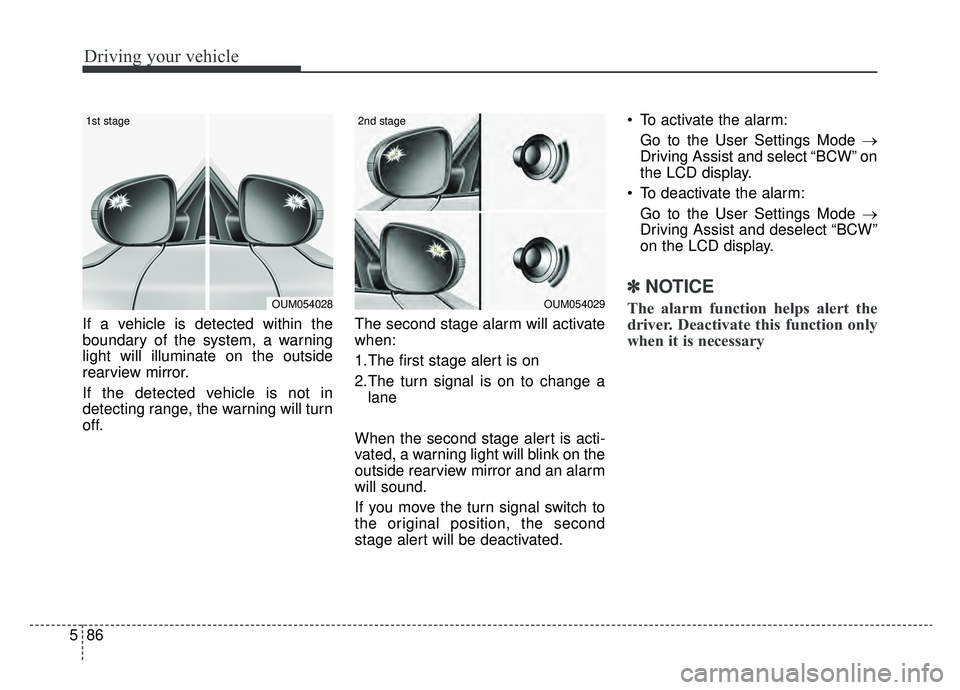
If a vehicle is detected within the
boundary of the system, a warning
light will illuminate on the outside
rearview mirror.
If the detected vehicle is not in
detecting range, the warning will turn
off. The second stage alarm will activate
when:
1.The first stage alert is on
2.The turn signal is on to change a
lane
When the second stage alert is acti-
vated, a warning light will blink on the
outside rearview mirror and an alarm
will sound.
If you move the turn signal switch to
the original position, the second
stage alert will be deactivated. To activate the alarm:
Go to the User Settings Mode →
Driving Assist and select “BCW” on
the LCD display.
To deactivate the alarm: Go to the User Settings Mode →
Driving Assist and deselect “BCW”
on the LCD display.
✽ ✽
NOTICE
The alarm function helps alert the
driver. Deactivate this function only
when it is necessaryOUM054029
2nd stage
OUM054028
1st stage