stop start KIA CADENZA 2020 Owners Manual
[x] Cancel search | Manufacturer: KIA, Model Year: 2020, Model line: CADENZA, Model: KIA CADENZA 2020Pages: 560, PDF Size: 11.37 MB
Page 347 of 560
Driving your vehicle
94 5
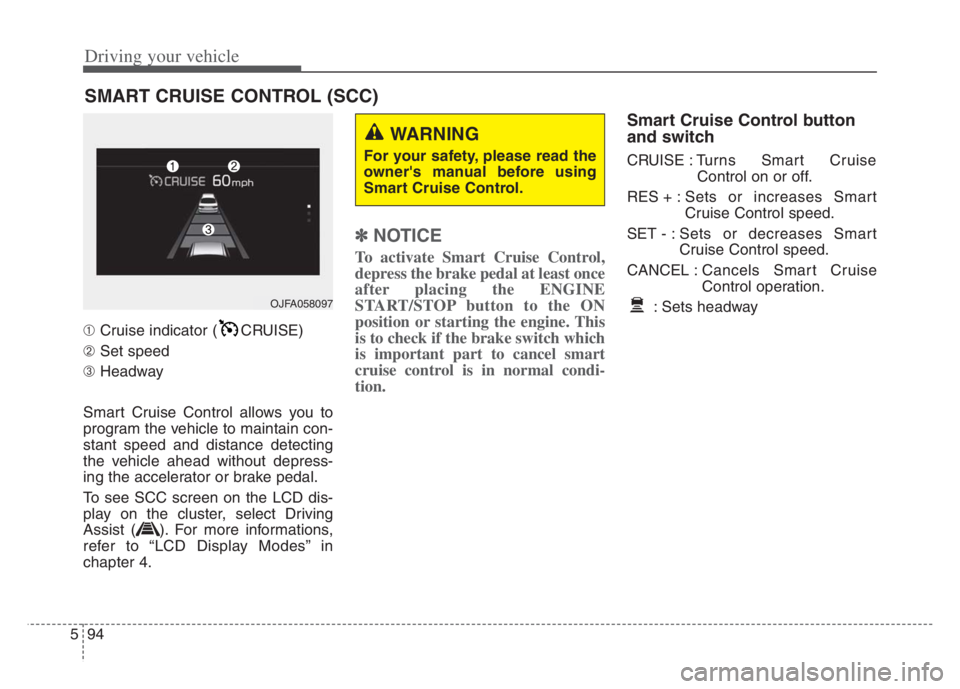
➀Cruise indicator ( CRUISE)
➁Set speed
➂Headway
Smart Cruise Control allows you to
program the vehicle to maintain con-
stant speed and distance detecting
the vehicle ahead without depress-
ing the accelerator or brake pedal.
To see SCC screen on the LCD dis-
play on the cluster, select Driving
Assist ( ). For more informations,
refer to “LCD Display Modes” in
chapter 4.
✽ ✽
NOTICE
To activate Smart Cruise Control,
depress the brake pedal at least once
after placing the ENGINE
START/STOP button to the ON
position or starting the engine. This
is to check if the brake switch which
is important part to cancel smart
cruise control is in normal condi-
tion.
Smart Cruise Control button
and switch
CRUISE : Turns Smart Cruise
Control on or off.
RES + :Sets or increases Smart
Cruise Control speed.
SET - : Sets or decreases Smart
Cruise Control speed.
CANCEL :Cancels Smart Cruise
Control operation.
: Sets headway
SMART CRUISE CONTROL (SCC)
WARNING
For your safety, please read the
owner's manual before using
Smart Cruise Control.
OJFA058097
Page 358 of 560
5105
Driving your vehicle
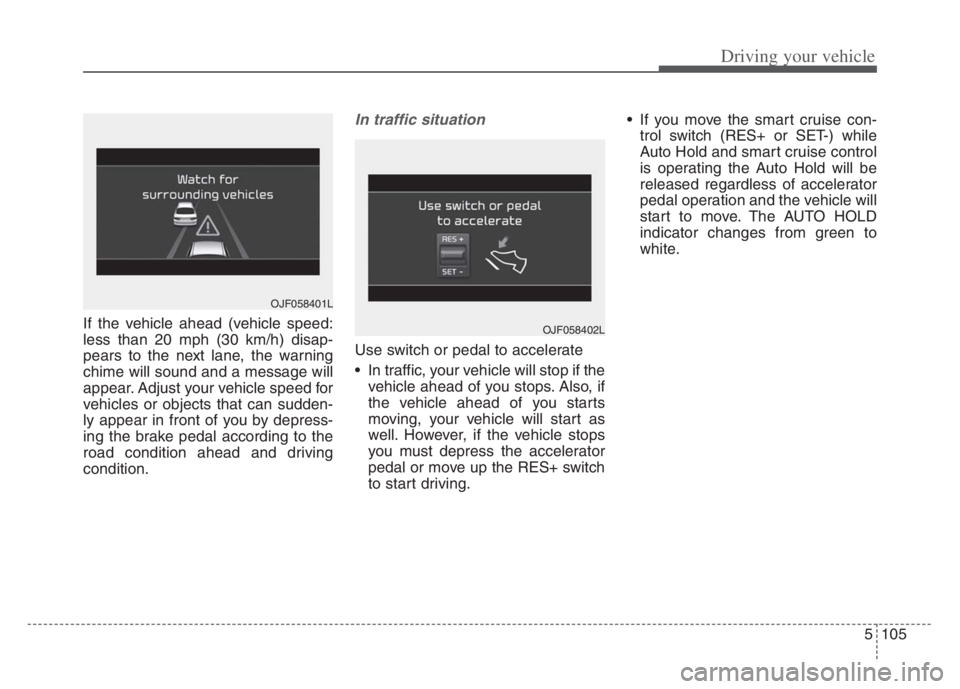
If the vehicle ahead (vehicle speed:
less than 20 mph (30 km/h) disap-
pears to the next lane, the warning
chime will sound and a message will
appear. Adjust your vehicle speed for
vehicles or objects that can sudden-
ly appear in front of you by depress-
ing the brake pedal according to the
road condition ahead and driving
condition.
In traffic situation
Use switch or pedal to accelerate
In traffic, your vehicle will stop if the
vehicle ahead of you stops. Also, if
the vehicle ahead of you starts
moving, your vehicle will start as
well. However, if the vehicle stops
you must depress the accelerator
pedal or move up the RES+ switch
to start driving. If you move the smart cruise con-
trol switch (RES+ or SET-) while
Auto Hold and smart cruise control
is operating the Auto Hold will be
released regardless of accelerator
pedal operation and the vehicle will
start to move. The AUTO HOLD
indicator changes from green to
white.
OJF058402L
OJF058401L
Page 365 of 560

Driving your vehicle
112 5
A vehicle ahead cannot be recog-
nized correctly by the sensor if any of
following occurs:
- When the vehicle is pointing
upwards due to overloading in the
liftgate (tailgate)
- While making turns by steering
- When driving to one side of the lane
- When driving on narrow lanes or on
curves
Adjust your vehicle speed by
depressing the brake pedal accord-
ing to the road condition ahead and
driving condition. When vehicles are at a standstill
and the vehicle in front of you
changes to the next lane, be care-
ful when your vehicle starts to
move because it may not recognize
the stopped vehicle in front of you.
In this case, you must maintain a
safe braking distance, and if nec-
essary, depress the brake pedal to
reduce your driving speed in order
to maintain a safe distance. Always look out for pedestrians
when your vehicle is maintaining a
distance with the vehicle ahead.
OJF055029OJF055050
Page 368 of 560

5115
Driving your vehicle
Navigation-based Smart Cruise
Control will help automatically adjust
your speed when a curved road is
ahead by receiving road information
from the navigation while the Smart
Cruise Control is operating.✽ ✽
NOTICE
• Navigation-based Smart Cruise
Control is available only on con-
trolled access road of certain high-
ways.
❈ ❈
Controlled access road indicates
roads with limited entrances
and exits that allow uninter-
rupted high speed traffic flow.
Only passenger cars and motor-
cycles are allowed on controlled
access roads.
• Additional highways may be
expanded by navigation updates.
System Setting and Operation
System setting
With the Engine Start/Stop button
in the ON or START position,
Navigation-based Smart Cruise
Control can be activated by select-
ing 'Driver Assistance →Driving
Assist →Highway Auto Curve
Slowdown' from the Vehicle mode
on the infotainment system. For
detailed information, please refer
to the infotainment system manual
separately supplied.
If the engine is turned off then on
again, the system maintains the
last setting.
NAVIGATION-BASED SMART CRUISE CONTROL (NSCC)
WARNING
Navigation-based Smart
Cruise Control is not a substi-
tute for safe driving practices,
but a convenience function. It
is the responsibility of the driv-
er to always be aware of the
surroundings and drive safely.
Navigation-based Smart
Cruise Control relies entirely
on the road information pro-
vided by the navigation sys-
tem and may accelerate above
speed limit. It is the responsi-
bility of the driver to follow
traffic laws and avoid acci-
dents.
For your safety, please read
the owner's manual before
using the system.
Available highway
(Controlled access road)
USA
Select Interstate Highway
and U.S. (Federal) and State
Highways
Page 374 of 560

5121
Driving your vehicle
LFA operation
With the ENGINE START/STOP but-
ton is
in the ON or START position, the
Lane Following Assist can be activat-
ed by pressing the button.
(Continued)
Keeping your hands off the
wheel while driving will trigger
the hands-off warning and
deactivate the steering-assist
system. Put your hands back
on the wheel, then the steer-
ing-assist system will be re-
activated.
When driving at a high speed,
the steering assist force can
become weak and the vehicle
can drive out of its lane. Extra
caution is required, and com-
ply with the speed limit.
Attaching an object to the
steering wheel could deter
steering assistance.
Attaching an object to the
steering wheel could deter the
hands-off alarming system.
OYG059312
CAUTION
Depending on your surround-
ings and road conditions, LFA
could fail to recognize the
lane and stop working. In turn,
extra caution is required
while driving with LFA on.
Be sure to check the non-
operating conditions and cau-
tions for the driver before
using LFA.
Do not place reflective materi-
als such as white paper or
mirror on the crash pad.
Sunlight reflections can cause
a malfunction in LFA.
Too big sound from the sound
system can interrupt the
alarming sound from LFA.
(Continued)
Page 382 of 560
![KIA CADENZA 2020 Owners Manual 5129
Driving your vehicle
System setting and operation
With the ENGINE START/STOP but-
ton in the [ON], select or release the
setting from “Settings Vehicle
Driver Assistance Driving As](/img/2/40377/w960_40377-381.png "KIA CADENZA 2020 Owners Manual 5129
Driving your vehicle
System setting and operation
With the ENGINE START/STOP but-
ton in the [ON], select or release the
setting from “Settings Vehicle
Driver Assistance Driving As")
5129
Driving your vehicle
System setting and operation
With the ENGINE START/STOP but-
ton in the [ON], select or release the
setting from “Settings Vehicle
Driver Assistance Driving Assist
Highway Driving Assist” from the
Settings mode on the infotainment
system. For detailed information,
please refer to the infotainment sys-
tem manual separately supplied.
Select HDA in and the system will
operate if the following conditions are
met :
If the engine is turned off then on
again, the system maintains the last
setting.
Operating conditions
Select 'Highway Driving Assist' from
the Settings menu in the infotain-
ment system screen and satisfy the
following conditions for the system to
operate.
When driving on the highway main
line.
When Smart Cruise Control is in
operation (Vehicle deceleration
and acceleration control)
- Refer to “Smart Cruise Control
(SCC)” in this chapter.
- If SCC is in standby mode (SCC
is on but speed is not set), HDA
will be in the same mode. The
white indicator ( ) light will
be turned on.
When the vehicle speed is below
95 mph (150 km/h)
If all the mentioned conditions are
satisfied, the system is ENABLED
and the indicator ( ) on the cluster
will illuminate green.
Steering wheel control
Steering control
If the vehicle detects both lane mark-
ers (lane color white), the ( ) indi-
cator light will change from white to
green. This indicates that the steer-
ing wheel is being controlled.
OQL058313
Page 390 of 560

5137
Driving your vehicle
System setting and activation
System setting
The driver can activate the sys-
tems by placing the ENGINE
START/STOP button to the ON
position and by selecting "Settings
Vehicle Driver Assistance
Parking Safety Rear Cross-
Traffic Safety”. RCCA and RCCW
turn on and get ready to be activat-
ed when ‘Rear Cross-Traffic safety’
is selected. When the engine is turned off then
on again, the systems always get
ready to be activated.
When the system is initially turned
on and when the engine is turned
off then on again, the warning light
will illuminate for 3 seconds on the
outside rearview mirror.
Warning Timing
The driver can select the initial warn-
ing activation time select "Settings
Vehicle Driver Assistance
Warning Timing". The options for the
initial Rear Cross-Traffic Collision
Warning includes the following:
- Normal:
When this condition is selected, the
initial Rear Cross-Traffic Collision
Warning is activated normally. If this
setting feels too sensitive change the
option to ‘Later’.
The warning activation time may feel
late if the side/rear vehicle abruptly
accelerates.
OYG059344L
Page 398 of 560

5145
Driving your vehicle
When the temperature of the rear
bumper is high or low.
When the sensors are blocked by
other vehicles, walls or parking-lot
pillars.
The vehicle drives on a curved
road.
The road pavement (or the periph-
eral ground) abnormally contains
metallic components (i.e. possibly
due to subway construction).
There is a fixed object near the
vehicle, such as a guardrail.
While going down or up a steep
road where the height of the lane is
different.
Driving on a narrow road where
trees or grass or overgrown.
Driving in rural areas where the
sensor does not detect another
vehicle for an extended period of
time.
Driving on a wet road.
Driving on a road where the
guardrail or wall is in double struc-
ture. A big vehicle is near such as a bus
or truck.
When the other vehicle approach-
es very close.
When the other vehicle passes at a
very fast speed.
While changing lanes.
If the vehicle has started at the
same time as the vehicle next to
you and has accelerated.
When the vehicle in the next lane
moves two lanes away from you
OR when the vehicle two lanes
away moves to the next lane from
you.
A motorcycle or bicycle is near.
A flat trailer is near.
If there are small objects in the
detecting area such as a shopping
cart or a baby stroller.
If there is a low height vehicle such
as a sports car.
The brake pedal is depressed.
ESC (Electronic Stability Control)
is activated. ESC (Electronic Stability Control)
malfunctions.
The tire pressure is low or a tire is
damaged.
The brake is reworked.
The vehicle sharply stops.
Temperature is extremely low
around the vehicle.
The vehicle severely vibrates while
driving over a bumpy road,
uneven/bumpy road, or concrete
patch.
The vehicle drives on a slippery
surface due to snow, water puddle,
or ice.
If the vehicle moves backward after
the vehicle is parked with a diago-
nal line.
Page 402 of 560
5149
Driving your vehicle
Your vehicle's fuel economy depends
mainly on your style of driving, where
you drive and when you drive.
Each of these factors affects how
many miles (kilometers) you can get
from a gallon (liter) of fuel. To operate
your vehicle as economically as pos-
sible, use the following driving sug-
gestions to help save money in both
fuel and repairs:
Drive smoothly. Accelerate at a
moderate rate. Don't make "jack-
rabbit" starts or full-throttle shifts
and maintain a steady cruising
speed. Don't race between stop-
lights. Try to adjust your speed to
the traffic so you don't have to
change speeds unnecessarily.
Avoid heavy traffic whenever pos-
sible. Always maintain a safe dis-
tance from other vehicles so you
can avoid unnecessary braking.
This also reduces brake wear.
Drive at a moderate speed. The
faster you drive, the more fuel your
vehicle uses. Driving at a moderate
speed, especially on the highway,
is one of the most effective ways to
reduce fuel consumption. Don't "ride" the brake pedal. This
can increase fuel consumption and
also increase wear on these com-
ponents. In addition, driving with
your foot resting on the brake pedal
may cause the brakes to overheat,
which reduces their effectiveness
and may lead to more serious con-
sequences.
Take care of your tires. Keep them
inflated to the recommended pres-
sure. Incorrect inflation, either too
much or too little, results in unnec-
essary tire wear. Check the tire
pressures at least once a month.
Be sure that the wheels are
aligned correctly. Improper align-
ment can result from hitting curbs
or driving too fast over irregular
surfaces. Poor alignment causes
faster tire wear and may also result
in other problems as well as
greater fuel consumption. Keep your vehicle in good condi-
tion. For better fuel economy and
reduced maintenance costs, main-
tain your vehicle in accordance
with the maintenance schedule in
chapter 7. If you drive your vehicle
in severe conditions, more frequent
maintenance is required (see
chapter 7 for details).
Keep your vehicle clean. For maxi-
mum service, your vehicle should
be kept clean and free of corrosive
materials. It is especially important
that mud, dirt, ice, etc. not be
allowed to accumulate on the
underside of the vehicle. This extra
weight can result in increased fuel
consumption and also contribute to
corrosion.
Travel lightly. Don't carry unneces-
sary weight in your vehicle. Weight
reduces fuel economy.
Don't let the engine idle longer
than necessary. If you are waiting
(and not in traffic), turn off your
engine and restart only when
you're ready to go.
ECONOMICAL OPERATION
Page 418 of 560

What to do in an emergency
2 6
ROAD WARNING
Hazard warning flasher
The hazard warning flasher serves
as a warning to other drivers to exer-
cise extreme caution when
approaching, overtaking, or passing
your vehicle.It should be used whenever emer-
gency repairs are being made or
when the vehicle is stopped near the
edge of a roadway.
Depress the flasher switch with the
ENGINE START/STOP button in any
position. The flasher switch is located
in the center facia panel. All turn sig-
nal lights will flash simultaneously.
• The hazard warning flasher oper-
ates whether your vehicle is run-
ning or not.
The turn signals do not work when
the hazard flasher is on.
Care must be taken when using
the hazard warning flasher while
the vehicle is being towed.
OYG069029