alarm KIA CADENZA 2020 User Guide
[x] Cancel search | Manufacturer: KIA, Model Year: 2020, Model line: CADENZA, Model: KIA CADENZA 2020Pages: 560, PDF Size: 11.37 MB
Page 299 of 560

Driving your vehicle
46 5
✽
✽
NOTICE
If you change the warning timing,
the warning timing of other systems
may change. Always be aware of
warning timing before changing the
warning timing.
Prerequisite for activation
FCA gets ready to be activated,
when the “Active assist” or “Warning
only” under the Forward Safety is
selected on the Infotainment System
screen, and when the following pre-
requisites are satisfied.
- The ESC is activated.
- The driving speed is over 6 mph
(10 km/h). (However, FCA is acti-
vated within certain driving speed.)
- When recognizing the vehicle or
the pedestrian or the cyclist in
front. (However, FCA does not acti-
vate according to conditions in
front and vehicle systems, but it
notices only certain warnings.)
- FCA does not operate properly or it
only produces a warning alarms in
accordance with the driving or
vehicle condition.
- If the warning only under the
Forward Safety is selected, FCA
produces only warning alarms in
accordance with the collision risk
levels.
✽ ✽
NOTICE
FCA may not operate properly
according to the frontal situation,
the direction of pedestrian or cyclist
and speed.
Page 300 of 560

547
Driving your vehicle
FCA warning message and
control
FCA produces warning messages
and warning alarms in accordance
with the collision risk levels of follow-
ings like vehicle’s sudden braking in
front or lack of headway or collision
to pedestrians or cyclist. Also, it con-
trols the brakes in accordance with
the collision risk levels.
The driver can select the initial warn-
ing activation time in the Settings
menu in the Infotainment System
screen. The options for the initial
Forward Collision Warning include
Normal or Late initial warning time.
Collision Warning (1st warning)
The warning message appears on
the LCD display with the warning
alarms.
The Vehicle may slow down slightly
- It will operate if the vehicle speed
is greater than 6 mph (10 km/h)
and less than or equal to 110
mph (180 km/h) on a forward
vehicle. (Depending on the condi-
tion of the vehicle ahead and the
environment surrounding it, the
possible maximum operating
speed may be reduced.)
WARNING
Completely stop the vehicle in
a safe location before operat-
ing the switch on the steering
wheel to activate/deactivate
FCA.
FCA automatically activates
upon placing the ENGINE
START/STOP button in the ON
position. The driver can deac-
tivate FCA by canceling the
system setting on the
Infotainment System screen.
FCA automatically deacti-
vates upon canceling the
ESC. When the ESC is can-
celed, FCA cannot be activat-
ed on the Infotainment
System screen.
FCA warning light will illumi-
nate, which is normal.
OYG059267L
Page 301 of 560

Driving your vehicle
48 5
- For pedestrians and cyclists, the
vehicle speed is greater than or
equal to 6 mph (10 km/h) and
less than 45 mph (70 km/h).
(Depending on the condition of
pedestrians and bike riders and
the surrounding environment the
possible maximum operating
speed may be reduced.)
FCA controls the brakes within cer-
tain limit to release shock from the
collision.
- If you select “Warning Only”, FCA
activates and produces only
warning alarms in accordance
with the collision risk levels. You
should control the brake directly
because FCA do not control the
brake.Emergency Braking (2nd warning)
The warning message appears on
the LCD display with the warning
alarms.
The brake control is maximized
just before a collision, reducing
impact when it strikes a forward
vehicle.
- It will operate if the vehicle speed
is greater than 6 mph (10 km/h)
and less than or equal to 50 mph
(80 km/h) on a forward vehicle.
(Depending on the condition of
the vehicle ahead and the envi-
ronment surrounding it, the possi-
ble maximum operating speed
may be reduced.)- For pedestrians and cyclists, the
vehicle speed is greater than or
equal to 6 mph (10 km/h) and less
than 45 mph (70 km/h).
(Depending on the condition of
pedestrians and bike riders and
the surrounding environment the
possible maximum operating
speed may be reduced.)
FCA controls the brakes within cer-
tain limit to release shock from the
collision.
FCA controls the maximum brakes
just before the collision.
- If you select “Warning Only”,
FCA activates and produces only
warning alarms in accordance
with the collision risk levels. You
should control the brake directly
because FCA do not control the
brake.
OYG059268L
Page 302 of 560
549
Driving your vehicle
Brake operation
In an urgent situation, the braking
system enters into the ready status
for prompt reaction to assist the driv-
er in depressing the brake pedal.
FCA provides additional braking
power for optimum braking per-
formance, when the driver
depresses the brake pedal.
The braking control is automatical-
ly deactivated, when the driver
sharply depresses the accelerator
pedal, or when the driver abruptly
operates the steering wheel.
The braking control is automatical-
ly canceled, when risk factors dis-
appear.WARNING
FCA cannot avoid all collisions.
FCA might not completely stop
the vehicle before a collision,
due to ambient, weather and
road conditions. The driver has
the responsibility to drive safely
and control the vehicle.
WARNING
FCA operates in accordance
with the risk levels, such as the
distance from the vehicle in
front, the speed of the vehicle in
front, and the driver's vehicle
operation. For the system to
activate, do not attempt risky
driving.
CAUTION
The driver should always pay
great caution to vehicle opera-
tion, even though there is no
warning message or warning
alarm.
If any other warning sound
such as seat belt warning
chime is already generated,
Forward Collision-Avoidance
Assist warning may not
sound.
Excessive audio volume may
disturb the sound of the sys-
tem warning alarm.
Page 304 of 560
551
Driving your vehicle
(Continued)
• Do not tint the window or install
stickers, accessories around the
inside mirror where the camera is
installed.
• Make sure the frontal camera
installation point does not get wet.
• Do not impact or arbitrarily
remove any radar/camera compo-
nents.
• Do not place reflective
objects(white paper or mirror etc.)
on the crash pad.
The system may activate unneces-
sarily due to reflect of the sunlight.
• Excessive audio volume may dis-
turb the sound of the system warn-
ing alarm.
• For more cautions for the camera
sensor, refer to the “Lane Keeping
Assist (LKA)” in this chapter.Warning message and warning
light
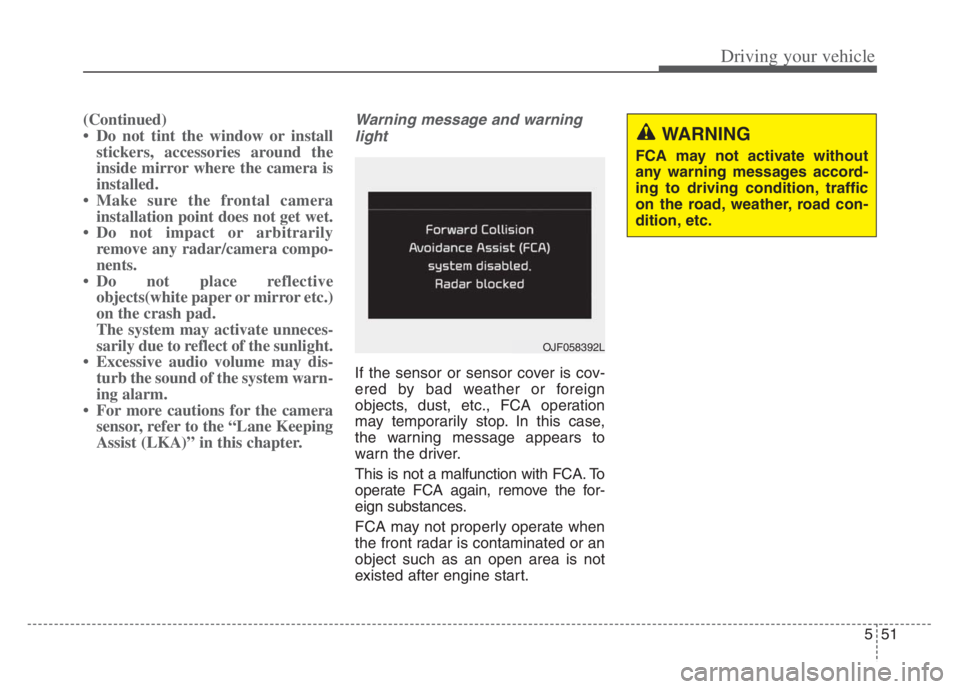
If the sensor or sensor cover is cov-
ered by bad weather or foreign
objects, dust, etc., FCA operation
may temporarily stop. In this case,
the warning message appears to
warn the driver.
This is not a malfunction with FCA. To
operate FCA again, remove the for-
eign substances.
FCA may not properly operate when
the front radar is contaminated or an
object such as an open area is not
existed after engine start.
WARNING
FCA may not activate without
any warning messages accord-
ing to driving condition, traffic
on the road, weather, road con-
dition, etc.
OJF058392L
Page 305 of 560
Driving your vehicle
52 5
System malfunction
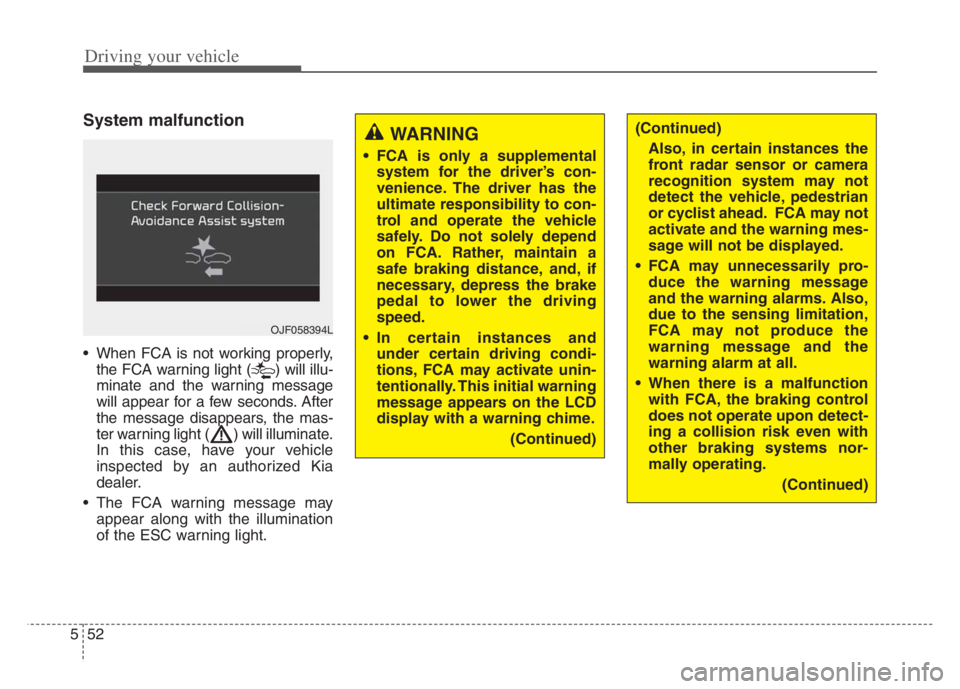
When FCA is not working properly,
the FCA warning light ( ) will illu-
minate and the warning message
will appear for a few seconds. After
the message disappears, the mas-
ter warning light ( ) will illuminate.
In this case, have your vehicle
inspected by an authorized Kia
dealer.
The FCA warning message may
appear along with the illumination
of the ESC warning light.
WARNING
FCA is only a supplemental
system for the driver’s con-
venience. The driver has the
ultimate responsibility to con-
trol and operate the vehicle
safely. Do not solely depend
on FCA. Rather, maintain a
safe braking distance, and, if
necessary, depress the brake
pedal to lower the driving
speed.
In certain instances and
under certain driving condi-
tions, FCA may activate unin-
tentionally. This initial warning
message appears on the LCD
display with a warning chime.
(Continued)
OJF058394L
(Continued)
Also, in certain instances the
front radar sensor or camera
recognition system may not
detect the vehicle, pedestrian
or cyclist ahead. FCA may not
activate and the warning mes-
sage will not be displayed.
FCA may unnecessarily pro-
duce the warning message
and the warning alarms. Also,
due to the sensing limitation,
FCA may not produce the
warning message and the
warning alarm at all.
When there is a malfunction
with FCA, the braking control
does not operate upon detect-
ing a collision risk even with
other braking systems nor-
mally operating.
(Continued)
Page 309 of 560
Driving your vehicle
56 5
OHM059353L
OHM059352L
OHM059354L
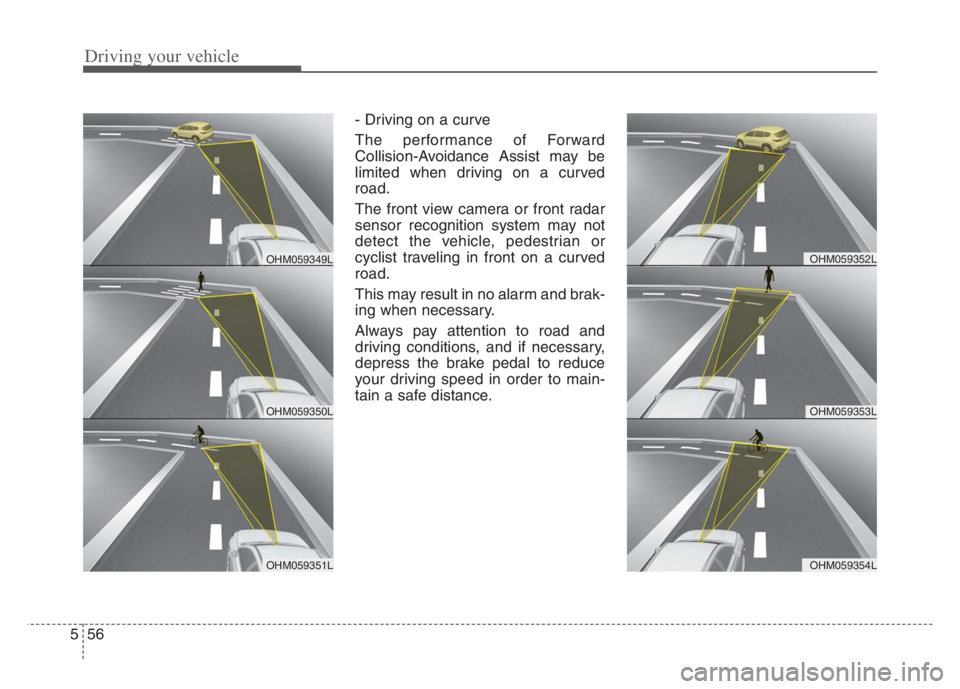
- Driving on a curve
The performance of Forward
Collision-Avoidance Assist may be
limited when driving on a curved
road.
The front view camera or front radar
sensor recognition system may not
detect the vehicle, pedestrian or
cyclist traveling in front on a curved
road.
This may result in no alarm and brak-
ing when necessary.
Always pay attention to road and
driving conditions, and if necessary,
depress the brake pedal to reduce
your driving speed in order to main-
tain a safe distance.
OHM059350L
OHM059349L
OHM059351L
Page 310 of 560
557
Driving your vehicle
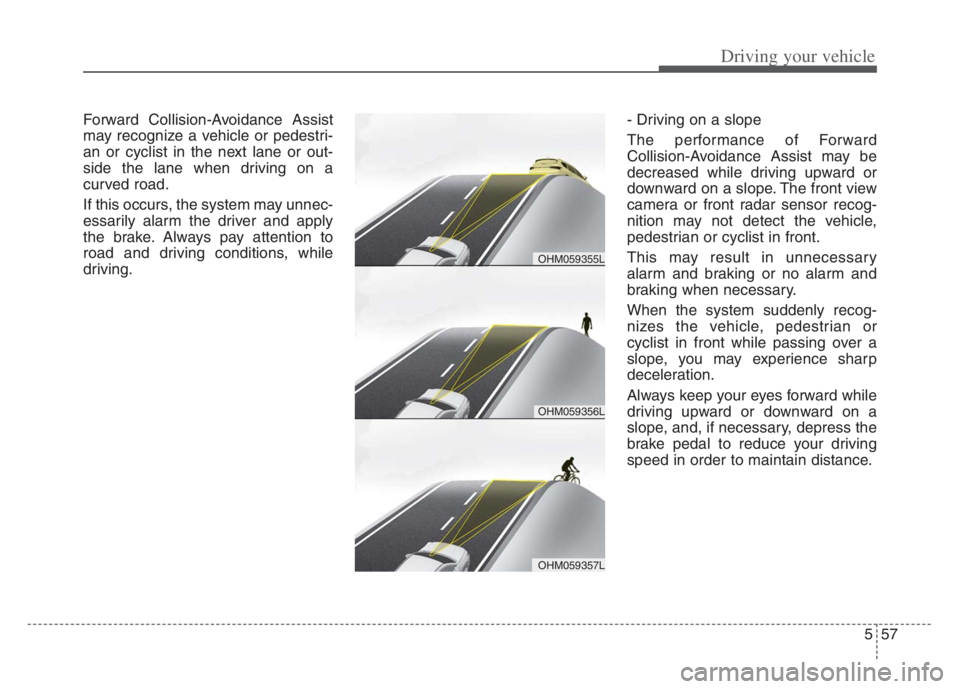
Forward Collision-Avoidance Assist
may recognize a vehicle or pedestri-
an or cyclist in the next lane or out-
side the lane when driving on a
curved road.
If this occurs, the system may unnec-
essarily alarm the driver and apply
the brake. Always pay attention to
road and driving conditions, while
driving.- Driving on a slope
The performance of Forward
Collision-Avoidance Assist may be
decreased while driving upward or
downward on a slope. The front view
camera or front radar sensor recog-
nition may not detect the vehicle,
pedestrian or cyclist in front.
This may result in unnecessary
alarm and braking or no alarm and
braking when necessary.
When the system suddenly recog-
nizes the vehicle, pedestrian or
cyclist in front while passing over a
slope, you may experience sharp
deceleration.
Always keep your eyes forward while
driving upward or downward on a
slope, and, if necessary, depress the
brake pedal to reduce your driving
speed in order to maintain distance.
OHM059356L
OHM059355L
OHM059357L
Page 316 of 560
563
Driving your vehicle
The system detects lane markers
and controls the steering wheel by
a front view camera, therefore, if
the lane markers are hard to
detect, the system may not work
properly. Always be cautious when
using the system.
When the lane markers are hard to
detect, please refer to “DRIVER’S
ATTENTION”.
Do not remove or damage the
related parts of the front view cam-
era system.
Do not place objects on the crash
pad that reflect light such as mir-
rors, white paper, etc. it may cause
malfunction of LKA if sunlight is
reflected.
You may not hear warning sound of
LKA because of the excessive
audio sound.
If other beeps such as the seat belt
warning sound are in operation
and override LKA alarming, LKA
beeps may not occur. At high vehicle speeds, the steer-
ing torque needed for assistance
may not be sufficient to keep your
vehicle within the lane. If so, the
vehicle may move out of its lane.
Always obey the speed limit when
using LKA.
If you attach objects to the steering
wheel, the system may not assist
steering.
If you attach objects to the steering
wheel, hands off alarm may not
work properly.LKA operation
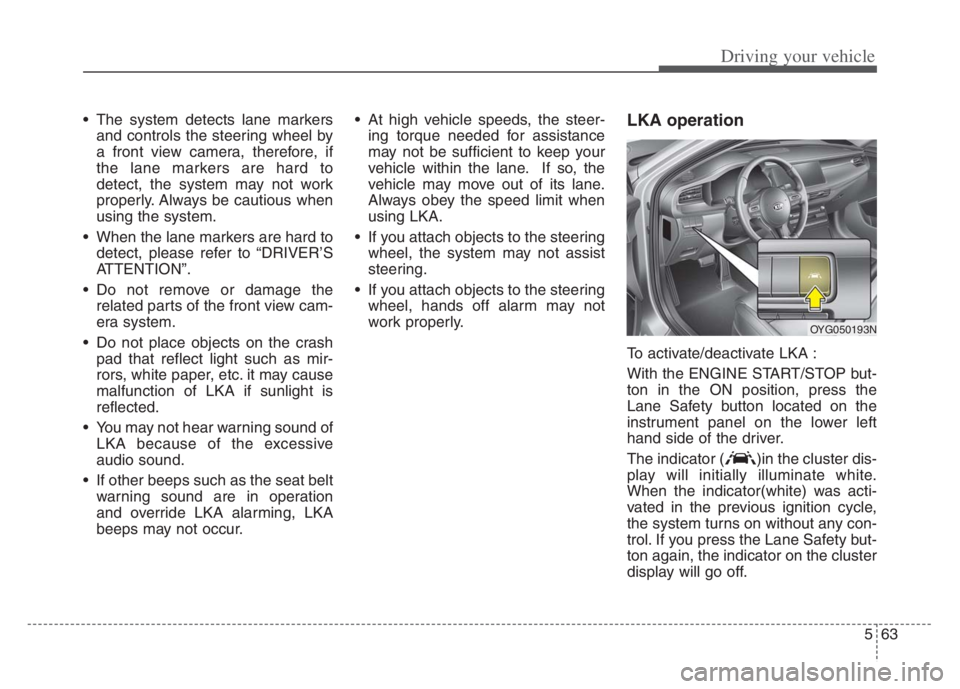
To activate/deactivate LKA :
With the ENGINE START/STOP but-
ton in the ON position, press the
Lane Safety button located on the
instrument panel on the lower left
hand side of the driver.
The indicator ( )in the cluster dis-
play will initially illuminate white.
When the indicator(white) was acti-
vated in the previous ignition cycle,
the system turns on without any con-
trol. If you press the Lane Safety but-
ton again, the indicator on the cluster
display will go off.
OYG050193N
Page 329 of 560
Driving your vehicle
76 5
When this alert is activated, the warn-
ing light on the outside rearview mirror
will also blink. And a warning chime
will sound.
If you turn off the turn signal indicator,
the second stage alert will be deacti-
vated.
Once the detected vehicle is no
longer within the warning area, the
warning will turn off according to the
driving conditions of the vehicle.
WARNING
The warning light on the out-
side rearview mirror will illu-
minate whenever a vehicle is
detected at the rear side by
the system.
To avoid accidents, do not
focus only on the warning
light and neglect to see the
surrounding of the vehicle.
Drive safely even though the
vehicle is equipped with a
Blind-Spot Collision Warning.
Do not solely rely on the sys-
tem but check your surround-
ing before changing lanes or
backing the vehicle up.
The system may not alert the
driver in some conditions so
always check your surround-
ings while driving.
CAUTION
The driver should always exer-
cise extreme caution while
operating the vehicle, whether
or not the warning light on the
outside rearview mirror illumi-
nates or there is a warning
alarm.
Playing the vehicle audio sys-
tem at high volume may pre-
vent you from hearing Blind-
Spot Collision Warning
sounds.
The warning of Blind-Spot
Collision Warning may not
sound while other system's
warning sounds.