battery KIA CADENZA 2020 User Guide
[x] Cancel search | Manufacturer: KIA, Model Year: 2020, Model line: CADENZA, Model: KIA CADENZA 2020Pages: 560, PDF Size: 11.37 MB
Page 105 of 560
423
Features of your vehicle
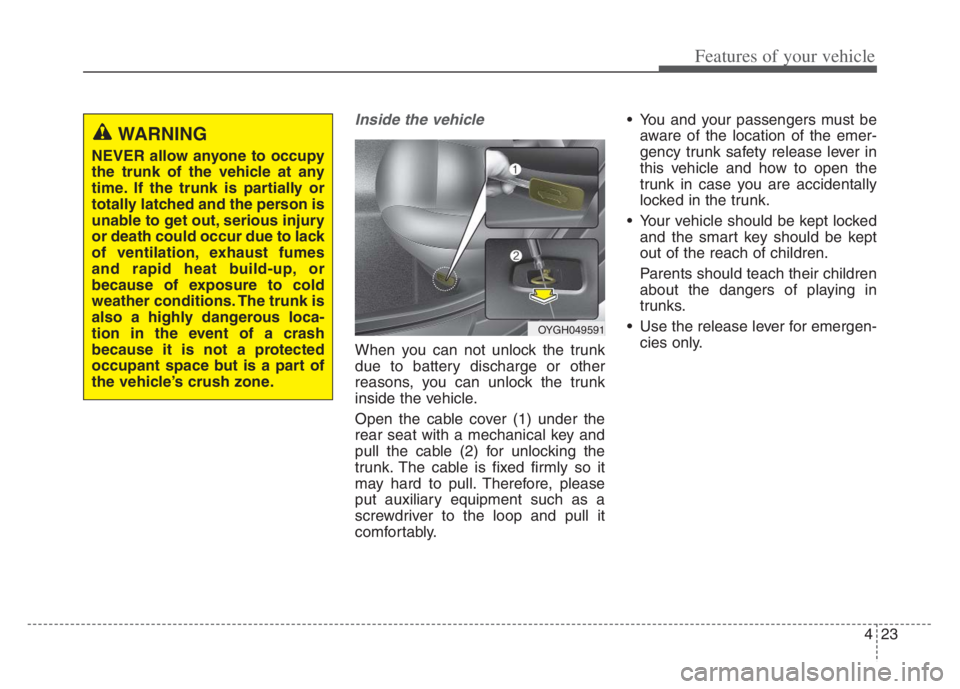
Inside the vehicle
When you can not unlock the trunk
due to battery discharge or other
reasons, you can unlock the trunk
inside the vehicle.
Open the cable cover (1) under the
rear seat with a mechanical key and
pull the cable (2) for unlocking the
trunk. The cable is fixed firmly so it
may hard to pull. Therefore, please
put auxiliary equipment such as a
screwdriver to the loop and pull it
comfortably. You and your passengers must be
aware of the location of the emer-
gency trunk safety release lever in
this vehicle and how to open the
trunk in case you are accidentally
locked in the trunk.
Your vehicle should be kept locked
and the smart key should be kept
out of the reach of children.
Parents should teach their children
about the dangers of playing in
trunks.
Use the release lever for emergen-
cies only.
WARNING
NEVER allow anyone to occupy
the trunk of the vehicle at any
time. If the trunk is partially or
totally latched and the person is
unable to get out, serious injury
or death could occur due to lack
of ventilation, exhaust fumes
and rapid heat build-up, or
because of exposure to cold
weather conditions. The trunk is
also a highly dangerous loca-
tion in the event of a crash
because it is not a protected
occupant space but is a part of
the vehicle’s crush zone.
OYGH049591
Page 127 of 560
445
Features of your vehicle
Resetting the sunroof
Reset the sunroof when:
- The battery is discharged or dis-
connected or the sunroof fuse
has been replaced or disconnect-
ed.
- The sunroof control switch is not
operating correctly.
Reset the sunroof as described
below:
1. Start the engine.
2. Close the sunshade and sunroof
completely if opened.
3. Release the sunroof control
lever.
4. Push the sunroof control lever
forward in the direction of close
(about 10 seconds) until the
sunshade slightly moves. Then,
release the lever.5.Push the sunroof control lever for-
ward in the direction of close, until
the sunroof operates as follows
again:
Sunshade Open Glass Tilt Open
Glass Tilt Close Glass Slide
Open Glass Slide Close
Sunshade Close
Then, release the lever.When this is complete, the sunroof
system has been reset and one
touch open and close should be
restored.
✽ ✽
NOTICE
If the resetting the sunroof proce-
dure is not correctly followed, the
sunroof may not operate properly.
Page 129 of 560

447
Features of your vehicle
(Continued)
• When the charging system warning
light comes on due to low voltage
(When should be lower case the
alternator or battery do not oper-
ate normally or malfunction), the
steering wheel may require
increased steering effort.Tilt and telescopic steering
Tilt and telescopic steering allows
you to adjust the steering wheel
before you drive. You can also raise it
to give your legs more room when
you exit and enter the vehicle.
The steering wheel should be posi-
tioned so that it is comfortable for
you to drive, while permitting you to
see the instrument panel warning
lights and gauges.
Manual type
To change the steering wheel angle,
pull down the lock-release lever (1),
adjust the steering wheel to the
desired angle (2) and height (3) then
pull up the lock-release lever to lock
the steering wheel in place. Be sure
to adjust the steering wheel to the
desired position before driving.
▼
WARNING- Steering
wheel adjustment
Never adjust the angle and
height of the steering wheel
while driving. You may lose
steering control.
OYG049038
Page 130 of 560

Features of your vehicle
48 4
✽
✽
NOTICE
After adjustment, sometimes the
lock release lever may not lock the
steering wheel. It is not a malfunc-
tion. This occurs when two gears are
not engaged correctly. In this case,
adjust the steering wheel again and
then lock the steering wheel.
Electric type (if equipped)
Adjust the steering wheel angle (2)
and position (3) with the knob (1) on
the steering column. Move the steer-
ing wheel, so it points toward your
chest, not toward your face. Make
sure you can see the instrument
panel warning lights and gauges.
After adjusting, push the steering
wheel both up and down to be cer-
tain it is locked in position. Always
adjust the position of the steering
wheel before driving.
✽ ✽
NOTICE
To prevent discharge of the battery,
do not operate when the engine is
stopped.
▼
OYG049039
Page 146 of 560
Features of your vehicle
64 4
L/R: When the remote control outside
rearview mirror switch (1) is
selected to the L (left) or R (right)
position, both outside rearview
mirrors will move downward.
Neutral: When neither switch is
selected, the outside
rearview mirror will not
move.
The outside rearview mirrors will auto-
matically revert to their original posi-
tions under the following conditions:
1. The ENGINE START/STOP button
is in the OFF position.
2. Shift lever is moved to any position
except R (Reverse).
3. Remote control outside rearview
mirror switch is placed in the middle
position.Folding the outside rearview mirror
Electric type
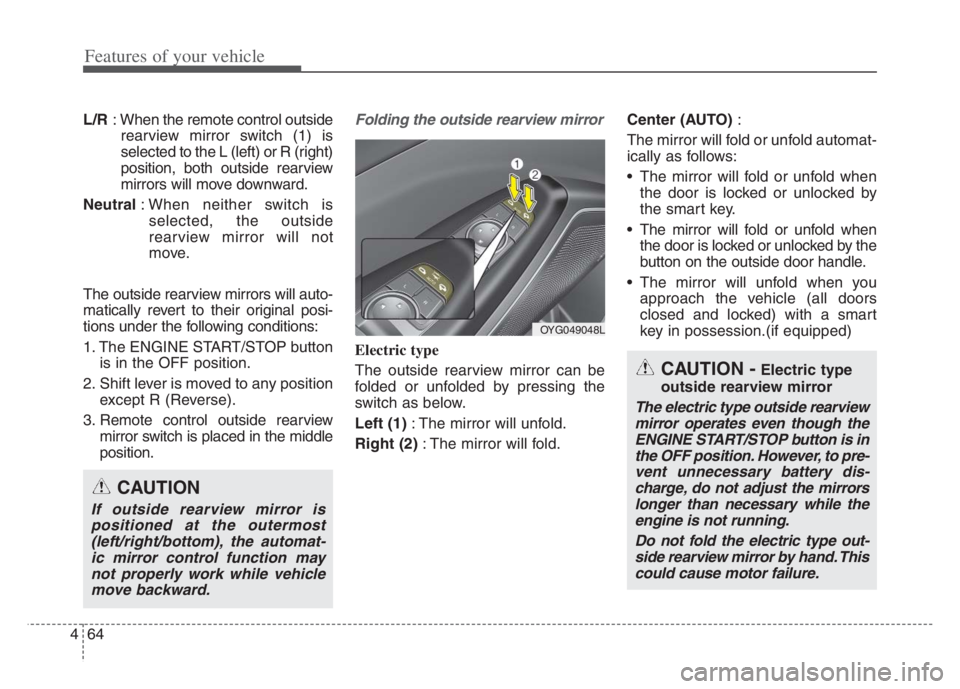
The outside rearview mirror can be
folded or unfolded by pressing the
switch as below.
Left (1): The mirror will unfold.
Right (2): The mirror will fold.Center (AUTO):
The mirror will fold or unfold automat-
ically as follows:
The mirror will fold or unfold when
the door is locked or unlocked by
the smart key.
The mirror will fold or unfold when
the door is locked or unlocked by the
button on the outside door handle.
The mirror will unfold when you
approach the vehicle (all doors
closed and locked) with a smart
key in possession.(if equipped)
OYG049048L
CAUTION -Electric type
outside rearview mirror
The electric type outside rearview
mirror operates even though the
ENGINE START/STOP button is in
the OFF position. However, to pre-
vent unnecessary battery dis-
charge, do not adjust the mirrors
longer than necessary while the
engine is not running.
Do not fold the electric type out-
side rearview mirror by hand. This
could cause motor failure.
CAUTION
If outside rearview mirror is
positioned at the outermost
(left/right/bottom), the automat-
ic mirror control function may
not properly work while vehicle
move backward.
Page 151 of 560

469
Features of your vehicle
Distance to empty
The distance to empty is the esti-
mated distance the vehicle can be
driven with the remaining fuel.
- Distance range : 1 ~ 9,999 mi. or
1 ~ 9,999 km If the estimated distance is below 1
mi. (1 km), the trip computer will
display “---” as distance to empty.
Outside Temperature Gauge
This gauge indicates the current out-
side air temperatures by 1°F (1°C).
- Temperature range : -40°F ~ 140°F
(-40°C ~ 60°C)
OYG040547NOYG040190N
CAUTION
If the vehicle is not on level
ground or the battery power
has been interrupted, the dis-
tance to empty function may
not operate correctly.
The distance to empty may
differ from the actual driving
distance as it is anestimate
of the available driving dis-
tance.
The trip computer may not
register additional fuel if less
than 1.6 gallons (6 liters) of
fuel are added to the vehicle.
The distance to empty may
vary significantly based on
driving conditions, driving
habits, and condition of the
vehicle.
Page 158 of 560
Features of your vehicle
76 4
Trip information (Trip computer)
The trip computer is a microcomput-
er-controlled driver information sys-
tem that displays information related
to driving.
✽ ✽
NOTICE
Some driving information stored in
the trip computer (for example
Average Vehicle Speed) resets if the
battery is disconnected.
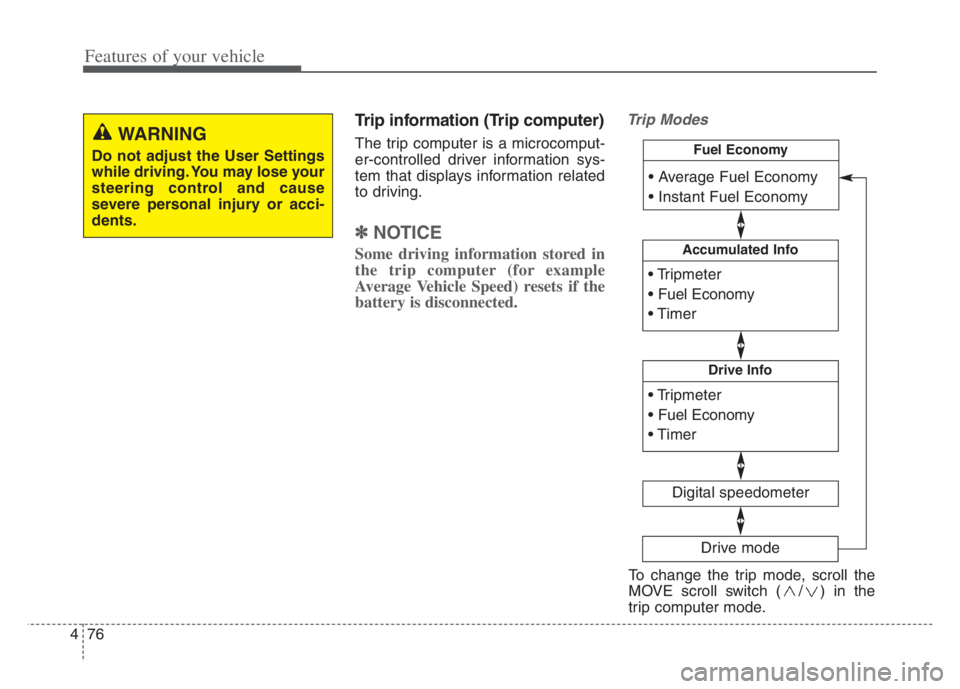
Trip Modes
WARNING
Do not adjust the User Settings
while driving. You may lose your
steering control and cause
severe personal injury or acci-
dents.
Accumulated Info
Digital speedometer
Drive Info
Fuel Economy
Drive mode
To change the trip mode, scroll the
MOVE scroll switch ( / ) in the
trip computer mode.
Page 162 of 560
Features of your vehicle
80 4
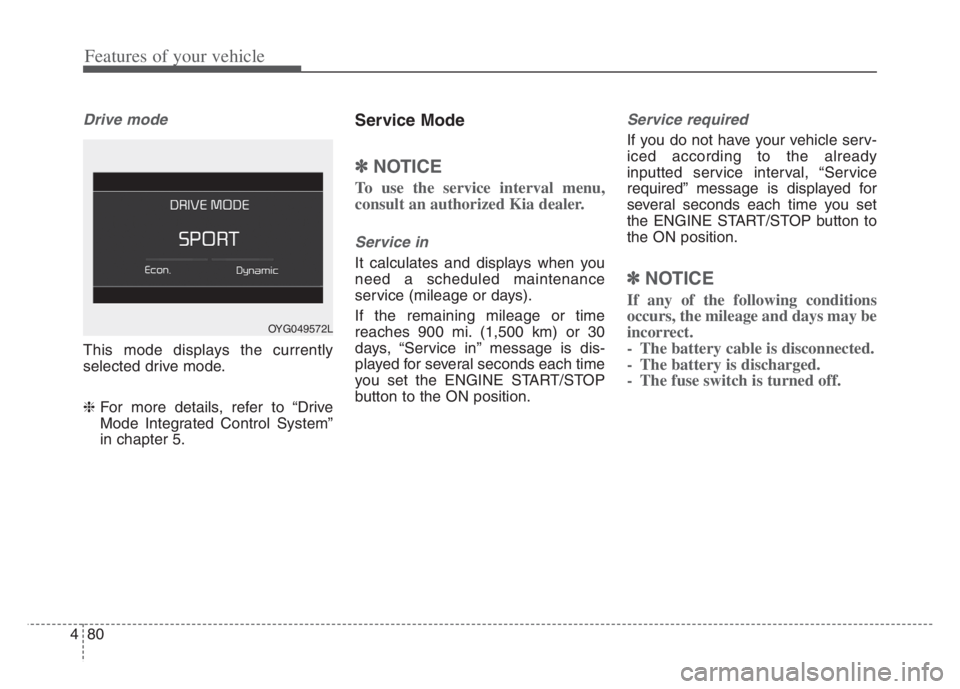
Drive mode
This mode displays the currently
selected drive mode.
❈For more details, refer to “Drive
Mode Integrated Control System”
in chapter 5.
Service Mode
✽ ✽
NOTICE
To use the service interval menu,
consult an authorized Kia dealer.
Service in
It calculates and displays when you
need a scheduled maintenance
service (mileage or days).
If the remaining mileage or time
reaches 900 mi. (1,500 km) or 30
days, “Service in” message is dis-
played for several seconds each time
you set the ENGINE START/STOP
button to the ON position.
Service required
If you do not have your vehicle serv-
iced according to the already
inputted service interval, “Service
required” message is displayed for
several seconds each time you set
the ENGINE START/STOP button to
the ON position.
✽ ✽
NOTICE
If any of the following conditions
occurs, the mileage and days may be
incorrect.
- The battery cable is disconnected.
- The battery is discharged.
- The fuse switch is turned off.
OYG049572L
Page 165 of 560

483
Features of your vehicle
Low Key Battery
This warning message illuminates
if the battery of the smart key is
discharged when the ENGINE
START/STOP button changes to
the OFF position.
Press START button while turning
wheel
This warning message illuminates
if the steering wheel does not
unlock normally when the ENGINE
START/STOP button is pressed.
It means that you should press the
ENGINE START/STOP button
while turning the steering wheel
right and left.
Press brake pedal to start engine
This warning message illuminates
if the ENGINE START/STOP button
changes to the ACC position twice
by pressing the button repeatedly
without depressing the brake pedal.
It means that you should depress
the brake pedal to start the engine.
Key not in vehicle
This warning message illuminates
if the smart key is not in the vehicle
when you press the ENGINE
START/STOP button.
It means that you should always
have the smart key with you.
Key not detected
This warning message illuminates
if the smart key is not detected
when you press the ENGINE
START/STOP button.
Vehicle is On
If the driver’s door is opened with
the ENGINE START/STOP button
in the ON position and shift lever in
P(Park) position, the message
above will appear.
Page 167 of 560
485
Features of your vehicle
Device in wireless charger
This warning messages will illumi-
nate when the vehicle ignition is in
OFF and the smart phone is on the
wireless charging pad in below two
situations.
1. When the driver or passenger
door is opened.
2. When one minute passed after
the ignition has been turned
OFF (and the door has not been
opened for more than one
minute).
❈For more details, refer to “Wireless
smart phone charging system” in
this chapter.
Check headlamp LED
This warning message illuminates if
the headlamp does not turn on nor-
mally when you attempt to turn the
head lamp on. In this case, have your
vehicle inspected by an authorized
Kia dealer.
Battery discharging due to exter-
nal electrical devices
The vehicle can detect self-dis-
charge of the battery due to over-cur-
rent that is generated by unautho-
rized electrical devices such as
dashboard camera (dash cam)
mounting during parking.
If the warning continues even after
external electrical devices are
removed, have your vehicle inspect-
ed by an authorized Kia dealer.