change wheel KIA CADENZA 2020 User Guide
[x] Cancel search | Manufacturer: KIA, Model Year: 2020, Model line: CADENZA, Model: KIA CADENZA 2020Pages: 560, PDF Size: 11.37 MB
Page 318 of 560
565
Driving your vehicle
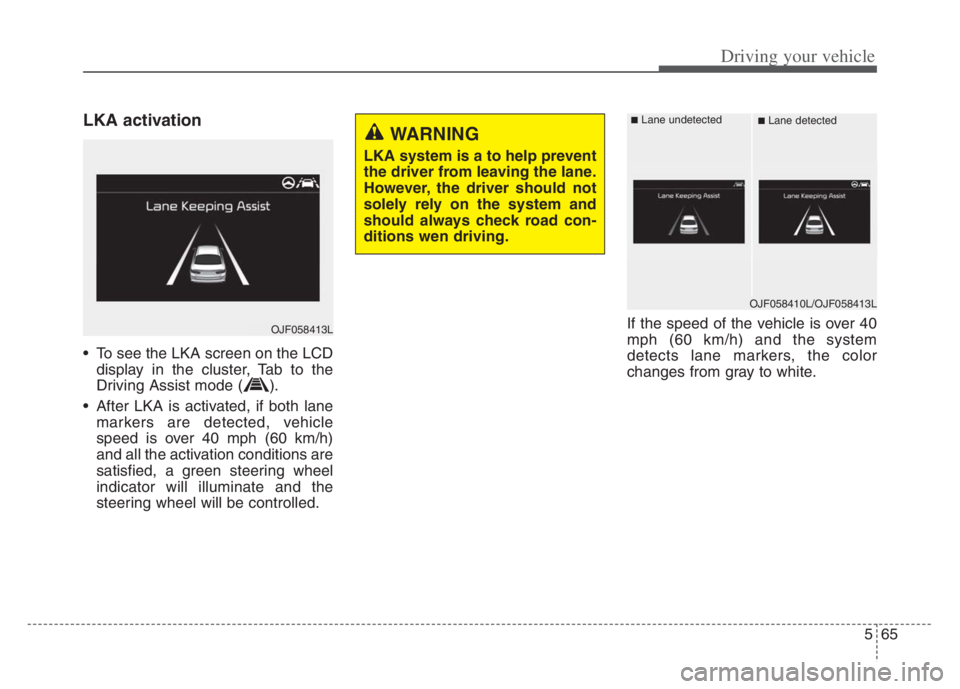
LKA activation
To see the LKA screen on the LCD
display in the cluster, Tab to the
Driving Assist mode ( ).
After LKA is activated, if both lane
markers are detected, vehicle
speed is over 40 mph (60 km/h)
and all the activation conditions are
satisfied, a green steering wheel
indicator will illuminate and the
steering wheel will be controlled.If the speed of the vehicle is over 40
mph (60 km/h) and the system
detects lane markers, the color
changes from gray to white.
WARNING
LKA system is a to help prevent
the driver from leaving the lane.
However, the driver should not
solely rely on the system and
should always check road con-
ditions wen driving.
OJF058413L
OJF058410L/OJF058413L
■Lane undetected■Lane detected
Page 321 of 560
Driving your vehicle
68 5
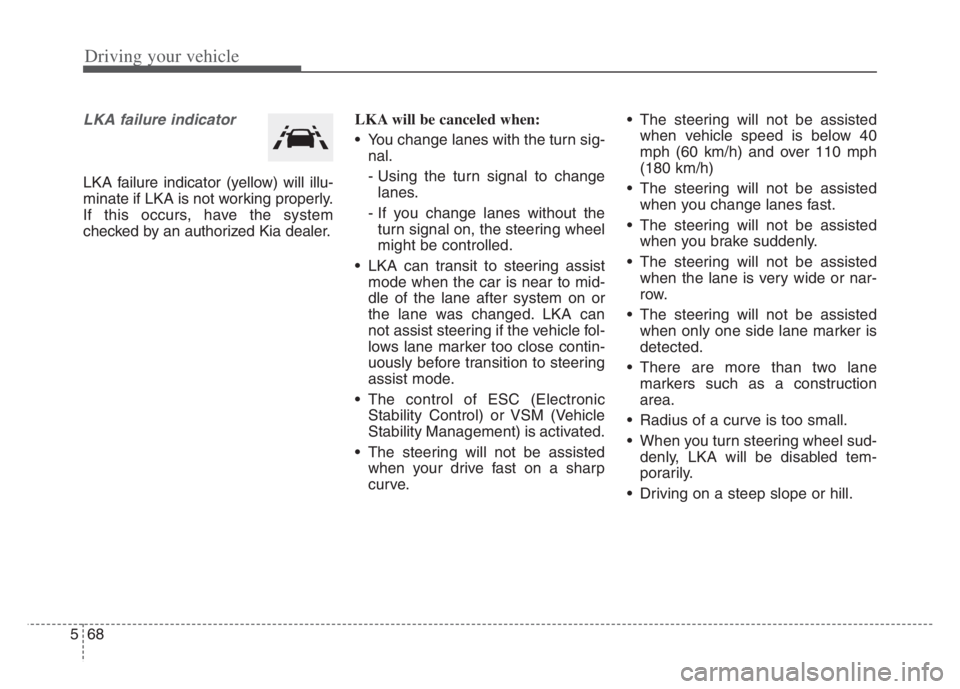
LKA failure indicator
LKA failure indicator (yellow) will illu-
minate if LKA is not working properly.
If this occurs, have the system
checked by an authorized Kia dealer.LKA will be canceled when:
You change lanes with the turn sig-
nal.
- Using the turn signal to change
lanes.
- If you change lanes without the
turn signal on, the steering wheel
might be controlled.
LKA can transit to steering assist
mode when the car is near to mid-
dle of the lane after system on or
the lane was changed. LKA can
not assist steering if the vehicle fol-
lows lane marker too close contin-
uously before transition to steering
assist mode.
The control of ESC (Electronic
Stability Control) or VSM (Vehicle
Stability Management) is activated.
The steering will not be assisted
when your drive fast on a sharp
curve. The steering will not be assisted
when vehicle speed is below 40
mph (60 km/h) and over 110 mph
(180 km/h)
The steering will not be assisted
when you change lanes fast.
The steering will not be assisted
when you brake suddenly.
The steering will not be assisted
when the lane is very wide or nar-
row.
The steering will not be assisted
when only one side lane marker is
detected.
There are more than two lane
markers such as a construction
area.
Radius of a curve is too small.
When you turn steering wheel sud-
denly, LKA will be disabled tem-
porarily.
Driving on a steep slope or hill.
Page 330 of 560
577
Driving your vehicle
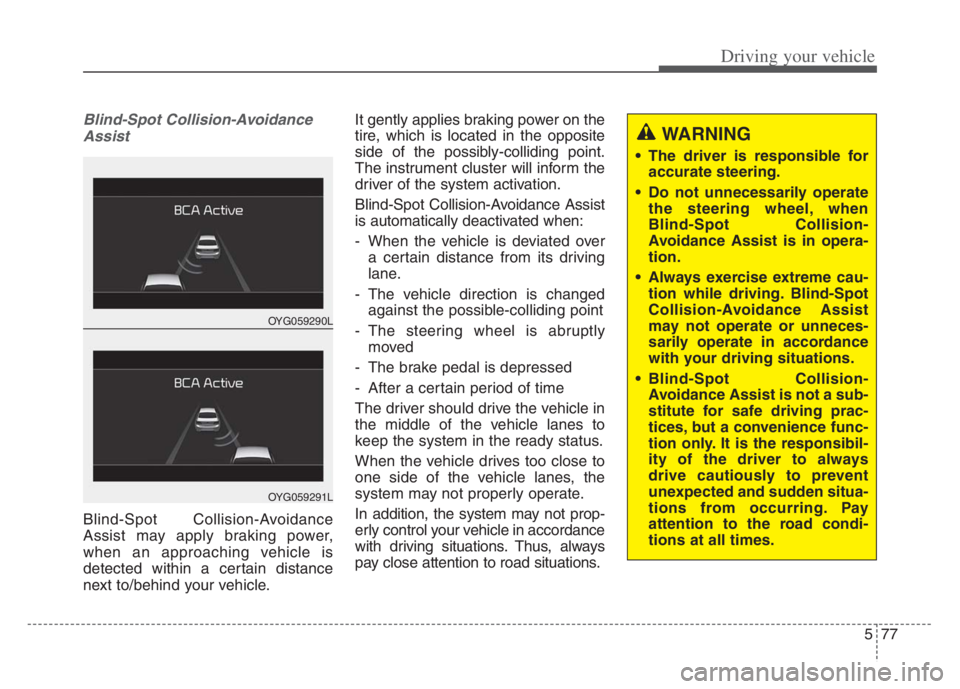
Blind-Spot Collision-Avoidance
Assist
Blind-Spot Collision-Avoidance
Assist may apply braking power,
when an approaching vehicle is
detected within a certain distance
next to/behind your vehicle.It gently applies braking power on the
tire, which is located in the opposite
side of the possibly-colliding point.
The instrument cluster will inform the
driver of the system activation.
Blind-Spot Collision-Avoidance Assist
is automatically deactivated when:
- When the vehicle is deviated over
a certain distance from its driving
lane.
- The vehicle direction is changed
against the possible-colliding point
- The steering wheel is abruptly
moved
- The brake pedal is depressed
- After a certain period of time
The driver should drive the vehicle in
the middle of the vehicle lanes to
keep the system in the ready status.
When the vehicle drives too close to
one side of the vehicle lanes, the
system may not properly operate.
In addition, the system may not prop-
erly control your vehicle in accordance
with driving situations. Thus, always
pay close attention to road situations.
OYG059290L
OYG059291L
WARNING
The driver is responsible for
accurate steering.
Do not unnecessarily operate
the steering wheel, when
Blind-Spot Collision-
Avoidance Assist is in opera-
tion.
Always exercise extreme cau-
tion while driving. Blind-Spot
Collision-Avoidance Assist
may not operate or unneces-
sarily operate in accordance
with your driving situations.
Blind-Spot Collision-
Avoidance Assist is not a sub-
stitute for safe driving prac-
tices, but a convenience func-
tion only. It is the responsibil-
ity of the driver to always
drive cautiously to prevent
unexpected and sudden situa-
tions from occurring. Pay
attention to the road condi-
tions at all times.
Page 375 of 560

Driving your vehicle
122 5
Operating conditions
When the system is activated, the
indicator ( ) on the cluster will illu-
minate.
While LFA is activated, if press the
button again, the system is
released and indicator ( ) light will
go off.
The color of the indicator will change
depending on the condition of LFA.
- Green : Steering assist mode is
ON
- White :Steering assist mode is
OFF
LFA activation
After LFA is activated, if the vehicle
is within the lane and both lane
markers are detected (lane color
changes grey to white) and there is
no abrupt steering by the driver,
indicator light will change from
white to green. This indicates that
the LFA is in the ENABLED state
and the steering wheel will be able
to be controlled.
The indicator light changes from
green to white when the control is
temporarily cancelled.
When the system does not recog-
nize the lane or depending on the
vehicle condition in front (presence
of the vehicle, driving status, etc.).
the steering wheel is controlled
restrictively.
When the control of the steering
wheel is stopped temporarily the
activation indicator blinks in green
and then changes to white.WARNING
LFA ensures the vehicle stays
in its lane. LFA does not guar-
antee 100% safety. Make sure
you make decisions on the road
after checking the road condi-
tions and safety matters while
driving. Never completely rely
on your LFA.
Page 377 of 560
Driving your vehicle
124 5
✽
✽
NOTICE
• Even though the steering is assist-
ed by the system, the driver may
control the steering wheel.
• The steering wheel may feel heav-
ier when the steering wheel is
assisted by the system than when it
is not.
Check Lane Following Assist
If there is a problem with the system
a message will appear for a few sec-
onds. In this case, have the system
checked by an authorized Kia dealer.LFA will not be in the ENABLED
state and/or the steering wheel will not
be assisted when:
If the driver operate turn signal
lamp or Hazzard warning flasher to
change the lane,
- To change the driving lane, turn
on the turn signal lamp switch
and change the lanes.
- If change the driving lane to
another without operating turn
signal lamp switch, the repulsive
force may occur on the steering
wheel.
- After system operating or chang-
ing the lanes, you must move to
the center of the lane to switch the
system to LFA. If you continue to
drive close to the lane line instead
of in the middle of the lane, it does
not assist the steering.
WARNING
LFA is a supplemental system
only. It is the responsibility of
the driver to safely steer the
vehicle and to maintain it in its
lane.
Turn off LFA and drive without
using the system in the fol-
lowing situations:
- In bad weather
- In bad road conditions
- When the steering wheel
needs to be controlled by the
driver frequently.
- When towing a vehicle or
trailer
Page 378 of 560

5125
Driving your vehicle
ESC (Electronic Stability Control)
or VSM (Vehicle Stability
Management) is activated.
The vehicle is driven on a sharp
curve.
Vehicle speed is over 95 mph (153
km/h).
The vehicle makes sharp lane
changes.
The vehicle brakes suddenly.
Only one lane marker is detected.
The lane is very wide or narrow.
Radius of a curve is too small.
The vehicle is driven on a steep
incline.
The steering wheel is turned sud-
denly.
The system may not operate for 15
seconds after the engine is started
or the front view camera is initial-
ized.Limitations of the System
LFA may operate prematurely even if
the vehicle does not depart from the
intended lane, OR, LFA may not
assist your steering or warn you if the
vehicle leaves the intended lane
under the following circumstances:When the lane and road condi-
tions are poor
It is difficult to distinguish the lane
marking from the road surface or
the lane marking is faded or not
clearly marked.
It is difficult to distinguish the color
of the lane marker from the road.
There are markings on the road
surface that look like a lane marker
that is inadvertently being detected
by the front view camera.
The lane marker is indistinct or
damaged.
The lane marker is merged or
divided. (e.g. tollgate)
The lane number increases or
decreases or the lane marker are
crossing complicatedly.
There are more than two lane
markers on the road in front of you.
The lane marker is very thick or
thin.
Page 382 of 560
![KIA CADENZA 2020 User Guide 5129
Driving your vehicle
System setting and operation
With the ENGINE START/STOP but-
ton in the [ON], select or release the
setting from “Settings Vehicle
Driver Assistance Driving As](/img/2/40377/w960_40377-381.png "KIA CADENZA 2020 User Guide 5129
Driving your vehicle
System setting and operation
With the ENGINE START/STOP but-
ton in the [ON], select or release the
setting from “Settings Vehicle
Driver Assistance Driving As")
5129
Driving your vehicle
System setting and operation
With the ENGINE START/STOP but-
ton in the [ON], select or release the
setting from “Settings Vehicle
Driver Assistance Driving Assist
Highway Driving Assist” from the
Settings mode on the infotainment
system. For detailed information,
please refer to the infotainment sys-
tem manual separately supplied.
Select HDA in and the system will
operate if the following conditions are
met :
If the engine is turned off then on
again, the system maintains the last
setting.
Operating conditions
Select 'Highway Driving Assist' from
the Settings menu in the infotain-
ment system screen and satisfy the
following conditions for the system to
operate.
When driving on the highway main
line.
When Smart Cruise Control is in
operation (Vehicle deceleration
and acceleration control)
- Refer to “Smart Cruise Control
(SCC)” in this chapter.
- If SCC is in standby mode (SCC
is on but speed is not set), HDA
will be in the same mode. The
white indicator ( ) light will
be turned on.
When the vehicle speed is below
95 mph (150 km/h)
If all the mentioned conditions are
satisfied, the system is ENABLED
and the indicator ( ) on the cluster
will illuminate green.
Steering wheel control
Steering control
If the vehicle detects both lane mark-
ers (lane color white), the ( ) indi-
cator light will change from white to
green. This indicates that the steer-
ing wheel is being controlled.
OQL058313
Page 383 of 560

Driving your vehicle
130 5
Temporary deactivation
The ( ) indicator light changes from
green to white when the steering
wheel control is temporarily deacti-
vated. Even if the steering wheel is
not controlled, the distance between
the vehicle ahead will be maintained.
Speed setting
Automatic speed setting mode
The system enters the automatic
speed setting mode when:
1. The operating conditions are satis-
fied
- ‘AUTO’ indicator will illuminate
green
2. Smart Cruise Control set speed
and the highway speed limit
matches
If the system changes to the auto-
matic speed mode, the ‘AUTO’
symbol will turn green and a chime
will sound. When the highway
speed limit changes, the set speed
automatically changes to the
changed speed limit.Manual speed setting mode
If the speed is set manually using the
RES+ or SET- switch on the steering
wheel, the set speed on the cluster
will turn white and the 'AUTO' symbol
will disappear.
OYG059288
Page 385 of 560

Driving your vehicle
132 5
Highway Driving Assist (HDA) system
canceled
If the driver still does not have their
hands on the steering wheel after the
message "Keep hands on steering
wheel", HDA will be canceled.
However, if Lane Following Assist is
reactivated manually by the driver,
Highway Driving Assist will reacti-
vate.
To activate Lane Following Assist,
refer to “Lane Following Assist (LFA)”
in this chapter.HDA will not be in the ENABLED
state and/or the steering wheel
will not be assisted when:
The turn signal is turned on before
changing a lane. If you change
lanes without the turn signal on,
the steering wheel might be con-
trolled.
The vehicle is not driven in the mid-
dle of the lane when the system is
turned on or right after changing a
lane.
ESC (Electronic Stability Control)
or VSM (Vehicle Stability
Management) is activated.
The vehicle is driven on a sharp
curve.
Vehicle speed is over 95 mph (153
km/h).
The vehicle makes sharp lane
changes.
The vehicle brakes suddenly.
Only one lane marker is detected.
The lane is very wide or narrow. There are more than two lane
markers on the road (e.g. construc-
tion area).
Radius of a curve is too small.
The vehicle is driven on a steep
incline.
The steering wheel is turned sud-
denly.
Page 402 of 560
5149
Driving your vehicle
Your vehicle's fuel economy depends
mainly on your style of driving, where
you drive and when you drive.
Each of these factors affects how
many miles (kilometers) you can get
from a gallon (liter) of fuel. To operate
your vehicle as economically as pos-
sible, use the following driving sug-
gestions to help save money in both
fuel and repairs:
Drive smoothly. Accelerate at a
moderate rate. Don't make "jack-
rabbit" starts or full-throttle shifts
and maintain a steady cruising
speed. Don't race between stop-
lights. Try to adjust your speed to
the traffic so you don't have to
change speeds unnecessarily.
Avoid heavy traffic whenever pos-
sible. Always maintain a safe dis-
tance from other vehicles so you
can avoid unnecessary braking.
This also reduces brake wear.
Drive at a moderate speed. The
faster you drive, the more fuel your
vehicle uses. Driving at a moderate
speed, especially on the highway,
is one of the most effective ways to
reduce fuel consumption. Don't "ride" the brake pedal. This
can increase fuel consumption and
also increase wear on these com-
ponents. In addition, driving with
your foot resting on the brake pedal
may cause the brakes to overheat,
which reduces their effectiveness
and may lead to more serious con-
sequences.
Take care of your tires. Keep them
inflated to the recommended pres-
sure. Incorrect inflation, either too
much or too little, results in unnec-
essary tire wear. Check the tire
pressures at least once a month.
Be sure that the wheels are
aligned correctly. Improper align-
ment can result from hitting curbs
or driving too fast over irregular
surfaces. Poor alignment causes
faster tire wear and may also result
in other problems as well as
greater fuel consumption. Keep your vehicle in good condi-
tion. For better fuel economy and
reduced maintenance costs, main-
tain your vehicle in accordance
with the maintenance schedule in
chapter 7. If you drive your vehicle
in severe conditions, more frequent
maintenance is required (see
chapter 7 for details).
Keep your vehicle clean. For maxi-
mum service, your vehicle should
be kept clean and free of corrosive
materials. It is especially important
that mud, dirt, ice, etc. not be
allowed to accumulate on the
underside of the vehicle. This extra
weight can result in increased fuel
consumption and also contribute to
corrosion.
Travel lightly. Don't carry unneces-
sary weight in your vehicle. Weight
reduces fuel economy.
Don't let the engine idle longer
than necessary. If you are waiting
(and not in traffic), turn off your
engine and restart only when
you're ready to go.
ECONOMICAL OPERATION