roof KIA CADENZA 2020 User Guide
[x] Cancel search | Manufacturer: KIA, Model Year: 2020, Model line: CADENZA, Model: KIA CADENZA 2020Pages: 560, PDF Size: 11.37 MB
Page 124 of 560
Features of your vehicle
42 4
Sunshade
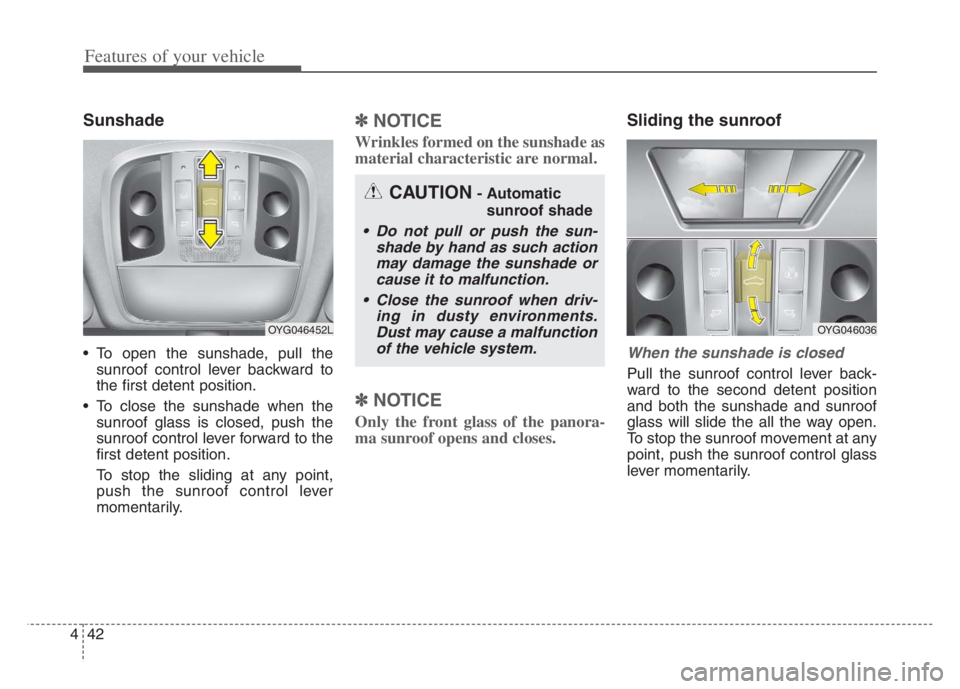
To open the sunshade, pull the
sunroof control lever backward to
the first detent position.
To close the sunshade when the
sunroof glass is closed, push the
sunroof control lever forward to the
first detent position.
To stop the sliding at any point,
push the sunroof control lever
momentarily.
✽ ✽
NOTICE
Wrinkles formed on the sunshade as
material characteristic are normal.
✽ ✽
NOTICE
Only the front glass of the panora-
ma sunroof opens and closes.
Sliding the sunroof
When the sunshade is closed
Pull the sunroof control lever back-
ward to the second detent position
and both the sunshade and sunroof
glass will slide the all the way open.
To stop the sunroof movement at any
point, push the sunroof control glass
lever momentarily.
CAUTION- Automatic
sunroof shade
Do not pull or push the sun-
shade by hand as such action
may damage the sunshade or
cause it to malfunction.
Close the sunroof when driv-
ing in dusty environments.
Dust may cause a malfunction
of the vehicle system.
OYG046452LOYG046036
Page 125 of 560
443
Features of your vehicle
When the sunshade is opened
If you pull the sunroof control lever
backward, the sunroof glass will slide
all the way open. To stop the sunroof
movement at any point, push the sun-
roof control glass lever momentarily.
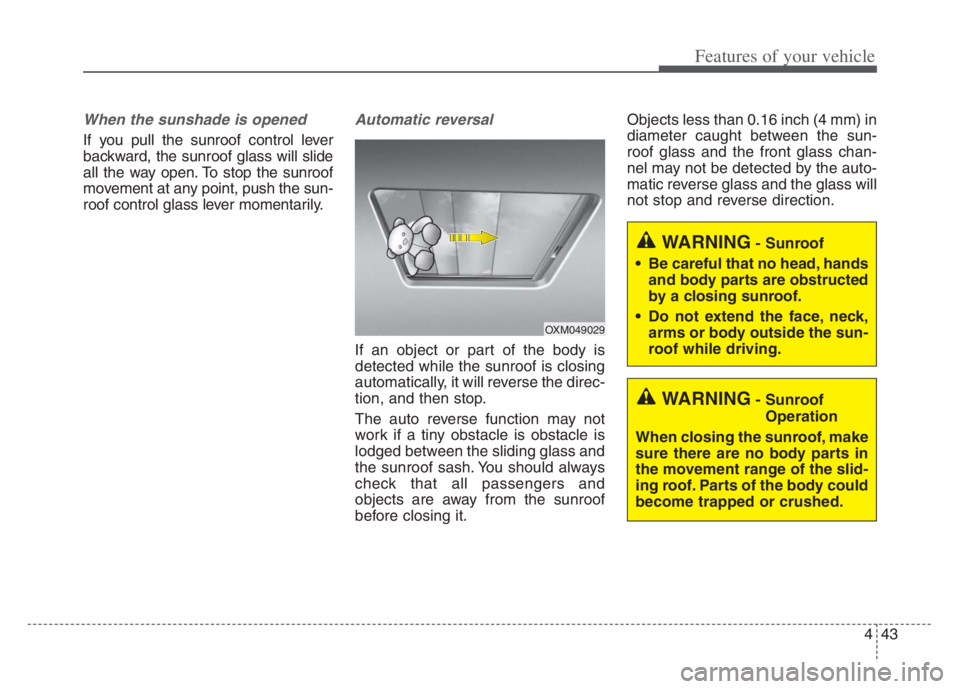
Automatic reversal
If an object or part of the body is
detected while the sunroof is closing
automatically, it will reverse the direc-
tion, and then stop.
The auto reverse function may not
work if a tiny obstacle is obstacle is
lodged between the sliding glass and
the sunroof sash. You should always
check that all passengers and
objects are away from the sunroof
before closing it.Objects less than 0.16 inch (4 mm) in
diameter caught between the sun-
roof glass and the front glass chan-
nel may not be detected by the auto-
matic reverse glass and the glass will
not stop and reverse direction.
OXM049029
WARNING- Sunroof
Operation
When closing the sunroof, make
sure there are no body parts in
the movement range of the slid-
ing roof. Parts of the body could
become trapped or crushed.
WARNING- Sunroof
Be careful that no head, hands
and body parts are obstructed
by a closing sunroof.
Do not extend the face, neck,
arms or body outside the sun-
roof while driving.
Page 126 of 560
Features of your vehicle
44 4
✽
✽
NOTICE
If you drive with the sunroof opened
right after a vehicle wash or rain,
water may get inside the vehicle.
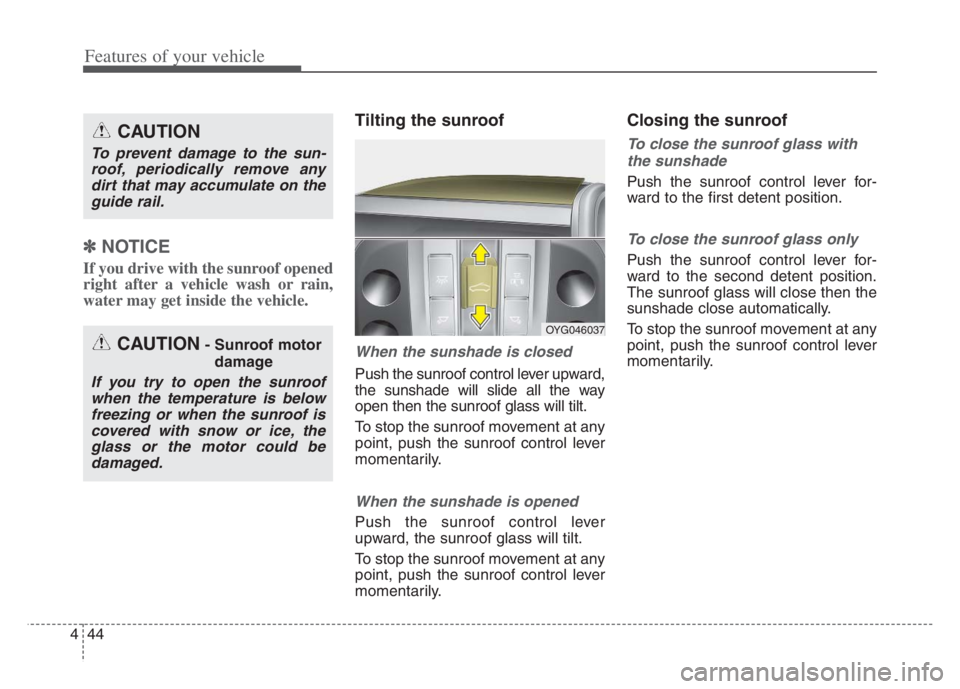
Tilting the sunroof
When the sunshade is closed
Push the sunroof control lever upward,
the sunshade will slide all the way
open then the sunroof glass will tilt.
To stop the sunroof movement at any
point, push the sunroof control lever
momentarily.
When the sunshade is opened
Push the sunroof control lever
upward, the sunroof glass will tilt.
To stop the sunroof movement at any
point, push the sunroof control lever
momentarily.
Closing the sunroof
To close the sunroof glass with
the sunshade
Push the sunroof control lever for-
ward to the first detent position.
To close the sunroof glass only
Push the sunroof control lever for-
ward to the second detent position.
The sunroof glass will close then the
sunshade close automatically.
To stop the sunroof movement at any
point, push the sunroof control lever
momentarily.
CAUTION
To prevent damage to the sun-
roof, periodically remove any
dirt that may accumulate on the
guide rail.
CAUTION- Sunroof motor
damage
If you try to open the sunroof
when the temperature is below
freezing or when the sunroof is
covered with snow or ice, the
glass or the motor could be
damaged.
OYG046037
Page 127 of 560
445
Features of your vehicle
Resetting the sunroof
Reset the sunroof when:
- The battery is discharged or dis-
connected or the sunroof fuse
has been replaced or disconnect-
ed.
- The sunroof control switch is not
operating correctly.
Reset the sunroof as described
below:
1. Start the engine.
2. Close the sunshade and sunroof
completely if opened.
3. Release the sunroof control
lever.
4. Push the sunroof control lever
forward in the direction of close
(about 10 seconds) until the
sunshade slightly moves. Then,
release the lever.5.Push the sunroof control lever for-
ward in the direction of close, until
the sunroof operates as follows
again:
Sunshade Open Glass Tilt Open
Glass Tilt Close Glass Slide
Open Glass Slide Close
Sunshade Close
Then, release the lever.When this is complete, the sunroof
system has been reset and one
touch open and close should be
restored.
✽ ✽
NOTICE
If the resetting the sunroof proce-
dure is not correctly followed, the
sunroof may not operate properly.
Page 163 of 560

481
Features of your vehicle
LCD Display Messages
Door, Hood, Trunk open
This warning is displayed indicat-
ing which door, hood or trunk is
open.
Sunroof Open
This warning is displayed if you
turn off the engine when the sun-
roof is open.
Lights mode
This indicator displays which exte-
rior light is selected using the light-
ing control.
OYG049582LOYG049588
OYG049587
Page 227 of 560

4145
Features of your vehicle
Sunroof inside air recircula-
tion
The outside (fresh) air position is
automatically selected, when the
sunroof is opened.
When you select the recirculated air
position, the system maintains the
recirculated air position for 3 minutes
and then automatically converts to
the outside (fresh) air position.
When the sunroof is closed, the air
intake position will return to the orig-
inal position that was selected.
Activate upon Washer Fluid
Use
To prevent the odor from entering to
inside the vehicle, the ventilation sys-
tem changes to Recirculated Air
Mode for a while when the wind-
shield washer fluid sprayed.
However, at low outside temperature,
to prevent from windshield fogging,
the system continues to outside air
mode.
System setting
1. ENGINE START/STOP button is
On.
2. Select Floor-Level ( ) air flow
direction by pressing
Mode Selection button.
3. With pressing Air Conditioning but-
ton, press the Recirculated Air but-
ton more than 4 times within 2
seconds.
4. If the system is set up, the indica-
tor on Recirculated Air button will
blinks 6 times.
System cancellation
1. ENGINE START/STOP button is
On.
2. Select Floor-Level ( ) air flow
direction by pressing
Mode Selection button.
3. With pressing Air Conditioning but-
ton, press the Recirculated Air but-
ton more than 4 times within 2
seconds.
4. If the system is cancelled, the indi-
cator on Recirculated Air button
will blinks 3 times.
Activation on washer fluid is activat-
ed when you select ‘Settings →
Vehicle →Climate →Recirculate Air
→Activate upon Washer Fluid Use’
from the Settings menu in the
Infotainment System screen.
For more details, please scan the
QR code in a separately supplied
Car Infotainment System Quick
Reference Guide.
Page 308 of 560
555
Driving your vehicle
The vehicle drives inside a build-
ing, such as a basement parking
lot
The front view camera does not
recognize the entire vehicle in
front.
The front view camera is damaged.
The brightness outside is too low
such as when the headlamps are
not on at night or the vehicle is
going through a tunnel.
The shadow is on the road by a
median strip, trees, etc.
The vehicle drives through a toll-
gate.
The windshield glass is fogged up;
a clear view of the road is obstruct-
ed.
The rear part of the vehicle in front
is not normally visible. (the vehicle
turns in other direction or the vehi-
cle is overturned.)
The adverse road conditions cause
excessive vehicle vibrations while
driving
The sensor recognition changes
suddenly when passing over a
speed bump The vehicle in front is moving lon-
gitudinally to the driving direction
The vehicle in front is stopped lon-
gitudinally
The vehicle in front is driving
towards your vehicle or reversing
You are on a roundabout and the
vehicle in front circles
It is difficult to secure the field of
view of the front view camera such
as backlight, reflected light, and
darkness.
When the front view camera is
blocked by continuous washer
spray and wiper operation.
The vehicle in front is a special
purpose vehicle, a trailer, or a truck
loading with unusual shape of lug-
gage.
The ambient light is too high or low.
The front view camera is contami-
nated by front glass tinting, attach-
ing film, water proof coating, dam-
aged, foreign material such as a
sticker, worm, etc.
When the front view camera
(including lens) or front radar is
damaged. If not using headlamp or using
weak light in the night or in a tun-
nel.
Backlight is shining in the driving
direction of the vehicle. (Including
oncoming vehicle headlights.)
When the rear part of the front
vehicle is small or low.
When a trailer or other vehicle is
towing the front vehicle.
When the ground clearance of the
front vehicle is high.
When a front vehicle makes sud-
den lane changes unexpectedly.
Page 453 of 560
Maintenance
8 7
SCHEDULED MAINTENANCE SERVICE
Follow the Normal Maintenance
Schedule if the vehicle is usually
operated where none of the following
conditions apply. If any of the following
conditions apply, follow the
Maintenance Under Severe Usage
Conditions.
Repeated driving short distance of
less than 5 miles (8 km) in normal
temperature or less than 10 miles
(16 km) in freezing temperature
Extensive engine idling or low
speed driving for long distances
Driving on rough, dusty, muddy,
unpaved, graveled or salt-spread
roads
Driving in areas using salt or other
corrosive materials or in very cold
weather
Driving in heavy dust condition
Driving in heavy traffic area
Driving on uphill, downhill, or
mountain road repeatedly Towing a trailer or using a camper,
or roof rack
Driving as a patrol car, taxi, other
commercial use of vehicle towing
Driving over 106 mph (170 km/h)
Frequently driving in stop-and-go
condition
If your vehicle is operated under the
above conditions, you should
inspect, replace or refill more fre-
quently than the following Normal
Maintenance Schedule. After 120
months or 150,000 miles continue to
follow the prescribed maintenance
intervals.
Page 458 of 560
713
Maintenance
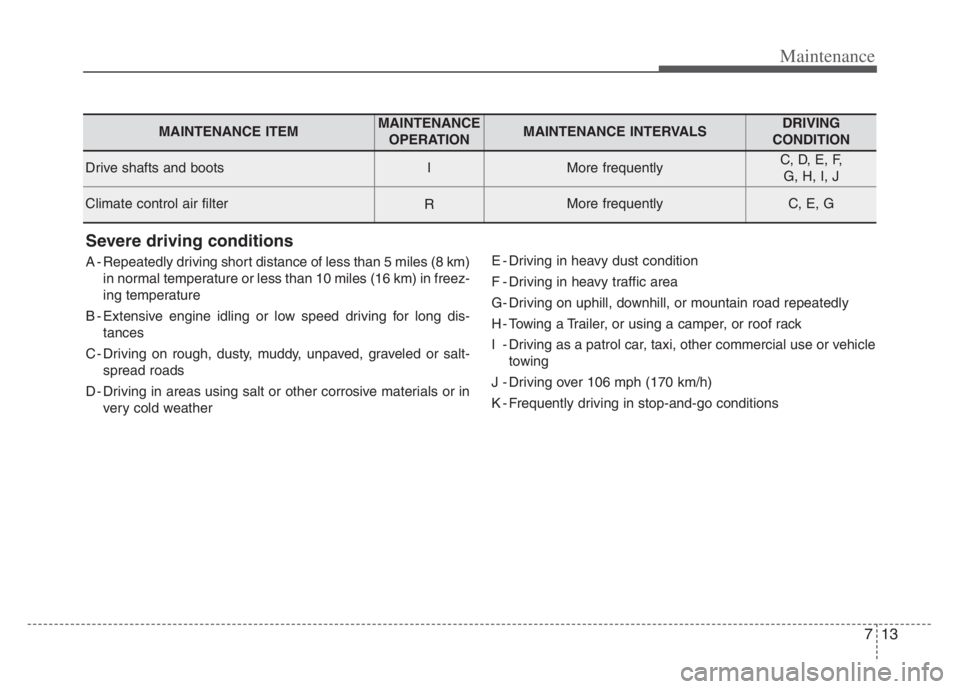
Severe driving conditions
A - Repeatedly driving short distance of less than 5 miles (8 km)
in normal temperature or less than 10 miles (16 km) in freez-
ing temperature
B - Extensive engine idling or low speed driving for long dis-
tances
C - Driving on rough, dusty, muddy, unpaved, graveled or salt-
spread roads
D - Driving in areas using salt or other corrosive materials or in
very cold weatherE - Driving in heavy dust condition
F - Driving in heavy traffic area
G- Driving on uphill, downhill, or mountain road repeatedly
H - Towing a Trailer, or using a camper, or roof rack
I - Driving as a patrol car, taxi, other commercial use or vehicle
towing
J - Driving over 106 mph (170 km/h)
K - Frequently driving in stop-and-go conditions
MAINTENANCE ITEMMAINTENANCE
OPERATIONMAINTENANCE INTERVALSDRIVING
CONDITION
Drive shafts and bootsIMore frequentlyC, D, E, F,
G, H, I, J
Climate control air filterRMore frequentlyC, E, G
Page 479 of 560
Maintenance
34 7
When recharging the battery,
observe the following precautions:
The battery must be removed from
the vehicle and placed in an area
with good ventilation.
Do not allow cigarettes, sparks, or
flame near the battery.
Watch the battery during charging,
and stop or reduce the charging
rate if the battery cells begin
gassing (boiling) violently or if the
temperature of the electrolyte of
any cell exceeds 120°F (49°C).
Wear eye protection when check-
ing the battery during charging.
Disconnect the battery charger in
the following order.
1. Turn off the battery charger main
switch.
2. Unhook the negative clamp from
the negative battery terminal.
3. Unhook the positive clamp from
the positive battery terminal. Before performing maintenance or
recharging the battery, turn off all
accessories and stop the engine.
The negative battery cable must be
removed first and installed last
when the battery is disconnected.Reset items
Items should be reset after the bat-
tery has been discharged or the bat-
tery has been disconnected.
Auto up/down window
Sunroof
Trip computer
Climate control system
Driver position memory system