trailer KIA CADENZA 2020 User Guide
[x] Cancel search | Manufacturer: KIA, Model Year: 2020, Model line: CADENZA, Model: KIA CADENZA 2020Pages: 560, PDF Size: 11.37 MB
Page 334 of 560
581
Driving your vehicle
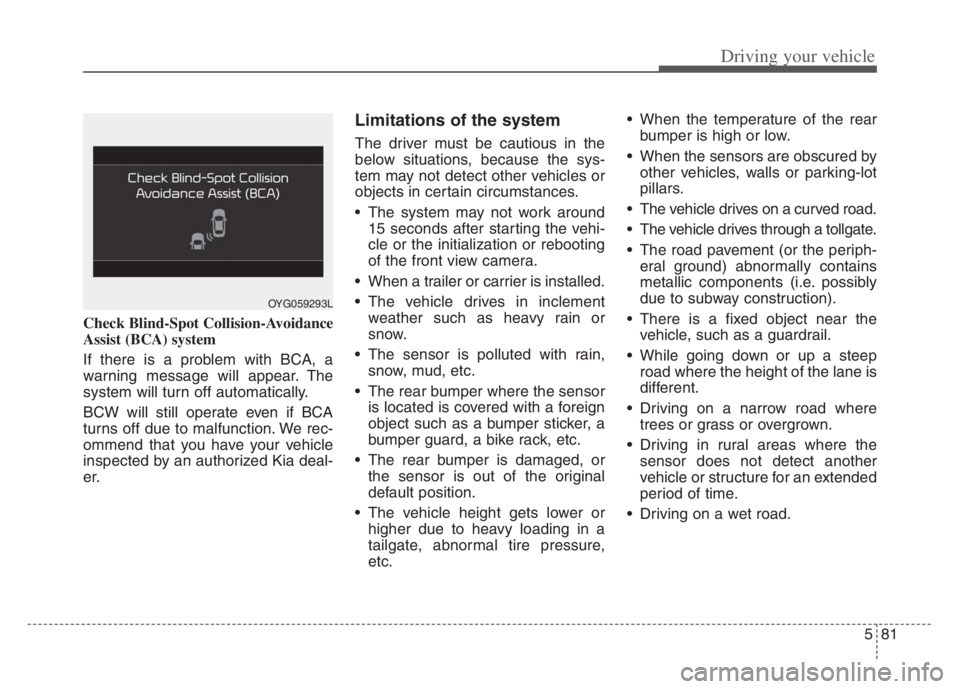
Check Blind-Spot Collision-Avoidance
Assist (BCA) system
If there is a problem with BCA, a
warning message will appear. The
system will turn off automatically.
BCW will still operate even if BCA
turns off due to malfunction. We rec-
ommend that you have your vehicle
inspected by an authorized Kia deal-
er.
Limitations of the system
The driver must be cautious in the
below situations, because the sys-
tem may not detect other vehicles or
objects in certain circumstances.
The system may not work around15 seconds after starting the vehi-
cle or the initialization or rebooting
of the front view camera.
When a trailer or carrier is installed.
The vehicle drives in inclement weather such as heavy rain or
snow.
The sensor is polluted with rain, snow, mud, etc.
The rear bumper where the sensor is located is covered with a foreign
object such as a bumper sticker, a
bumper guard, a bike rack, etc.
The rear bumper is damaged, or the sensor is out of the original
default position.
The vehicle height gets lower or higher due to heavy loading in a
tailgate, abnormal tire pressure,
etc. When the temperature of the rear
bumper is high or low.
When the sensors are obscured by other vehicles, walls or parking-lot
pillars.
The vehicle drives on a curved road.
The vehicle drives through a tollgate.
The road pavement (or the periph- eral ground) abnormally contains
metallic components (i.e. possibly
due to subway construction).
There is a fixed object near the vehicle, such as a guardrail.
While going down or up a steep road where the height of the lane is
different.
Driving on a narrow road where trees or grass or overgrown.
Driving in rural areas where the sensor does not detect another
vehicle or structure for an extended
period of time.
Driving on a wet road.
OYG059293L
Page 335 of 560

Driving your vehicle
82 5
Driving on a road where the guardrail
or wall is in double structure.
A big vehicle is near such as a bus
or truck.
When the other vehicle approach-
es very close.
When the other vehicle passes at a
very fast speed.
While changing lanes.
If the vehicle has started at the
same time as the vehicle next to
you and has accelerated.
When the vehicle in the next lane
moves two lanes away from you OR
when the vehicle two lanes away
moves to the next lane from you.
A motorcycle or bicycle is near.
A flat trailer is near.
If there are small objects in the
detecting area such as a shopping
cart or a baby stroller.
If there is a low height vehicle such
as a sports car.
The braking pull control may not
work in the following cases. You
need pay attention. The brake pedal is depressed.
ESC (Electronic Stability Control)
is activated.
ESC (Electronic Stability Control)
malfunctions.
The tire pressure is low or a tire is
damaged.
The brake is reworked.
The vehicle abruptly changes driv-
ing direction.
The vehicle makes sharp lane
changes.
The vehicle sharply stops.
Temperature is extremely low
around the vehicle.
The vehicle severely vibrates while
driving over a bumpy road,
uneven/bumpy road, or concrete
patch.
The vehicle drives on a slippery
surface due to snow, water puddle,
or ice. Lane Departure Warning or Lane
Keeping Assist do not operate nor-
mally.
For more information refer to "Lane
Keeping Assist (LKA)" in this chap-
ter.
Page 364 of 560

5111
Driving your vehicle
If a vehicle which moves into your
lane is faster than your vehicle,
your vehicle will accelerate to the
selected speed.
Your vehicle may accelerate when
a vehicle ahead of you disappears.
When you are warned that the
vehicle ahead of you is not detect-
ed, drive with caution.Vehicle recognition
Some vehicles ahead in your lane
cannot be recognized by the sensor
as follows:
- Narrow vehicles such as motorcy-
cles or bicycles
- Vehicles offset to one side
- Slow-moving vehicles or sudden-
decelerating vehicles
- Stopped vehicles
- Vehicles with small rear profiles
such as trailers with no loads
OJF055049
OJF055048
Page 377 of 560
Driving your vehicle
124 5
✽
✽
NOTICE
• Even though the steering is assist-
ed by the system, the driver may
control the steering wheel.
• The steering wheel may feel heav-
ier when the steering wheel is
assisted by the system than when it
is not.
Check Lane Following Assist
If there is a problem with the system
a message will appear for a few sec-
onds. In this case, have the system
checked by an authorized Kia dealer.LFA will not be in the ENABLED
state and/or the steering wheel will not
be assisted when:
If the driver operate turn signal
lamp or Hazzard warning flasher to
change the lane,
- To change the driving lane, turn
on the turn signal lamp switch
and change the lanes.
- If change the driving lane to
another without operating turn
signal lamp switch, the repulsive
force may occur on the steering
wheel.
- After system operating or chang-
ing the lanes, you must move to
the center of the lane to switch the
system to LFA. If you continue to
drive close to the lane line instead
of in the middle of the lane, it does
not assist the steering.
WARNING
LFA is a supplemental system
only. It is the responsibility of
the driver to safely steer the
vehicle and to maintain it in its
lane.
Turn off LFA and drive without
using the system in the fol-
lowing situations:
- In bad weather
- In bad road conditions
- When the steering wheel
needs to be controlled by the
driver frequently.
- When towing a vehicle or
trailer
Page 387 of 560
Driving your vehicle
134
5
Highway Driving Assist may not func-
tion properly in the following situa-
tions:
The navigation is not working prop-
erly.
The navigation is not updated.
The real-time GPS or map infor- mation provided has errors.
The navigation is overloaded by performing functions such as route
search, video playback, voice
recognition, etc. are performing
simultaneously.
The navigation is recalculating the route while driving.
GPS signals are blocked in areas such as a tunnel.
The driver goes off course or the route to the destination is changed
or canceled by resetting the navi-
gation.
The vehicle enters a service sta- tion or rest area
The speed limit of selected high- way section is changed due to road
conditions. Android Auto or Car Play is operat-
ing.
The navigation cannot detect the current vehicle position (ex: elevat-
ed roads including overpass adja-
cent to general roads or nearby
roads exist in a parallel way).
The navigation is being updated while driving.
The navigation is being reset while driving.
The road is slippery due to bad weather such as rain or snow.
If your vehicle tows a trailer or another vehicle, you should
release Highway Driving Assist.
Operating the brake system or
steering system while towing may
adversely affect the safety. * Refer to “Smart Cruise Control
(SCC)” in this chapter. for cautions
and warnings about headway con-
trol and front radar.
* Refer to “Lane Following Assist (LFA) “ in this chapter. for cautions
and warnings about steering con-
trol and front view camera.
Page 396 of 560

5143
Driving your vehicle
Blind-Spot Collision Warning (BCW)
system disabled. Radar blocked
This warning message may appear
when:
- One or both of the rear corner
radar sensors on the rear bumper
is blocked by dirt or snow or a for-
eign object.
- Driving in rural areas where the
sensor does not detect another
vehicle for an extended period of
time.
- When there is inclement weather
such as heavy snow or rain.
- When a trailer or carrier is con-
nected to the rear corner radar
sensor area.If any of these conditions occur, the
system will turn off automatically.
✽ ✽
NOTICE
Turn off BCW, BCA and RCCA
when a trailer or carrier is installed.
• Press and turn off the Blind-Spot
Safety button (the indicator on the
switch will turn off)
• Deactivate BCW and BCA by
selecting “Settings
Driver
Assistance
Blind-Spot Safety
Off”
• Deactivate RCCW and RCCA by
deselecting “Settings
Driver
Assistance
Parking Safety
Rear Cross-Traffic Safety”.
(Continued)
Have the vehicle inspected by
an authorized Kia dealer.
Do not apply foreign objects
such as a bumper sticker or a
bumper guard near the rear
corner radar sensor or apply
paint to the sensor area.
Doing so may adversely affect
the performance of the sen-
sor.
OJF058433L
Page 397 of 560

Driving your vehicle
144 5
When BCW canceled warning mes-
sage is displayed in the cluster,
check to make sure that the rear
bumper is free from any dirt or snow
in the areas where the sensor is
located. Remove any dirt, snow, or
foreign material that could interfere
with the radar sensors.
After any dirt or debris is removed,
RCCA system should operate nor-
mally after about 10 minutes of driv-
ing the vehicle.
If the system does not work normally
even though the foreign substance,
trailer or carrier, or other equipment
is removed, have the system
checked by an authorized Kia dealer.Check Blind-Spot Collision Warning
system
If there is a problem with BCW sys-
tem, a warning message will appear.
The system will turn off automatical-
ly. RCCW and RCCA will not operate
also if BCW system turns off due to
malfunction. In this case, have the
system checked by an authorized
Kia dealer.Limitations of the system
The driver must be cautious in the
below situations, because the sys-
tem may not detect other vehicles
or objects in certain circum-
stances.
When a trailer or carrier is
installed.
The vehicle drives in inclement
weather such as heavy rain or
snow.
The rear corner radar sensors are
is polluted with rain, snow, mud,
etc.
The rear bumper where the sensor
is located is covered with a foreign
object such as a bumper sticker, a
bumper guard, a bike rack, etc.
The rear bumper is damaged, or
the sensor is out of the original
default position.
The vehicle height gets lower or
higher due to heavy loading in a
trunk (tailgate), abnormal tire pres-
sure, etc.
OJF058435L
Page 398 of 560

5145
Driving your vehicle
When the temperature of the rear
bumper is high or low.
When the sensors are blocked by
other vehicles, walls or parking-lot
pillars.
The vehicle drives on a curved
road.
The road pavement (or the periph-
eral ground) abnormally contains
metallic components (i.e. possibly
due to subway construction).
There is a fixed object near the
vehicle, such as a guardrail.
While going down or up a steep
road where the height of the lane is
different.
Driving on a narrow road where
trees or grass or overgrown.
Driving in rural areas where the
sensor does not detect another
vehicle for an extended period of
time.
Driving on a wet road.
Driving on a road where the
guardrail or wall is in double struc-
ture. A big vehicle is near such as a bus
or truck.
When the other vehicle approach-
es very close.
When the other vehicle passes at a
very fast speed.
While changing lanes.
If the vehicle has started at the
same time as the vehicle next to
you and has accelerated.
When the vehicle in the next lane
moves two lanes away from you
OR when the vehicle two lanes
away moves to the next lane from
you.
A motorcycle or bicycle is near.
A flat trailer is near.
If there are small objects in the
detecting area such as a shopping
cart or a baby stroller.
If there is a low height vehicle such
as a sports car.
The brake pedal is depressed.
ESC (Electronic Stability Control)
is activated. ESC (Electronic Stability Control)
malfunctions.
The tire pressure is low or a tire is
damaged.
The brake is reworked.
The vehicle sharply stops.
Temperature is extremely low
around the vehicle.
The vehicle severely vibrates while
driving over a bumpy road,
uneven/bumpy road, or concrete
patch.
The vehicle drives on a slippery
surface due to snow, water puddle,
or ice.
If the vehicle moves backward after
the vehicle is parked with a diago-
nal line.
Page 411 of 560
Driving your vehicle
158 5
To keep locks from freezing
To keep the locks from freezing,
squirt an approved de-icer fluid or
glycerine into the key opening. If a
lock is covered with ice, squirt it with
an approved de-icing fluid to remove
the ice. If the lock is frozen internally,
you may be able to thaw it out by
using a heated key. Handle the heat-
ed key with care to avoid injury.
Use approved window washer
anti-freeze in system
To keep the water in the window
washer system from freezing, add an
approved window washer anti-freeze
solution in accordance with instruc-
tions on the container. Window wash-
er anti-freeze is available from an
authorized Kia dealer and most auto
parts outlets. Do not use engine
coolant or other types of anti-freeze
as these may damage the paint fin-
ish.
Don’t let your parking brake
freeze
Under some conditions your parking
brake can freeze in the engaged
position. This is most likely to happen
when there is an accumulation of
snow or ice around or near the rear
brakes or if the brakes are wet. If
there is a risk the parking brake may
freeze, apply it only temporarily while
you put the gear shift lever in P
(Park, Automatic Transmission) and
block the rear wheels so the vehicle
cannot roll. Then release the parking
brake.
Don't let ice and snow accu-
mulate underneath
Under some conditions, snow and
ice can build up under the fenders
and interfere with the steering. When
driving in severe winter conditions
where this may happen, you should
periodically check underneath the
vehicle to be sure the movement of
the front wheels and the steering
components are not obstructed.
Carry emergency equipment
Depending on the severity of the
weather, you should carry appropri-
ate emergency equipment. Some of
the items you may want to carry
include tow straps or chains, flash-
light, emergency flares, sand, shov-
el, jumper cables, window scraper,
gloves, ground cloth, coveralls, blan-
ket, etc.
TRAILER TOWING
We do not recommend using this
vehicle for trailer towing.
Page 412 of 560

5159
Driving your vehicle
Tire and loading information
label
The label located on the driver's door
sill gives the original tire size, cold
tire pressures recommended for your
vehicle, the number of people that
can be in your vehicle and vehicle
capacity weight.
Vehicle capacity weight:
904 lbs. (410 kg)
Vehicle capacity weight is the maxi-
mum combined weight of occupants
and cargo. If your vehicle is equipped
with a trailer, the combined weight
includes the tongue load.
Seating capacity:
Total : 5 persons
(Front seat : 2 persons,
Rear seat : 3 persons)
Seating capacity is the maximum
number of occupants including a
driver, your vehicle may carry.
However, the seating capacity may
be reduced based upon the weight of
all of the occupants, and the weight
of the cargo being carried or towed.
Do not overload the vehicle as there
is a limit to the total weight, or load
limit including occupants and cargo,
the vehicle can carry.
VEHICLE LOAD LIMIT
OYG066040N
OYG066041N