trunk KIA CADENZA 2020 User Guide
[x] Cancel search | Manufacturer: KIA, Model Year: 2020, Model line: CADENZA, Model: KIA CADENZA 2020Pages: 560, PDF Size: 11.37 MB
Page 96 of 560
Features of your vehicle
14 4
Theft-alarm stage
The alarm will be activated if any of
the following occurs while the system
is armed.
A front or rear door is opened with-
out using the smart key.
The trunk is opened without using
the smart key.
The engine hood is opened.
The horn will sound and the hazard
warning lights will blink continuously
for approximately 27 seconds, and
repeat the horn 2 times unless the
system is disarmed. To turn off the
system, unlock the doors with the
smart key.
Disarmed stage
The system will be disarmed when
The doors (and trunk) are unlocked
with the smart key.
After depressing the unlock button,
the hazard warning lights will blink
and the chime will sound twice (in
smart key) to indicate that the sys-
tem is disarmed.
After depressing the unlock button, if
any door (or trunk) is not opened
within 30 seconds, the system will be
rearmed.
Avoid trying to start the engine
while the alarm is activated. The
vehicle starting motor is disabled
during the theft-alarm stage.
If the system is not disarmed with
the smart key, open the doors by
using the mechanical key and start
the engine by directly pressing the
ENGINE START/STOP button with
the smart key.
If you lose your keys, consult your
authorized Kia dealer.
✽ ✽
NOTICE
Malfunctions caused by improper
alterations, adjustments or modifi-
cations to the theft-alarm system are
not covered by your vehicle manu-
facturer warranty.
CAUTION - Adjusting
alarm system
Do not change, alter or adjust
the theft-alarm system because
it could cause the theft-alarm
system to malfunction.
Page 103 of 560
421
Features of your vehicle
Opening the trunk
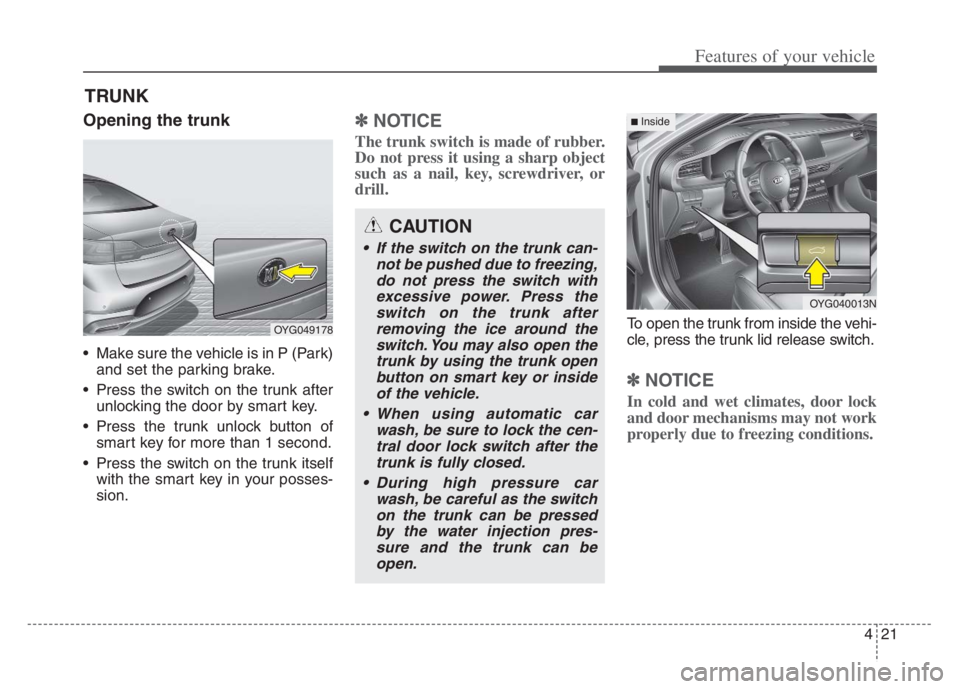
Make sure the vehicle is in P (Park)
and set the parking brake.
Press the switch on the trunk after
unlocking the door by smart key.
Press the trunk unlock button of
smart key for more than 1 second.
Press the switch on the trunk itself
with the smart key in your posses-
sion.
✽ ✽
NOTICE
The trunk switch is made of rubber.
Do not press it using a sharp object
such as a nail, key, screwdriver, or
drill.
To open the trunk from inside the vehi-
cle, press the trunk lid release switch.
✽ ✽
NOTICE
In cold and wet climates, door lock
and door mechanisms may not work
properly due to freezing conditions.
TRUNK
OYG049178
CAUTION
If the switch on the trunk can-
not be pushed due to freezing,
do not press the switch with
excessive power. Press the
switch on the trunk after
removing the ice around the
switch. You may also open the
trunk by using the trunk open
button on smart key or inside
of the vehicle.
When using automatic car
wash, be sure to lock the cen-
tral door lock switch after the
trunk is fully closed.
During high pressure car
wash, be careful as the switch
on the trunk can be pressed
by the water injection pres-
sure and the trunk can be
open.
OYG040013N
■ Inside
Page 104 of 560

Features of your vehicle
22 4
✽
✽
NOTICE
In cold and wet climates, trunk lock
and trunk mechanisms may not
work properly due to freezing condi-
tions.
Closing the trunk
To close, lower the trunk lid, then
press down on it until it locks. To be
sure the trunk lid is securely fas-
tened, always check by trying to pull
it up again.
Emergency trunk safety
release
Inside the trunk
Your vehicle is equipped with an
emergency trunk safety release lever
located inside the trunk. When some-
one is inadvertently locked in the
trunk, the trunk can be opened by
moving the lever in the direction of
the arrow and pushing the trunk
open.
WARNING
The trunk swings upward. Make
sure no objects or people are
near the rear of the vehicle
when opening the trunk.
WARNING- Exhaust
Fumes
The trunk lid should always be
kept completely closed while
the vehicle is in motion. If it is
left open or ajar, poisonous
exhaust gases may enter the
car and serious illness or death
may result.
WARNING
Make sure your hands, feet and
other parts of your body are
safely out of the way before
closing the trunk.
OYG049020
Page 105 of 560
423
Features of your vehicle
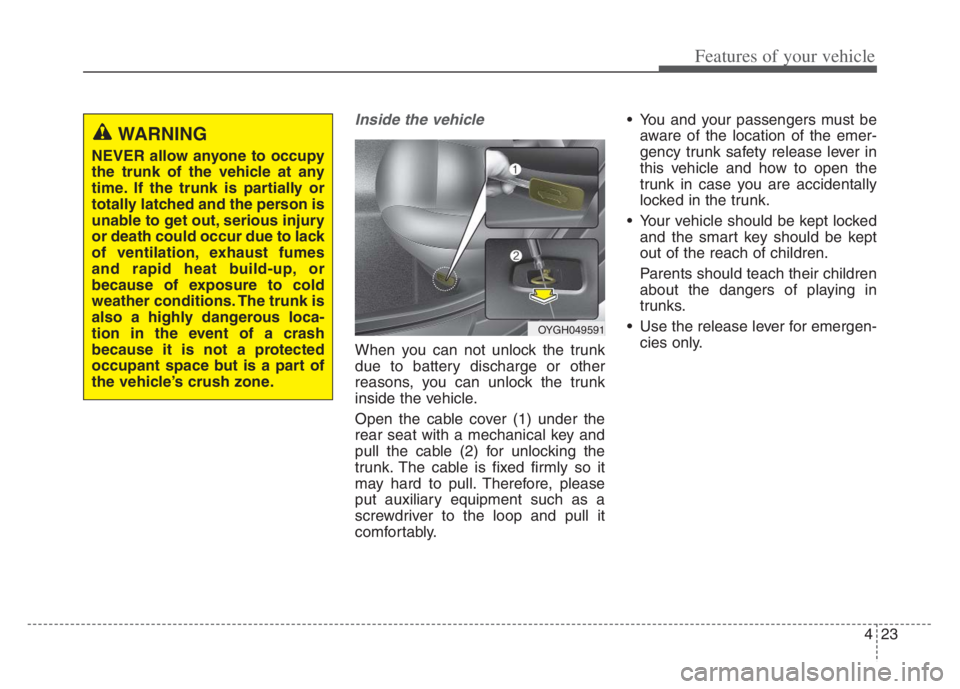
Inside the vehicle
When you can not unlock the trunk
due to battery discharge or other
reasons, you can unlock the trunk
inside the vehicle.
Open the cable cover (1) under the
rear seat with a mechanical key and
pull the cable (2) for unlocking the
trunk. The cable is fixed firmly so it
may hard to pull. Therefore, please
put auxiliary equipment such as a
screwdriver to the loop and pull it
comfortably. You and your passengers must be
aware of the location of the emer-
gency trunk safety release lever in
this vehicle and how to open the
trunk in case you are accidentally
locked in the trunk.
Your vehicle should be kept locked
and the smart key should be kept
out of the reach of children.
Parents should teach their children
about the dangers of playing in
trunks.
Use the release lever for emergen-
cies only.
WARNING
NEVER allow anyone to occupy
the trunk of the vehicle at any
time. If the trunk is partially or
totally latched and the person is
unable to get out, serious injury
or death could occur due to lack
of ventilation, exhaust fumes
and rapid heat build-up, or
because of exposure to cold
weather conditions. The trunk is
also a highly dangerous loca-
tion in the event of a crash
because it is not a protected
occupant space but is a part of
the vehicle’s crush zone.
OYGH049591
Page 106 of 560

Features of your vehicle
24 4
WARNING
Make sure that there are no peo-
ple or objects in the path of the
trunk (or smart trunk) prior to
use. Serious injury, damage to
the vehicle or damage to sur-
rounding objects may result if
contact with the trunk (or smart
trunk) occurs.
Page 107 of 560

425
Features of your vehicle
On a vehicle equipped with a smart
key, the trunk can be opened with
no-touch activation using the Smart
Trunk system.
How to use the Smart Trunk
The trunk can be opened with no-
touch activation if all the conditions
below are met.
15 seconds has elapsed and all
doors are closed and locked
The smart key is positioned in the
detecting area for more than 3 sec-
onds.
✽ ✽
NOTICE
• The Smart Trunk does not operate
when:
- The smart key is detected within
15 seconds after the doors are
closed and locked, and is contin-
uously detected.
- The smart key is detected within
15 seconds after the doors are
closed and locked, and 60 inches
(1.5 m) from the front door han-
dles. (for vehicles equipped with
Welcome Light)
- A door is not locked or closed.
- The smart key is in the vehicle.
SMART TRUNK
OYG049021
Page 108 of 560
Features of your vehicle
26 4
1. Setting
You can activate or deactivate the
Smart Trunk when you select
‘Settings →Vehicle →Door →Smart
Trunk’ from the Settings menu in the
Infotainment System screen.
For more details, please scan the
QR code in a separately supplied
Car Infotainment System Quick
Reference Guide.
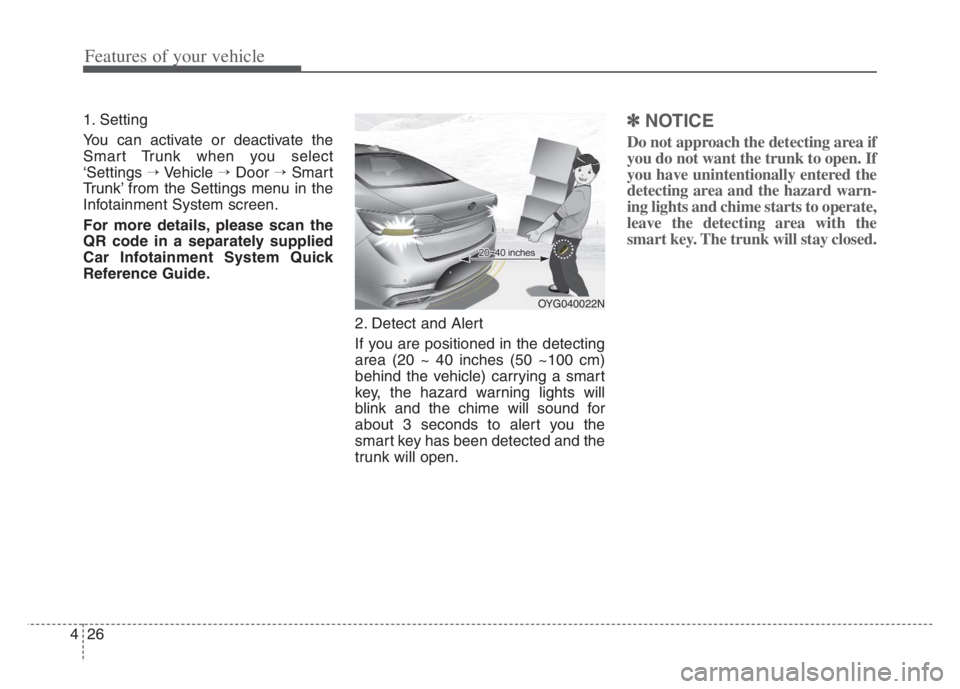
2. Detect and Alert
If you are positioned in the detecting
area (20 ~ 40 inches (50 ~100 cm)
behind the vehicle) carrying a smart
key, the hazard warning lights will
blink and the chime will sound for
about 3 seconds to alert you the
smart key has been detected and the
trunk will open.✽ ✽
NOTICE
Do not approach the detecting area if
you do not want the trunk to open. If
you have unintentionally entered the
detecting area and the hazard warn-
ing lights and chime starts to operate,
leave the detecting area with the
smart key. The trunk will stay closed.
OYG040022N
Page 109 of 560
427
Features of your vehicle
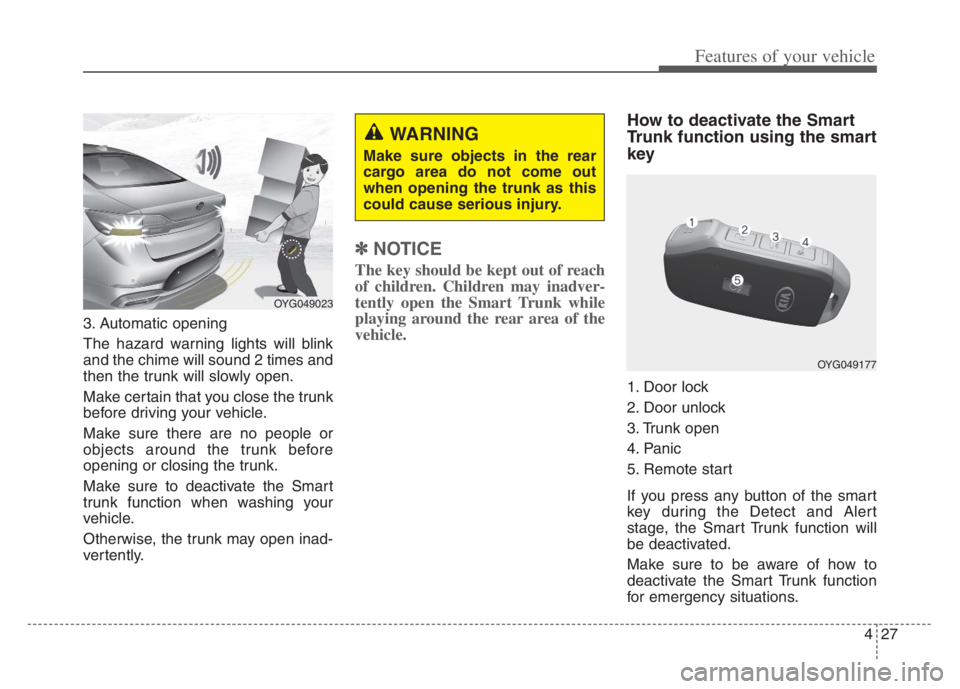
3. Automatic opening
The hazard warning lights will blink
and the chime will sound 2 times and
then the trunk will slowly open.
Make certain that you close the trunk
before driving your vehicle.
Make sure there are no people or
objects around the trunk before
opening or closing the trunk.
Make sure to deactivate the Smart
trunk function when washing your
vehicle.
Otherwise, the trunk may open inad-
vertently.
✽ ✽
NOTICE
The key should be kept out of reach
of children. Children may inadver-
tently open the Smart Trunk while
playing around the rear area of the
vehicle.
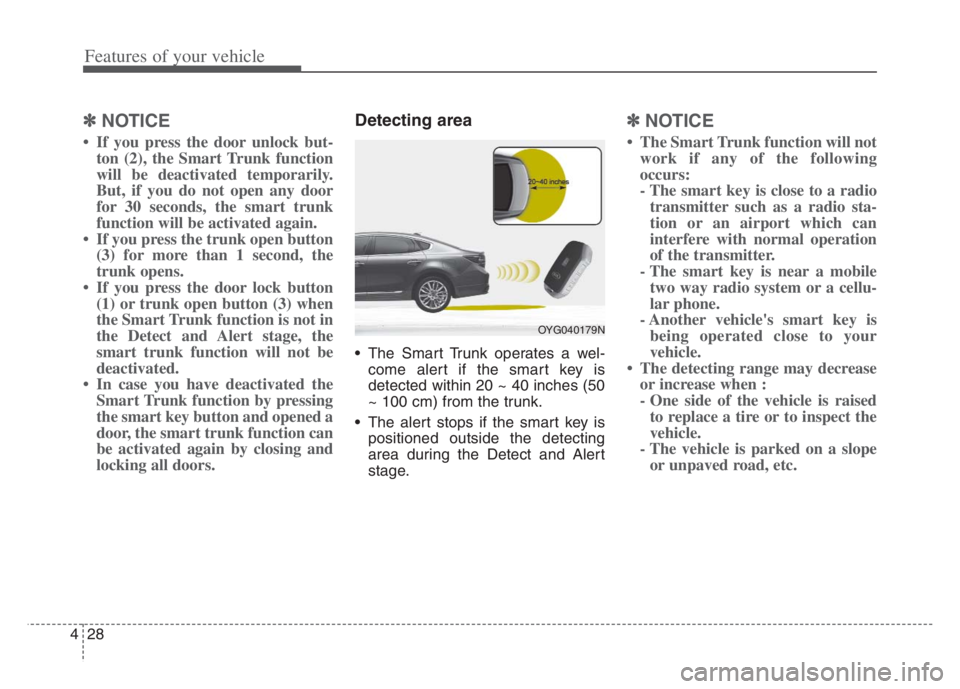
How to deactivate the Smart
Trunk function using the smart
key
1. Door lock
2. Door unlock
3. Trunk open
4. Panic
5. Remote start
If you press any button of the smart
key during the Detect and Alert
stage, the Smart Trunk function will
be deactivated.
Make sure to be aware of how to
deactivate the Smart Trunk function
for emergency situations.
OYG049023
WARNING
Make sure objects in the rear
cargo area do not come out
when opening the trunk as this
could cause serious injury.
OYG049177
Page 110 of 560
Features of your vehicle
28 4
✽
✽
NOTICE
• If you press the door unlock but-
ton (2), the Smart Trunk function
will be deactivated temporarily.
But, if you do not open any door
for 30 seconds, the smart trunk
function will be activated again.
• If you press the trunk open button
(3) for more than 1 second, the
trunk opens.
• If you press the door lock button
(1) or trunk open button (3) when
the Smart Trunk function is not in
the Detect and Alert stage, the
smart trunk function will not be
deactivated.
• In case you have deactivated the
Smart Trunk function by pressing
the smart key button and opened a
door, the smart trunk function can
be activated again by closing and
locking all doors.
Detecting area
The Smart Trunk operates a wel-
come alert if the smart key is
detected within 20 ~ 40 inches (50
~ 100 cm) from the trunk.
The alert stops if the smart key is
positioned outside the detecting
area during the Detect and Alert
stage.
✽ ✽
NOTICE
• The Smart Trunk function will not
work if any of the following
occurs:
- The smart key is close to a radio
transmitter such as a radio sta-
tion or an airport which can
interfere with normal operation
of the transmitter.
- The smart key is near a mobile
two way radio system or a cellu-
lar phone.
- Another vehicle's smart key is
being operated close to your
vehicle.
• The detecting range may decrease
or increase when :
- One side of the vehicle is raised
to replace a tire or to inspect the
vehicle.
- The vehicle is parked on a slope
or unpaved road, etc.
OYG040179N
Page 163 of 560

481
Features of your vehicle
LCD Display Messages
Door, Hood, Trunk open
This warning is displayed indicat-
ing which door, hood or trunk is
open.
Sunroof Open
This warning is displayed if you
turn off the engine when the sun-
roof is open.
Lights mode
This indicator displays which exte-
rior light is selected using the light-
ing control.
OYG049582LOYG049588
OYG049587