instrument panel KIA CADENZA 2020 Owner's Manual
[x] Cancel search | Manufacturer: KIA, Model Year: 2020, Model line: CADENZA, Model: KIA CADENZA 2020Pages: 560, PDF Size: 11.37 MB
Page 316 of 560
563
Driving your vehicle
The system detects lane markers
and controls the steering wheel by
a front view camera, therefore, if
the lane markers are hard to
detect, the system may not work
properly. Always be cautious when
using the system.
When the lane markers are hard to
detect, please refer to “DRIVER’S
ATTENTION”.
Do not remove or damage the
related parts of the front view cam-
era system.
Do not place objects on the crash
pad that reflect light such as mir-
rors, white paper, etc. it may cause
malfunction of LKA if sunlight is
reflected.
You may not hear warning sound of
LKA because of the excessive
audio sound.
If other beeps such as the seat belt
warning sound are in operation
and override LKA alarming, LKA
beeps may not occur. At high vehicle speeds, the steer-
ing torque needed for assistance
may not be sufficient to keep your
vehicle within the lane. If so, the
vehicle may move out of its lane.
Always obey the speed limit when
using LKA.
If you attach objects to the steering
wheel, the system may not assist
steering.
If you attach objects to the steering
wheel, hands off alarm may not
work properly.LKA operation
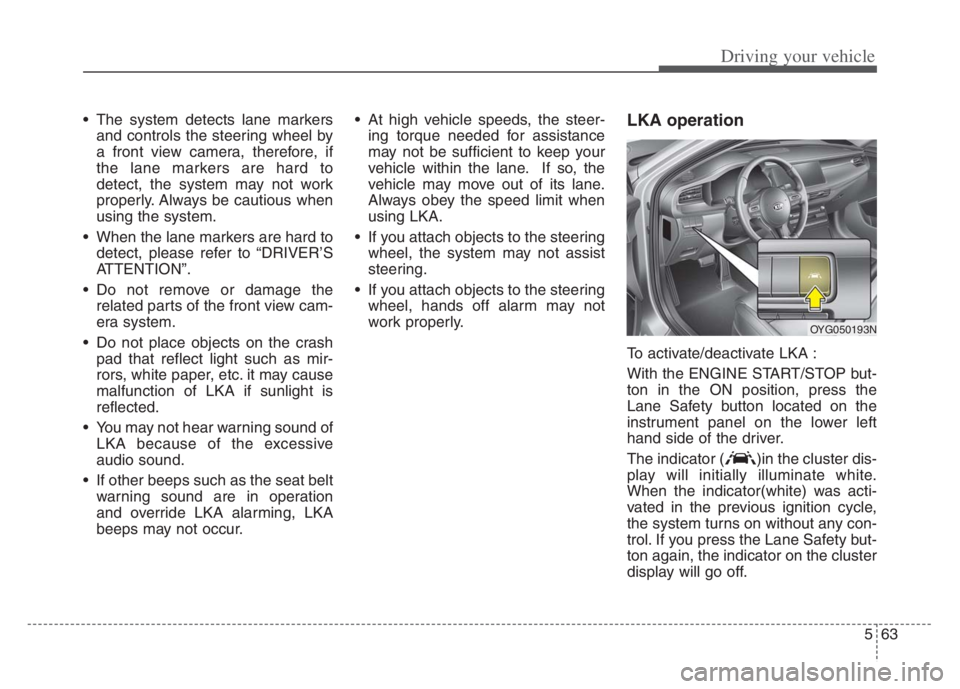
To activate/deactivate LKA :
With the ENGINE START/STOP but-
ton in the ON position, press the
Lane Safety button located on the
instrument panel on the lower left
hand side of the driver.
The indicator ( )in the cluster dis-
play will initially illuminate white.
When the indicator(white) was acti-
vated in the previous ignition cycle,
the system turns on without any con-
trol. If you press the Lane Safety but-
ton again, the indicator on the cluster
display will go off.
OYG050193N
Page 498 of 560
753
Maintenance
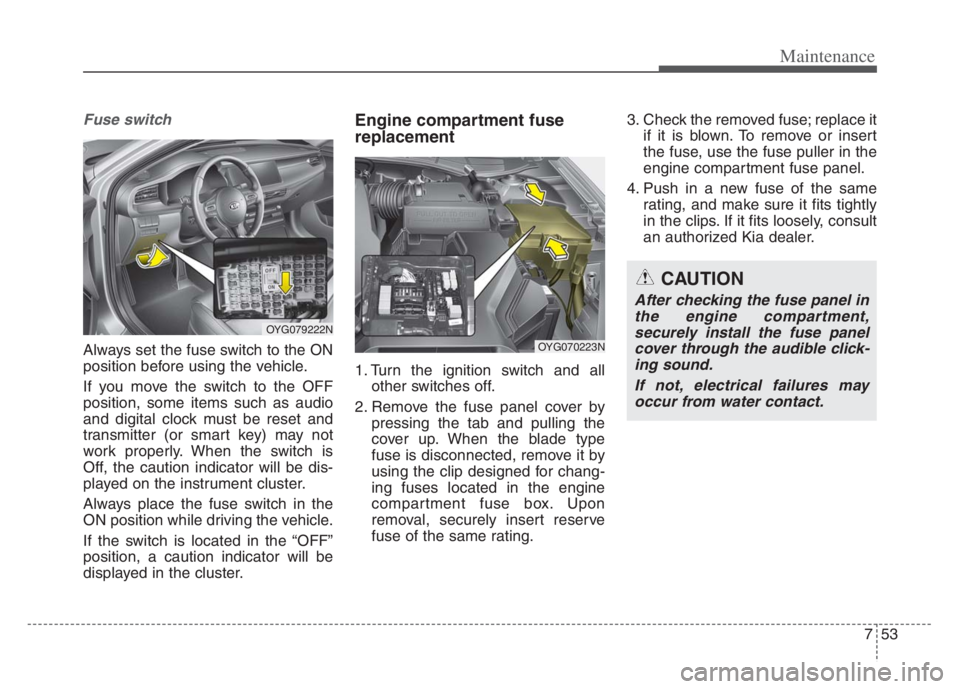
Fuse switch
Always set the fuse switch to the ON
position before using the vehicle.
If you move the switch to the OFF
position, some items such as audio
and digital clock must be reset and
transmitter (or smart key) may not
work properly. When the switch is
Off, the caution indicator will be dis-
played on the instrument cluster.
Always place the fuse switch in the
ON position while driving the vehicle.
If the switch is located in the “OFF”
position, a caution indicator will be
displayed in the cluster.
Engine compartment fuse
replacement
1. Turn the ignition switch and all
other switches off.
2. Remove the fuse panel cover by
pressing the tab and pulling the
cover up. When the blade type
fuse is disconnected, remove it by
using the clip designed for chang-
ing fuses located in the engine
compartment fuse box. Upon
removal, securely insert reserve
fuse of the same rating.3. Check the removed fuse; replace it
if it is blown. To remove or insert
the fuse, use the fuse puller in the
engine compartment fuse panel.
4. Push in a new fuse of the same
rating, and make sure it fits tightly
in the clips. If it fits loosely, consult
an authorized Kia dealer.
CAUTION
After checking the fuse panel in
the engine compartment,
securely install the fuse panel
cover through the audible click-
ing sound.
If not, electrical failures may
occur from water contact.
OYG079222N
OYG070223N
Page 502 of 560
757
Maintenance
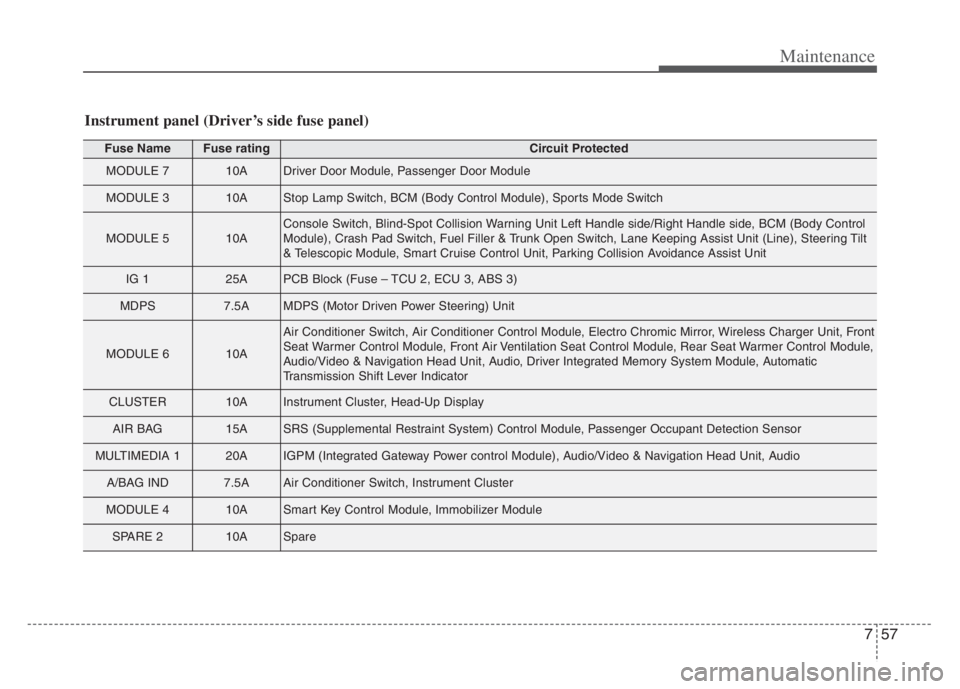
Fuse NameFuse ratingCircuit Protected
MODULE 710ADriver Door Module, Passenger Door Module
MODULE 310AStop Lamp Switch, BCM (Body Control Module), Sports Mode Switch
MODULE 510AConsole Switch, Blind-Spot Collision Warning Unit Left Handle side/Right Handle side, BCM (Body Control
Module), Crash Pad Switch, Fuel Filler & Trunk Open Switch, Lane Keeping Assist Unit (Line), Steering Tilt
& Telescopic Module, Smart Cruise Control Unit, Parking Collision Avoidance Assist Unit
IG 125APCB Block (Fuse – TCU 2, ECU 3, ABS 3)
MDPS7.5AMDPS (Motor Driven Power Steering) Unit
MODULE 610A
Air Conditioner Switch, Air Conditioner Control Module, Electro Chromic Mirror, Wireless Charger Unit, Front
Seat Warmer Control Module, Front Air Ventilation Seat Control Module, Rear Seat Warmer Control Module,
Audio/Video & Navigation Head Unit, Audio, Driver Integrated Memory System Module, Automatic
Transmission Shift Lever Indicator
CLUSTER10AInstrument Cluster, Head-Up Display
AIR BAG15ASRS (Supplemental Restraint System) Control Module, Passenger Occupant Detection Sensor
MULTIMEDIA 120AIGPM (Integrated Gateway Power control Module), Audio/Video & Navigation Head Unit, Audio
A/BAG IND7.5AAir Conditioner Switch, Instrument Cluster
MODULE 410ASmart Key Control Module, Immobilizer Module
SPARE 210ASpare
Instrument panel (Driver’s side fuse panel)
Page 554 of 560
I5
Index
How to use this manual ..................................................1-2
If the engine overheats ....................................................6-8
If the engine will not start ..............................................6-5
If engine doesn't turn over or turns over slowly ..........6-5
If engine turns over normally but does not start ..........6-5
If you have a flat tire ....................................................6-16
Changing tires ............................................................6-18
Jack and tools ..............................................................6-16
Removing and storing the spare tire ..........................6-17
Important safety precautions ..........................................3-2
Air bag hazards ............................................................3-2
Always wear your seat belt ..........................................3-2
Control your speed ........................................................3-3
Driver distraction ..........................................................3-2
Keep your vehicle in safe condition ............................3-3
Restrain all children ......................................................3-2
In case of an emergency while driving ............................6-3
If the engine stalls at a crossroad or crossing ..............6-3
If the engine stalls while driving ..................................6-3
If you have a flat tire while driving ..............................6-3
Warning triangle............................................................6-4
Infotainment system ....................................................4-168
Antenna ....................................................................4-168
USB port ..................................................................4-169Instrument cluster ..........................................................4-65
Gauges ........................................................................4-66
Instrument Cluster Control ........................................4-66
Transmission Shift Indicator ......................................4-70
Instrument panel overview ..............................................2-5
Interior features............................................................4-156
Air ventilation seat ....................................................4-158
Coat hook ..................................................................4-165
Cup holder ................................................................4-156
Floor mat anchor (s)..................................................4-166
Luggage net (holder) ................................................4-167
Power outlet ............................................................4-159
Seat warmer ..............................................................4-156
Sunvisor ....................................................................4-158
USB charger ............................................................4-160
Wireless smart phone charging system ....................4-161
Interior lights ..............................................................4-127
Automatic turn off function ......................................4-127
Glove box lamp ........................................................4-129
Map lamp ................................................................4-127
Room lamp ................................................................4-128
Trunk room lamp ......................................................4-129
Vanity mirror lamp ....................................................4-129
Interior overview..............................................................2-4
I