break KIA Carens 2014 3.G User Guide
[x] Cancel search | Manufacturer: KIA, Model Year: 2014, Model line: Carens, Model: KIA Carens 2014 3.GPages: 517, PDF Size: 13.98 MB
Page 258 of 517
4171
Features of your vehicle
USING THE USB DEVICE
To use an external USB device,make sure the device is not con-
nected when starting up the
vehicle. Connect the device after
starting up.
If you start the engine when the USB device is connected, it may
damage the USB device. (USB
flashdrives are very sensitive to
electric shock.)
If the engine is started up or turned off while the external USB
device is connected, the external
USB device may not work.
The System may not play unau- thenticated MP3 or WMA files.
1) It can only play MP3 files with the compression rate between
8Kbps ~ 320Kbps.
2) It can only play WMA music files with the compression rate
between 8Kbps ~ 320Kbps.
Take precautions for static elec- tricity when connecting or discon-
necting the external USB device.
(Continued)(Continued)
An encrypted MP3 PLAYER is
not recognizable.
Depending on the condition of the external USB device, the
connected external USB device
can be unrecognizable.
When the formatted byte/sector setting of External USB device is
not either 512BYTE or
2048BYTE, then the device will
not be recognized.
Use only a USB device format- ted to FAT 12/16/32.
USB devices without USB I/F authentication may not be recog-
nizable.
Make sure the USB connection terminal does not come in con-
tact with the human body or
other objects.
If you repeatedly connect or dis- connect the USB device in a
short period of time, it may break
the device.
(Continued)
(Continued) When cleaning the device, make sure to turn off thedevice and use a dry andsmooth cloth. Never usetough materials, chemicalcloths, or solvents (alcohol,benzene, thinners, etc.) assuch materials may damagethe device panel or causecolor/quality deterioration
Do not place beverages close to the audio system. Spillingbeverages may lead to systemmalfunction.
In case of product malfunction, please contact your place of pur-chase or After Service center.
Placing the audio system within an electromagneticenvironment may result innoise interference.
Prevent caustic solutions such as perfume and cosmetic oilfrom contacting the dashboardbecause they may cause dam-age or discoloration.
Page 373 of 517
Driving your vehicle
66
5
Parking on hills
Generally, if you have a trailer
attached to your vehicle, you should
not park your vehicle on a hill. People
can be seriously or fatally injured,
and both your vehicle and the trailer
can be damaged if they unexpected-
ly roll downhill.
However, if you ever have to park
your trailer on a hill, here's how to do
it:
1.Pull the vehicle into the parking
space. Turn the steering wheel in
the direction of the curb (right if
headed downhill, left if headed up
hill). 2.If the vehicle has a manual
transaxle, place the vehicle in neu-
tral. If the vehicle has an automatic
transaxle, place the vehicle in P
(Park).
3.Set the parking brake and shut off the engine.
4.Place chocks under the trailer wheels on the down hill side of the
wheels.
5.Start the vehicle, hold the brakes, shift to neutral, release the parking
brake and slowly release the
brakes until the trailer chocks
absorb the load.
6.Reapply the brakes, reapply the parking brake and shift the vehicle
to R (Reverse) for manual
transaxle or P (Park) for automatic
transaxle.
7.Shut off the vehicle and release the vehicle brakes but leave the park-
ing brake set.CAUTION
When towing a trailer on steep grades (in excess of 6%) payclose attention to the enginecoolant temperature gauge toensure the engine does notoverheat.
If the needle of the coolanttemperature gauge movesacross the dial towards “H”(HOT), pull over and stop assoon as it is safe to do so, andallow the engine to idle until itcools down. You may proceedonce the engine has cooledsufficiently.
You must decide driving speed depending on trailerweight and uphill grade toreduce the possibility ofengine and transaxle over-heating.
WARNING- Parking on a hill
Parking your vehicle on a hill
with a trailer attached could
cause serious injury or death,
should the trailer break loose or
brake stops working.
Page 375 of 517
Driving your vehicle
68
5
If you do decide to pull a trail-
er
Here are some important points if
you decide to pull a trailer:
Consider using a sway control. You
can ask a hitch dealer about sway
control.
Do not do any towing with your vehicle during its first 2,000 km
(1,200 miles) in order to allow the
engine to properly break in. Failure
to heed this caution may result in
serious engine or transaxle dam-
age.
When towing a trailer, be sure to consult an authorized Kia dealer
for further information on additional
requirements such as a towing kit,
etc.
Always drive your vehicle at a mod- erate speed (less than 100 km/h
(60 mph)).
On a long uphill grade, do not exceed 70 km/h (45 mph) or the
posted towing speed limit,
whichever is lower.
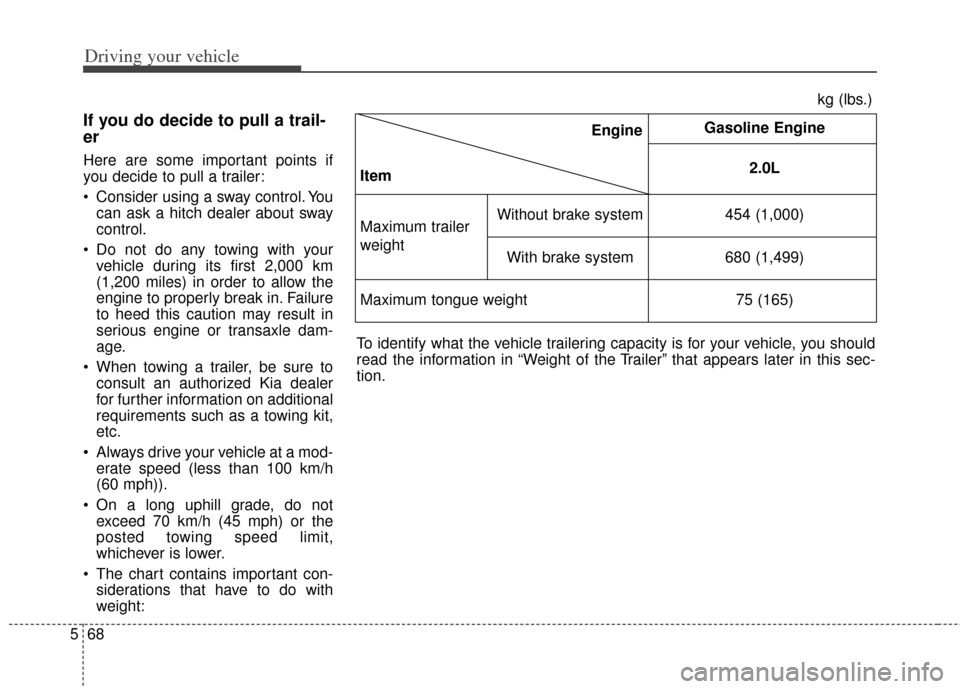
The chart contains important con- siderations that have to do with
weight: Engine
Item Gasoline Engine
2.0L
Maximum trailer
weight
Without brake system 454 (1,000)
With brake system 680 (1,499)
Maximum tongue weight 75 (165)
kg (lbs.)
To identify what the vehicle trailering capacity is for your vehicle, you should
read the information in “Weight of the Trailer” that appears later in this sec-
tion.
Page 382 of 517
575
Driving your vehicle
Certification label
The certification label is located on
the driver's door sill at the center pil-
lar.
This label shows the maximum
allowable weight of the fully loaded
vehicle. This is called the GVWR
(Gross Vehicle Weight Rating). The
GVWR includes the weight of the
vehicle, all occupants, fuel and
cargo.
This label also tells you the maxi-
mum weight that can be supported
by the front and rear axles, called
Gross Axle Weight Rating (GAWR).
To find out the actual loads on your
front and rear axles, you need to go
to a weigh station and weigh your
vehicle. Your dealer can help you with
this. Be sure to spread out your load
equally on both sides of the center-
line.The label will help you decide how
much cargo and installed equipment
your vehicle can carry.
If you carry items inside your vehicle
- like suitcases, tools, packages, or
anything else - they are moving as
fast as the vehicle. If you have to stop
or turn quickly, or if there is a crash,
the items will keep going and can
cause an injury if they strike the driv-
er or a passenger.WARNING- Over
loading
Never exceed the GVWR for
your vehicle, the GAWR for
either the front or rear axle
and vehicle capacity weight.
Exceeding these ratings can
cause an accident or vehicle
damage. You can calculate the
weight of your load by weigh-
ing the items (or people)
before putting them in the
vehicle. Be careful not to over-
load your vehicle.
Do not load your vehicle any heavier than the GVWR, either
the maximum front or rear
GAWR and vehicle capacity
weight. If you do, parts,
including tires on your vehicle
can break, and it can change
the way your vehicle handles
and braking ability. This could
cause you to lose control and
crash. Also, overloading can
shorten the life of your vehi-
cle.
Page 411 of 517
627
What to do in an emergency
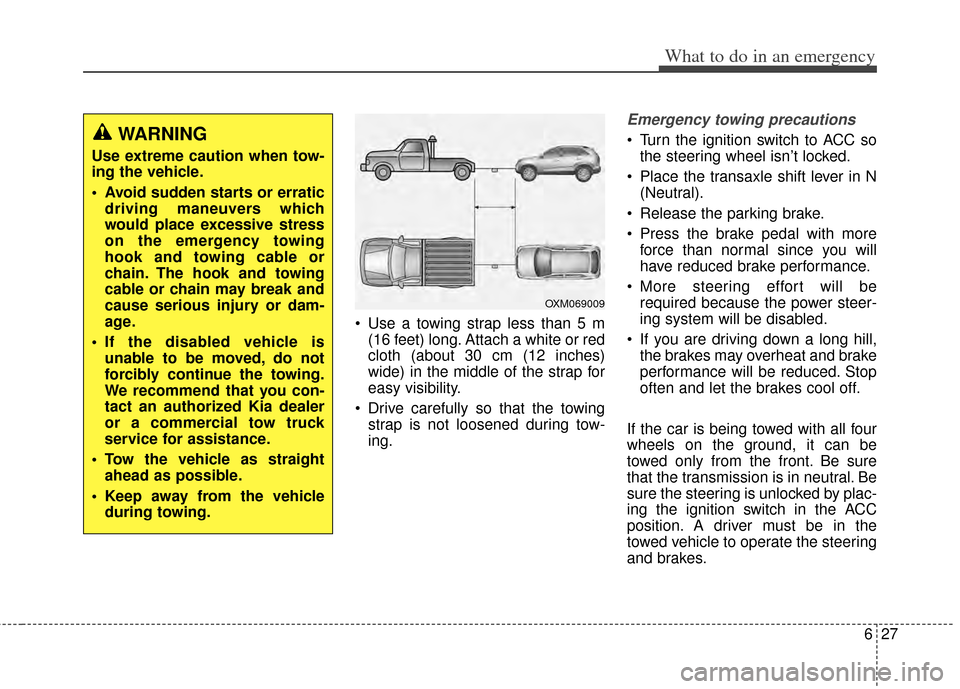
Use a towing strap less than 5 m (16 feet) long. Attach a white or red
cloth (about 30 cm (12 inches)
wide) in the middle of the strap for
easy visibility.
Drive carefully so that the towing strap is not loosened during tow-
ing.
Emergency towing precautions
Turn the ignition switch to ACC sothe steering wheel isn’t locked.
Place the transaxle shift lever in N (Neutral).
Release the parking brake.
Press the brake pedal with more force than normal since you will
have reduced brake performance.
More steering effort will be required because the power steer-
ing system will be disabled.
If you are driving down a long hill, the brakes may overheat and brake
performance will be reduced. Stop
often and let the brakes cool off.
If the car is being towed with all four
wheels on the ground, it can be
towed only from the front. Be sure
that the transmission is in neutral. Be
sure the steering is unlocked by plac-
ing the ignition switch in the ACC
position. A driver must be in the
towed vehicle to operate the steering
and brakes.WARNING
Use extreme caution when tow-
ing the vehicle.
Avoid sudden starts or erratic driving maneuvers which
would place excessive stress
on the emergency towing
hook and towing cable or
chain. The hook and towing
cable or chain may break and
cause serious injury or dam-
age.
If the disabled vehicle is unable to be moved, do not
forcibly continue the towing.
We recommend that you con-
tact an authorized Kia dealer
or a commercial tow truck
service for assistance.
Tow the vehicle as straight ahead as possible.
Keep away from the vehicle during towing.
OXM069009
Page 516 of 517
Index
10I
Tilt and telescopic steering . . . . . . . . . . . . . . . . . . . . . . 4-44
Tire and wheels . . . . . . . . . . . . . . . . . . . . . . . . . . . . . . . . 8-4
Tire pressure monitoring system . . . . . . . . . . . . . . . . . . 6-9
Tire rotation . . . . . . . . . . . . . . . . . . . . . . . . . . . . . . . . . 7-49
Tire specification and pressure label . . . . . . . . . . . . . . . 8-9
Tires and wheels . . . . . . . . . . . . . . . . . . . . . . . . . . . . . . 7-46Checking tire inflation pressure . . . . . . . . . . . . . . . . 7-48
Compact spare tire replacement . . . . . . . . . . . . . . . . 7-51
Recommended cold tire inflation pressures . . . . . . . 7-46
Tire care . . . . . . . . . . . . . . . . . . . . . . . . . . . . . . . . . . 7-46\
Tire maintenance . . . . . . . . . . . . . . . . . . . . . . . . . . . 7-52
Tire replacement . . . . . . . . . . . . . . . . . . . . . . . . . . . . 7-50
Tire rotation . . . . . . . . . . . . . . . . . . . . . . . . . . . . . . . 7-49
Tire sidewall labeling . . . . . . . . . . . . . . . . . . . . . . . . 7-52
Tire traction . . . . . . . . . . . . . . . . . . . . . . . . . . . . . . . 7-52
Wheel alignment and tire balance . . . . . . . . . . . . . . 7-50
Wheel replacement . . . . . . . . . . . . . . . . . . . . . . . . . . 7-51
Towing . . . . . . . . . . . . . . . . . . . . . . . . . . . . . . . . . . . . \
. 6-24
Trailer towing . . . . . . . . . . . . . . . . . . . . . . . . . . . . . . . . 5-61
Transaxle Automatic transaxle . . . . . . . . . . . . . . . . . . . . . . . . . 5-17
Manual transaxle . . . . . . . . . . . . . . . . . . . . . . . . . . . 5-13
Transaxle Shift Indicator . . . . . . . . . . . . . . . . . . . . . . . 4-59
Transmitter precautions . . . . . . . . . . . . . . . . . . . . . . . . . 4-6
Trip A/B . . . . . . . . . . . . . . . . . . . . . . . . . . . . . . . . . . . . \
4-73
Trip computer . . . . . . . . . . . . . . . . . . . . . . . . . . . . . . . . 4-71 Fuel Economy . . . . . . . . . . . . . . . . . . . . . . . . . . . . . 4-72
Trip A/B . . . . . . . . . . . . . . . . . . . . . . . . . . . . . . . . . . 4-73\
Trip Modes . . . . . . . . . . . . . . . . . . . . . . . . . . . . . . . . 4-71
Trip Modes . . . . . . . . . . . . . . . . . . . . . . . . . . . . . . . . . . 4-71\
Turn By Turn Mode . . . . . . . . . . . . . . . . . . . . . . . . . . . 4-64
Turn signals and lane change signals . . . . . . . . . . . . . 4-103
User Settings Mode . . . . . . . . . . . . . . . . . . . . . . . . . . . 4-62
Vanity mirror lamp . . . . . . . . . . . . . . . . . . . . . . . . . . . 4-113
Vehicle break-in process . . . . . . . . . . . . . . . . . . . . . . . . . 1-4
Vehicle identification number (VIN) . . . . . . . . . . . . . . . 8-8
Vehicle load limit . . . . . . . . . . . . . . . . . . . . . . . . . . . . . 5-71
Vehicle stability management . . . . . . . . . . . . . . . . . . . . 5-41
Vehicle weight . . . . . . . . . . . . . . . . . . . . . . . . . . . . . . . 5-77
Warning lights . . . . . . . . . . . . . . . . . . . . . . . . . . . . . . . . 4-75
Warning Messages . . . . . . . . . . . . . . . . . . . . . . . . . . . . 4-65
Warnings and indicator lights . . . . . . . . . . . . . . . . . . . . 4-75
Washer fluid . . . . . . . . . . . . . . . . . . . . . . . . . . . . . . . . . 7-36
Welcome system . . . . . . . . . . . . . . . . . . . . . . . . . . . . . 4-114 Headlamp welcome . . . . . . . . . . . . . . . . . . . . . . . . 4-114
Interior light . . . . . . . . . . . . . . . . . . . . . . . . . . . . . 4-114
Puddle lamp . . . . . . . . . . . . . . . . . . . . . . . . . . . . . . 4-114
U
V
W