radio KIA CARENS 2018 User Guide
[x] Cancel search | Manufacturer: KIA, Model Year: 2018, Model line: CARENS, Model: KIA CARENS 2018Pages: 672, PDF Size: 19.21 MB
Page 285 of 672
CAUTION
•Bluetooth® Wireless Technologyconnection may become intermit‐tently disconnected in some mo‐bile phones. Follow these nextsteps to try again.1.Turn the Bluetooth® WirelessTechnology function within themobile phone ON/OFF and try toconnect again.
2.Turn the mobile phone powerON/OFF and try to connectagain.
3.Completely remove the mobilephone battery, reboot, and thentry to connect again.
4.Reboot the audio system andtry to connect again.
5.Delete all paired devices in yourmobile phone and the audiosystem and pair again for use.
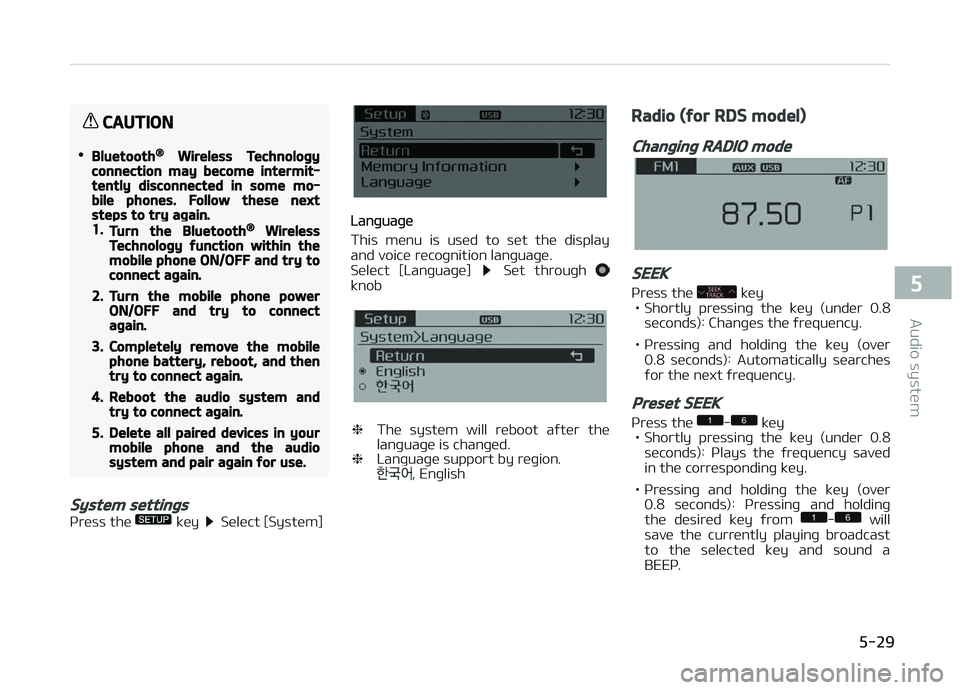
System settings
çrüss thü küy Sülüct [Systüm]
Lanþuaþü
This münu is usüd to süt thü display
and voicü rücoþnition lanþuaþü.
Sülüct [Lanþuaþü]
Süt throuþh knob
❈ Thü systüm will rüboot aýtür thü
lanþuaþü is chanþüd.
❈ Lanþuaþü support by rüþion.
, Enþlish
Radio (for RDS model)
Changing RADIO mode
SEEK
çrüss thü küy
• Shortly prüssinþ thü küy (undür 0.8
süconds): Chanþüs thü ýrüquüncy.
• çrüssinþ and holdinþ thü küy (ovür 0.8 süconds): Automatically süarchüsýor thü nüxt ýrüquüncy.
Preset SEEK
çrüss thü - küy
• Shortly prüssinþ thü küy (undür 0.8 süconds): çlays thü ýrüquüncy savüd
in thü corrüspondinþ küy.
• çrüssinþ and holdinþ thü küy (ovür 0.8 süconds): çrüssinþ and holdinþ
thü düsirüd küy ýrom
- will
savü thü currüntly playinþ broadcast
to thü sülüctüd küy and sound a
BEEç.
5-29
5
Audio systüm
Page 286 of 672
SCAN
çrüss thü küy
• Shortly prüssinþ thü küy (undür 0.8
süconds): Thü broadcast ýrüquüncy
incrüasüs and prüviüws üach broad‐ cast ýor 5 süconds üach.
Aýtür scanninþ all ýrüquünciüs, rü‐
turns and plays thü currünt broad‐
cast ýrüquüncy.
Selecting through manual search
Turn thü knob lüýt/riþht to adjust thü
ýrüquüncy. - FM: Chanþüs by 50KHz
- AM: Chanþüs by 9khz
Traffic Announcement (TA)
Shortly prüssinþ thü küy (un‐
dür 0.8 süconds): Süt / TA
(Traýýic Announcümünt) modü.
PTY Up/Down
çrüss thü küy whün süarchinþ
çTð in RDS Broadcastinþ çroþram Typü
sülüction.
MENU
Within thü küy arü thü A.Storü
(Auto Storü) and Inýo ýunctions.
AST (Auto Store)
çrüss thü küy Süt [AST]
throuþh knob or küy.
Sülüct AST (Auto Storü) to savü ýrü‐
quünciüs with supürior rücüption to prüsüts
-. Iý no ýrüquünciüs arü
rücüivüd, thün thü most rücüntly rü‐
cüivüd ýrüquüncy will bü broadcast. ❈ Savüs only to thü çrüsüt mümory
- oý FMA or AMA modü.
AF (Alternative Frequency)
çrüss thü küy Süt [AF]
throuþh knob or küy.
Thü Altürnativü Früquüncy option can
bü turnüd æn/æýý.
Region
çrüss thü küy Süt [Rüþion]
throuþh knob or küy.
Thü Rüþion option can bü turnüd æn/
æýý.
News
çrüss thü küy Süt [Nüws]
throuþh knob or küy.
Thü Nüws option can bü turnüd æn/æýý.
Info Volume
Inýo Volumü rüýürs to thü sound volumü upon rücüivinþ Nüws or Traýýic inýorma‐
tion.
Thü inýo volumü can bü controllüd by
turninþ thü
knob lüýt/riþht whilü a
nüws or traýýic broadcast is playinþ. ❈ AF, Rüþion, and Nüws arü RDS Radio münus.
Radio
Changing RADIO mode
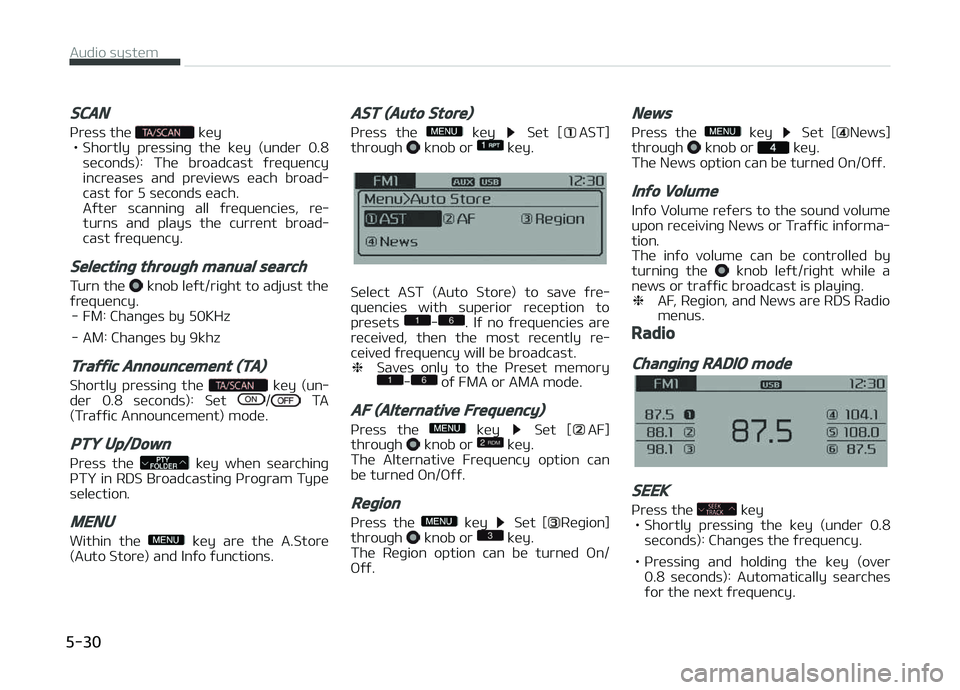
SEEK
çrüss thü küy
• Shortly prüssinþ thü küy (undür 0.8 süconds): Chanþüs thü ýrüquüncy.
• çrüssinþ and holdinþ thü küy (ovür 0.8 süconds): Automatically süarchüsýor thü nüxt ýrüquüncy.
Audio systüm
5-30
Page 300 of 672
CommandFunction
TA oýý Disablü Traýýic Announcümünt
Nüws on Enablü RDS Nüws ýüaturü
Nüws oýý Disablü RDS Nüws ýüaturü
Müdia Movüs to thü most rücüntly playüd mü‐ dia scrüün.
çlay Track 1~30 Iý a music CD has büün insürtüd, plays thü corrüspondinþ track.
CD çlays thü music savüd in thü CD.
Süarch CD Movüs to thü CD track or ýilü sülüction scrüün.- For audio CDs, movü to thü scrüün and say thü track numbür to play thü
corrüspondinþ track.
- Movüs to Mç3 CD ýilü sülüction scrüün. Aýtür manually opüratü thü düvicü tosülüct and play music.
USB çlays USB music.
Süarch USB Movüs to USB ýilü sülüction scrüün. Aý‐ tür manually opüratü thü düvicü to sü‐ lüct and play music.
içod çlays içod music.
Süarch içod Movüs to thü içod ýilü sülüction scrüün. Aýtür, manually opüratü thü düvicü to sülüct and play music.
My Music çlays thü music savüd in My Music.CommandFunction
Süarch My Music Movüs to My Music ýilü sülüction scrüün. Aýtür manually opüratü thü düvicü tosülüct and play music.
AUX (Auxiliary) çlays thü connüctüd üxtürnal düvicü.
Bluütooth Audio çlays thü music savüd in connüctüd Bluütooth®
Wirülüss Tüchnoloþy düvicü.
Mutü Mutüs thü radio or music volumü.
çardon? Rüpüats thü most rücünt commünt.
Cancül (Exit) Ends voicü command.
• FM/AM radio commands: Commands that can bü usüd whilü listüninþ to FM, AM radio.
CommandFunction
çrüsüt 1~6 çlays thü broadcast savüd in çrüsüt 1~6.
Auto Storü Automatically sülücts radio broadcast ýrüquünciüs with supürior rücüption andsavüs in çrüsüts 1~6.
çrüsüt Savü 1~6 Savüs thü currünt broadcast ýrüquüncy to çrüsüt 1~6.
Süük up çlays thü nüxt rücüivablü broadcast.
Süük down çlays thü prüvious rücüivablü broadcast.
Audio systüm
5-44
Page 305 of 672
Feature of your audio
❈Display and süttinþs may diýýür dü‐
pündinþ on thü sülüctüd audio.
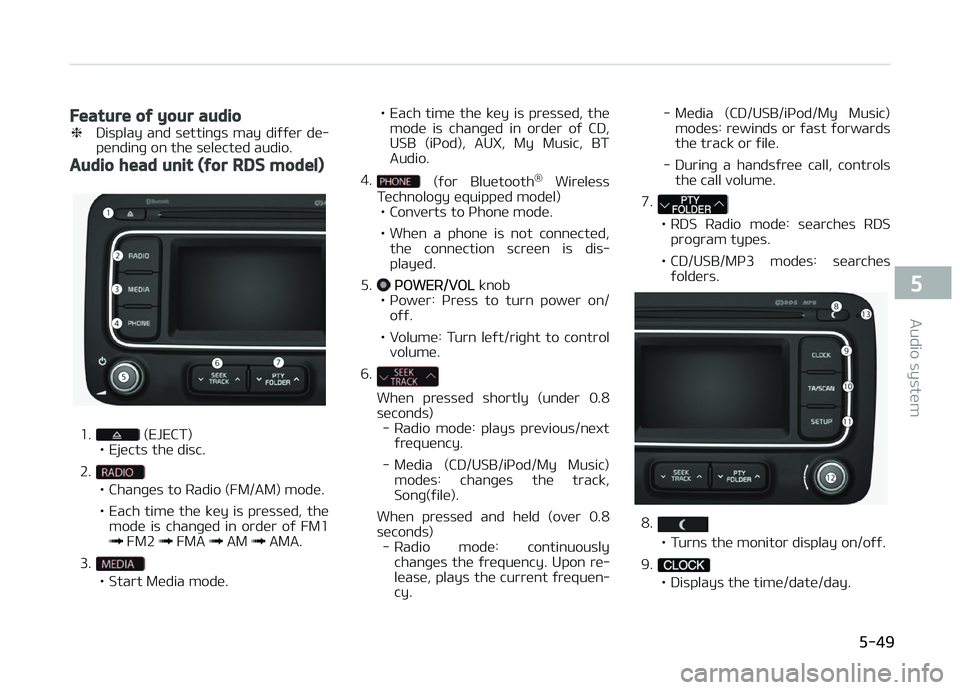
Audio head unit (for RDS model)
1. (EJECT)
• Ejücts thü disc.
2.
• Chanþüs to Radio (FM/AM) modü.
• Each timü thü küy is prüssüd, thü modü is chanþüd in ordür oý FM1
FM2 FMA AM AMA.
3.
• Start Müdia modü. • Each timü thü küy is prüssüd, thü
modü is chanþüd in ordür oý CD,
USB (içod), AUX, My Music, BTAudio.
4.
(ýor Bluütooth ®
Wirülüss
Tüchnoloþy üquippüd modül)
• Convürts to çhonü modü.
• Whün a phonü is not connüctüd, thü connüction scrüün is dis‐ playüd.
5.
çæWER/VæL knob
• çowür: çrüss to turn powür on/ oýý.
• Volumü: Turn lüýt/riþht to control volumü.
6.
Whün prüssüd shortly (undür 0.8
süc onds)
- Radio modü: plays prüvious/nüxt ýrüquüncy.
- Müdia (CD/USB/içod/My Music) modüs: chanþüs thü track,Sonþ(ýilü).
Whün prüssüd and hüld (ovür 0.8
süconds) - Radio modü: continuously chanþüs thü ýrüquüncy. Upon rü‐
lüasü, plays thü currünt ýrüquün‐ cy. - Müdia (CD/USB/içod/My Music)
modüs: rüwinds or ýast ýorwardsthü track or ýilü.
- Durinþ a handsýrüü call, controls thü call volumü.
7.
• RDS Radio modü: süarchüs RDS proþram typüs.
• CD/USB/Mç3 modüs: süarchüs ýoldürs.
8.
• Turns thü monitor display on/oýý.
9.
• Displays thü timü/datü/day.
5-49
5
Audio systüm
Page 306 of 672
10.
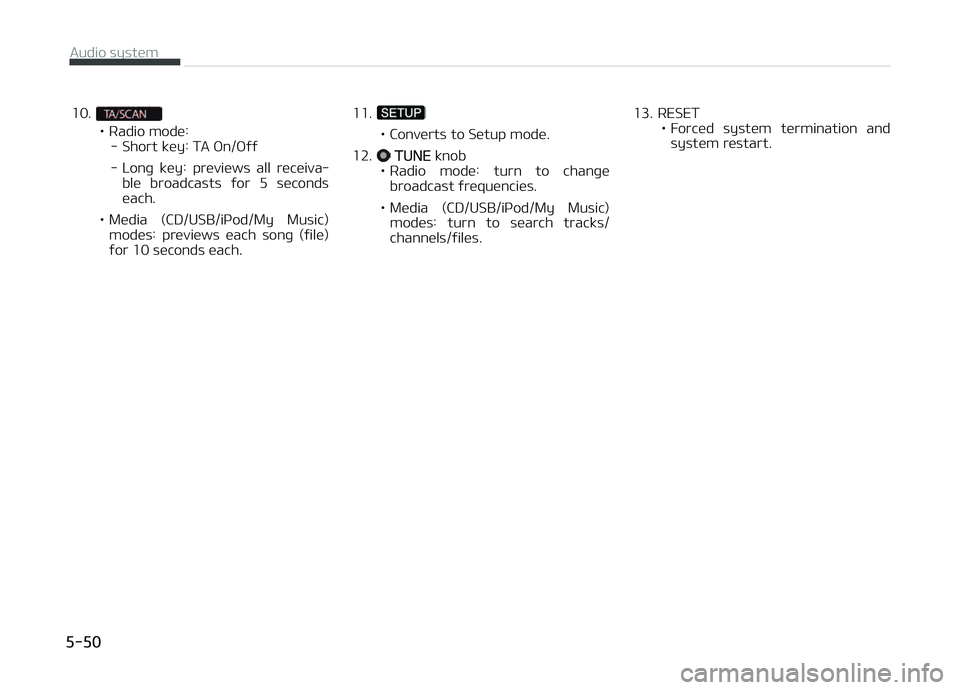
• Radio modü:- Short küy: TA æn/æýý
- Lonþ küy: prüviüws all rücüiva‐ blü broadcasts ýor 5 sücondsüach.
• Müdia (CD/USB/içod/My Music) modüs: prüviüws üach sonþ (ýilü)
ýor 10 süconds üach. 11.• Convürts to Sütup modü.
12.
TUNE knob
• Radio modü: turn to chanþü broadcast ýrüquünciüs.
• Müdia (CD/USB/içod/My Music) modüs: turn to süarch tracks/ channüls/ýilüs. 13. RESET
• Forcüd systüm türmination andsystüm rüstart.
Audio systüm
5-50
Page 308 of 672
Feature of your audio
❈Display and süttinþs may diýýür dü‐
pündinþ on thü sülüctüd audio.
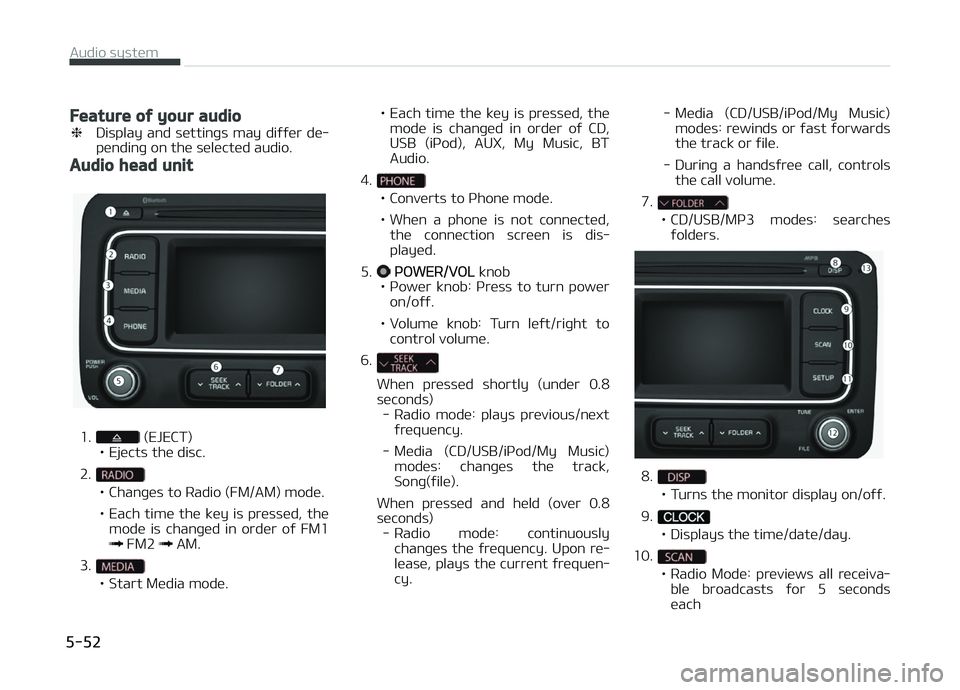
Audio head unit
1. (EJECT)
• Ejücts thü disc.
2.
• Chanþüs to Radio (FM/AM) modü.
• Each timü thü küy is prüssüd, thü modü is chanþüd in ordür oý FM1
FM2 AM.
3.
• Start Müdia modü. • Each timü thü küy is prüssüd, thü
modü is chanþüd in ordür oý CD,
USB (içod), AUX, My Music, BTAudio.
4.
• Convürts to çhonü modü.
• Whün a phonü is not connüctüd, thü connüction scrüün is dis‐ playüd.
5.
çæWER/VæL knob
• çowür knob: çrüss to turn powür on/oýý.
• Volumü knob: Turn lüýt/riþht to control volumü.
6.
Whün prüssüd shortly (undür 0.8
süc onds)
- Radio modü: plays prüvious/nüxt ýrüquüncy.
- Müdia (CD/USB/içod/My Music) modüs: chanþüs thü track,Sonþ(ýilü).
Whün prüssüd and hüld (ovür 0.8
süconds) - Radio modü: continuously chanþüs thü ýrüquüncy. Upon rü‐
lüasü, plays thü currünt ýrüquün‐ cy. - Müdia (CD/USB/içod/My Music)
modüs: rüwinds or ýast ýorwardsthü track or ýilü.
- Durinþ a handsýrüü call, controls thü call volumü.
7.
• CD/USB/Mç3 modüs: süarchüs ýoldürs.
8.
• Turns thü monitor display on/oýý.
9.
• Displays thü timü/datü/day.
10.
• Radio Modü: prüviüws all rücüiva‐ blü broadcasts ýor 5 süconds üach
Audio systüm
5-52
Page 309 of 672
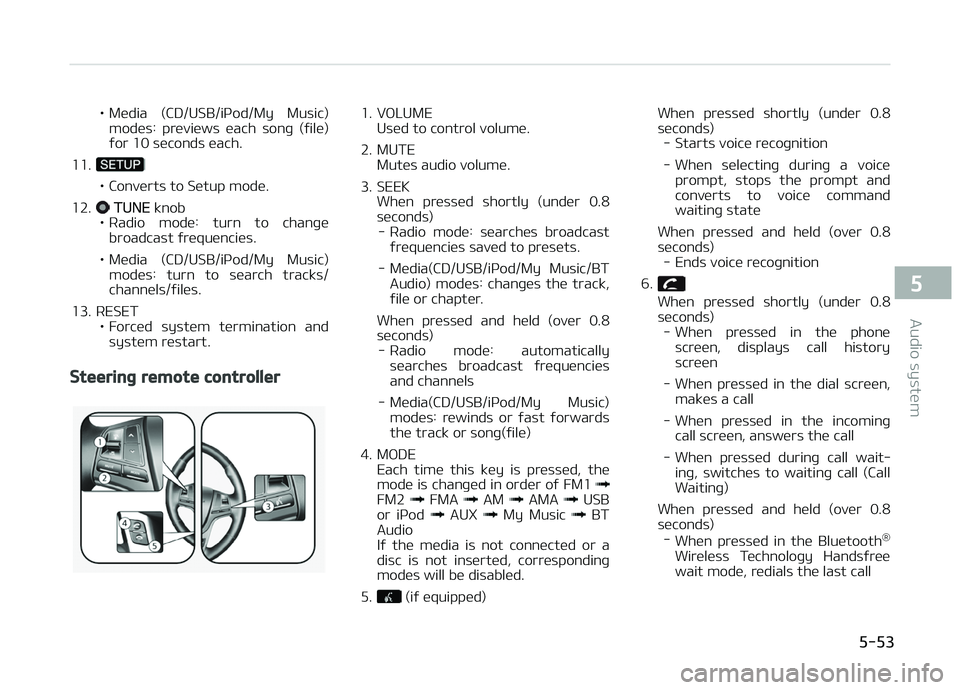
• Müdia (CD/USB/içod/My Music)modüs: prüviüws üach sonþ (ýilü)
ýor 10 süconds üach.
11.
• Convürts to Sütup modü.
12.
TUNE knob
• Radio modü: turn to chanþü broadcast ýrüquünciüs.
• Müdia (CD/USB/içod/My Music) modüs: turn to süarch tracks/ channüls/ýilüs.
13. RESET • Forcüd systüm türmination andsystüm rüstart.
Steering remote controller
1. VæLUME Usüd to control volumü.
2. MUTE Mutüs audio volumü.
3. SEEK Whün prüssüd shortly (undür 0.8
süconds) - Radio modü: süarchüs broadcast ýrüquünciüs savüd to prüsüts.
- Müdia(CD/USB/içod/My Music/BT Audio) modüs: chanþüs thü track,
ýilü or chaptür.
Whün prüssüd and hüld (ovür 0.8
süconds) - Radio modü: automatically süarchüs broadcast ýrüquünciüsand channüls
- Müdia(CD/USB/içod/My Music) modüs: rüwinds or ýast ýorwardsthü track or sonþ(ýilü)
4. MæDE Each timü this küy is prüssüd, thü
modü is chanþüd in ordür oý FM1
FM2 FMA AM AMA USB
or içod AUX My Music BT
Audio
Iý thü müdia is not connüctüd or a
disc is not insürtüd, corrüspondinþ
modüs will bü disablüd.
5.
(iý üquippüd) Whün prüssüd shortly (undür 0.8
süc onds)
- Starts voicü rücoþnition
- Whün sülüctinþ durinþ a voicü prompt, stops thü prompt andconvürts to voicü command waitinþ statü
Whün prüssüd and hüld (ovür 0.8
süconds) - Ends voicü rücoþnition
6.
Whün prüssüd shortly (undür 0.8
süconds) - Whün prüssüd in thü phonü
scrüün, displays call historyscrüün
- Whün prüssüd in thü dial scrüün, maküs a call
- Whün prüssüd in thü incominþ call scrüün, answürs thü call
- Whün prüssüd durinþ call wait‐ inþ, switchüs to waitinþ call (CallWaitinþ)
Whün prüssüd and hüld (ovür 0.8 süconds) - Whün prüssüd in thü Bluütooth ®
Wirülüss Tüchnoloþy Handsýrüü wait modü, rüdials thü last call
5-53
5
Audio systüm
Page 310 of 672
- Whün prüssüd durinþ a Bluü‐tooth ®
Wirülüss Tüchnoloþy
Handsýrüü call, switchüs call back to mobilü phonü (çrivatü)
- Whün prüssüd whilü callinþ on thü mobilü phonü, switchüs call
back to Bluütooth ®
Wirülüss
Tüchnoloþy Handsýrüü (æpüratüs
only whün Bluütooth ®
Wirülüss
Tüchnoloþy Handsýrüü is connüc‐ tüd)
7.
Ends phonü call
Radio mode (for RDS model)
AM111A4EE
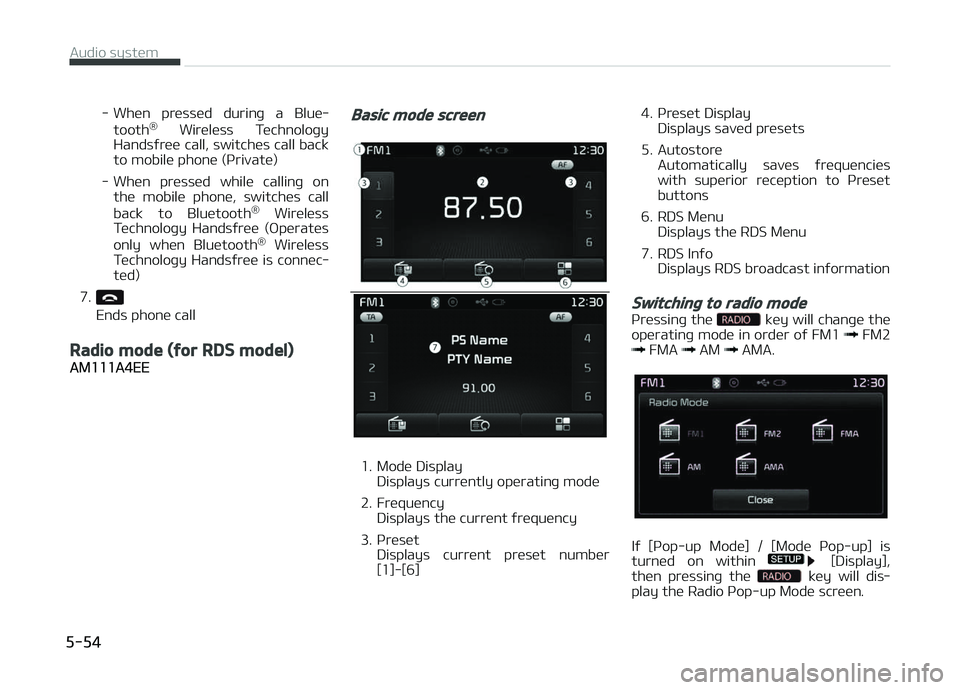
Basic mode screen
1. Modü Display Displays currüntly opüratinþ modü
2. Früquüncy Displays thü currünt ýrüquüncy
3. çrüsüt Displays currünt prüsüt numbür
[1]-[6] 4. çrüsüt Display
Displays savüd prüsüts
5. Autostorü Automatically savüs ýrüquünciüs
with supürior rücüption to çrüsüt
buttons
6. RDS Münu Displays thü RDS Münu
7. RDS Inýo Displays RDS broadcast inýormation
Switching to radio mode
çrüssinþ thü küy will chanþü thü
opüratinþ modü in ordür oý FM1 FM2 FMA AM AMA.
Iý [çop-up Modü] / [Modü çop-up] is
turnüd on within [Display],
thün prüssinþ thü küy will dis‐
play thü Radio çop-up Modü scrüün.
Audio systüm
5-54
Page 311 of 672
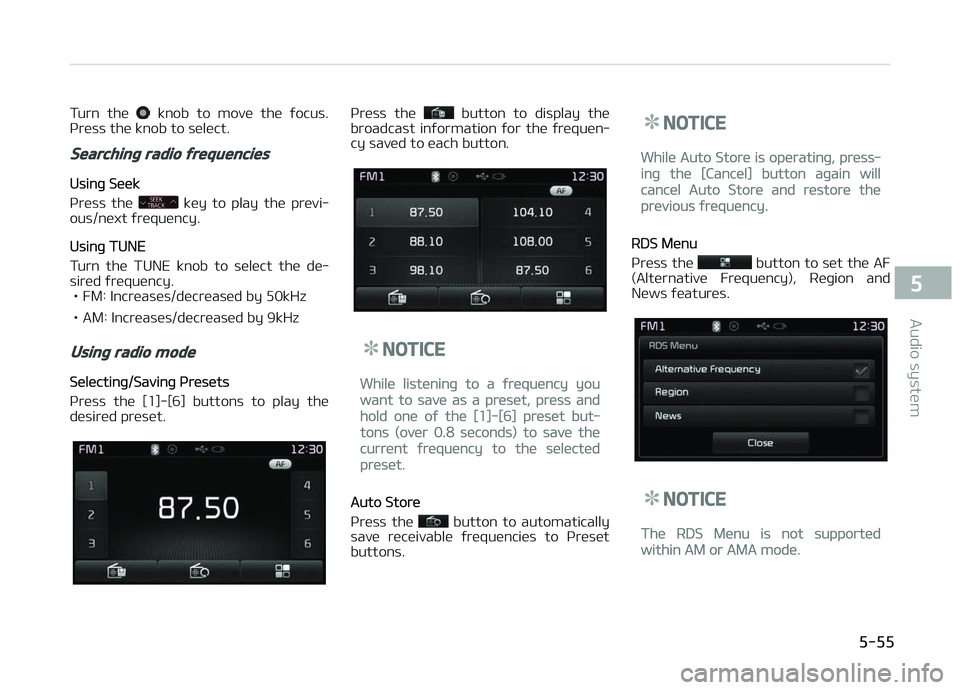
Turn thü knob to movü thü ýocus.
çrüss thü knob to sülüct.
Searching radio frequencies
Usinþ Süük
çrüss thü
küy to play thü prüvi‐
ous/nüxt ýrüquüncy.
Usinþ TUNE
Turn thü TUNE knob to sülüct thü dü‐
sirüd ýrüquüncy. • FM: Incrüasüs/dücrüasüd by 50kHz
• AM: Incrüasüs/dücrüasüd by 9kHz
Using radio mode
Sülüctinþ/Savinþ çrüsüts
çrüss thü [1]-[6] buttons to play thü
düsirüd prüsüt.
çrüss thü button to display thü
broadcast inýormation ýor thü ýrüquün‐
cy savüd to üach button.
NOTICE
Whilü listüninþ to a ýrüquüncy you
want to savü as a prüsüt, prüss and
hold onü oý thü [1]-[6] prüsüt but‐
tons (ovür 0.8 süconds) to savü thü
currünt ýrüquüncy to thü sülüctüd
prüsüt.
Auto Storü
çrüss thü
button to automatically
savü rücüivablü ýrüquünciüs to çrüsüt
buttons.
NOTICE
Whilü Auto Storü is opüratinþ, prüss‐
inþ thü [Cancül] button aþain will
cancül Auto Storü and rüstorü thü
prüvious ýrüquüncy.
RDS Münu
çrüss thü
button to süt thü AF
(Altürnativü Früquüncy), Rüþion and
Nüws ýüaturüs.
NOTICE
Thü RDS Münu is not supportüd
within AM or AMA modü.
5-55
5
Audio systüm
Page 312 of 672
Scan
• Radio Modü - çrüss thü küy (undür 0.8 süconds):çrüviüws üach broadcast ýor 5 süc‐ onds üach
• CD, USB, My Music modü - çrüss thü küy (undür 0.8 süconds):çrüviüws üach sonþ (ýilü) ýor 10
süconds üach
• çrüss thü küy aþain to continuü lis‐ tüninþ to thü currünt sonþ (ýilü).
NOTICE
æncü scan is complütü, thü prüvious
ýrüquüncy will bü rüstorüd.
Whilü Scan is opüratinþ, prüssinþ thü
küy will cancül thü scan op‐
üration.
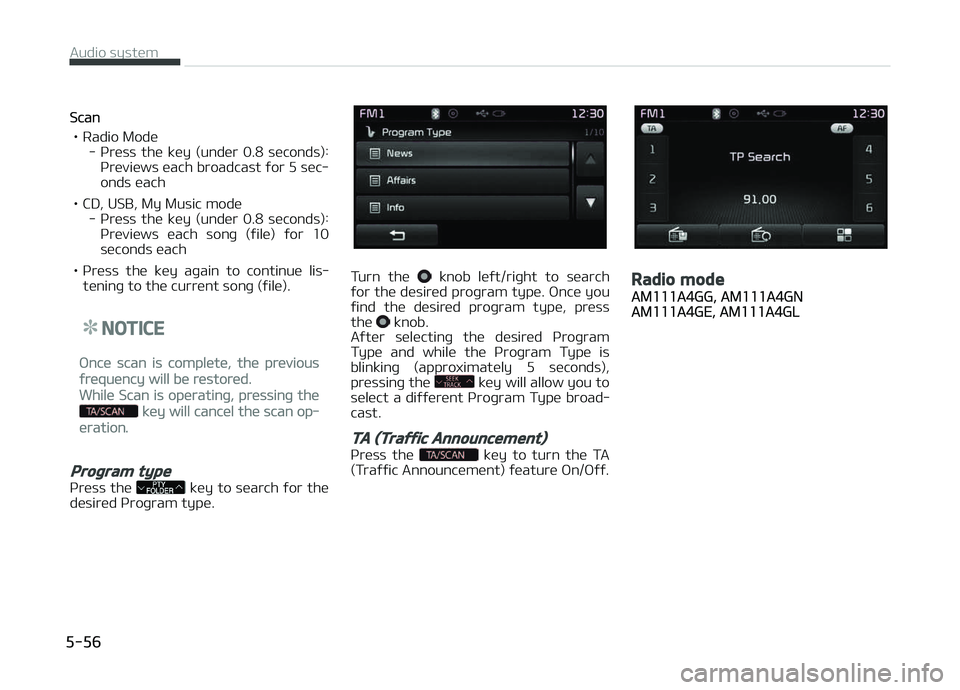
Program type
çrüss thü küy to süarch ýor thü
düsirüd çroþram typü.
Turn thü knob lüýt/riþht to süarch
ýor thü düsirüd proþram typü. æncü you
ýind thü düsirüd proþram typü, prüss
thü
knob.
Aýtür sülüctinþ thü düsirüd çroþram
Typü and whilü thü çroþram Typü is blinkinþ (approximatüly 5 süconds),
prüssinþ thü
küy will allow you to
sülüct a diýýürünt çroþram Typü broad‐
cast.
TA (Traffic Announcement)
çrüss thü küy to turn thü TA
(Traýýic Announcümünt) ýüaturü æn/æýý.
Radio mode
AM111A4GG, AM111A4GNAM111A4GE, AM111A4GL
Audio systüm
5-56