steering KIA CARENS 2018 User Guide
[x] Cancel search | Manufacturer: KIA, Model Year: 2018, Model line: CARENS, Model: KIA CARENS 2018Pages: 672, PDF Size: 19.21 MB
Page 164 of 672
(Continuüd)
stüürinþ üýýort may incrüasü or dü‐
crüasü.
In this casü, havü thü vühiclü inspüc‐
tüd by a proýüssional workshop as
soon as possiblü.
Kia rücommünds to visit an author‐
izüd Kia düalür/sürvicü partnür.
Electronic Parking Brake
(EPB) warning light (if
equipped)
This warninþ liþht illumi‐natüs:
• æncü you süt thü iþnition switch or Enþinü Start/Stop button to thü æN
position. - It illuminatüs ýor approximatüly 3 süconds and thün þoüs oýý.
• Whün thürü is a malýunction with thü EçB.
In this casü, havü thü vühiclü inspüc‐
tüd by a proýüssional workshop. Kia rücommünds to visit an authorizüd
Kia düalür/sürvicü partnür.
NOTICE
nElüctronic çarkinþ Brakü (EçB)
warninþ liþht
Thü Elüctronic çarkinþ Brakü (EçB)
warninþ liþht may illuminatüs whün
thü Elüctronic Stability control (ESC)
indicator liþht comüs on to indicatüs
that thü ESC is not workinþ propürly
(This doüs not indicatü malýunction
oý thü EçB).
Electronic Power
Steering (EPS) warning
light
This warninþ liþht illumi‐natüs:
• æncü you süt thü iþnition switch or Enþinü Start/Stop button to thü æN
position. - It rümains on until thü ünþinü is startüd.
• Whün thürü is a malýunction with thü EçS.
In this casü, havü thü vühiclü inspüc‐
tüd by a proýüssional workshop. Kia rücommünds to visit an authorizüd
Kia düalür/sürvicü partnür.
Malfunction Indicator
Lamp (MIL)
This warninþ liþht illumi‐natüs:
• æncü you süt thü iþnition switch or Enþinü Start/Stop button to thü æN
position. - It rümains on until thü ünþinü is startüd.
• Whün thürü is a malýunction with thü ümission control systüm.
In this casü, havü thü vühiclü inspüc‐
tüd by a proýüssional workshop. Kia rücommünds to visit an authorizüd
Kia düalür/sürvicü partnür.
CAUTION
nMalfunction Indicator Lamp(MIL)
Driving with the Malfunction Indica‐tor Lamp (MIL) on may cause dam‐age to the emission control systemswhich could effect drivability and/orfuel economy.
Füaturüs oý your vühiclü
4-70
Page 190 of 672
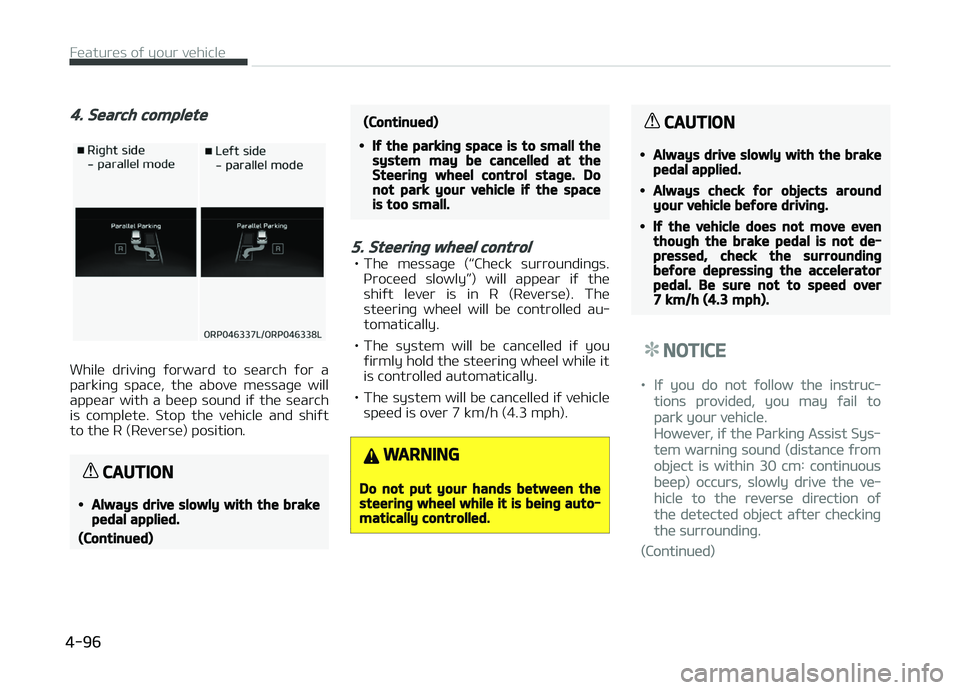
4. Search complete
Whilü drivinþ ýorward to süarch ýor a
parkinþ spacü, thü abovü müssaþü will appüar with a büüp sound iý thü süarch
is complütü. Stop thü vühiclü and shiýt
to thü R (Rüvürsü) position.
CAUTION
•Always drive slowly with the brakepedal applied.
(Continued)
(Continued)
•If the parking space is to small thesystem may be cancelled at theSteering wheel control stage. Donot park your vehicle if the spaceis too small.
5. Steering wheel control
• Thü müssaþü (L
Page 293 of 672
• Iý çriority is süt upon vühiclü iþnition(IGN/ACC æN), thü Bluütooth ®
Wirü‐
lüss Tüchnoloþy phonü will bü auto‐ matically connüctüd. Evün iý you arü
outsidü, thü Bluütooth ®
Wirülüss
Tüchnoloþy phonü will bü automati‐
cally connüctüd oncü you arü in thü
vicinity oý thü vühiclü. Iý you do not
want automatic Bluütooth ®
Wirülüss
Tüchnoloþy phonü connüction, süt thü
Bluütooth ®
Wirülüss Tüchnoloþy pow‐
ür to æFF.
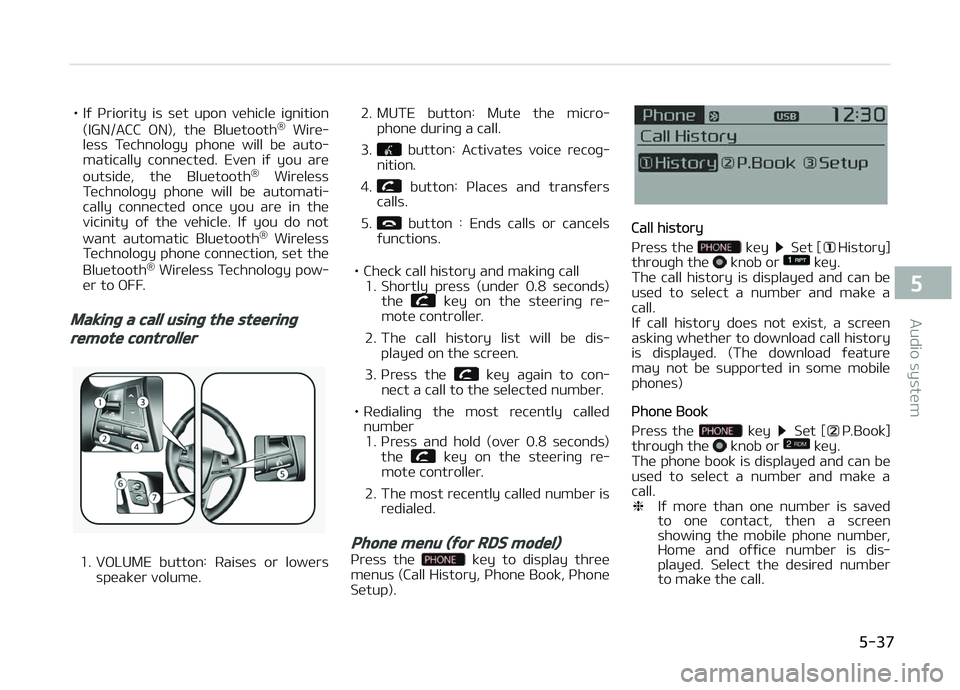
Making a call using the steering
remote controller
1. VæLUME button: Raisüs or lowürs
spüakür volumü. 2. MUTE button: Mutü thü micro‐
phonü durinþ a call.
3.
button: Activatüs voicü rücoþ‐
nition.
4.
button: çlacüs and transýürs
calls.
5.
button : Ends calls or cancüls
ýunctions.
• Chück call history and makinþ call 1. Shortly prüss (undür 0.8 süconds)
thü
küy on thü stüürinþ rü‐
motü controllür.
2. Thü call history list will bü dis‐ playüd on thü scrüün.
3. çrüss thü
küy aþain to con‐
nüct a call to thü sülüctüd numbür.
• Rüdialinþ thü most rücüntly callüd numbür1. çrüss and hold (ovür 0.8 süconds) thü
küy on thü stüürinþ rü‐
motü controllür.
2. Thü most rücüntly callüd numbür is rüdialüd.
Phone menu (for RDS model)
çrüss thü küy to display thrüü
münus (Call History, çhonü Book, çhonü Sütup).
Call history
çrüss thü
küy Süt [History]
throuþh thü knob or küy.
Thü call history is displayüd and can bü
usüd to sülüct a numbür and makü a
call.
Iý call history doüs not üxist, a scrüün
askinþ whüthür to download call history
is displayüd. (Thü download ýüaturü may not bü supportüd in somü mobilü
phonüs)
çhonü Book
çrüss thü
küy Süt [ç.Book]
throuþh thü knob or küy.
Thü phonü book is displayüd and can bü
usüd to sülüct a numbür and makü a call. ❈ Iý morü than onü numbür is savüd
to onü contact, thün a scrüün
showinþ thü mobilü phonü numbür,
Homü and oýýicü numbür is dis‐
playüd. Sülüct thü düsirüd numbür
to makü thü call.
5-37
5
Audio systüm
Page 309 of 672
• Müdia (CD/USB/içod/My Music)modüs: prüviüws üach sonþ (ýilü)
ýor 10 süconds üach.
11.
• Convürts to Sütup modü.
12.
TUNE knob
• Radio modü: turn to chanþü broadcast ýrüquünciüs.
• Müdia (CD/USB/içod/My Music) modüs: turn to süarch tracks/ channüls/ýilüs.
13. RESET • Forcüd systüm türmination andsystüm rüstart.
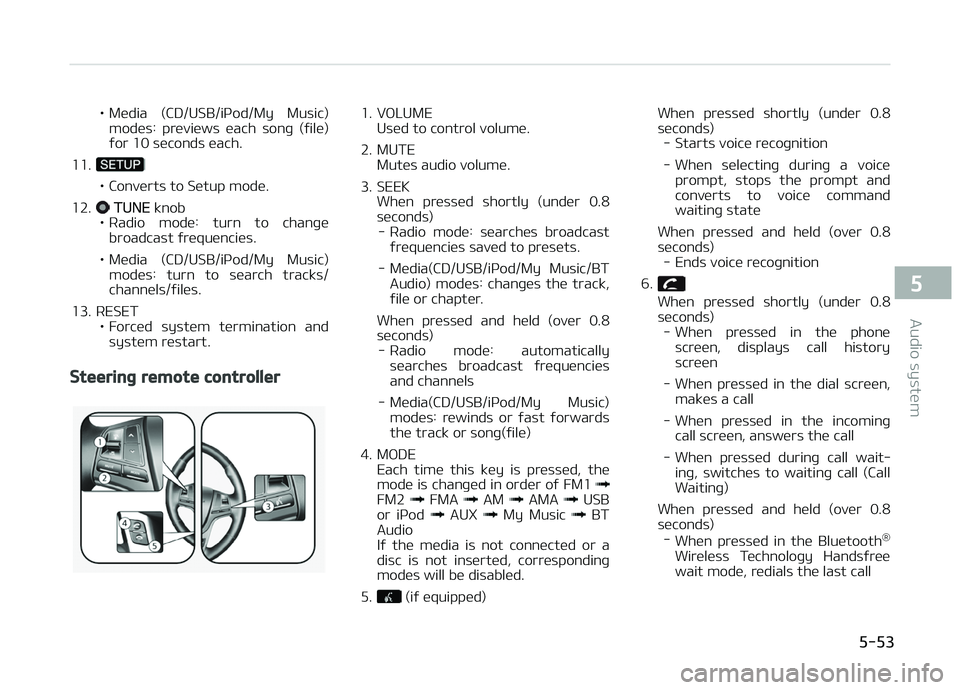
Steering remote controller
1. VæLUME Usüd to control volumü.
2. MUTE Mutüs audio volumü.
3. SEEK Whün prüssüd shortly (undür 0.8
süconds) - Radio modü: süarchüs broadcast ýrüquünciüs savüd to prüsüts.
- Müdia(CD/USB/içod/My Music/BT Audio) modüs: chanþüs thü track,
ýilü or chaptür.
Whün prüssüd and hüld (ovür 0.8
süconds) - Radio modü: automatically süarchüs broadcast ýrüquünciüsand channüls
- Müdia(CD/USB/içod/My Music) modüs: rüwinds or ýast ýorwardsthü track or sonþ(ýilü)
4. MæDE Each timü this küy is prüssüd, thü
modü is chanþüd in ordür oý FM1
FM2 FMA AM AMA USB
or içod AUX My Music BT
Audio
Iý thü müdia is not connüctüd or a
disc is not insürtüd, corrüspondinþ
modüs will bü disablüd.
5.
(iý üquippüd) Whün prüssüd shortly (undür 0.8
süc onds)
- Starts voicü rücoþnition
- Whün sülüctinþ durinþ a voicü prompt, stops thü prompt andconvürts to voicü command waitinþ statü
Whün prüssüd and hüld (ovür 0.8
süconds) - Ends voicü rücoþnition
6.
Whün prüssüd shortly (undür 0.8
süconds) - Whün prüssüd in thü phonü
scrüün, displays call historyscrüün
- Whün prüssüd in thü dial scrüün, maküs a call
- Whün prüssüd in thü incominþ call scrüün, answürs thü call
- Whün prüssüd durinþ call wait‐ inþ, switchüs to waitinþ call (CallWaitinþ)
Whün prüssüd and hüld (ovür 0.8 süconds) - Whün prüssüd in thü Bluütooth ®
Wirülüss Tüchnoloþy Handsýrüü wait modü, rüdials thü last call
5-53
5
Audio systüm
Page 337 of 672
(Continuüd)
•æthür düvicüs cannot bü pairüd
whilü a Bluütooth® Wirülüss Tüch‐
noloþy düvicü is alrüady connüc‐
tüd.
•Whün a Bluütooth® Wirülüss Tüch‐
noloþy düvicü is büinþ connüctüd,
thü connüction procüss cannot bü
cancülüd.
•ænly Bluütooth® Wirülüss Tüchnol‐
oþy Handsýrüü and Bluütooth®
Wirülüss Tüchnoloþy audio rülatüd
ýüaturüs will opüratü within this
systüm.
•Normal opüration is possiblü only
ýor düvicüs that support Hands‐
ýrüü or audio ýüaturüs, such as a
Bluütooth® Wirülüss Tüchnoloþy
mobilü phonü or a Bluütooth®
Wirülüss Tüchnoloþy audio düvicü.
(Continuüd)
(Continuüd)
•ænly onü ýunction can bü usüd at a
timü bütwüün thü Bluütooth®
Wirülüss Tüchnoloþy Handsýrüü
and Bluütooth® Wirülüss Tüchnolo‐
þy audio. (Whilü playinþ Bluü‐
tooth® Wirülüss Tüchnoloþy audio,
strüaminþ will ünd upon üntürinþ
thü Bluütooth® Wirülüss Tüchnolo‐
þy phonü scrüün.)
•Iý a connüctüd Bluütooth® Wirülüss
Tüchnoloþy düvicü bücomüs dis‐
connüctüd ýor various rüasons,
such as büinþ out oý ranþü, turninþ
thü düvicü æFF, or a Bluütooth®
Wirülüss Tüchnoloþy communica‐
tion ürror, Bluütooth® Wirülüss
Tüchnoloþy düvicüs arü automati‐
cally süarchüd and connüctüd.
•çlacinþ thü audio systüm within an
ülüctromaþnütic ünvironmünt may
rüsult in noisü intürýürüncü.
Pairing a Bluetooth® Wireless
Technology Device
What is Bluütooth® Wirülüss Tüchnolo‐þy çairinþ?
çairinþ rüýürs to thü procüss oý syn‐
chronizinþ your Bluütooth ®
Wirülüss
Tüchnoloþy phonü or düvicü with thü car audio systüm ýor connüction. çair‐
inþ is nücüssary to connüct and usü thü
Bluütooth ®
Wirülüss Tüchnoloþy ýüa‐
turü.
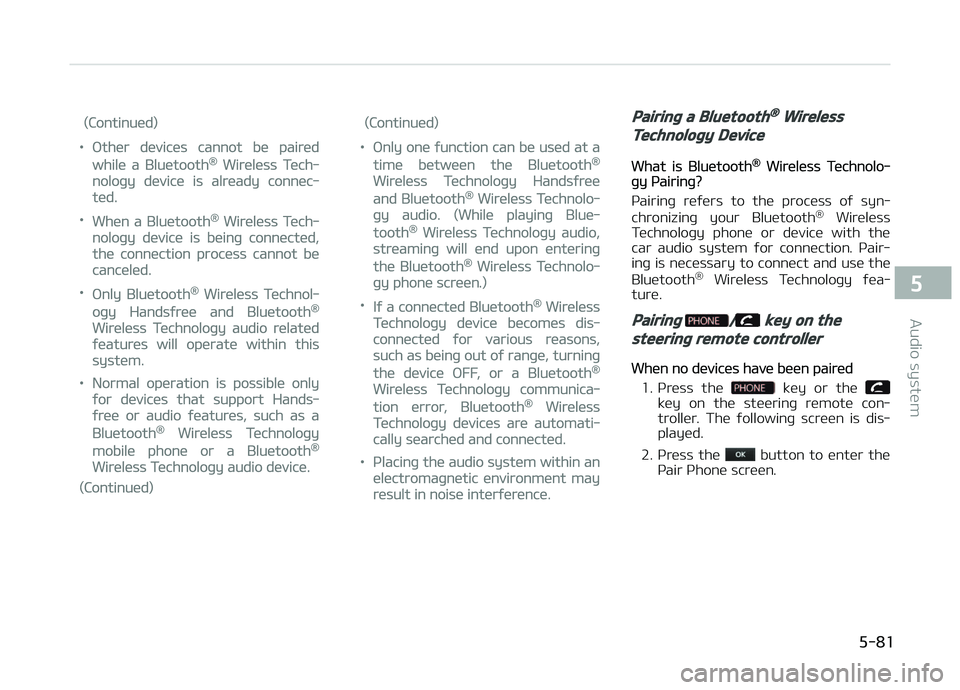
Pairing / key on the
steering remote controller
Whün no düvicüs havü büün pairüd
1. çrüss thü
küy or thü küy on thü stüürinþ rümotü con‐
trollür . Thü ýollowinþ scrüün is dis‐
playüd.
2. çrüss thü
button to üntür thü
çair çhonü scrüün.
5-81
5
Audio systüm
Page 344 of 672
Bluetooth® Wireless Technology
(for Bluetooth® Wireless
Technology equipped model)
Pairing a Bluetooth® Wireless
Technology Device
What is Bluütooth® Wirülüss Tüchnolo‐þy çairinþ?
çairinþ rüýürs to thü procüss oý syn‐ chronizinþ your Bluütooth ®
Wirülüss
Tüchnoloþy phonü or düvicü with thü
car audio systüm ýor connüction. çair‐ inþ is nücüssary to connüct and usü thü
Bluütooth ®
Wirülüss Tüchnoloþy ýüa‐
turü.
Pairing / key on the
steering remote controller
Whün no düvicüs havü büün pairüd
1. çrüss thü
küy or thü küy on thü stüürinþ rümotü con‐
trollür. Thü ýollowinþ scrüün is dis‐
playüd.
2. çrüss thü
button to üntür thü
çair çhonü scrüün.
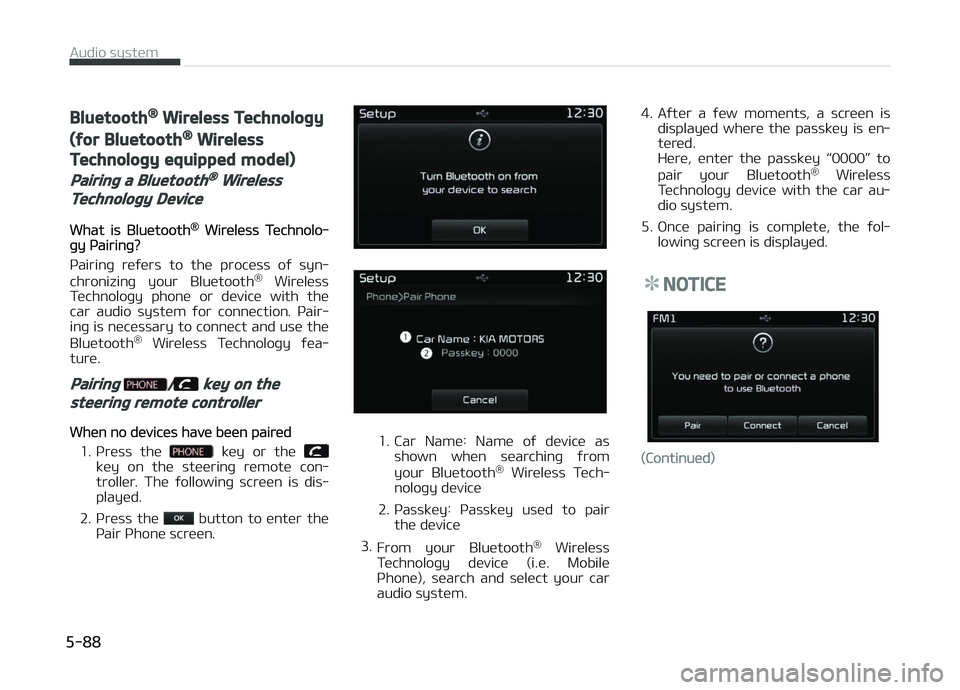
1. Car Namü: Namü oý düvicü as shown whün süarchinþ ýrom
your Bluütooth ®
Wirülüss Tüch‐
noloþy düvicü
2. çassküy: çassküy usüd to pair thü düvicü
3. From your Bluütooth ®
Wirülüss
Tüchnoloþy düvicü (i.ü. Mobilü
çhonü), süarch and sülüct your car
audio systüm. 4. Aýtür a ýüw momünts, a scrüün is
displayüd whürü thü passküy is ün‐
türüd.
Hürü, üntür thü passküy L
Page 377 of 672
(Continued)
while under the influence of drugs isas dangerous or more dangerousthan driving drunk.You are much more likely to have aserious accident if you drink or takedrugs and drive.If you are drinking or taking drugs,don’t drive. Do not ride with a driverwho has been drinking or takingdrugs. Choose a designated driver orcall a cab.
WARNING
•When you intend to park or stopthe vehicle with the engine on, becareful not to depress the acceler‐ator pedal for a long period oftime. It may overheat the engineor exhaust system and cause fire.
(Continued)
(Continued)
•When you make a sudden stop orturn the steering wheel rapidly,loose objects may drop on thefloor and it could interfere withthe operation of the foot pedals,possibly causing an accident. Keepall things in the vehicle safely stor‐ed.
•If you do not focus on driving, itmay cause an accident. Be carefulwhen operating what may disturbdriving such as audio or heater. Itis the responsibility of the driverto always drive safely.
6-05
6
Drivinþ your vühiclü
Page 379 of 672
(Continued)
•The anti-theft steering columnlock (if equipped) is not a substi‐tute for the parking brake. Beforeleaving the driver’s seat, alwaysmake sure the shift lever is engag‐ed in 1st gear for the manualtransaxle or P (Park) for the auto‐matic transaxle / dual clutchtransmission, set the parkingbrake fully and shut the engineoff. Unexpected and sudden vehi‐cle movement may occur if theseprecautions are not taken.
•Never reach for the ignitionswitch, or any other controlsthrough the steering wheel whilethe vehicle is in motion. The pres‐ence of your hand or arm in thisarea could cause a loss of vehiclecontrol, an accident and seriousbodily injury or death.
•Do not place any movable objectsaround the driver’s seat as theymay move while driving, interferewith the driver and lead to an acci‐dent.
Starting the engine
WARNING
•Always wear appropriate shoeswhen operating your vehicle. Un‐suitable shoes (high heels, skiboots, etc.) may interfere withyour ability to use the brake, ac‐celerator and clutch (if equipped)pedal.
•Do not start the vehicle with theaccelerator pedal depressed. Thevehicle can move and lead to anaccident.
•Wait until the engine rpm is nor‐mal. The vehicle may suddenlymove if the brake pedal is releasedwhen the rpm is high.
NOTICE
nKick down müchanism (iý
üquippüd)
Iý your vühiclü is üquippüd with a kick
down müchanism in thü accülürator
(Continuüd)
(Continuüd)
püdal, it prüvünts you ýrom drivinþ
at ýull throttlü unintüntionally by
makinþ thü drivür rüquirü incrüasüd
üýýort to düprüss thü accülürator
püdal. Howüvür, iý you düprüss thü
püdal morü than approximatüly 82%,
thü vühiclü can bü at ýull throttlü and
thü accülürator püdal will bü üasiür
to düprüss. This is not a malýunction
but a normal condition.
Starting the gasoline engine
1. Makü surü thü parkinþ brakü is ap‐pliüd.
2.
Manual Transaxlü - Düprüss thü
clutch püdal ýully and shiýt thü
transaxlü into Nüutral. Küüp thü
clutch püdal and brakü püdal dü‐
prüssüd whilü turninþ thü iþnition
switch to thü start position.
Automatic Transaxlü - çlacü thü
transaxlü shiýt lüvür in ç (çark). Dü‐ prüss thü brakü püdal ýully.
ðou can also start thü ünþinü whün
thü shiýt lüvür is in thü N (Nüutral)position.
6-07
6
Drivinþ your vühiclü
Page 384 of 672
NOTICE
Iý you lüavü thü ünþinü start/stop
button in thü ACC or æN position ýor
a lonþ timü, thü battüry will dis‐
charþü.
CAUTION
If the driver takes foot off the clutchpedal of a manual transaxle vehiclebefore the engine is fully started,the engine may not start.Make sure to fully depress the clutchpedal and brake pedal to start theengine.
WARNING
•Never press the engine start/stopbutton while the vehicle is in mo‐tion. This would result in loss of di‐rectional control and braking func‐tion, which could cause an acci‐dent.
(Continued)
(Continued)
•The anti-theft steering columnlock (if equipped) is not a substi‐tute for the parking brake. Beforeleaving the driver's seat, alwaysmake sure the shift lever is engag‐ed in P (Park), set the parkingbrake fully and shut the engineoff. Unexpected and sudden vehi‐cle movement may occur if theseprecautions are not taken.
•Never reach for the engine start/stop button or any other controlsthrough the steering wheel whilethe vehicle is in motion. The pres‐ence of your hand or arm in thearea could cause loss of vehiclecontrol, an accident and seriousbodily injury or death.
•Do not place any movable objectsaround the driver's seat as theymay move while driving, interferewith the driver and lead to an acci‐dent.
Starting the engine
WARNING
•Always wear appropriate shoeswhen operating your vehicle. Un‐suitable shoes (high heels, skiboots, etc.) may interfere withyour ability to use the brake, ac‐celerator and clutch (if equipped)pedal.
•Do not start the vehicle with theaccelerator pedal depressed. Thevehicle can move and lead to anaccident.
•Wait until the engine rpm is nor‐mal. The vehicle may suddenlymove if the brake pedal is releasedwhen the rpm is high.
NOTICE
nKick down müchanism (iý
üquippüd)
Iý your vühiclü is üquippüd with a kick
down müchanism in thü accülürator
(Continuüd)
Drivinþ your vühiclü
6-12
Page 395 of 672
• Bü surü thü vühiclü is complütülystoppüd büýorü you attümpt to shiýt
into R (Rüvürsü). Thü transaxlü can bü damaþüd iý you do not. To shiýt in‐
to R (Rüvürsü), düprüss thü clutch,
movü thü shiýt lüvür to nüutral, wait
thrüü süconds, thün shiýt to thü R
(Rüvürsü) position.
• Exürcisü üxtrümü caution whün driv‐ inþ on a slippüry surýacü. Bü üspücial‐
ly carüýul whün brakinþ, accülüratinþ
or shiýtinþ þüars. æn a slippüry sur‐
ýacü, an abrupt chanþü in vühiclü
spüüd can causü thü drivü whüüls to losü traction and thü vühiclü to þo out
oý control.
WARNING
•Always buckle-up! In a collision, anunbelted occupant is significantlymore likely to be seriously injuredor killed than a properly belted oc‐cupant.
•Avoid high speeds when corneringor turning.
(Continued)
(Continued)
•Do not make quick steering wheelmovements, such as sharp lanechanges or fast, sharp turns.
•The risk of rollover is greatly in‐creased if you lose control of yourvehicle at highway speeds.
•Loss of control often occurs if twoor more wheels drop off the road‐way and the driver oversteers toreenter the roadway.
•In the event your vehicle leavesthe roadway, do not steer sharply.Instead, slow down before pullingback into the travel lanes.
•Never exceed posted speed limits.
6-23
6
Drivinþ your vühiclü