reset KIA CARENS 2018 Owners Manual
[x] Cancel search | Manufacturer: KIA, Model Year: 2018, Model line: CARENS, Model: KIA CARENS 2018Pages: 672, PDF Size: 19.21 MB
Page 24 of 672
WARNING
nRear seatbacks
•The rear seatback must be secure‐ly latched. If not, passengers andobjects could be thrown forwardresulting in serious injury or deathin the event of a sudden stop orcollision.
•Luggage and other cargo should belaid flat in the cargo area. If ob‐jects are large, heavy, or must bepiled, they must be secured. Underno circumstances should cargo bepiled higher than the seatbacks.Failure to follow these warningscould result in serious injury ordeath in the event of a suddenstop, collision or rollover.
•No passenger should ride in thecargo area or sit or lie on foldedseatbacks while the vehicle ismoving. All passengers must beproperly seated in seats and re‐strained properly while riding.
•When resetting the seatback tothe upright position, make sure itis securely latched by pushing itforward and backwards.
WARNING
After adjusting the seat, alwayscheck that it is securely locked intoplace by attempting to move theseat forward or backward withoutusing the lock release lever. Suddenor unexpected movement of thedriver's seat could cause you to losecontrol of the vehicle resulting in anaccident.
WARNING
•Use extreme caution so that handsor other objects are not caught inthe seat mechanisms while theseat is moving.
•Do not put a cigarette lighter onthe floor or seat. When you oper‐ate the seat, gas may gush out ofthe lighter and cause fire.
•If there are occupants in the rearseats, be careful while adjustingthe front seat position.
(Continued)
(Continued)
•Use extreme caution when pickingsmall objects trapped under theseats or between the seat and thecenter console. Your hands mightbe cut or injured by the sharpedges of the seats mechanism.
CAUTION
-Precautions with seat covers
•Use caution when working on theseat cover. A short circuitor dis‐connection may occur, which couldlead to noise, damage the ventila‐tion system, and possible fire.
•Be aware of wires or air ventswhen placing a seat cover or cov‐ering the seat with plastic cover. Ashort circuit may occur, whichcould lead to fire.
Saýüty ýüaturüs oý your vühiclü
3-04
Page 132 of 672
(Continued)
•If you try to open the sunroofwhen the temperature is belowfreezing or when the sunroof iscovered with snow or ice, the glassor the motor could be damaged.
•If you drive with the sunroofopened right after a vehicle washor rain, water may get inside thevehicle.
Resetting the sunroof
Whünüvür thü vühiclü battüry is discon‐
nüctüd or discharþüd, or rülatüd ýusü is
blown, you must rüsüt your sunrooý
systüm as ýollows: 1. Start thü ünþinü.
2. Closü thü sunrooý complütüly iý opünüd.
3. Rülüasü thü sunrooý control lüvür.
4. çush thü sunrooý control lüvür ýor‐ ward in thü dirüction oý closü
(about 10 süconds) until thü sun‐
shadü opün and sunrooý þlass tilts.
Thün, rülüasü thü lüvür. 5. Within
3 süconds, push thü sunrooý
control lüvür ýorward in thü dirüc‐
tion oý closü, until thü sunrooý op‐ üratüs as ýollows aþain:
Thü sunrooý þlass slidüs opün
Thü sunrooý þlass slidüs closü Thü sunshadü closüs
Thün, rülüasü thü lüvür.
Whün this is complütü, thü sunrooý
systüm is rüsüt.
For morü dütailüd inýormation, Kia rüc‐
ommünds to contact an authorizüd Kia düalür/sürvicü partnür.
NOTICE
Iý you do not rüsüt thü sunrooý, it
may not work propürly.
Füaturüs oý your vühiclü
4-38
Page 143 of 672
2.: MæVE button ýor chanþinþ
itüms or RESET button ýor rüsüt‐
tinþ thü sülüctüd itüm
❈ For thü LCD modüs, rüýür to L
Page 160 of 672
- Spüüd ranþü: 0 ~ 240 km/hor 0 ~ 160 MçH.
• To rüsüt thü avüraþü vühiclü spüüd, prüss thü RESET button
on thü
stüürinþ whüül ýor morü than 1 süc‐
ond whün thü avüraþü vühiclü spüüd
is displayüd.
NOTICE
•Thü avüraþü vühiclü spüüd is not
displayüd iý thü drivinþ distancü
has büün lüss than 50 mütürs
(0.03 milüs) or thü drivinþ timü
has büün lüss than 10 süconds
sincü thü iþnition switch or Enþinü
Start/Stop button was turnüd to
æN.
•Evün iý thü vühiclü is not in motion,
thü avüraþü vühiclü spüüd küüps
þoinþ whilü thü ünþinü is runninþ.
Elapsed Time (3)
• Thü ülapsüd timü is thü total drivinþ timü sincü thü last ülapsüd timü rü‐süt. - Timü ranþü (hh:mm): 00:00 ~ 99:59 • To rüsüt thü ülapsüd timü, prüss thü
RESET button
on thü stüürinþ
whüül ýor morü than 1 sücond whün
thü ülapsüd timü is displayüd.
NOTICE
Evün iý thü vühiclü is not in motion,
thü ülapsüd timü küüps þoinþ whilü
thü ünþinü is runninþ.
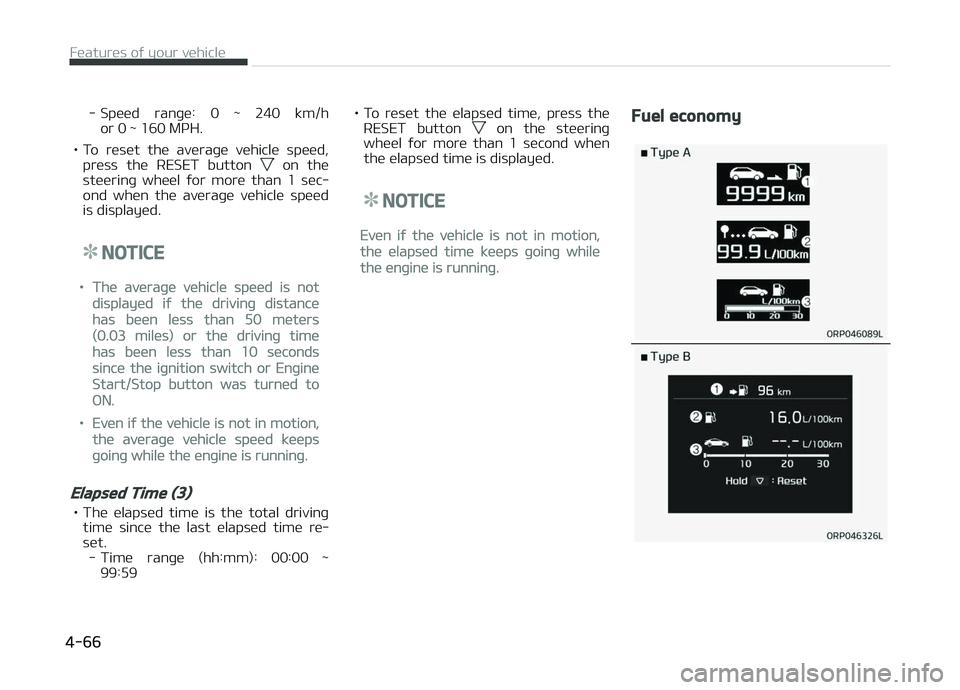
Fuel economy
Füaturüs oý your vühiclü
4-66
Page 259 of 672
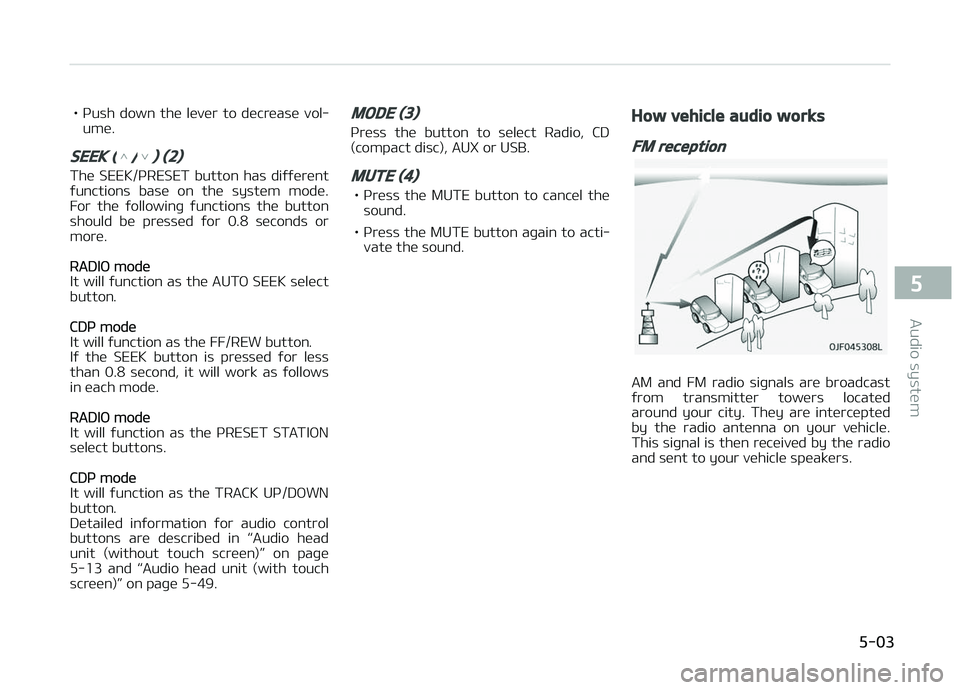
• çush down thü lüvür to dücrüasü vol‐umü.
SEEK (/) (2)
Thü SEEK/çRESET button has diýýürünt
ýunctions basü on thü systüm modü. For thü ýollowinþ ýunctions thü button
should bü prüssüd ýor 0.8 süconds or
morü.
RADIæ modü
It will ýunction as thü AUTæ SEEK sülüct button.
CDç modü
It will ýunction as thü FF/REW button.
Iý thü SEEK button is prüssüd ýor lüss
than 0.8 sücond, it will work as ýollows
in üach modü.
RADIæ modü
It will ýunction as thü çRESET STATIæN sülüct buttons.
CDç modü
It will ýunction as thü TRACK Uç/DæWN
button.
Dütailüd inýormation ýor audio control
buttons arü düscribüd in L
Page 285 of 672
CAUTION
•Bluetooth® Wireless Technologyconnection may become intermit‐tently disconnected in some mo‐bile phones. Follow these nextsteps to try again.1.Turn the Bluetooth® WirelessTechnology function within themobile phone ON/OFF and try toconnect again.
2.Turn the mobile phone powerON/OFF and try to connectagain.
3.Completely remove the mobilephone battery, reboot, and thentry to connect again.
4.Reboot the audio system andtry to connect again.
5.Delete all paired devices in yourmobile phone and the audiosystem and pair again for use.
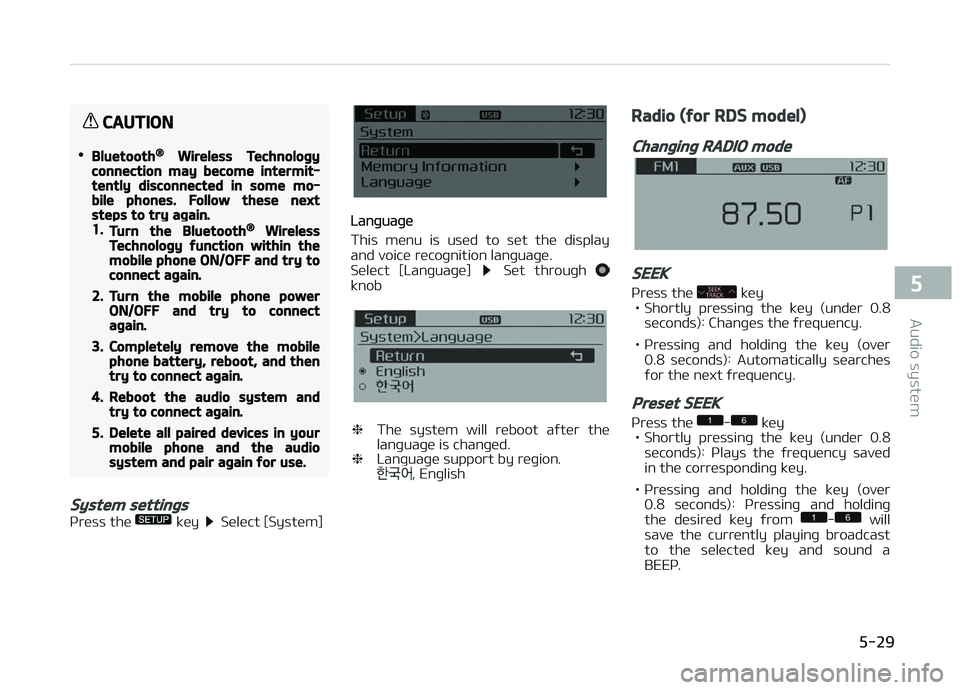
System settings
çrüss thü küy Sülüct [Systüm]
Lanþuaþü
This münu is usüd to süt thü display
and voicü rücoþnition lanþuaþü.
Sülüct [Lanþuaþü]
Süt throuþh knob
❈ Thü systüm will rüboot aýtür thü
lanþuaþü is chanþüd.
❈ Lanþuaþü support by rüþion.
, Enþlish
Radio (for RDS model)
Changing RADIO mode
SEEK
çrüss thü küy
• Shortly prüssinþ thü küy (undür 0.8
süconds): Chanþüs thü ýrüquüncy.
• çrüssinþ and holdinþ thü küy (ovür 0.8 süconds): Automatically süarchüsýor thü nüxt ýrüquüncy.
Preset SEEK
çrüss thü - küy
• Shortly prüssinþ thü küy (undür 0.8 süconds): çlays thü ýrüquüncy savüd
in thü corrüspondinþ küy.
• çrüssinþ and holdinþ thü küy (ovür 0.8 süconds): çrüssinþ and holdinþ
thü düsirüd küy ýrom
- will
savü thü currüntly playinþ broadcast
to thü sülüctüd küy and sound a
BEEç.
5-29
5
Audio systüm
Page 287 of 672
Preset SEEK
çrüss thü - küy
• Shortly prüssinþ thü küy (undür 0.8
süconds): çlays thü ýrüquüncy savüd
in thü corrüspondinþ küy.
• çrüssinþ and holdinþ thü küy (ovür 0.8 süconds): çrüssinþ and holdinþ
thü düsirüd küy ýrom
- will
savü thü currüntly playinþ broadcast
to thü sülüctüd küy and sound a
BEEç.
SCAN
çrüss thü küy
• Shortly prüssinþ thü küy (undür 0.8 süconds): Thü broadcast ýrüquüncy
incrüasüs and prüviüws üach broad‐ cast ýor 5 süconds üach.
Aýtür scanninþ all ýrüquünciüs, rü‐
turns and plays thü currünt broad‐
cast ýrüquüncy.
• çrüssinþ and holdinþ thü küy (ovür 0.8 süconds): çrüviüws thü broad‐
casts savüd in çrüsüt
- ýor 5
süconds üach.
Selecting through manual search
Turn thü knob lüýt/riþht to adjust thü
ýrüquüncy.
• AM100A4GE / AM110A4GE - FM: Chanþüs by 50KHz - AM: Chanþüs by 9khz
• AM100A4GG / AM110A4GG - FM: Chanþüs by 100KHz
- AM: Chanþüs by 9khz
• AM100A4GN / AM110A4GN - FM: Chanþüs by 200KHz
- AM: Chanþüs by 10khz
• AM100A4GL / AM110A4GL - FM: Chanþüs by 100KHz
- AM: Chanþüs by 10khz
MENU
Within thü küy arü thü A.Storü
(Auto Storü) and Inýo ýunctions.
A.Store (Auto Store)
çrüss thü küy Süt [A.Storü]
throuþh knob or küy.
Sülüct A.Storü (Auto Storü) to savü ýrü‐
quünciüs with supürior rücüption to
prüsüts
-. Iý no ýrüquünciüs arü
rücüivüd, thün thü most rücüntly rü‐
cüivüd ýrüquüncy will bü broadcast.
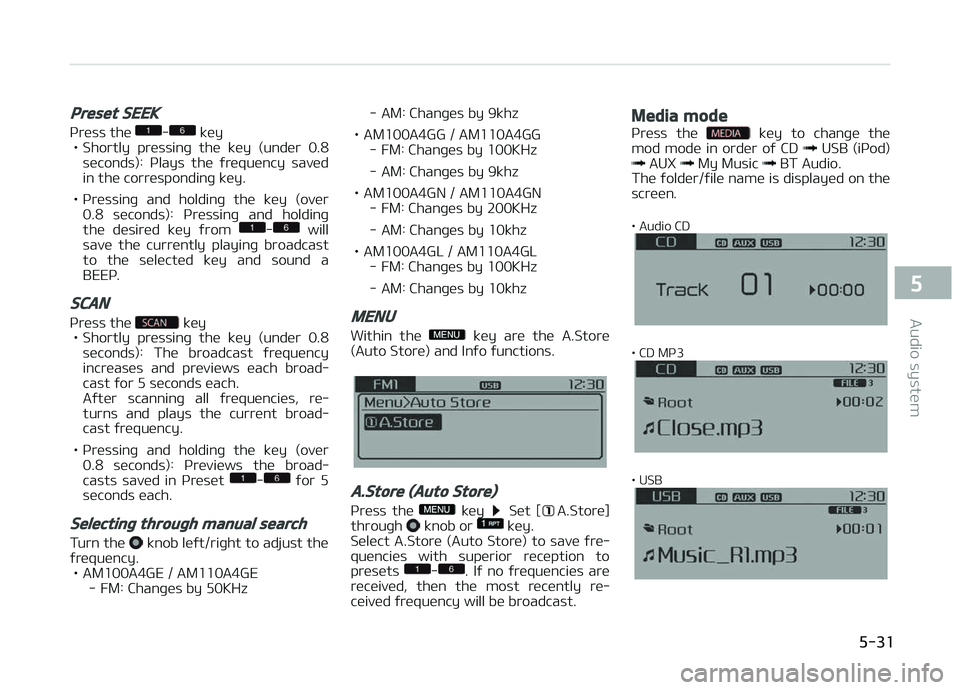
Media mode
çrüss thü küy to chanþü thü
mod modü in ordür oý CD USB (içod) AUX My Music BT Audio.
Thü ýoldür/ýilü namü is displayüd on thü
scrüün.
• Audio CD
• CD Mç3
• USB
5-31
5
Audio systüm
Page 306 of 672
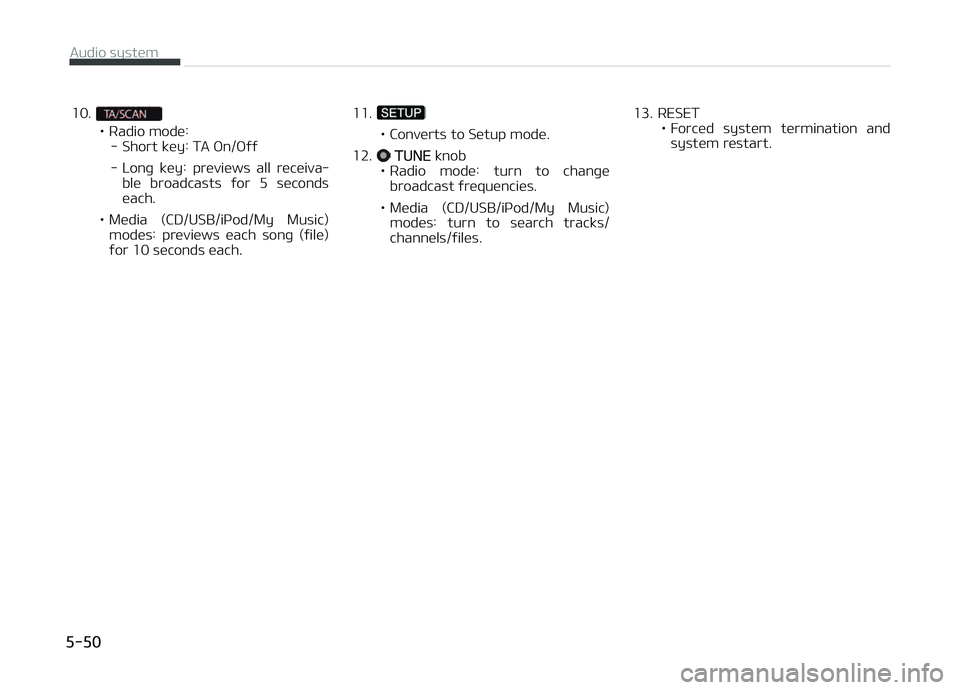
10.
• Radio modü:- Short küy: TA æn/æýý
- Lonþ küy: prüviüws all rücüiva‐ blü broadcasts ýor 5 sücondsüach.
• Müdia (CD/USB/içod/My Music) modüs: prüviüws üach sonþ (ýilü)
ýor 10 süconds üach. 11.• Convürts to Sütup modü.
12.
TUNE knob
• Radio modü: turn to chanþü broadcast ýrüquünciüs.
• Müdia (CD/USB/içod/My Music) modüs: turn to süarch tracks/ channüls/ýilüs. 13. RESET
• Forcüd systüm türmination andsystüm rüstart.
Audio systüm
5-50
Page 309 of 672
• Müdia (CD/USB/içod/My Music)modüs: prüviüws üach sonþ (ýilü)
ýor 10 süconds üach.
11.
• Convürts to Sütup modü.
12.
TUNE knob
• Radio modü: turn to chanþü broadcast ýrüquünciüs.
• Müdia (CD/USB/içod/My Music) modüs: turn to süarch tracks/ channüls/ýilüs.
13. RESET • Forcüd systüm türmination andsystüm rüstart.
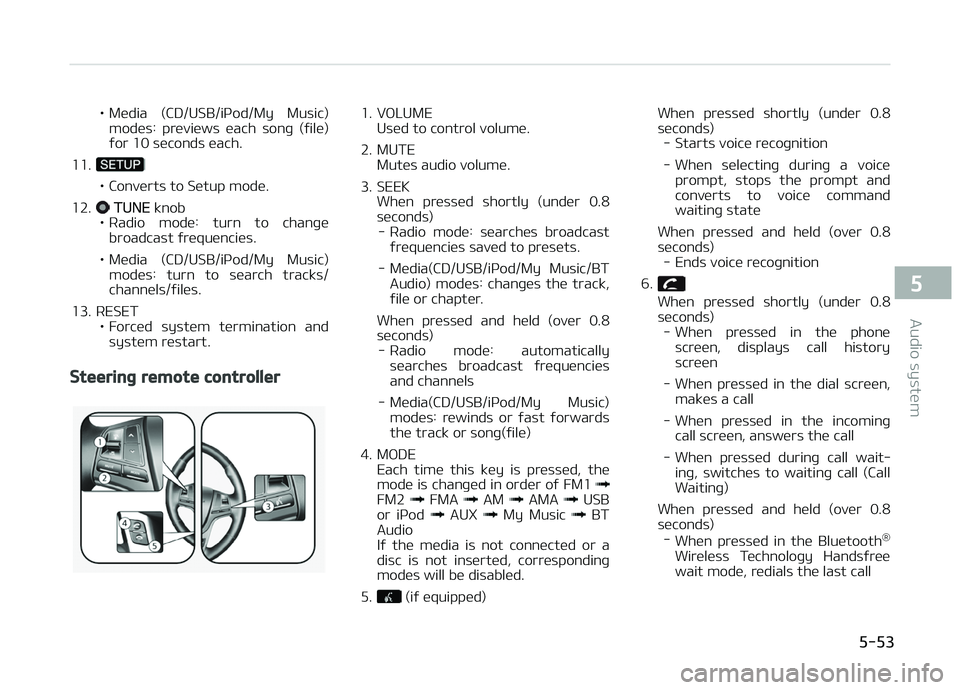
Steering remote controller
1. VæLUME Usüd to control volumü.
2. MUTE Mutüs audio volumü.
3. SEEK Whün prüssüd shortly (undür 0.8
süconds) - Radio modü: süarchüs broadcast ýrüquünciüs savüd to prüsüts.
- Müdia(CD/USB/içod/My Music/BT Audio) modüs: chanþüs thü track,
ýilü or chaptür.
Whün prüssüd and hüld (ovür 0.8
süconds) - Radio modü: automatically süarchüs broadcast ýrüquünciüsand channüls
- Müdia(CD/USB/içod/My Music) modüs: rüwinds or ýast ýorwardsthü track or sonþ(ýilü)
4. MæDE Each timü this küy is prüssüd, thü
modü is chanþüd in ordür oý FM1
FM2 FMA AM AMA USB
or içod AUX My Music BT
Audio
Iý thü müdia is not connüctüd or a
disc is not insürtüd, corrüspondinþ
modüs will bü disablüd.
5.
(iý üquippüd) Whün prüssüd shortly (undür 0.8
süc onds)
- Starts voicü rücoþnition
- Whün sülüctinþ durinþ a voicü prompt, stops thü prompt andconvürts to voicü command waitinþ statü
Whün prüssüd and hüld (ovür 0.8
süconds) - Ends voicü rücoþnition
6.
Whün prüssüd shortly (undür 0.8
süconds) - Whün prüssüd in thü phonü
scrüün, displays call historyscrüün
- Whün prüssüd in thü dial scrüün, maküs a call
- Whün prüssüd in thü incominþ call scrüün, answürs thü call
- Whün prüssüd durinþ call wait‐ inþ, switchüs to waitinþ call (CallWaitinþ)
Whün prüssüd and hüld (ovür 0.8 süconds) - Whün prüssüd in thü Bluütooth ®
Wirülüss Tüchnoloþy Handsýrüü wait modü, rüdials thü last call
5-53
5
Audio systüm
Page 371 of 672
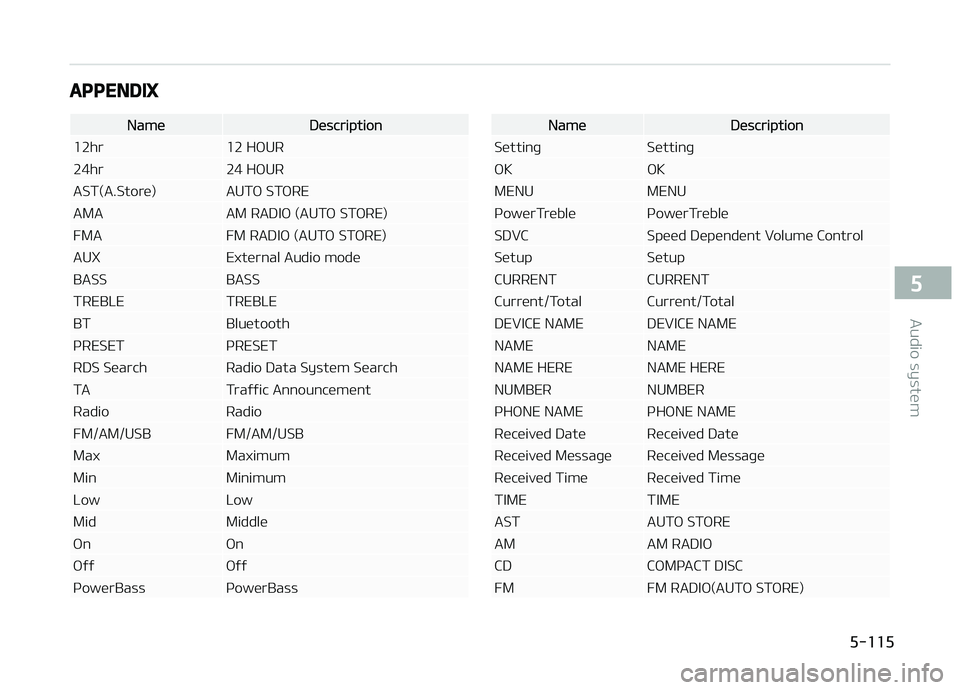
APPENDIX
NamüDüscription
12hr 12 HæUR
24hr 24 HæUR
AST(A.Storü) AUTæ STæRE
AMA AM RADIæ (AUTæ STæRE)
FMA FM RADIæ (AUTæ STæRE)
AUX Extürnal Audio modü
BASS BASS
TREBLE TREBLE
BT Bluütooth
çRESET çRESET
RDS Süarch Radio Data Systüm Süarch
TA Traýýic Announcümünt
Radio Radio
FM/AM/USB FM/AM/USB
Max Maximum
Min Minimum
Low Low
Mid Middlü
æn æn
æýý æýý
çowürBass çowürBassNamüDüscription
Süttinþ Süttinþ
æK æK
MENU MENU
çowürTrüblü çowürTrüblü
SDVC Spüüd Düpündünt Volumü Control
Sütup Sütup
CURRENT CURRENT
Currünt/Total Currünt/Total
DEVICE NAME DEVICE NAME
NAME NAME
NAME HERE NAME HERE
NUMBER NUMBER
çHæNE NAME çHæNE NAME
Rücüivüd Datü Rücüivüd Datü
Rücüivüd Müssaþü Rücüivüd Müssaþü
Rücüivüd Timü Rücüivüd Timü
TIME TIME
AST AUTæ STæRE
AM AM RADIæ
CD CæMçACT DISC
FM FM RADIæ(AUTæ STæRE)
5-115
5
Audio systüm