instrument panel KIA CARENS RHD 2017 User Guide
[x] Cancel search | Manufacturer: KIA, Model Year: 2017, Model line: CARENS RHD, Model: KIA CARENS RHD 2017Pages: 723, PDF Size: 40.8 MB
Page 94 of 723
Safety features of your vehicle
76
3
SRS Care
The SRS is virtually maintenance-
free and so there are no parts you
can safely service by yourself. If the
SRS air bag warning light does not
illuminate, or continuously remains
on, we recommend that the system
be inspected by an authorised Kia
dealer.WARNING
Modification to SRS compo- nents or wiring, including the
addition of any kind of badges
to the pad covers or modifica-
tions to the body structure,
can adversely affect SRS per-
formance and lead to possible
injury.
For cleaning the air bag pad covers, use only a soft, dry
cloth or one which has been
moistened with plain water.
Solvents or cleaners could
adversely affect the air bag
covers and proper deploy-ment of the system.
No objects should be placed over or near the air bag mod-ules on the steering wheel,
instrument panel, and the
front passenger's panel above
the glove box, because any
such object could cause harm
if the vehicle is in a crash
severe enough to cause the
air bags to inflate.
(Continued)(Continued)
If the air bags inflate, we rec-ommend that the system be
replaced by an authorised Kia
dealer.
Do not tamper with or discon- nect SRS wiring, or othercomponents of the SRS sys-
tem. Doing so could result in
injury, due to accidental infla-
tion of the air bags or by ren-
dering the SRS inoperative.
If components of the air bag system must be discarded, or
if the vehicle must be
scrapped, certain safety pre-
cautions must be observed.An authorised Kia dealer
knows these precautions and
can give you the necessary
information. Failure to follow
these precautions and proce-dures could increase the risk
of personal injury.
If your car was flooded and has soaked carpeting or water
on flooring, you shouldn't try to
start the engine; we recom-
mend that you contact an
authorised Kia dealer.
Page 145 of 723
449
Features of your vehicle
Tilt & telescopic steering
A tilt and telescopic steering wheel
allows you to adjust the steering
wheel before you drive. You can also
raise it to give your legs more room
when you exit and enter the vehicle.
The steering wheel should be posi-
tioned so that it is comfortable for
you to drive, whilst permitting you to
see the instrument panel warning
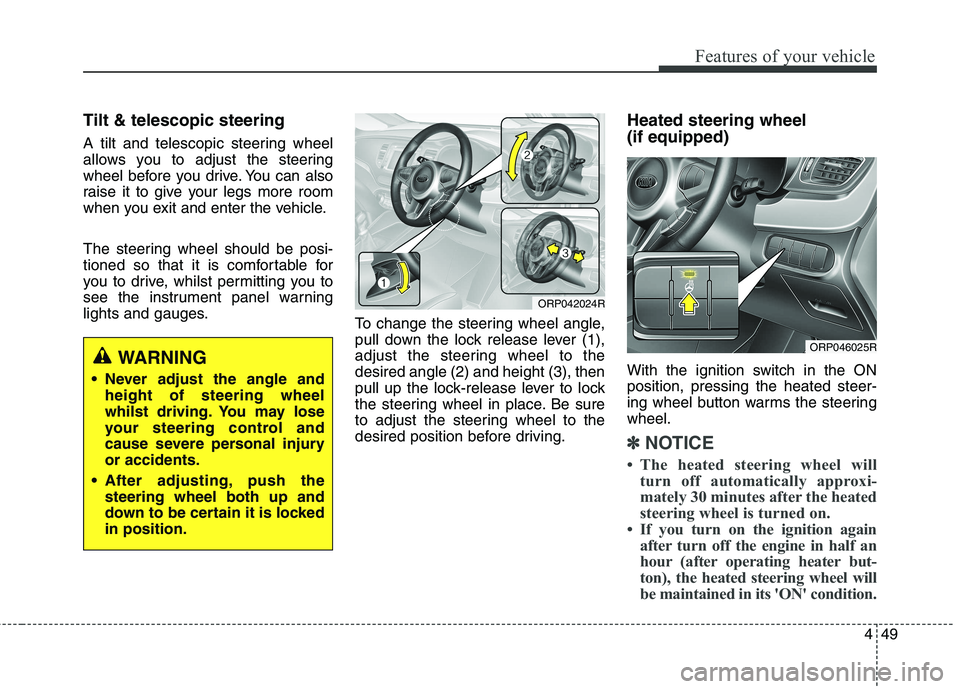
lights and gauges.To change the steering wheel angle,
pull down the lock release lever (1),
adjust the steering wheel to thedesired angle (2) and height (3), then
pull up the lock-release lever to lock
the steering wheel in place. Be sure
to adjust the steering wheel to the
desired position before driving.Heated steering wheel (if equipped)
With the ignition switch in the ON position, pressing the heated steer-
ing wheel button warms the steeringwheel.
✽✽
NOTICE
The heated steering wheel will turn off automatically approxi-
mately 30 minutes after the heated
steering wheel is turned on.
If you turn on the ignition again after turn off the engine in half an
hour (after operating heater but-
ton), the heated steering wheel will
be maintained in its 'ON' condition.
WARNING
Never adjust the angle and height of steering wheel
whilst driving. You may lose
your steering control and
cause severe personal injuryor accidents.
After adjusting, push the steering wheel both up and
down to be certain it is lockedin position.
ORP042024R
ORP046025R
Page 154 of 723
Features of your vehicle
58
4
Instrument Cluster ControlAdjusting Instrument Cluster
Illumination (if equipped)
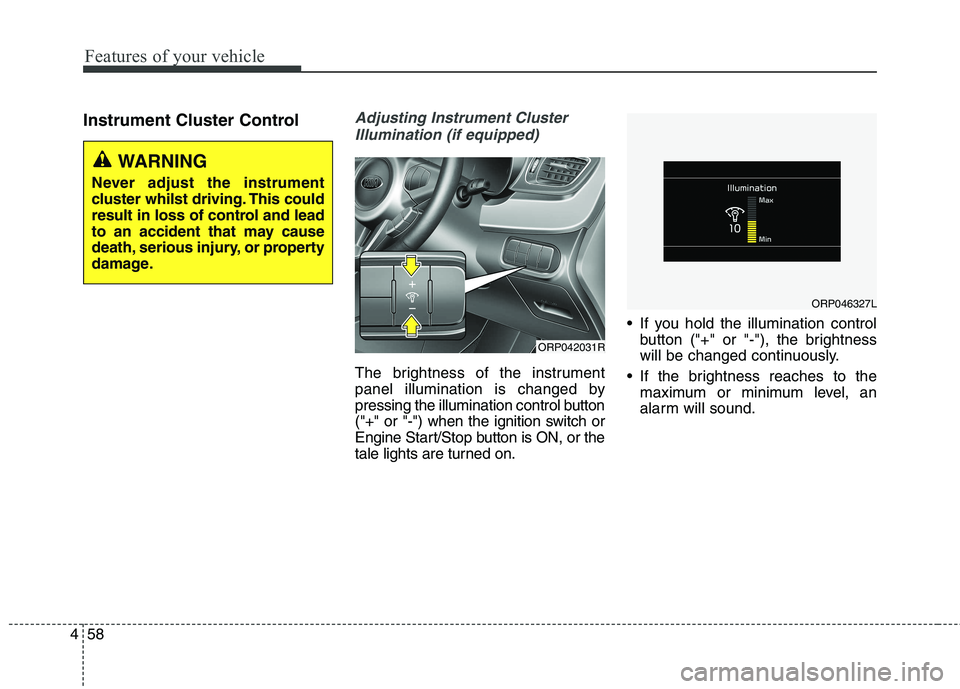
The brightness of the instrument
panel illumination is changed by
pressing the illumination control button
("+" or "-") when the ignition switch or
Engine Start/Stop button is ON, or the
tale lights are turned on. If you hold the illumination control
button ("+" or "-"), the brightness
will be changed continuously.
If the brightness reaches to the maximum or minimum level, an
alarm will sound.
ORP042031R
WARNING
Never adjust the instrument
cluster whilst driving. This could
result in loss of control and lead
to an accident that may cause
death, serious injury, or property
damage.
ORP046327L
Page 216 of 723
Features of your vehicle
120
4
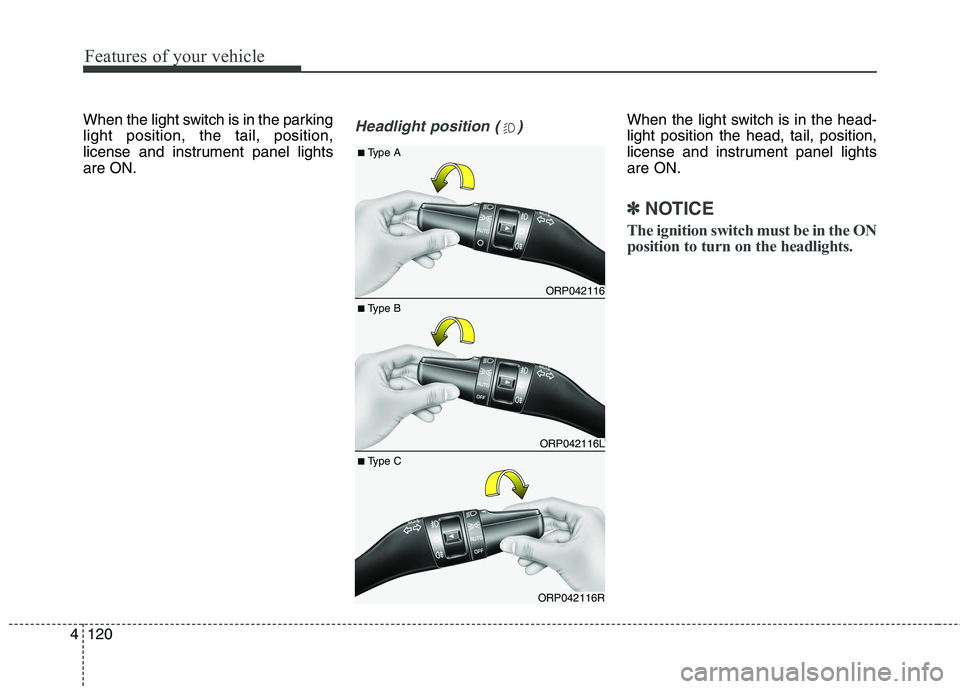
When the light switch is in the parking light position, the tail, position,
license and instrument panel lightsare ON.Headlight position ( )When the light switch is in the head- light position the head, tail, position,
license and instrument panel lightsare ON.
✽✽
NOTICE
The ignition switch must be in the ON
position to turn on the headlights.
ORP042116
ORP042116L
ORP042116R
■ Type B
■
Type A
■ Type C
Page 218 of 723
Features of your vehicle
122
4
The high-beam indicator will light
when the headlight high beams are
switched on.
To prevent the battery from being discharged, do not leave the lights
on for a prolonged time whilst the
engine is not running.Flashing headlights
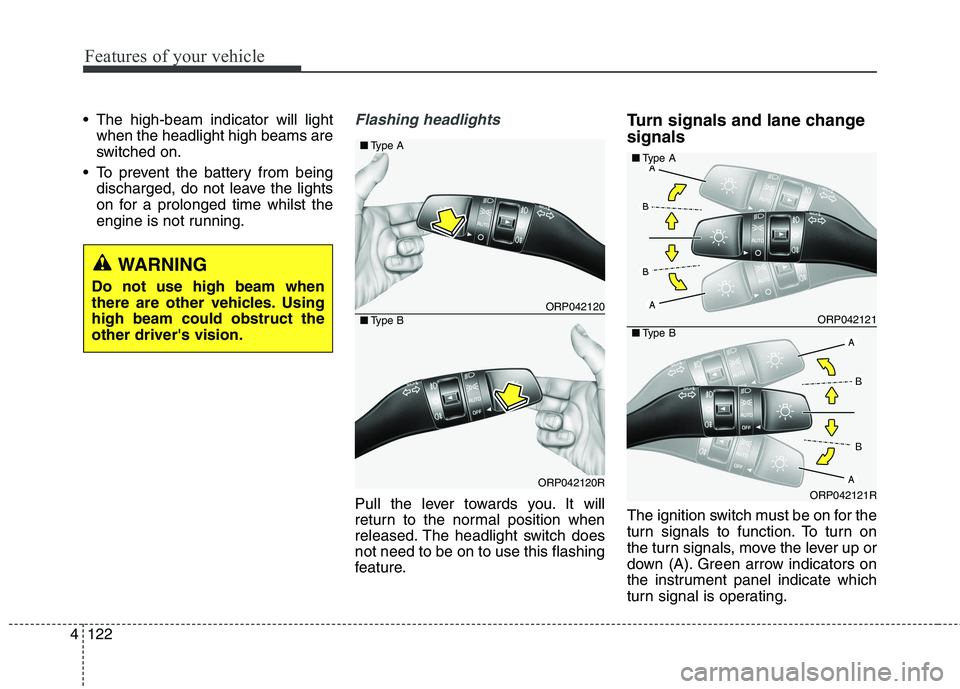
Pull the lever towards you. It will
return to the normal position when
released. The headlight switch doesnot need to be on to use this flashing
feature. Turn signals and lane change signals
The ignition switch must be on for the
turn signals to function. To turn on
the turn signals, move the lever up or
down (A). Green arrow indicators on
the instrument panel indicate which
turn signal is operating.
ORP042120
ORP042120R
■
Type A
■Type BORP042121
ORP042121R
■Type A
■Type B
WARNING
Do not use high beam when
there are other vehicles. Usinghigh beam could obstruct theother driver's vision.
Page 234 of 723
Features of your vehicle
138
4
✽✽
NOTICE
If you want to defrost and defog the
front windscreen, refer to
“Windscreen Defrosting and
Defogging” in this chapter.
Rear window defroster
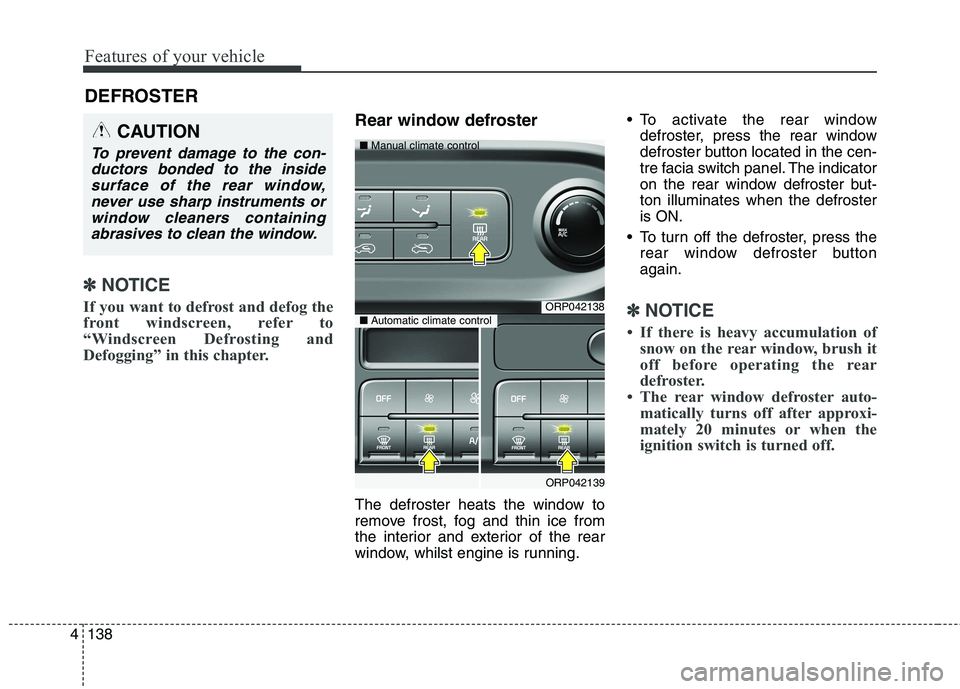
The defroster heats the window to
remove frost, fog and thin ice from
the interior and exterior of the rear
window, whilst engine is running. To activate the rear window
defroster, press the rear window
defroster button located in the cen-
tre facia switch panel. The indicator
on the rear window defroster but-ton illuminates when the defrosteris ON.
To turn off the defroster, press the rear window defroster buttonagain.
✽✽ NOTICE
If there is heavy accumulation of snow on the rear window, brush it
off before operating the rear
defroster.
The rear window defroster auto- matically turns off after approxi-
mately 20 minutes or when the
ignition switch is turned off.
DEFROSTER
CAUTION
To prevent damage to the con-
ductors bonded to the insidesurface of the rear window, never use sharp instruments orwindow cleaners containingabrasives to clean the window.
ORP042138
ORP042139
■
Manual climate control
■Automatic climate control
Page 239 of 723
4143
Features of your vehicle
Instrument panel vents
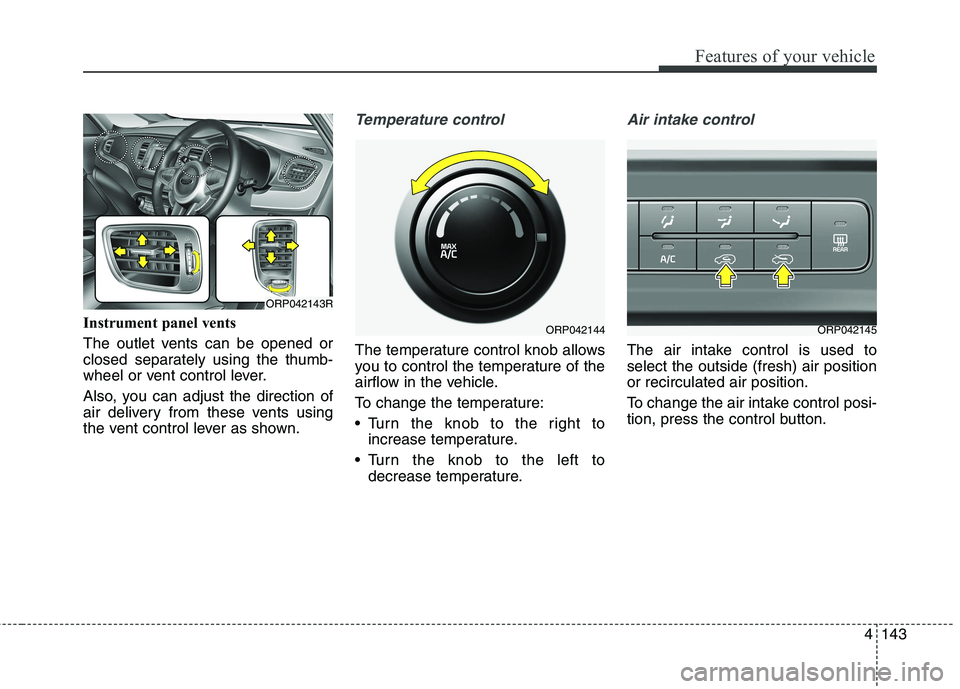
The outlet vents can be opened or
closed separately using the thumb-
wheel or vent control lever.
Also, you can adjust the direction of
air delivery from these vents using
the vent control lever as shown.
Temperature control
The temperature control knob allows
you to control the temperature of the
airflow in the vehicle.
To change the temperature:
Turn the knob to the right toincrease temperature.
Turn the knob to the left to decrease temperature.
Air intake control
The air intake control is used to select the outside (fresh) air positionor recirculated air position.
To change the air intake control posi-
tion, press the control button.
ORP042144ORP042145
ORP042143R
Page 248 of 723
Features of your vehicle
152
4
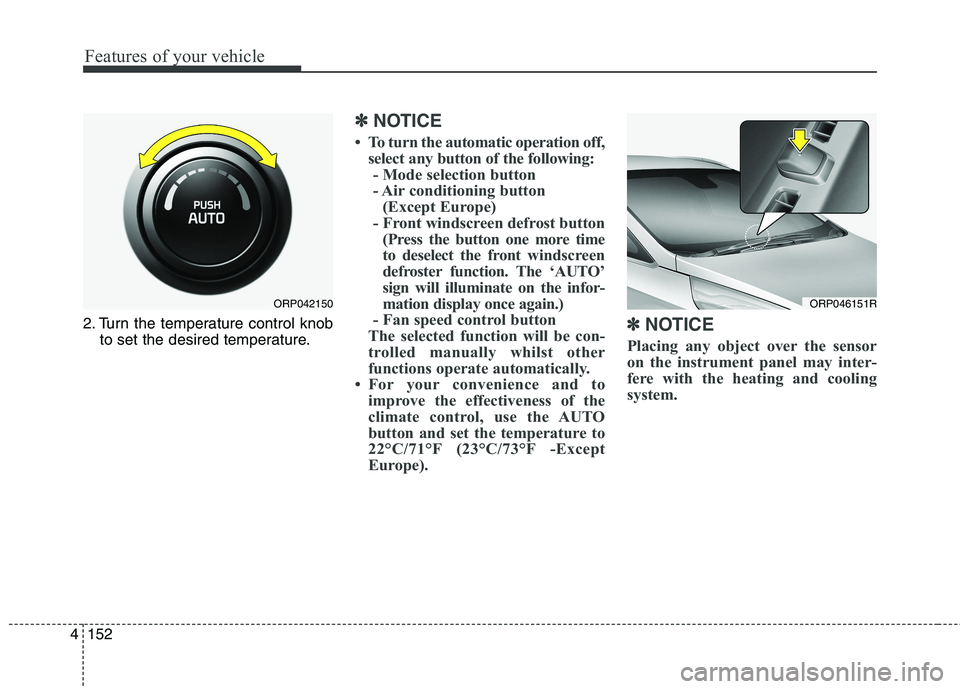
2. Turn the temperature control knob
to set the desired temperature.
✽✽ NOTICE
To turn the automatic operation off, select any button of the following:- Mode selection button
- Air conditioning button (Except Europe)
- Front windscreen defrost button (Press the button one more time
to deselect the front windscreen
defroster function. The ‘AUTO’
sign will illuminate on the infor-
mation display once again.)
- Fan speed control button
The selected function will be con-
trolled manually whilst other
functions operate automatically.
For your convenience and to improve the effectiveness of the
climate control, use the AUTO
button and set the temperature to
22°C/71°F (23°C/73°F -Except
Europe). ✽
✽
NOTICE
Placing any object over the sensor
on the instrument panel may inter-
fere with the heating and cooling
system.
ORP046151RORP042150
Page 250 of 723
Features of your vehicle
154
4
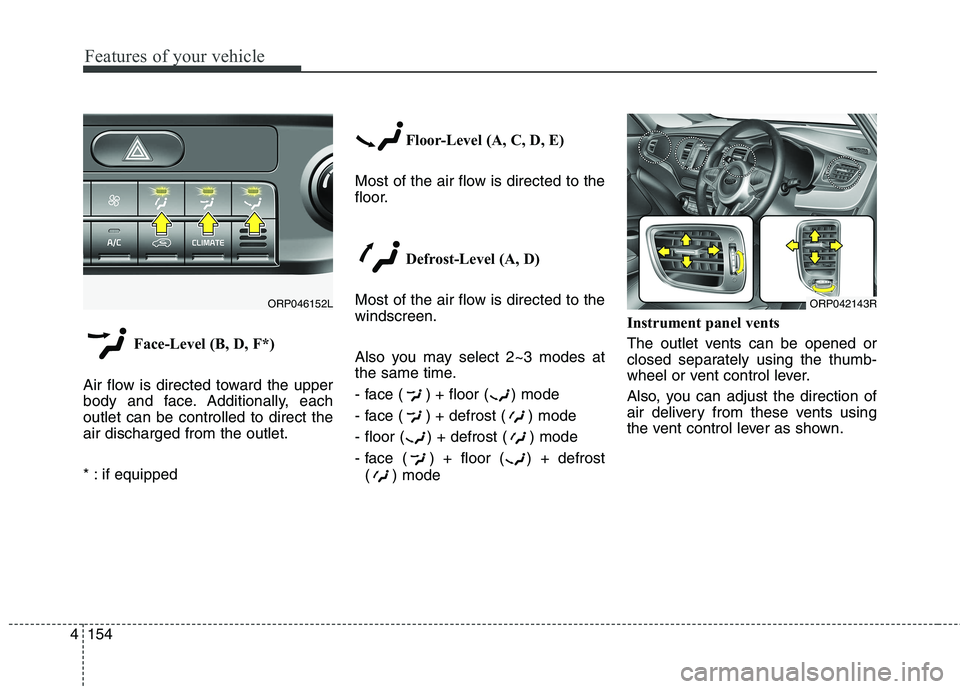
Face-Level (B, D, F*)
Air flow is directed toward the upper
body and face. Additionally, eachoutlet can be controlled to direct theair discharged from the outlet.
* : if equipped Floor-Level (A, C, D, E)
Most of the air flow is directed to the
floor.
Defrost-Level (A, D)
Most of the air flow is directed to thewindscreen.
Also you may select 2~3 modes at
the same time.
- face ( ) + floor ( ) mode
- face ( ) + defrost ( ) mode
- floor ( ) + defrost ( ) mode
- face ( ) + floor ( ) + defrost ( ) mode Instrument panel vents
The outlet vents can be opened or
closed separately using the thumb-
wheel or vent control lever.
Also, you can adjust the direction of
air delivery from these vents using
the vent control lever as shown.
ORP042143RORP046152L
Page 512 of 723
677
Driving your vehicle
DRIVER'S ATTENTION
The driver must be cautious in the
below situations for the system may
not assist the driver and may not
work properly.
Do not stick or attach anything tothe windscreen in front of the cam-
era as this may reduce effective-ness or cause one more of the sys-
tems dependent on the camera to
stop working.
Keep the windscreen in the area behind the interior rear view mirrorclean.
Do not place reflective materials, such as white paper or a mirror, on
the instrument panel.
Do not strike or damage the areas around the camera unit.
Do not touch the camera lens or remove the screw located on the
camera unit. The system does not work in all sit-
uations but is designed merely as a
supplementary aid.
The system assists the driver and does not replace the human eye.
The driver always bears ultimate responsibility for ensuring that the
vehicle is driven safely and that
applicable road traffic rules and
regulations are followed.