roof KIA CARENS RHD 2017 User Guide
[x] Cancel search | Manufacturer: KIA, Model Year: 2017, Model line: CARENS RHD, Model: KIA CARENS RHD 2017Pages: 723, PDF Size: 40.8 MB
Page 171 of 723
475
Features of your vehicle
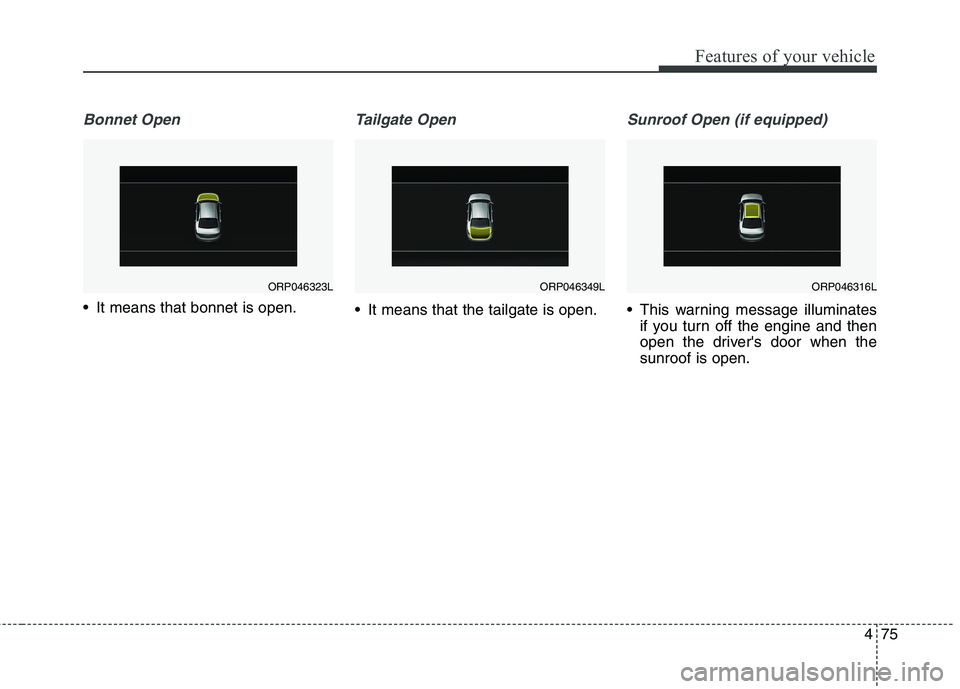
Bonnet Open
It means that bonnet is open.
Tailgate Open
It means that the tailgate is open.
Sunroof Open (if equipped)
This warning message illuminatesif you turn off the engine and then
open the driver's door when thesunroof is open.
ORP046323LORP046349LORP046316L
Page 282 of 723
Features of your vehicle
186
4
EXTERIOR FEATURES
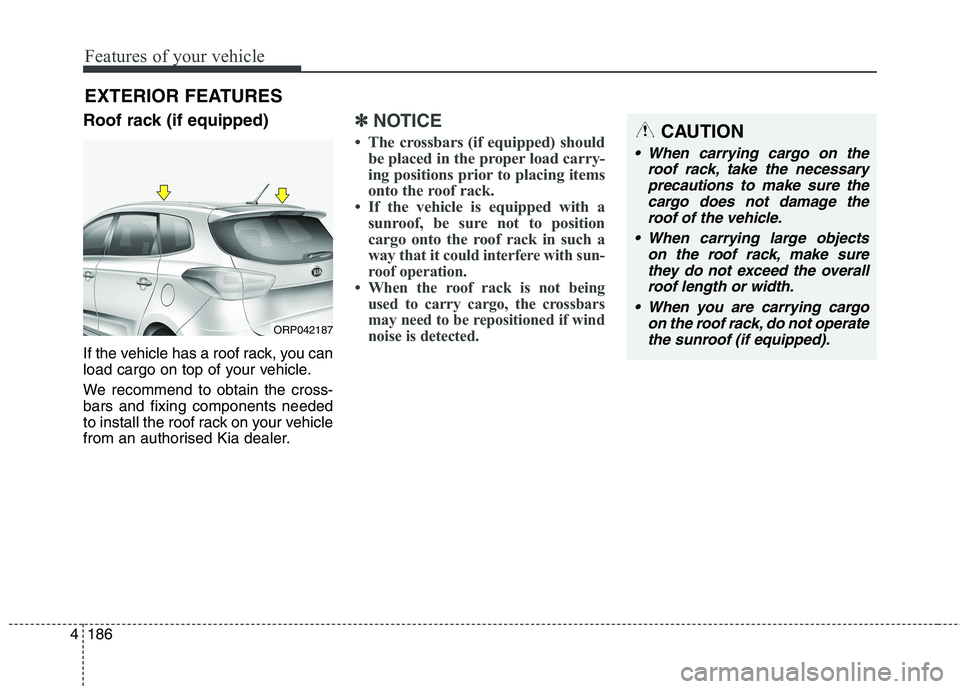
Roof rack (if equipped)
If the vehicle has a roof rack, you can
load cargo on top of your vehicle.
We recommend to obtain the cross- bars and fixing components needed
to install the roof rack on your vehicle
from an authorised Kia dealer.
✽✽ NOTICE
The crossbars (if equipped) should be placed in the proper load carry-
ing positions prior to placing items
onto the roof rack.
If the vehicle is equipped with a sunroof, be sure not to position
cargo onto the roof rack in such a
way that it
could interfere with sun-
roof operation.
When the roof rack is not being used to carry cargo, the crossbars
may need to be repositioned if wind
noise is detected.
ORP042187
CAUTION
When carrying cargo on the
roof rack, take the necessaryprecautions to make sure the cargo does not damage theroof of the vehicle.
When carrying large objects on the roof rack, make surethey do not exceed the overall roof length or width.
When you are carrying cargo on the roof rack, do not operatethe sunroof (if equipped).
Page 283 of 723
4187
Features of your vehicle
WARNING
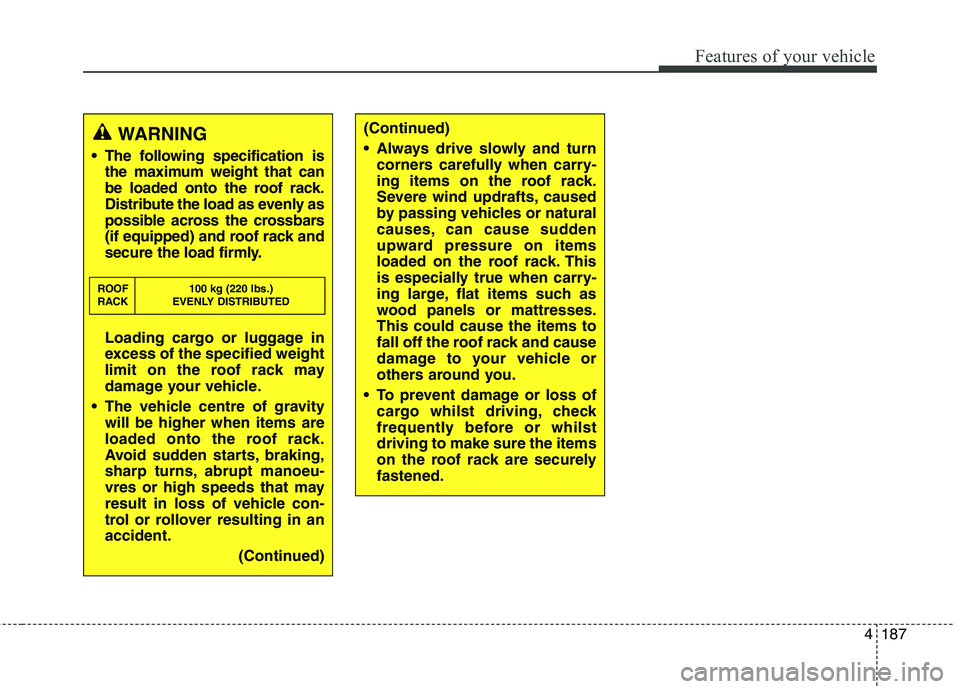
The following specification is the maximum weight that can
be loaded onto the roof rack.
Distribute the load as evenly as
possible across the crossbars
(if equipped) and roof rack and
secure the load firmly.
Loading cargo or luggage in
excess of the specified weight
limit on the roof rack may
damage your vehicle.
The vehicle centre of gravity will be higher when items are
loaded onto the roof rack.
Avoid sudden starts, braking,
sharp turns, abrupt manoeu-
vres or high speeds that may
result in loss of vehicle con-
trol or rollover resulting in anaccident.
(Continued)
ROOF 100 kg (220 lbs.)
RACK EVENLY DISTRIBUTED
(Continued)
Always drive slowly and turn
corners carefully when carry-
ing items on the roof rack.
Severe wind updrafts, caused
by passing vehicles or natural
causes, can cause sudden
upward pressure on items
loaded on the roof rack. This
is especially true when carry-
ing large, flat items such as
wood panels or mattresses.This could cause the items to
fall off the roof rack and cause
damage to your vehicle or
others around you.
To prevent damage or loss of cargo whilst driving, check
frequently before or whilstdriving to make sure the items
on the roof rack are securelyfastened.
Page 285 of 723
Audio system
2
5
✽✽
NOTICE
If you install an aftermarket HID
head lamp, your vehicle’s audio and
electronic device may malfunction.Antenna
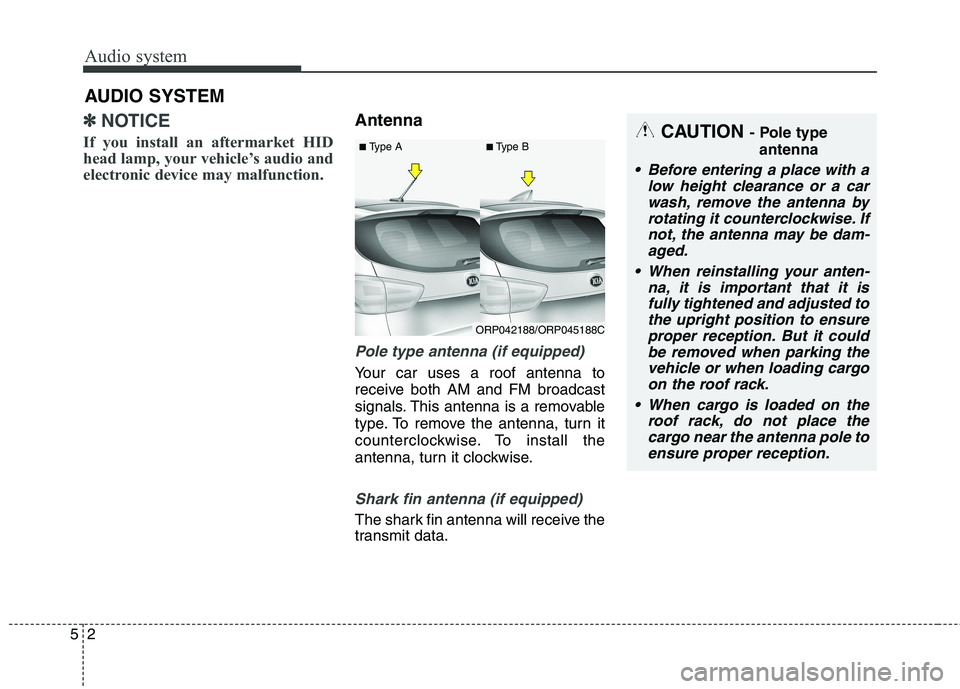
Pole type antenna (if equipped)
Your car uses a roof antenna to
receive both AM and FM broadcast
signals. This antenna is a removable
type. To remove the antenna, turn it
counterclockwise. To install the
antenna, turn it clockwise.
Shark fin antenna (if equipped)
The shark fin antenna will receive the
transmit data.
AUDIO SYSTEM
CAUTION
- Pole type
antenna
• Before entering a place with a low height clearance or a carwash, remove the antenna by rotating it counterclockwise. Ifnot, the antenna may be dam-aged.
When reinstalling your anten- na, it is important that it isfully tightened and adjusted tothe upright position to ensureproper reception. But it could be removed when parking thevehicle or when loading cargoon the roof rack.
When cargo is loaded on the roof rack, do not place thecargo near the antenna pole toensure proper reception.
ORP042188/ORP045188C
■
Type A ■Type B
Page 339 of 723
Audio system
56
5
✽✽
NOTICE - USING VOICE COM-
MAND
The voice recognition feature of this product supports recognition
of the commands listed within this
user’s manual.
Whilst using voice recognition, operating the steering remote con-
trol or the device will terminate
voice recognition and allow you to
manually operate desired func-
tions.
Position the microphone above the head of the driver’s seat. For supe-
rior performance, maintain good
posture when saying voice com-
mands. (Continued)(Continued)
Voice recognition may not func-
tion properly due to outside noise.
The following conditions can
affect the performance of Voice
Recognition:
- When the windows and sunroofare open
- When the heating/cooling system is on
- When passing a tunnel
- When driving on rugged and uneven roads
After downloading Bluetooth®
Wireless Technology phone book,
the system requires some times to
convert the phone book into voice
information. During this time,
voice recognition may not operate
properly.
Upon inputting your phone book, special symbols and numbers can-
not be recognized by voice. For
example, “# John Doe%&” will be
recognized as “John Doe”.
Page 408 of 723
5125
Audio system
✽✽NOTICE - USING THE
Voice Recognition
When using the voice recognition feature, only commands listed
within the user's manual are sup-
ported.
Be aware that during the opera- tion of the voice recognition sys-
tem, pressing any key other than
the key or touching the screen
will terminate voice recognition
mode.
For superior voice recognition performance, position the micro-
phone used for voice recognition
above the head of the driver’s seat
and maintain a proper position
when saying commands.
Within the following situations, voice recognition may not function
properly due to external sound.
- When the windows and sunroofare open
- When the wind of the cooling / heating device is strong
- When entering and passing through tunnels
- When driving on rugged and uneven roads (Continued)(Continued)
- During severe rain (heavy rains,windstorms)
Phone related voice commands can be used only when a
Bluetooth ®
Wireless Technology
device is connected.
When making calls by stating a name, the corresponding contact
must be downloaded and stored
within the audio system.
After downloading the Bluetooth®
Wireless Technology phone book,
it takes some times to convert the
phone book data into voice infor-
mation. During this time, voice
recognition may not properly
operate.
Pronounce the voice commands naturally and clearly as if in a nor-
mal conversation.
Page 598 of 723
811
Maintenance
SCHEDULED MAINTENANCE SERVICE
Follow Normal Maintenance
Schedule if the vehicle is usually
operated where none of the following
conditions apply. If any of the following
conditions apply, follow Maintenance
Under Severe Usage Conditions.
Repeated driving short distance of less than 8 km (5 miles) in normal
temperature or less than 16 km(10
miles) in freezing temperature
Extensive engine idling or low speed driving for long distances
Driving on rough, dusty, muddy, unpaved, graveled or salt-spreadroads
Driving in areas using salt or other corrosive materials or in very cold
weather
Driving in the condition of inflowing sand or dust into engine
Driving in heavy traffic area
Driving on uphill, downhill, or mountain road repeatedly
Towing a trailer or using a camper, or roof rack Driving as a patrol car, taxi, other
commercial use of vehicle towing
Driving over 170 km/h (106 mile/h)
Frequently driving in stop-and-go condition
If your vehicle is operated under the
above conditions, you shouldinspect, replace or refill more fre- quently than the following NormalMaintenance Schedule. After theperiods or distance shown in the chart, continue to follow the pre-scribed maintenance intervals.
Page 605 of 723
Maintenance
18
8
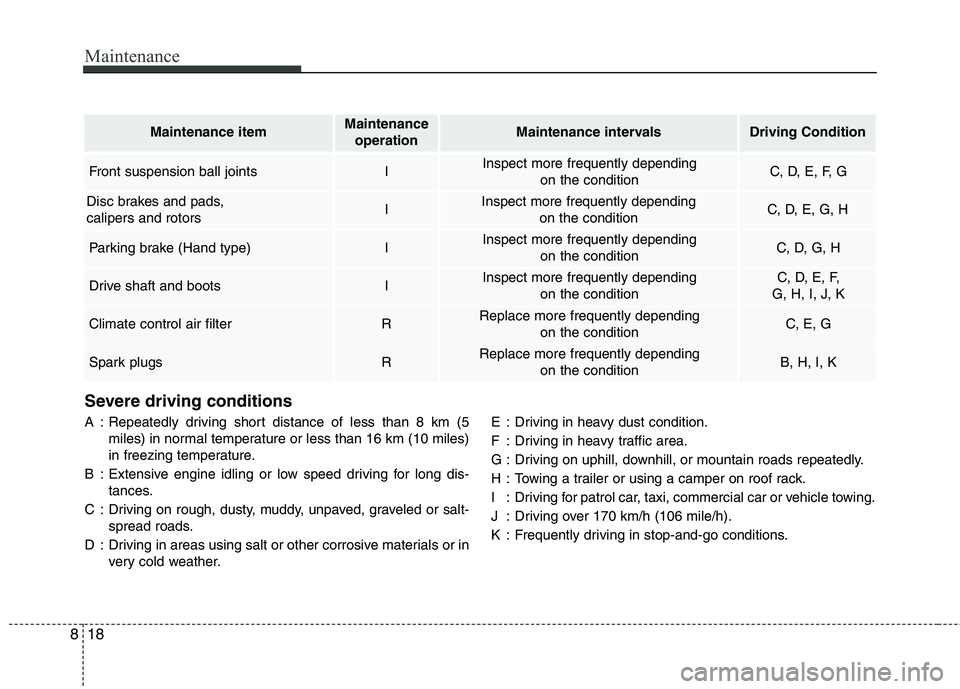
Severe driving conditions
A : Repeatedly driving short distance of less than 8 km (5
miles) in normal temperature or less than 16 km (10 miles)
in freezing temperature.
B : Extensive engine idling or low speed driving for long dis- tances.
C : Driving on rough, dusty, muddy, unpaved, graveled or salt- spread roads.
D : Driving in areas using salt or other corrosive materials or in very cold weather. E : Driving in heavy dust condition.
F : Driving in heavy traffic area.
G : Driving on uphill, downhill, or mountain roads repeatedly.
H : Towing a trailer or using a camper on roof rack.
I : Driving for patrol car, taxi, commercial car or vehicle towing.
J : Driving over 170 km/h (106 mile/h).
K : Frequently driving in stop-and-go conditions.
Maintenance itemMaintenance
operationMaintenance intervalsDriving Condition
Front suspension ball jointsIInspect more frequently depending on the conditionC, D, E, F, G
Disc brakes and pads, calipers and rotorsIInspect more frequently depending on the conditionC, D, E, G, H
Parking brake (Hand type)IInspect more frequently depending on the conditionC, D, G, H
Drive shaft and bootsIInspect more frequently depending on the conditionC, D, E, F,
G, H, I, J, K
Climate control air filter RReplace more frequently depending on the conditionC, E, G
Spark plugsRReplace more frequently depending on the conditionB, H, I, K
Page 614 of 723
827
Maintenance
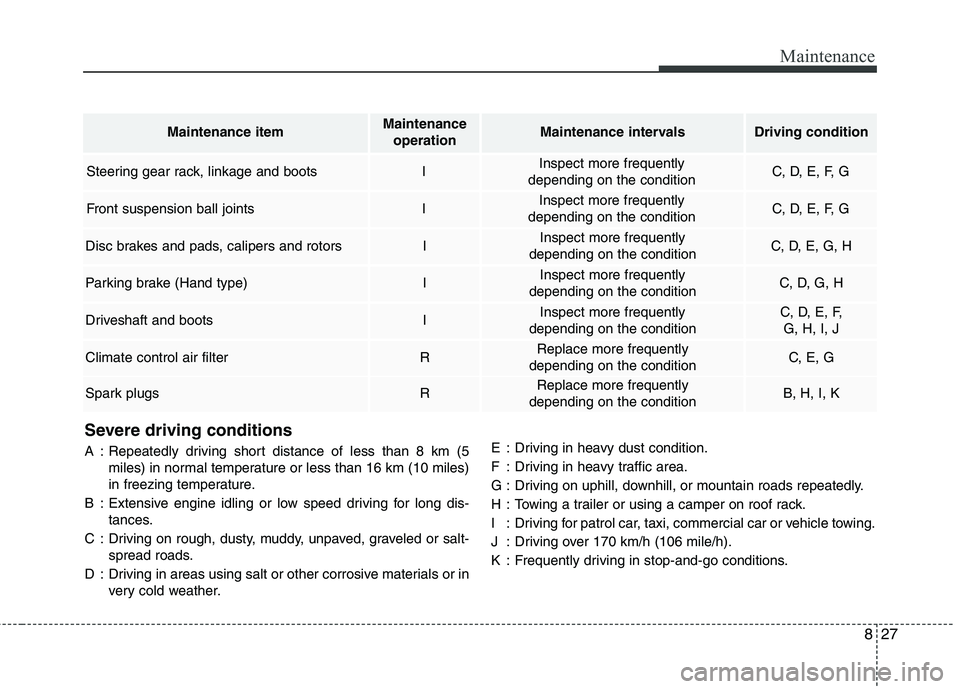
Severe driving conditions
A : Repeatedly driving short distance of less than 8 km (5miles) in normal temperature or less than 16 km (10 miles)
in freezing temperature.
B : Extensive engine idling or low speed driving for long dis- tances.
C : Driving on rough, dusty, muddy, unpaved, graveled or salt- spread roads.
D : Driving in areas using salt or other corrosive materials or in very cold weather. E : Driving in heavy dust condition.
F : Driving in heavy traffic area.
G : Driving on uphill, downhill, or mountain roads repeatedly.
H : Towing a trailer or using a camper on roof rack.
I : Driving for patrol car, taxi, commercial car or vehicle towing.
J : Driving over 170 km/h (106 mile/h).
K : Frequently driving in stop-and-go conditions.
Maintenance itemMaintenance
operationMaintenance intervalsDriving condition
Steering gear rack, linkage and bootsIInspect more frequently
depending on the conditionC, D, E, F, G
Front suspension ball jointsIInspect more frequently
depending on the conditionC, D, E, F, G
Disc brakes and pads, calipers and rotorsIInspect more frequently
depending on the conditionC, D, E, G, H
Parking brake (Hand type)IInspect more frequently
depending on the conditionC, D, G, H
Driveshaft and bootsIInspect more frequently
depending on the conditionC, D, E, F, G, H, I, J
Climate control air filterRReplace more frequently
depending on the conditionC, E, G
Spark plugsRReplace more frequently
depending on the conditionB, H, I, K
Page 638 of 723
851
Maintenance
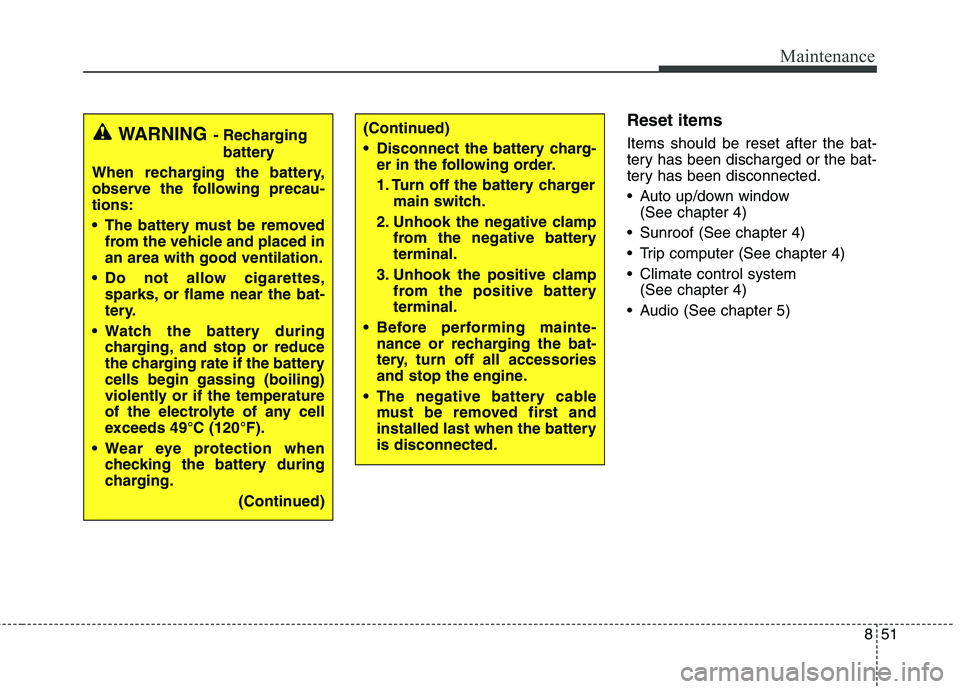
Reset items Items should be reset after the bat-
tery has been discharged or the bat-
tery has been disconnected.
Auto up/down window (See chapter 4)
Sunroof (See chapter 4)
Trip computer (See chapter 4)
Climate control system (See chapter 4)
Audio (See chapter 5)(Continued)
Disconnect the battery charg- er in the following order.
1. Turn off the battery charger main switch.
2. Unhook the negative clamp from the negative battery terminal.
3. Unhook the positive clamp from the positive batteryterminal.
Before performing mainte- nance or recharging the bat-
tery, turn off all accessories
and stop the engine.
The negative battery cable must be removed first and
installed last when the batteryis disconnected.WARNING - Recharging
battery
When recharging the battery,
observe the following precau-tions:
The battery must be removed from the vehicle and placed in an area with good ventilation.
Do not allow cigarettes, sparks, or flame near the bat-
tery.
Watch the battery during charging, and stop or reduce
the charging rate if the batterycells begin gassing (boiling)
violently or if the temperature
of the electrolyte of any cell
exceeds 49°C (120°F).
Wear eye protection when checking the battery during
charging.
(Continued)