window KIA CARENS RHD 2017 User Guide
[x] Cancel search | Manufacturer: KIA, Model Year: 2017, Model line: CARENS RHD, Model: KIA CARENS RHD 2017Pages: 723, PDF Size: 40.8 MB
Page 123 of 723
427
Features of your vehicle
Deadlocks (if equipped)
Some vehicles are equipped with a
deadlock system. Deadlocks preventopening of a door from either inside
or outside the vehicle once the dead-
locks have been activated providing
an additional measure of vehicle
security.
To lock the vehicle using the deadlock
function, the doors must be locked by
using the transmitter or smart key. To
unlock the vehicle, the transmitter or
smart key must be used again.WARNING- Unlocked
vehicles
Leaving your vehicle unlocked
can invite theft or possible harm
to you or others from someone
hiding in your vehicle whilst you
are gone. Always remove the
ignition key, engage the parking
brake, close all windows and
lock all doors when leaving your
vehicle unattended.WARNING - Unattended
children
An enclosed vehicle can
become extremely hot, causing
death or severe injury to unat-
tended children or animals who
cannot escape the vehicle.
Furthermore, children might
operate features of the vehicle
that could injure them, or theycould encounter other harm,
possibly from someone gaining
entry to the vehicle. Never leave
children or animals unattended
in your vehicle.
WARNING
Do not lock the doors with the
transmitter or the smart key
with anybody left in the vehicle.
The passenger in the vehicle
cannot unlock the doors with
the door lock button. For exam-
ple, if the door is locked with
the transmitter, the passenger
in the vehicle cannot unlock the
door without the transmitter.
Page 127 of 723
431
Features of your vehicle
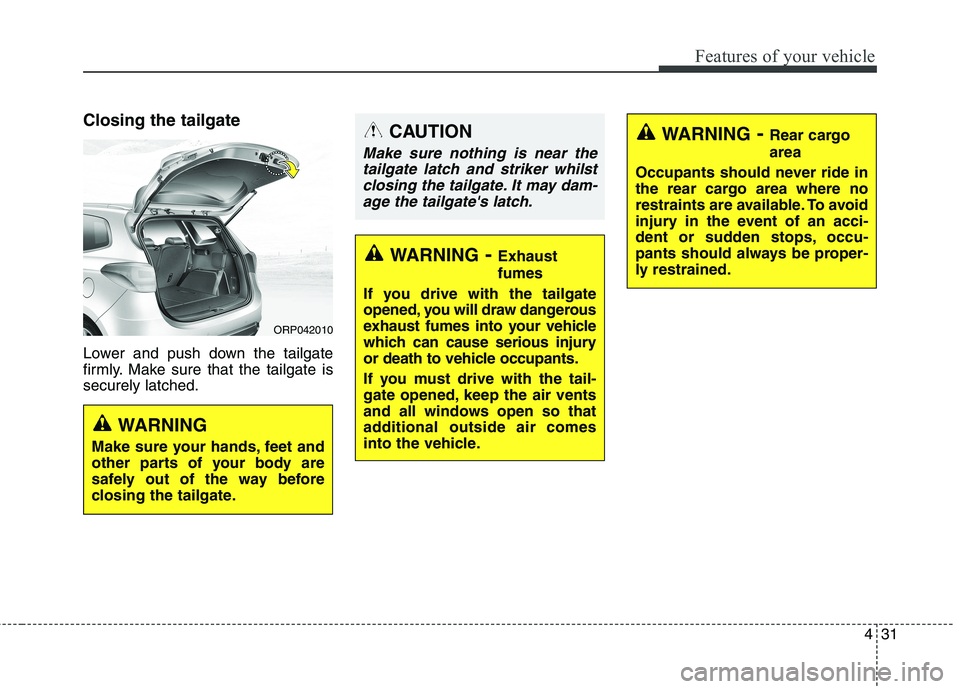
Closing the tailgate
Lower and push down the tailgate
firmly. Make sure that the tailgate issecurely latched.
WARNING- Exhaust fumes
If you drive with the tailgate
opened, you will draw dangerous
exhaust fumes into your vehicle
which can cause serious injury
or death to vehicle occupants.
If you must drive with the tail-
gate opened, keep the air vents
and all windows open so that
additional outside air comes
into the vehicle.
WARNING - Rear cargo area
Occupants should never ride in
the rear cargo area where no
restraints are available. To avoid
injury in the event of an acci-
dent or sudden stops, occu-
pants should always be proper-
ly restrained.CAUTION
Make sure nothing is near the tailgate latch and striker whilstclosing the tailgate. It may dam- age the tailgate's latch.
WARNING
Make sure your hands, feet and
other parts of your body are
safely out of the way before
closing the tailgate.
ORP042010
Page 129 of 723
433
Features of your vehicle
WINDOWS
ORP042012RORP042012R2
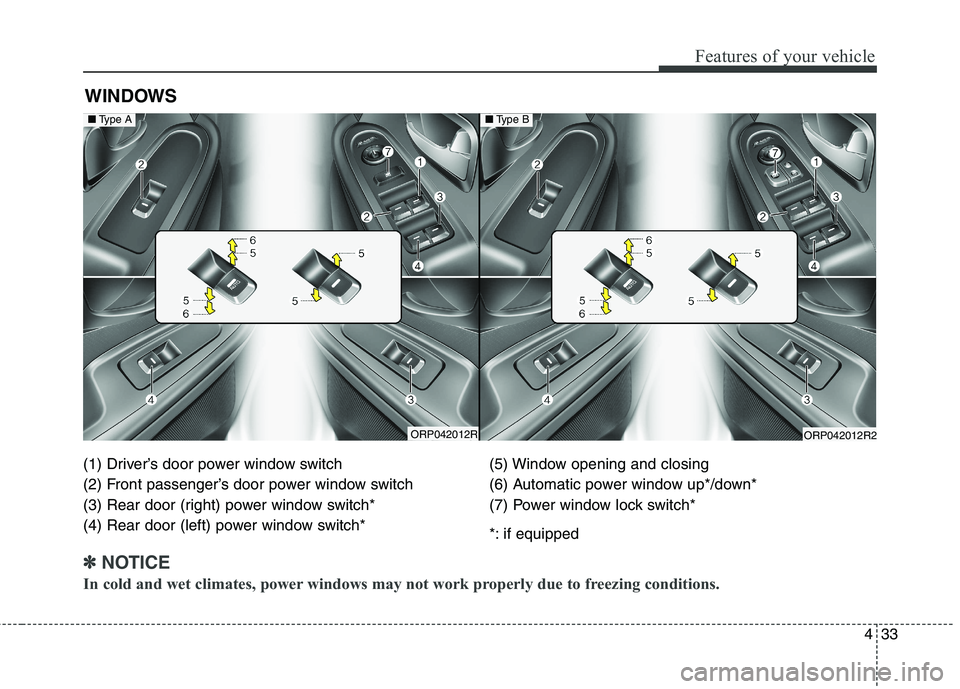
(1) Driver’s door power window switch
(2) Front passenger’s door power window switch
(3) Rear door (right) power window switch*
(4) Rear door (left) power window switch* (5) Window opening and closing
(6) Automatic power window up*/down*
(7) Power window lock switch*
*: if equipped
✽✽
NOTICE
In cold and wet climates, power windows may not work properly due to freezing conditions.
■ Type A■Type B
Page 130 of 723
Features of your vehicle
34
4
Power windows
The ignition switch must be in the ON
position for power windows to oper-
ate. Each door has a power window
switch that controls the door’s win-
dow. The driver’s door has a master
power window switch that controls all
the windows in the vehicle. Also, the
driver has a power window lock
switch which can block the operation
of rear passenger windows.
The power windows can be operated
for approximately 30 seconds after
the ignition key is removed or turned
to the ACC or LOCK position.
However, if the front doors are
opened, the power windows cannot
be operated even within the 30 sec-
onds period.✽✽
NOTICE
Whilst driving with the rear win-
dows down or with the sunroof (if
equipped) in an open (or partially
open position), your vehicle may
demonstrate a wind buffeting or
pulsation noise. This noise is a nor-
mal occurrence and can be reduced
or eliminated by taking the follow-
ing actions. If the noise occurs with
one or both of the rear windows
down, partially lower both front
windows approximately one inch.
If you experience the noise with the
sunroof open, slightly reduce the
size of the sunroof opening. Window opening and closing
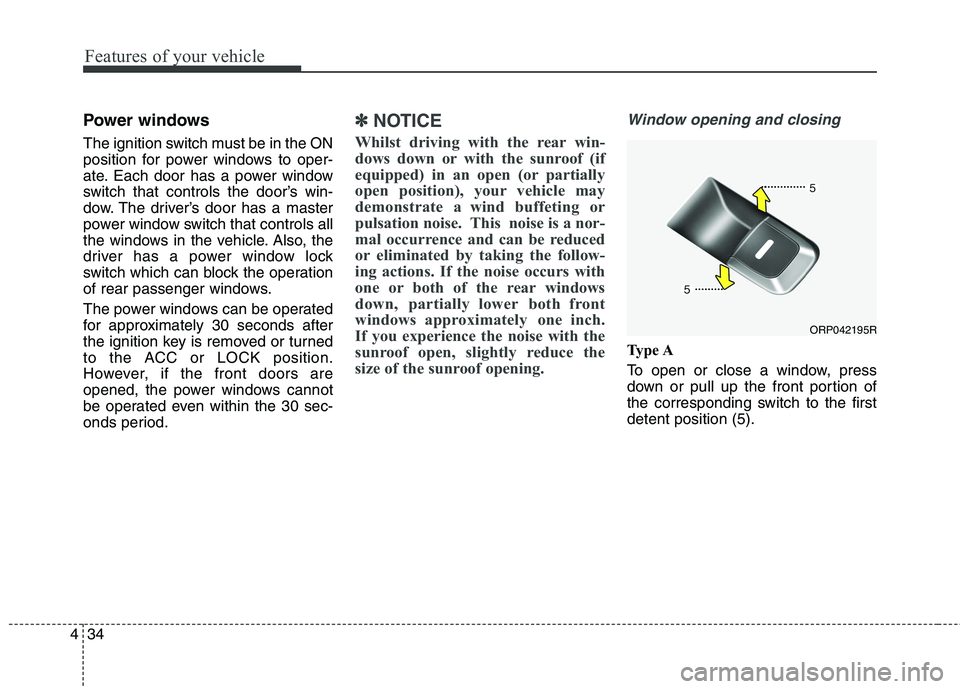
Type A
To open or close a window, press
down or pull up the front portion of
the corresponding switch to the firstdetent position (5).
ORP042195R
Page 131 of 723
435
Features of your vehicle
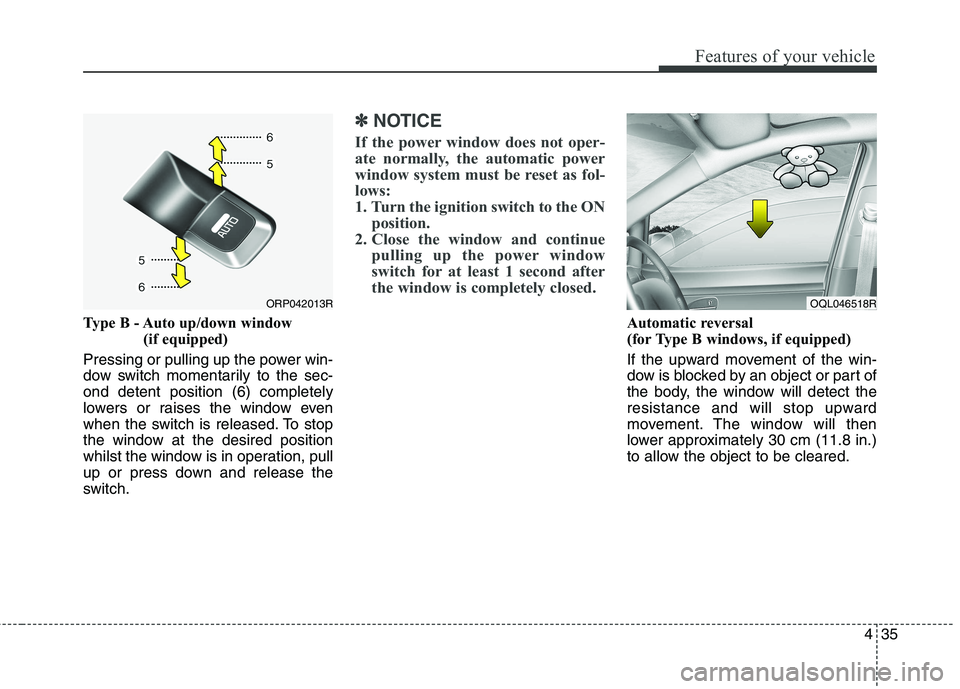
Type B - Auto up/down window (if equipped)
Pressing or pulling up the power win-
dow switch momentarily to the sec-ond detent position (6) completely
lowers or raises the window even
when the switch is released. To stop
the window at the desired position
whilst the window is in operation, pull
up or press down and release the
switch.
✽✽ NOTICE
If the power window does not oper-
ate normally, the automatic power
window system must be reset as fol-
lows:
1. Turn the ignition switch to the ON position.
2. Close the window and continue pulling up the power window
switch for at least 1 second after
the window is completely closed.
Automatic reversal
(for Type B windows, if equipped)
If the upward movement of the win-
dow is blocked by an object or part of
the body, the window will detect the
resistance and will stop upward
movement. The window will then
lower approximately 30 cm (11.8 in.)
to allow the object to be cleared.
ORP042013ROQL046518R
Page 132 of 723
Features of your vehicle
36
4
If the window detects the resistance
whilst the power window switch is
pulled up continuously, the window
will stop upward movement then
lower approximately 2.5 cm (1 in.).
And if the power window switch is
pulled up continuously again within 5
seconds after the window is lowered
by the automatic window reversal
feature, the automatic window rever-
sal will not operate.
✽✽
NOTICE
The automatic reverse feature is
only active when the “auto up” fea-
ture is used by fully pulling up the
switch. The automatic reverse fea-
ture will not operate if the window is
raised using the halfway position on
the power window switch.
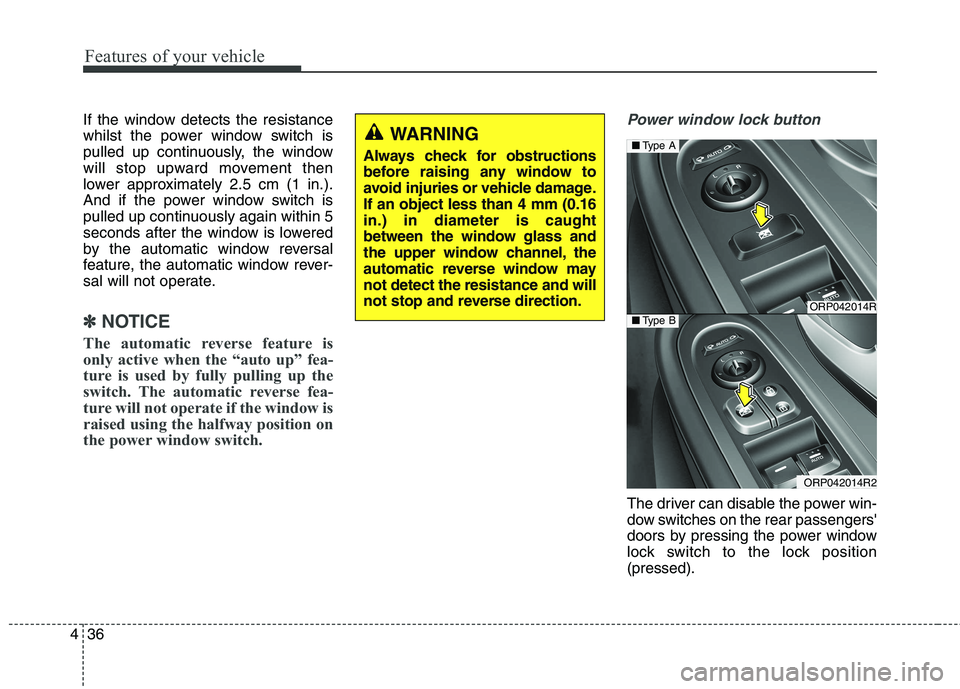
Power window lock button
The driver can disable the power win-
dow switches on the rear passengers'
doors by pressing the power window
lock switch to the lock position(pressed).
WARNING
Always check for obstructions
before raising any window to
avoid injuries or vehicle damage.If an object less than 4 mm (0.16in.) in diameter is caught
between the window glass and
the upper window channel, the
automatic reverse window maynot detect the resistance and will
not stop and reverse direction.
ORP042014R
ORP042014R2
■ Type A
■Type B
Page 133 of 723
437
Features of your vehicle
When the power window lock switch is pressed:
The driver's master control canoperate all the power windows.
The front passenger's control can operate the front passenger's
power window.
The rear passenger's control can- not operate the rear passenger's
power window.
WARNING - Windows
NEVER leave the keys in your vehicle with unsupervised
children, when the Engine isrunning.
NEVER leave any child unat- tended in the vehicle. Even
very young children may inad-
vertently cause the vehicle to
move, entangle themselves in
the windows, or otherwise
injure themselves or others.
Always double check to make sure all arms, hands, headand other obstructions are
safely out of the way before
closing a window.
Do not allow children to play with the power windows. Keep
the driver’s door power window
lock switch in the LOCK posi-
tion (pressed). Serious injury
can result from unintentional
window operation by the child.
Do not extend face or arms out- side the window whilst driving.
CAUTION
To prevent possible damage
to the power window system,do not open or close two win-dows or more at the sametime. This will also ensure the longevity of the fuse.
Never try to operate the main switch on the driver's doorand the individual door win-dow switch in opposing direc- tions at the same time. If this isdone, the window will stop andcannot be opened or closed.
Page 148 of 723
Features of your vehicle
52
4
Inside rearview mirror
Adjust the rearview mirror so that the
centre view through the rear window
is seen. Make this adjustment before
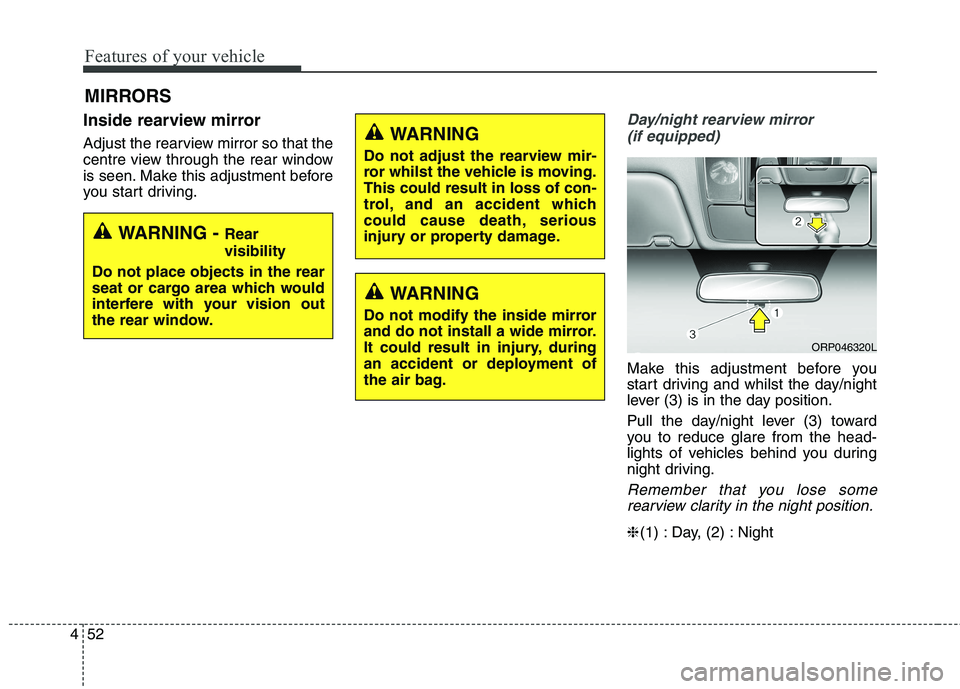
you start driving.Day/night rearview mirror
(if equipped)
Make this adjustment before you
start driving and whilst the day/night
lever (3) is in the day position.
Pull the day/night lever (3) toward
you to reduce glare from the head-
lights of vehicles behind you during
night driving.
Remember that you lose somerearview clarity in the night position.
❈ (1) : Day, (2) : Night
MIRRORS
WARNING -
Rear visibility
Do not place objects in the rear
seat or cargo area which would
interfere with your vision out
the rear window.
WARNING
Do not adjust the rearview mir-
ror whilst the vehicle is moving.This could result in loss of con-
trol, and an accident which
could cause death, serious
injury or property damage.
WARNING
Do not modify the inside mirror
and do not install a wide mirror.
It could result in injury, during
an accident or deployment of
the air bag.
ORP046320L
Page 217 of 723
4121
Features of your vehicle
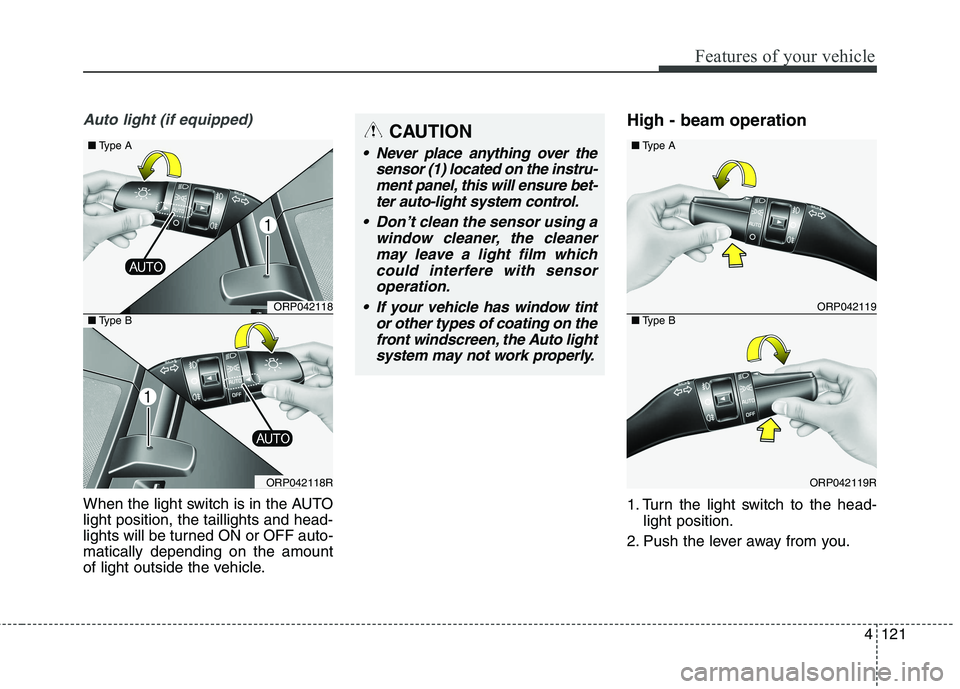
Auto light (if equipped)
When the light switch is in the AUTO light position, the taillights and head-
lights will be turned ON or OFF auto-matically depending on the amount
of light outside the vehicle.High - beam operation
1. Turn the light switch to the head-
light position.
2. Push the lever away from you.
CAUTION
Never place anything over the sensor (1) located on the instru-ment panel, this will ensure bet-ter auto-light system control.
Don’t clean the sensor using a window cleaner, the cleanermay leave a light film which could interfere with sensoroperation.
If your vehicle has window tint or other types of coating on thefront windscreen, the Auto light system may not work properly.
ORP042119
ORP042119R
■ Type A
■Type BORP042118
ORP042118R
■ Type A
■Type B
Page 223 of 723
4127
Features of your vehicle
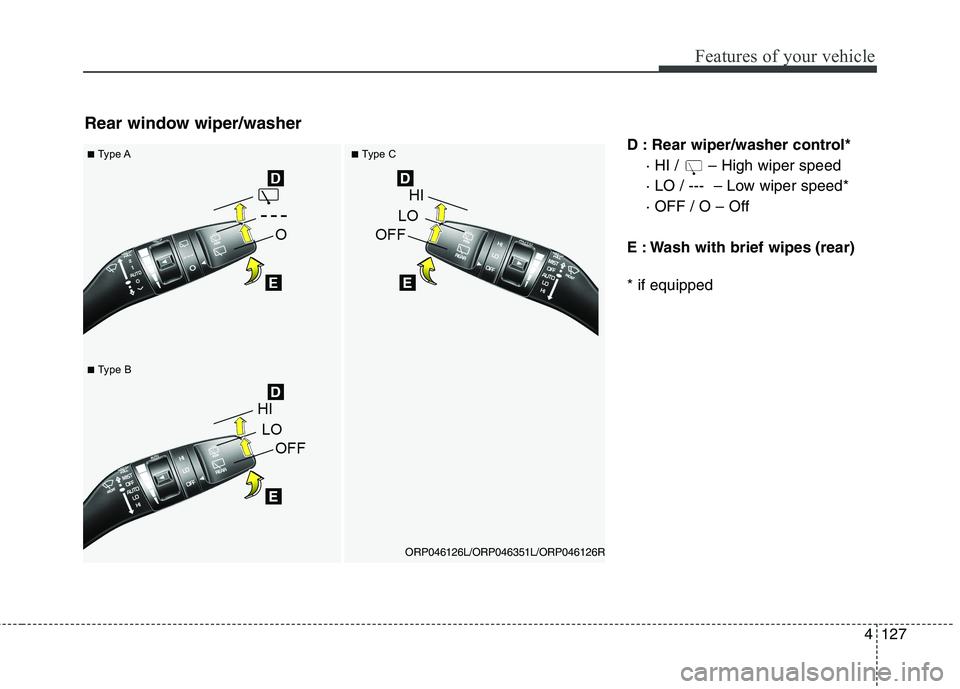
D : Rear wiper/washer control*· HI / – High wiper speed
· LO / --- – Low wiper speed*· OFF / O – Off
E : Wash with brief wipes (rear) * if equipped
Rear window wiper/washer
■ Type A■Type C
ORP046126L/ORP046351L/ORP046126R
■Type B