mirror KIA CARENS RHD 2017 Owner's Manual
[x] Cancel search | Manufacturer: KIA, Model Year: 2017, Model line: CARENS RHD, Model: KIA CARENS RHD 2017Pages: 723, PDF Size: 40.8 MB
Page 512 of 723
677
Driving your vehicle
DRIVER'S ATTENTION
The driver must be cautious in the
below situations for the system may
not assist the driver and may not
work properly.
Do not stick or attach anything tothe windscreen in front of the cam-
era as this may reduce effective-ness or cause one more of the sys-
tems dependent on the camera to
stop working.
Keep the windscreen in the area behind the interior rear view mirrorclean.
Do not place reflective materials, such as white paper or a mirror, on
the instrument panel.
Do not strike or damage the areas around the camera unit.
Do not touch the camera lens or remove the screw located on the
camera unit. The system does not work in all sit-
uations but is designed merely as a
supplementary aid.
The system assists the driver and does not replace the human eye.
The driver always bears ultimate responsibility for ensuring that the
vehicle is driven safely and that
applicable road traffic rules and
regulations are followed.
Page 516 of 723
681
Driving your vehicle
The LDWS does not operate when:
The driver turns on the turn signalor hazard warning flasher to
change lane.
Driving on the lane line.
✽✽ NOTICE
To change lane, operate the turn sig-
nal switch, then change the lane.
The LDWS may not warn you
even if the vehicle leaves the
lane, or may warn you even if
the vehicle does not leave thelane when:
The lane is not visible due to snow, rain, stain, a puddle or many other
things.
The brightness of the outside changes suddenly.
Not turning on the headlight even at night or in the tunnel.
Difficult to distinguish the colour of the lane from the road.
Driving on a steep grade or a curve.
Light reflects from the water on the road.
The lens or windscreen is stained with foreign matter.
The sensor can not detect the lane because of fog, heavy rain or
heavy snow.
The surrounding temperature of the inside rear view mirror is high
due to a direct ray of light.
The lane is very wide or narrow. The lane line is damaged or indis-
tinct.
The shadow is on the lane line by a median strip.
There is a mark similar to a lane line.
There is a boundary structure.
The distance from vehicle ahead is very short or the vehicle ahead
hides the lane line.
The vehicle shakes heavily.
The lane number increases or decreases or the lane lines are
crossing complicatedly.
Putting something on the dash- board.
Driving with the sun in front of you.
Driving in areas under construc- tion.
The lane line is more than two in either side (Left/Right).
Page 518 of 723
683
Driving your vehicle
BSD (Blind Spot Detection) /
LCA (Lane Change Assist)
Operating conditions
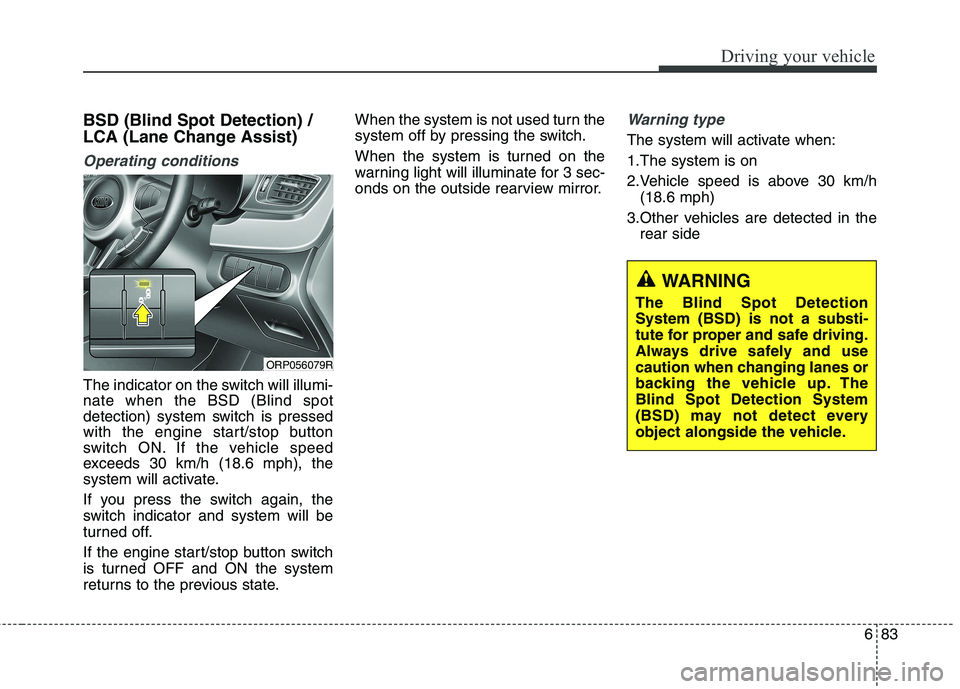
The indicator on the switch will illumi- nate when the BSD (Blind spot
detection) system switch is pressed
with the engine start/stop button
switch ON. If the vehicle speed
exceeds 30 km/h (18.6 mph), the
system will activate.
If you press the switch again, the
switch indicator and system will be
turned off.
If the engine start/stop button switch
is turned OFF and ON the system
returns to the previous state.When the system is not used turn the
system off by pressing the switch.
When the system is turned on the
warning light will illuminate for 3 sec-
onds on the outside rearview mirror.
Warning type
The system will activate when:
1.The system is on
2.Vehicle speed is above 30 km/h
(18.6 mph)
3.Other vehicles are detected in the rear side
ORP056079R
WARNING
The Blind Spot Detection System (BSD) is not a substi-
tute for proper and safe driving.
Always drive safely and use
caution when changing lanes or
backing the vehicle up. TheBlind Spot Detection System
(BSD) may not detect every
object alongside the vehicle.
Page 519 of 723
Driving your vehicle
84
6
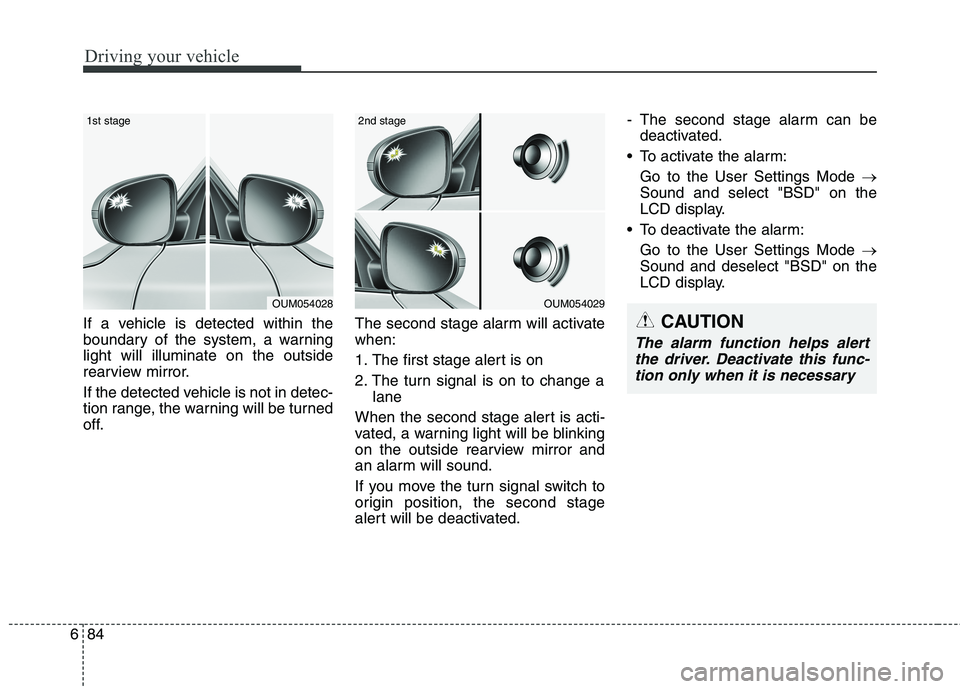
If a vehicle is detected within the
boundary of the system, a warninglight will illuminate on the outside
rearview mirror.
If the detected vehicle is not in detec-
tion range, the warning will be turned
off. The second stage alarm will activatewhen:
1. The first stage alert is on
2. The turn signal is on to change a
lane
When the second stage alert is acti-
vated, a warning light will be blinking
on the outside rearview mirror and
an alarm will sound.
If you move the turn signal switch to
origin position, the second stage
alert will be deactivated. - The second stage alarm can be
deactivated.
To activate the alarm:
Go to the User Settings Mode
Sound and select "BSD" on the
LCD display.
To deactivate the alarm: Go to the User Settings Mode
Sound and deselect "BSD" on the
LCD display.
OUM054028
1st stage
OUM054029
2nd stage
CAUTION
The alarm function helps alert
the driver. Deactivate this func-tion only when it is necessary
Page 522 of 723
687
Driving your vehicle
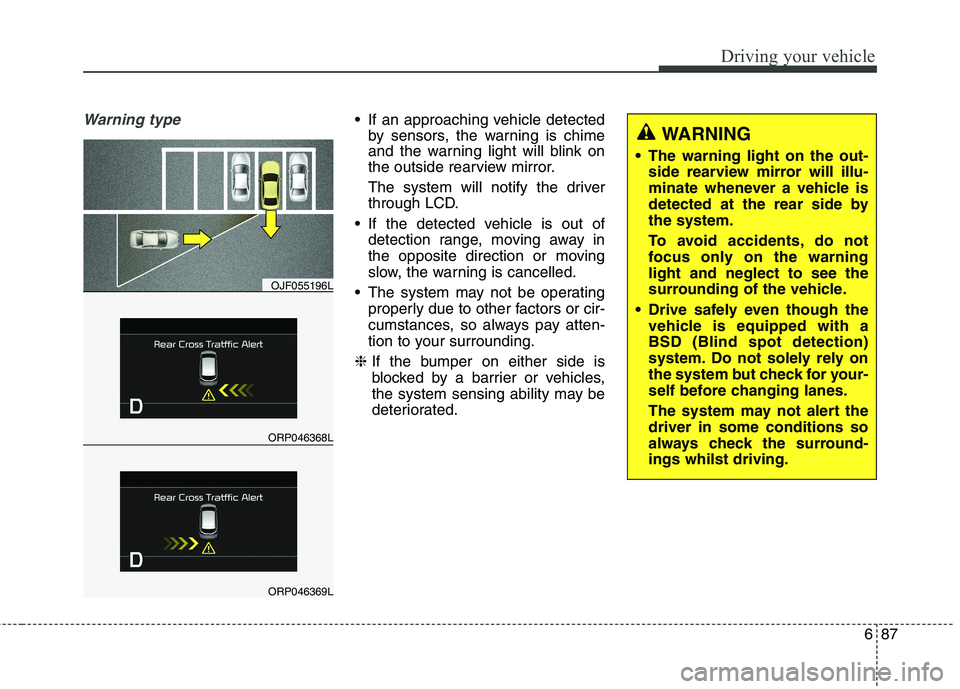
Warning type If an approaching vehicle detectedby sensors, the warning is chime
and the warning light will blink on
the outside rearview mirror.
The system will notify the driver
through LCD.
If the detected vehicle is out of detection range, moving away in
the opposite direction or moving
slow, the warning is cancelled.
The system may not be operating properly due to other factors or cir-
cumstances, so always pay atten-
tion to your surrounding.
❈ If the bumper on either side is
blocked by a barrier or vehicles,
the system sensing ability may be
deteriorated.
ORP046368L
OJF055196L
ORP046369L
WARNING
The warning light on the out- side rearview mirror will illu-
minate whenever a vehicle is
detected at the rear side bythe system.
To avoid accidents, do not
focus only on the warninglight and neglect to see the
surrounding of the vehicle.
Drive safely even though the vehicle is equipped with aBSD (Blind spot detection)
system. Do not solely rely on
the system but check for your-
self before changing lanes.
The system may not alert the driver in some conditions so
always check the surround-ings whilst driving.
Page 523 of 723
Driving your vehicle
88
6
Non-operating condition
Outside rearview mirror may not
alert the driver when:
- The outside rearview mirror housing
is damaged or covered with debris.
- The window is covered with debris.
- The windows are severely tinted. Driver's Attention
The driver must be cautious in the
below situations, because the sys-
tem may not detect other vehicles
or objects in certain circumstances.
- The vehicle drives on a curved
road or through a tollgate.
- The sensor is polluted with rain, snow, mud, etc.
- The rear bumper, in which the sensor is located, is covered or
blocked with a foreign matter
such as a sticker, a bumper
guard, a bicycle stand, etc.
- The rear bumper is damaged, or the sensor is out of the originaldefault position.
- The vehicle height gets lower or higher due to heavy loading in a
trunk, abnormal tyre pressure,etc.
- The vehicle drives in a bad weather such as heavy rain or
snow.
(Continued)CAUTION
The system may not work prop-erly if the bumper has beenreplaced or if a repair work hasbeen done near the sensor.
The detection area differs according to the roads width.If the road is narrow the sys- tem may detect other vehiclesin the second next lane.
On the contrary, if the road is very wide the system may notdetect other vehicles in the next lane.
The system might be turned off due to strong electromag-netic waves.
Page 528 of 723
693
Driving your vehicle
✽✽NOTICE
The ESC system should be turned
OFF prior to rocking the vehicle.
Smooth cornering
Avoid braking or gear changing in
corners, especially when roads are
wet. Ideally, corners should always
be taken under gentle acceleration. If
you follow these suggestions, tyre
wear will be held to a minimum. Driving at night
Because night driving presents more
hazards than driving in the daylight,
here are some important tips to
remember:
Slow down and keep more distance between you and other vehicles, as
it may be more difficult to see atnight, especially in areas where
there may not be any street lights.
Adjust your mirrors to reduce the glare from other driver's headlights.WARNING - Spinning
tyres
Do not spin the wheels, espe-
cially at speeds more than 56
km/h (35 mph). Spinning thewheels at high speeds when the
vehicle is stationary could
cause a tyre to overheat which
could result in tyre damage that
may injure bystanders.WARNING
If your vehicle becomes stuck in
snow, mud, sand, etc., then you
may attempt to rock the vehicle
free by moving it forward and
backward. Do not attempt this
procedure if people or objects
are anywhere near the vehicle.
During the rocking operation
the vehicle may suddenly move
forward or backward as it
becomes unstuck, causing
injury or damage to nearby peo-ple or objects.
Page 538 of 723
6103
Driving your vehicle
Loading the trailer
The weight distribution between the
car and trailer should be balanced.
Make sure that the load in the trailer
is equally distributed and it is not
front-heavy or tail-heavy.
The heavy load in the trailer should
be placed above the axle or as close
as possible to the axle. And, secure
loads properly on the trailer.
Tyre pressure
Follow the trailer manufacturer’s tyre
pressure recommendations for the
trailer tyres.
When towing, inflate tyres in vehicle
to the maximum permissible pres-
sure referring to the tyre pressurelabel.Driving with a trailer
Towing a trailer requires a certain
amount of experience. Before setting
out for the open road, you must get to
know your trailer. Acquaint yourself
with the feel of handling and braking
with the added weight of the trailer.
And always keep in mind that the
vehicle you are driving is now a good
deal longer and not nearly so respon-
sive as your vehicle is by itself.
Before you start, check the trailer
hitch and platform, safety chains,
electrical connector(s), lights, tyres
and mirror adjustment. If the trailer
has electric brakes, start your vehicle
and trailer moving and then apply the
trailer brake controller by hand to be
sure the brakes are working. This lets
you check your electrical connection
at the same time.
During your trip, check occasionally
to be sure that the load is secure,
and that the lights and any trailer
brakes are still working.Following distance
Stay at least twice as far behind the
vehicle ahead as you would when
driving your vehicle without a trailer.
This can help you avoid situations
that require heavy braking and sud-
den turns.
Passing
You’ll need more passing distance
up ahead when you’re towing a trail-
er. And, because of the increased
vehicle length, you’ll need to go
much farther beyond the passed
vehicle before you can return to your
lane.
Page 657 of 723
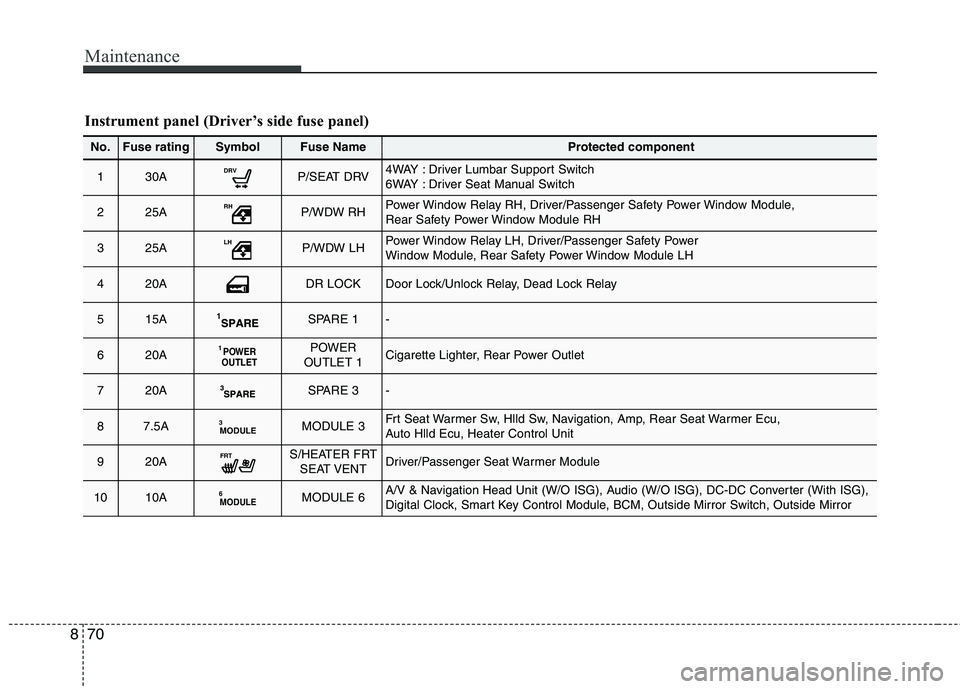
Maintenance
70
8
Instrument panel (Driver’s side fuse panel)
No.Fuse ratingSymbolFuse NameProtected component
130ADRVP/SEAT DRV4WAY : Driver Lumbar Support Switch
6WAY : Driver Seat Manual Switch
225ARHP/WDW RHPower Window Relay RH, Driver/Passenger Safety Power Window Module,
Rear Safety Power Window Module RH
325ALHP/WDW LHPower Window Relay LH, Driver/Passenger Safety Power
Window Module, Rear Safety Power Window Module LH
420ADR LOCKDoor Lock/Unlock Relay, Dead Lock Relay
515ASPARE 1-
620APOWER
OUTLET1POWER
OUTLET 1Cigarette Lighter, Rear Power Outlet
720ASPARE 3-
87.5AMODULE3MODULE 3Frt Seat Warmer Sw, Hlld Sw, Navigation, Amp, Rear Seat Warmer Ecu,
Auto Hlld Ecu, Heater Control Unit
920AFRTS/HEATER FRT SEAT VENTDriver/Passenger Seat Warmer Module
1010AMODULE6MODULE 6A/V & Navigation Head Unit (W/O ISG), Audio (W/O ISG), DC-DC Converter (With ISG),
Digital Clock, Smart Key Control Module, BCM, Outside Mirror Switch, Outside Mirror
Page 658 of 723
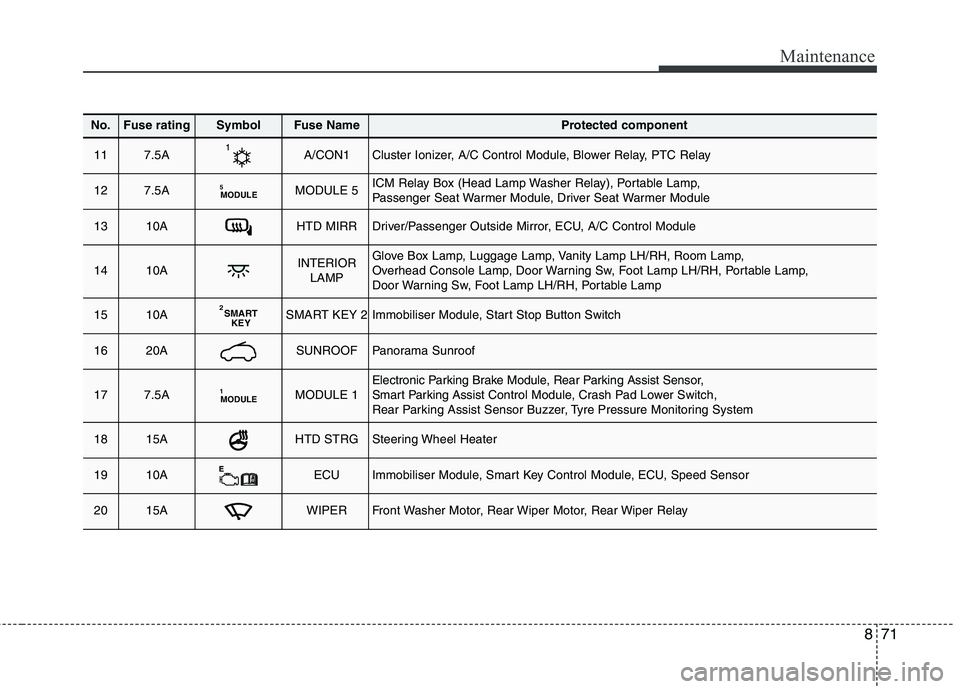
871
Maintenance
No.Fuse ratingSymbolFuse NameProtected component
117.5AA/CON1Cluster Ionizer, A/C Control Module, Blower Relay, PTC Relay
127.5AMODULE
5MODULE 5ICM Relay Box (Head Lamp Washer Relay), Portable Lamp,
Passenger Seat Warmer Module, Driver Seat Warmer Module
1310AHTD MIRRDriver/Passenger Outside Mirror, ECU, A/C Control Module
1410AINTERIOR
LAMPGlove Box Lamp, Luggage Lamp, Vanity Lamp LH/RH, Room Lamp,
Overhead Console Lamp, Door Warning Sw, Foot Lamp LH/RH, Portable Lamp,
Door Warning Sw, Foot Lamp LH/RH, Portable Lamp
1510ASMARTKEY
2SMART KEY 2Immobiliser Module, Start Stop Button Switch
1620ASUNROOFPanorama Sunroof
177.5AMODULE1MODULE 1Electronic Parking Brake Module, Rear Parking Assist Sensor,
Smart Parking Assist
Control Module, Crash Pad Lower Switch,
Rear Parking Assist Sensor Buzzer, Tyre Pressure Monitoring System
1815AHTD STRGSteering Wheel Heater
1910AECUImmobiliser Module, Smart Key Control Module, ECU, Speed Sensor
2015AWIPERFront Washer Motor, Rear Wiper Motor, Rear Wiper Relay