key KIA CARENS RHD 2017 Manual Online
[x] Cancel search | Manufacturer: KIA, Model Year: 2017, Model line: CARENS RHD, Model: KIA CARENS RHD 2017Pages: 723, PDF Size: 40.8 MB
Page 335 of 723
![KIA CARENS RHD 2017 Manual Online Audio system
52
5
Phone MENU (for RDS model)
Press the key to display three
menus (Call History, Phone Book,Phone Setup).
Call history
Press the key Set [
History] through the TUNE knob
or key](/img/2/57939/w960_57939-334.png "KIA CARENS RHD 2017 Manual Online Audio system
52
5
Phone MENU (for RDS model)
Press the key to display three
menus (Call History, Phone Book,Phone Setup).
Call history
Press the key Set [
History] through the TUNE knob
or key")
Audio system
52
5
Phone MENU (for RDS model)
Press the key to display three
menus (Call History, Phone Book,Phone Setup).
Call history
Press the key Set [
History] through the TUNE knob
or key.
The call history is displayed and can
be used to select a number and
make a call.
If call history does not exist, a screen
asking whether to download call his-
tory is displayed. (The download fea-
ture may not be supported in somemobile phones) Phone Book
Press the key Set [ P.
Book] through the TUNE knob or
key.
The phone book is displayed and
can be used to select a number and
make a call. ❈ If more than one number is saved to one contact, then a screen
showing the mobile phone num-
ber, Home and office number is
displayed. Select the desired num-
ber to make the call.
❈ If phone book do not exist, a
screen asking whether to down-
load phone book is displayed.
(The download feature may not be
supported in some mobilephones) Phone Setup
Press the key Set [ Setup]
through the TUNE knob or
key. The
Bluetooth®Wireless Technology
mobile phone setup screen is dis-
played. For more information, refer to“Phone Setup”.
3
PHONE
2 RDM
PHONE
1 RPT
PHONE
PHONE
Page 336 of 723
![KIA CARENS RHD 2017 Manual Online 553
Audio system
Phone MENU
Press the key to display three
menus (Call History, Contacts,Phone Setup).
Call history
Press the key Set [
History] through the TUNE knob
or key.
The call history](/img/2/57939/w960_57939-335.png "KIA CARENS RHD 2017 Manual Online 553
Audio system
Phone MENU
Press the key to display three
menus (Call History, Contacts,Phone Setup).
Call history
Press the key Set [
History] through the TUNE knob
or key.
The call history")
553
Audio system
Phone MENU
Press the key to display three
menus (Call History, Contacts,Phone Setup).
Call history
Press the key Set [
History] through the TUNE knob
or key.
The call history is displayed and can
be used to select a number and
make a call.
If call history does not exist, a screen
asking whether to download call his-
tory is displayed. (The download fea-
ture may not be supported in somemobile phones)Contacts
Press the key Set [ Contacts
] through the TUNE knob
or key.
The Contacts are displayed and can
be used to select a number and
make a call. ❈ If more than one number is saved to
one contact, then a screen showing
the mobile phone number, Home and
office number is displayed. Select the
desired number to make the call.
❈ If Contacts do not exist, a screen ask-
ing whether to download Contacts is
displayed. (The download feature may
not be supported in some mobilephones) Phone Setup
Press the key Set [
Setup] through the TUNE knob or
key.
The
Bluetooth®Wireless Technology
mobile phone setup screen is dis-
played. For more information, refer to“Phone Setup”.
3
PHONE
2 RDM
PHONE
1 RPT
PHONE
PHONE
Page 340 of 723
![KIA CARENS RHD 2017 Manual Online 557
Audio system
VOICE COMMAND (if equipped)
Starting Voice Command
press the key on the steering
wheel remote controller.
Mode], then the system will say
“Please say a command. Beep”
❈](/img/2/57939/w960_57939-339.png "KIA CARENS RHD 2017 Manual Online 557
Audio system
VOICE COMMAND (if equipped)
Starting Voice Command
press the key on the steering
wheel remote controller.
Mode], then the system will say
“Please say a command. Beep”
❈")
557
Audio system
VOICE COMMAND (if equipped)
Starting Voice Command
press the key on the steering
wheel remote controller.
Mode], then the system will say
“Please say a command. Beep”
❈ If voice command is in [ExpertMode], then the system will only
say a “Beep-”
❈ Setting Voice command [Normal
Mode]/[Expert Mode]:
Press the key Select
[System] through the TUNE
knob or key Select [VoiceCommand Mode] through the
TUNE knob Set [Normal
Mode]/[Expert Mode]
✽✽ NOTICE
For proper voice recognition, say the
voice command after the guidance
message and the “Beep” sound.
Skipping the Guidance
Message Whilst the guidance message is
being stated, shortly press the
key (under 0.8 seconds) to discontin-ue the guidance message and soundthe “beep”.
After the “beep”, say the voice com- mand. Ending Voice Command
and hold the key (over 0.8 sec-
onds) to end voice command.
pressing the steering wheel remote
controller or a different key will end
voice command.
ing for your voice command, say
“cancel” or “end” to end voice com-mand.
ing for your voice command, short-
ly press the key (under 0.8 sec-
onds) to end voice command.
5
SETUP
Page 341 of 723
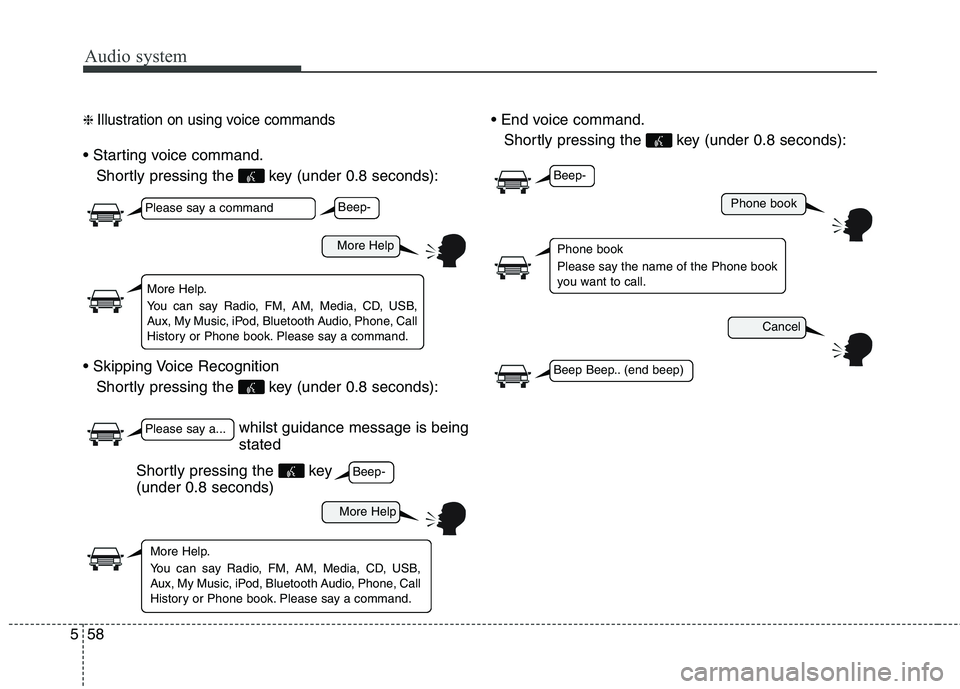
Audio system
58
5
❈ Illustration on using voice commands
Shortly pressing the key (under 0.8 seconds):
Shortly pressing the key (under 0.8 seconds):
Shortly pressing the key (under 0.8 seconds):
whilst guidance message is being stated
More Help
Phone book
Cancel
More Help
Please say a command
Please say a...
More Help.
You can say Radio, FM, AM, Media, CD, USB,
Aux, My Music, iPod, Bluetooth Audio, Phone, Call
History or Phone book. Please say a command.
Phone book
Please say the name of the Phone book
you want to call.
More Help.
You can say Radio, FM, AM, Media, CD, USB,
Aux, My Music, iPod, Bluetooth Audio, Phone, Call
History or Phone book. Please say a command.
Beep-
Beep-
Beep-
Beep Beep.. (end beep)
Shortly pressing the key (under 0.8 seconds)
Page 348 of 723
565
Audio system
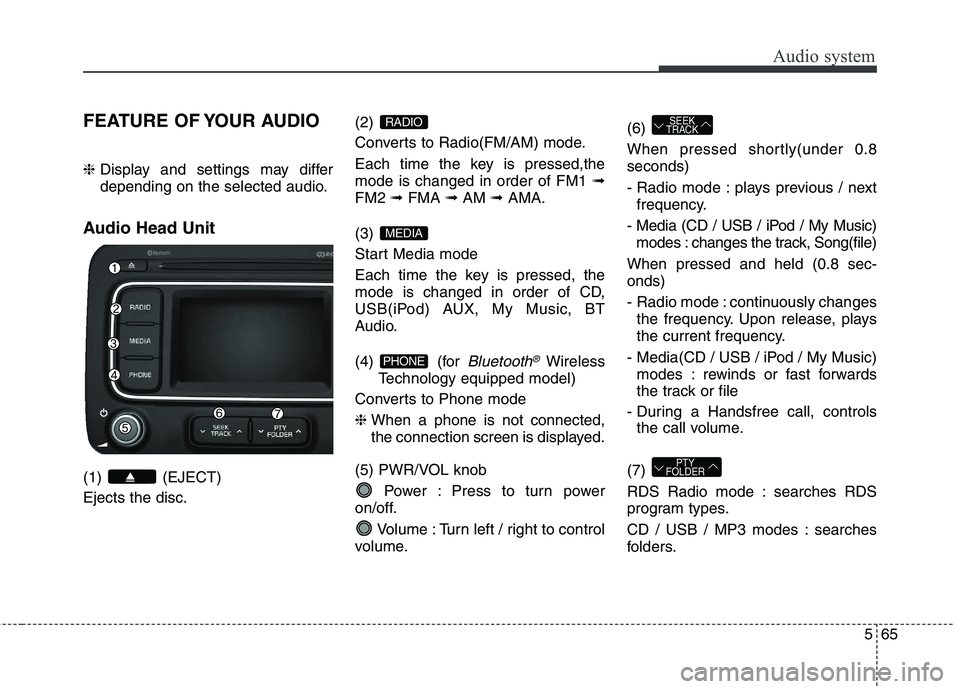
FEATURE OF YOUR AUDIO ❈ Display and settings may differ
depending on the selected audio.
Audio Head Unit (1) (EJECT) Ejects the disc. (2)
Converts to Radio(FM/AM) mode.
Each time the key is pressed,the mode is changed in order of FM1
➟
FM2 ➟FMA ➟AM ➟AMA.
(3)
Start Media mode
Each time the key is pressed, the
mode is changed in order of CD,
USB(iPod) AUX, My Music, BT
Audio.
(4) (for
Bluetooth®Wireless
Technology equipped model)
Converts to Phone mode ❈ When a phone is not connected,
the connection screen is displayed.
(5) PWR/VOL knob Power : Press to turn power
on/off.
Volume : Turn left / right to control
volume. (6)
When pressed shortly(under 0.8 seconds)
- Radio mode : plays previous / next
frequency.
- Media (CD / USB / iPod / My Music) modes : changes the track, Song(file)
When pressed and held (0.8 sec- onds)
- Radio mode : continuously changes the frequency. Upon release, plays
the current frequency.
- Media(CD / USB / iPod / My Music) modes : rewinds or fast forwards
the track or file
- During a Handsfree call, controls the call volume.
(7)
RDS Radio mode : searches RDS
program types.
CD / USB / MP3 modes : searches
folders.
PTY
FOLDER
SEEK
TRACK
PHONE
MEDIA
RADIO
Page 349 of 723
Audio system
66
5
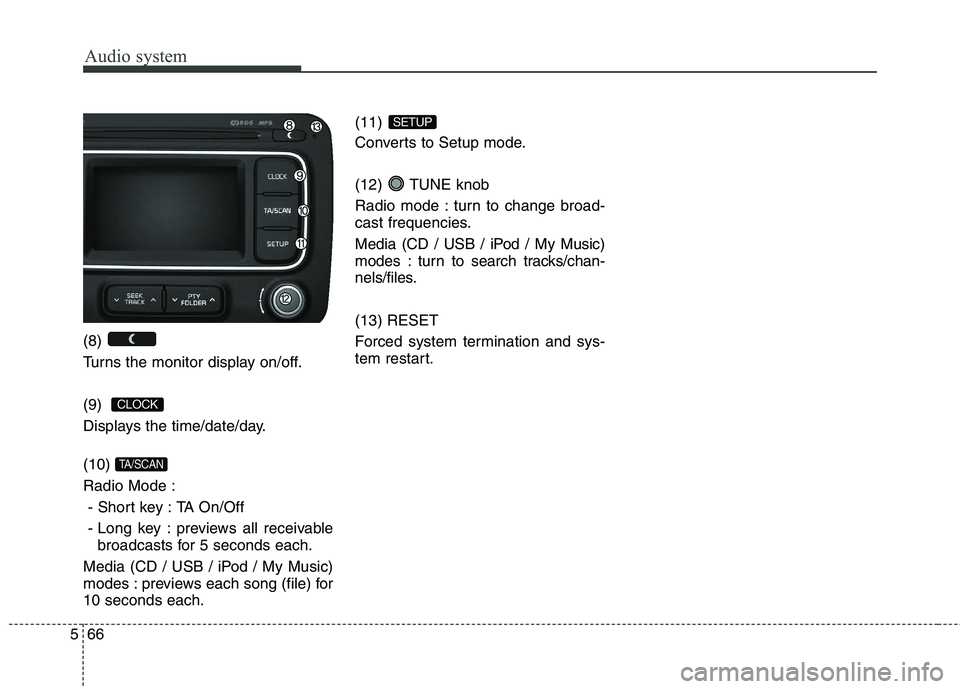
(8)
Turns the monitor display on/off. (9)
Displays the time/date/day. (10) Radio Mode :
- Short key : TA On/Off
- Long key : previews all receivable broadcasts for 5 seconds each.
Media (CD / USB / iPod / My Music)
modes : previews each song (file) for10 seconds each. (11)
Converts to Setup mode.
(12) TUNE knob
Radio mode : turn to change broad-
cast frequencies.
Media (CD / USB / iPod / My Music)
modes : turn to search tracks/chan-
nels/files. (13) RESET
Forced system termination and sys-
tem restart.
SETUP
TA/SCAN
CLOCK
Page 351 of 723
Audio system
68
5
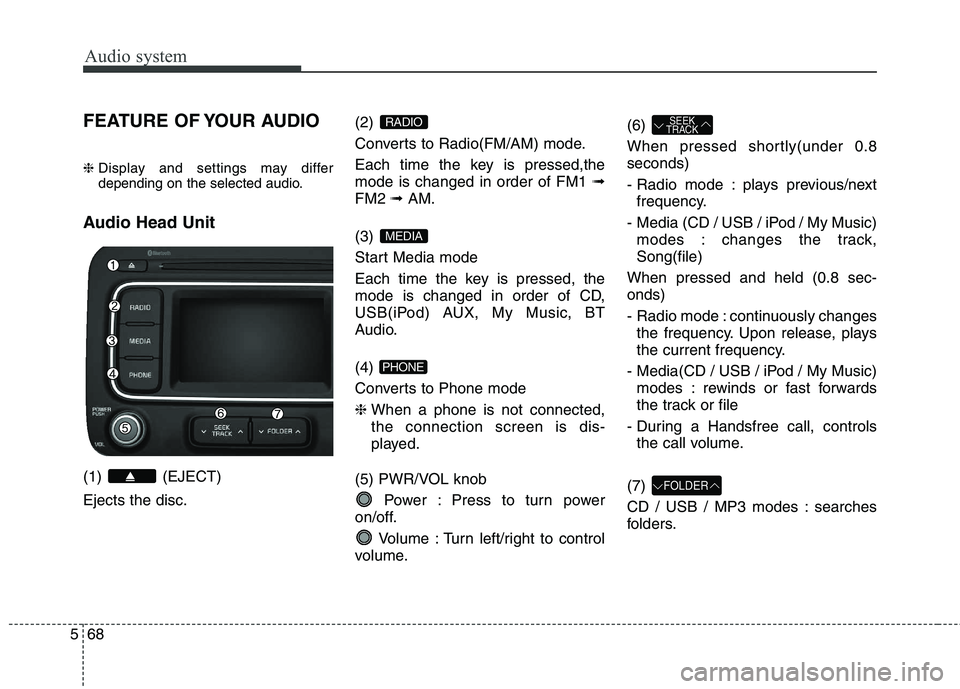
FEATURE OF YOUR AUDIO ❈ Display and settings may differ
depending on the selected audio.
Audio Head Unit (1) (EJECT) Ejects the disc. (2)
Converts to Radio(FM/AM) mode.
Each time the key is pressed,the mode is changed in order of FM1
➟
FM2 ➟ AM.
(3)
Start Media mode
Each time the key is pressed, the
mode is changed in order of CD,
USB(iPod) AUX, My Music, BT
Audio. (4)
Converts to Phone mode❈ When a phone is not connected, the connection screen is dis-
played.
(5) PWR/VOL knob Power : Press to turn power
on/off.
Volume : Turn left/right to control
volume. (6)
When pressed shortly(under 0.8 seconds)
- Radio mode : plays previous/next
frequency.
- Media (CD / USB / iPod / My Music) modes : changes the track, Song(file)
When pressed and held (0.8 sec-onds)
- Radio mode : continuously changes the frequency. Upon release, plays
the current frequency.
- Media(CD / USB / iPod / My Music) modes : rewinds or fast forwards
the track or file
- During a Handsfree call, controls the call volume.
(7)
CD / USB / MP3 modes : searches
folders.
FOLDER
SEEK
TRACK
PHONE
MEDIA
RADIO
Page 353 of 723
Audio system
70
5
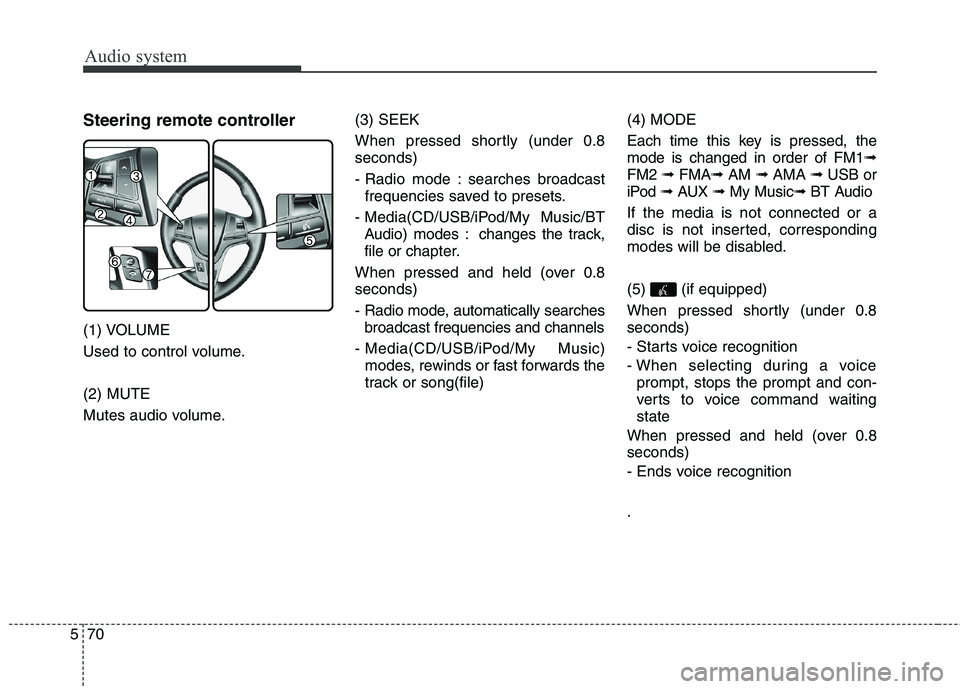
Steering remote controller
(1) VOLUME
Used to control volume. (2) MUTE
Mutes audio volume. (3) SEEK
When pressed shortly (under 0.8 seconds)
- Radio mode : searches broadcast
frequencies saved to presets.
- Media(CD/USB/iPod/My Music/BT Audio) modes : changes the track, file or ch apter.
When pressed and held (over 0.8seconds)
- Radio mode, automatically searches broadcast frequencies and channels
- Media(CD/USB/iPod/My Music) modes, rewinds or fast forwards the
track or song(file) (4) MODE
Each time this key is pressed, the mode is changed in order of FM1
➟
FM2 ➟ FMA ➟AM ➟ AMA ➟ USB or
iPod ➟ AUX ➟ My Music ➟ BT Audio
If the media is not connected or a
disc is not inserted, corresponding
modes will be disabled. (5) (if equipped)
When pressed shortly (under 0.8 seconds)
- Starts voice recognition
- When selecting during a voice prompt, stops the prompt and con-
verts to voice command waitingstate
When pressed and held (over 0.8seconds)
- Ends voice recognition .
Page 355 of 723
Audio system
72
5
RADIO MODE
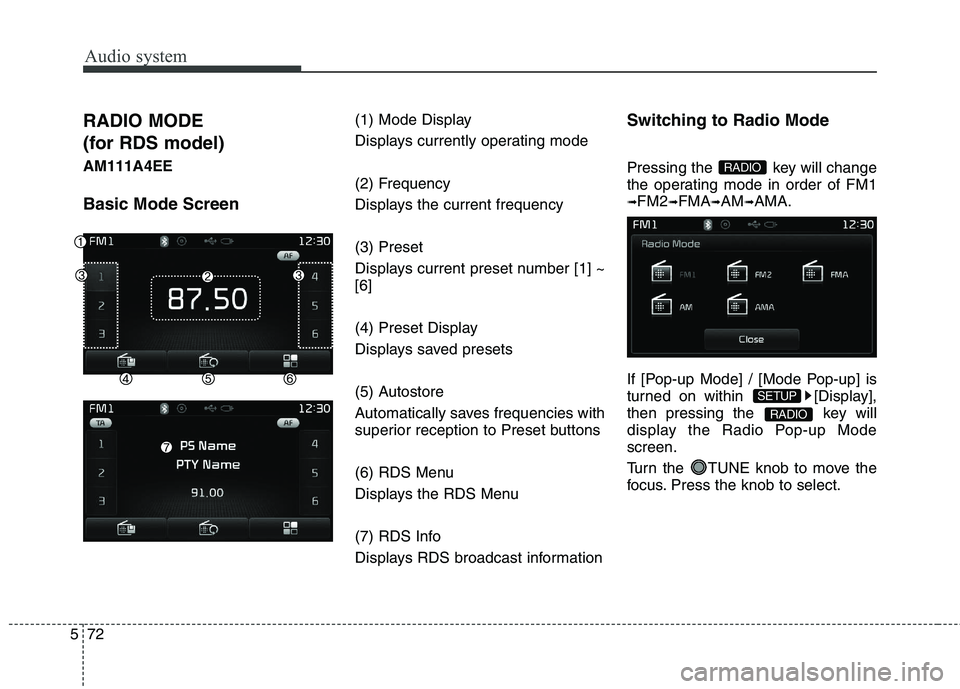
(for RDS model)AM111A4EE Basic Mode Screen (1) Mode Display
Displays currently operating mode
(2) Frequency
Displays the current frequency (3) Preset
Displays current preset number [1] ~ [6]
(4) Preset Display
Displays saved presets
(5) Autostore
Automatically saves frequencies with
superior reception to Preset buttons
(6) RDS Menu
Displays the RDS Menu
(7) RDS Info
Displays RDS broadcast informationSwitching to Radio Mode
Pressing the key will change
the operating mode in order of FM1➟
FM2 ➟FMA ➟AM ➟AMA.
If [Pop-up Mode] / [Mode Pop-up] is
turned on within [Display],
then pressing the key will
display the Radio Pop-up Modescreen.
Turn the TUNE knob to move the
focus. Press the knob to select.
RADIO
SETUP
RADIO
Page 356 of 723
573
Audio system
Searching Radio Frequencies
Using Seek
Press the key to play the
previous/next frequency.
Using TUNE
Turn the TUNE knob to select the
desired frequency.
FM : Increases/decreased by 50kHz
AM : Increases/decreased by 9kHzUsing Radio Mode
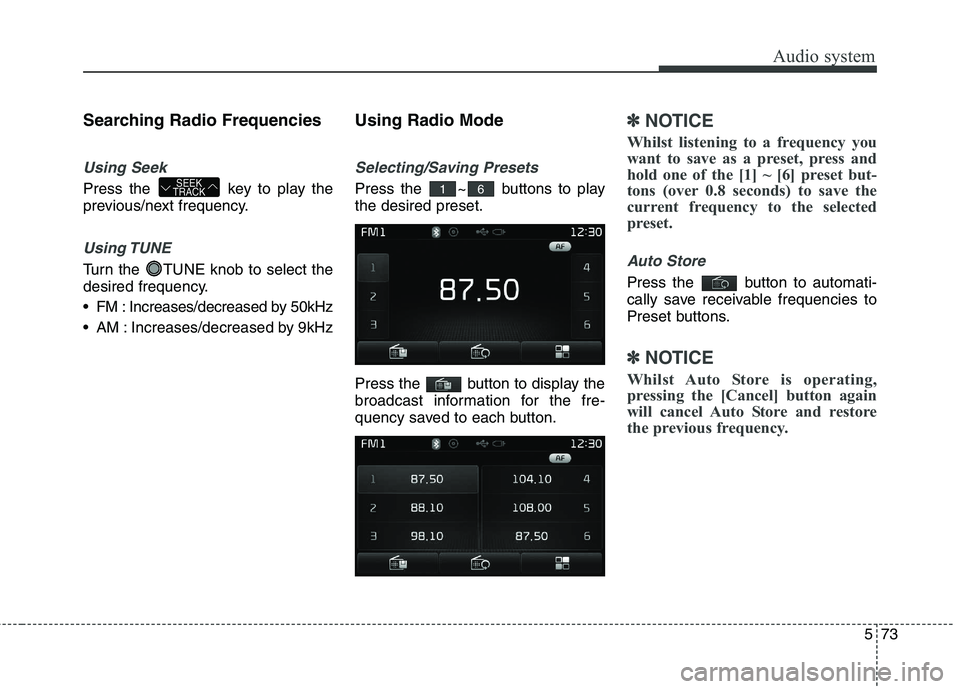
Selecting/Saving Presets
Press the ~ buttons to play the desired preset.
Press the button to display the
broadcast information for the fre-
quency saved to each button.
✽✽
NOTICE
Whilst listening to a frequency you
want to save as a preset, press and
hold one of the [1] ~ [6] preset but-
tons (over 0.8 seconds) to save the
current frequency to the selected
preset.
Auto Store
Press the button to automati-
cally save receivable frequencies to
Preset buttons.
✽✽ NOTICE
Whilst Auto Store is operating,
pressing the [Cancel] button again
will cancel Auto Store and restore
the previous frequency.
61SEEK
TRACK