change wheel KIA CARENS RHD 2017 Owners Manual
[x] Cancel search | Manufacturer: KIA, Model Year: 2017, Model line: CARENS RHD, Model: KIA CARENS RHD 2017Pages: 723, PDF Size: 40.8 MB
Page 25 of 723

37
Safety features of your vehicle
3. To use the front passenger’s seat,lift and pull the seatback backward
by pulling on the folding lever.
Pull the seatback firmly until it
clicks into place. Make sure the
seatback is locked in place.Seat cushion height (if equipped)
To change the height of the seat
cushion, push the lever upwards or
downwards.
To lower the seat cushion, push down the lever several times.
To raise the seat cushion, pull up the lever several times. Front seat adjustment - power (if equipped)
The driver’s seat can be adjusted by
using the control switches located onthe outside of the seat cushion.
Before driving, adjust the seat to theproper position so as to easily con-
trol the steering wheel, pedals and
switches on the instrument panel.
WARNING
Do not fold the front passen- ger’s seat, if the occupants in
the 2nd row centre and front
passenger’s side seats. It may
cause the injury to occupants
by the seat device.
Be careful not to pinch your hands or fingers on the seat
device, when you fold or unfold.
ORP036004R
WARNING
The power seat is operable with
the ignition OFF.
Therefore, children should never
be left unattended in the car.
Page 144 of 723
Features of your vehicle
48
4
STEERING WHEEL
Electronic power steering (EPS)
Power steering uses the motor to
assist you in steering the vehicle. If
the engine is off or if the power steer-
ing system becomes inoperative, the
vehicle may still be steered, but it will
require increased steering effort.
The motor driven power steering is
controlled by the power steering con-
trol unit which senses the steering
wheel torque and vehicle speed to
command the motor.
The steering wheel becomes heavier
as the vehicle’s speed increases and
becomes lighter as the vehicle’s
speed decreases for better control of
the steering wheel.
Should you notice any change in the
effort required to steer during normal
vehicle operation, we recommend
that the system be checked by an
authorised Kia dealer.
✽✽ NOTICE
The following symptoms may occur
during normal vehicle operation:
The EPS warning light does not illuminate.
The steering effort is high immedi- ately after turning the ignition
switch on. This happens as the sys-
tem performs the EPS system diag-
nostics. When the diagnostics is
completed, the steering wheel will
return to its normal condition.
A click noise may be heard from the EPS relay after the ignition switch
is turned to the ON or LOCK/OFF
position.
Motor noise may be heard when the vehicle is at a stop or at a low driv-
ing speed.
The steering effort increases if the steering wheel is rotated continu-
ously when the vehicle is not in
motion. However, after a few min-
utes, it will return to its normal con-
ditions. (Continued)(Continued)
If an error is detected in the electric
power steering system, EPS will
stop assisting driver in steering the
vehicle to prevent accidents and the
warning light on the cluster will
illuminate or blink. We recom-
mend that the system be checked
by an authorised Kia dealer.
When you operate the steering wheel in low temperature, abnor-
mal noise could occur. If tempera-
ture rises, the noise will disappear.
This is a normal condition.
When the vehicle is stationary, if you turn the steering wheel all the
way to the left or right continuously,
the steering wheel becomes heavier
from the end. This is not a system
malfunction but for your safety. As
time passes, the steering wheel
returns to its normal condition.
When the charging system warn- ing light comes on or the voltage is
low (When the alternator (or bat-
tery) does not operate normally or
it malfunctions), the steering wheel
may get heavy and become diffi-
cult to control operate abnormally.
Page 145 of 723
449
Features of your vehicle
Tilt & telescopic steering
A tilt and telescopic steering wheel
allows you to adjust the steering
wheel before you drive. You can also
raise it to give your legs more room
when you exit and enter the vehicle.
The steering wheel should be posi-
tioned so that it is comfortable for
you to drive, whilst permitting you to
see the instrument panel warning
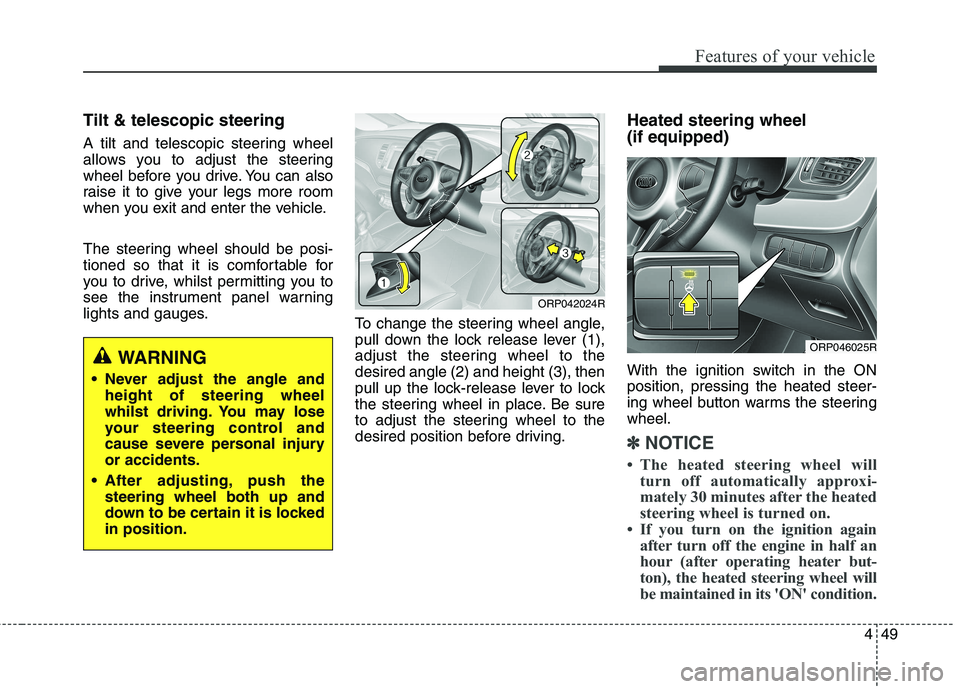
lights and gauges.To change the steering wheel angle,
pull down the lock release lever (1),
adjust the steering wheel to thedesired angle (2) and height (3), then
pull up the lock-release lever to lock
the steering wheel in place. Be sure
to adjust the steering wheel to the
desired position before driving.Heated steering wheel (if equipped)
With the ignition switch in the ON position, pressing the heated steer-
ing wheel button warms the steeringwheel.
✽✽
NOTICE
The heated steering wheel will turn off automatically approxi-
mately 30 minutes after the heated
steering wheel is turned on.
If you turn on the ignition again after turn off the engine in half an
hour (after operating heater but-
ton), the heated steering wheel will
be maintained in its 'ON' condition.
WARNING
Never adjust the angle and height of steering wheel
whilst driving. You may lose
your steering control and
cause severe personal injuryor accidents.
After adjusting, push the steering wheel both up and
down to be certain it is lockedin position.
ORP042024R
ORP046025R
Page 147 of 723
451
Features of your vehicle
FLEX STEER (if equipped)
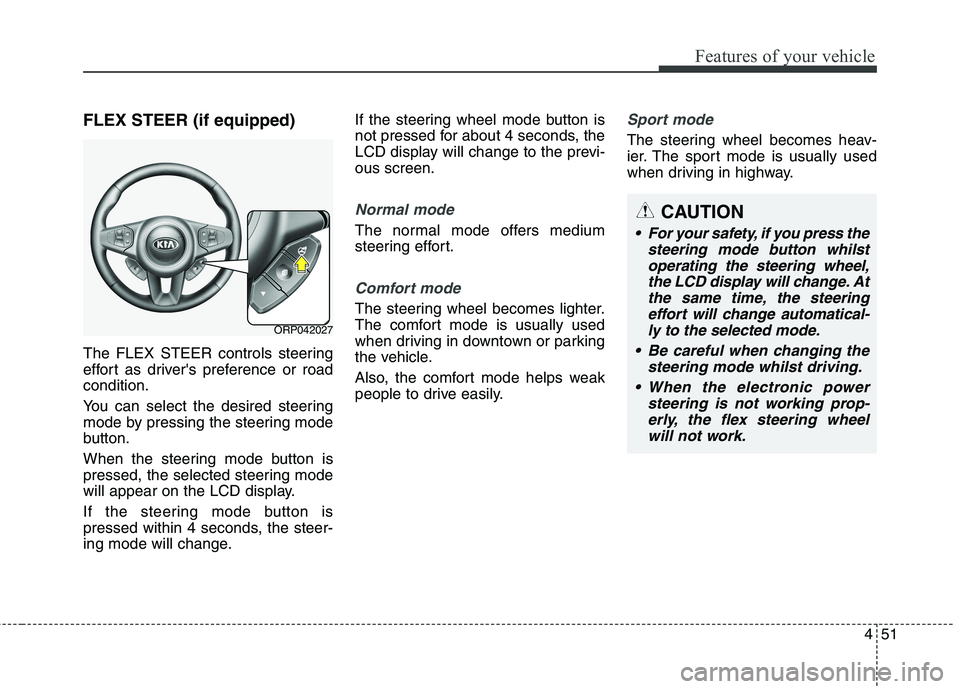
The FLEX STEER controls steering
effort as driver's preference or roadcondition.
You can select the desired steering
mode by pressing the steering mode
button.
When the steering mode button is
pressed, the selected steering mode
will appear on the LCD display.
If the steering mode button is
pressed within 4 seconds, the steer-
ing mode will change.If the steering wheel mode button is
not pressed for about 4 seconds, the
LCD display will change to the previ-ous screen.
Normal mode
The normal mode offers medium
steering effort.
Comfort mode
The steering wheel becomes lighter.
The comfort mode is usually used
when driving in downtown or parking
the vehicle.
Also, the comfort mode helps weak
people to drive easily.
Sport mode
The steering wheel becomes heav-
ier. The sport mode is usually used
when driving in highway.
ORP042027
CAUTION
For your safety, if you press the
steering mode button whilstoperating the steering wheel, the LCD display will change. Atthe same time, the steeringeffort will change automatical- ly to the selected mode.
Be careful when changing the steering mode whilst driving.
When the electronic power steering is not working prop-erly, the flex steering wheelwill not work.
Page 155 of 723
![KIA CARENS RHD 2017 Owners Manual 459
Features of your vehicle
LCD Display Control
The LCD display modes can be
changed by using the control buttons
on the steering wheel.
[Type A]
(1) : TRIP button for changing tripmodes
(2) :](/img/2/57939/w960_57939-154.png "KIA CARENS RHD 2017 Owners Manual 459
Features of your vehicle
LCD Display Control
The LCD display modes can be
changed by using the control buttons
on the steering wheel.
[Type A]
(1) : TRIP button for changing tripmodes
(2) :")
459
Features of your vehicle
LCD Display Control
The LCD display modes can be
changed by using the control buttons
on the steering wheel.
[Type A]
(1) : TRIP button for changing tripmodes
(2) : RESET button for resetting items [Type B]
(1) : MODE button for changing
modes or SELECT button
for setting the selected item
(2) : MOVE button for changing items or RESET button forresetting the selected item
❈ For the LCD modes, refer to “LCD
Display” in this chapter.
ORP042032
Page 168 of 723
Features of your vehicle
72
4
Warning Messages (if equipped)
Shift to "P" position (for smart key
system and automatic transaxle / dual clutch transmission)
This warning message illuminates if you try to turn off the engine without
the shift lever in P (Park) position.
At this time, the Engine Start/Stop Button turns to the ACC position (If
you press the Engine Start/Stop
Button once more, it will turn to theON position).
Low Key Battery
(for smart key system)
This warning message illuminates if the battery of the smart key is discharged when the Engine
Start/Stop Button changes to theOFF position.
Press start button whilst turn
steering (for smart key system)
This warning message illuminates if the steering wheel does not
unlock normally when the Engine
Start/Stop Button is pressed.
It means that you should press the Engine Start/Stop Button whilst
turning the steering wheel rightand left.
Steering wheel unlocked
(for smart key system)
This warning message illuminates if the steering wheel does not lock
when the Engine Start/Stop Buttonchanges to the OFF position.
Check steering wheel lock
system (for smart key system)
This warning message illuminates if the steering wheel does not lock
normally when the Engine
Start/Stop Button changes to theOFF position.
Press brake pedal to start engine
(for smart key system and auto- matic transaxle / dual clutchtransmission)
This warning message illuminates if the Engine Start/Stop Button
changes to the ACC position twice
by pressing the button repeatedly
without depressing the brake pedal.
It means that you should depress the brake pedal to start the engine.
Page 203 of 723
4107
Features of your vehicle
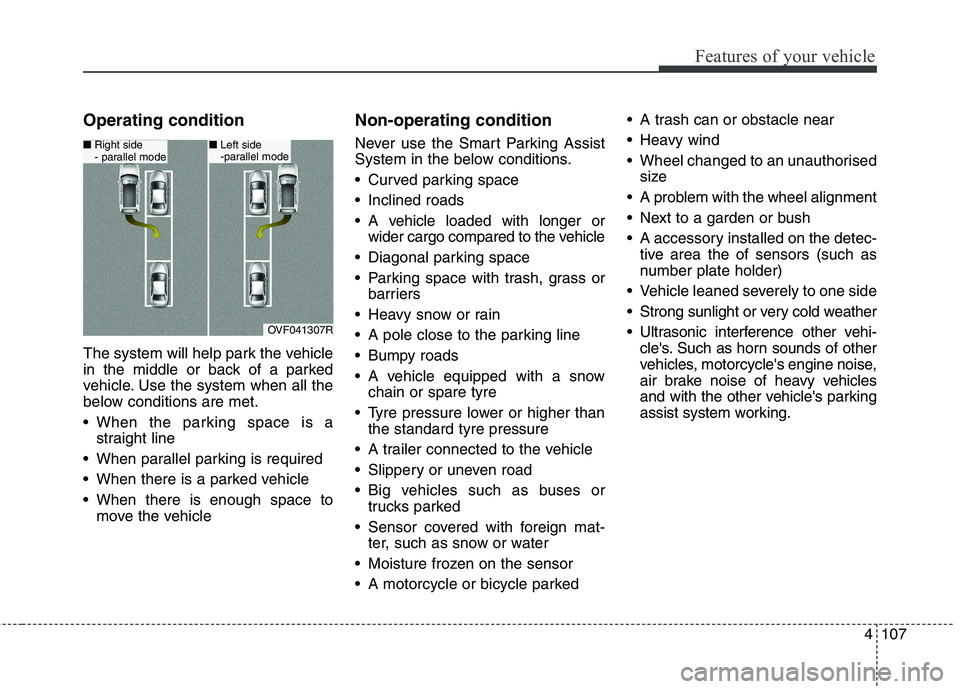
Operating condition
The system will help park the vehicle
in the middle or back of a parked
vehicle. Use the system when all the
below conditions are met.
When the parking space is astraight line
When parallel parking is required
When there is a parked vehicle
When there is enough space to move the vehicle Non-operating condition
Never use the Smart Parking Assist
System in the below conditions.
Curved parking space
Inclined roads
A vehicle loaded with longer or
wider cargo compared to the vehicle
Diagonal parking space
Parking space with trash, grass or barriers
Heavy snow or rain
A pole close to the parking line
Bumpy roads
A vehicle equipped with a snow chain or spare tyre
Tyre pressure lower or higher than the standard tyre pressure
A trailer connected to the vehicle
Slippery or uneven road
Big vehicles such as buses or trucks parked
Sensor covered with foreign mat- ter, such as snow or water
Moisture frozen on the sensor
A motorcycle or bicycle parked A trash can or obstacle near
Heavy wind
Wheel changed to an unauthorised
size
A problem with the wheel alignment
Next to a garden or bush
A accessory installed on the detec- tive area the of sensors (such as
number plate holder)
Vehicle leaned severely to one side
Strong sunlight or very cold weather
Ultrasonic interference other vehi- cle's. Such as horn sounds of other
vehicles, motorcycle's engine noise,
air brake noise of heavy vehicles
and with the other vehicle's parking
assist system working.
OVF041307R
■Right side
- parallel mode■ Left side
-parallel mode
Page 210 of 723
Features of your vehicle
114
4
Gear shift whilst steering wheel control When the message ("Shift to 1st gear", "Shift to R", "Shift to D")appears with a beep sound, shift the
gear and drive the vehicle with the
brake pedal depressed.6. Smart Parking Assist System
completed
Complete parking your vehicle
according to the instructions on the
LCD display. If required, manually
control the steering wheel and com-
plete parking your vehicle.
✽✽NOTICE
The brake pedal must be depressed
by the driver whilst parking your
vehicle.
The system may be cancelled in the
below conditions:
Ignoring the gear shift message and drive the vehicle approximate- ly 150cm (59in).
The front and rear Parking Assist System warning sound (distance
from object is within 30cm: contin-uous beep) is heard at the same
time.
6 minutes have passed since the vehicle has been controlled by the
Smart Parking Assist System.
The shift lever is changed to the P (Park) or R (Reverse) position
whilst searching for parking space.
WARNING
Always be careful whilst park-
ing for other vehicles or pedes-trians.
CAUTION
Always check the surrounding before releasing the brakepedal.
Page 239 of 723
4143
Features of your vehicle
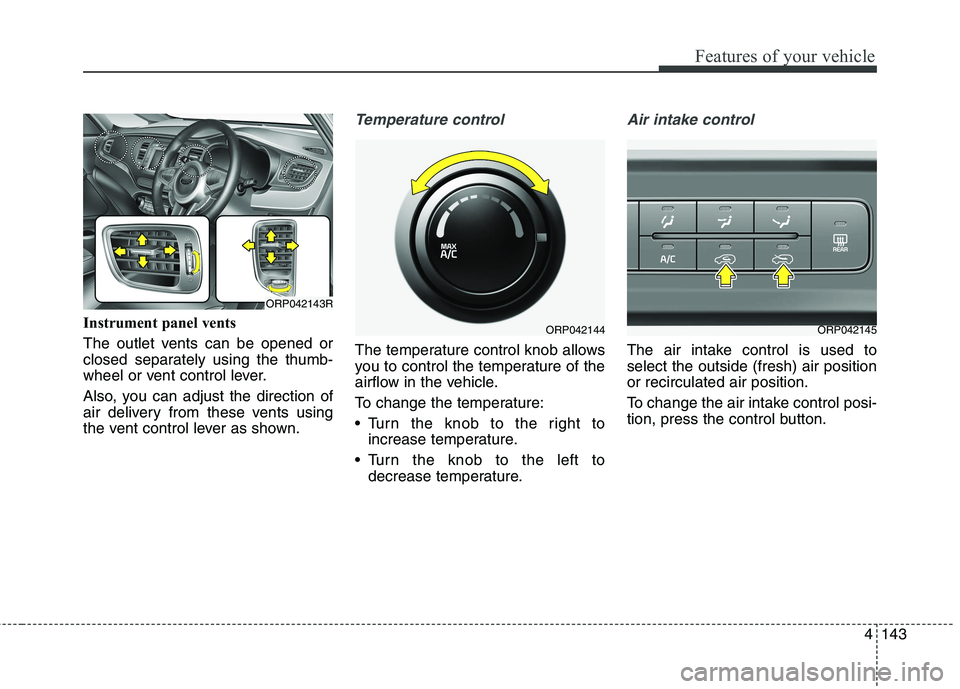
Instrument panel vents
The outlet vents can be opened or
closed separately using the thumb-
wheel or vent control lever.
Also, you can adjust the direction of
air delivery from these vents using
the vent control lever as shown.
Temperature control
The temperature control knob allows
you to control the temperature of the
airflow in the vehicle.
To change the temperature:
Turn the knob to the right toincrease temperature.
Turn the knob to the left to decrease temperature.
Air intake control
The air intake control is used to select the outside (fresh) air positionor recirculated air position.
To change the air intake control posi-
tion, press the control button.
ORP042144ORP042145
ORP042143R
Page 445 of 723
Driving your vehicle
10
6
ENGINE START/STOP BUTTON (IF EQUIPPED)
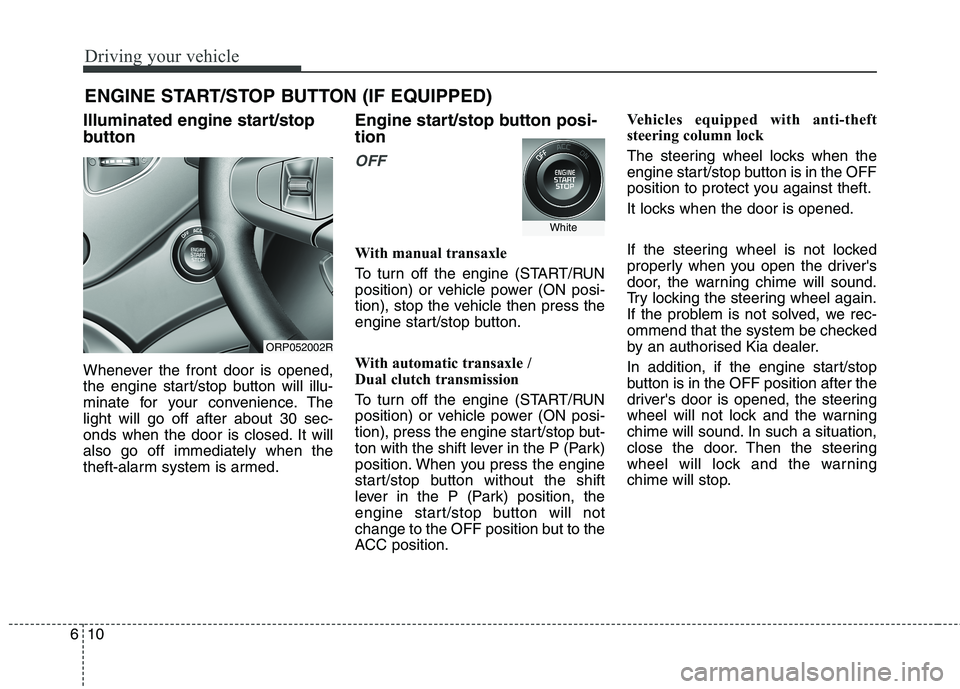
Illuminated engine start/stop
button
Whenever the front door is opened,
the engine start/stop button will illu-
minate for your convenience. Thelight will go off after about 30 sec-
onds when the door is closed. It willalso go off immediately when the
theft-alarm system is armed. Engine start/stop button posi- tion
OFF
With manual transaxle
To turn off the engine (START/RUN
position) or vehicle power (ON posi-
tion), stop the vehicle then press the
engine start/stop button.
With automatic transaxle /
Dual clutch transmission
To turn off the engine (START/RUN
position) or vehicle power (ON posi-
tion), press the engine start/stop but-
ton with the shift lever in the P (Park)
position. When you press the engine
start/stop button without the shift
lever in the P (Park) position, the
engine start/stop button will not
change to the OFF position but to the
ACC position.Vehicles equipped with anti-theft
steering column lock
The steering wheel locks when the
engine start/stop button is in the OFF
position to protect you against theft.
It locks when the door is opened.
If the steering wheel is not locked
properly when you open the driver's
door, the warning chime will sound.
Try locking the steering wheel again.
If the problem is not solved, we rec-
ommend that the system be checked
by an authorised Kia dealer.
In addition, if the engine start/stop
button is in the OFF position after the
driver's door is opened, the steering
wheel will not lock and the warning
chime will sound. In such a situation,
close the door. Then the steering
wheel will lock and the warning
chime will stop.
ORP052002R
White