change time KIA CARENS RHD 2018 Owner's Manual
[x] Cancel search | Manufacturer: KIA, Model Year: 2018, Model line: CARENS RHD, Model: KIA CARENS RHD 2018Pages: 723, PDF Size: 40.94 MB
Page 271 of 723
4175
Features of your vehicle
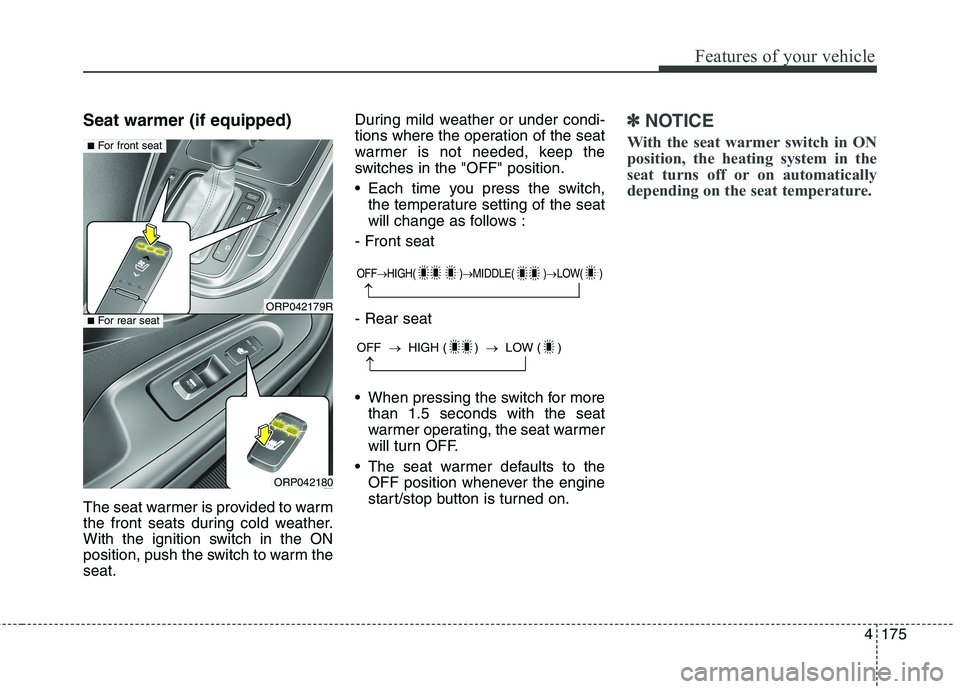
Seat warmer (if equipped)
The seat warmer is provided to warm
the front seats during cold weather.
With the ignition switch in the ON
position, push the switch to warm theseat.During mild weather or under condi-
tions where the operation of the seat
warmer is not needed, keep the
switches in the "OFF" position.
Each time you press the switch,
the temperature setting of the seat
will change as follows :
- Front seat - Rear seat
When pressing the switch for more than 1.5 seconds with the seat
warmer operating, the seat warmer
will turn OFF.
The seat warmer defaults to the OFF position whenever the engine
start/stop button is turned on.✽✽ NOTICE
With the seat warmer switch in ON
position, the heating system in the
seat turns off or on automatically
depending on the seat temperature.
OFF HIGH( ) MIDDLE( ) LOW( )
OFF HIGH ( ) LOW ( )
ORP042179R
ORP042180
■For front seat
■For rear seat
Page 272 of 723
Features of your vehicle
176
4
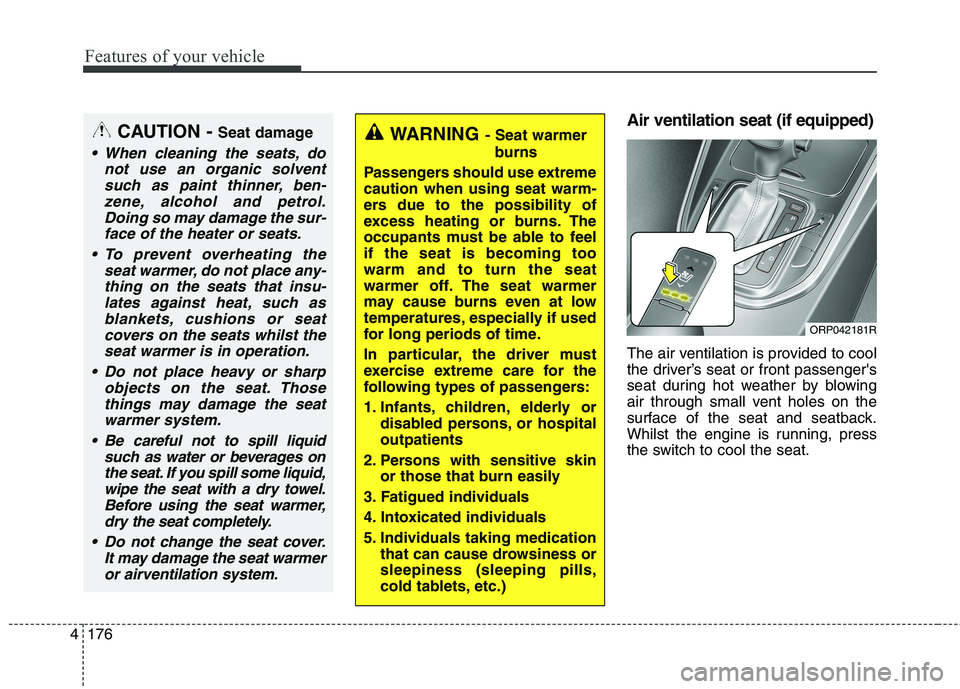
Air ventilation seat (if equipped)
The air ventilation is provided to cool
the driver’s seat or front passenger's
seat during hot weather by blowing
air through small vent holes on the
surface of the seat and seatback.
Whilst the engine is running, press
the switch to cool the seat.WARNING - Seat warmer
burns
Passengers should use extreme caution when using seat warm-
ers due to the possibility of
excess heating or burns. The
occupants must be able to feelif the seat is becoming toowarm and to turn the seat
warmer off. The seat warmer
may cause burns even at low
temperatures, especially if used
for long periods of time.
In particular, the driver must
exercise extreme care for the
following types of passengers:
1. Infants, children, elderly or disabled persons, or hospital outpatients
2. Persons with sensitive skin or those that burn easily
3. Fatigued individuals
4. Intoxicated individuals
5. Individuals taking medication that can cause drowsiness or sleepiness (sleeping pills,
cold tablets, etc.)CAUTION - Seat damage
When cleaning the seats, do
not use an organic solventsuch as paint thinner, ben-zene, alcohol and petrol.Doing so may damage the sur-face of the heater or seats.
To prevent overheating the seat warmer, do not place any-thing on the seats that insu-lates against heat, such asblankets, cushions or seat covers on the seats whilst theseat warmer is in operation.
Do not place heavy or sharp objects on the seat. Thosethings may damage the seat warmer system.
Be careful not to spill liquid such as water or beverages onthe seat. If you spill some liquid,wipe the seat with a dry towel. Before using the seat warmer,dry the seat completely.
Do not change the seat cover. It may damage the seat warmeror airventilation system.
ORP042181R
Page 273 of 723
4177
Features of your vehicle
When the operation of the air ventila-
tion is not needed, keep the switchesin the OFF position.
Each time you press the switch,the airflow will change as follows:
When pressing the switch for more than 1.5 seconds with the seat
cooler operating, the seat cooler
will turn OFF.
When the air ventilation seat is turned on, the seat may get cooler
after about 5 minutes.
Because the air ventilation uses the air in the vehicle, cooling effi-
ciency depends on the tempera-
ture of the air. In order to improve
cooling efficiency, use the air con-
ditioning system together.
The air ventilation seat defaults to the OFF position whenever the
ignition switch is turned to the ONposition. Sunvisor
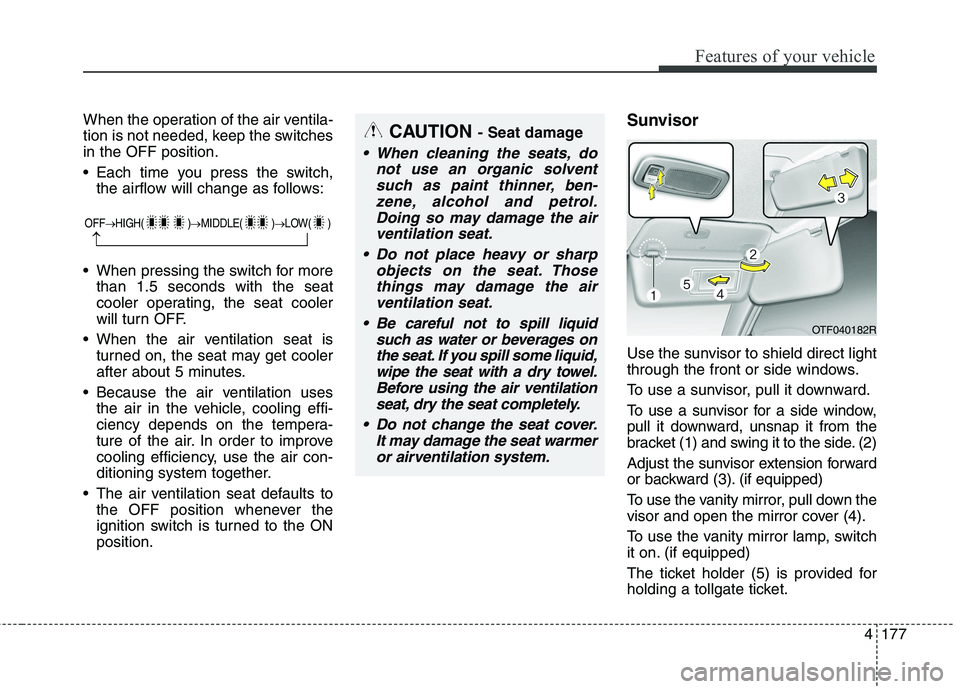
Use the sunvisor to shield direct light
through the front or side windows.
To use a sunvisor, pull it downward.
To use a sunvisor for a side window,
pull it downward, unsnap it from the
bracket (1) and swing it to the side. (2)
Adjust the sunvisor extension forward
or backward (3). (if equipped)
To use the vanity mirror, pull down the
visor and open the mirror cover (4).
To use the vanity mirror lamp, switch
it on. (if equipped)
The ticket holder (5) is provided for
holding a tollgate ticket.CAUTION
- Seat damage
When cleaning the seats, do
not use an organic solventsuch as paint thinner, ben-zene, alcohol and petrol.Doing so may damage the air ventilation seat.
Do not place heavy or sharp objects on the seat. Thosethings may damage the airventilation seat.
Be careful not to spill liquid such as water or beverages onthe seat. If you spill some liquid,wipe the seat with a dry towel.Before using the air ventilation seat, dry the seat completely.
Do not change the seat cover. It may damage the seat warmeror airventilation system.
OTF040182R
OFF HIGH( ) MIDDLE( ) LOW( )
Page 292 of 723
59
Audio system
(Continued) If you want to change the posi- tion of device installation,please inquire with your place of purchase or service mainte-nance centre. Technicalexpertise is required to install or disassemble the device.
Turn on the car ignition before using this device. Do not oper-ate the audio system for longperiods of time with the igni- tion turned off as such opera-tions may lead to battery dis-charge.
Do not subject the device to severe shock or impact. Directpressure onto the front side ofthe monitor may cause damageto the LCD or touch screen.
(Continued)(Continued) When cleaning the device, make sure to turn off thedevice and use a dry and smooth cloth. Never usetough materials, chemicalcloths, or solvents (alcohol,benzene, thinners, etc.) as such materials may damagethe device panel or causecolour/quality deterioration
Do not place beverages close to the audio system. Spillingbeverages may lead to systemmalfunction.
In case of product malfunc- tion, please contact your placeof purchase or After Service centre.
Placing the audio system with- in an electromagnetic environ-ment may result in noise inter-ference.
Page 295 of 723
Audio system
12
5
✽✽
NOTICE - USING THE iPod ®
DEVICE
Some iPod models may not sup- port communication protocol and
files may not properly play.
Supported iPod models:
- iPhone 3GS/4
- iPod touch 1st~4th generation
- iPod nano 1st~6th generation
- iPod classic
The order of search or playback of songs in the iPod can be different
from the order searched in the
audio system.
If the iPod disabled due to its own malfunction, reset the iPod.
(Reset: Refer to iPod manual)
An iPod may not operate normal- ly on low battery. (Continued)(Continued)
Some iPod devices, such as the
iPhone, can be connected through
the Bluetooth ®
Wireless Technology
interface. The device must have
audio Bluetooth®
Wireless
Technology capability (such as for
stereo headphone Bluetooth®
Wireless Technology ). The device
can play, but it will not be con-
trolled by the audio system.
To use iPod features within the audio, use the cable provided upon purchas-
ing an iPod device.
Skipping or improper operation may occur depending on the characteris-
tics of your iPod/Phone device.
If your iPhone is connected to both the Bluetooth ®
Wireless Technology
and USB, the sound may not be prop-
erly played. In your iPhone, select the
Dock connector or Bluetooth®
Wireless Technology to change the
sound output (source). (Continued)(Continued)
When connecting iPod with the
iPod Power Cable, insert the con-
nector to the multimedia socket
completely. If not inserted com-
pletely, communications between
iPod and audio may be interrupted.
When adjusting the sound effects of the iPod and the audio system,
the sound effects of both devices
will overlap and might reduce or
distort the quality of the sound.
Deactivate (turn off) the equalizer function of an iPod when adjust-
ing the audio system’s volume, and
turn off the equalizer of the audio
system when using the equalizer of
an iPod.
When not using iPod with car audio, detach the iPod cable from
iPod. Otherwise, iPod may remain
in accessory mode, and may not
work properly.
Page 298 of 723
515
Audio systemFeatures of your vehicle
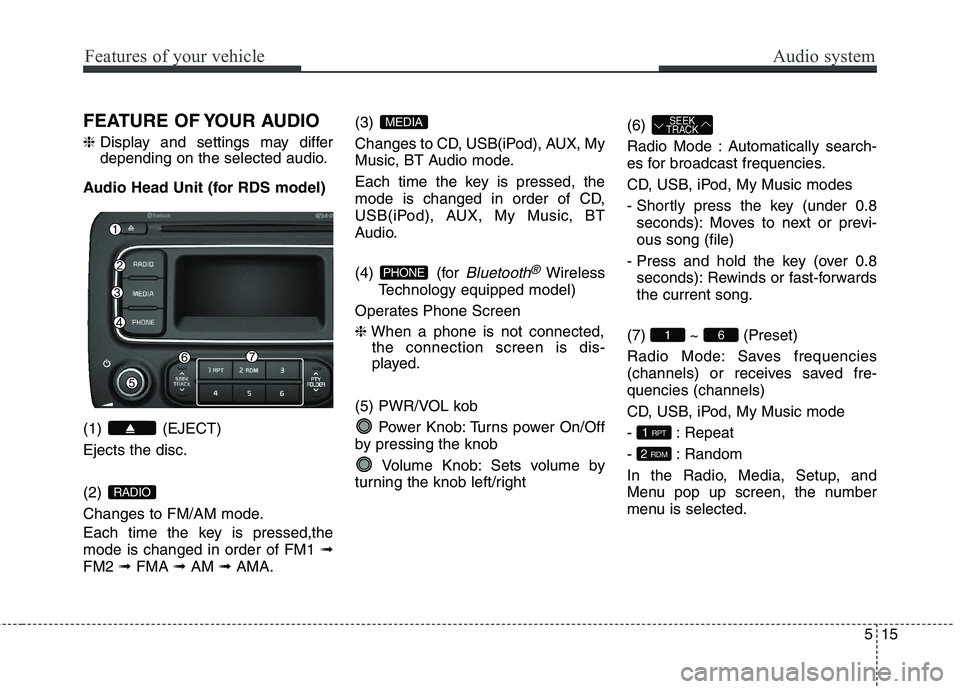
FEATURE OF YOUR AUDIO ❈Display and settings may differ
depending on the selected audio.
Audio Head Unit (for RDS model) (1) (EJECT) Ejects the disc. (2)
Changes to FM/AM mode.
Each time the key is pressed,the mode is changed in order of FM1 ➟
FM2 ➟FMA ➟AM ➟AMA. (3)
Changes to CD, USB(iPod), AUX, My
Music, BT Audio mode.
Each time the key is pressed, the
mode is changed in order of CD,
USB(iPod), AUX, My Music, BT
Audio.
(4) (for
Bluetooth®Wireless
Technology equipped model)
Operates Phone Screen ❈ When a phone is not connected,
the connection screen is dis-
played.
(5) PWR/VOL kob Power Knob: Turns power On/Off
by pressing the knob
Volume Knob: Sets volume by
turning the knob left/right (6)
Radio Mode : Automatically search-
es for broadcast frequencies.
CD, USB, iPod, My Music modes
- Shortly press the key (under 0.8
seconds): Moves to next or previ- ous song (file)
- Press and hold the key (over 0.8 seconds): Rewinds or fast-forwardsthe current song.
(7) ~ (Preset)
Radio Mode: Saves frequencies
(channels) or receives saved fre-quencies (channels)
CD, USB, iPod, My Music mode
- : Repeat
- : Random
In the Radio, Media, Setup, and
Menu pop up screen, the number
menu is selected.
2 RDM
1 RPT
61
SEEK
TRACK
PHONE
MEDIA
RADIO
Page 299 of 723
Audio system
16
5
Features of your vehicle
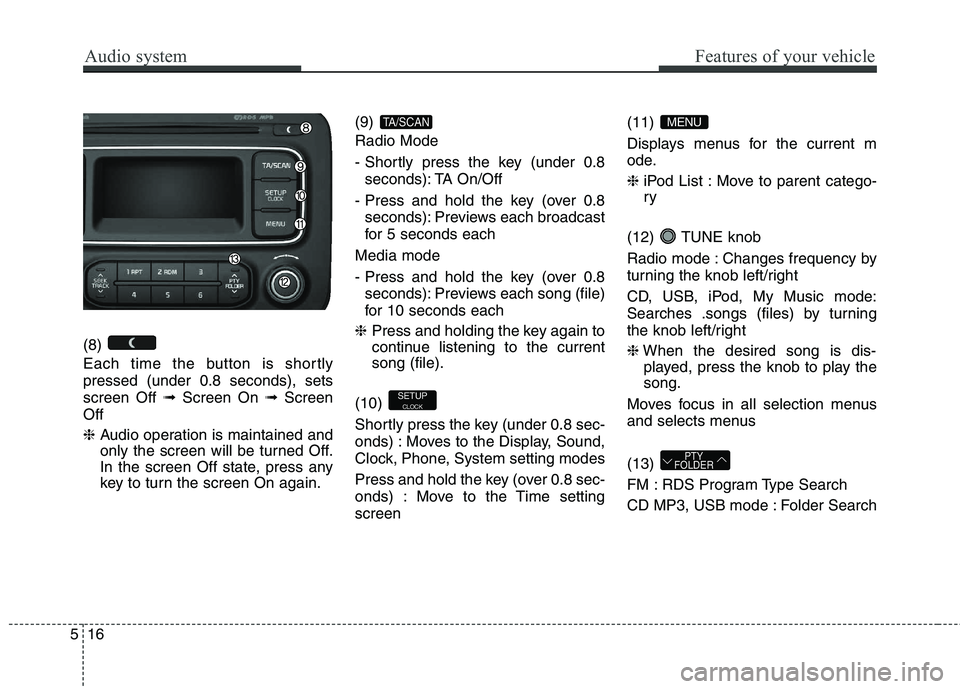
(8)
Each time the button is shortly pressed (under 0.8 seconds), setsscreen Off ➟Screen On ➟Screen
Off ❈ Audio operation is maintained and
only the screen will be turned Off.
In the screen Off state, press any
key to turn the screen On again. (9) Radio Mode
- Shortly press the key (under 0.8
seconds): TA On/Off
- Press and hold the key (over 0.8 seconds): Previews each broadcast
for 5 seconds each
Media mode
- Press and hold the key (over 0.8 seconds): Previews each song (file)
for 10 seconds each
❈ Press and holding the key again to
continue listening to the currentsong (file).
(10)
Shortly press the key (under 0.8 sec-
onds) : Moves to the Display, Sound,
Clock, Phone, System setting modes
Press and hold the key (over 0.8 sec-
onds) : Move to the Time settingscreen (11)
Displays menus for the current m
ode. ❈
iPod List : Move to parent catego- ry
(12) TUNE knob
Radio mode : Changes frequency by
turning the knob left/right
CD, USB, iPod, My Music mode:
Searches .songs (files) by turning
the knob left/right ❈ When the desired song is dis-
played, press the knob to play the song.
Moves focus in all selection menus
and selects menus (13)
FM : RDS Program Type Search
CD MP3, USB mode : Folder Search
PTY
FOLDER
MENU
SETUP
CLOCK
TA/SCAN
Page 300 of 723
517
Audio system
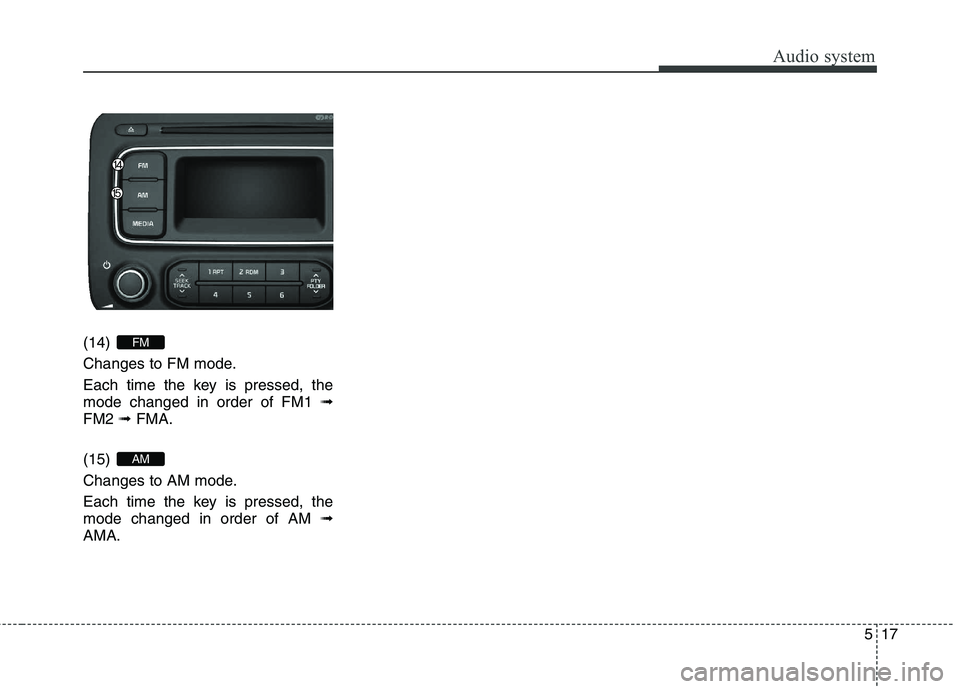
(14)
Changes to FM mode.
Each time the key is pressed, the mode changed in order of FM1 ➟
FM2 ➟FMA.
(15)
Changes to AM mode.
Each time the key is pressed, the mode changed in order of AM ➟
AMA.
AM
FM
Page 301 of 723
Audio system
18
5
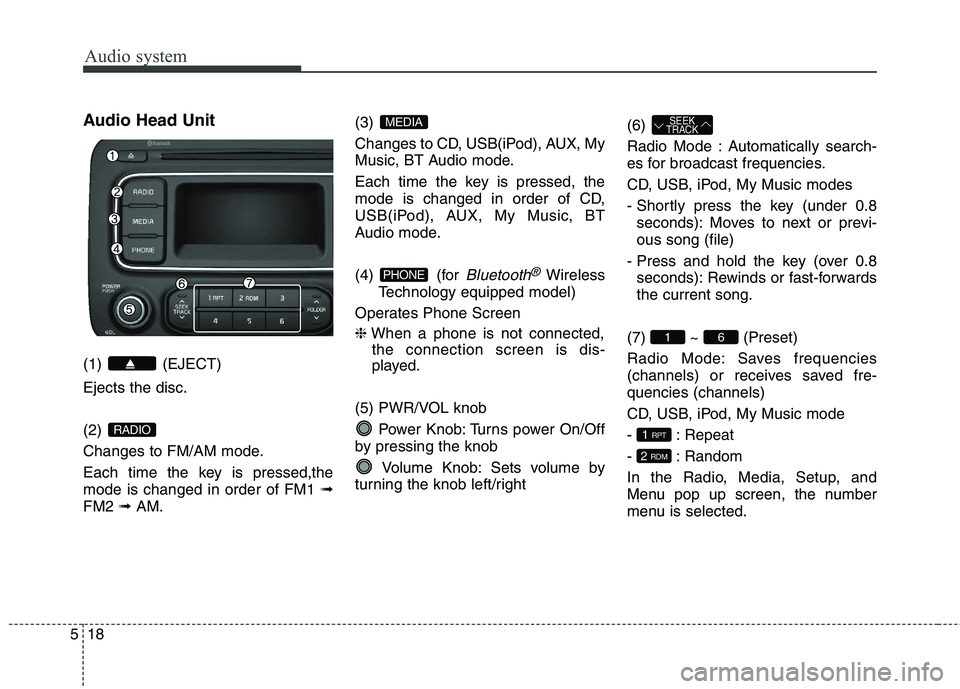
Audio Head Unit (1) (EJECT) Ejects the disc. (2)
Changes to FM/AM mode.
Each time the key is pressed,the mode is changed in order of FM1 ➟
FM2 ➟AM. (3)
Changes to CD, USB(iPod), AUX, My
Music, BT Audio mode.
Each time the key is pressed, the
mode is changed in order of CD,
USB(iPod), AUX, My Music, BT
Audio mode.
(4) (for
Bluetooth®Wireless
Technology equipped model)
Operates Phone Screen ❈ When a phone is not connected,
the connection screen is dis-
played.
(5) PWR/VOL knob Power Knob: Turns power On/Off
by pressing the knob
Volume Knob: Sets volume by
turning the knob left/right (6)
Radio Mode : Automatically search-
es for broadcast frequencies.
CD, USB, iPod, My Music modes
- Shortly press the key (under 0.8
seconds): Moves to next or previ- ous song (file)
- Press and hold the key (over 0.8 seconds): Rewinds or fast-forwardsthe current song.
(7) ~ (Preset)
Radio Mode: Saves frequencies
(channels) or receives saved fre-quencies (channels)
CD, USB, iPod, My Music mode
- : Repeat
- : Random
In the Radio, Media, Setup, and
Menu pop up screen, the number
menu is selected.
2 RDM
1 RPT
61
SEEK
TRACK
PHONE
MEDIA
RADIO
Page 302 of 723
519
Audio system
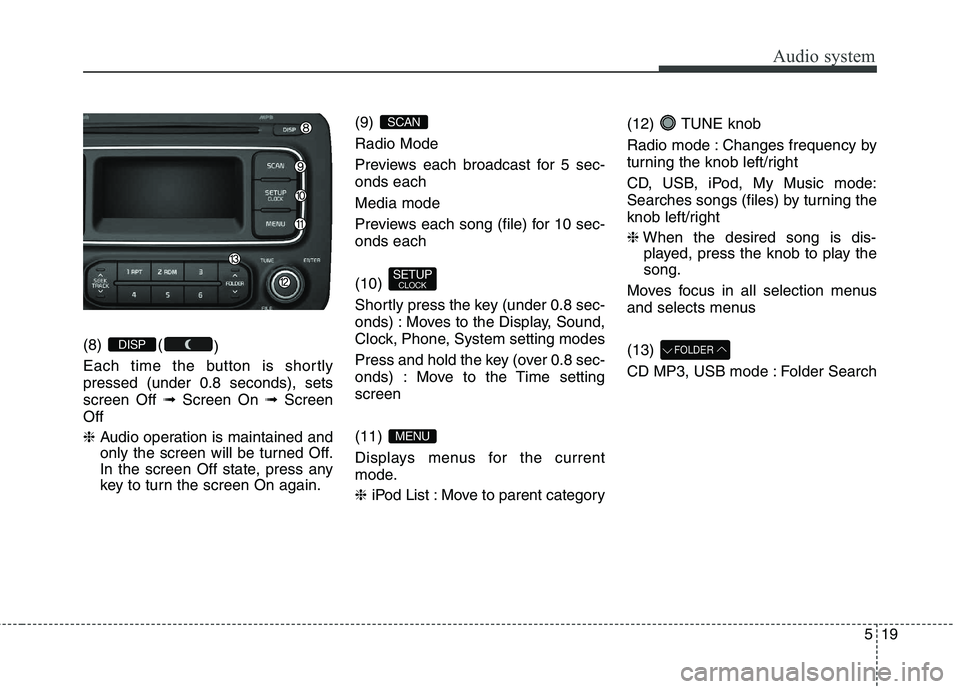
(8) ()
Each time the button is shortly pressed (under 0.8 seconds), setsscreen Off ➟Screen On ➟Screen
Off ❈ Audio operation is maintained and
only the screen will be turned Off.
In the screen Off state, press any
key to turn the screen On again. (9) Radio Mode
Previews each broadcast for 5 sec- onds each Media mode
Previews each song (file) for 10 sec- onds each (10)
Shortly press the key (under 0.8 sec-
onds) : Moves to the Display, Sound,
Clock, Phone, System setting modes
Press and hold the key (over 0.8 sec-
onds) : Move to the Time settingscreen (11)
Displays menus for the current
mode. ❈
iPod List : Move to parent category (12) TUNE knob
Radio mode : Changes frequency by
turning the knob left/right
CD, USB, iPod, My Music mode:
Searches songs (files) by turning the
knob left/right ❈
When the desired song is dis-
played, press the knob to play the song.
Moves focus in all selection menus
and selects menus (13)
CD MP3, USB mode : Folder SearchFOLDER
MENU
SETUP CLOCK
SCAN
DISP