change time KIA CARENS RHD 2018 Service Manual
[x] Cancel search | Manufacturer: KIA, Model Year: 2018, Model line: CARENS RHD, Model: KIA CARENS RHD 2018Pages: 723, PDF Size: 40.94 MB
Page 366 of 723
583
Audio system
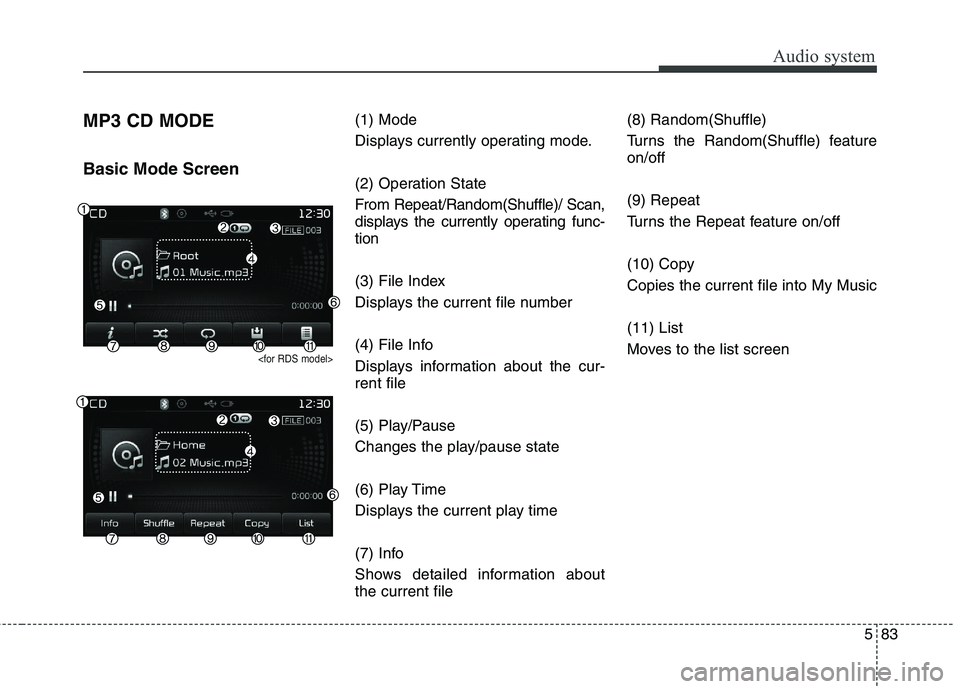
MP3 CD MODE Basic Mode Screen
(1) Mode
Displays currently operating mode.
(2) Operation State
From Repeat/Random(Shuffle)/ Scan,
displays the currently operating func-tion
(3) File Index
Displays the current file number
(4) File Info
Displays information about the cur- rent file
(5) Play/Pause
Changes the play/pause state
(6) Play Time
Displays the current play time
(7) Info
Shows detailed information about the current file(8) Random(Shuffle)
Turns the Random(Shuffle) feature on/off (9) Repeat
Turns the Repeat feature on/off
(10) Copy Copies the current file into My Music (11) List
Moves to the list screen
Page 369 of 723
Audio system
86
5
Random(Shuffle)
Press the ( )button to play
files in random(Shuffle) order.
Each time the button is pressed, the
feature changes in order of Random
(Shuffle) Folder ➟ Random (Shuffle)
All ➟ Off.
Plays all files within the current folder in
Random (Shuffle) order.
Plays all files in Random(Shuffle) order.
Repeat
Press the ( )button to
repeat the current file or folder.
Each time the button is pressed, the
feature changes in order of Repeat➟ Repeat Folder ➟Off.
Repeats the current file.
Repeats all files within the current Folder.
Copying Files
Press the ( )button to
copy the current file into My Music.
✽✽ NOTICE
Selecting another feature during
copying will display a pop-up asking
whether you wish to cancel copying.
To cancel, select 'Yes’.
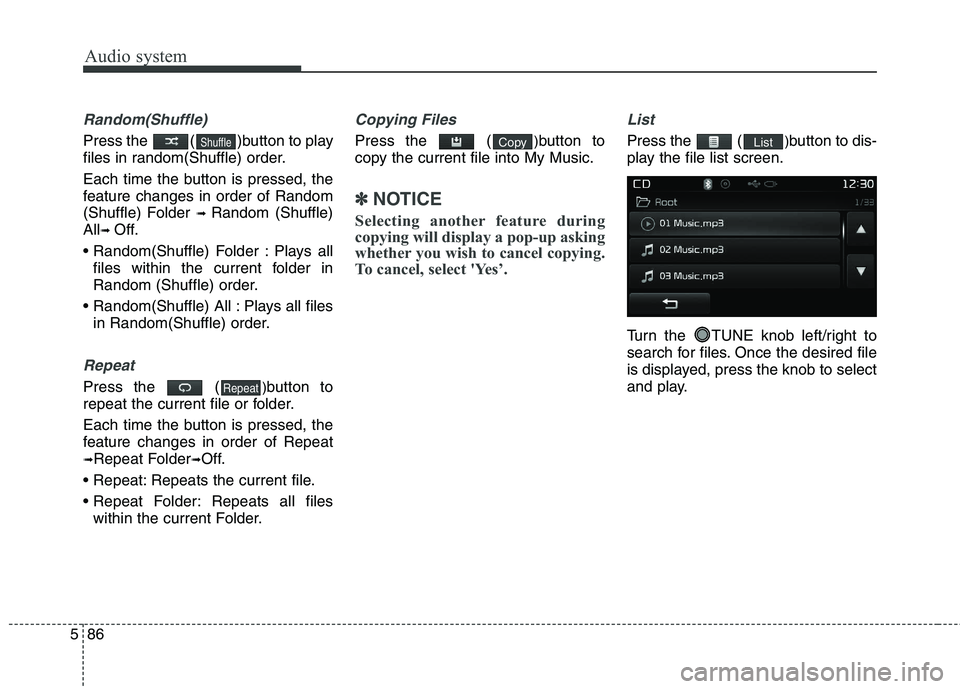
List
Press the ( )button to dis-
play the file list screen.
Turn the TUNE knob left/right to
search for files. Once the desired file
is displayed, press the knob to select
and play.ListCopy
Repeat
Shuffle
Page 372 of 723
589
Audio system
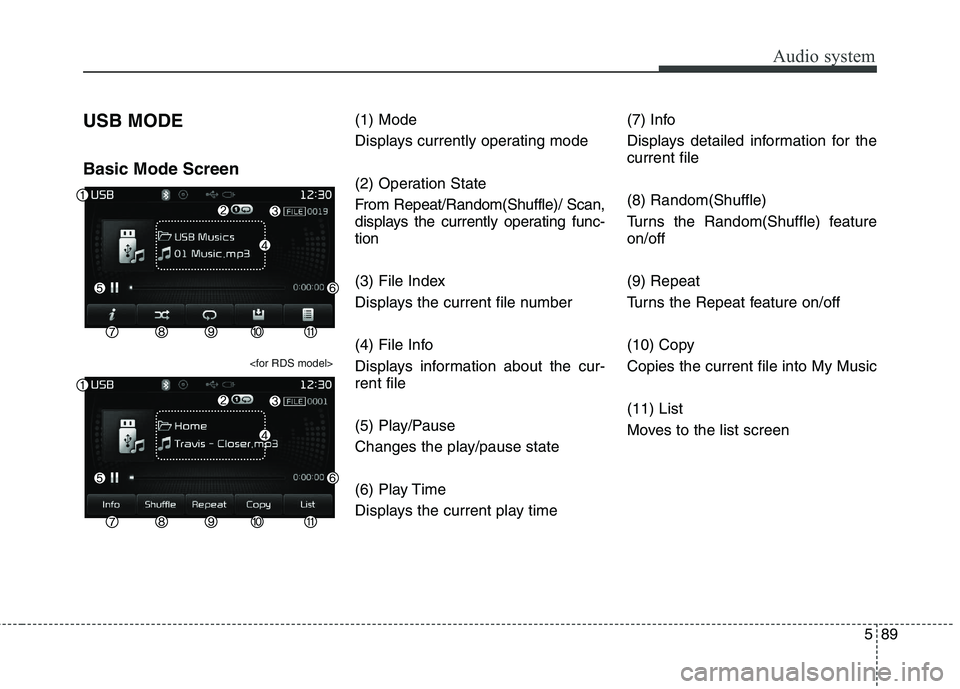
USB MODE Basic Mode Screen
(1) Mode
Displays currently operating mode
(2) Operation State
From Repeat/Random(Shuffle)/ Scan,
displays the currently operating func-tion
(3) File Index
Displays the current file number
(4) File Info
Displays information about the cur- rent file
(5) Play/Pause
Changes the play/pause state
(6) Play Time
Displays the current play time(7) Info
Displays detailed information for the current file (8) Random(Shuffle)
Turns the Random(Shuffle) feature on/off (9) Repeat
Turns the Repeat feature on/off
(10) Copy Copies the current file into My Music (11) List
Moves to the list screen
Page 375 of 723
Audio system
92
5
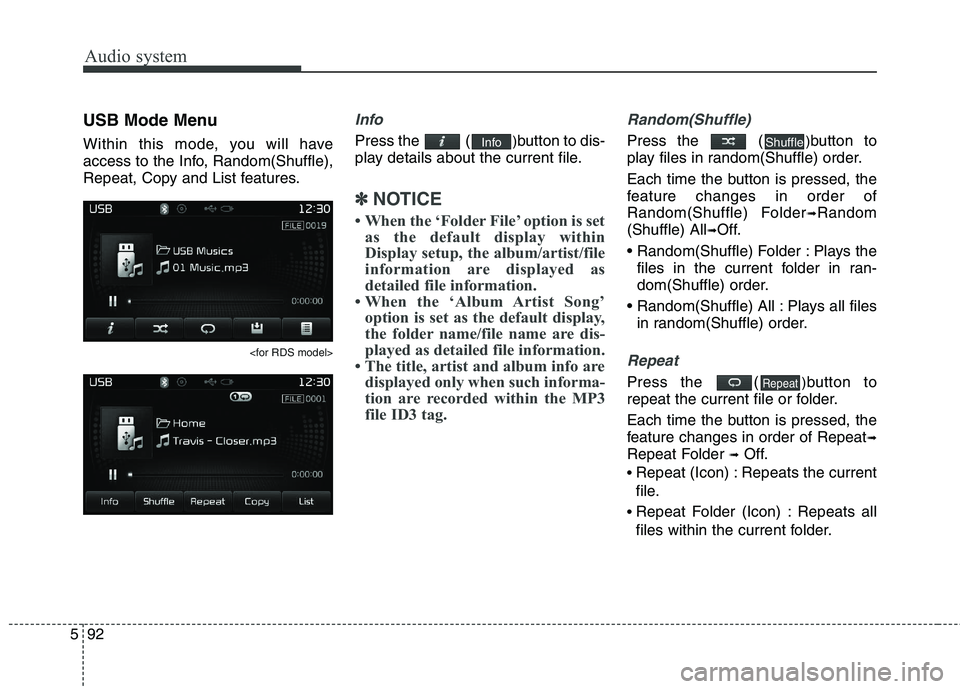
USB Mode Menu
Within this mode, you will have
access to the Info, Random(Shuffle),
Repeat, Copy and List features.
Info
Press the ( )button to dis-
play details about the current file.
✽✽ NOTICE
When the ‘Folder File’ option is set as the default display within
Display setup, the album/artist/file
information are displayed as
detailed file information.
When the ‘Album Artist Song’ option is set as the default display,
the folder name/file name are dis-
played as detailed file information.
The title, artist and album info are displayed only when such informa-
tion are recorded within the MP3
file ID3 tag.
Random(Shuffle)
Press the ( )button to
play files in random(Shuffle) order.
Each time the button is pressed, the
feature changes in order of
Random(Shuffle) Folder ➟Random
(Shuffle) All ➟Off.
Plays the files in the current folder in ran-
dom(Shuffle) order.
Plays all files in random(Shuffle) order.
Repeat
Press the ( )button to
repeat the current file or folder.
Each time the button is pressed, the
feature changes in order of Repeat ➟
Repeat Folder ➟Off.
Repeat (Icon) : Repeats the current
file.
Repeat Folder (Icon) : Repeats all
files within the current folder.Repeat
ShuffleInfo
Page 378 of 723
595
Audio system
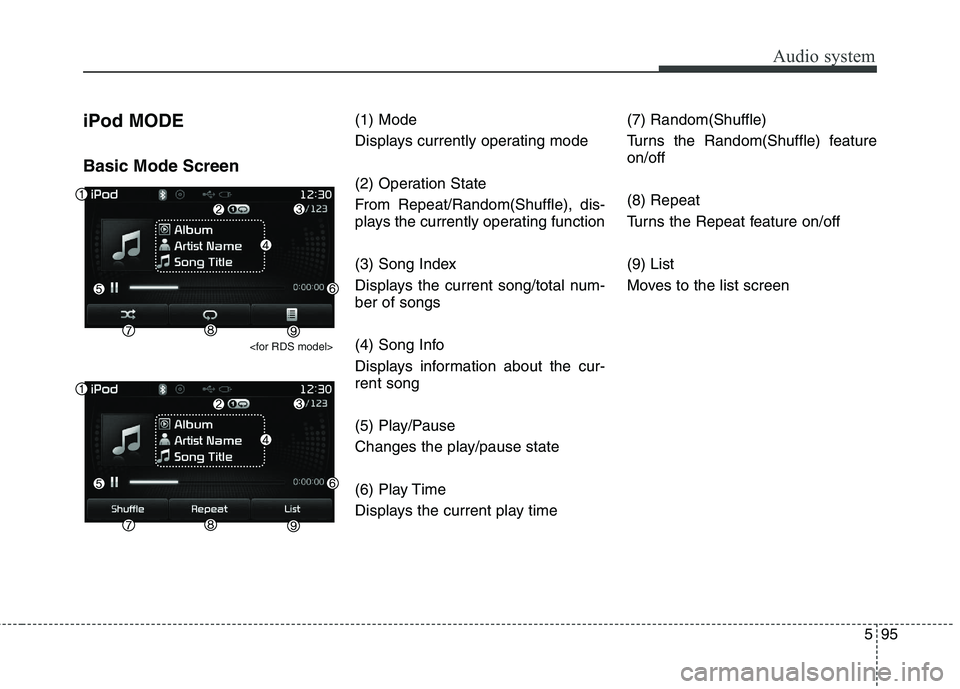
iPod MODE Basic Mode Screen
(1) Mode
Displays currently operating mode
(2) Operation State
From Repeat/Random(Shuffle), dis-
plays the currently operating function
(3) Song Index
Displays the current song/total num- ber of songs
(4) Song Info
Displays information about the cur- rent song
(5) Play/Pause
Changes the play/pause state
(6) Play Time
Displays the current play time(7) Random(Shuffle)
Turns the Random(Shuffle) feature on/off (8) Repeat
Turns the Repeat feature on/off (9) List
Moves to the list screen
Page 381 of 723
Audio system
98
5
✽✽
NOTICE
If the search mode is accessed whilst playing a song, the most
recently searched category is dis-
played.
Search steps upon initial connec- tion may differ depending on the
type of iPod device.iPod Mode Menu
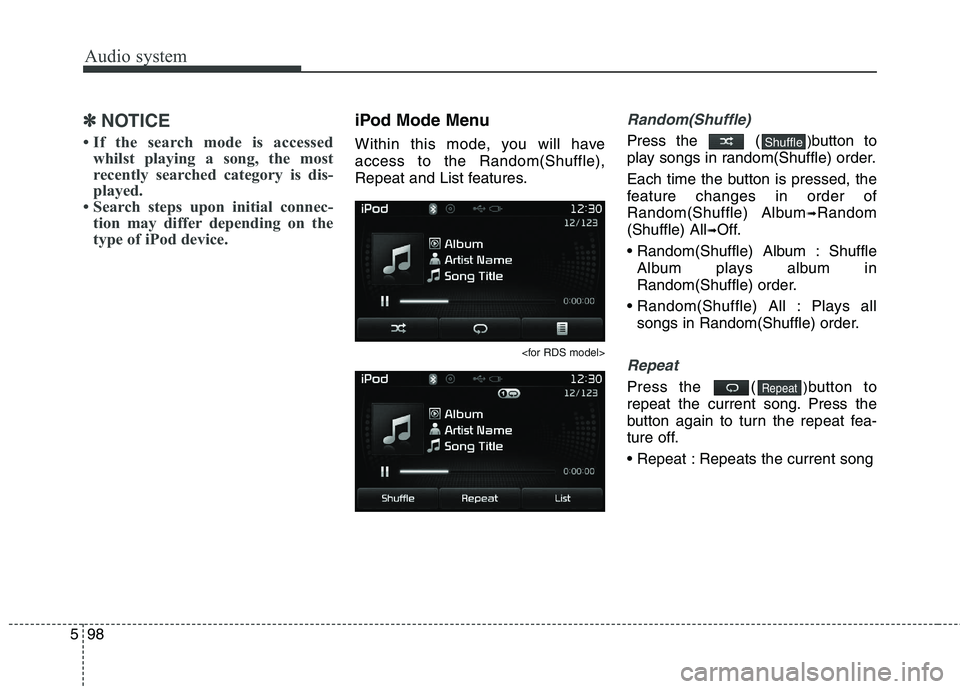
Within this mode, you will have access to the Random(Shuffle),
Repeat and List features.
Random(Shuffle)
Press the ( )button to
play songs in random(Shuffle) order.
Each time the button is pressed, the
feature changes in order of
Random(Shuffle) Album ➟Random
(Shuffle) All ➟Off.
Album : Shuffle Album plays album in
Random(Shuffle) order.
Plays all songs in Random(Shuffle) order.
Repeat
Press the ( )button to
repeat the current song. Press the
button again to turn the repeat fea-
ture off.
Repeats the current songRepeat
Shuffle
Page 383 of 723
Audio system
100
5
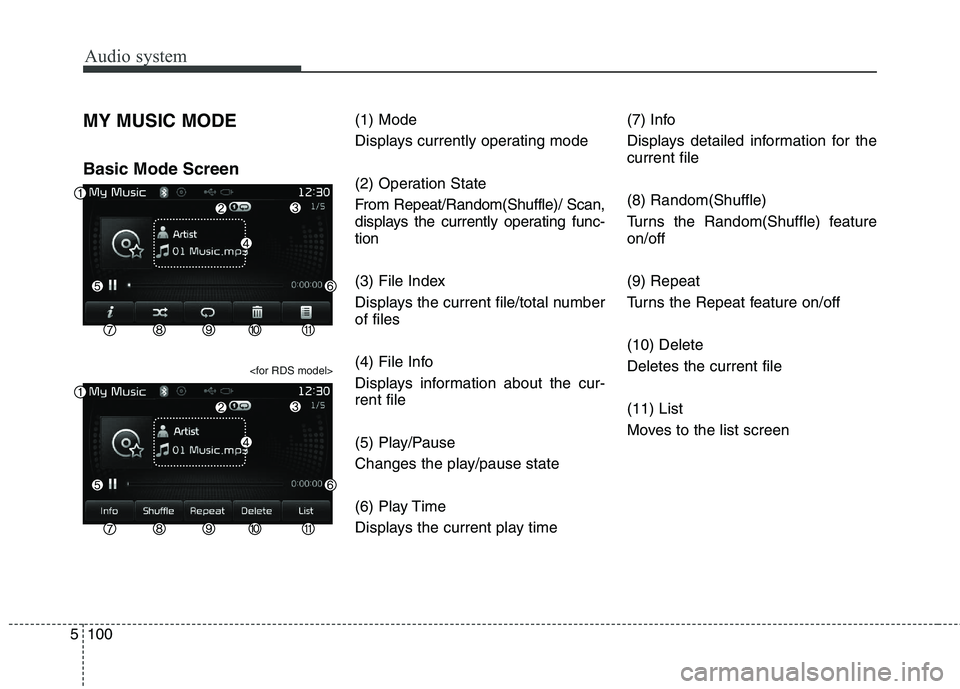
MY MUSIC MODE Basic Mode Screen
(1) Mode
Displays currently operating mode
(2) Operation State
From Repeat/Random(Shuffle)/ Scan,
displays the currently operating func-tion
(3) File Index
Displays the current file/total number of files
(4) File Info
Displays information about the cur- rent file
(5) Play/Pause
Changes the play/pause state
(6) Play Time
Displays the current play time (7) Info
Displays detailed information for the current file (8) Random(Shuffle)
Turns the Random(Shuffle) feature on/off (9) Repeat
Turns the Repeat feature on/off (10) Delete Deletes the current file (11) List
Moves to the list screen
Page 421 of 723
![KIA CARENS RHD 2018 Service Manual Audio system
138
5
Time Format
Press the key Select
[Clock/Day] Select [Time Format]
This feature is used to change the
clock format between 12hr or 24hr.
Clock Display
Press the key Select
[Clo](/img/2/57938/w960_57938-420.png "KIA CARENS RHD 2018 Service Manual Audio system
138
5
Time Format
Press the key Select
[Clock/Day] Select [Time Format]
This feature is used to change the
clock format between 12hr or 24hr.
Clock Display
Press the key Select
[Clo")
Audio system
138
5
Time Format
Press the key Select
[Clock/Day] Select [Time Format]
This feature is used to change the
clock format between 12hr or 24hr.
Clock Display
Press the key Select
[Clock/Day] Select [Clock Display
(Power off)]
This feature is used to display a clock on the screen when the audio sys-
tem is turned off.
Automatic RDS Time
Press the key Select
[Clock/Day] Select [Automatic RDSTime]
This feature is used to set time auto-
matically by synchronizing with RDS.SETUP SETUP SETUP
Page 438 of 723
63
Driving your vehicle
WARNING- ENGINE EXHAUST CAN BE DANGEROUS!
Engine exhaust fumes can be extremely dangerous. If, at any time, you smell exhaust fumes inside the vehicle,
open the windows immediately.
• Do not inhale exhaust fumes.
Exhaust fumes contain carbon monoxide, a colourless, odourless gas that can cause unconsciousness and death
by asphyxiation.
The exhaust system should be checked whenever the vehicle is raised to change the oil or for any other purpose.
If you hear a change in the sound of the exhaust or if you drive over something that strikes the underneath side
of the vehicle, have the system checked by a professional workshop Kia.
Letting the engine idle in your garage, even with the garage door open, is a hazardous practice. Never run the
engine in your garage any longer than it takes to start the engine and back the vehicle out.
If it is necessary to idle the engine for a prolonged period with people inside the vehicle, be sure to do so only in
an open area with the air intake set at "Fresh" and fan operating at one of the higher speeds so fresh air is drawn
into the interior.
If you must drive with the tailgate/trunk open because you are carrying objects that make this necessary:
1. Close all windows.
2. Open side vents.
3. Set the air intake control at "Fresh", the air flow control at "Floor" or "Face" and the fan at one of the higher speeds.
To assure proper operation of the ventilation system, be sure the ventilation air intakes located just in front of the
windscreen are kept clear of snow, ice, leaves or other obstructions.
Page 447 of 723
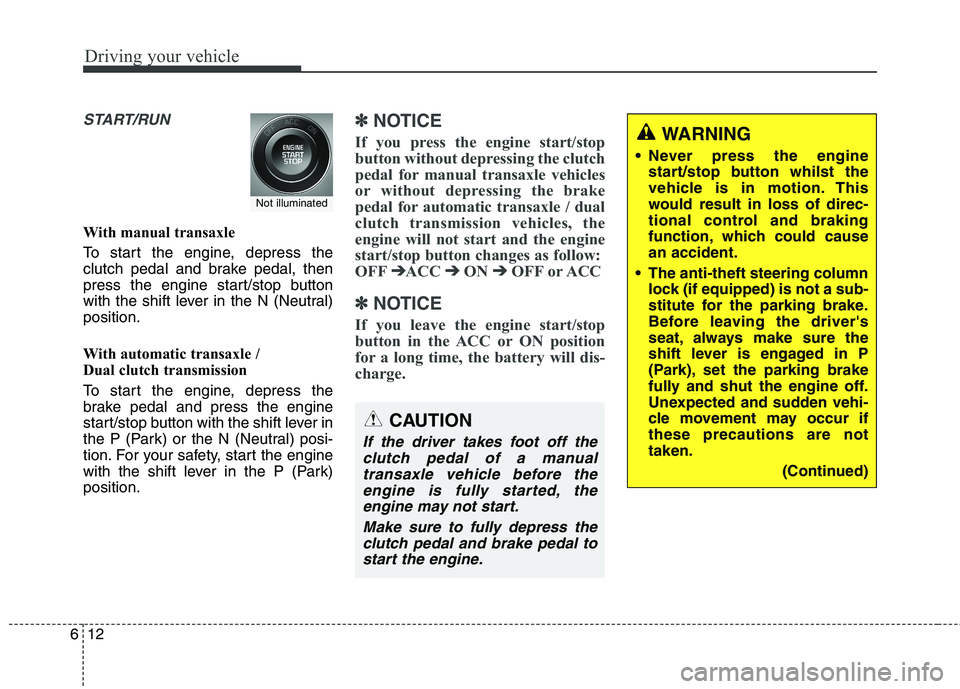
Driving your vehicle
12
6
START/RUN
With manual transaxle
To start the engine, depress the
clutch pedal and brake pedal, then
press the engine start/stop button
with the shift lever in the N (Neutral)position.
With automatic transaxle /
Dual clutch transmission
To start the engine, depress the
brake pedal and press the engine
start/stop button with the shift lever in
the P (Park) or the N (Neutral) posi-
tion. For your safety, start the engine
with the shift lever in the P (Park)position.
✽✽
NOTICE
If you press the engine start/stop
button without depressing the clutch
pedal for manual transaxle vehicles
or without depressing the brake
pedal for automatic transaxle / dual
clutch transmission vehicles, the
engine will not start and the engine
start/stop button changes as follow:
OFF ➔
➔
ACC ➔➔
ON ➔➔
OFF or ACC
✽
✽
NOTICE
If you leave the engine start/stop
button in the ACC or ON position
for a long time, the battery will dis-
charge.
WARNING
Never press the engine start/stop button whilst the
vehicle is in motion. This
would result in loss of direc-
tional control and braking
function, which could causean accident.
The anti-theft steering column lock (if equipped) is not a sub-
stitute for the parking brake.
Before leaving the driver's
seat, always make sure the
shift lever is engaged in P
(Park), set the parking brake
fully and shut the engine off.
Unexpected and sudden vehi-
cle movement may occur ifthese precautions are nottaken.
(Continued)
Not illuminated
CAUTION
If the driver takes foot off theclutch pedal of a manualtransaxle vehicle before the engine is fully started, theengine may not start.
Make sure to fully depress theclutch pedal and brake pedal tostart the engine.