bluetooth KIA CARENS RHD 2018 Workshop Manual
[x] Cancel search | Manufacturer: KIA, Model Year: 2018, Model line: CARENS RHD, Model: KIA CARENS RHD 2018Pages: 723, PDF Size: 40.94 MB
Page 422 of 723
![KIA CARENS RHD 2018 Workshop Manual 5139
Audio system
Bluetooth®Wireless
Technology Setting
Pairing a New Device
Press the key Select
[Phone] Select [Pair Phone]
Bluetooth®Wireless Technology devices
can be paired with the audio sys](/img/2/57938/w960_57938-421.png "KIA CARENS RHD 2018 Workshop Manual 5139
Audio system
Bluetooth®Wireless
Technology Setting
Pairing a New Device
Press the key Select
[Phone] Select [Pair Phone]
Bluetooth®Wireless Technology devices
can be paired with the audio sys")
5139
Audio system
Bluetooth®Wireless
Technology Setting
Pairing a New Device
Press the key Select
[Phone] Select [Pair Phone]
Bluetooth®Wireless Technology devices
can be paired with the audio system.
For more information, refer to the
“Pairing through Phone Setup” sec-tion within
Bluetooth®Wireless
Technology.
Viewing Paired Phone List
Press the key Select
[Phone] Select [Paired Phone List]
This feature is used to view mobile
phones that have been paired with
the audio system. Upon selecting a
paired phone, the setup menu is dis-
played.
For more information, refer to the“Setting
Bluetooth®Wireless
Technology Connection” section with-in
Bluetooth®Wireless Technology.
1) : Moves to the previous screen
2) Connect/Disconnect Phone : Connect/ disconnects currentlyselected phone 3) Delete : Deletes the currently
selected phone
4) Change Priority : Sets currentlyselected phone to highest connec-
tion priority
✽✽NOTICE BEFORE DOWN-
LOADING PHONE BOOKS
Only phone books within connect- ed phones can be downloaded.
Also check to see that your mobile
phone supports the download fea-
ture.
To learn more about whether your mobile phone supports phone
book downloads, refer to your
mobile phone user’s manual.
The Phone book for only the con- nected phone can be downloaded.
Before downloading, check to see
whether your phone supports the
download feature.
SETUP
SETUP
Page 423 of 723
![KIA CARENS RHD 2018 Workshop Manual Audio system
140
5
Downloading Phone books
Press the key Select
[Phone] Select [Phone book
Download]
The Phone book is downloaded from
the mobile phone and the download
progress is displayed.
✽â](/img/2/57938/w960_57938-422.png "KIA CARENS RHD 2018 Workshop Manual Audio system
140
5
Downloading Phone books
Press the key Select
[Phone] Select [Phone book
Download]
The Phone book is downloaded from
the mobile phone and the download
progress is displayed.
✽â")
Audio system
140
5
Downloading Phone books
Press the key Select
[Phone] Select [Phone book
Download]
The Phone book is downloaded from
the mobile phone and the download
progress is displayed.
✽✽
NOTICE
Up to 1,000 phone book entries can be copied into car phone book.
Up to 1,000 phone book entries can be saved for each paired
device.
Upon downloading phone book data, previously saved phone book
data will be deleted. However,
Phone book entries saved to other
paired phones are not deleted.
Auto Download (Phone Book)
Press the key Select
[Phone] Select [Auto Download]
This feature is used to automatically
download mobile phone book entriesonce a
Bluetooth®Wireless
Technology phone is connected.
✽✽ NOTICE
The Auto Download feature will download mobile phone book
entries every time the phone is
connected. The download time
may differ depending on the num-
ber of saved phone book entries
and the communication state.
When downloading a phone book, first check to see that your mobile
phone supports the phone book
download feature.
Audio Streaming
Press the key Select
[Phone] Select [Audio Streaming]
When Audio Streaming is turned on,
you can play music files saved in
your
Bluetooth®Wireless
Technology device from the car.
SETUP SETUP SETUP
Page 424 of 723
![KIA CARENS RHD 2018 Workshop Manual 5141
Audio system
Outgoing Volume
Press the key Select
[Phone] Select [Outgoing Volume]
Use the , buttons to adjust
the outgoing volume level.
Turning Bluetooth System Off
Press the key Select](/img/2/57938/w960_57938-423.png "KIA CARENS RHD 2018 Workshop Manual 5141
Audio system
Outgoing Volume
Press the key Select
[Phone] Select [Outgoing Volume]
Use the , buttons to adjust
the outgoing volume level.
Turning Bluetooth System Off
Press the key Select")
5141
Audio system
Outgoing Volume
Press the key Select
[Phone] Select [Outgoing Volume]
Use the , buttons to adjust
the outgoing volume level.
Turning Bluetooth System Off
Press the key Select
[Phone] Select [Bluetooth SystemOff] Once
Bluetooth®Wireless
Technology is turned off,
Bluetooth®
Wireless Technology related features
will not be supported within the audiosystem.
✽✽ NOTICE
To turn Bluetooth®
Wireless
Technology back on, go to
[Phone] and press “Yes”.
SETUP
SETUP SETUP
CAUTION
Bluetooth ®
Wireless Technology
audio streaming may not be sup- ported in some Bluetooth ®
Wireless Technology phones.
Page 430 of 723
![KIA CARENS RHD 2018 Workshop Manual 5147
Audio system
Bluetooth®Wireless
Technology Setting
Pairing a New Device
Press the key Select
[Phone] Select [Pair Phone]
Bluetooth®Wireless Technology
devices can be paired with the audiosyst](/img/2/57938/w960_57938-429.png "KIA CARENS RHD 2018 Workshop Manual 5147
Audio system
Bluetooth®Wireless
Technology Setting
Pairing a New Device
Press the key Select
[Phone] Select [Pair Phone]
Bluetooth®Wireless Technology
devices can be paired with the audiosyst")
5147
Audio system
Bluetooth®Wireless
Technology Setting
Pairing a New Device
Press the key Select
[Phone] Select [Pair Phone]
Bluetooth®Wireless Technology
devices can be paired with the audiosystem.
For more information, refer to the
“Pairing through Phone Setup” sec-tion within
Bluetooth®Wireless
Technology.
Viewing Paired Phone List
Press the key Select
[Phone] Select [Paired Phone List]
This feature is used to view mobile
phones that have been paired with
the audio system. Upon selecting a
paired phone, the setup menu is dis-
played.
For more information, refer to the“Setting
Bluetooth®Wireless
Technology Connection” section with-in
Bluetooth®Wireless Technology.
(1) : Moves to the previous screen
(2) Connect/Disconnect Phone :
Connect/disconnects currently selected phone (3) Delete : Deletes the currently
selected phone
(4) Change Priority : Sets currently selected phone to highest connec-
tion priority
✽✽NOTICE BEFORE DOWN-
LOADING CONTACTS
Only contacts within connected phones can be downloaded. Also
check to see that your mobile
phone supports the download fea-
ture.
To learn more about whether your mobile phone supports contacts
downloads, refer to your mobile
phone user’s manual.
The contacts for only the connect- ed phone can be downloaded.
Before downloading, check to see
whether your phone supports the
download feature.
SETUP
SETUP
Page 431 of 723
![KIA CARENS RHD 2018 Workshop Manual Audio system
148
5
Downloading Contacts
Press the key Select
[Phone] Select [Contacts Download]
The contacts is downloaded from the
mobile phone and the download
progress is displayed.
✽✽
NOTI](/img/2/57938/w960_57938-430.png "KIA CARENS RHD 2018 Workshop Manual Audio system
148
5
Downloading Contacts
Press the key Select
[Phone] Select [Contacts Download]
The contacts is downloaded from the
mobile phone and the download
progress is displayed.
✽✽
NOTI")
Audio system
148
5
Downloading Contacts
Press the key Select
[Phone] Select [Contacts Download]
The contacts is downloaded from the
mobile phone and the download
progress is displayed.
✽✽
NOTICE
Up to 1,000 contacts entries can be copied into car contacts.
Up to 1,000 contacts entries can be saved for each paired device.
Upon downloading contacts data, previously saved contacts data
will be deleted. However, contacts
entries saved to other paired
phones are not deleted.
Auto Download (Contacts)
Press the key Select
[Phone] Select [Auto Download] T
his feature is used to automatically
download mobile contacts entries once a
Bluetooth®Wireless Technology
phone is connected.
✽✽ NOTICE
The Auto Download feature will download mobile contacts entries
every time the phone is connected.
The download time may differ
depending on the number of saved
contacts entries and the communi-
cation state.
When downloading a contacts, first check to see that your mobile
phone supports the contacts
download feature.
Streaming Audio
Press the key Select
[Phone] Select [Streaming Audio]
When Streaming Audio is turned on,
you can play music files saved in
your
Bluetooth®Wireless Technology
device from the car.
SETUP SETUP SETUP
Page 432 of 723
![KIA CARENS RHD 2018 Workshop Manual 5149
Audio system
Outgoing Volume
Press the key Select
[Phone] Select [Outgoing Volume]
Use the , buttons to adjust the
outgoing volume level.
Turning Bluetooth System Off
Press the key Select](/img/2/57938/w960_57938-431.png "KIA CARENS RHD 2018 Workshop Manual 5149
Audio system
Outgoing Volume
Press the key Select
[Phone] Select [Outgoing Volume]
Use the , buttons to adjust the
outgoing volume level.
Turning Bluetooth System Off
Press the key Select")
5149
Audio system
Outgoing Volume
Press the key Select
[Phone] Select [Outgoing Volume]
Use the , buttons to adjust the
outgoing volume level.
Turning Bluetooth System Off
Press the key Select
[Phone] Select [Bluetooth SystemOff]
Once Bluetooth®Wireless Technology
is turned off,
Bluetooth®Wireless
Technology related features will not be
supported within the audio system.
✽✽ NOTICE
To turn Bluetooth®
Wireless
Technology back on, go to
[Phone] and press “Yes”.
SETUP
SETUP SETUP
Page 434 of 723
5151
Audio system
APPENDIX
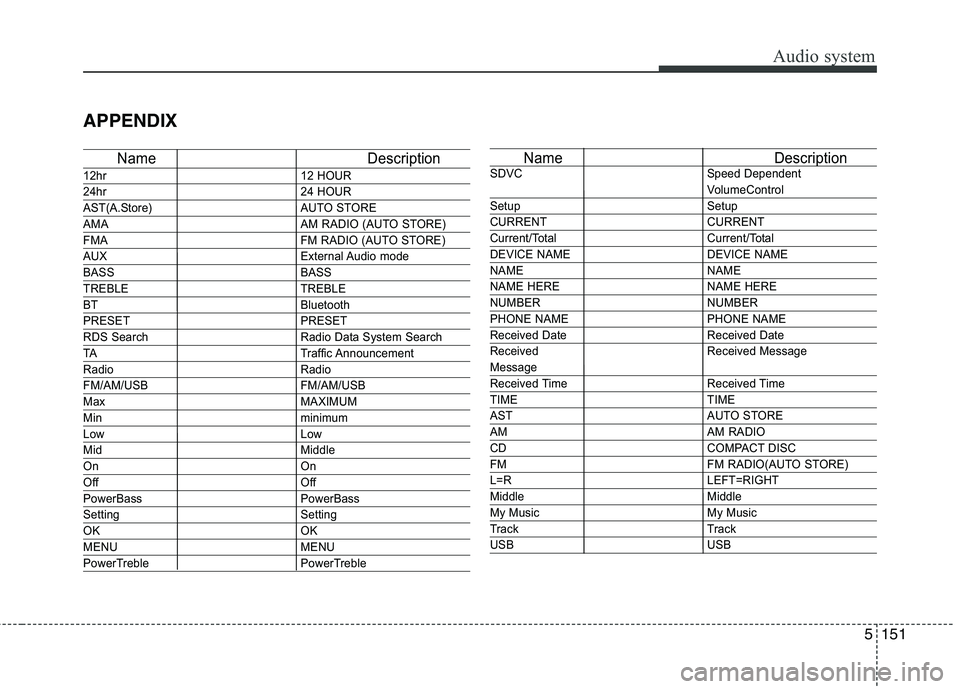
Name Description
12hr12 HOUR
24hr24 HOUR
AST(A.Store) AUTO STORE
AMA AM RADIO (AUTO STORE)
FMA FM RADIO (AUTO STORE)
AUXExternal Audio mode
BASS BASS
TREBLE TREBLE
BT Bluetooth
PRESET PRESET
RDS Search Radio Data System Search
TATraffic Announcement
Radio Radio
FM/AM/USB FM/AM/USB
MaxMAXIMUM
Minminimum
LowLow
MidMiddle
On On
Off Off
PowerBass PowerBass
Setting Setting
OKOK
MENU MENU
PowerTreble PowerTreble
Name Description
SDVC Speed Dependent
VolumeControl
Setup Setup
CURRENT CURRENT
Current/Total Current/Total
DEVICE NAME DEVICE NAME
NAME NAME
NAME HERE NAME HERE
NUMBER NUMBER
PHONE NAME PHONE NAME
Received Date Received Date
Received Received Message
Message
Received Time Received Time
TIME TIME
AST AUTO STORE
AMAM RADIO
CDCOMPACT DISC
FM FM RADIO(AUTO STORE)
L=RLEFT=RIGHT
Middle Middle
My Music My Music
Track Track
USB USB
Page 714 of 723
Index
2
I
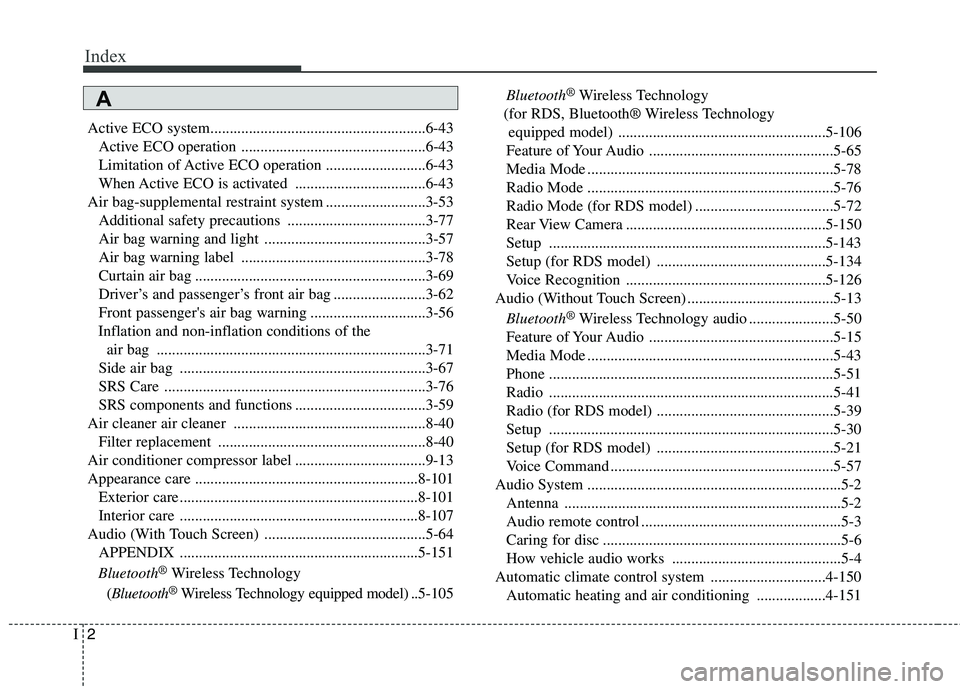
Active ECO system........................................................6-43
Active ECO operation ................................................6-43
Limitation of Active ECO operation ..........................6-43
When Active ECO is activated ..................................6-43
Air bag-supplemental restraint system ..........................3-53 Additional safety precautions ....................................3-77
Air bag warning and light ..........................................3-57
Air bag warning label ................................................3-78
Curtain air bag ............................................................3-69
Driver’s and passenger’s front air bag ........................3-62
Front passenger's air bag warning ..............................3-56
Inflation and non-inflation conditions of the air bag ......................................................................3-71
Side air bag ................................................................3-67
SRS Care ....................................................................3-76
SRS components and functions ..................................3-59
Air cleaner air cleaner ..................................................8-40 Filter replacement ......................................................8-40
Air conditioner compressor label ..................................9-13
Appearance care ..........................................................8-101 Exterior care ..............................................................8-101
Interior care ..............................................................8-107
Audio (With Touch Screen) ..........................................5-64 APPENDIX ..............................................................5-151
Bluetooth ®
Wireless Technology
( Bluetooth ®
Wireless Technology equipped model) .. 5-105Bluetooth
®
Wireless Technology
(for RDS, Bluetooth® Wireless Technology equipped model) ......................................................5-106
Feature of Your Audio ................................................5-65
Media Mode ................................................................5-78
Radio Mode ................................................................5-76
Radio Mode (for RDS model) ....................................5-72
Rear View Camera ....................................................5-150
Setup ........................................................................5-143
Setup (for RDS model) ............................................5-134
Voice Recognition ....................................................5-126
Audio (Without Touch Screen) ......................................5-13
Bluetooth ®
Wireless Technology audio ......................5-50
Feature of Your Audio ................................................5-15
Media Mode ................................................................5-43
Phone ..........................................................................5-51
Radio ..........................................................................5-41
Radio (for RDS model) ..............................................5-39
Setup ..........................................................................5-30
Setup (for RDS model) ..............................................5-21
Voice Command ..........................................................5-57
Audio System ..................................................................5-2 Antenna ........................................................................5-2
Audio remote control ....................................................5-3
Caring for disc ..............................................................5-6
How vehicle audio works ............................................5-4
Automatic climate control system ..............................4-150 Automatic heating and air conditioning ..................4-151
A