mirror KIA CEED 2010 User Guide
[x] Cancel search | Manufacturer: KIA, Model Year: 2010, Model line: CEED, Model: KIA CEED 2010Pages: 442, PDF Size: 28.25 MB
Page 245 of 442
Driving your vehicle
38
5
Adjust your mirrors to reduce the glare
from other driver's headlights.
Keep your headlights clean and prop- erly aimed on vehicles not equipped with the automatic headlight aiming
feature. Dirty or improperly aimed
headlights will make it much more diffi-cult to see at night.
Avoid staring directly at the headlights of oncoming vehicles. You could be
temporarily blinded, and it will take
several seconds for your eyes to read-
just to the darkness.
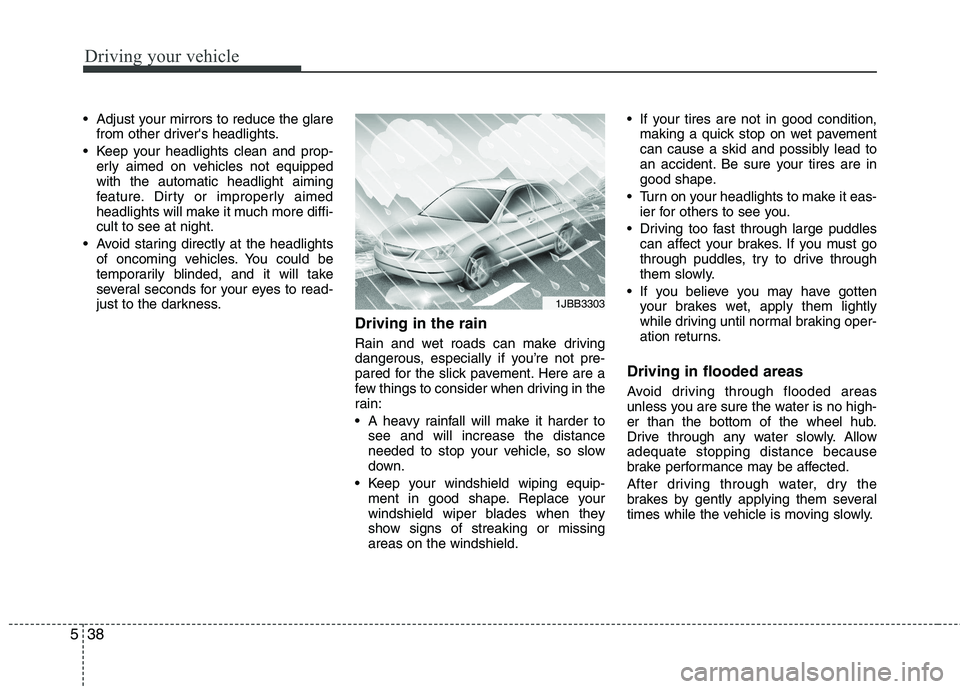
Driving in the rain
Rain and wet roads can make driving
dangerous, especially if you’re not pre-
pared for the slick pavement. Here are a
few things to consider when driving in the
rain:
A heavy rainfall will make it harder tosee and will increase the distance
needed to stop your vehicle, so slow
down.
Keep your windshield wiping equip- ment in good shape. Replace your
windshield wiper blades when they
show signs of streaking or missingareas on the windshield. If your tires are not in good condition,
making a quick stop on wet pavement
can cause a skid and possibly lead to
an accident. Be sure your tires are in
good shape.
Turn on your headlights to make it eas- ier for others to see you.
Driving too fast through large puddles can affect your brakes. If you must go
through puddles, try to drive through
them slowly.
If you believe you may have gotten your brakes wet, apply them lightly
while driving until normal braking oper-
ation returns.
Driving in flooded areas
Avoid driving through flooded areas
unless you are sure the water is no high-
er than the bottom of the wheel hub.
Drive through any water slowly. Allowadequate stopping distance because
brake performance may be affected.
After driving through water, dry the
brakes by gently applying them several
times while the vehicle is moving slowly.
1JBB3303
Page 253 of 442
Driving your vehicle
46
5
Safety chains
You should always attach chains
between your vehicle and your trailer.
Cross the safety chains under the tongue
of the trailer so that the tongue will not
drop to the road if it becomes separatedfrom the hitch.
Instructions about safety chains may be
provided by the hitch manufacturer or by
the trailer manufacturer. Follow the man-
ufacturer’s recommendation for attaching
safety chains. Always leave just enough
slack so you can turn with your trailer.
And, never allow safety chains drag on
the ground. Trailer brakes
If your trailer is equipped with a braking
system, make sure it conforms to your
country’s regulations and that it is prop-
erly installed and operating correctly.
If your trailer weighs more than the max-
imum trailer weight without trailer brakes
loaded, then it needs its own brakes and
they must be adequate. Be sure to read
and follow the instructions for the trailer
brakes so you’ll be able to install, adjust
and maintain them properly.
Don’t tap into your vehicle's brake sys-
tem. Driving with a trailer
Towing a trailer requires a certain
amount of experience. Before setting out
for the open road, you must get to know
your trailer. Acquaint yourself with the
feel of handling and braking with the
added weight of the trailer. And always
keep in mind that the vehicle you are
driving is now a good deal longer and not
nearly so responsive as your vehicle is
by itself.
Before you start, check the trailer hitch
and platform, safety chains, electrical
connector(s), lights, tires and mirror
adjustment. If the trailer has electric
brakes, start your vehicle and trailer mov-
ing and then apply the trailer brake con-
troller by hand to be sure the brakes are
working. This lets you check your electri-
cal connection at the same time.
During your trip, check occasionally to be
sure that the load is secure, and that the
lights and trailer brakes are still working.
WARNING
- Trailer brakes
Do not use a trailer with its own
brakes unless you are absolutely
certain that you have properly set
up the brake system. This is not a
task for amateurs. Use an experi-
enced, competent trailer shop for
this work.
Page 262 of 442

53
Driving your vehicle
Before entering vehicle
• Be sure that all windows, outside mir-ror(s), and outside lights are clean.
Check the condition of the tires.
Check under the vehicle for any sign of leaks.
Be sure there are no obstacles behind you if you intend to back up.
Necessary inspections
Fluid levels, such as engine oil, engine
coolant, brake fluid, and washer fluid
should be checked on a regular basis,
with the exact interval depending on the
fluid. Further details are provided in sec-
tion 7, “Maintenance”.
Before starting
Close and lock all doors.
Position the seat so that all controls are easily reached.
Adjust the inside and outside rearview mirrors. Be sure that all lights work.
Check all gauges.
Check the operation of warning lights
when the ignition switch is turned to the ON position.
Release the parking brake and make sure the brake warning light goes out.
For safe operation, be sure you are famil-
iar with your vehicle and its equipment.
BEFORE DRIVING
WARNING
All passengers must be properly
belted whenever the vehicle is mov-
ing. Refer to “Seat belts” in section
3 for more information on their
proper use.
WARNING
Always check the surrounding
areas near your vehicle for people,
especially children, before putting a
car into D (Drive) or R (Reverse).
WARNING - Driving under
the influence of alcohol or drugs
Drinking and driving is dangerous.
Drunk driving is the number one
contributor to the highway death
toll each year. Even a small amount
of alcohol will affect your reflexes,
perceptions and judgment. Drivingwhile under the influence of drugs
is as dangerous or more dangerousthan driving drunk.
You are much more likely to have a
serious accident if you drink or
take drugs and drive.
If you are drinking or taking drugs,
don’t drive. Do not ride with a driv-er who has been drinking or taking
drugs. Choose a designated driveror call a cab.
WARNING
When you intend to park or stop the
vehicle with the engine on, be care-ful not to depress the accelerator
pedal for a long period of time. It
may overheat the engine or exhaust
system and cause fire.
Page 297 of 442
Driving your vehicle
38
5
Adjust your mirrors to reduce the glare
from other driver's headlights.
Keep your headlights clean and prop- erly aimed on vehicles not equipped with the automatic headlight aiming
feature. Dirty or improperly aimed
headlights will make it much more diffi-cult to see at night.
Avoid staring directly at the headlights of oncoming vehicles. You could be
temporarily blinded, and it will take
several seconds for your eyes to read-
just to the darkness.
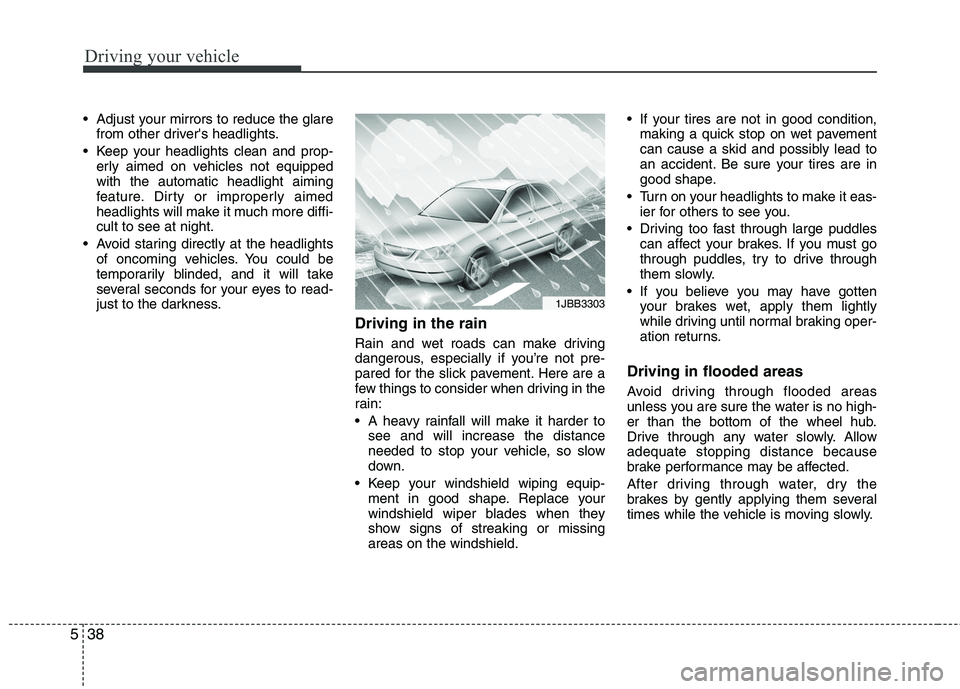
Driving in the rain
Rain and wet roads can make driving
dangerous, especially if you’re not pre-
pared for the slick pavement. Here are a
few things to consider when driving in the
rain:
A heavy rainfall will make it harder tosee and will increase the distance
needed to stop your vehicle, so slow
down.
Keep your windshield wiping equip- ment in good shape. Replace your
windshield wiper blades when they
show signs of streaking or missingareas on the windshield. If your tires are not in good condition,
making a quick stop on wet pavement
can cause a skid and possibly lead to
an accident. Be sure your tires are in
good shape.
Turn on your headlights to make it eas- ier for others to see you.
Driving too fast through large puddles can affect your brakes. If you must go
through puddles, try to drive through
them slowly.
If you believe you may have gotten your brakes wet, apply them lightly
while driving until normal braking oper-
ation returns.
Driving in flooded areas
Avoid driving through flooded areas
unless you are sure the water is no high-
er than the bottom of the wheel hub.
Drive through any water slowly. Allowadequate stopping distance because
brake performance may be affected.
After driving through water, dry the
brakes by gently applying them several
times while the vehicle is moving slowly.
1JBB3303
Page 305 of 442
Driving your vehicle
46
5
Safety chains
You should always attach chains
between your vehicle and your trailer.
Cross the safety chains under the tongue
of the trailer so that the tongue will not
drop to the road if it becomes separatedfrom the hitch.
Instructions about safety chains may be
provided by the hitch manufacturer or by
the trailer manufacturer. Follow the man-
ufacturer’s recommendation for attaching
safety chains. Always leave just enough
slack so you can turn with your trailer.
And, never allow safety chains drag on
the ground. Trailer brakes
If your trailer is equipped with a braking
system, make sure it conforms to your
country’s regulations and that it is prop-
erly installed and operating correctly.
If your trailer weighs more than the max-
imum trailer weight without trailer brakes
loaded, then it needs its own brakes and
they must be adequate. Be sure to read
and follow the instructions for the trailer
brakes so you’ll be able to install, adjust
and maintain them properly.
Don’t tap into your vehicle's brake sys-
tem. Driving with a trailer
Towing a trailer requires a certain
amount of experience. Before setting out
for the open road, you must get to know
your trailer. Acquaint yourself with the
feel of handling and braking with the
added weight of the trailer. And always
keep in mind that the vehicle you are
driving is now a good deal longer and not
nearly so responsive as your vehicle is
by itself.
Before you start, check the trailer hitch
and platform, safety chains, electrical
connector(s), lights, tires and mirror
adjustment. If the trailer has electric
brakes, start your vehicle and trailer mov-
ing and then apply the trailer brake con-
troller by hand to be sure the brakes are
working. This lets you check your electri-
cal connection at the same time.
During your trip, check occasionally to be
sure that the load is secure, and that the
lights and trailer brakes are still working.
WARNING
- Trailer brakes
Do not use a trailer with its own
brakes unless you are absolutely
certain that you have properly set
up the brake system. This is not a
task for amateurs. Use an experi-
enced, competent trailer shop for
this work.
Page 406 of 442
771
Maintenance
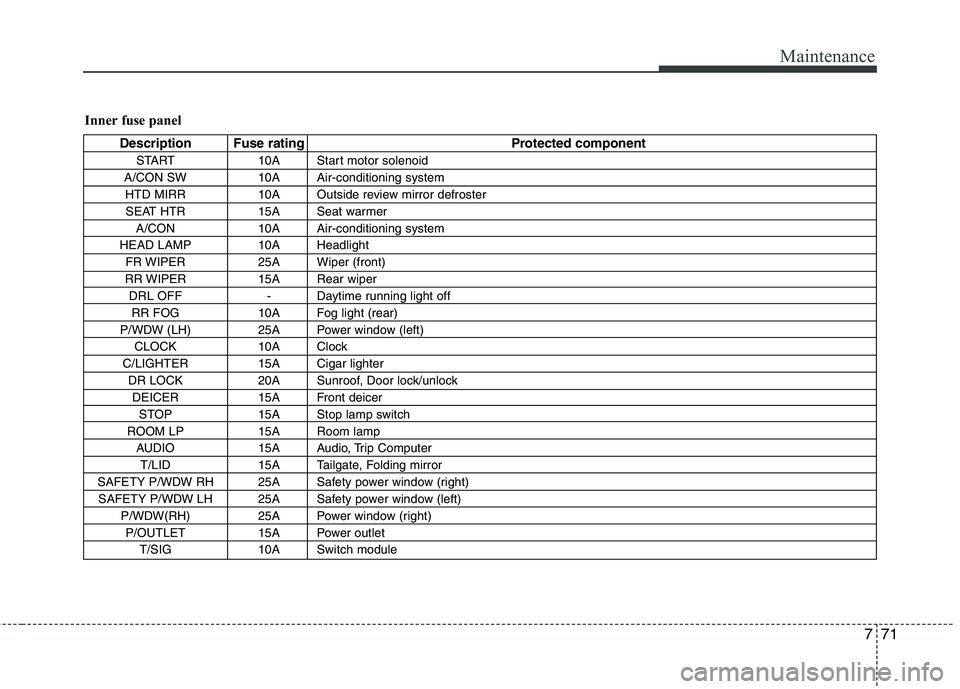
Inner fuse panel
Description Fuse rating Protected componentSTART 10A Start motor solenoid
A/CON SW 10A Air-conditioning system HTD MIRR 10A Outside review mirror defrosterSEAT HTR 15A Seat warmer A/CON 10A Air-conditioning system
HEAD LAMP 10A Headlight FR WIPER 25A Wiper (front)
RR WIPER 15A Rear wiper DRL OFF - Daytime running light offRR FOG 10A Fog light (rear)
P/WDW (LH) 25A Power window (left) CLOCK 10A Clock
C/LIGHTER 15A Cigar lighter DR LOCK 20A Sunroof, Door lock/unlockDEICER 15A Front deicer STOP 15A Stop lamp switch
ROOM LP 15A Room lamp AUDIO 15A Audio, Trip ComputerT/LID 15A Tailgate, Folding mirror
SAFETY P/WDW RH 25A Safety power window (right) SAFETY P/WDW LH 25A Safety power window (left) P/WDW(RH) 25A Power window (right)P/OUTLET 15A Power outlet T/SIG 10A Switch module
Page 414 of 442
779
Maintenance
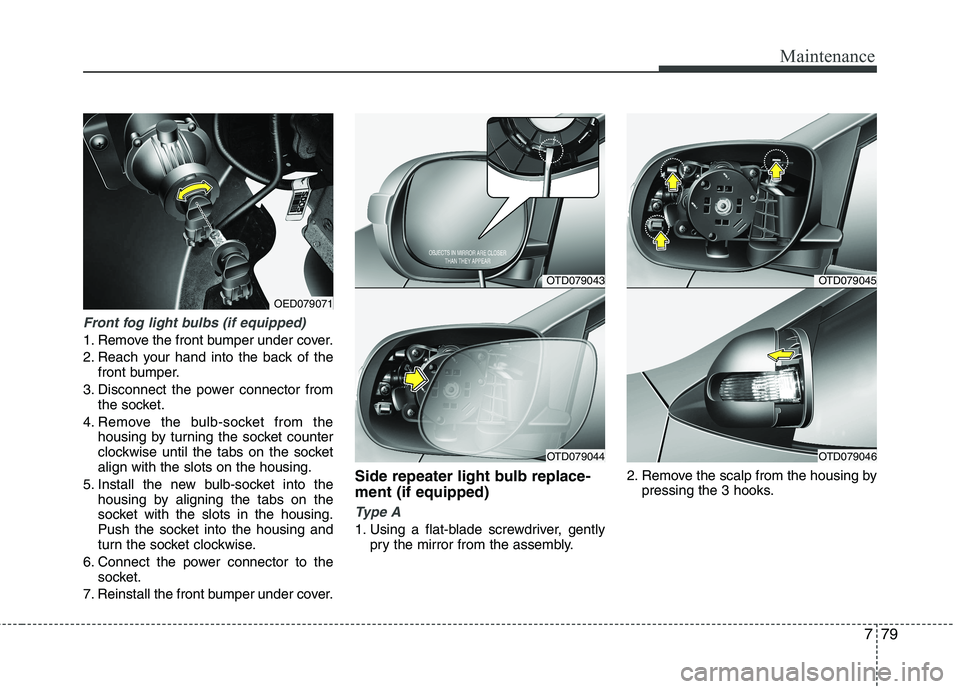
Front fog light bulbs (if equipped)
1. Remove the front bumper under cover.
2. Reach your hand into the back of thefront bumper.
3. Disconnect the power connector from the socket.
4. Remove the bulb-socket from the housing by turning the socket counter
clockwise until the tabs on the socketalign with the slots on the housing.
5. Install the new bulb-socket into the housing by aligning the tabs on the
socket with the slots in the housing.
Push the socket into the housing and
turn the socket clockwise.
6. Connect the power connector to the socket.
7. Reinstall the front bumper under cover. Side repeater light bulb replace- ment (if equipped)
Type A
1. Using a flat-blade screwdriver, gently
pry the mirror from the assembly. 2. Remove the scalp from the housing by
pressing the 3 hooks.
OTD079043
OTD079044
OTD079045
OTD079046
OED079071
Page 441 of 442
I3
Index
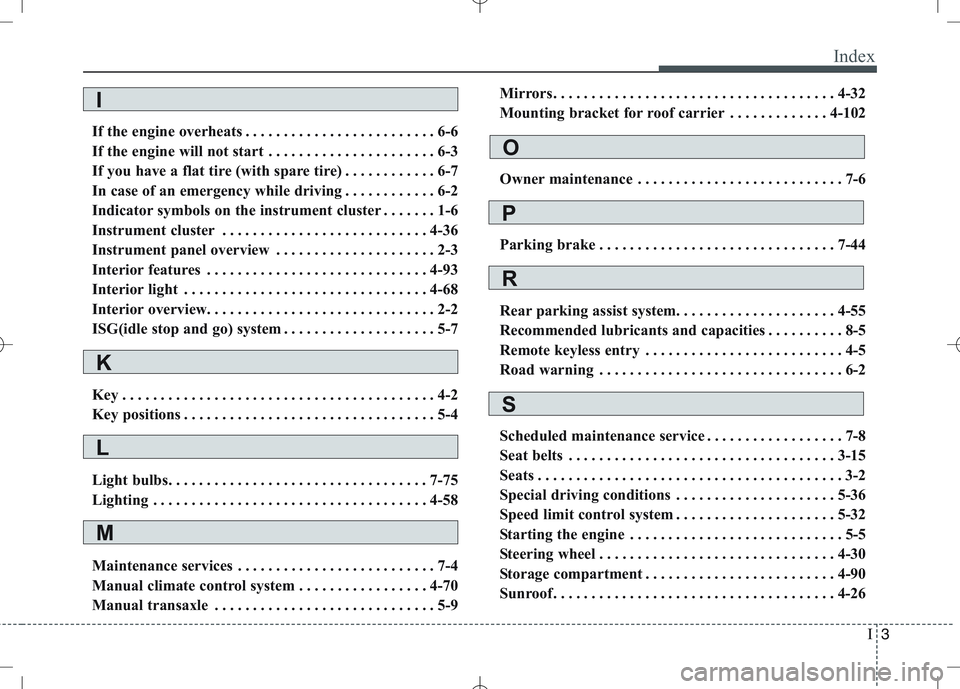
If the engine overheats . . . . . . . . . . . . . . . . . . . . . . . . . 6-6
If the engine will not start . . . . . . . . . . . . . . . . . . . . . . 6-3
If you have a flat tire (with spare tire) . . . . . . . . . . . . 6-7
In case of an emergency while driving . . . . . . . . . . . . 6-2
Indicator symbols on the instrument cluster . . . . . . . 1-6
Instrument cluster . . . . . . . . . . . . . . . . . . . . . . . . . . . 4-36
Instrument panel overview . . . . . . . . . . . . . . . . . . . . . 2-3
Interior features . . . . . . . . . . . . . . . . . . . . . . . . . . . . . 4-93
Interior light . . . . . . . . . . . . . . . . . . . . . . . . . . . . . . . . 4-68
Interior overview. . . . . . . . . . . . . . . . . . . . . . . . . . . . . . 2-2
ISG(idle stop and go) system . . . . . . . . . . . . . . . . . . . . 5-7
Key . . . . . . . . . . . . . . . . . . . . . . . . . . . . . . . . . . . . . . . . . 4-2
Key positions . . . . . . . . . . . . . . . . . . . . . . . . . . . . . . . . . 5-4
Light bulbs. . . . . . . . . . . . . . . . . . . . . . . . . . . . . . . . . . 7-75
Lighting . . . . . . . . . . . . . . . . . . . . . . . . . . . . . . . . . . . . 4-58
Maintenance services . . . . . . . . . . . . . . . . . . . . . . . . . . 7-4
Manual climate control system . . . . . . . . . . . . . . . . . 4-70
Manual transaxle . . . . . . . . . . . . . . . . . . . . . . . . . . . . . 5-9 Mirrors . . . . . . . . . . . . . . . . . . . . . . . . . . . . . . . . . . . . . 4-32
Mounting bracket for roof carrier . . . . . . . . . . . . . 4-102
Owner maintenance . . . . . . . . . . . . . . . . . . . . . . . . . . . 7-6
Parking brake . . . . . . . . . . . . . . . . . . . . . . . . . . . . . . . 7-44
Rear parking assist system. . . . . . . . . . . . . . . . . . . . . 4-55
Recommended lubricants and capacities . . . . . . . . . . 8-5
Remote keyless entry . . . . . . . . . . . . . . . . . . . . . . . . . . 4-5
Road warning . . . . . . . . . . . . . . . . . . . . . . . . . . . . . . . . 6-2
Scheduled maintenance service . . . . . . . . . . . . . . . . . . 7-8
Seat belts . . . . . . . . . . . . . . . . . . . . . . . . . . . . . . . . . . . 3-15
Seats . . . . . . . . . . . . . . . . . . . . . . . . . . . . . . . . . . . . . . . . 3-2
Special driving conditions . . . . . . . . . . . . . . . . . . . . . 5-36
Speed limit control system . . . . . . . . . . . . . . . . . . . . . 5-32
Starting the engine . . . . . . . . . . . . . . . . . . . . . . . . . . . . 5-5
Steering wheel . . . . . . . . . . . . . . . . . . . . . . . . . . . . . . . 4-30
Storage compartment . . . . . . . . . . . . . . . . . . . . . . . . . 4-90
Sunroof . . . . . . . . . . . . . . . . . . . . . . . . . . . . . . . . . . . . . 4-26
I
K
L
M
O
P
R
S