window KIA CEED 2011 User Guide
[x] Cancel search | Manufacturer: KIA, Model Year: 2011, Model line: CEED, Model: KIA CEED 2011Pages: 390, PDF Size: 20.01 MB
Page 91 of 390

Features of your vehicle
20
4
Manual windows (if equipped)
To raise or lower the window, turn the
window regulator handle clockwise or
counterclockwise.
WARNING - Windows
NEVER leave the ignition key in the vehicle.
NEVER leave any child unattend- ed in the vehicle. Even very
young children may inadvertently
cause the vehicle to move, entan-
gle themselves in the windows,or otherwise injure themselves or
others.
Always double check to make sure all arms, hands, head and
other obstructions are safely out
of the way before closing a win-
dow.
Do not allow children to play with the power windows. Keep the dri-
ver’s door power window lock
switch in the LOCK position
(depressed). Serious injury can
result from unintentional window
operation by the child.
Do not extend face or arms out- side the window opening whiledriving.
OED036088
WARNING
When opening or closing the win-
dows, make sure your passenger's
arms, hands and body are safely
out of the way.
ED(FL) ENG 4(~103).QXP 10/28/2010 6:54 PM Page 20
Page 103 of 390

Features of your vehicle
32
4
Inside rearview mirror
Adjust the rearview mirror so that the
center view through the rear window is
seen. Make this adjustment before you
start driving.
Day/night rearview mirror
(if equipped)
Make this adjustment before you start
driving and while the day/night lever is in
the day position.
Pull the day/night lever toward you to reduce glare from the headlights of the
vehicles behind you during night driving.
Remember that you lose some rearviewclarity in the night position.
Electrochromic mirror (ECM)
(if equipped)
The electric rearview mirror automatical- ly controls the glare from the headlights
of the car behind you in nighttime or low
light driving conditions. The sensormounted in the mirror senses the light
level around the vehicle, and automati-cally controls the headlight glare from
vehicles behind you.
When the engine is running, the glare is
automatically controlled by the sensor
mounted in the rearview mirror.
Whenever the shift lever is shifted into
reverse (R), the mirror will automatically
go to the brightest setting in order to
improve the drivers view behind the vehi-
cle.
MIRRORS
OAM049023
CAUTION
When cleaning the mirror, use a
paper towel or similar materialdampened with glass cleaner. Do not spray glass cleaner directly on
the mirror as that may cause the liq-uid cleaner to enter the mirror hous- ing.
Day
Night
WARNING - Rear visibility
Do not place objects in the rear
seat or cargo area which would
interfere with your vision out the
rear window.
WARNING
Do not adjust the rearview mirror
while the vehicle is moving. This
could result in loss of control, and
an accident which could cause
death, serious injury or property
damage.
ED(FL) ENG 4(~103).QXP 10/28/2010 6:55 PM Page 32
Page 106 of 390
435
Features of your vehicle
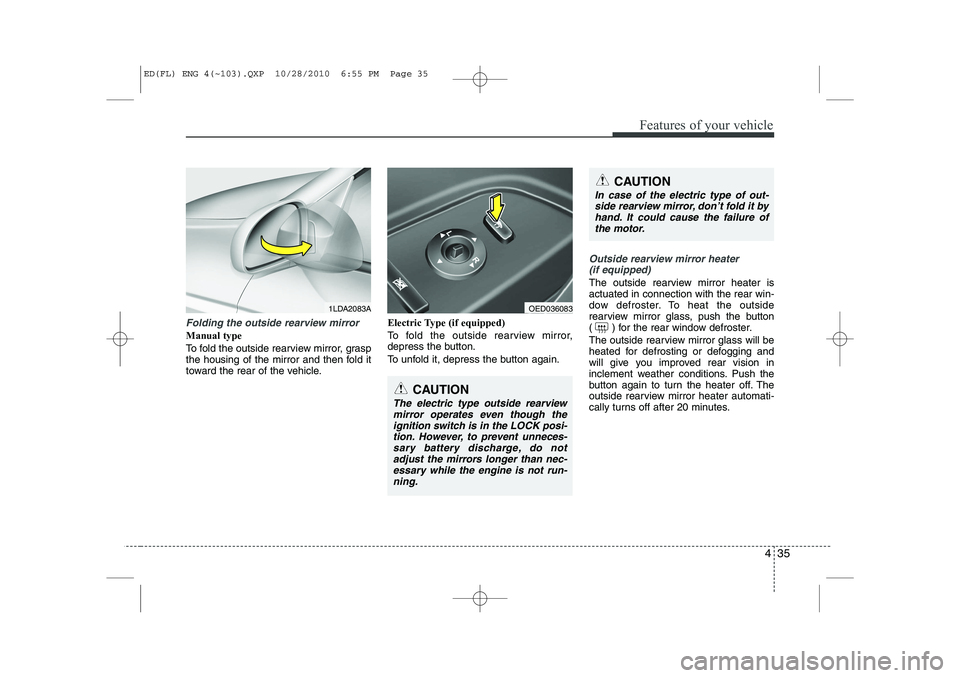
Folding the outside rearview mirror
Manual type
To fold the outside rearview mirror, grasp
the housing of the mirror and then fold it
toward the rear of the vehicle.Electric Type (if equipped)
To fold the outside rearview mirror,
depress the button.
To unfold it, depress the button again.
Outside rearview mirror heater
(if equipped)
The outside rearview mirror heater is actuated in connection with the rear win-
dow defroster. To heat the outside
rearview mirror glass, push the button
( ) for the rear window defroster.
The outside rearview mirror glass will be
heated for defrosting or defogging and
will give you improved rear vision in
inclement weather conditions. Push the
button again to turn the heater off. The
outside rearview mirror heater automati-
cally turns off after 20 minutes.
CAUTION
In case of the electric type of out-side rearview mirror, don’t fold it by
hand. It could cause the failure ofthe motor.
CAUTION
The electric type outside rearview mirror operates even though the
ignition switch is in the LOCK posi- tion. However, to prevent unneces-sary battery discharge, do not adjust the mirrors longer than nec-
essary while the engine is not run- ning.
1LDA2083AOED036083
ED(FL) ENG 4(~103).QXP 10/28/2010 6:55 PM Page 35
Page 131 of 390

Features of your vehicle
60
4
Parking light position ( )
When the light switch is in the parking light position (1st position), the tail posi-
tion, license and instrument panel lights
will turn ON.
Headlight position ( )
When the light switch is in the headlight position (2nd position), the head, tail,
position, license and instrument panellights are ON.
✽✽
NOTICE
The ignition switch must be in the ON position to turn on the headlights.
Auto light position (if equipped)
When the light switch is in the AUTO light position, the taillights and headlights will
be turned ON or OFF automaticallydepending on the amount of light outside
the vehicle.
CAUTION
Never place anything over sensor (1) located on the instrumentpanel, this will ensure better auto-light system control.
Do not clean the sensor using a window cleaner, the cleanser mayleave a light film which could inter-fere with sensor operation.
If your vehicle has window tint or other types of metallic coating onthe front windshield, the Auto lightsystem may not work properly.
OED040030OED040800OED040046
ED(FL) ENG 4(~103).QXP 10/28/2010 6:57 PM Page 60
Page 138 of 390

467
Features of your vehicle
Rear window wiper and washer
switch (if equipped)
The rear window wiper and washer
switch is located at the end of the wiper
and washer switch lever. Turn the switch
to desired position to operate the rear
wiper and washer.- Normal wiper operation
O - Wiper is not in operation Push the lever away from you to spray
rear washer fluid and to run the rear
wipers 1~3 cycles. The spray and wiper
operation will continue until you release
the lever.
OED040906OED040908
ED(FL) ENG 4(~103).QXP 10/28/2010 6:58 PM Page 67
Page 140 of 390

469
Features of your vehicle
✽✽NOTICE
If you want to defrost and defog the
front windshield, refer to “Windshield
defrosting and defogging” in this sec-tion.
Rear window defroster
The defroster heats the window to
remove frost, fog and thin ice from the
interior and exterior of the rear window,
while engine is running.
To activate the rear window defroster,
press the rear window defroster button
located in the center facia switch panel. The indicator on the rear window
defroster button illuminates when thedefroster is ON.
If there is heavy accumulation of snow on
the rear window, brush it off before oper-
ating the rear defroster.
The rear window defroster automatically
turns off after approximately 20 minutes
or when the ignition switch is turned off.
To turn off the defroster, press the rear
window defroster button again.
Outside mirror defroster
(if equipped)
If your vehicle is equipped with outside
mirror defrosters, they will operate at the
same time when you turn on the rear
window defroster.
Front windshield deicer (if equipped)
If your vehicle is equipped with front
windshield deicer, they will operate at the
same time when you turn on the rear
window defroster.
DEFROSTER
CAUTION
To prevent damage to the conduc-
tors bonded to the inside surface of
the rear window, never use sharpinstruments or window cleanerscontaining abrasives to clean the window.
OED040043
OED040044B
Type A
Type B
ED(FL) ENG 4(~103).QXP 10/28/2010 6:58 PM Page 69
Page 141 of 390
Features of your vehicle
70
4
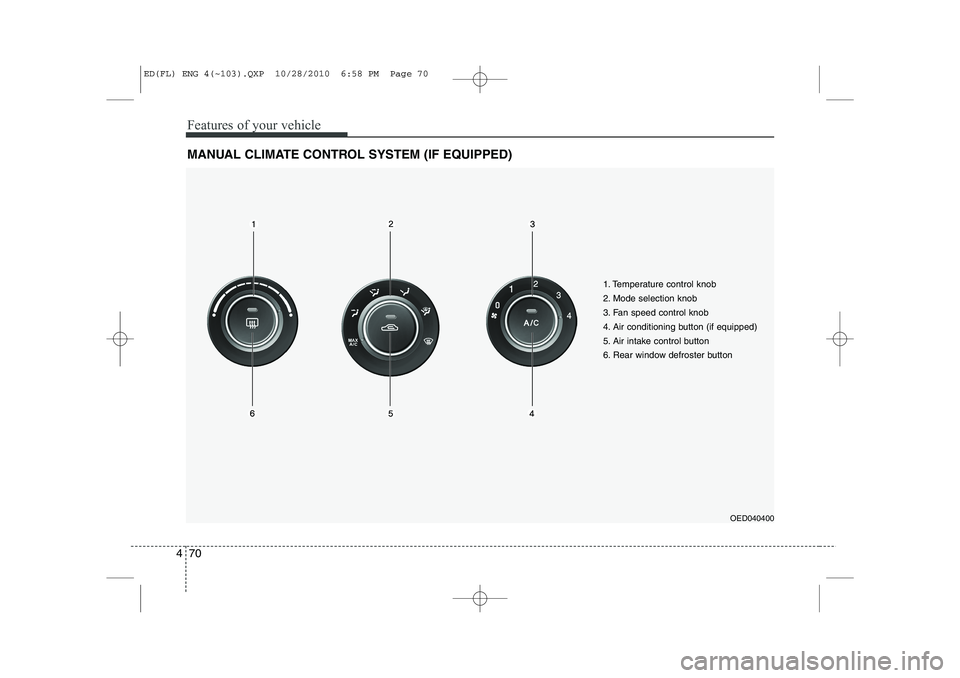
MANUAL CLIMATE CONTROL SYSTEM (IF EQUIPPED)
OED040400
1. Temperature control knob
2. Mode selection knob
3. Fan speed control knob
4. Air conditioning button (if equipped)
5. Air intake control button
6. Rear window defroster button
ED(FL) ENG 4(~103).QXP 10/28/2010 6:58 PM Page 70
Page 144 of 390
473
Features of your vehicle
Floor/Defrost-Level (A, C, E, D)
Most of the air flow is directed to the floor and the windshield with a small amount
directed to the side window defrosters.
Defrost-Level (A, D)
Most of the air flow is directed to thewindshield with a small amount of air
directed to the side window defrosters.Instrument panel vents
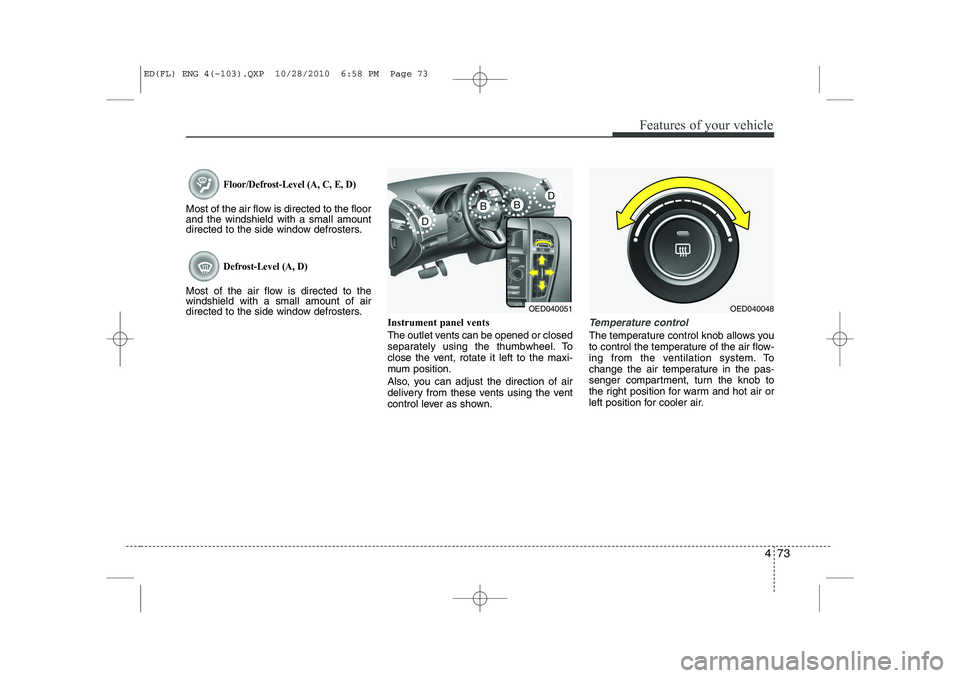
The outlet vents can be opened or closed
separately using the thumbwheel. To
close the vent, rotate it left to the maxi-
mum position.
Also, you can adjust the direction of air
delivery from these vents using the vent
control lever as shown.
Temperature control
The temperature control knob allows you
to control the temperature of the air flow-
ing from the ventilation system. To
change the air temperature in the pas-
senger compartment, turn the knob to
the right position for warm and hot air or
left position for cooler air.
OED040051OED040048
ED(FL) ENG 4(~103).QXP 10/28/2010 6:58 PM Page 73
Page 145 of 390
Features of your vehicle
74
4
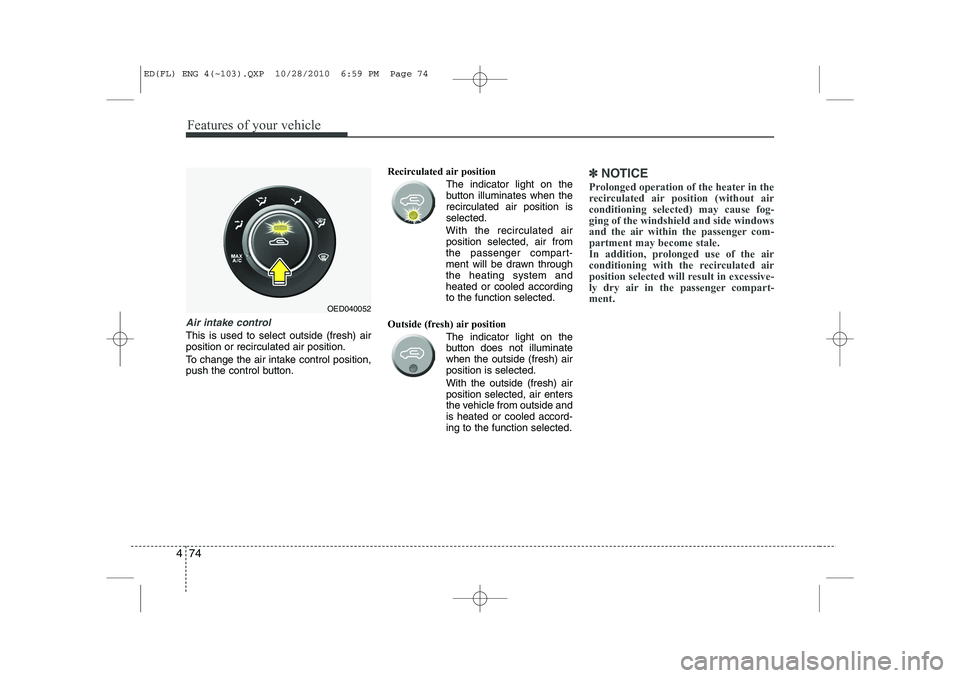
Air intake control
This is used to select outside (fresh) air position or recirculated air position.
To change the air intake control position,
push the control button. Recirculated air position
The indicator light on the
button illuminates when therecirculated air position isselected.
With the recirculated air position selected, air from
the passenger compart-
ment will be drawn throughthe heating system andheated or cooled accordingto the function selected.
Outside (fresh) air position The indicator light on the
button does not illuminatewhen the outside (fresh) airposition is selected. With the outside (fresh) air position selected, air enters
the vehicle from outside andis heated or cooled accord-ing to the function selected.
✽✽NOTICE
Prolonged operation of the heater in the
recirculated air position (without airconditioning selected) may cause fog-ging of the windshield and side windows
and the air within the passenger com-partment may become stale.
In addition, prolonged use of the air
conditioning with the recirculated air
position selected will result in excessive-
ly dry air in the passenger compart-ment.
OED040052
ED(FL) ENG 4(~103).QXP 10/28/2010 6:59 PM Page 74
Page 150 of 390
479
Features of your vehicle
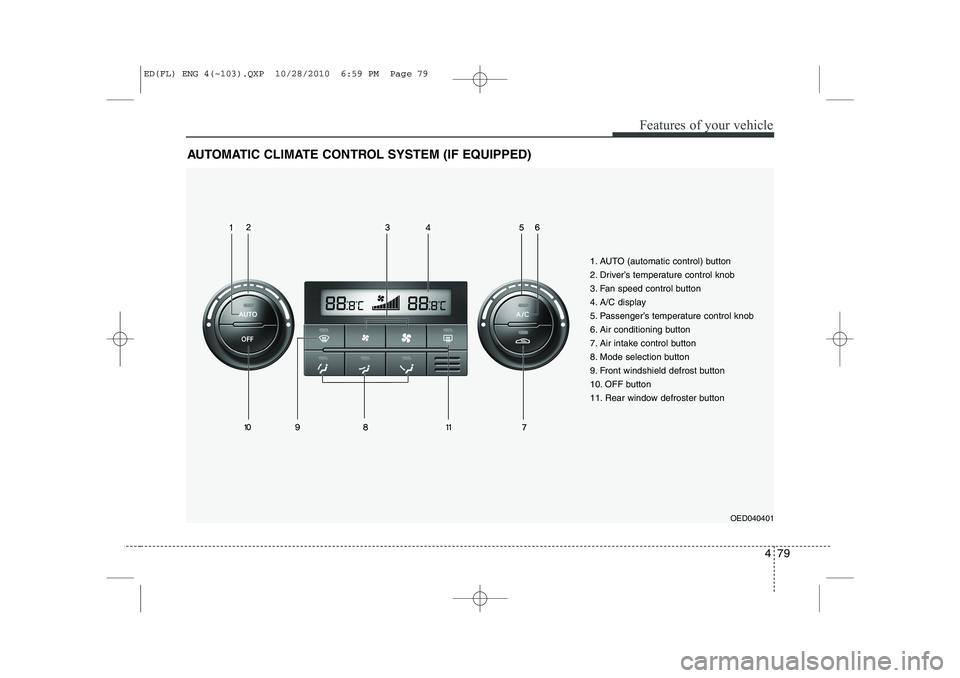
AUTOMATIC CLIMATE CONTROL SYSTEM (IF EQUIPPED)
OED040401
1. AUTO (automatic control) button
2. Driver’s temperature control knob
3. Fan speed control button
4. A/C display
5. Passenger’s temperature control knob
6. Air conditioning button
7. Air intake control button
8. Mode selection button
9. Front windshield defrost button
10. OFF button
11. Rear window defroster button
ED(FL) ENG 4(~103).QXP 10/28/2010 6:59 PM Page 79