change time KIA CEED 2011 Owners Manual
[x] Cancel search | Manufacturer: KIA, Model Year: 2011, Model line: CEED, Model: KIA CEED 2011Pages: 390, PDF Size: 20.01 MB
Page 1 of 390
kia, the company
Thank you for becoming the owner of a new Kia vehicle. As a global car manufacturing company focused on building high- quality vehicles at value prices, Kia Motors is dedicated to providing you
with Service above your expectation and delight customer experience. In our Kia dealerships you will experience our “ Family-like Care”
promise, that creates feelings of warmth, hospitality and trust – feelings of being looked after by people who care.
All information contained in this Owner’s Manual is accurate at the
time of publication. However, Kia reserves the right to make changesat any time so that our policy of continual product improvement can becarried out. This manual applies to all Kia models and includes descriptions and
explanations of optional as well as standard equipment. As a result, youmay encounter material in this manual that is not applicable to yourspecific Kia vehicle.
Enjoy your vehicle & experience Kia “Family-like Care” !
ED(FL) ENG FOREWORD.QXP 10/28/2010 6:03 PM Page 1
Page 2 of 390
i
Thank you for choosing a KIA vehicle. When you require service, remember that your dealer
knows your vehicle best. Your dealer has factory-trainedtechnicians, recommended special tools, genuine KIAreplacement parts and is dedicated to your complete sat-isfaction. Because subsequent owners require this important infor- mation as well, this publication should remain with thevehicle if it is sold. This manual will familiarize you with operational, main- tenance and safety information about your new vehicle. It
is supplemented by a Warranty and Maintenance bookthat provides important information on all warranties
regarding your vehicle. We urge you to read these publi-cations carefully and follow the recommendations to helpassure enjoyable and safe operation of your new vehicle.
KIA offers a great variety of options, components and
features for its various models. Therefore, some of theequipment described in this manual, along with the vari-ous illustrations, may not be applicable to your particularvehicle.
The information and specifications provided in this man-
ual were accurate at the time of printing. KIA reservesthe right to discontinue or change specifications or designat any time without notice and without incurring anyobligation. If you have questions, always check with your
authorized KIA dealer.
We assure you of our continuing interest in your motor-
ing pleasure and satisfaction in your KIA vehicle.
© 2010 Kia Motors Slovakia s.r.o. All rights reserved. Reproduction by any means, elec- tronic or mechanical, including photocopying, recording,or by any information storage and retrieval system ortranslation in whole or part is not permitted without writ-
ten authorization from Kia Motors Slovakia s.r.o..
Foreword
ED(FL) ENG FOREWORD.QXP 10/28/2010 6:03 PM Page 2
Page 18 of 390

35
Safety features of your vehicle
Adjusting the seatback recliner
To recline the seatback, rotate the
knob forward or rearward to the
desired angle.
Seat cushion height (for driver’s seat)
To change the height of the seat cushion,
push the lever that is located on the out-
side of the seat cushion upwards or
downwards.
• To lower the seat cushion, push thelever down several times.
To raise the seat cushion, pull the lever up several times.
Lumbar support (if equipped)
The lumbar support can be adjusted by
moving the lever on the side of seatback.
Pivoting the lever increases or decreases
lumbar support.
OED036016OED036017OED036018
ED(FL) ENG 3.QXP 6/28/2010 10:28 AM Page 5
Page 21 of 390

Safety features of your vehicle
8
3
Seat warmer (if equipped)
The seat warmer is provided to warm the
front seats during cold weather. With the
ignition switch in the ON position, push
either of the switches to warm the driver'sseat or the front passenger's seat.
Each time you push the button, the
temperature setting of the seat is
changed as follows :
The seat warmer defaults to the OFF position whenever the ignition switch is
turned on. During mild weather or under conditions
where the operation of the seat warmer
is not needed, keep the switches in the"OFF" position.
✽✽
NOTICE
Page 124 of 390

453
Features of your vehicle
LCD display warnings and indica-
tors
Calendar / Clock / Outside ambientTemperature (if equipped)
The monitor will display the outside ambi-
ent temperature, date and time.
The date display when the radio power is
turned off.
To change the date, time or temperature unit(°C ↔ °F), press the SET button for
more than 1 seconds.
Then you will enter the set-up mode and
mode changes in the following order as
you press the SET button less than 1second. YEAR →MONTH →DAY →HOUR →
MINUTE →TEMPERATURE UNIT
CHANGE →Escape set-up mode Press the SET button less than 1 second to select the mode and set the data usingthe UP(
▲) and DOWN( ▼) button while
the selected setting mode blinks.
To cancel the SET UP mode, do one of
the following :
- Press the SET button less than 1 sec- ond in set-up temperature unit change mode
- Press the SET button more than 1 sec- ond in any set-up mode
- After 15 seconds without any key press
- Ignition is On or OFF in Set-up mode
- Battery is disconnected
Door and tailgate open display
The monitor will display the correspon- ding door or tailgate that is not closed
securely.
OED040075OED040080
ED(FL) ENG 4(~103).QXP 10/28/2010 6:57 PM Page 53
Page 132 of 390

461
Features of your vehicle
High beam operation
To turn on the high beam headlights, push
the lever away from you. Pull it back for
low beams. The high beam indicator will light when
the headlight high beams are switched on.
To prevent the battery from being dis-
charged, do not leave the lights on for aprolonged time while the engine is not
running.To flash the headlights, pull the lever
towards you. It will return to the normal
(low beam) position when released. The
headlight switch does not need to be on
to use this flashing feature.
Turn signals and lane change sig- nals
The ignition switch must be on for the
turn signals to function. To turn on the
turn signals, move the lever up or down
(A). The green arrow indicators on the
instrument panel indicate which turn sig-
nal is operating. They will self-cancel
after a turn is completed. If the indicator
continues to flash after a turn, manually
return the lever to the O/OFF position.
OED040802OED040801OED040804
ED(FL) ENG 4(~103).QXP 10/28/2010 6:57 PM Page 61
Page 209 of 390

Driving your vehicle
2
5
WARNING - ENGINE EXHAUST CAN BE DANGEROUS!
Engine exhaust fumes can be extremely dangerous. If, at any time, you smell exhaust fumes inside the vehicle, open the win-
dows immediately.
• Do not inhale exhaust fumes.
Exhaust fumes contain carbon monoxide, a colorless, odorless gas that can cause unconsciousness and death by asphyxia- tion.
Be sure the exhaust system does not leak. The exhaust system should be checked whenever the vehicle is raised to change the oil or for any other purpose. If you hear
a change in the sound of the exhaust or if you drive over something that strikes the underneath side of the car, have the
exhaust system checked as soon as possible by an authorized KIA dealer.
Do not run the engine in an enclosed area. Letting the engine idle in your garage, even with the garage door open, is a hazardous practice. Never run the engine in your
garage any longer than it takes to start the engine and back the vehicle out.
Avoid idling the engine for prolonged periods with people inside the vehicle. If it is necessary to idle the engine for a prolonged period with people inside the vehicle, be sure to do so only in an open a rea
with the air intake set at "Fresh" and fan operating at one of the higher speeds so fresh air is drawn into the interior.
If you must drive with the tailgate open because you are carrying objects that make this necessary:
1. Close all windows.
2. Open side vents.
3. Set the air intake control at "Fresh", the air flow control at "Floor" or "Face" and the fan at one of the higher speeds.
To assure proper operation of the ventilation system, be sure the ventilation air intakes located just in front of the windshield are
kept clear of snow, ice, leaves or other obstructions.
ED(FL) ENG 5.QXP 10/28/2010 6:22 PM Page 2
Page 238 of 390
531
Driving your vehicle
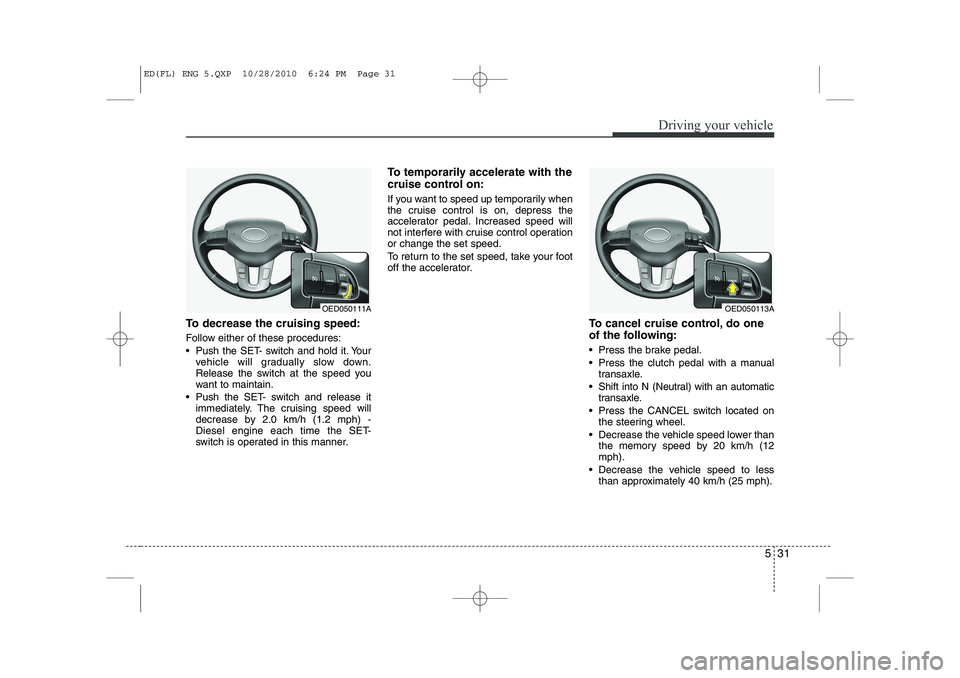
To decrease the cruising speed:
Follow either of these procedures:
Push the SET- switch and hold it. Yourvehicle will gradually slow down.
Release the switch at the speed you
want to maintain.
Push the SET- switch and release it immediately. The cruising speed will
decrease by 2.0 km/h (1.2 mph) -
Diesel engine each time the SET-
switch is operated in this manner. To temporarily accelerate with the
cruise control on:
If you want to speed up temporarily when
the cruise control is on, depress the
accelerator pedal. Increased speed will
not interfere with cruise control operationor change the set speed.
To return to the set speed, take your foot
off the accelerator.
To cancel cruise control, do one
of the following:
Press the brake pedal.
Press the clutch pedal with a manualtransaxle.
Shift into N (Neutral) with an automatic transaxle.
Press the CANCEL switch located on the steering wheel.
Decrease the vehicle speed lower than the memory speed by 20 km/h (12 mph).
Decrease the vehicle speed to less than approximately 40 km/h (25 mph).
OED050113AOED050111A
ED(FL) ENG 5.QXP 10/28/2010 6:24 PM Page 31
Page 250 of 390
543
Driving your vehicle
Use high quality ethylene glycol coolant
Your vehicle is delivered with high quality
ethylene glycol coolant in the cooling
system. It is the only type of coolant that
should be used because it helps prevent
corrosion in the cooling system, lubri-
cates the water pump and prevents
freezing. Be sure to replace or replenish
your coolant in accordance with themaintenance schedule in section 7.
Before winter, have your coolant tested toassure that its freezing point is sufficient
for the temperatures anticipated during
the winter.
Check battery and cables
Winter puts additional burdens on the
battery system. Visually inspect the bat-
tery and cables as described in section
7. The level of charge in your battery can
be checked by an authorized KIA dealer
or a service station.Change to "winter weight" oil if
necessary In some climates it is recommended that
a lower viscosity "winter weight" oil be
used during cold weather. See section 8
for recommendations. If you aren't sure
what weight oil you should use, consult
an authorized KIA dealer.
Check spark plugs and ignition system
Inspect your spark plugs as described in
section 7 and replace them if necessary.
Also check all ignition wiring and compo-
nents to be sure they are not cracked,
worn or damaged in any way.
WARNING
- Tire chains
The use of chains may adversely affect vehicle handling.
Do not exceed 30 km/h (20 mph) or the chain manufacturer’s rec-
ommended speed limit, whichev-
er is lower.
Drive carefully and avoid bumps, holes, sharp turns, and other
road hazards, which may cause
the vehicle to bounce.
Avoid sharp turns or locked- wheel braking.
CAUTION
Chains that are the wrong size or
improperly installed can damage
your vehicle's brake lines, sus-pension, body and wheels.
Stop driving and retighten the chains any time you hear themhitting the vehicle.
ED(FL) ENG 5.QXP 10/28/2010 6:24 PM Page 43
Page 255 of 390
Driving your vehicle
48
5
Following distance
Stay at least twice as far behind the vehi-
cle ahead as you would when driving
your vehicle without a trailer. This can
help you avoid situations that require
heavy braking and sudden turns.
Passing
You’ll need more passing distance up
ahead when you’re towing a trailer. And,
because of the increased vehicle length,
you’ll need to go much farther beyond the
passed vehicle before you can return to
your lane.
Backing up
Hold the bottom of the steering wheel
with one hand. Then, to move the trailer
to the left, just move your hand to the left.
To move the trailer to the right, move your
hand to the right. Always back up slowly
and, if possible, have someone guide
you.
Making turns
When you’re turning with a trailer, make
wider turns than normal. Do this so your
trailer won’t strike soft shoulders, curbs,
road signs, trees, or other objects. Avoid
jerky or sudden maneuvers. Signal well
in advance.
Turn signals when towing a trailer
When you tow a trailer, your vehicle has
to have a different turn signal flasher and
extra wiring. The green arrows on your
instrument panel will flash whenever you
signal a turn or lane change. Properly
connected, the trailer lights will also flash
to alert other drivers you’re about to turn,
change lanes, or stop.
When towing a trailer, the green arrows
on your instrument panel will flash for
turns even if the bulbs on the trailer are
burned out. Thus, you may think drivers
behind you are seeing your signals
when, in fact, they are not. It’s important
to check occasionally to be sure the trail-
er bulbs are still working. You must also
check the lights every time you discon-
nect and then reconnect the wires.
Do not connect a trailer lighting system
directly to your vehicle’s lighting system.
Use only an approved trailer wiring har-
ness. An authorized KIA dealer can assist you
in installing the wiring harness.Driving on grades
Reduce speed and shift to a lower gear
before you start down a long or steep
downgrade. If you don’t shift down, you
might have to use your brakes so much
that they would get hot and no longer
operate efficiently.
On a long uphill grade, shift down and
reduce your speed to around 70 km/h (45mph) to reduce the possibility of engine
and transaxle overheating.
If your trailer weighs more than the max-
imum trailer weight without trailer brakes
and you have an automatic transaxle,
you should drive in D (Drive) when tow-
ing a trailer.
Operating your vehicle in D (Drive) when
towing a trailer will minimize heat build up
and extend the life of your transaxle.
WARNING
Failure to use an approved trailer wiring harness could result in dam-
age to the vehicle electrical system
and/or personal injury.
ED(FL) ENG 5.QXP 10/28/2010 6:24 PM Page 48