reverse KIA CEED 2011 Owners Manual
[x] Cancel search | Manufacturer: KIA, Model Year: 2011, Model line: CEED, Model: KIA CEED 2011Pages: 390, PDF Size: 20.01 MB
Page 77 of 390
Features of your vehicle
6
4
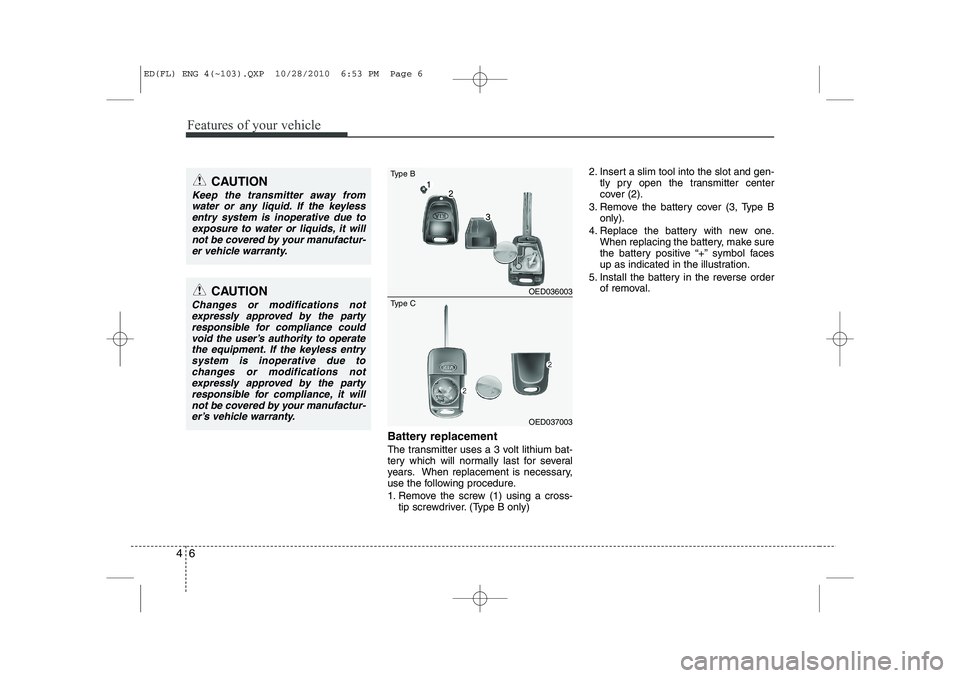
Battery replacement
The transmitter uses a 3 volt lithium bat-
tery which will normally last for several
years. When replacement is necessary,
use the following procedure.
1. Remove the screw (1) using a cross-
tip screwdriver. (Type B only) 2. Insert a slim tool into the slot and gen-
tly pry open the transmitter center
cover (2).
3. Remove the battery cover (3, Type B only).
4. Replace the battery with new one. When replacing the battery, make sure
the battery positive “+” symbol faces
up as indicated in the illustration.
5. Install the battery in the reverse order of removal.
OED036003
OED037003
Type B
Type C
CAUTION
Keep the transmitter away from
water or any liquid. If the keyless
entry system is inoperative due toexposure to water or liquids, it willnot be covered by your manufactur- er vehicle warranty.
CAUTION
Changes or modifications not
expressly approved by the partyresponsible for compliance could void the user’s authority to operate
the equipment. If the keyless entrysystem is inoperative due to changes or modifications notexpressly approved by the party
responsible for compliance, it will not be covered by your manufactur-er’s vehicle warranty.
ED(FL) ENG 4(~103).QXP 10/28/2010 6:53 PM Page 6
Page 90 of 390

419
Features of your vehicle
✽✽NOTICE
The automatic reverse feature for the window is only active when the “auto
up” feature is used by fully pulling up
the switch. The automatic reverse fea-
ture will not operate if the window israised using the halfway position on the
power window switch.
Power window lock button
The driver can disable the power win- dow switches on the rear passenger
doors by depressing the power window
lock switch located on the driver’s doorto LOCK (pressed).
When the power window lock switch is ON, the driver’s master control
cannot operate the rear passenger
door power windows either.
CAUTION
To prevent possible damage to
the power window system, do not
open or close two windows ormore at the same time. This willalso ensure the longevity of the fuse.
Never try to operate the main switch on the driver's door andthe individual door windowswitch in opposing directions at
the same time. If this is done, thewindow will stop and cannot be opened or closed.
WARNING
Always check for obstructions
before raising any window to avoid
injuries or vehicle damage. If anobject less than 4 mm (0.16 in.) indiameter is caught between the
window glass and the upper win-
dow channel, the automatic reverse
window may not detect the resist-
ance and will not stop and reversedirection.
OED036013
ED(FL) ENG 4(~103).QXP 10/28/2010 6:54 PM Page 19
Page 98 of 390

427
Features of your vehicle
Sliding the sunroof
To open the sunroof automatically:
Press the slide button (1) for more than
0.5 seconds and then release it. The sun-
roof will slide open automatically but will
not open all the way. If you would like to
completely open the sunroof, press the
slide button once more. However, the
second time the button is pressed the
sunroof will open only while the button ispressed.
To stop the sunroof sliding at any point,
press any sunroof control button momen-
tarily.
✽✽NOTICE
While driving with the sunroof in an
open (or partially open position), yourvehicle may demonstrate a wind buffet-
ing or pulsation noise. This noise is a
normal occurrence and can be reduced
or eliminated by taking the followingactions. If you experience the noise with
the sunroof open, slightly reduce the size
of the sunroof opening
To close the sunroof automatically:
Press the close button (3) for more than
0.5 seconds and then release it. The sun-
roof will automatically close all the way.
To stop the sunroof sliding at any point,
press any sunroof control button momen-
tarily.
Automatic reversal
If an object or part of the body is detect- ed while the sunroof is closing automati-
cally, it will reverse direction, and then
stop.
The auto reverse function does not work
if a tiny obstacle is between the sliding
glass and the sunroof sash. You should
always check that all passengers and
objects are away from the sunroof beforeclosing it.
OED036064OED036092
ED(FL) ENG 4(~103).QXP 10/28/2010 6:55 PM Page 27
Page 103 of 390

Features of your vehicle
32
4
Inside rearview mirror
Adjust the rearview mirror so that the
center view through the rear window is
seen. Make this adjustment before you
start driving.
Day/night rearview mirror
(if equipped)
Make this adjustment before you start
driving and while the day/night lever is in
the day position.
Pull the day/night lever toward you to reduce glare from the headlights of the
vehicles behind you during night driving.
Remember that you lose some rearviewclarity in the night position.
Electrochromic mirror (ECM)
(if equipped)
The electric rearview mirror automatical- ly controls the glare from the headlights
of the car behind you in nighttime or low
light driving conditions. The sensormounted in the mirror senses the light
level around the vehicle, and automati-cally controls the headlight glare from
vehicles behind you.
When the engine is running, the glare is
automatically controlled by the sensor
mounted in the rearview mirror.
Whenever the shift lever is shifted into
reverse (R), the mirror will automatically
go to the brightest setting in order to
improve the drivers view behind the vehi-
cle.
MIRRORS
OAM049023
CAUTION
When cleaning the mirror, use a
paper towel or similar materialdampened with glass cleaner. Do not spray glass cleaner directly on
the mirror as that may cause the liq-uid cleaner to enter the mirror hous- ing.
Day
Night
WARNING - Rear visibility
Do not place objects in the rear
seat or cargo area which would
interfere with your vision out the
rear window.
WARNING
Do not adjust the rearview mirror
while the vehicle is moving. This
could result in loss of control, and
an accident which could cause
death, serious injury or property
damage.
ED(FL) ENG 4(~103).QXP 10/28/2010 6:55 PM Page 32
Page 128 of 390

457
Features of your vehicle
✽✽NOTICE
This system can only sense objects with- in the range and location of the sensors;
It can not detect objects in other areas
where sensors are not installed. Also,
small or slim objects, such as poles orobjects located between sensors may notbe detected by the sensors.Always visually check behind the vehi-cle when backing up.
Be sure to inform any drivers of the
vehicle that may be unfamiliar with the
system regarding the systems capabili-ties and limitations.Self-diagnosis
If you don’t hear an audible warning
sound or if the buzzer sounds intermit-tently when shifting the gear to the R
(Reverse) position, this may indicate a
malfunction in the rear parking assist sys-
tem. If this occurs, have your vehicle
checked by an authorized KIA dealer as
soon as possible.
WARNING
Pay close attention when the vehi-
cle is driven close to objects on the
road, particularly pedestrians, and
especially children. Be aware that
some objects may not be detected
by the sensors, due to the object’s
distance, size or material, all of
which can limit the effectiveness of
the sensor. Always perform a visu-al inspection to make sure the vehi-
cle is clear of all obstructions
before moving the vehicle in anydirection.
WARNING
Your new vehicle warranty does not
cover any accidents or damage to
the vehicle or injuries to its occu-pants due to a rear parking assist
system malfunction. Always drive
safely and cautiously.
ED(FL) ENG 4(~103).QXP 10/28/2010 6:57 PM Page 57
Page 129 of 390

Features of your vehicle
58
4
The rearview camera will activate when
the back-up light is ON with the ignition
switch ON and the shift lever in the R
(Reverse) position. This system is a supplemental system
that shows behind the vehicle through
the AVN monitor while backing-up. ❈
For more detailed informations, refer
to supplement for navigation system. The hazard warning flasher should be
used whenever you find it necessary to
stop the vehicle in a hazardous location.
When you must make such an emer-
gency stop, always pull off the road as far
as possible.
The hazard warning lights are turned on
by pushing in the hazard switch. Both
turn signal lights will blink. The hazard
warning lights will operate even though
the key is not in the ignition switch.
To turn the hazard warning lights off,
push the switch again.
REARVIEW CAMERA (IF EQUIPPED) HAZARD WARNING FLASHER
OED040302
WARNING
This system is a supplementary function only. It is the responsibil-
ity of the driver to always check
the inside/outside rearview mirror
and the area behind the vehicle
before and while backing upbecause there is a dead zone that
can't see through the camera.
Always keep the camera lens clean. If lens is covered with for-
eign matter, the camera may not
operate normally.
OED040112
OED040114
Rear view display
ED(FL) ENG 4(~103).QXP 10/28/2010 6:57 PM Page 58
Page 173 of 390

Features of your vehicle
102
4
To install or remove a roof carrier, you
can use the mounting bracket and cover
on the roof.
When you install a roof carrier, use the
following procedure.
1. Insert a slim tool(coin or flat blade driv-
er) into the slot and slide the cover
toward the arrow on the cover. 2. Rotate the cover half way and insert
the cover on the roof hole as the illus-
tration.
✽✽ NOTICE
To prevent loosing the roof carrier
cover, install the cover on the roof before
you install the roof carrier.
3. After using the roof carrier, install the cover back on the roof in the reverse
order.
MOUNTING BRACKET FOR ROOF CARRIER
OED046090OED046091
WARNING
Use a coin or flat blade driver when
you remove the roof carrier cover.
If you use your fingernail, it may
damage your fingernail.
ED(FL) ENG 4(~103).QXP 10/28/2010 7:01 PM Page 102
Page 185 of 390

Features of your vehicle
114
4
Sound settings
) Short press the button to enter the
Sound Menu.
) Short press the button to select
the sound option you want to set.
✎ When pressing the button the
selection order is reversed.
) To exit, press SETUP, CD, FM or AM
buttons or short the button again.
Setting the Bass level
) Enter the Bass sub-menu by means
of the or button.
) Short press the or button to set
the Bass level to the required setting.
Setting the Middle level
) Enter the Middle sub-menu by means
of the or button.
) Short press the or button to set
the Middle level to the required set-ting. Setting the Treble level
)
Enter the Treble sub-menu by means
of the or button.
) Short press the or button to set
the Treble level to the required setting.
Setting the Fader level
With this function you can gradually
increase or decrease in the sound vol-
ume level between the front and rear
speakers.
) Enter the Fader sub-menu by means
of the or button.
) Short press the or button to
adjust the sound volume level
between the rear and front speakersto the desired setting. Adjusting the Balance
)
Enter the Balance sub-menu by
means of the or button.
) Short press the or button to
adjust the sound volume level
between the right hand and left hand
speakers)
Adjusting the Volume
Adjusts the volume level between its min-
imum and maximum settings.
) Rotate the Volume knob clock-
wise to increase and counter-clock-
wise to decrease the volume level.
BASS
FADERTREBLE
BALANCE MIDDLE
ED(FL) ENG 4(104~AUDIO).QXP 10/28/2010 6:34 PM Page 114
Page 189 of 390
Features of your vehicle
118
4
Listening to CD Notes on CD ‰ This CD player is suitable for 12 cm discs and 8 cm discs with an adaptoronly and can read both audio and
MP3 format CD.
‰ Please do not use irregular shaped
CDs.
‰ CD-R’s or CD-RW’s can generally be
played. Due to varying quality of sur-
face conditions of CDs, as well as the
performance and condition of the CD
writer, certain CD-R/CD-RW CD may
not operate normally on this unit.
Notes on WMA
WMA files up to WMA Version 9.0 are
supported. CD playback
Starting/Stopping a CDIf no CD is located in the unit:
)
Insert a CD.
9 The CD will be played from the first
title.
If a CD is located in the unit:
) Press CD button to start playback.
✎ If no CD is loaded into the unit “NO
DISC” will appear the display.
9 Playback will stop when anothersource is selected.
Ejecting a CD
) Press the button.
) Remove the disc from the CD slot.
9 The previous used source will be selected.
9 If the CD is not removed from the slot,
it will be re-tracked into the unit with-
out being played.
Previous/Next Track
) Press the or button to select the
previous or next title OR Fast Forward/Reverse
)
Press and hold the or button to
for fast forward and reverse.
✎ During fast forward and fast reverse
audio is audible at reduced volume
Random Track
) Press the RDMbutton to activate/
deactivate “Random Track” feature.
Repeat Track
) Press the RPTbutton to activate/
deactivate the “Repeat Track” feature.
Scan Track
) Press SCAN button to activate/deac-
tivate the track (title) scan feature.
9 The first 10 seconds of each track/title
will be played.
ED(FL) ENG 4(104~AUDIO).QXP 10/28/2010 6:34 PM Page 118
Page 191 of 390

Features of your vehicle
120
4
Playing MP3/WMA files
Starting/Stopping playback
) Press CD button to start playback.
9 Playback will stop when another source is selected.
Previous/Next Track
) Press the or buttons to select
previous or next track.
Previous/Next Folder
) Press the or button to select
the previous or next folder.
Fast Forward/Reverse
) Press and hold the or button to
for fast reverse and fast forward.
✎ During fast forward and fast reverse
audio is audible at reduced volume.
Random
) Short press the RDM button to select
the Random Folder option.
✎ All files in the Random Folder will be
played randomly.
) Long press the RDM button to selectthe Random All option.
✎ All files on the CD will be played ran-
domly. Repeat
)
Short press the RPT button to select the Repeat file option.
✎ The current file will be repeated.
) Long press the RPT button to select
the Repeat Folder option.
✎ All files in the current folder will berepeated.
Scan
) Short press the SCAN button to select the Scan All option.
✎ All files in the CD will be scanned.
) Long press the SCAN button to select
the Scan Folder option.
✎ The first file in each folder will bescanned.
9 CD plays the first 10 seconds of thesong.
9 When a folder ends: scanning contin-
ues with the first file of the next folder.
9 When a CD ends: scanning continues
with the first file of the first folder. Viewing Information of CompressedAudio Files
)
Short press the INFObutton.
9 File name, Song title*, Album name,
Artist name, Directory name and Total
track can be displayed.
✎ If no ID3 Tag is available “NO INFO”
will be displayed, otherwise the corre-
sponding information will be displayed
for 5 seconds.
) To abort this mode: press one of the
following buttons: or , Fast
or , RPT, RDM, INFO, SOUND,
SETUP and LIST.
List Function Compressed Audio Files ✎ With this mode you can browse fold-
ers and files located on the CD.
9 The main menu of the LIST functionconsists of:
) Short press LIST to enter track brows-ing.
) Short press or button to
browse through the list of the selected
category.
) Short press OK to playback of the
selected track.
) To abort this mode: press one of the
following buttons: or , Fast
or , RPT, RDM, INFO, SOUND,
SETUP and LIST.
ED(FL) ENG 4(104~AUDIO).QXP 10/28/2010 6:34 PM Page 120