key KIA CEED 2013 Owners Manual
[x] Cancel search | Manufacturer: KIA, Model Year: 2013, Model line: CEED, Model: KIA CEED 2013Pages: 1168, PDF Size: 48.01 MB
Page 861 of 1168
Features of your vehicle
198
4
Bluetooth®Wireless Technology
AUDIO
Before using
Bluetooth®Wireless
Technology
audio features
Bluetooth®Wireless Technology audio
may not be supported depending on
the compatibility of your
Bluetooth®
Wireless Technologymobile phone.
In order to use
Bluetooth®Wireless
Technologyaudio, you must first pair and
connect the Bluetooth®Wireless
Technologymobile phone.
Bluetooth®Wireless Technologyaudio
can be used only when the [Audio
Streaming] of Phone is turned .
❈ Setting
Bluetooth®Wireless TechnologyAudio Streaming : Press the
key Select [Phone] through the tune
knob or key Select [Audio
Streaming] through the TUNE
knob Set
/
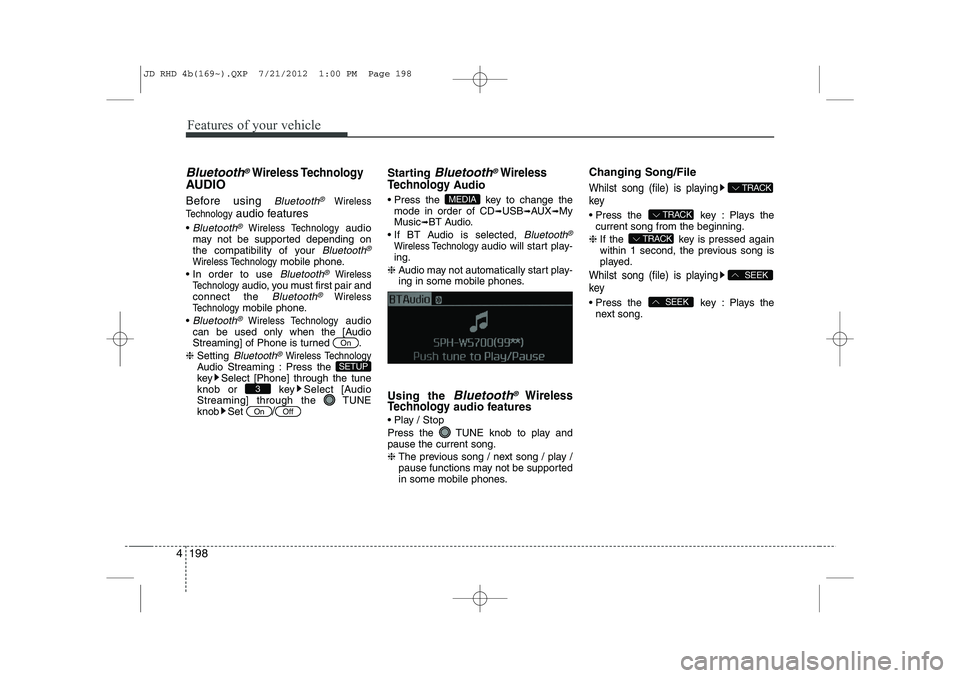
Starting Bluetooth®Wireless
Technology
Audio
Press the key to change the mode in order of CD ➟USB ➟AUX ➟My
Music ➟BT Audio.
If BT Audio is selected,
Bluetooth®
Wireless Technology audio will start play-
ing.
❈ Audio may not automatically start play-
ing in some mobile phones.
Using the
Bluetooth®Wireless
Technologyaudio features
Play / Stop
Press the TUNE knob to play and pause the current song. ❈ The previous song / next song / play /
pause functions may not be supported
in some mobile phones. Changing Song/File
Whilst song (file) is playing key
Press the key : Plays the
current song from the beginning.
❈ If the key is pressed again
within 1 second, the previous song is
played.
Whilst song (file) is playing key
Press the key : Plays the
next song.SEEK
SEEK
TRACK
TRACK
TRACK
MEDIA
OffOn
3
SETUP
On
JD RHD 4b(169~).QXP 7/21/2012 1:00 PM Page 198
Page 862 of 1168
4 199
Features of your vehicle
PHONE (if equipped)
Before using the
Bluetooth®Wireless
Technology
phone features
In order to use
Bluetooth®Wireless
Technologyphone, you must first pair
and connect the Bluetooth®Wireless
Technologymobile phone.
If the mobile phone is not paired or con- nected, it is not possible to enter Phone
mode. Once a phone is paired or con-nected, the guidance screen will be dis-
played.
If Priority is set upon vehicle ignition (IGN/ACC ON), the
Bluetooth®Wireless
Technologyphone will be automatically
connected. Even if you are outside, the
Bluetooth®Wireless Technologyphone
will be automatically connected once
you are in the vicinity of the vehicle. If
you do not want automatic
Bluetooth®
Wireless Technologyphone connection,
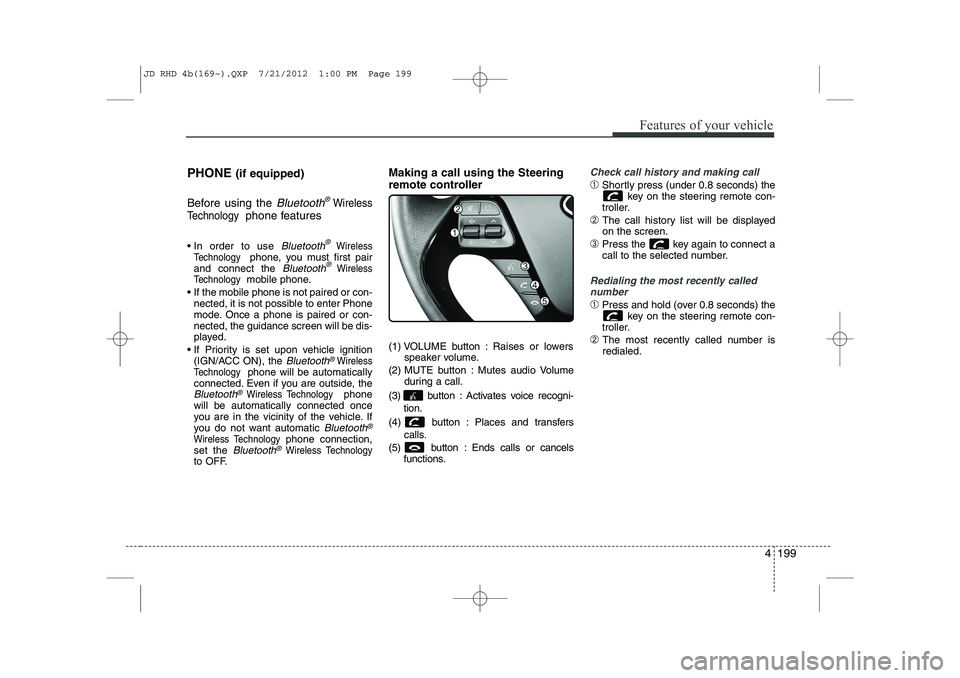
set the Bluetooth®Wireless Technologyto OFF. Making a call using the Steering
remote controller
(1) VOLUME button : Raises or lowers
speaker volume.
(2) MUTE button : Mutes audio Volume during a call.
(3) button : Activates voice recogni- tion.
(4) button : Places and transfers calls.
(5) button : Ends calls or cancels functions.
Check call history and making call
➀Shortly press (under 0.8 seconds) the
key on the steering remote con-
troller.
➁ The call history list will be displayed on the screen.
➂ Press the key again to connect a
call to the selected number.
Redialing the most recently called
number
➀ Press and hold (over 0.8 seconds) the
key on the steering remote con-
troller.
➁ The most recently called number is redialed.
JD RHD 4b(169~).QXP 7/21/2012 1:00 PM Page 199
Page 863 of 1168
![KIA CEED 2013 Owners Manual Features of your vehicle
200
4
Phone MENU
Press the key to display three
menus (Call History, Phone book, PhoneSetup).
Call History
Press the key Set [ History] through the TUNEknob or
key.
The](/img/2/57944/w960_57944-862.png "KIA CEED 2013 Owners Manual Features of your vehicle
200
4
Phone MENU
Press the key to display three
menus (Call History, Phone book, PhoneSetup).
Call History
Press the key Set [ History] through the TUNEknob or
key.
The")
Features of your vehicle
200
4
Phone MENU
Press the key to display three
menus (Call History, Phone book, PhoneSetup).
Call History
Press the key Set [ History] through the TUNEknob or
key.
The call history is displayed and can be
used to select a number and make a call.
If call history does not exist, a screen
asking whether to download call history
is displayed. (The download feature may
not be supported in some mobilephones) Phone Book
Press the key Set [P. Book]
through the TUNEknob or key.
The Phone book is displayed and can be
used to select a number and make a call. ❈ If more than one number is saved to
one contact, then a screen showing
the mobile phone number, house and
office number is displayed. Select the
desired number to make the call.
❈ If Phone book does not exist, a screen
asking whether to download Phone
book is displayed. (The download fea-
ture may not be supported in somemobile phones)
Phone Setup
Press the key Set [ Setup] through the TUNEknob or
key.
The Bluetooth®Wireless Technologymobile phone setup screen is displayed.
For more information, refer to “PhoneSetup”.
3
PHONE
2 RDM
PHONE
1 RPT
PHONE
PHONE
JD RHD 4b(169~).QXP 7/21/2012 1:00 PM Page 200
Page 866 of 1168
4 203
Features of your vehicle
VOICE COMMAND (if equipped)
The voice recognition feature of this
product supports recognition of the
commands listed within this user’s
manual.
Whilst using voice recognition, operating the steering remote control or the device
will terminate voice recognition and allow
you to manually operate desired func-
tions.
Position of the microphone is above the head of the driver’s seat.
Voice recognition may not function properly due to outside noise. The fol-
lowing conditions can affect the per-
formance of Voice Recognition:
- When the windows and sunroof are open
- When the heating/cooling system is on
- When passing a tunnel
- When driving on rugged and uneven roads
After downloading
Bluetooth®Wireless
Technology phone book, the system
requires some times to convert the
phone book into voice information.
During this time, voice recognition may
not operate properly. Upon inputting your phone book, spe-
cial symbols and numbers cannot be
recognized by voice. For example, “#
John Doe%&” will be recognized as“John Doe”. Starting Voice Command
To start voice command, shortly press
the key on the steering wheel
remote controller.
If voice command is in [Normal Mode], then the system will say “Please say a
command. Beep”
❈ If voice command is in [Expert Mode],
then the system will only say a “Beep-”
❈ Setting Voice command [Normal
Mode]/[Expert Mode]:
Press the key Select [ System]
through the TUNE knob or key
Select [Prompt Feedback] through the
TUNE knob Set [Normal Mode]/[ExpertMode]
Say the voice command.
For proper voice recognition, say the
voice command after the guidance
message and the “Beep” sound.
4
SETUP
JD RHD 4b(169~).QXP 7/21/2012 1:00 PM Page 203
Page 867 of 1168
Features of your vehicle
204
4
Skipping the Guidance Message Whilst the guidance message is being
stated, shortly press the key (under
0.8 seconds) to discontinue the guidance
message and sound the “beep”.
After the “beep”, say the voice command. Ending Voice Command
Whilst using voice command, press and
hold the key (over 0.8 seconds) to
end voice command.
Whilst using voice command, pressing the steering wheel remote controller or
a different key will end voice command.
In a state where the system is waiting for your voice command, say “cancel” or
“end” to end voice command.
In a state where the system is waiting for your voice command, shortly press
the key (under 0.8 seconds) to end
voice command.
JD RHD 4b(169~).QXP 7/21/2012 1:00 PM Page 204
Page 868 of 1168
4 205
Features of your vehicle
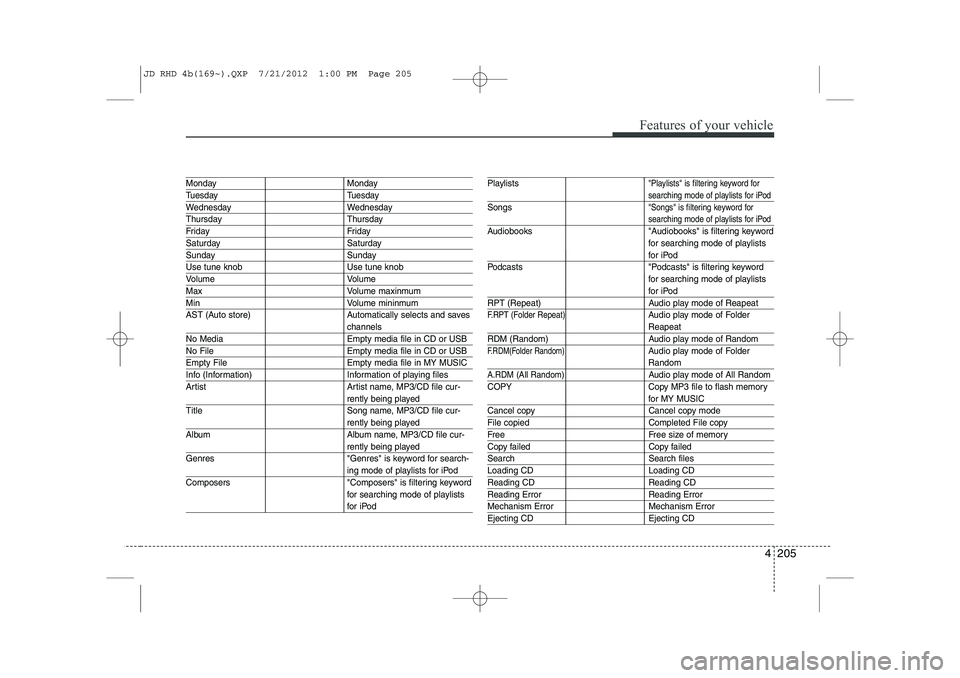
Monday Monday
Tuesday Tuesday
Wednesday Wednesday
Thursday Thursday
Friday Friday
Saturday Saturday
Sunday Sunday
Use tune knob Use tune knob
Volume Volume
MaxVolume maxinmum
MinVolume mininmum
AST (Auto store) Automatically selects and saves
channels
No Media Empty media file in CD or USB
No File Empty media file in CD or USB
Empty File Empty media file in MY MUSIC
Info (Information) Information of playing files
Artist Artist name, MP3/CD file cur-
rently being played
Title Song name, MP3/CD file cur-
rently being played
Album Album name, MP3/CD file cur-
rently being played
Genres "Genres" is keyword for search-
ing mode of playlists for iPod
Composers "Composers" is filtering keyword for searching mode of playlists
for iPod
Playlists"Playlists" is filtering keyword for
searching mode of playlists for iPod
Songs"Songs" is filtering keyword for
searching mode of playlists for iPod
Audiobooks "Audiobooks" is filtering keywordfor searching mode of playlists
for iPod
Podcasts "Podcasts" is filtering keyword for searching mode of playlists
for iPod
RPT (Repeat) Audio play mode of Reapeat
F.RPT (Folder Repeat)Audio play mode of Folder
Reapeat
RDM (Random) Audio play mode of Random
F.RDM(Folder Random)Audio play mode of Folder
Random
A.RDM (All Random)Audio play mode of All Random
COPY Copy MP3 file to flash memory
for MY MUSIC
Cancel copy Cancel copy mode
File copied Completed File copy
Free Free size of memory
Copy failed Copy failed
Search Search files
Loading CD Loading CD
Reading CD Reading CD
Reading Error Reading Error
Mechanism Error Mechanism Error
Ejecting CD Ejecting CD
JD RHD 4b(169~).QXP 7/21/2012 1:00 PM Page 205
Page 871 of 1168
Features of your vehicle
208
4
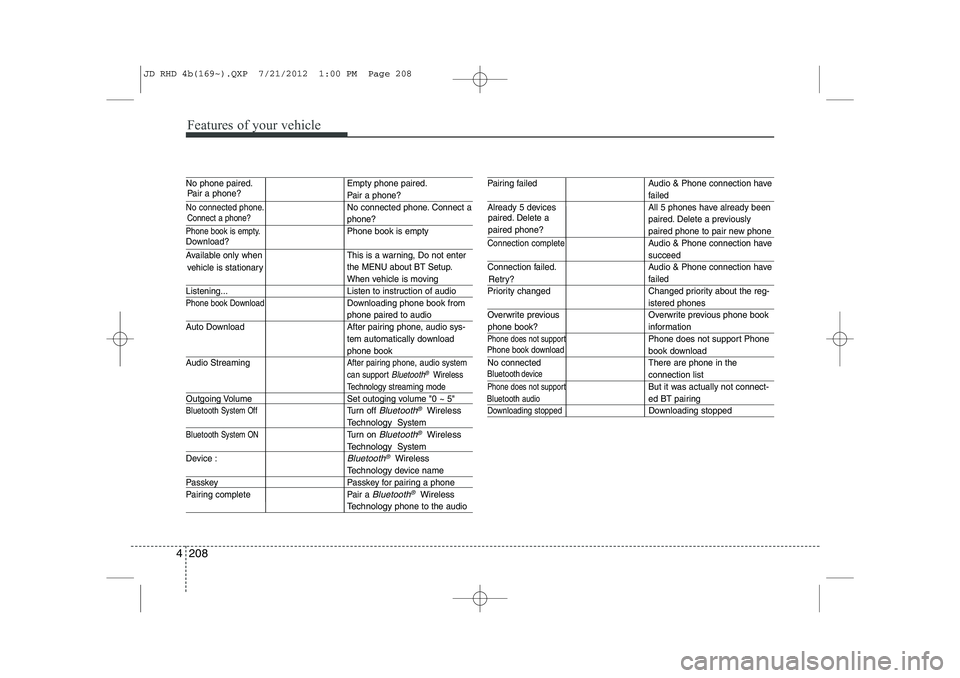
No phone paired. Empty phone paired.
Pair a phone?
No connected phone.No connected phone. Connect a
phone?
Phone book is empty.Phone book is empty
Available only when This is a warning, Do not enter
the MENU about BT Setup.
When vehicle is moving
Listening... Listen to instruction of audio
Phone book DownloadDownloading phone book from
phone paired to audio
Auto Download After pairing phone, audio sys- tem automatically download
phone book
Audio Streaming
After pairing phone, audio system
can support
Bluetooth®Wireless
Technology streaming mode
Outgoing Volume Set outoging volume "0 ~ 5"
Bluetooth System OffTurn off Bluetooth®Wireless
TechnologySystem
Bluetooth System ONTurn on Bluetooth®Wireless
TechnologySystem
Device :
Bluetooth®Wireless
Technologydevice name
Passkey Passkey for pairing a phone
Pairing complete Pair a
Bluetooth®Wireless
Technologyphone to the audio
Pairing failed Audio & Phone connection have
failed
Already 5 devices All 5 phones have already been paired. Delete a previously
paired phone to pair new phone
Connection completeAudio & Phone connection have
succeed
Connection failed. Audio & Phone connection have
failed
Priority changed Changed priority about the reg-
istered phones
Overwrite previous Overwrite previous phone book
information
Phone does not supportPhone does not support Phone
book download
No connected There are phone in the
connection list
Phone does not supportBut it was actually not connect-
ed BT pairing
Downloading stoppedDownloading stopped
paired. Delete a paired phone?
Phone book download
Bluetooth
audio
vehicle is stationary
Download?
Connect a phone?
Pair a phone?
phone book?Retry?
Bluetoothdevice
JD RHD 4b(169~).QXP 7/21/2012 1:00 PM Page 208
Page 873 of 1168
Features of your vehicle
210
4
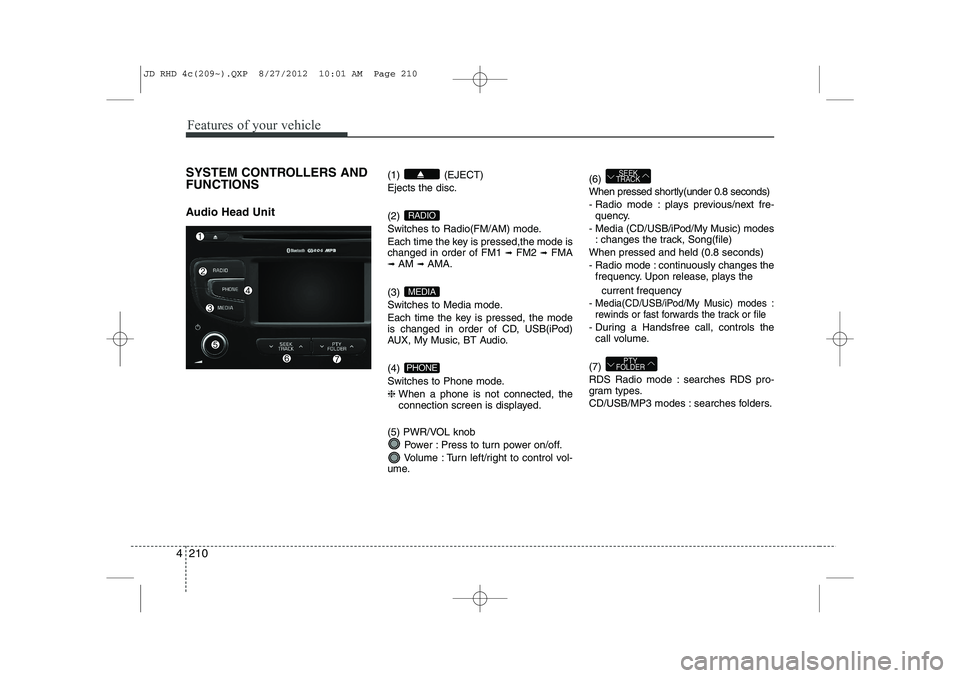
SYSTEM CONTROLLERS AND FUNCTIONS
Audio Head Unit (1) (EJECT) Ejects the disc. (2)
Switches to Radio(FM/AM) mode.
Each time the key is pressed,the mode is changed in order of FM1
➟
FM2 ➟FMA
➟ AM ➟AMA.
(3)
Switches to Media mode.
Each time the key is pressed, the mode
is changed in order of CD, USB(iPod)
AUX, My Music, BT Audio. (4)
Switches to Phone mode.❈ When a phone is not connected, the
connection screen is displayed.
(5) PWR/VOL knob Power : Press to turn power on/off.
Volume : Turn left/right to control vol-
ume. (6)
When pressed shortly(under 0.8 seconds)
- Radio mode : plays previous/next fre-
quency.
- Media (CD/USB/iPod/My Music) modes : changes the track, Song(file)
When pressed and held (0.8 seconds)
- Radio mode : continuously changes the frequency. Upon release, plays the
current frequency
-
Media(CD/USB/iPod/My Music) modes :
rewinds or fast forwards the track or file
- During a Handsfree call, controls the call volume.
(7)
RDS Radio mode : searches RDS pro-
gram types.
CD/USB/MP3 modes : searches folders.
PTY
FOLDER
SEEK
TRACK
PHONE
MEDIA
RADIO
JD RHD 4c(209~).QXP 8/27/2012 10:01 AM Page 210
Page 874 of 1168
4 211
Features of your vehicle
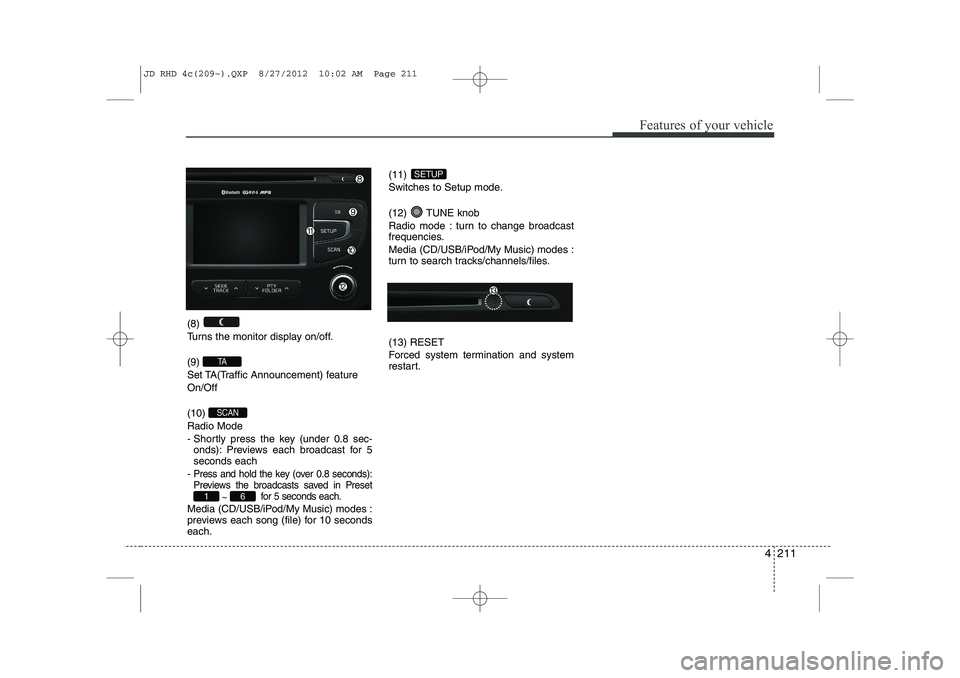
(8)
Turns the monitor display on/off. (9)
Set TA(Traffic Announcement) featureOn/Off (10) Radio Mode
- Shortly press the key (under 0.8 sec-onds): Previews each broadcast for 5 seconds each
-
Press and hold the key (over 0.8 seconds):
Previews the broadcasts saved in Preset ~ for 5 seconds each.
Media (CD/USB/iPod/My Music) modes :
previews each song (file) for 10 secondseach. (11)
Switches to Setup mode.
(12) TUNE knob
Radio mode : turn to change broadcast
frequencies.
Media (CD/USB/iPod/My Music) modes :
turn to search tracks/channels/files. (13) RESET
Forced system termination and system
restart.
SETUP
61
SCAN
TA
JD RHD 4c(209~).QXP 8/27/2012 10:02 AM Page 211
Page 875 of 1168
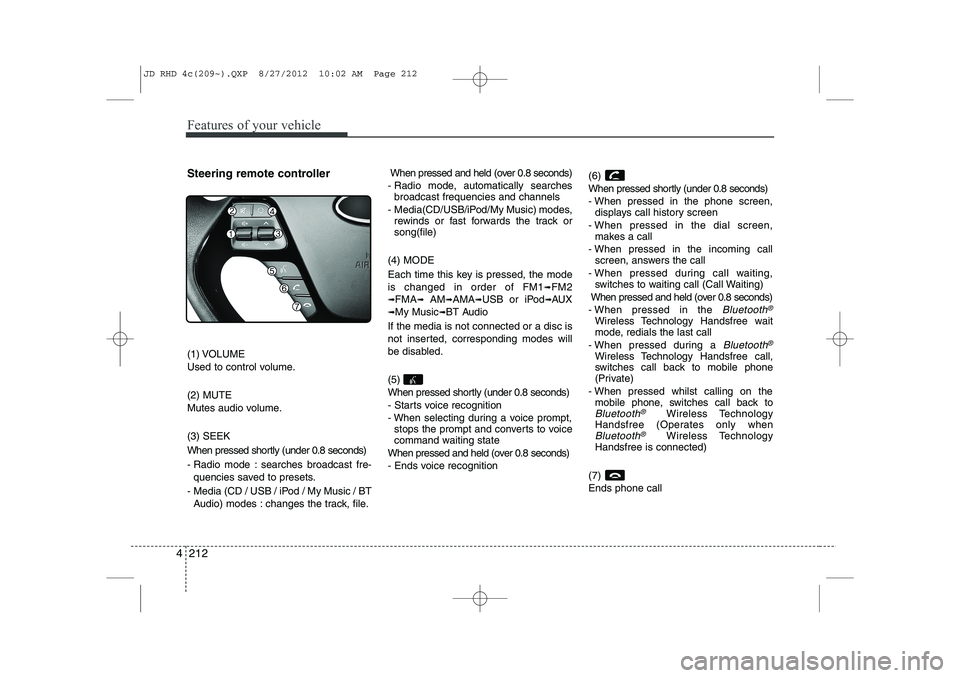
Features of your vehicle
212
4
Steering remote controller
(1) VOLUME
Used to control volume. (2) MUTE
Mutes audio volume. (3) SEEK
When pressed shortly (under 0.8 seconds)
- Radio mode : searches broadcast fre-
quencies saved to presets.
- Media (CD / USB / iPod / My Music / BT Audio) modes : changes the track, file. When pressed and held (over 0.8 seconds)
- Radio mode, automatically searches broadcast frequencies and channels
- Media(CD/USB/iPod/My Music) modes, rewinds or fast forwards the track or song(file)
(4) MODE
Each time this key is pressed, the mode is changed in order of FM1
➟FM2
➟FMA➟AM➟AMA➟USB or iPod➟AUX
➟My Music➟BT Audio
If the media is not connected or a disc is
not inserted, corresponding modes will
be disabled. (5)
When pressed shortly (under 0.8 seconds)
- Starts voice recognition
- When selecting during a voice prompt, stops the prompt and converts to voice
command waiting state
When pressed and held (over 0.8 seconds)
- Ends voice recognition (6)
When pressed shortly (under 0.8 seconds)
- When pressed in the phone screen,
displays call history screen
- When pressed in the dial screen, makes a call
- When pressed in the incoming call screen, answers the call
- When pressed during call waiting, switches to waiting call (Call Waiting)
When pressed and held (over 0.8 seconds)
- When pressed in the Bluetooth®
Wireless Technology Handsfree wait
mode, redials the last call
- When pressed during a
Bluetooth®
Wireless Technology Handsfree call,
switches call back to mobile phone
(Private)
- When pressed whilst calling on the mobile phone, switches call back to
Bluetooth®Wireless Technology
Handsfree (Operates only when
Bluetooth®Wireless Technology
Handsfree is connected)
(7) Ends phone call
JD RHD 4c(209~).QXP 8/27/2012 10:02 AM Page 212