light KIA CEED 2013 Owners Manual
[x] Cancel search | Manufacturer: KIA, Model Year: 2013, Model line: CEED, Model: KIA CEED 2013Pages: 1168, PDF Size: 48.01 MB
Page 661 of 1168
361
Safety system of your vehicle
SRS Care
The SRS is virtually maintenance-free
and so there are no parts you can safely
service by yourself. If the SRS air bag
warning light does not illuminate, or con-
tinuously remains on, we recommend
that the system be inspected by an
authorised Kia dealer.
WARNING
Modification to SRS components or wiring, including the addition
of any kind of badges to the pad
covers or modifications to the
body structure, can adversely
affect SRS performance and lead
to possible injury.
For cleaning the air bag pad cov- ers, use only a soft, dry cloth or
one which has been moistened
with plain water. Solvents or
cleaners could adversely affect
the air bag covers and proper
deployment of the system.
No objects should be placed over or near the air bag modules on
the steering wheel, instrument
panel, and the front passenger's
panel above the glove box,
because any such object could
cause harm if the vehicle is in a
crash severe enough to cause
the air bags to inflate.
(Continued)(Continued)
If the air bags inflate, we recom-mend that the system be replaced
by an authorised Kia dealer.
Do not tamper with or disconnect SRS wiring, or other components
of the SRS system. Doing so
could result in injury, due to acci-
dental inflation of the air bags or
by rendering the SRS inopera-
tive.
If components of the air bag sys- tem must be discarded, or if the
vehicle must be scrapped, certain
safety precautions must be
observed. An authorised Kia
dealer knows these precautions
and can give you the necessary
information. Failure to follow
these precautions and proce-dures could increase the risk of
personal injury.
If your car was flooded and has soaked carpeting or water on floor-
ing, you shouldn't try to start the
engine; we recommend that you
contact an authorised Kia dealer.
JD RHD 3.QXP 7/21/2012 1:08 PM Page 61
Page 670 of 1168
47
Features of your vehicle
3. The hazard warning light will blinkonce to indicate that all doors are
locked (the engine bonnet and tailgate
must be closed). Also, the outside
rearview mirror will automatically fold if
the outside rearview mirror folding
switch (Type B) is in the AUTO posi-tion (if equipped).
✽✽ NOTICE
The doors will not lock if any door is opened.
Unlock (2)
1. Press the unlock button.
2. The hazard warning lights will blink twice to indicate that all doors are
unlocked. Also, the outside rearview
mirror will automatically unfold if the
outside rearview mirror folding switch
(Type B) is in the AUTO position (ifequipped).
✽✽ NOTICE
After unlocking all doors, the doors will
lock and the outside rearview mirror
will unfold if the outside rearview mir-
ror folding switch (Type B) is in the
AUTO position (if equipped) unless a
door is opened within 30 seconds.
Tailgate unlock (3)
1. Press the tailgate unlock button for more than 1 second.
2. The hazard warning light will blink twice to indicate the tailgate is
unlocked.
✽✽ NOTICE
Page 673 of 1168
Features of your vehicle
10
4
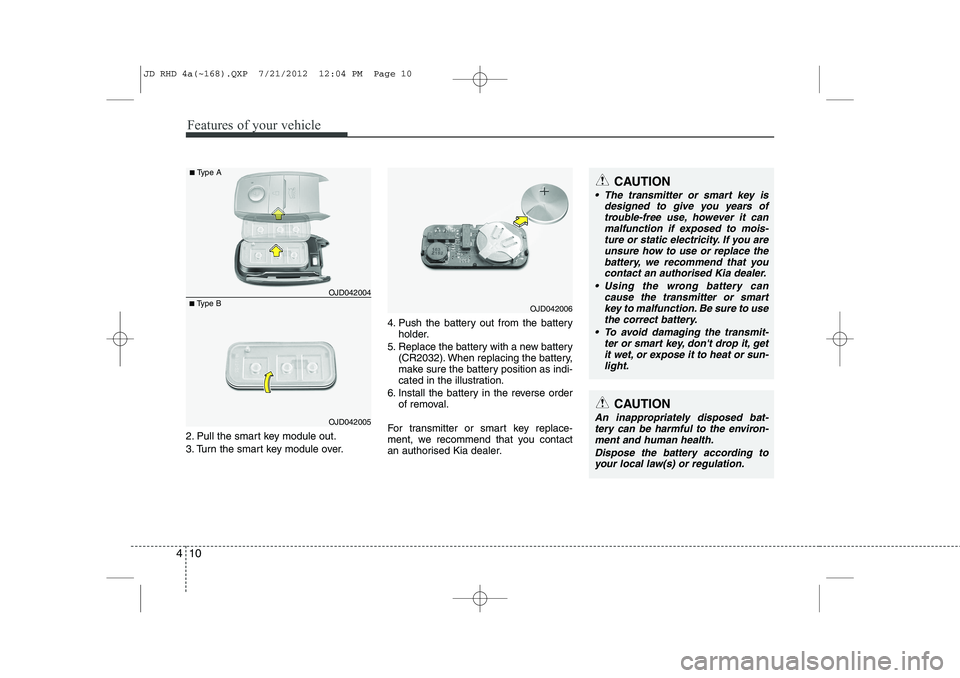
2. Pull the smart key module out.
3. Turn the smart key module over. 4. Push the battery out from the battery
holder.
5. Replace the battery with a new battery (CR2032). When replacing the battery,
make sure the battery position as indi-
cated in the illustration.
6. Install the battery in the reverse order of removal.
For transmitter or smart key replace-
ment, we recommend that you contact
an authorised Kia dealer.
CAUTION
The transmitter or smart key is designed to give you years of
trouble-free use, however it canmalfunction if exposed to mois-ture or static electricity. If you are unsure how to use or replace the
battery, we recommend that you contact an authorised Kia dealer.
Using the wrong battery can cause the transmitter or smart
key to malfunction. Be sure to usethe correct battery.
To avoid damaging the transmit- ter or smart key, don't drop it, get
it wet, or expose it to heat or sun- light.
CAUTION
An inappropriately disposed bat-tery can be harmful to the environ- ment and human health.
Dispose the battery according toyour local law(s) or regulation.
■ Type B OJD042004
■
Type A
OJD042005
OJD042006
JD RHD 4a(~168).QXP 7/21/2012 12:04 PM Page 10
Page 674 of 1168
411
Features of your vehicle
SMART KEY (IF EQUIPPED)
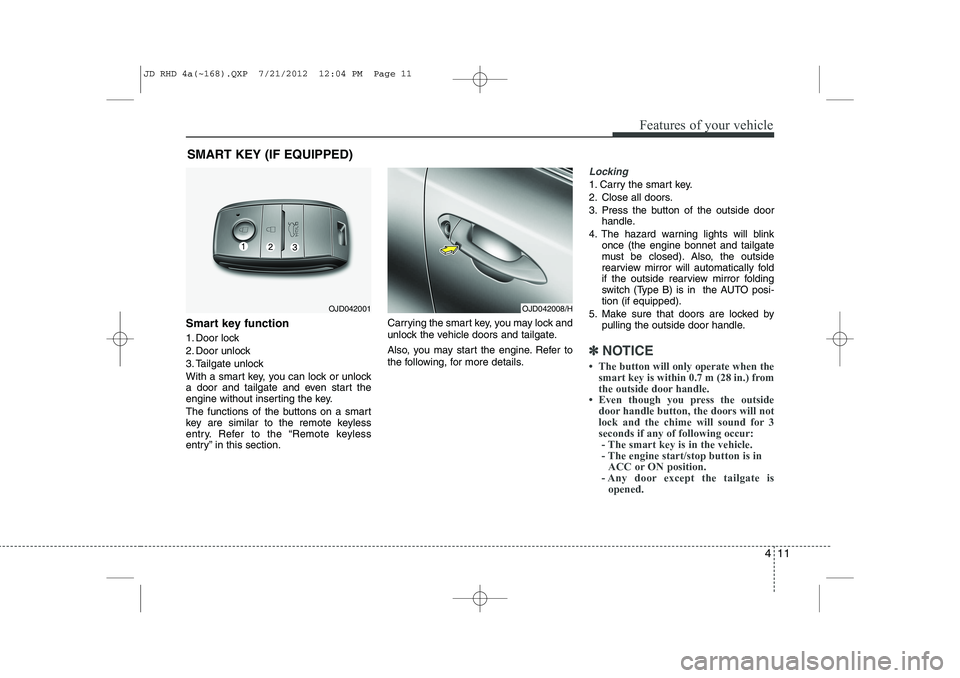
Smart key function
1. Door lock
2. Door unlock
3. Tailgate unlock
With a smart key, you can lock or unlock
a door and tailgate and even start the
engine without inserting the key.
The functions of the buttons on a smart
key are similar to the remote keyless
entry. Refer to the “Remote keyless
entry” in this section. Carrying the smart key, you may lock and
unlock the vehicle doors and tailgate.
Also, you may start the engine. Refer to
the following, for more details.
Locking
1. Carry the smart key.
2. Close all doors.
3. Press the button of the outside door
handle.
4. The hazard warning lights will blink once (the engine bonnet and tailgate
must be closed). Also, the outside
rearview mirror will automatically fold
if the outside rearview mirror folding
switch (Type B) is in the AUTO posi-tion (if equipped).
5. Make sure that doors are locked by pulling the outside door handle.
✽✽ NOTICE
Page 675 of 1168
Features of your vehicle
12
4
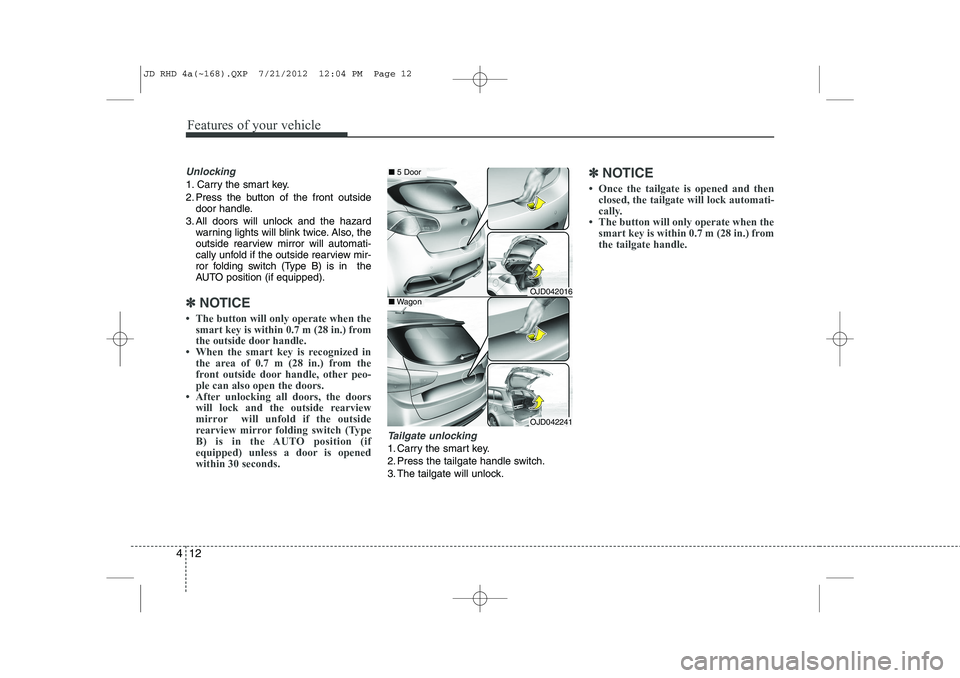
Unlocking
1. Carry the smart key.
2. Press the button of the front outside
door handle.
3. All doors will unlock and the hazard warning lights will blink twice. Also, the
outside rearview mirror will automati-
cally unfold if the outside rearview mir-
ror folding switch (Type B) is in the
AUTO position (if equipped).
✽✽ NOTICE
Page 677 of 1168
Features of your vehicle
14
4
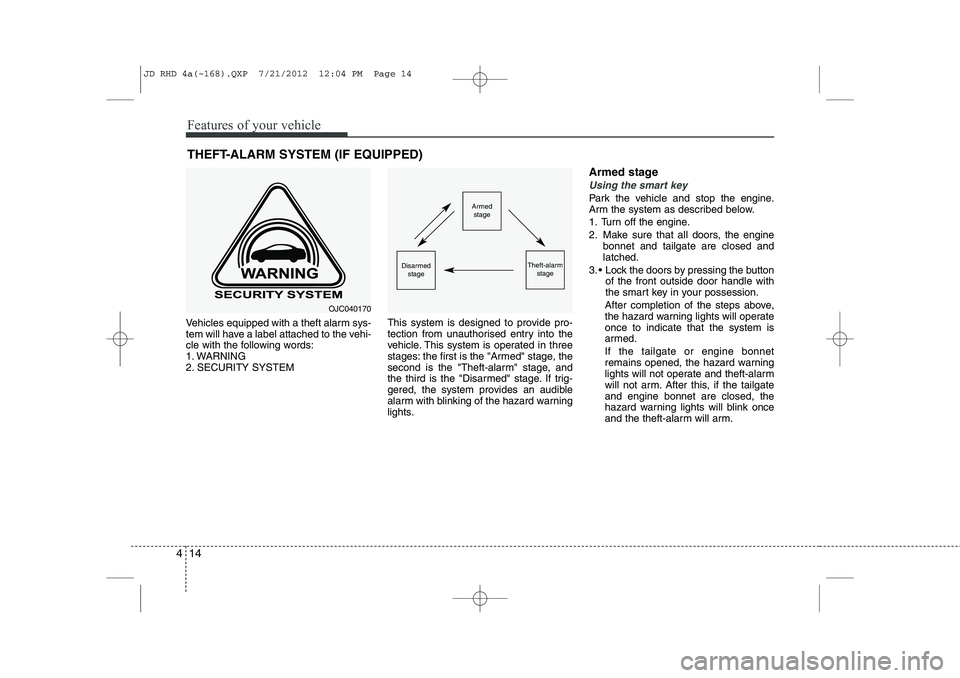
Vehicles equipped with a theft alarm sys-
tem will have a label attached to the vehi-
cle with the following words:
1. WARNING
2. SECURITY SYSTEM This system is designed to provide pro-
tection from unauthorised entry into the
vehicle. This system is operated in three
stages: the first is the "Armed" stage, the
second is the "Theft-alarm" stage, and
the third is the "Disarmed" stage. If trig-
gered, the system provides an audible
alarm with blinking of the hazard warning
lights.Armed stage
Using the smart key
Park the vehicle and stop the engine.
Arm the system as described below.
1. Turn off the engine.
2. Make sure that all doors, the engine
bonnet and tailgate are closed and latched.
3. Lock the doors by pressing the button of the front outside door handle with
the smart key in your possession.
After completion of the steps above,
the hazard warning lights will operateonce to indicate that the system is
armed. If the tailgate or engine bonnet
remains opened, the hazard warning
lights will not operate and theft-alarm
will not arm. After this, if the tailgateand engine bonnet are closed, the
hazard warning lights will blink once
and the theft-alarm will arm.
THEFT-ALARM SYSTEM (IF EQUIPPED)Armed
stage
Theft-alarm stageDisarmedstage
OJC040170
JD RHD 4a(~168).QXP 7/21/2012 12:04 PM Page 14
Page 678 of 1168
415
Features of your vehicle
Lock the doors by pressing the lockbutton on the smart key.
After completion of the steps above,
the hazard warning lights will operateonce to indicate that the system is
armed. If the tailgate or engine bonnet
remains opened, the hazard warning
lights will not operate and theft-alarm
will not arm. After this, if the tailgateand engine bonnet are closed, the
hazard warning lights will blink once
and the theft-alarm will arm.Using the transmitter
Park the vehicle and stop the engine.
Arm the system as described below.
1. Turn off the engine and remove the ignition key from the ignition switch.
2. Make sure that all doors, the engine bonnet and tailgate are closed andlatched.
3. Lock the doors by pressing the lock button on the transmitter.
After completion of the steps above,
the hazard warning lights will blinkonce to indicate that the system is
armed.
If the tailgate or engine bonnet remains opened, the hazard warning lights will
not operate and theft-alarm will not
arm. After this, if the tailgate andengine bonnet are closed, the hazard
warning lights will blink once and the
theft-alarm will arm.
Do not arm the system until all pas- sengers have left the vehicle. If thesystem is armed whilst a passen-
ger(s) remains in the vehicle, the
alarm may be activated when the
remaining passenger(s) leave the
vehicle. If any door, tailgate orengine bonnet is opened within 30seconds after entering the armed
stage, the system is disarmed to
prevent unnecessary alarm. Theft-alarm stage
The alarm will be activated if any of the
following occurs whilst the system is
armed.
A front or rear door is opened without
using transmitter or smart key.
The tailgate is opened without using transmitter or smart key.
The engine bonnet is opened.The siren will sound and the hazard
warning lights will blink continuously for
27 seconds, unless the system is dis-
armed. To turn off the system, unlock the
doors with the transmitter or smart key.
JD RHD 4a(~168).QXP 7/21/2012 12:04 PM Page 15
Page 679 of 1168
Features of your vehicle
16
4
Disarmed stage
The system will be disarmed when:
Transmitter
- The door unlock button is pressed.
- The engine is started.
- The ignition switch is in the “ON” posi-
tion for 30 seconds or more.
Smart key
- The door unlock button is pressed.
- The button of the front outside door ispressed whilst carrying the smart key.
- The engine is started.
After the doors are unlocked, the hazard
warning lights will blink twice to indicate
that the system is disarmed.
After pressing the unlock button, if anydoor (or tailgate) is not opened within 30
seconds, the system will be rearmed.
✽✽ NOTICE
Page 681 of 1168
Features of your vehicle
18
4
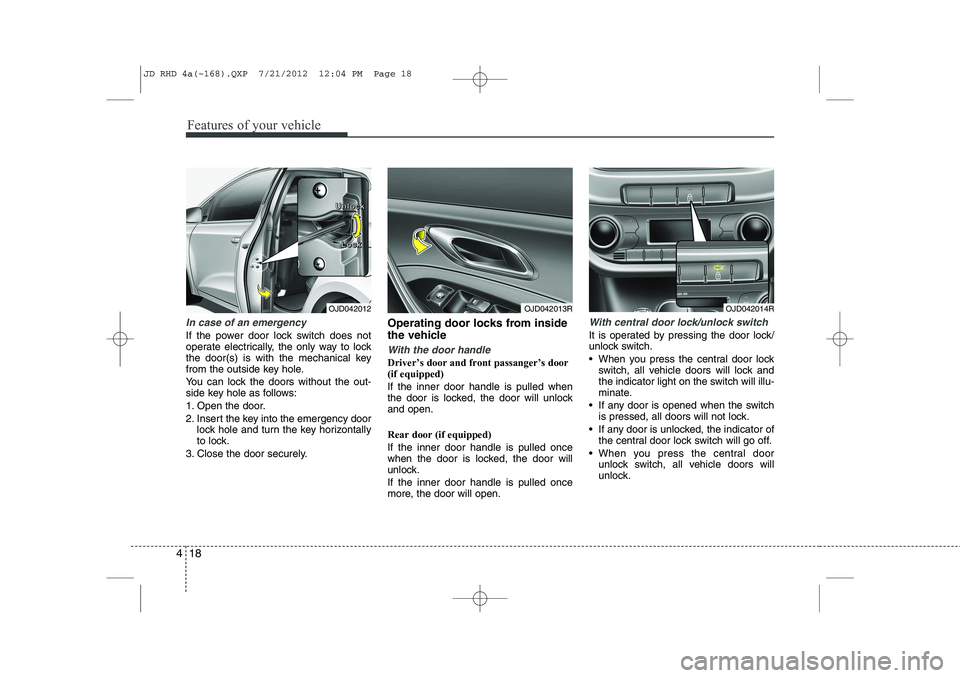
In case of an emergency
If the power door lock switch does not
operate electrically, the only way to lock
the door(s) is with the mechanical key
from the outside key hole.
You can lock the doors without the out-
side key hole as follows:
1. Open the door.
2. Insert the key into the emergency door
lock hole and turn the key horizontally
to lock.
3. Close the door securely. Operating door locks from inside
the vehicle
With the door handle
Driver’s door and front passanger’s door (if equipped) If the inner door handle is pulled when
the door is locked, the door will unlockand open. Rear door (if equipped) If the inner door handle is pulled once
when the door is locked, the door will
unlock. If the inner door handle is pulled once
more, the door will open.
With central door lock/unlock switch
It is operated by pressing the door lock/
unlock switch.
When you press the central door lock
switch, all vehicle doors will lock and
the indicator light on the switch will illu-
minate.
If any door is opened when the switch is pressed, all doors will not lock.
If any door is unlocked, the indicator of the central door lock switch will go off.
When you press the central door unlock switch, all vehicle doors will
unlock.
OJD042012 L
LLLoooocccckkkk
OJD042013ROJD042014R
U
UUUnnnnlllloooocccckkkk
JD RHD 4a(~168).QXP 7/21/2012 12:04 PM Page 18
Page 688 of 1168
425
Features of your vehicle
Power windows
The ignition switch must be in the ON
position for power windows to operate.
Each door has a power window switch
that controls the door’s window. The dri-
ver’s door has a master power window
switch that controls all the windows in the
vehicle. Also, the driver has a power win-
dow lock switch which can block the
operation of rear passenger windows.
The power windows can be operated for
approximately 30 seconds after the igni-
tion key is removed or turned to the ACC
or LOCK position. However, if the front
doors are opened, the power windows
cannot be operated even within the 30
seconds period.
✽✽NOTICE
Whilst driving with the rear windows
down or with the sunroof (if equipped)
in an open (or partially open position),
your vehicle may demonstrate a wind
buffeting or pulsation noise. This
noise is a normal occurrence and can be
reduced or eliminated by taking the fol-
lowing actions. If the noise occurs with
one or both of the rear windows down,
partially lower both front windows
approximately one inch. If you experi-
ence the noise with the sunroof open,
slightly reduce the size of the sunroofopening.
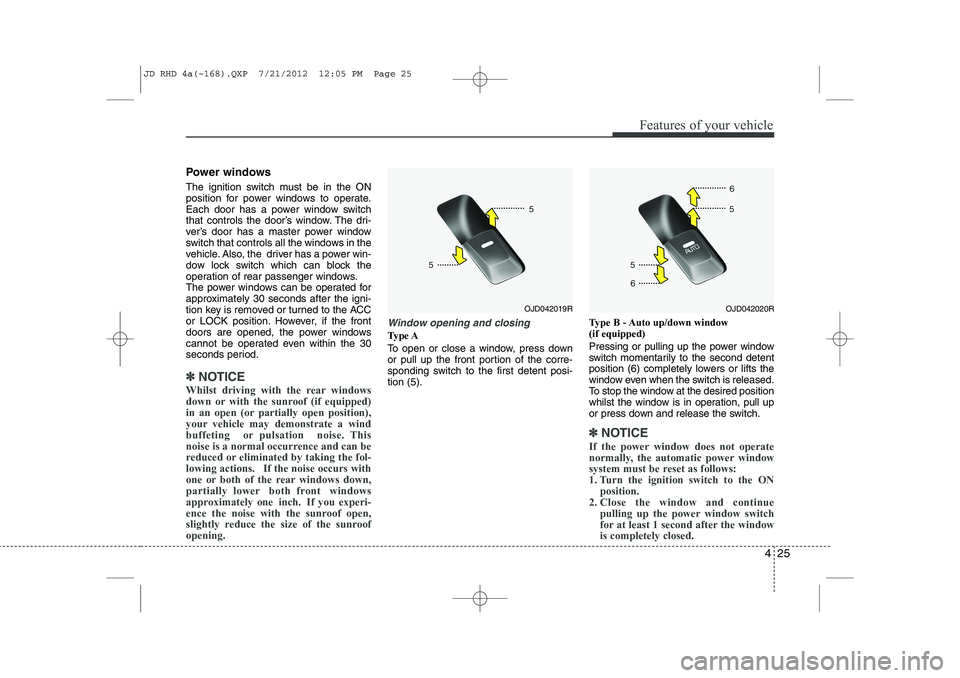
Window opening and closing
Type A
To open or close a window, press down
or pull up the front portion of the corre-
sponding switch to the first detent posi-tion (5). Type B - Auto up/down window (if equipped)
Pressing or pulling up the power window
switch momentarily to the second detent
position (6) completely lowers or lifts the
window even when the switch is released.
To stop the window at the desired position
whilst the window is in operation, pull up
or press down and release the switch.
✽✽
NOTICE
If the power window does not operate
normally, the automatic power window
system must be reset as follows:
1. Turn the ignition switch to the ON position.
2. Close the window and continue
pulling up the power window switch
for at least 1 second after the windowis completely closed.
OJD042020ROJD042019R
JD RHD 4a(~168).QXP 7/21/2012 12:05 PM Page 25