display KIA CEED 2013 Owners Manual
[x] Cancel search | Manufacturer: KIA, Model Year: 2013, Model line: CEED, Model: KIA CEED 2013Pages: 1168, PDF Size: 48.01 MB
Page 941 of 1168
Driving your vehicle
16
5
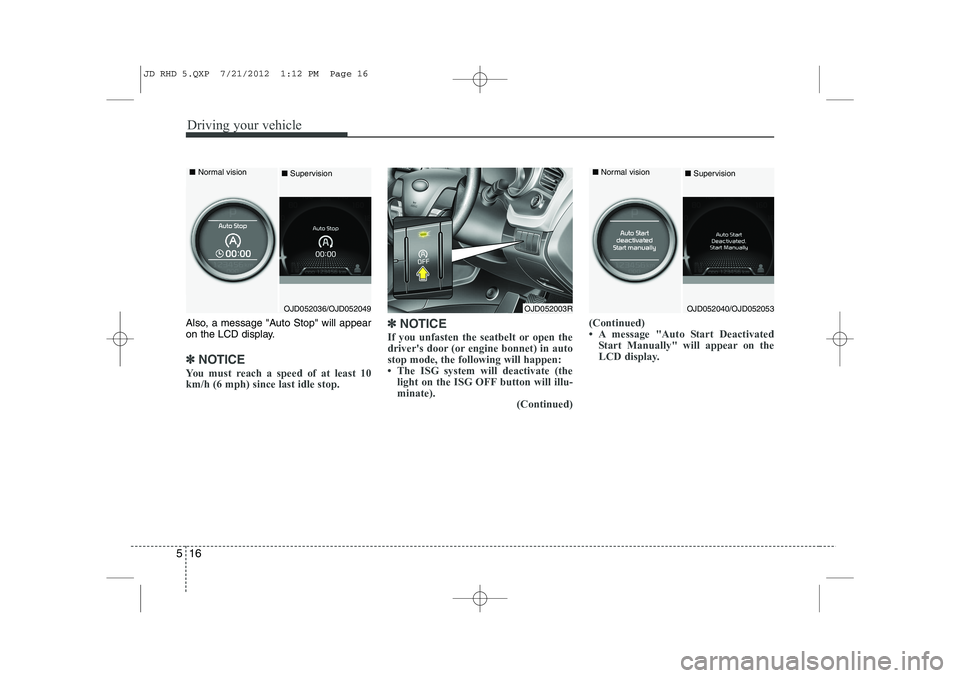
Also, a message "Auto Stop" will appear
on the LCD display.
✽✽
NOTICE
You must reach a speed of at least 10 km/h (6 mph) since last idle stop. ✽
✽
NOTICE
If you unfasten the seatbelt or open the
driver's door (or engine bonnet) in autostop mode, the following will happen:
Page 942 of 1168
517
Driving your vehicle
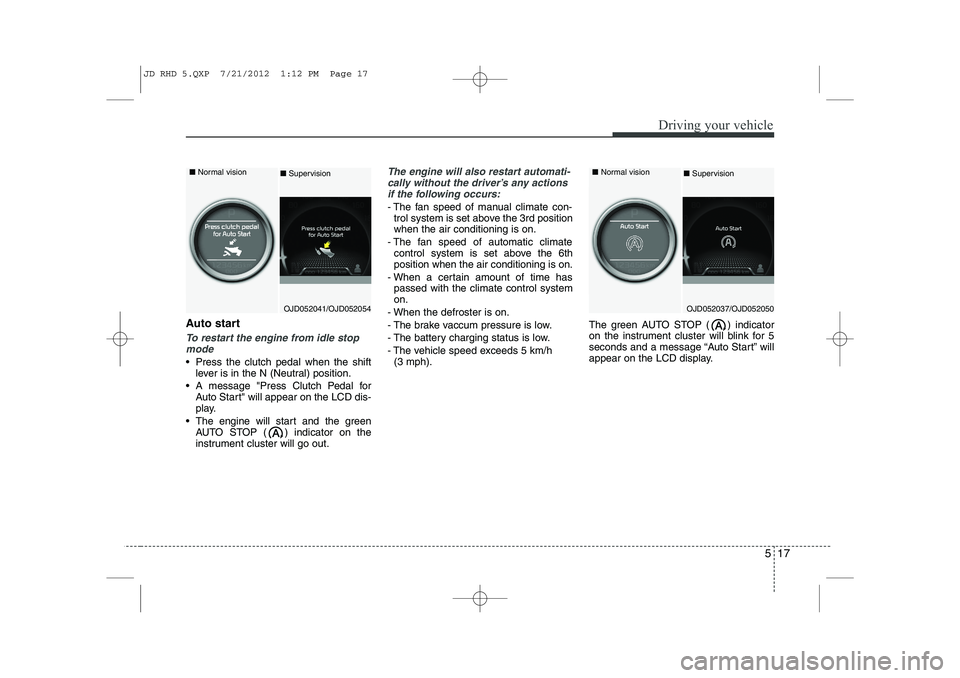
Auto start
To restart the engine from idle stopmode
Press the clutch pedal when the shift lever is in the N (Neutral) position.
A message "Press Clutch Pedal for Auto Start" will appear on the LCD dis-
play.
The engine will start and the green AUTO STOP ( ) indicator on the
instrument cluster will go out.
The engine will also restart automati-
cally without the driver’s any actions if the following occurs:
- The fan speed of manual climate con- trol system is set above the 3rd position when the air conditioning is on.
- The fan speed of automatic climate control system is set above the 6thposition when the air conditioning is on.
- When a certain amount of time has passed with the climate control systemon.
- When the defroster is on.
- The brake vaccum pressure is low.
- The battery charging status is low.
- The vehicle speed exceeds 5 km/h (3 mph). The green AUTO STOP ( ) indicator
on the instrument cluster will blink for 5
seconds and a message “Auto Start” will
appear on the LCD display.
OJD052041/OJD052054
■
Normal vision
■Supervision
OJD052037/OJD052050
■
Normal vision
■ Supervision
JD RHD 5.QXP 7/21/2012 1:12 PM Page 17
Page 950 of 1168
525
Driving your vehicle
CAUTION
To avoid damage to yourtransaxle, do not accelerate the
engine in R (Reverse) or any for- ward gear position with thebrakes on.
When stopped on an upgrade, do not hold the vehicle stationarywith engine power. Use the serv- ice brake or the parking brake.
Do not shift from N (Neutral) or P (Park) into D (Drive), or R
(Reverse) when the engine isabove idle speed.
CAUTION - DCT
If the vehicle is held by applying
accelerator pedal at the hill, the
transmission and clutch will be damaged. To hold at the hill, usethe parking brake or foot brake.
An overload of the clutch is indi- cated by a longitudinal judder anda blinking display. To exclude aclutch-damage, the clutch is opened and the torque flow inter-
rupted. If the clutch is opened, apply the foot brake and waitsome minutes before driving again.
Ignoring the warnings can lead to severe injuries and damage onthe car.
If the LCD warning is active, the foot brake has to be applied.
When the problem of gear system occurs, the transaxle indicatorwill blink. For your safety, we rec- ommend that you contact anauthorised Kia dealer and have
the system checked.
(Continued)
(Continued) When the clutch is overheated, the safe protection mode oper-ates. According to the safe pro-tection mode, the transaxle indi-
cator blinks with buzzer sound.The buzzer beeps 3 times.
In this time, the LCD warningabout safe protection mode also
displays. In this condition, thedriving may not be smoothly. Ifyou ignore this warning, the driv-ing condition is getting worse and
the system may have problem. Toreturn the normal driving condi- tion, apply the foot brake and
stop the vehicle for few minutes before driving off.
Whilst shifting the gear automati- cally, you may feel a correspon-ding shifting of gear. However, it
is not malfunction.
JD RHD 5.QXP 7/21/2012 1:13 PM Page 25
Page 951 of 1168
Driving your vehicle
26
5
Transaxle ranges
The indicator lights in the instrument
cluster displays the shift lever position
when the ignition switch is in the ONposition.
P (Park)
Always come to a complete stop before
shifting into P (Park). This position locks
the transaxle and prevents the frontwheels from rotating. R (Reverse)
Use this position to drive the vehicle
backward. N (Neutral)
The wheels and transaxle are not
engaged. The vehicle will roll freely even
on the slightest incline unless the parking
brake or service brakes are applied.D (Drive)
This is the normal forward driving posi-
tion. The transaxle will automatically shift
through a 6-gear sequence, providing the
best fuel economy and power.
For extra power when passing another
vehicle or climbing grades, depress the
accelerator pedal fully (more than 80%)
until the kick down mechanism works
with a clicking noise, at which time the
transaxle will automatically downshift to
the next lower gear.
✽✽
NOTICE
Page 982 of 1168
557
Driving your vehicle
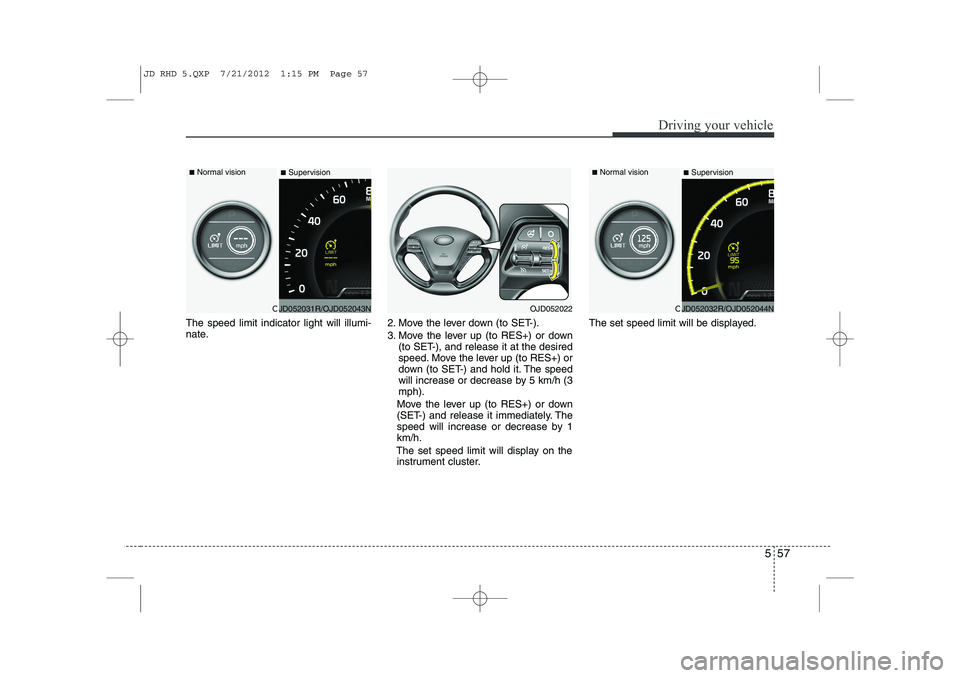
The speed limit indicator light will illumi-
nate.2. Move the lever down (to SET-).
3. Move the lever up (to RES+) or down
(to SET-), and release it at the desired
speed. Move the lever up (to RES+) or
down (to SET-) and hold it. The speed
will increase or decrease by 5 km/h (3mph).
Move the lever up (to RES+) or down
(SET-) and release it immediately. The
speed will increase or decrease by 1km/h.
The set speed limit will display on the instrument cluster. The set speed limit will be displayed.
OJD052031R/OJD052043N
■
Normal vision
■SupervisionOJD052022OJD052032R/OJD052044N
■
Normal vision
■Supervision
JD RHD 5.QXP 7/21/2012 1:15 PM Page 57
Page 985 of 1168
Driving your vehicle
60
5
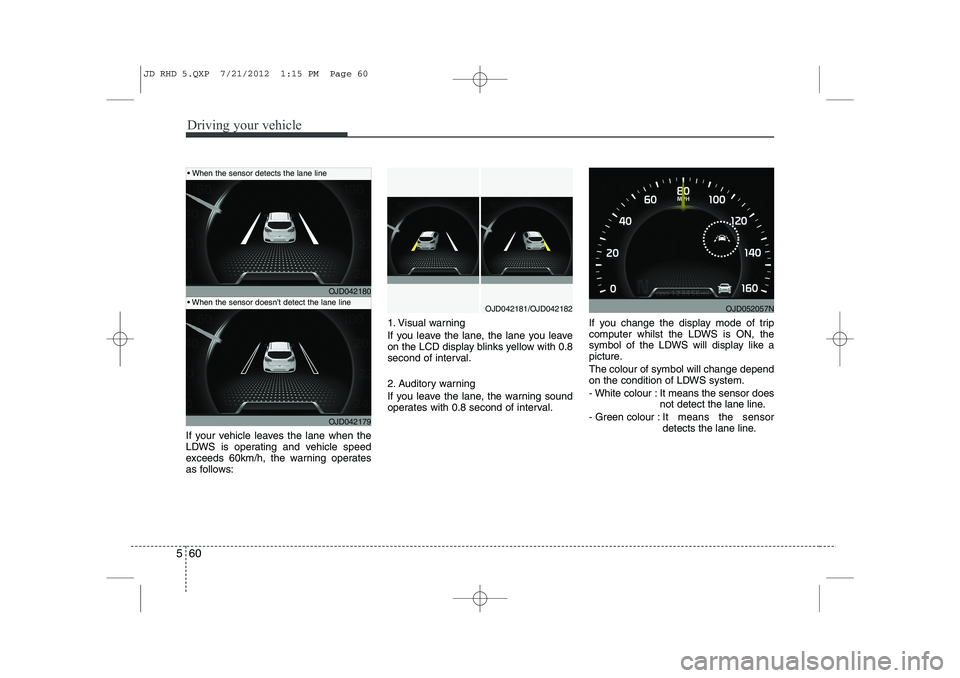
If your vehicle leaves the lane when the
LDWS is operating and vehicle speed
exceeds 60km/h, the warning operates
as follows: 1. Visual warning
If you leave the lane, the lane you leave
on the LCD display blinks yellow with 0.8
second of interval.
2. Auditory warning
If you leave the lane, the warning sound
operates with 0.8 second of interval.
If you change the display mode of trip
computer whilst the LDWS is ON, the
symbol of the LDWS will display like a
picture. The colour of symbol will change depend
on the condition of LDWS system.
- White colour : It means the sensor does
not detect the lane line.
- Green colour : It means the sensor
detects the lane line.
OJD042180
OJD042179
OJD042181/OJD042182
When the sensor detects the lane line
When the sensor doesn’t detect the lane lineOJD052057N
JD RHD 5.QXP 7/21/2012 1:15 PM Page 60
Page 1024 of 1168
619
What to do in an emergency
7. Pressure gauge for displaying thetyre inflation pressure
8. Button for reducing tyre inflation pressure
9. Hose to connect compressor and sealant bottle or compressor and wheel
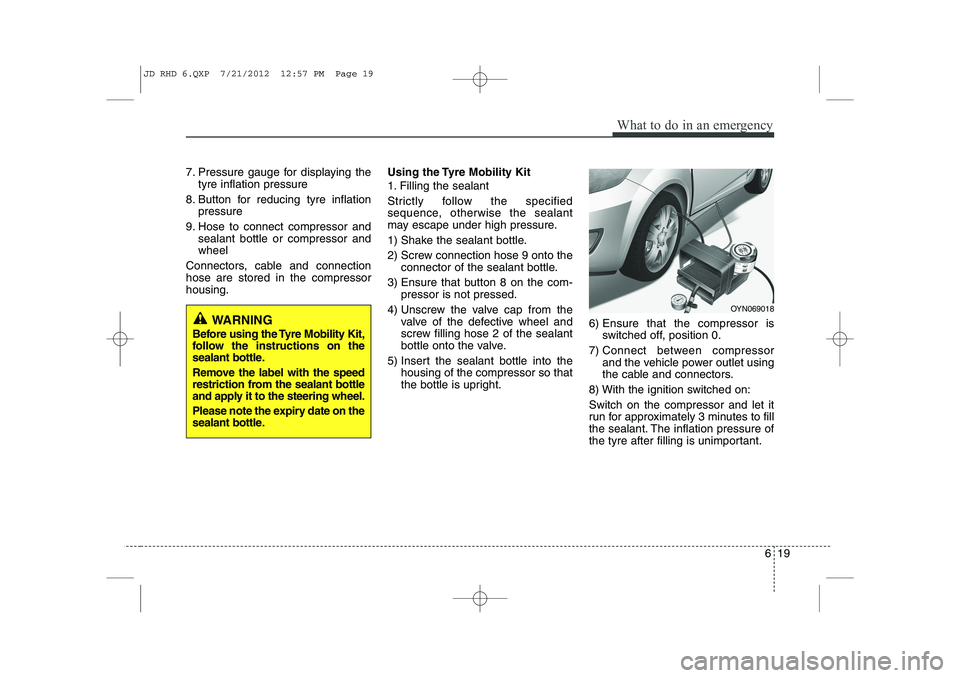
Connectors, cable and connectionhose are stored in the compressorhousing. Using the Tyre Mobility Kit
1. Filling the sealant
Strictly follow the specified
sequence, otherwise the sealant
may escape under high pressure.
1) Shake the sealant bottle.
2) Screw connection hose 9 onto the
connector of the sealant bottle.
3) Ensure that button 8 on the com- pressor is not pressed.
4) Unscrew the valve cap from the valve of the defective wheel and
screw filling hose 2 of the sealant
bottle onto the valve.
5) Insert the sealant bottle into the housing of the compressor so that
the bottle is upright. 6) Ensure that the compressor is
switched off, position 0.
7) Connect between compressor and the vehicle power outlet using
the cable and connectors.
8) With the ignition switched on: Switch on the compressor and let it
run for approximately 3 minutes to fill
the sealant. The inflation pressure of
the tyre after filling is unimportant.
OYN069018
WARNING
Before using the Tyre Mobility Kit,
follow the instructions on the
sealant bottle.
Remove the label with the speed
restriction from the sealant bottle
and apply it to the steering wheel.
Please note the expiry date on the
sealant bottle.
JD RHD 6.QXP 7/21/2012 12:57 PM Page 19
Page 1028 of 1168
623
What to do in an emergency
TYRE PRESSURE MONITORING SYSTEM (TPMS) (IF EQUIPPED)
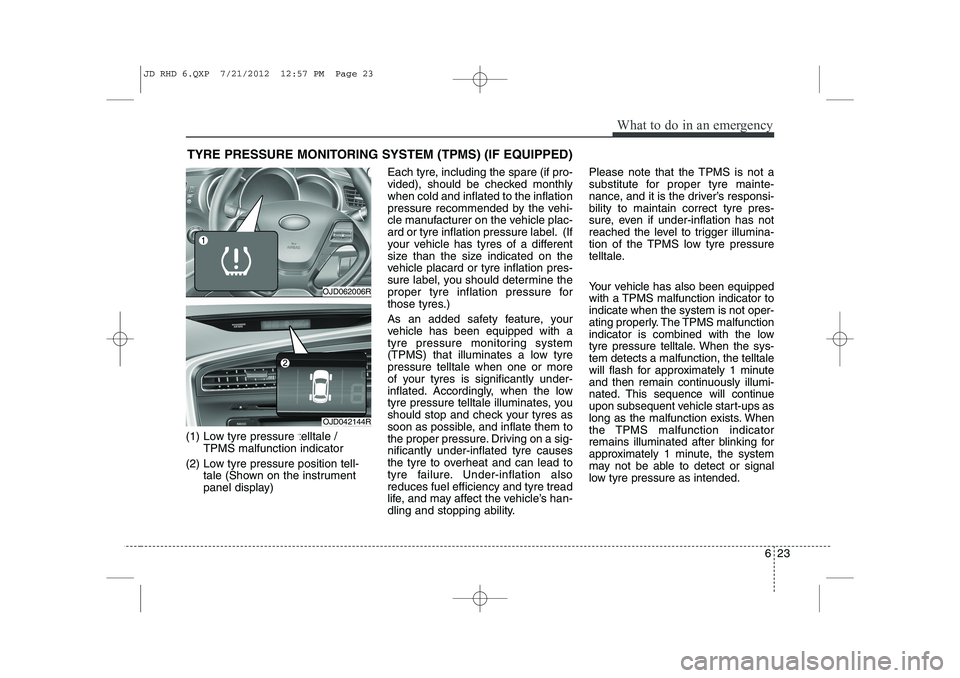
(1) Low tyre pressure telltale / TPMS malfunction indicator
(2) Low tyre pressure position tell- tale (Shown on the instrument
panel display) Each tyre, including the spare (if pro-
vided), should be checked monthlywhen cold and inflated to the inflation
pressure recommended by the vehi-
cle manufacturer on the vehicle plac-
ard or tyre inflation pressure label. (If
your vehicle has tyres of a different
size than the size indicated on the
vehicle placard or tyre inflation pres-
sure label, you should determine the
proper tyre inflation pressure for
those tyres.)
As an added safety feature, your
vehicle has been equipped with a
tyre pressure monitoring system
(TPMS) that illuminates a low tyrepressure telltale when one or more
of your tyres is significantly under-
inflated. Accordingly, when the low
tyre pressure telltale illuminates, you
should stop and check your tyres as
soon as possible, and inflate them to
the proper pressure. Driving on a sig-nificantly under-inflated tyre causes
the tyre to overheat and can lead to
tyre failure. Under-inflation alsoreduces fuel efficiency and tyre tread
life, and may affect the vehicle’s han-
dling and stopping ability. Please note that the TPMS is not a
substitute for proper tyre mainte-
nance, and it is the driver’s responsi-bility to maintain correct tyre pres-
sure, even if under-inflation has not
reached the level to trigger illumina-
tion of the TPMS low tyre pressure
telltale.
Your vehicle has also been equipped
with a TPMS malfunction indicator toindicate when the system is not oper-
ating properly. The TPMS malfunction
indicator is combined with the low
tyre pressure telltale. When the sys-tem detects a malfunction, the telltale
will flash for approximately 1 minute
and then remain continuously illumi-
nated. This sequence will continue
upon subsequent vehicle start-ups as
long as the malfunction exists. When
the TPMS malfunction indicator
remains illuminated after blinking for
approximately 1 minute, the system
may not be able to detect or signal
low tyre pressure as intended.
OJD062006R
OJD042144R
JD RHD 6.QXP 7/21/2012 12:57 PM Page 23
Page 1097 of 1168
Maintenance
60
7
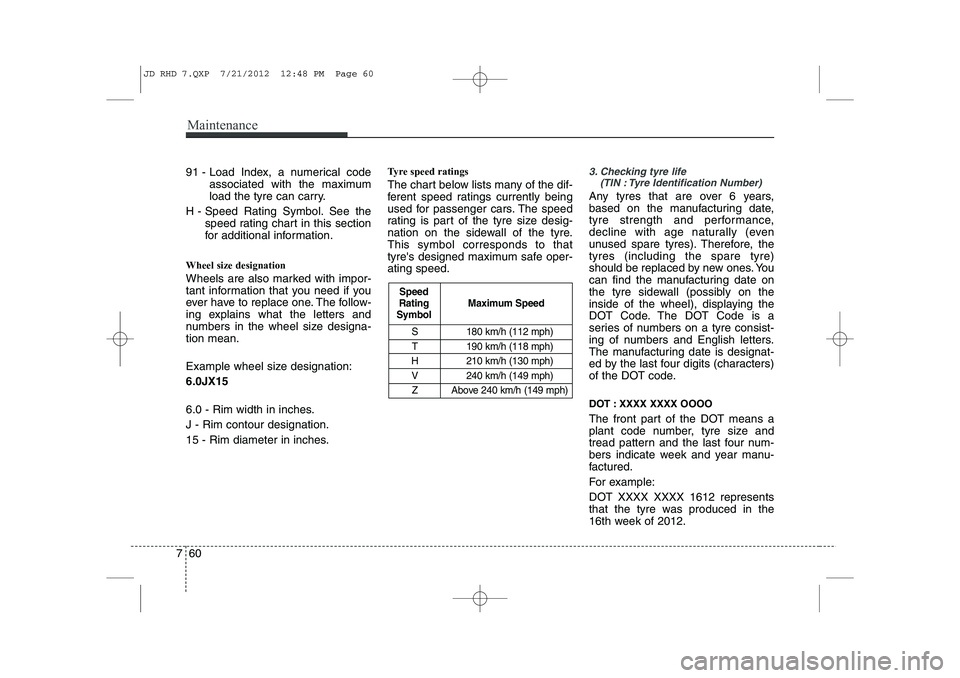
S 180 km/h (112 mph)
T 190 km/h (118 mph)
H 210 km/h (130 mph)
V 240 km/h (149 mph) Z Above 240 km/h (149 mph)
Maximum Speed
Speed
Rating
Symbol
91 - Load Index, a numerical code
associated with the maximum
load the tyre can carry.
H - Speed Rating Symbol. See the speed rating chart in this section
for additional information.
Wheel size designation
Wheels are also marked with impor-
tant information that you need if you
ever have to replace one. The follow-
ing explains what the letters and
numbers in the wheel size designa-tion mean.
Example wheel size designation: 6.0JX15
6.0 - Rim width in inches. J - Rim contour designation.
15 - Rim diameter in inches. Tyre speed ratings
The chart below lists many of the dif-
ferent speed ratings currently being
used for passenger cars. The speed
rating is part of the tyre size desig-
nation on the sidewall of the tyre.This symbol corresponds to that
tyre's designed maximum safe oper-ating speed.3. Checking tyre life
(TIN : Tyre Identification Number)
Any tyres that are over 6 years,
based on the manufacturing date,
tyre strength and performance,
decline with age naturally (even
unused spare tyres). Therefore, thetyres (including the spare tyre)
should be replaced by new ones. You
can find the manufacturing date on
the tyre sidewall (possibly on the
inside of the wheel), displaying the
DOT Code. The DOT Code is a
series of numbers on a tyre consist-
ing of numbers and English letters.
The manufacturing date is designat-
ed by the last four digits (characters)
of the DOT code.
DOT : XXXX XXXX OOOO
The front part of the DOT means a
plant code number, tyre size and
tread pattern and the last four num-
bers indicate week and year manu-
factured.
For example:
DOT XXXX XXXX 1612 represents
that the tyre was produced in the
16th week of 2012.
JD RHD 7.QXP 7/21/2012 12:48 PM Page 60
Page 1159 of 1168
Index
4
I
Cup holder . . . . . . . . . . . . . . . . . . . . . . . . . . . . . . . . . 4-155
Curtain air bag . . . . . . . . . . . . . . . . . . . . . . . . . . . . . . 3-54 Dashboard illumination, see instrument panel
illumination (Normal vision) . . . . . . . . . . . . . . . . . . 4-47
Dashboard illumination, see instrument panel illumination (Super vision) . . . . . . . . . . . . . . . . . . . 4-60
Dashboard, see instrument cluster (Normal vision) . . 4-46
Dashboard, see instrument cluster (Super vision) . . . 4-59
Daytime running light (DRL) . . . . . . . . . . . . . . . . . 4-115
Deadlocks . . . . . . . . . . . . . . . . . . . . . . . . . . . . . . . . . . . 4-20
Defogging (Windscreen) . . . . . . . . . . . . . . . . . . . . . . 4-148
Defroster (Rear window) . . . . . . . . . . . . . . . . . . . . . 4-126
Defrosting (Windscreen) . . . . . . . . . . . . . . . . . . . . . 4-148
Dimensions. . . . . . . . . . . . . . . . . . . . . . . . . . . . . . . . . . . 8-2Display illumination, see instrument panel illumination (Normal vision) . . . . . . . . . . . . . . . . . . . . . . . . . . . . . 4-47
Display illumination, see instrument panel illumination (Super vision) . . . . . . . . . . . . . . . . . . . . . . . . . . . . . . 4-60
Displays, see instrument cluster (Normal vision) . . 4-46
Displays, see instrument cluster (Super vision) . . . . 4-59
Door locks . . . . . . . . . . . . . . . . . . . . . . . . . . . . . . . . . . 4-17 Central door lock switch . . . . . . . . . . . . . . . . . . . . . 4-18
Child-protector rear door lock . . . . . . . . . . . . . . . . 4-21
Deadlocks. . . . . . . . . . . . . . . . . . . . . . . . . . . . . . . . . . 4-20
Double clutch transmission shift indicator (Normal vision) . . . . . . . . . . . . . . . . . . . . . . . . . . . . . 4-49
Double clutch transmission shift indicator (Super vision) . . . . . . . . . . . . . . . . . . . . . . . . . . . . . . 4-62
Drinks holders, see cup holders. . . . . . . . . . . . . . . . 4-155
Driver position memory system. . . . . . . . . . . . . . . . . . 3-8
Driver's and passenger's front air bag . . . . . . . . . . . 3-48
Driving at night . . . . . . . . . . . . . . . . . . . . . . . . . . . . . . 5-65
Driving in flooded areas . . . . . . . . . . . . . . . . . . . . . . . 5-66
Driving in the rain . . . . . . . . . . . . . . . . . . . . . . . . . . . 5-65
Driving information mode . . . . . . . . . . . . . . . . . . . . . 4-65
Driving off-road . . . . . . . . . . . . . . . . . . . . . . . . . . . . . 5-66
DS mode . . . . . . . . . . . . . . . . . . . . . . . . . . . . . . . . . . . . 5-27
Economical operation . . . . . . . . . . . . . . . . . . . . . . . . . 5-62
Electric chromic mirror (ECM) . . . . . . . . . . . . . . . . 4-42
Electric parking brake . . . . . . . . . . . . . . . . . . . . . . . . 5-37
Electric power steering . . . . . . . . . . . . . . . . . . . . . . . . 4-37
Electronic stability control (ESC) . . . . . . . . . . . . . . . 5-44
Emergency commodity . . . . . . . . . . . . . . . . . . . . . . . . 6-32
Emergency starting. . . . . . . . . . . . . . . . . . . . . . . . . . . . 6-5
Jump starting . . . . . . . . . . . . . . . . . . . . . . . . . . . . . . . 6-5
Push starting . . . . . . . . . . . . . . . . . . . . . . . . . . . . . . . . 6-7
Emergency Stop Signal (ESS) . . . . . . . . . . . . . . . . . . 5-48
Emergency whilst driving . . . . . . . . . . . . . . . . . . . . . . 6-3
Emission control system . . . . . . . . . . . . . . . . . . . . . . 7-104
E
D
JD RHD Index.QXP 7/21/2012 1:10 PM Page 4