door lock KIA CEED 2013 Owner's Manual
[x] Cancel search | Manufacturer: KIA, Model Year: 2013, Model line: CEED, Model: KIA CEED 2013Pages: 1168, PDF Size: 48.01 MB
Page 100 of 1168
421
Features of your vehicle
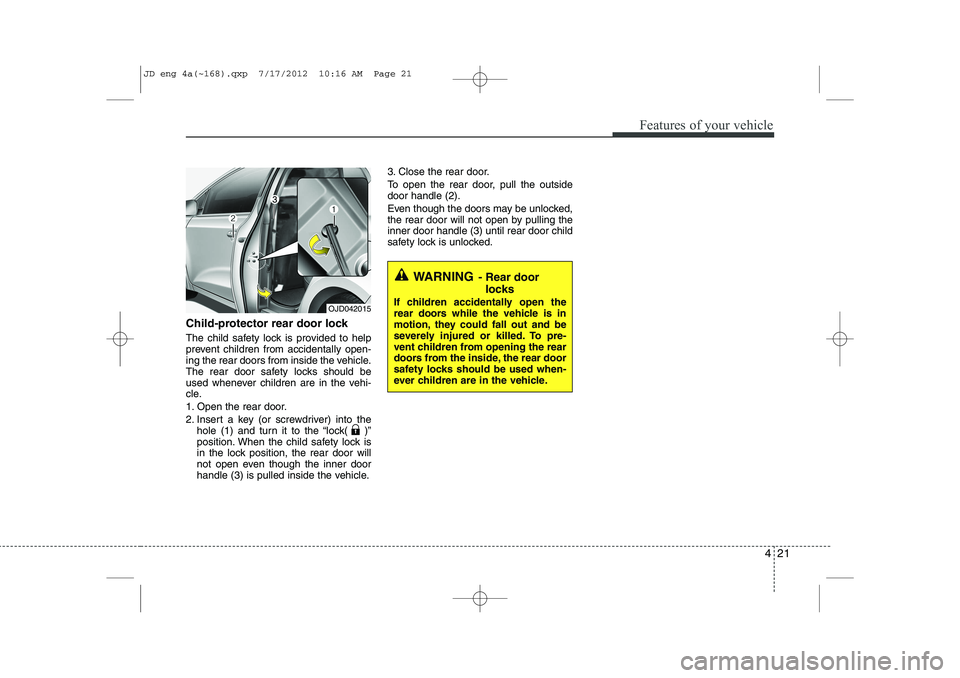
Child-protector rear door lock
The child safety lock is provided to help
prevent children from accidentally open-
ing the rear doors from inside the vehicle.
The rear door safety locks should be
used whenever children are in the vehi-
cle.
1. Open the rear door.
2. Insert a key (or screwdriver) into thehole (1) and turn it to the “lock( )”
position. When the child safety lock is
in the lock position, the rear door will
not open even though the inner door
handle (3) is pulled inside the vehicle. 3. Close the rear door.
To open the rear door, pull the outside door handle (2).
Even though the doors may be unlocked,
the rear door will not open by pulling theinner door handle (3) until rear door child
safety lock is unlocked.
WARNING
- Rear door
locks
If children accidentally open the
rear doors while the vehicle is in
motion, they could fall out and be
severely injured or killed. To pre-
vent children from opening the rear
doors from the inside, the rear door
safety locks should be used when-
ever children are in the vehicle.
OJD042015
JD eng 4a(~168).qxp 7/17/2012 10:16 AM Page 21
Page 101 of 1168
Features of your vehicle
22
4
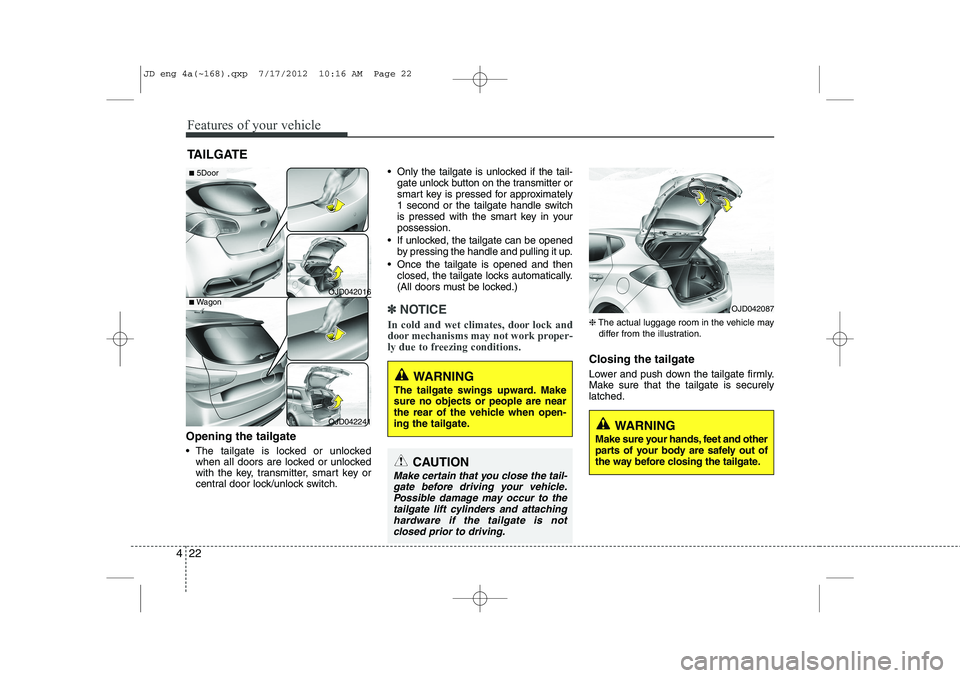
Opening the tailgate
The tailgate is locked or unlocked
when all doors are locked or unlocked
with the key, transmitter, smart key or
central door lock/unlock switch. Only the tailgate is unlocked if the tail-
gate unlock button on the transmitter or
smart key is pressed for approximately
1 second or the tailgate handle switch
is pressed with the smart key in yourpossession.
If unlocked, the tailgate can be opened by pressing the handle and pulling it up.
Once the tailgate is opened and then closed, the tailgate locks automatically.
(All doors must be locked.)
✽✽ NOTICE
In cold and wet climates, door lock and
door mechanisms may not work proper-
ly due to freezing conditions.
❈ The actual luggage room in the vehicle may
differ from the illustration.
Closing the tailgate
Lower and push down the tailgate firmly.
Make sure that the tailgate is securelylatched.
TAILGATE
OJD042016
OJD042241
WARNING
The tailgate swings upward. Make sure no objects or people are near
the rear of the vehicle when open-
ing the tailgate.
CAUTION
Make certain that you close the tail- gate before driving your vehicle.Possible damage may occur to the tailgate lift cylinders and attachinghardware if the tailgate is not
closed prior to driving.
WARNING
Make sure your hands, feet and other
parts of your body are safely out of
the way before closing the tailgate.
OJD042087
■ 5Door
■Wagon
JD eng 4a(~168).qxp 7/17/2012 10:16 AM Page 22
Page 103 of 1168
Features of your vehicle
24
4
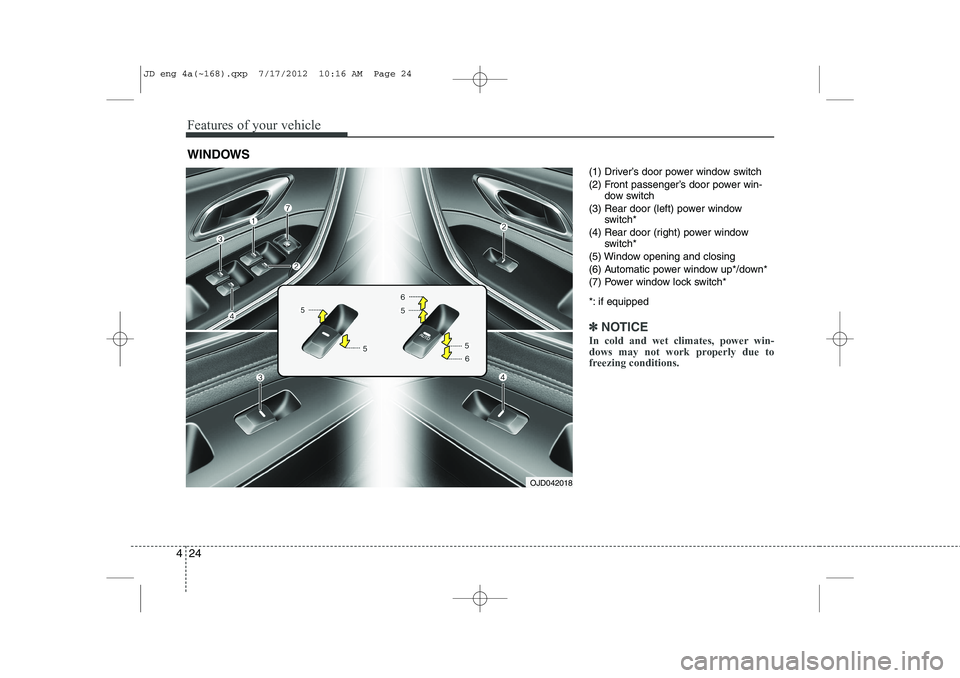
(1) Driver’s door power window switch
(2) Front passenger’s door power win-
dow switch
(3) Rear door (left) power window switch*
(4) Rear door (right) power window switch*
(5) Window opening and closing
(6) Automatic power window up*/down*
(7) Power window lock switch*
*: if equipped
✽✽ NOTICE
In cold and wet climates, power win-
dows may not work properly due to
freezing conditions.
WINDOWS
OJD042018
JD eng 4a(~168).qxp 7/17/2012 10:16 AM Page 24
Page 104 of 1168
425
Features of your vehicle
Power windows
The ignition switch must be in the ON
position for power windows to operate.
Each door has a power window switch
that controls the door’s window. The dri-
ver’s door has a master power window
switch that controls all the windows in the
vehicle. Also, the driver has a power win-
dow lock switch which can block the
operation of rear passenger windows.
The power windows can be operated for
approximately 30 seconds after the igni-
tion key is removed or turned to the ACC
or LOCK position. However, if the front
doors are opened, the power windows
cannot be operated even within the 30
seconds period.
✽✽NOTICE
While driving with the rear windows
down or with the sunroof (if equipped)
in an open (or partially open position),
your vehicle may demonstrate a wind
buffeting or pulsation noise. This
noise is a normal occurrence and can be
reduced or eliminated by taking the fol-
lowing actions. If the noise occurs with
one or both of the rear windows down,
partially lower both front windows
approximately one inch. If you experi-
ence the noise with the sunroof open,
slightly reduce the size of the sunroofopening.
Window opening and closing
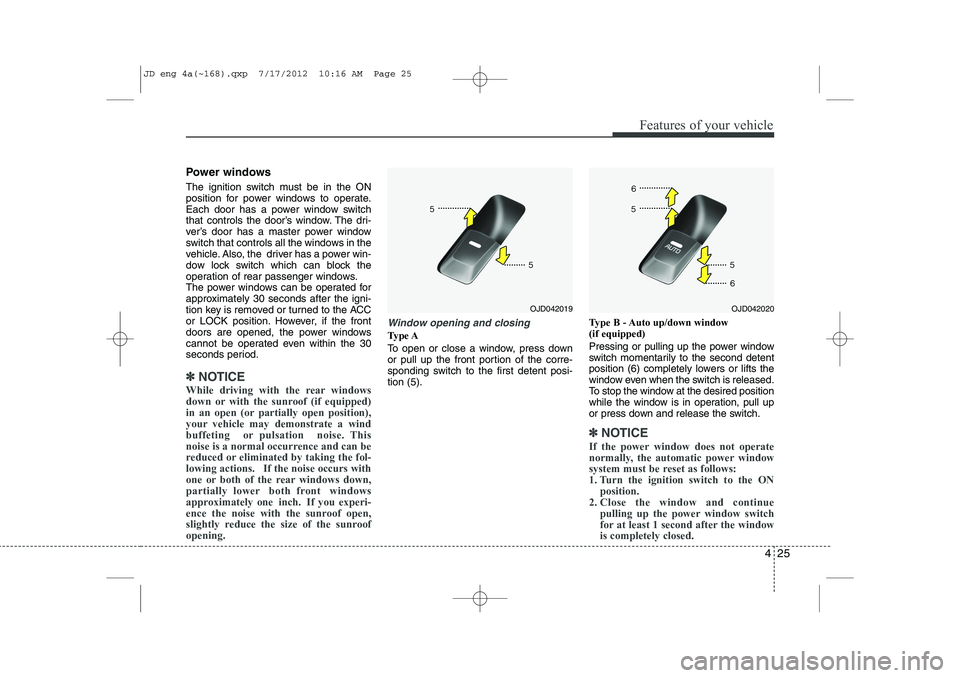
Type A
To open or close a window, press down
or pull up the front portion of the corre-
sponding switch to the first detent posi-tion (5). Type B - Auto up/down window (if equipped)
Pressing or pulling up the power window
switch momentarily to the second detent
position (6) completely lowers or lifts the
window even when the switch is released.
To stop the window at the desired position
while the window is in operation, pull up
or press down and release the switch.
✽✽
NOTICE
If the power window does not operate
normally, the automatic power window
system must be reset as follows:
1. Turn the ignition switch to the ON position.
2. Close the window and continue
pulling up the power window switch
for at least 1 second after the windowis completely closed.
OJD042020OJD042019
JD eng 4a(~168).qxp 7/17/2012 10:16 AM Page 25
Page 105 of 1168
Features of your vehicle
26
4
WARNING
Always check for obstructions
before raising any window to avoid
injuries or vehicle damage. If anobject less than 4 mm (0.16 in.) indiameter is caught between the
window glass and the upper win-
dow channel, the automatic reverse
window may not detect the resist-
ance and will not stop and reversedirection.
Automatic reversal
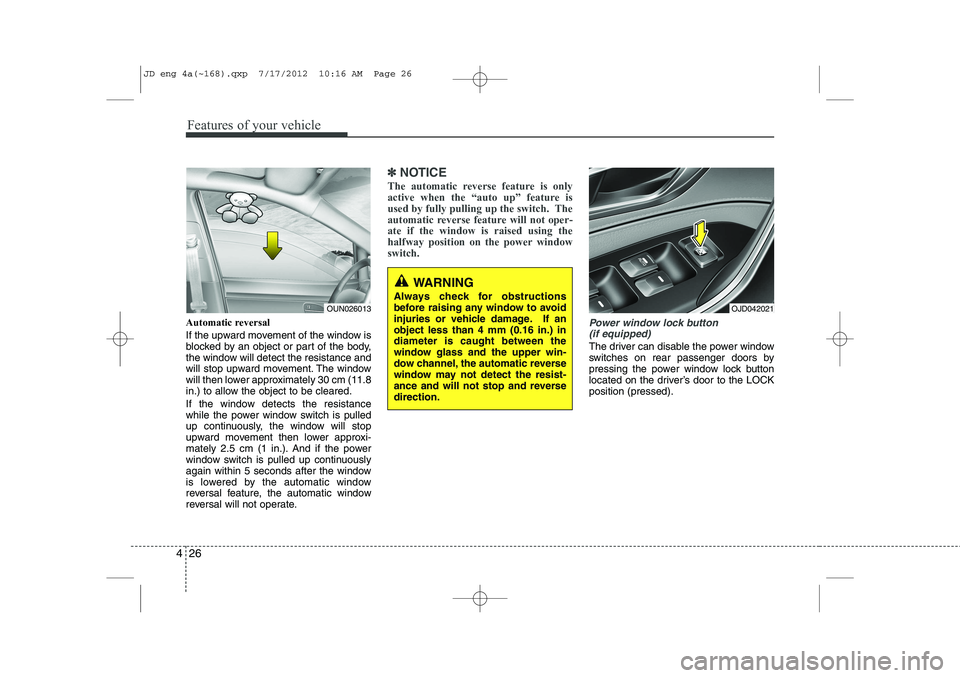
If the upward movement of the window is
blocked by an object or part of the body,
the window will detect the resistance and
will stop upward movement. The window
will then lower approximately 30 cm (11.8
in.) to allow the object to be cleared.
If the window detects the resistance
while the power window switch is pulled
up continuously, the window will stop
upward movement then lower approxi-
mately 2.5 cm (1 in.). And if the power
window switch is pulled up continuously
again within 5 seconds after the window
is lowered by the automatic window
reversal feature, the automatic window
reversal will not operate.
✽✽ NOTICE
The automatic reverse feature is only
active when the “auto up” feature is
used by fully pulling up the switch. The
automatic reverse feature will not oper-ate if the window is raised using the
halfway position on the power windowswitch.
Power window lock button (if equipped)
The driver can disable the power window
switches on rear passenger doors by
pressing the power window lock button
located on the driver’s door to the LOCKposition (pressed).
OUN026013OJD042021
JD eng 4a(~168).qxp 7/17/2012 10:16 AM Page 26
Page 106 of 1168
427
Features of your vehicle
Manual windows (if equipped)
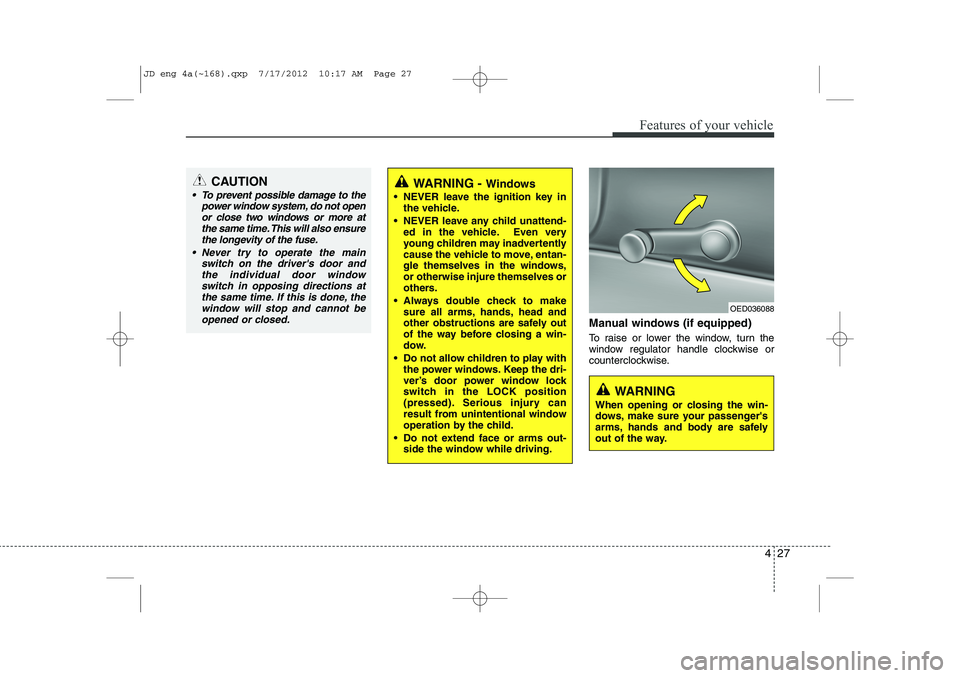
To raise or lower the window, turn the
window regulator handle clockwise or
counterclockwise.
CAUTION
To prevent possible damage to thepower window system, do not open
or close two windows or more at the same time. This will also ensurethe longevity of the fuse.
Never try to operate the main switch on the driver's door andthe individual door windowswitch in opposing directions at the same time. If this is done, the
window will stop and cannot be opened or closed.WARNING - Windows
NEVER leave the ignition key in the vehicle.
NEVER leave any child unattend- ed in the vehicle. Even very
young children may inadvertently
cause the vehicle to move, entan-
gle themselves in the windows,or otherwise injure themselves or
others.
Always double check to make sure all arms, hands, head and
other obstructions are safely out
of the way before closing a win-
dow.
Do not allow children to play with the power windows. Keep the dri-
ver’s door power window lock
switch in the LOCK position
(pressed). Serious injury can
result from unintentional window
operation by the child.
Do not extend face or arms out- side the window while driving.
OED036088
WARNING
When opening or closing the win-
dows, make sure your passenger's
arms, hands and body are safely
out of the way.
JD eng 4a(~168).qxp 7/17/2012 10:17 AM Page 27
Page 109 of 1168
Features of your vehicle
30
4
Opening the fuel filler lid
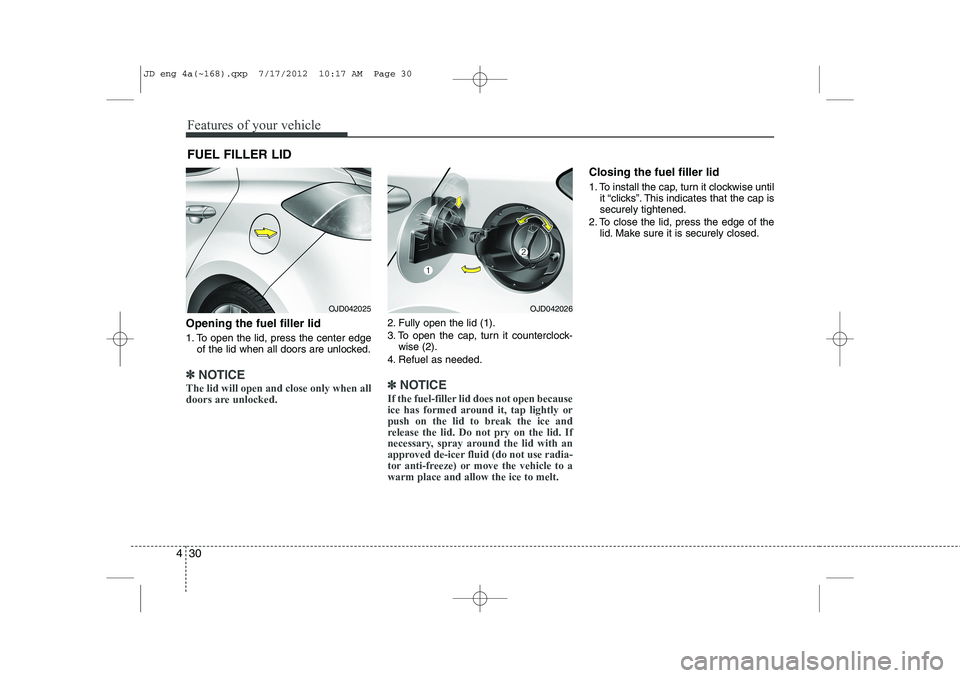
1. To open the lid, press the center edge
of the lid when all doors are unlocked.
✽✽ NOTICE
The lid will open and close only when all
doors are unlocked.
2. Fully open the lid (1).
3. To open the cap, turn it counterclock- wise (2).
4. Refuel as needed.
✽✽ NOTICE
If the fuel-filler lid does not open because
ice has formed around it, tap lightly or
push on the lid to break the ice and
release the lid. Do not pry on the lid. If
necessary, spray around the lid with an
approved de-icer fluid (do not use radia-
tor anti-freeze) or move the vehicle to awarm place and allow the ice to melt.
Closing the fuel filler lid
1. To install the cap, turn it clockwise until it “clicks”. This indicates that the cap is securely tightened.
2. To close the lid, press the edge of the lid. Make sure it is securely closed.
FUEL FILLER LID
OJD042025OJD042026
JD eng 4a(~168).qxp 7/17/2012 10:17 AM Page 30
Page 124 of 1168
445
Features of your vehicle
Electric type
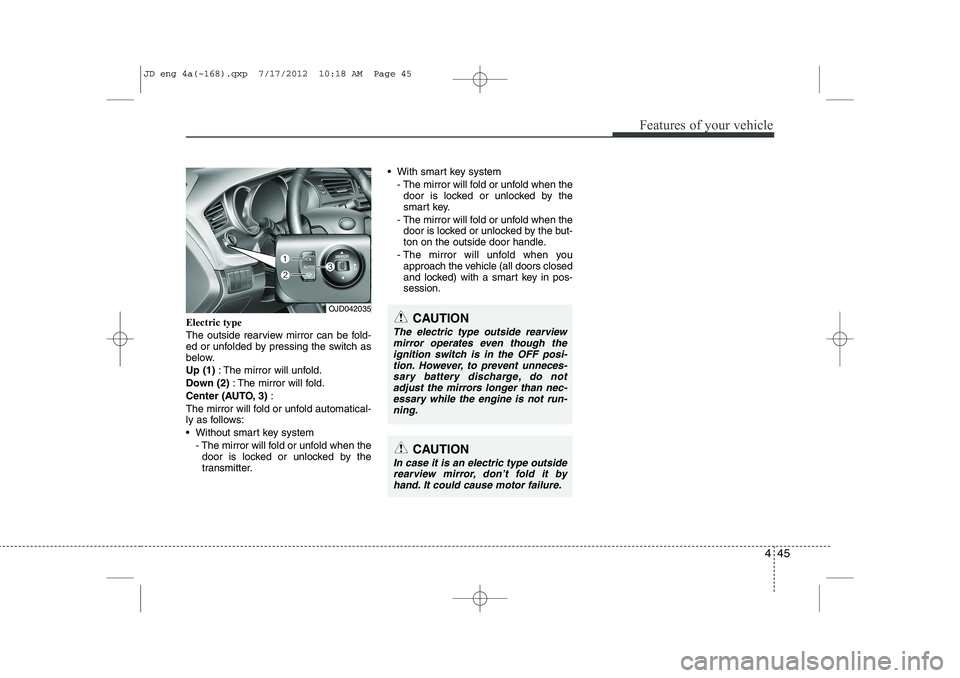
The outside rearview mirror can be fold-
ed or unfolded by pressing the switch as
below. Up (1): The mirror will unfold.
Down (2) : The mirror will fold.
Center (AUTO, 3) :
The mirror will fold or unfold automatical-
ly as follows:
Without smart key system - The mirror will fold or unfold when thedoor is locked or unlocked by the
transmitter. With smart key system
- The mirror will fold or unfold when thedoor is locked or unlocked by the
smart key.
- The mirror will fold or unfold when the door is locked or unlocked by the but-
ton on the outside door handle.
- The mirror will unfold when you approach the vehicle (all doors closed
and locked) with a smart key in pos-session.
OJD042035
CAUTION
In case it is an electric type outside
rearview mirror, don’t fold it byhand. It could cause motor failure.
CAUTION
The electric type outside rearviewmirror operates even though the
ignition switch is in the OFF posi-tion. However, to prevent unneces- sary battery discharge, do notadjust the mirrors longer than nec-
essary while the engine is not run-ning.
JD eng 4a(~168).qxp 7/17/2012 10:18 AM Page 45
Page 167 of 1168
Features of your vehicle
88
4
LCD DISPLAY WARNINGS AND INDICATORS (INSTRUMENT PANEL DISPLAY)
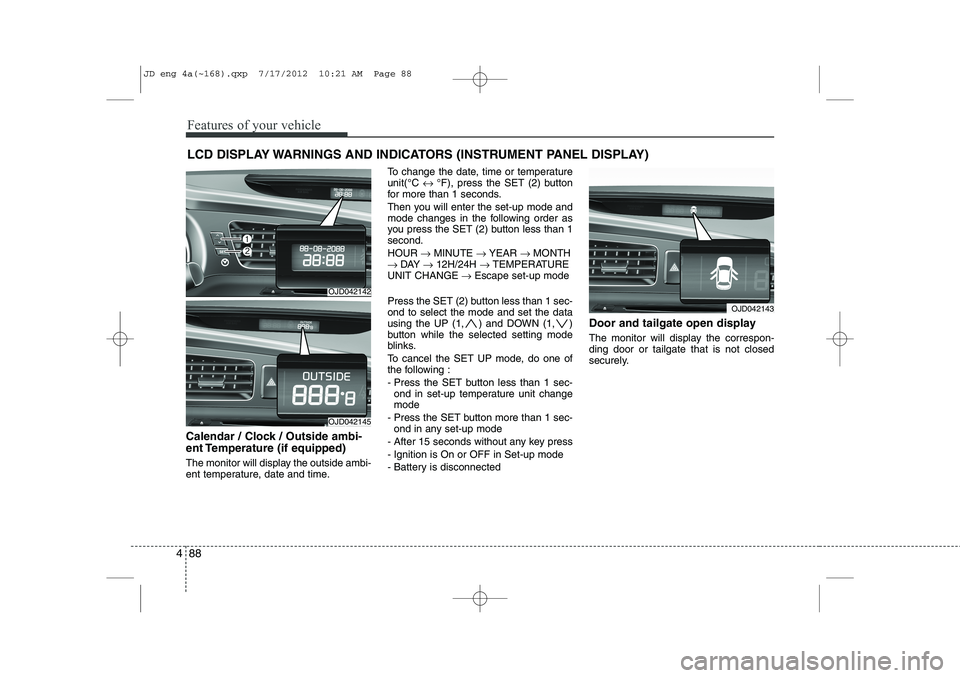
Calendar / Clock / Outside ambi-
ent Temperature (if equipped)
The monitor will display the outside ambi-
ent temperature, date and time. To change the date, time or temperatureunit(°C
↔ °F), press the SET (2) button
for more than 1 seconds.
Then you will enter the set-up mode and
mode changes in the following order as
you press the SET (2) button less than 1second. HOUR → MINUTE → YEAR → MONTH
→ DAY → 12H/24H → TEMPERATURE
UNIT CHANGE → Escape set-up mode
Press the SET (2) button less than 1 sec- ond to select the mode and set the data
using the UP (1, ) and DOWN (1, )
button while the selected setting mode
blinks.
To cancel the SET UP mode, do one of
the following :
- Press the SET button less than 1 sec- ond in set-up temperature unit change mode
- Press the SET button more than 1 sec- ond in any set-up mode
- After 15 seconds without any key press
- Ignition is On or OFF in Set-up mode
- Battery is disconnected Door and tailgate open display
The monitor will display the correspon- ding door or tailgate that is not closed
securely.
OJD042142
OJD042145
OJD042143
JD eng 4a(~168).qxp 7/17/2012 10:21 AM Page 88
Page 189 of 1168
Features of your vehicle
110
4
Battery saver function
The purpose of this feature is to pre-
vent the battery from being dis-
charged. The system automatically
turns off the parking lights when the
driver removes the ignition key (Smart
key : turns off the engine) and opens
the driver- side door.
With this feature, the parking lights will be turned off automatically if the driver
parks on the side of road at night.
If necessary, to keep the lights on
when the ignition key is removed, per-
form the following :
1) Open the driver-side door.
2) Turn the parking lights OFF and ON again using the light switch on the
steering column. Headlamp delay function (if equipped) The headlamps (and/or taillights) remain
on for same minutes (Type A: 20 minutes,
Type B: 5 minutes) after the ignition key
is removed or turned to the ACC or
LOCK position. However, if the driver’sdoor is opened and closed, the head-
lights are turned off after 15 seconds.
The headlights can be turned off by
pressing the lock button on the transmit-
ter or smart key twice or turning off the
light switch from the headlight or Autolight position.
You can activate or deactivate the head-
lamp delay fuction. Refer to “User setting”in this section.
Headlight (Headlamp) welcome function (if equipped)
When the headlight switch is in the ON or
AUTO position and all doors (and tail-
gate) are closed and locked, if you press
the door unlock button on the transmitter
or smart key, the headlights will come on
for about 15 seconds.
If the headlight switch is in the AUTO
position, the function can only operate atnight.
At this time, if you press the door unlock
button again or door lock button on the
transmitter or smart key, the headlights
will turn off immediately.
You can activate or deactivate the head-
lamp welcome fuction. Refer to “User set-
ting” in this section.
LIGHTING
CAUTION
If the driver gets out of the vehicle
through other doors (except driver’sdoor), the battery saver functiondoes not operate and the headlamp
delay function does not turn offautomatically. Therefore, it causes the battery to be discharged. In this case, make sure to turn off the lampbefore getting out of the vehicle.
JD eng 4a(~168).qxp 7/17/2012 10:22 AM Page 110