change time KIA CEED 2013 Workshop Manual
[x] Cancel search | Manufacturer: KIA, Model Year: 2013, Model line: CEED, Model: KIA CEED 2013Pages: 1168, PDF Size: 48.01 MB
Page 875 of 1168
Features of your vehicle
212
4
Steering remote controller
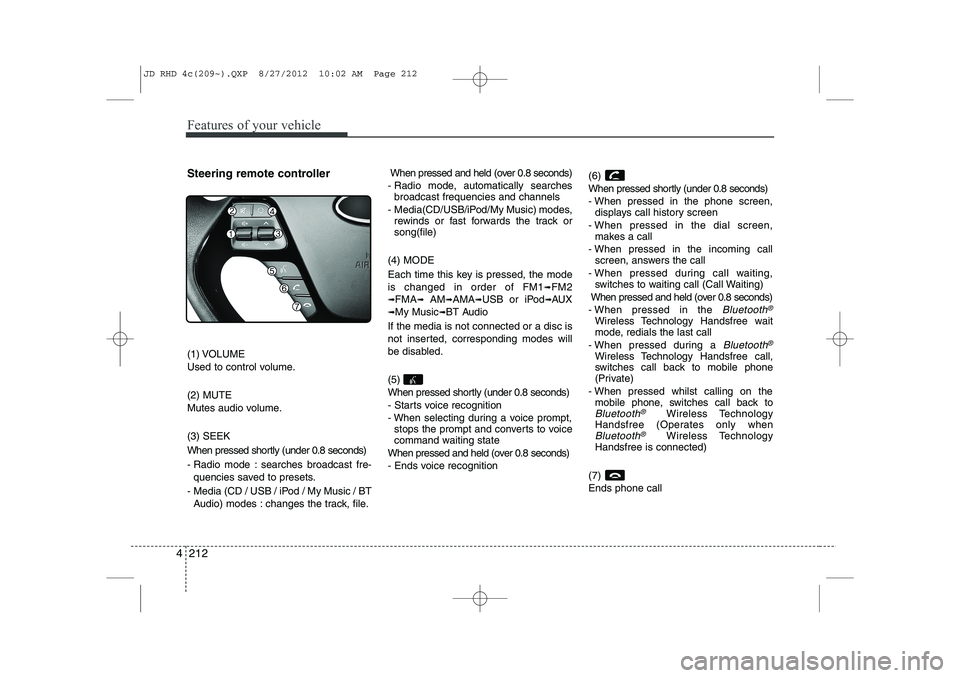
(1) VOLUME
Used to control volume. (2) MUTE
Mutes audio volume. (3) SEEK
When pressed shortly (under 0.8 seconds)
- Radio mode : searches broadcast fre-
quencies saved to presets.
- Media (CD / USB / iPod / My Music / BT Audio) modes : changes the track, file. When pressed and held (over 0.8 seconds)
- Radio mode, automatically searches broadcast frequencies and channels
- Media(CD/USB/iPod/My Music) modes, rewinds or fast forwards the track or song(file)
(4) MODE
Each time this key is pressed, the mode is changed in order of FM1
➟FM2
➟FMA➟AM➟AMA➟USB or iPod➟AUX
➟My Music➟BT Audio
If the media is not connected or a disc is
not inserted, corresponding modes will
be disabled. (5)
When pressed shortly (under 0.8 seconds)
- Starts voice recognition
- When selecting during a voice prompt, stops the prompt and converts to voice
command waiting state
When pressed and held (over 0.8 seconds)
- Ends voice recognition (6)
When pressed shortly (under 0.8 seconds)
- When pressed in the phone screen,
displays call history screen
- When pressed in the dial screen, makes a call
- When pressed in the incoming call screen, answers the call
- When pressed during call waiting, switches to waiting call (Call Waiting)
When pressed and held (over 0.8 seconds)
- When pressed in the Bluetooth®
Wireless Technology Handsfree wait
mode, redials the last call
- When pressed during a
Bluetooth®
Wireless Technology Handsfree call,
switches call back to mobile phone
(Private)
- When pressed whilst calling on the mobile phone, switches call back to
Bluetooth®Wireless Technology
Handsfree (Operates only when
Bluetooth®Wireless Technology
Handsfree is connected)
(7) Ends phone call
JD RHD 4c(209~).QXP 8/27/2012 10:02 AM Page 212
Page 880 of 1168
4 217
Features of your vehicle
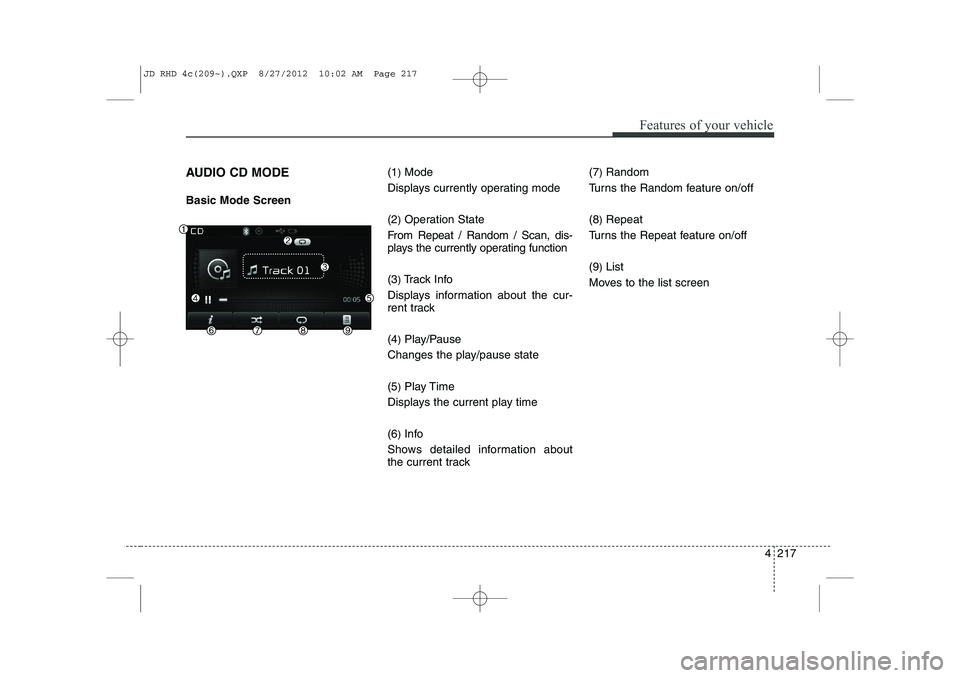
AUDIO CD MODE Basic Mode Screen(1
)Mode
Displays currently operating mode (2 )Operation State
From Repeat / Random / Scan, dis-
plays the currently operating function (3 )Track Info
Displays information about the cur-
rent track (4 )Play/Pause
Changes the play/pause state(5 )Play Time
Displays the current play time(6 )Info
Shows detailed information about
the current track (7
)
Random
Turns the Random feature on/off (8 )Repeat
Turns the Repeat feature on/off(9 )List
Moves to the list screen
JD RHD 4c(209~).QXP 8/27/2012 10:02 AM Page 217
Page 883 of 1168
Features of your vehicle
220
4
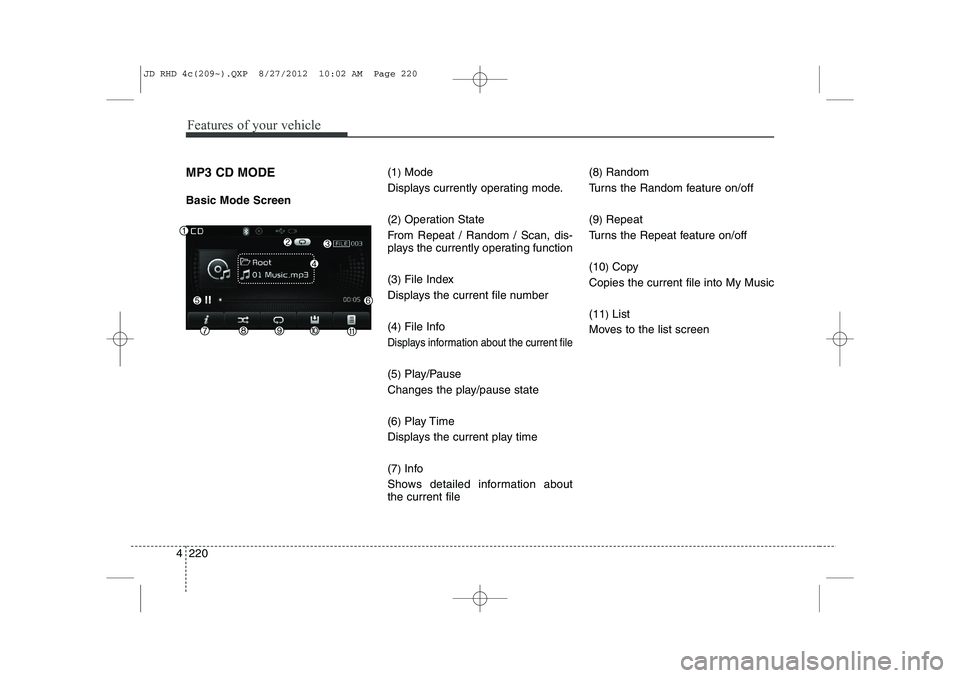
MP3 CD MODE Basic Mode Screen (1
)Mode
Displays currently operating mode. (2 )Operation State
From Repeat / Random / Scan, dis-
plays the currently operating function (3 )File Index
Displays the current file number(4 )File Info
Displays information about the current file
(5 )Play/Pause
Changes the play/pause state(6 )Play Time
Displays the current play time(7 )Info
Shows detailed information about the current file (8
)Random
Turns the Random feature on/off (9 )Repeat
Turns the Repeat feature on/off(10 )Copy
Copies the current file into My Music(11 )List
Moves to the list screen
JD RHD 4c(209~).QXP 8/27/2012 10:02 AM Page 220
Page 886 of 1168
4 223
Features of your vehicle
Repeat
Press the button to repeat the
current file or folder.
Each time the button is pressed, the fea- ture changes in order of Repeat ➟Repeat
Folder ➟Off.
Repeat: Repeats the current file.
Repeat Folder: Repeats all files within the current Folder.
Copying Files
Press the button to copy the current file into My Music.
✽✽ NOTICE
Selecting another feature during copy- ing will display a pop-up asking whether
you wish to cancel copying. To cancel,
select 'Yes’.
List
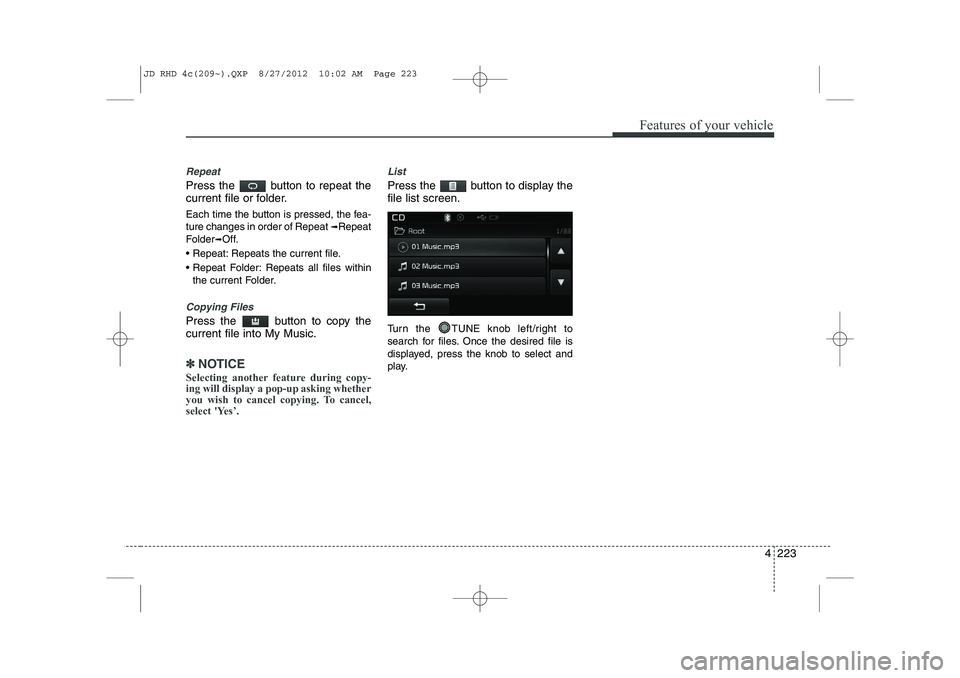
Press the button to display the file list screen.
Turn the TUNE knob left/right to
search for files. Once the desired file is
displayed, press the knob to select and
play.
JD RHD 4c(209~).QXP 8/27/2012 10:02 AM Page 223
Page 887 of 1168
Features of your vehicle
224
4
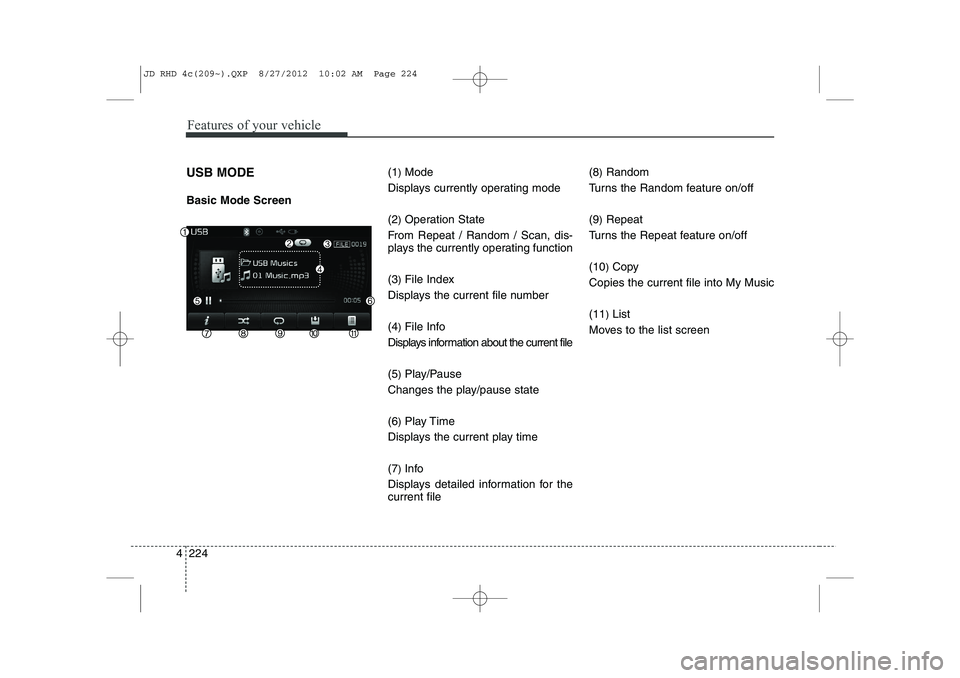
USB MODE Basic Mode Screen (1
)Mode
Displays currently operating mode (2 )Operation State
From Repeat / Random / Scan, dis-
plays the currently operating function (3 )File Index
Displays the current file number(4 )File Info
Displays information about the current file(5 )Play/Pause
Changes the play/pause state(6 )Play Time
Displays the current play time(7 )Info
Displays detailed information for the current file (8
)Random
Turns the Random feature on/off (9 )Repeat
Turns the Repeat feature on/off(10 )Copy
Copies the current file into My Music(11 )List
Moves to the list screen
JD RHD 4c(209~).QXP 8/27/2012 10:02 AM Page 224
Page 890 of 1168
4 227
Features of your vehicle
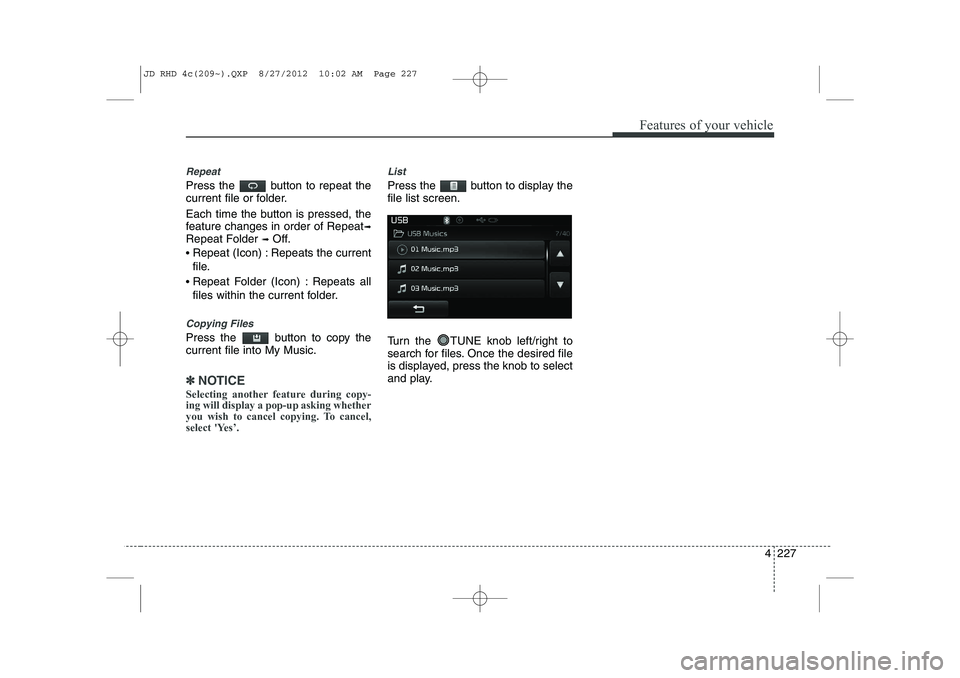
Repeat
Press the button to repeat the
current file or folder.
Each time the button is pressed, the
feature changes in order of Repeat➟
Repeat Folder ➟Off.
Repeat (Icon) : Repeats the current
file.
Repeat Folder (Icon) : Repeats all
files within the current folder.
Copying Files
Press the button to copy the current file into My Music.
✽✽
NOTICE
Selecting another feature during copy- ing will display a pop-up asking whether
you wish to cancel copying. To cancel,
select 'Yes’.
List
Press the button to display the file list screen.
Turn the TUNE knob left/right to
search for files. Once the desired file
is displayed, press the knob to select
and play.
JD RHD 4c(209~).QXP 8/27/2012 10:02 AM Page 227
Page 891 of 1168
Features of your vehicle
228
4
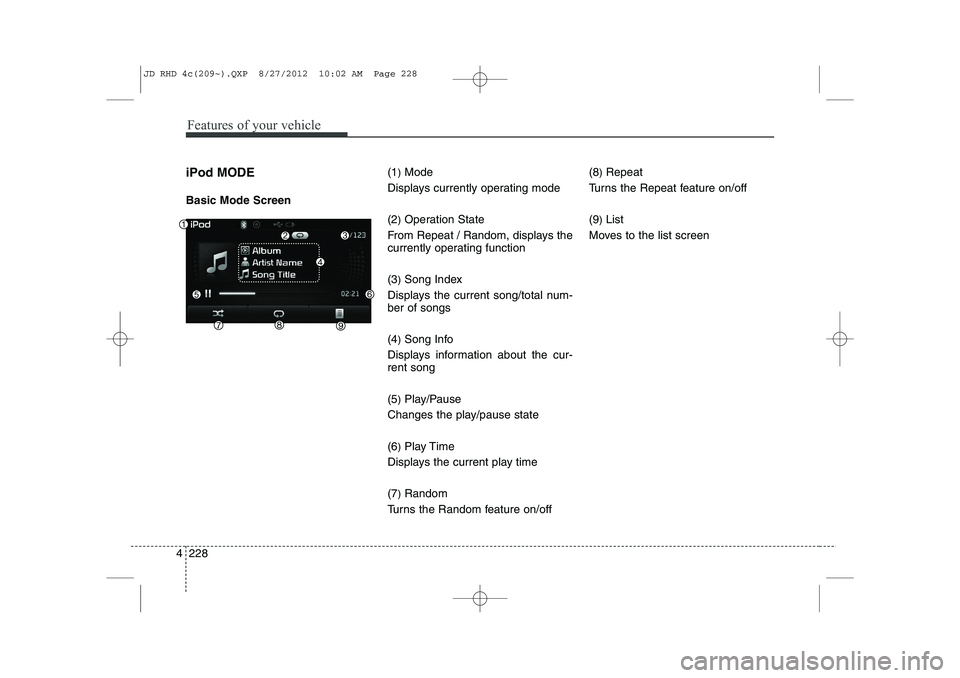
iPod MODE Basic Mode Screen (1
)Mode
Displays currently operating mode (2 )Operation State
From Repeat / Random, displays the
currently operating function (3 )Song Index
Displays the current song/total num- ber of songs (4 )Song Info
Displays information about the cur- rent song (5 )Play/Pause
Changes the play/pause state(6 )Play Time
Displays the current play time(7 )Random
Turns the Random feature on/off (8
)Repeat
Turns the Repeat feature on/off(9 )List
Moves to the list screen
JD RHD 4c(209~).QXP 8/27/2012 10:02 AM Page 228
Page 895 of 1168
Features of your vehicle
232
4
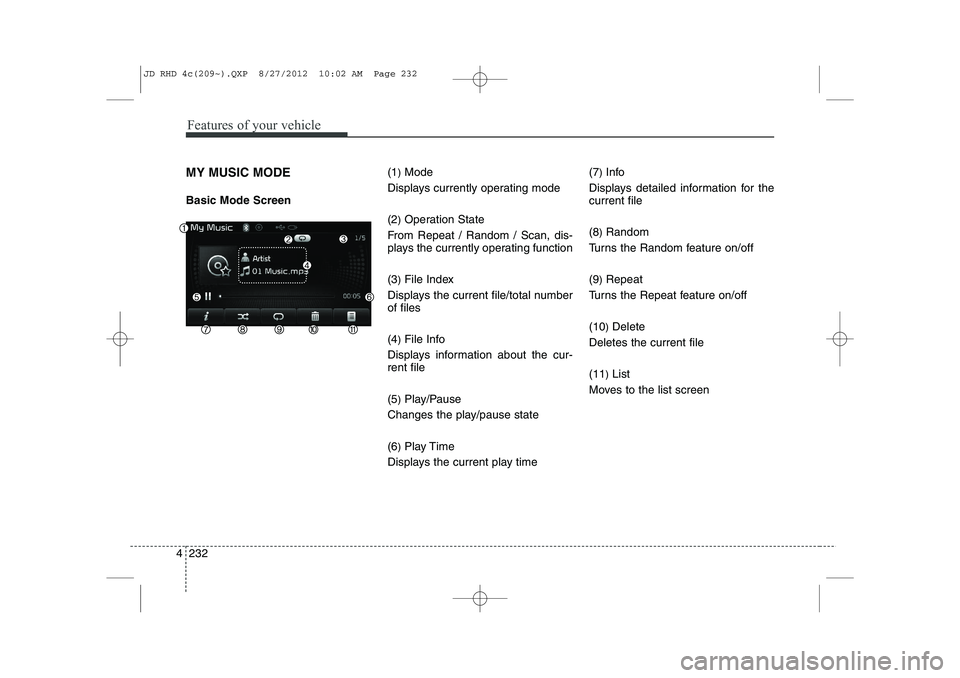
MY MUSIC MODE Basic Mode Screen (1
)Mode
Displays currently operating mode (2 )Operation State
From Repeat / Random / Scan, dis-
plays the currently operating function (3 )File Index
Displays the current file/total number of files (4 )File Info
Displays information about the cur- rent file (5 )Play/Pause
Changes the play/pause state(6 )Play Time
Displays the current play time (7
)
Info
Displays detailed information for the current file (8 )Random
Turns the Random feature on/off(9 )Repeat
Turns the Repeat feature on/off(10 )Delete
Deletes the current file(11 )List
Moves to the list screen
JD RHD 4c(209~).QXP 8/27/2012 10:02 AM Page 232
Page 928 of 1168
53
Driving your vehicle
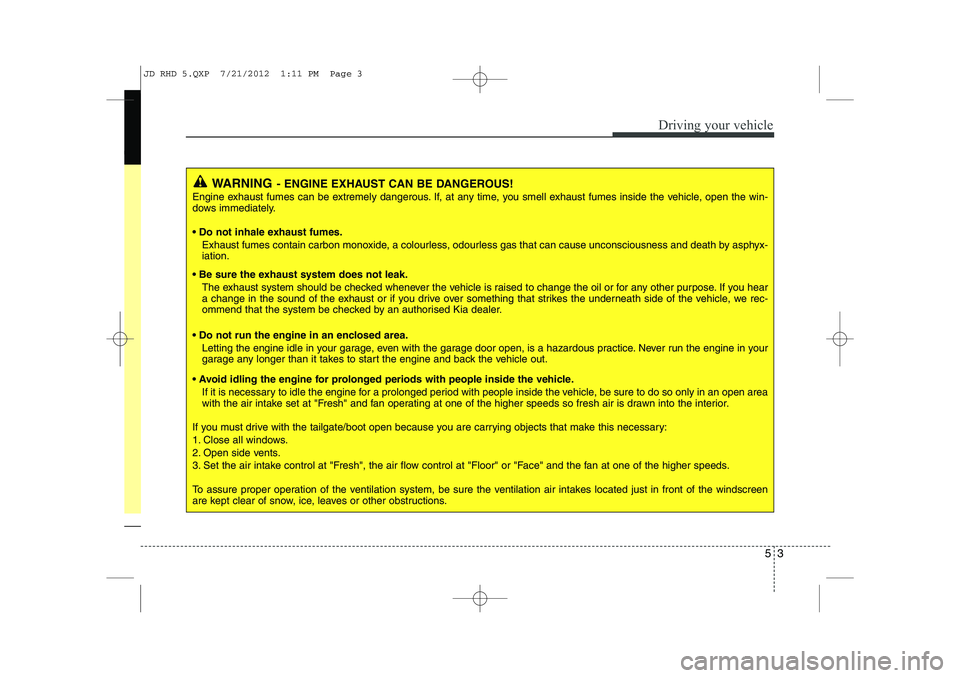
WARNING- ENGINE EXHAUST CAN BE DANGEROUS!
Engine exhaust fumes can be extremely dangerous. If, at any time, you smell exhaust fumes inside the vehicle, open the win-
dows immediately.
• Do not inhale exhaust fumes.
Exhaust fumes contain carbon monoxide, a colourless, odourless gas that can cause unconsciousness and death by asphyx- iation.
Be sure the exhaust system does not leak. The exhaust system should be checked whenever the vehicle is raised to change the oil or for any other purpose. If you hear
a change in the sound of the exhaust or if you drive over something that strikes the underneath side of the vehicle, we rec-
ommend that the system be checked by an authorised Kia dealer.
Do not run the engine in an enclosed area. Letting the engine idle in your garage, even with the garage door open, is a hazardous practice. Never run the engine in your
garage any longer than it takes to start the engine and back the vehicle out.
Avoid idling the engine for prolonged periods with people inside the vehicle. If it is necessary to idle the engine for a prolonged period with people inside the vehicle, be sure to do so only in an open a rea
with the air intake set at "Fresh" and fan operating at one of the higher speeds so fresh air is drawn into the interior.
If you must drive with the tailgate/boot open because you are carrying objects that make this necessary:
1. Close all windows.
2. Open side vents.
3. Set the air intake control at "Fresh", the air flow control at "Floor" or "Face" and the fan at one of the higher speeds.
To assure proper operation of the ventilation system, be sure the ventilation air intakes located just in front of the windscre en
are kept clear of snow, ice, leaves or other obstructions.
JD RHD 5.QXP 7/21/2012 1:11 PM Page 3
Page 936 of 1168
511
Driving your vehicle
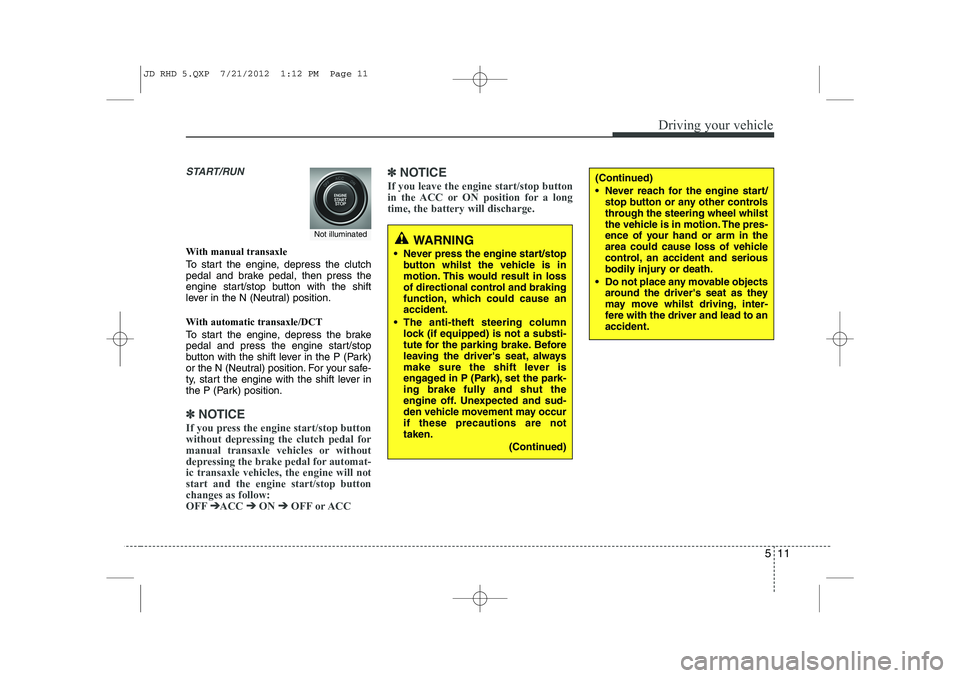
START/RUN
With manual transaxle
To start the engine, depress the clutch
pedal and brake pedal, then press the
engine start/stop button with the shift
lever in the N (Neutral) position.
With automatic transaxle/DCT
To start the engine, depress the brake
pedal and press the engine start/stop
button with the shift lever in the P (Park)
or the N (Neutral) position. For your safe-
ty, start the engine with the shift lever in
the P (Park) position.
✽✽
NOTICE
If you press the engine start/stop button
without depressing the clutch pedal for
manual transaxle vehicles or without
depressing the brake pedal for automat-ic transaxle vehicles, the engine will notstart and the engine start/stop buttonchanges as follow:OFF ➔
➔
ACC ➔➔
ON ➔➔
OFF or ACC ✽
✽
NOTICE
If you leave the engine start/stop button
in the ACC or ON position for a longtime, the battery will discharge.
WARNING
Never press the engine start/stop button whilst the vehicle is in
motion. This would result in loss
of directional control and braking
function, which could cause anaccident.
The anti-theft steering column lock (if equipped) is not a substi-
tute for the parking brake. Before
leaving the driver's seat, always
make sure the shift lever is
engaged in P (Park), set the park-
ing brake fully and shut the
engine off. Unexpected and sud-
den vehicle movement may occurif these precautions are nottaken.
(Continued)
(Continued)
Never reach for the engine start/stop button or any other controls
through the steering wheel whilst
the vehicle is in motion. The pres-
ence of your hand or arm in the
area could cause loss of vehicle
control, an accident and serious
bodily injury or death.
Do not place any movable objects around the driver's seat as they
may move whilst driving, inter-
fere with the driver and lead to anaccident.
Not illuminated
JD RHD 5.QXP 7/21/2012 1:12 PM Page 11