key KIA CEED 2013 Manual Online
[x] Cancel search | Manufacturer: KIA, Model Year: 2013, Model line: CEED, Model: KIA CEED 2013Pages: 1168, PDF Size: 48.01 MB
Page 323 of 1168
![KIA CEED 2013 Manual Online Features of your vehicle
244
4
Calling by Dialing a Number
Press the key Select [Dial Number]
(1) Dial Pad : Used to enter phone num-
ber
(2) Call : If a number has been entered, calls the number I](/img/2/57944/w960_57944-322.png "KIA CEED 2013 Manual Online Features of your vehicle
244
4
Calling by Dialing a Number
Press the key Select [Dial Number]
(1) Dial Pad : Used to enter phone num-
ber
(2) Call : If a number has been entered, calls the number I")
Features of your vehicle
244
4
Calling by Dialing a Number
Press the key Select [Dial Number]
(1) Dial Pad : Used to enter phone num-
ber
(2) Call : If a number has been entered, calls the number If no number has
been entered, switches to call historyscreen
(3) End : Deletes the entered phone number
(4) Delete : Deletes entered numbers one digit at a time Answering Calls
Answering a Call
Answering a call with a Bluetooth®
Wireless Technology device connect-
ed will display the following screen. (1)
Caller : Displays the other part’s name when the incoming caller is
saved within your phone book
(2) Incoming Number : Displays the
incoming number
(3) Accept : Accept the incoming call
(4) Reject : Reject the incoming call
✽✽ NOTICE
Page 324 of 1168
4 245
Features of your vehicle
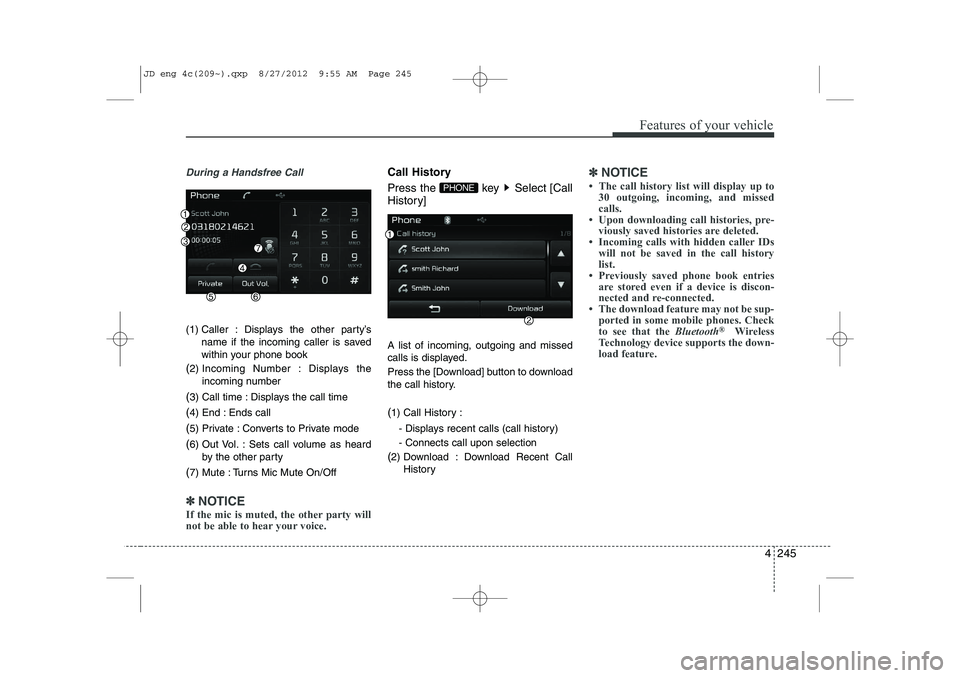
During a Handsfree Call
(1) Caller : Displays the other party’sname if the incoming caller is saved
within your phone book
( 2) Incoming Number : Displays the
incoming number
( 3) Call time : Displays the call time
( 4) End : Ends call
( 5) Private : Converts to Private mode
( 6) Out Vol. : Sets call volume as heard
by the other party
( 7) Mute : Turns Mic Mute On/Off
✽✽
NOTICE
If the mic is muted, the other party will
not be able to hear your voice.
Call History
Press the key Select [Call
History] A list of incoming, outgoing and missed
calls is displayed.
Press the [Download] button to download
the call history. ( 1) Call History :
- Displays recent calls (call history) - Connects call upon selection
( 2) Download : Download Recent Call
History✽✽NOTICE
Page 325 of 1168
![KIA CEED 2013 Manual Online Features of your vehicle
246
4
Phone Book
Press the key Select [Phone book]
The list of saved phone book entries is
displayed. Press the [Download] button
to download the call history. ( 1) Contac](/img/2/57944/w960_57944-324.png "KIA CEED 2013 Manual Online Features of your vehicle
246
4
Phone Book
Press the key Select [Phone book]
The list of saved phone book entries is
displayed. Press the [Download] button
to download the call history. ( 1) Contac")
Features of your vehicle
246
4
Phone Book
Press the key Select [Phone book]
The list of saved phone book entries is
displayed. Press the [Download] button
to download the call history. ( 1) Contact List :
- Displays downloaded phone bookentries
- Connects call upon selection
( 2) Download : Download phone book
entries✽✽NOTICE
Page 327 of 1168
Features of your vehicle
248
4
VOICE RECOGNITION
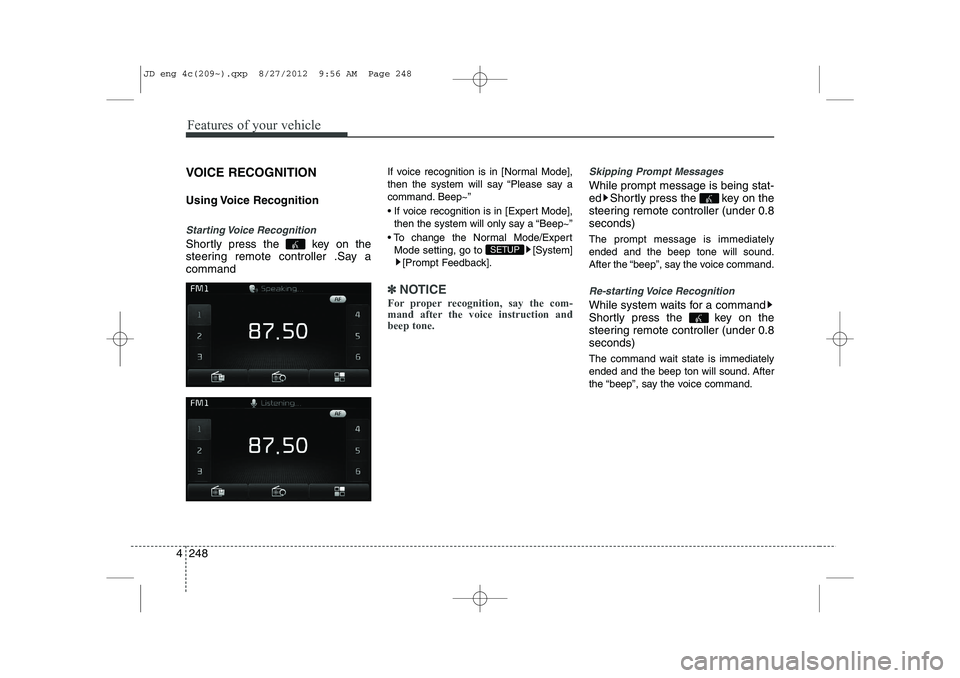
Using Voice Recognition
Starting Voice Recognition
Shortly press the key on the
steering remote controller .Say acommand If voice recognition is in [Normal Mode],
then the system will say “Please say a
command. Beep~”
If voice recognition is in [Expert Mode],
then the system will only say a “Beep~”
To change the Normal Mode/Expert Mode setting, go to [System] [Prompt Feedback].
✽✽ NOTICE
For proper recognition, say the com-
mand after the voice instruction andbeep tone.
Skipping Prompt Messages
While prompt message is being stat-
ed Shortly press the key on the
steering remote controller (under 0.8seconds) The prompt message is immediately ended and the beep tone will sound.
After the “beep”, say the voice command.
Re-starting Voice Recognition
While system waits for a command
Shortly press the key on the
steering remote controller (under 0.8seconds)
The command wait state is immediately
ended and the beep ton will sound. After
the “beep”, say the voice command.
SETUP
JD eng 4c(209~).qxp 8/27/2012 9:56 AM Page 248
Page 328 of 1168
4 249
Features of your vehicle
ENDING VOICE RECOGNITION
While Voice Recognition is operatingPress and hold the key on the
steering remote controller (over 0.8 seconds)
✽✽ NOTICE
Page 329 of 1168
![KIA CEED 2013 Manual Online Features of your vehicle
250
4
SETUP
Starting Mode
Press the key to display the Setup screen.
You can select and control options relat-
ed to [Display], [Sound], [Phone] and[System]. Display Sett](/img/2/57944/w960_57944-328.png "KIA CEED 2013 Manual Online Features of your vehicle
250
4
SETUP
Starting Mode
Press the key to display the Setup screen.
You can select and control options relat-
ed to [Display], [Sound], [Phone] and[System]. Display Sett")
Features of your vehicle
250
4
SETUP
Starting Mode
Press the key to display the Setup screen.
You can select and control options relat-
ed to [Display], [Sound], [Phone] and[System]. Display Settings
Adjusting the Brightness
Press the key Select
[Display] Select [Brightness]
Use the , buttons to adjust the
screen brightness or set the Brightness
on Automatic, Day, or Night mode.
Press the button to reset. (
1) Automatic : Adjusts the brightness
automatically
( 2) Day : Always maintains the bright-
ness on high
( 3) Night : Always maintains the bright-
ness on low
Pop-up Mode
Press the key Select
[Display] Select [Pop-up Mode]
This feature is used to display the Pop-up
Mode screen when entering radio and
media modes.
When this feature is turned on, pressing
the or key will display
the Pop-up Mode screen.
✽✽NOTICE
The media Pop-up Mode screen can be
displayed only when two or more mediamodes have been connected.
MEDIA RADIO
SETUP
Default
SETUP SETUP
JD eng 4c(209~).qxp 8/27/2012 9:56 AM Page 250
Page 330 of 1168
![KIA CEED 2013 Manual Online 4 251
Features of your vehicle
Scroll Text
Press the key Select
[Display] Select [Scroll text]
This feature is used to scroll text dis-
played on the screen when it is too long
to be displayed at](/img/2/57944/w960_57944-329.png "KIA CEED 2013 Manual Online 4 251
Features of your vehicle
Scroll Text
Press the key Select
[Display] Select [Scroll text]
This feature is used to scroll text dis-
played on the screen when it is too long
to be displayed at")
4 251
Features of your vehicle
Scroll Text
Press the key Select
[Display] Select [Scroll text]
This feature is used to scroll text dis-
played on the screen when it is too long
to be displayed at once.
When turned on, the text is repeatedly
scrolled. When turned off, the text is
scrolled just once.
MP3 Information Display
Press the key Select
[Display] Select [Song Info]
This feature is used to change the infor-
mation displayed within USB and MP3
CD modes.
(1) Folder File : Displays file name andfolder name
(2) Album Artist Song : Displays album name/artist name/song Sound Settings
Sound Settings
Press the key Select
[Sound] Select [Audio Setting]
Use the , , , buttons to
adjust the Fader/Balance settings.
Use the , buttons to adjust the
Bass/Middle/Treble settings.
Press the button to reset.
Default
SETUP
SETUP
SETUP
JD eng 4c(209~).qxp 8/27/2012 9:56 AM Page 251
Page 331 of 1168
![KIA CEED 2013 Manual Online Features of your vehicle
252
4
SDVC (Speed Dependent Volume
Control)
Press the key Select
[Sound] Select [Speed Dependent
Vol.]
The volume level is controlled automati-
cally according to the vehi](/img/2/57944/w960_57944-330.png "KIA CEED 2013 Manual Online Features of your vehicle
252
4
SDVC (Speed Dependent Volume
Control)
Press the key Select
[Sound] Select [Speed Dependent
Vol.]
The volume level is controlled automati-
cally according to the vehi")
Features of your vehicle
252
4
SDVC (Speed Dependent Volume
Control)
Press the key Select
[Sound] Select [Speed Dependent
Vol.]
The volume level is controlled automati-
cally according to the vehicle speed.
SDVC can be set by selecting from
Off/Low/Mid/High.
Voice Recognition Setting
Press the key Select
[Sound] Select [Volume Dialogue]
Use the , buttons to adjust the
Volume Dialog.
Touch Screen Beep
Press the key Select
[Sound] Select [Touch ScreenBeep]
This feature is used to turn the touch
screen beep on/off.SETUP SETUP SETUP
JD eng 4c(209~).qxp 8/27/2012 9:56 AM Page 252
Page 332 of 1168
![KIA CEED 2013 Manual Online 4 253
Features of your vehicle
Bluetooth®Wireless Technology
Setting
Pairing a New Device
Press the key Select
[Phone] Select [Pair Phone]
Bluetooth®Wireless Technology devices
can be paired with](/img/2/57944/w960_57944-331.png "KIA CEED 2013 Manual Online 4 253
Features of your vehicle
Bluetooth®Wireless Technology
Setting
Pairing a New Device
Press the key Select
[Phone] Select [Pair Phone]
Bluetooth®Wireless Technology devices
can be paired with")
4 253
Features of your vehicle
Bluetooth®Wireless Technology
Setting
Pairing a New Device
Press the key Select
[Phone] Select [Pair Phone]
Bluetooth®Wireless Technology devices
can be paired with the audio system.
For more information, refer to the “Pairing
through Phone Setup” section within
Bluetooth®Wireless Technology.
Viewing Paired Phone List
Press the key Select
[Phone] Select [Paired Phone List]
This feature is used to view mobile
phones that have been paired with the
audio system. Upon selecting a paired
phone, the setup menu is displayed.
For more information, refer to the “Setting
Bluetooth®Wireless Technology
Connection” section within
Bluetooth®
Wireless Technology. ( 1) : Moves to the previous screen
( 2) Connect/Disconnect Phone :
Connect/ disconnects currently selected phone
( 3) Delete : Deletes the currently select-
ed phone (
4) Change Priority : Sets currently select-
ed phone to highest connection priority
✽✽NOTICE BEFORE DOWN-
LOADING PHONE BOOKS
Page 333 of 1168
![KIA CEED 2013 Manual Online Features of your vehicle
254
4
Downloading Phone books
Press the key Select
[Phone] Select [Phone book
Download]
The Phone book is downloaded from the
mobile phone and the download
progress is dis](/img/2/57944/w960_57944-332.png "KIA CEED 2013 Manual Online Features of your vehicle
254
4
Downloading Phone books
Press the key Select
[Phone] Select [Phone book
Download]
The Phone book is downloaded from the
mobile phone and the download
progress is dis")
Features of your vehicle
254
4
Downloading Phone books
Press the key Select
[Phone] Select [Phone book
Download]
The Phone book is downloaded from the
mobile phone and the download
progress is displayed.
✽✽
NOTICE