key battery KIA CEED 2014 User Guide
[x] Cancel search | Manufacturer: KIA, Model Year: 2014, Model line: CEED, Model: KIA CEED 2014Pages: 1206, PDF Size: 50.15 MB
Page 270 of 1206
4 189
Features of your vehicle
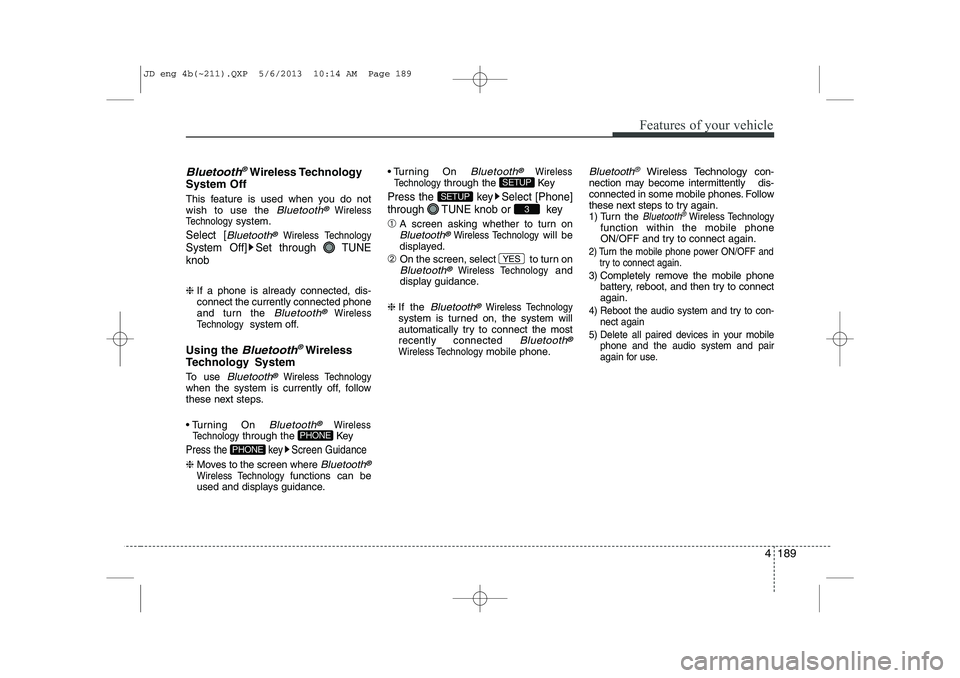
Bluetooth®Wireless Technology
System Off
This feature is used when you do not wish to use the
Bluetooth®Wireless
Technologysystem.
Select [Bluetooth®Wireless Technology
System Off] Set through TUNE knob
❈ If a phone is already connected, dis- connect the currently connected phone
and turn the
Bluetooth®Wireless
Technologysystem off.
Using the
Bluetooth®Wireless
Technology System
To use
Bluetooth®Wireless Technologywhen the system is currently off, follow
these next steps.
Turning On
Bluetooth®Wireless
Technologythrough the Key
Press the key Screen Guidance
❈ Moves to the screen where Bluetooth®
Wireless Technology functions can be
used and displays guidance. Turning On
Bluetooth®Wireless
Technologythrough the Key
Press the key Select [Phone]
through TUNE knob or key
➀ A screen asking whether to turn onBluetooth®Wireless Technologywill be
displayed.
➁ On the screen, select to turn on
Bluetooth®Wireless Technologyand
display guidance.
❈ If the
Bluetooth®Wireless Technologysystem is turned on, the system will
automatically try to connect the mostrecently connected
Bluetooth®
Wireless Technologymobile phone.
Bluetooth®Wireless Technology con-
nection may become intermittently dis-
connected in some mobile phones. Follow
these next steps to try again.
1) Turn the Bluetooth®Wireless Technologyfunction within the mobile phone
ON/OFF and try to connect again.
2) Turn the mobile phone power ON/OFF and try to connect again.
3) Completely remove the mobile phone
battery, reboot, and then try to connectagain.
4) Reboot the audio system and try to con-
nect again
5) Delete all paired devices in your mobile phone and the audio system and pair
again for use.
YES
3
SETUP
SETUP
PHONE
PHONE
JD eng 4b(~211).QXP 5/6/2013 10:14 AM Page 189
Page 279 of 1206
![KIA CEED 2014 User Guide Features of your vehicle
198
4
All Random
Press the key Set [ A.RDM] through the TUNEknob or
key.
Plays all songs within the currently play-
ing category in random order.
Information
Press the](/img/2/57942/w960_57942-278.png "KIA CEED 2014 User Guide Features of your vehicle
198
4
All Random
Press the key Set [ A.RDM] through the TUNEknob or
key.
Plays all songs within the currently play-
ing category in random order.
Information
Press the")
Features of your vehicle
198
4
All Random
Press the key Set [ A.RDM] through the TUNEknob or
key.
Plays all songs within the currently play-
ing category in random order.
Information
Press the key Set [ Info] through the
TUNEknob or
key.
Displays information of the current song.
Search
Press the key Set [ Search] through the TUNEknob or
key.
Some iPod models may not support communication protocol and files may
not properly play.
Supported iPod models:
- iPod Mini ®
- iPod 4th(Photo) ~ 6th(Classic) genera- tion
- iPod Nano ®
1st~4th generation
- iPod Touch ®
1st~2nd generation The order of search or playback of
songs in the iPod can be different from the order searched in the audio system.
If the iPod is disabled due to its own malfunction, reset the iPod. (Reset:
Refer to iPod manual)
An iPod may not operate normally on low battery.
Some iPod devices, such as the iPhone, can be connected through the
-interface. The device must have audio
Bluetooth®Wireless Technology capa-
bility (such as for stereo headphone
Bluetooth®Wireless Technology ). The
device can play, but it will not be con-
trolled by the audio system.
To use iPod features within the audio, use the cable provided upon purchasing an
iPod device.
Skipping or improper operation may occur depending on the characteristics of your
iPod/Phone device.
If your iPhone is connected to both the
Bluetooth®Wireless Technology and
USB, the sound may not be properly
played. In your iPhone, select the Dockconnector or
Bluetooth®Wireless
Technology to change the sound output
(source). When connecting iPod with the iPod
Power Cable, insert the connector to the
multimedia socket completely. If not
inserted completely, communications
between iPod and audio may be inter-
rupted.
When adjusting the sound effects of the iPod and the audio system, the sound
effects of both devices will overlap and
might reduce or distort the quality of thesound.
Deactivate (turn off) the equalizer func- tion of an iPod when adjusting the audio
system’s volume, and turn off the
equalizer of the audio system whenusing the equaliz
er of an iPod.
When not using iPod with car audio, detach the iPod cable from iPod. Otherwise, iPod
may remain in accessory mode, and may
not work properly.
5
MENU
4
MENU
3
MENU
JD eng 4b(~211).QXP 5/6/2013 10:15 AM Page 198
Page 352 of 1206

Driving your vehicle
6
5
Ignition switch position
LOCK
The steering wheel locks to protect
against theft. The ignition key can be
removed only in the LOCK position.
When turning the ignition switch to the
LOCK position, push the key inward at
the ACC position and turn the key towardthe LOCK position.
ACC (Accessory)
The steering wheel is unlocked and elec-
trical accessories are operative.
✽✽
NOTICE
If difficulty is experienced turning the
ignition switch to the ACC position, turnthe key while turning the steering wheel
right and left to release the tension.
ON
The warning lights can be checked
before the engine is started. This is the
normal running position after the engine
is started.
Do not leave the ignition switch ON if the engine is not running to prevent battery
discharge.
START
Turn the ignition key to the START posi-
tion to start the engine. The engine will
crank until you release the key; then it
returns to the ON position. The brake
warning lamp can be checked in thisposition.
WARNING - Ignition key
Never turn the ignition switch to LOCK or ACC while the vehicle is
moving. This would result in loss of
directional control and braking
function, which could cause anaccident.
The anti-theft steering column lock (if equipped) is not a substitute for
the parking brake. Before leaving
the driver’s seat, always make sure
the shift lever is engaged in 1 st
gear
for the manual transaxle or P (Park)
for the automatic transaxle, set the
parking brake fully and shut the
engine off. Unexpected and sud-
den vehicle movement may occur ifthese precautions are not taken.
Never reach for the ignition switch, or any other controls through the
steering wheel while the vehicle is
in motion. The presence of yourhand or arm in this area could
cause a loss of vehicle control, an
accident and serious bodily injuryor death.
Do not place any movable objects around the driver’s seat as they
may move while driving, interferewith the driver and lead to an acci-dent.
JD eng 5.QXP 5/6/2013 10:06 AM Page 6
Page 526 of 1206

Maintenance
68
7
Fuse switch
Always, put the fuse switch at the ON position.
If you move the switch to the OFF posi- tion, some items such as audio and digi-
tal clock must be reset and transmitter
(or smart key) may not work properly.
When the fuse switch is in the OFF posi-
tion, a message "Turn on fuse switch" will
illuminate on the cluster.
✽✽
NOTICE
If you need to park your vehicle for pro-
longed periods more than 1 month,
move the fuse switch to the OFF position
to prevent the battery being discharged.
Engine compartment panel fuse replacement
1. Turn the ignition switch and all other switches off.
2. Remove the fuse box cover by press- ing the tap and pulling up.
OGD071019
OGD071021
Diesel onlyOJD072017
CAUTION
Always place the fuse switch in
the ON position while driving the
vehicle.
Do not move the fuse switch repeatedly. The fuse switch maybe worn out.
JD eng 7.QXP 5/6/2013 9:49 AM Page 68
Page 592 of 1206
Index
2
I
Active ECO system . . . . . . . . . . . . . . . . . . . . . . . . . . . 5-32
Adaptive Front Lighting System (AFLS) . . . . . . . . 4-118
Air bag warning label . . . . . . . . . . . . . . . . . . . . . . . . . 3-65
Air bag warning light . . . . . . . . . . . . . . . . . . . . . . . . . 3-45
Air bags . . . . . . . . . . . . . . . . . . . . . . . . . . . . . . . . . . . . 3-42
Air bag warning label . . . . . . . . . . . . . . . . . . . . . . . 3-65
Air bag warning light . . . . . . . . . . . . . . . . . . . . . . . . 3-45
Curtain air bag . . . . . . . . . . . . . . . . . . . . . . . . . . . . . 3-56
Driver's and passenger's front air bag . . . . . . . . . . 3-50
Passenger’s front air bag ON/OFF indicator. . . . . 3-46
Passenger’s front air bag ON/OFF switch . . . . . . . 3-52
Side impact air bag. . . . . . . . . . . . . . . . . . . . . . . . . . 3-55
SRS components and functions . . . . . . . . . . . . . . . . 3-47
Air cleaner . . . . . . . . . . . . . . . . . . . . . . . . . . . . . . . . . . 7-45
Air conditioner compressor label . . . . . . . . . . . . . . . 8-12
Air conditioning system . . . . . . . . . . . . . . . . . . . . . . . . 8-4
Alarm system. . . . . . . . . . . . . . . . . . . . . . . . . . . . . . . . 4-14
Aiming . . . . . . . . . . . . . . . . . . . . . . . . . . . . . . . . . . . . . 7-94
Anti-lock brake system (ABS) . . . . . . . . . . . . . . . . . . 5-41
Appearance care Exterior care . . . . . . . . . . . . . . . . . . . . . . . . . . . . . . 7-110
Interior care. . . . . . . . . . . . . . . . . . . . . . . . . . . . . . . 7-115
Armrest (Rear seat) . . . . . . . . . . . . . . . . . . . . . . . . . . 3-15
Ashtray. . . . . . . . . . . . . . . . . . . . . . . . . . . . . . . . . . . . 4-156 Audio remote control . . . . . . . . . . . . . . . . . . . . . . . . 4-173
Audio system . . . . . . . . . . . . . . . . . . . . . . . . . . . . . . . 4-172
Audio remote control . . . . . . . . . . . . . . . . . . . . . . . 4-173
Roof antenna . . . . . . . . . . . . . . . . . . . . . . . . . . . . . . 4-172
Auto defogging system . . . . . . . . . . . . . . . . . . . . . . . 4-150
Auto light/AFLS position . . . . . . . . . . . . . . . . . . . . . 4-113
Automatic climate control system . . . . . . . . . . . . . . 4-137 Air conditioning . . . . . . . . . . . . . . . . . . . . . . . . . . . 4-146
Automatic heating and air conditioning . . . . . . . 4-138
Climate control air filter . . . . . . . . . . . . . . . . . . . . 4-147
Manual heating and air conditioning . . . . . . . . . . 4-140
Automatic transaxle / Double clutch transmission. . 5-23
DS mode. . . . . . . . . . . . . . . . . . . . . . . . . . . . . . . . . . . 5-27
Paddle shifter . . . . . . . . . . . . . . . . . . . . . . . . . . . . . . 5-28
Shift lock system . . . . . . . . . . . . . . . . . . . . . . . . . . . . 5-29
Sports mode. . . . . . . . . . . . . . . . . . . . . . . . . . . . . . . . 5-27
Automatic transaxle shift position indicator (Normal vision) . . . . . . . . . . . . . . . . . . . . . . . . . . . . . 4-49
Automatic transaxle shift position indicator (Super vision) . . . . . . . . . . . . . . . . . . . . . . . . . . . . . . 4-64
Aux, USB and iPod . . . . . . . . . . . . . . . . . . . . . . . . . . 4-160
Barrier net . . . . . . . . . . . . . . . . . . . . . . . . . . . . . . . . . 4-163
Battery . . . . . . . . . . . . . . . . . . . . . . . . . . . . . . . . . . . . . 7-52
Battery replacement (Remote keyless entry) . . . . . . . 4-9
A
B
JD eng Index.QXP 5/6/2013 10:37 AM Page 2
Page 598 of 1206

Index
8
I
Key positions . . . . . . . . . . . . . . . . . . . . . . . . . . . . . . . . . 5-5
Keys . . . . . . . . . . . . . . . . . . . . . . . . . . . . . . . . . . . . . . . . 4-4 Label
Air bag warning label . . . . . . . . . . . . . . . . . . . . . . . 3-65
Air conditioner compressor label . . . . . . . . . . . . . . 8-12
Refrigerant label . . . . . . . . . . . . . . . . . . . . . . . . . . . . 8-13
Tire sidewall labeling . . . . . . . . . . . . . . . . . . . . . . . . 7-61
Tire specification and pressure label . . . . . . . . . . . 8-12
Vehicle certification label . . . . . . . . . . . . . . . . . . . . . 8-11
Lane Departure Warning System . . . . . . . . . . . . . . . 5-59
Lane Departure Warning System Mode. . . . . . . . . . 4-69
Lap/shoulder belt . . . . . . . . . . . . . . . . . . . . . . . . . . . . 3-23
LCD display information . . . . . . . . . . . . . . . . . . . . . . 4-73LCD display warnings and indicators (instrument panel display) . . . . . . . . . . . . . . . . . . . . 4-90
Calender . . . . . . . . . . . . . . . . . . . . . . . . . . . . . . . . . . 4-90
Clock . . . . . . . . . . . . . . . . . . . . . . . . . . . . . . . . . . . . . 4-90
Icy road warning . . . . . . . . . . . . . . . . . . . . . . . . . . . 4-91
Outside ambient Temperature . . . . . . . . . . . . . . . . 4-90
LDWS (Lane Departure Warning System) . . . . . . . 5-59
Light bulbs. . . . . . . . . . . . . . . . . . . . . . . . . . . . . . . . . . 7-89 Lighting . . . . . . . . . . . . . . . . . . . . . . . . . . . . . . . . . . . 4-111
AFLS (Adaptive Front Lighting System) . . . . . . . 4-118
Auto light/AFLS position . . . . . . . . . . . . . . . . . . . . 4-113
Battery saver function . . . . . . . . . . . . . . . . . . . . . . 4-111
Daytime running light (DRL) . . . . . . . . . . . . . . . . 4-116
Front fog light . . . . . . . . . . . . . . . . . . . . . . . . . . . . . 4-116
Headlamp delay function . . . . . . . . . . . . . . . . . . . . 4-111
Headlight (Headlamp) welcome function . . . . . . . 4-111
Headlight leveling device . . . . . . . . . . . . . . . . . . . . 4-117
Headlight position . . . . . . . . . . . . . . . . . . . . . . . . . . 4-113
High - beam operation . . . . . . . . . . . . . . . . . . . . . . 4-114
Position light position . . . . . . . . . . . . . . . . . . . . . . . 4-112
Rear fog light. . . . . . . . . . . . . . . . . . . . . . . . . . . . . . 4-116
Static bending light . . . . . . . . . . . . . . . . . . . . . . . . . 4-112
Turn signals . . . . . . . . . . . . . . . . . . . . . . . . . . . . . . . 4-115
Lubricants and capacities . . . . . . . . . . . . . . . . . . . . . . 8-8
Luggage net (holder) . . . . . . . . . . . . . . . . . . . . . . . . 4-162
Luggage rail system . . . . . . . . . . . . . . . . . . . . . . . . . 4-167
Luggage room lamp . . . . . . . . . . . . . . . . . . . . . . . . . 4-125
Luggage side tray . . . . . . . . . . . . . . . . . . . . . . . . . . . 4-155
Luggage tray . . . . . . . . . . . . . . . . . . . . . . . . . . . . . . . 4-154
Lumbar support (Automatic Seat) . . . . . . . . . . . . . . . 3-7
Lumbar support (Manual seat) . . . . . . . . . . . . . . . . . . 3-5
L
K
JD eng Index.QXP 5/6/2013 10:37 AM Page 8
Page 600 of 1206
Index
10
I
Paddle shifter . . . . . . . . . . . . . . . . . . . . . . . . . . . . . . . 5-28
Panorama sunroof . . . . . . . . . . . . . . . . . . . . . . . . . . . 4-33
Parking assist system . . . . . . . . . . . . . . . . . . . . . . . . . 4-96
Parking brake-Hand type . . . . . . . . . . . . . . . . . . . . . 7-43
Passenger’s front air bag ON/OFF indicator . . . . . . 3-46
Passenger’s front air bag ON/OFF switch . . . . . . . . 3-52
Position light position . . . . . . . . . . . . . . . . . . . . . . . . 4-112
Power brakes . . . . . . . . . . . . . . . . . . . . . . . . . . . . . . . . 5-33
Power outlet . . . . . . . . . . . . . . . . . . . . . . . . . . . . . . . . 4-159
Power window lock button. . . . . . . . . . . . . . . . . . . . . 4-26
Pre-tensioner seat belt . . . . . . . . . . . . . . . . . . . . . . . . 3-25
Push starting . . . . . . . . . . . . . . . . . . . . . . . . . . . . . . . . . 6-7
Rear combination light bulb replacement . . . . . . . 7-103
Rear parking assist system. . . . . . . . . . . . . . . . . . . . . 4-92
Rear seat . . . . . . . . . . . . . . . . . . . . . . . . . . . . . . . . . . . 3-14
Rear view camera . . . . . . . . . . . . . . . . . . . . . . . . . . . 4-110
Rear window wiper . . . . . . . . . . . . . . . . . . . . . . . . . . 4-122
Recommended cold tire inflation pressures . . . . . . . 7-55
Recommended lubricants and capacities . . . . . . . . . . 8-8
Recommended SAE viscosity number . . . . . . . . . . 8-10
Recommends Engine oil . . . . . . . . . . . . . . . . . . . . . . . 8-9 Refrigerant label . . . . . . . . . . . . . . . . . . . . . . . . . . . . . 8-13Remote keyless entry
Battery replacement . . . . . . . . . . . . . . . . . . . . . . . . . . 4-9
Remote keyless entry . . . . . . . . . . . . . . . . . . . . . . . . . . 4-6
Replacement light bulb . . . . . . . . . . . . . . . . . . . . . . . 7-89
Road warning . . . . . . . . . . . . . . . . . . . . . . . . . . . . . . . . 6-2
Rocking the vehicle . . . . . . . . . . . . . . . . . . . . . . . . . . . 5-64
Roof antenna . . . . . . . . . . . . . . . . . . . . . . . . . . . . . . . 4-172
Room lamp . . . . . . . . . . . . . . . . . . . . . . . . . . . . . . . . 4-124
Roof rack . . . . . . . . . . . . . . . . . . . . . . . . . . . . . . . . . . 4-170
Scheduled maintenance service . . . . . . . . . . . . . . . . . 7-10
Maintenance under severe usage conditions (except Europe, for Russia) . . . . . . . . . . . . . . . . . . 7-32
Maintenance under severe usage conditions (for Europe, except Russia) . . . . . . . . . . . . . . . . . . 7-20
Normal maintenance schedule (except Europe, for Russia) . . . . . . . . . . . . . . . . . . 7-22
Normal maintenance schedule (for Europe, except Russia) . . . . . . . . . . . . . . . . . . 7-11
Seat belts . . . . . . . . . . . . . . . . . . . . . . . . . . . . . . . . . . . 3-20
Hight adjustment . . . . . . . . . . . . . . . . . . . . . . . . . . . 3-23
Lap/shoulder belt . . . . . . . . . . . . . . . . . . . . . . . . . . . 3-23
Pre-tensioner seat belt . . . . . . . . . . . . . . . . . . . . . . . 3-25
Seat belt warning . . . . . . . . . . . . . . . . . . . . . . . . . . . 3-21
Seat warmer(front) . . . . . . . . . . . . . . . . . . . . . . . . . . . 3-12
R
S
P
JD eng Index.QXP 5/6/2013 10:37 AM Page 10
Page 668 of 1206

349
Safety system of your vehicle
WARNING
If an air bag deploys, there may be a loud noise followed by a fine
dust released in the vehicle.These conditions are normal and
are not hazardous - the air bags
are packed in this fine powder.
The dust generated during air
bag deployment may cause skin
or eye irritation as well as aggra-
vate asthma for some persons.
Always wash all exposed skin
areas thoroughly with lukewarmwater and a mild soap after an
accident in which the air bags
were deployed.
(Continued)(Continued)
The SRS can function only whenthe ignition key is in the ON posi-
tion. If the SRS air bag warning
light does not illuminate, or con-
tinuously remains on after illumi-
nating for about 6 seconds when
the ignition key is turned to the
ON position, or after the engine is
started, comes on whilst driving,
the SRS is not working properly.
If this occurs, we recommend
that the system be inspected by
an authorised Kia dealer.
Before you replace a fuse or dis- connect a battery terminal, turn
the ignition switch to the LOCK
position and remove the ignition
key. Never remove or replace the
air bag related fuse(s) when the
ignition switch is in the ON posi-
tion. Failure to heed this warning
will cause the SRS air bag warn-
ing light to illuminate.
WARNING
Do not install or place any acces- sories (drink holder, cassette
holder, sticker, etc.) on the front
passenger's panel above the
glove box in a vehicle with a pas-
senger's air bag. Such objects
may become dangerous projec-
tiles and cause injury if the pas-
senger's air bag inflates.
When installing a container of liq- uid air freshener inside the vehi-
cle, do not place it near the
instrument cluster nor on the
instrument panel surface.
It may become dangerous projec-
tiles and cause injury if the pas-
senger's air bag inflates.
B240B05L/H
Passenger’s front air bag
JD RHD 3.QXP 4/29/2013 11:22 AM Page 49
Page 693 of 1206
49
Features of your vehicle
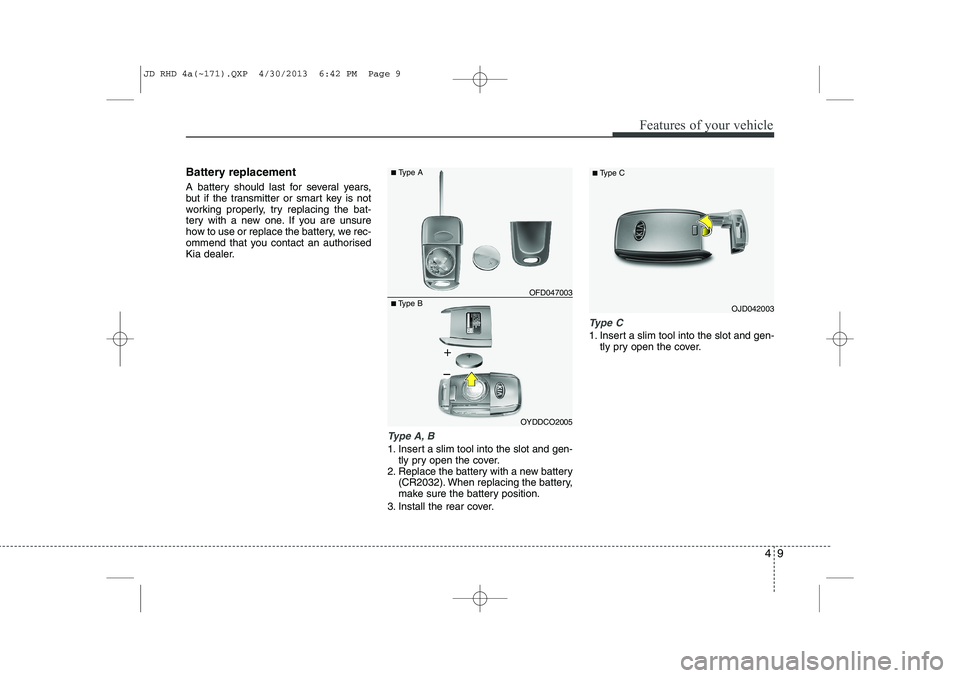
Battery replacement
A battery should last for several years,
but if the transmitter or smart key is not
working properly, try replacing the bat-
tery with a new one. If you are unsure
how to use or replace the battery, we rec-
ommend that you contact an authorised
Kia dealer.
Type A, B
1. Insert a slim tool into the slot and gen-tly pry open the cover.
2. Replace the battery with a new battery (CR2032). When replacing the battery,
make sure the battery position.
3. Install the rear cover.
Type C
1. Insert a slim tool into the slot and gen- tly pry open the cover.
OJD042003
■
Type C■Type B OFD047003
■
Type A
OYDDCO2005
JD RHD 4a(~171).QXP 4/30/2013 6:42 PM Page 9
Page 694 of 1206
Features of your vehicle
10
4
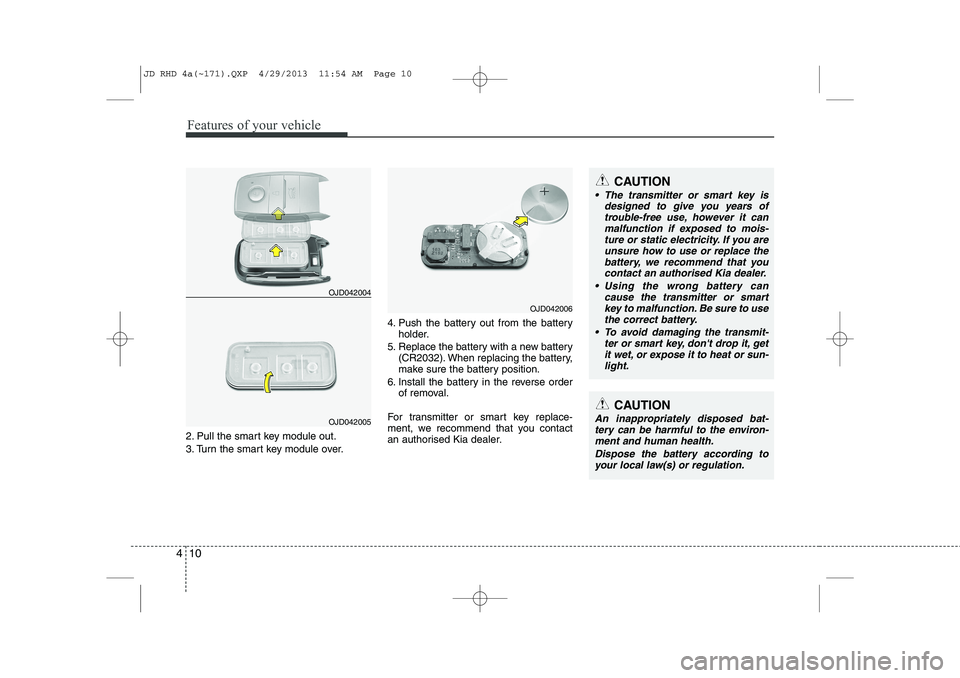
2. Pull the smart key module out.
3. Turn the smart key module over. 4. Push the battery out from the battery
holder.
5. Replace the battery with a new battery (CR2032). When replacing the battery,
make sure the battery position.
6. Install the battery in the reverse order of removal.
For transmitter or smart key replace-
ment, we recommend that you contact
an authorised Kia dealer.
CAUTION
The transmitter or smart key is designed to give you years of
trouble-free use, however it canmalfunction if exposed to mois-ture or static electricity. If you are unsure how to use or replace the
battery, we recommend that you contact an authorised Kia dealer.
Using the wrong battery can cause the transmitter or smart
key to malfunction. Be sure to usethe correct battery.
To avoid damaging the transmit- ter or smart key, don't drop it, get
it wet, or expose it to heat or sun- light.
CAUTION
An inappropriately disposed bat-tery can be harmful to the environ-ment and human health.
Dispose the battery according toyour local law(s) or regulation.
OJD042006
OJD042004
OJD042005
JD RHD 4a(~171).QXP 4/29/2013 11:54 AM Page 10