key battery KIA CEED 2014 Owners Manual
[x] Cancel search | Manufacturer: KIA, Model Year: 2014, Model line: CEED, Model: KIA CEED 2014Pages: 1206, PDF Size: 50.15 MB
Page 65 of 1206
349
Safety system of your vehicle
WARNING
If an air bag deploys, there may be a loud noise followed by a fine
dust released in the vehicle.These conditions are normal and
are not hazardous - the air bags
are packed in this fine powder.
The dust generated during air
bag deployment may cause skin
or eye irritation as well as aggra-
vate asthma for some persons.
Always wash all exposed skin
areas thoroughly with lukewarmwater and a mild soap after an
accident in which the air bags
were deployed.
(Continued)(Continued)
The SRS can function only whenthe ignition key is in the ON posi-
tion. If the SRS air bag warning
light does not illuminate, or con-
tinuously remains on after illumi-
nating for about 6 seconds when
the ignition key is turned to the
ON position, or after the engine is
started, comes on while driving,
the SRS is not working properly.
If this occurs, we recommend
that the system be inspected by
an authorized Kia dealer.
Before you replace a fuse or dis- connect a battery terminal, turn
the ignition switch to the LOCK
position and remove the ignition
key. Never remove or replace the
air bag related fuse(s) when the
ignition switch is in the ON posi-
tion. Failure to heed this warning
will cause the SRS air bag warn-
ing light to illuminate.
WARNING
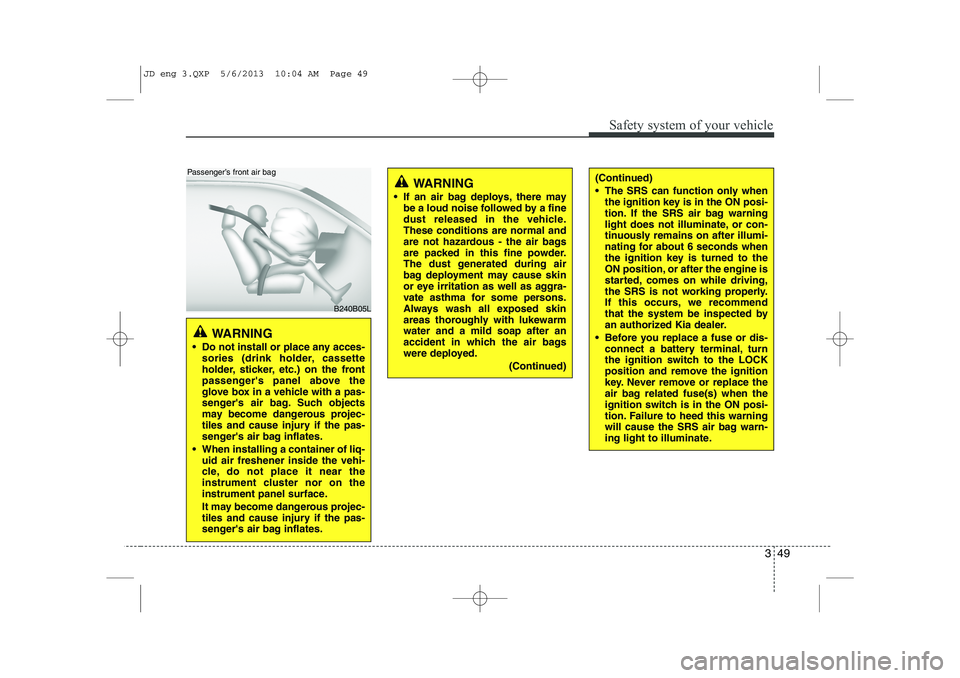
Do not install or place any acces- sories (drink holder, cassette
holder, sticker, etc.) on the front
passenger's panel above the
glove box in a vehicle with a pas-
senger's air bag. Such objects
may become dangerous projec-
tiles and cause injury if the pas-
senger's air bag inflates.
When installing a container of liq- uid air freshener inside the vehi-
cle, do not place it near the
instrument cluster nor on the
instrument panel surface.
It may become dangerous projec-
tiles and cause injury if the pas-
senger's air bag inflates.
B240B05L
Passenger’s front air bag
JD eng 3.QXP 5/6/2013 10:04 AM Page 49
Page 90 of 1206
49
Features of your vehicle
Battery replacement
A battery should last for several years,
but if the transmitter or smart key is not
working properly, try replacing the bat-
tery with a new one. If you are unsure
how to use or replace the battery, we rec-
ommend that you contact an authorized
Kia dealer.
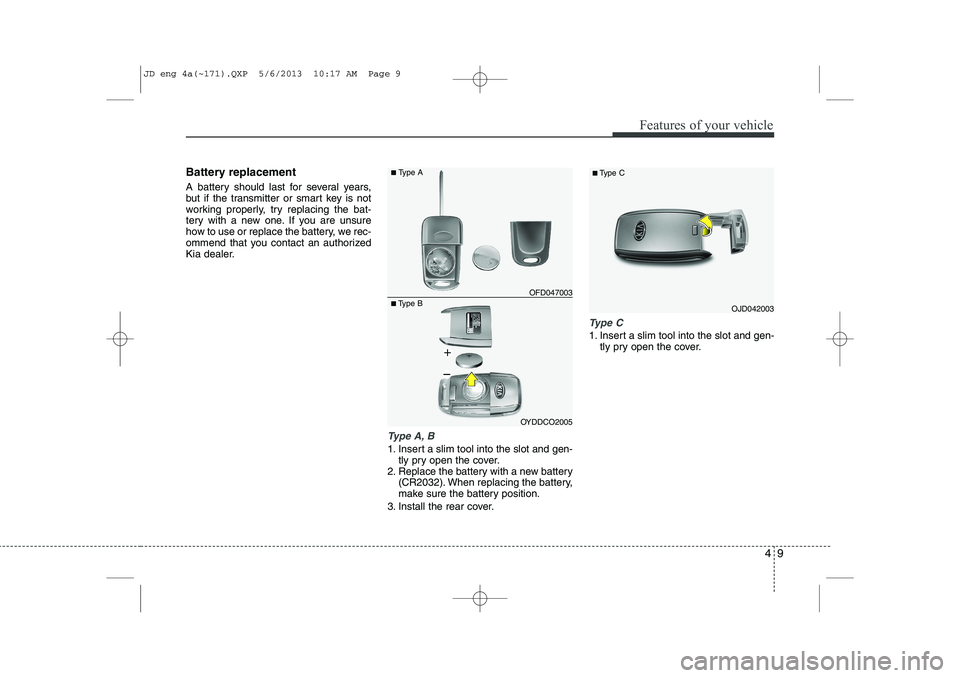
Type A, B
1. Insert a slim tool into the slot and gen-tly pry open the cover.
2. Replace the battery with a new battery (CR2032). When replacing the battery,
make sure the battery position.
3. Install the rear cover.
Type C
1. Insert a slim tool into the slot and gen- tly pry open the cover.
OJD042003
■
Type C■Type B OFD047003
■
Type A
OYDDCO2005
JD eng 4a(~171).QXP 5/6/2013 10:17 AM Page 9
Page 91 of 1206
Features of your vehicle
10
4
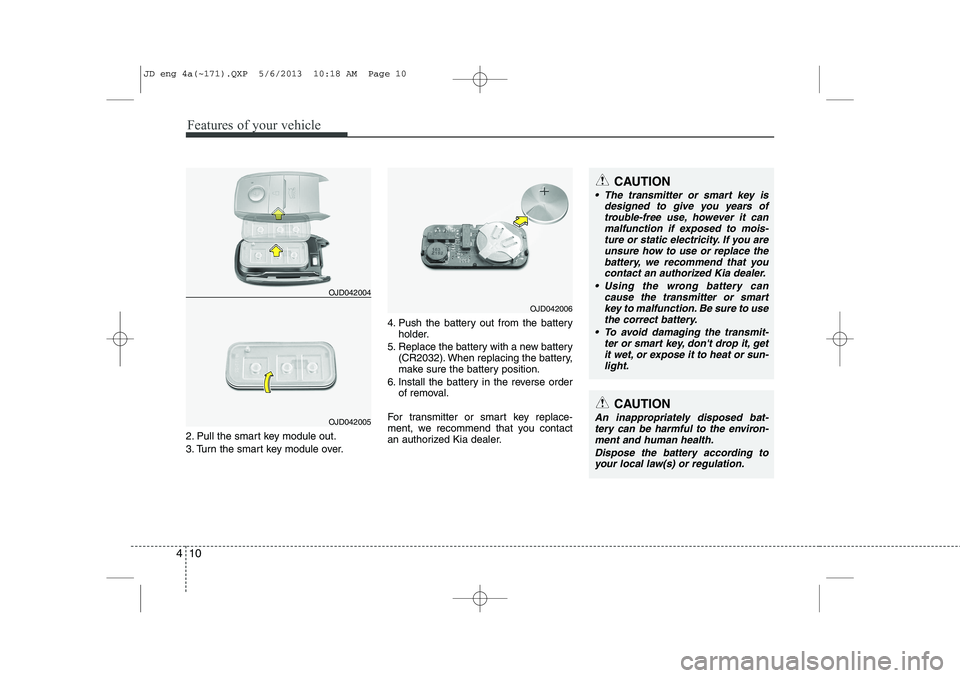
2. Pull the smart key module out.
3. Turn the smart key module over. 4. Push the battery out from the battery
holder.
5. Replace the battery with a new battery (CR2032). When replacing the battery,
make sure the battery position.
6. Install the battery in the reverse order of removal.
For transmitter or smart key replace-
ment, we recommend that you contact
an authorized Kia dealer.
CAUTION
The transmitter or smart key is designed to give you years of
trouble-free use, however it canmalfunction if exposed to mois-ture or static electricity. If you are unsure how to use or replace the
battery, we recommend that you contact an authorized Kia dealer.
Using the wrong battery can cause the transmitter or smart
key to malfunction. Be sure to usethe correct battery.
To avoid damaging the transmit- ter or smart key, don't drop it, get
it wet, or expose it to heat or sun- light.
CAUTION
An inappropriately disposed bat-tery can be harmful to the environ- ment and human health.
Dispose the battery according toyour local law(s) or regulation.
OJD042004
OJD042005
OJD042006
JD eng 4a(~171).QXP 5/6/2013 10:18 AM Page 10
Page 126 of 1206
445
Features of your vehicle
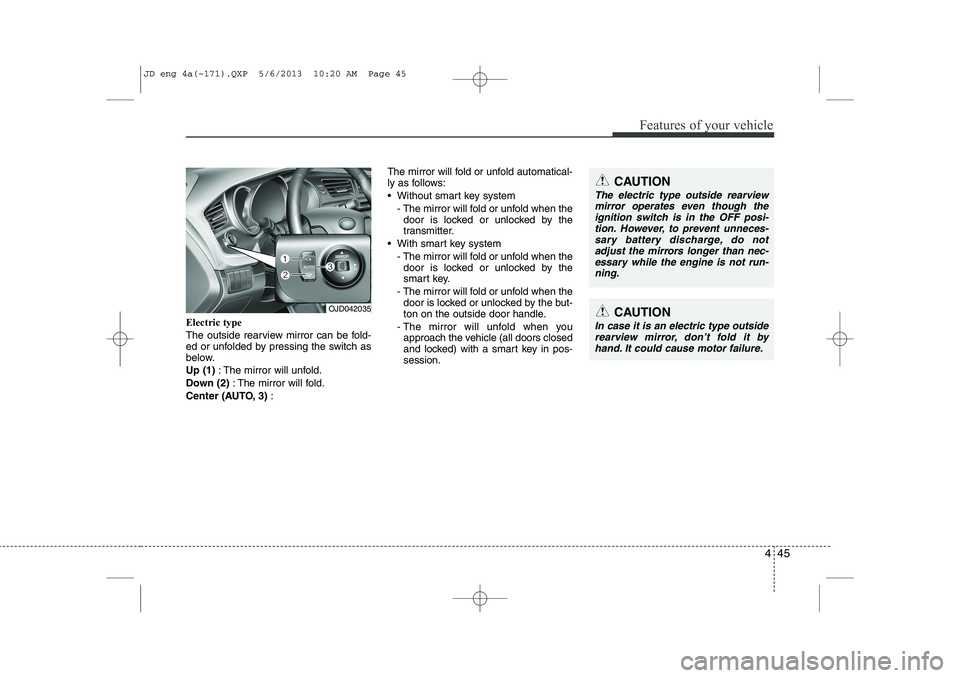
Electric type
The outside rearview mirror can be fold-
ed or unfolded by pressing the switch as
below. Up (1): The mirror will unfold.
Down (2) : The mirror will fold.
Center (AUTO, 3) : The mirror will fold or unfold automatical-
ly as follows:
Without smart key system
- The mirror will fold or unfold when thedoor is locked or unlocked by the
transmitter.
With smart key system - The mirror will fold or unfold when thedoor is locked or unlocked by the
smart key.
- The mirror will fold or unfold when the door is locked or unlocked by the but-
ton on the outside door handle.
- The mirror will unfold when you approach the vehicle (all doors closed
and locked) with a smart key in pos-session.
OJD042035CAUTION
In case it is an electric type outside
rearview mirror, don’t fold it by hand. It could cause motor failure.
CAUTION
The electric type outside rearviewmirror operates even though the
ignition switch is in the OFF posi- tion. However, to prevent unneces-sary battery discharge, do not adjust the mirrors longer than nec-
essary while the engine is not run-ning.
JD eng 4a(~171).QXP 5/6/2013 10:20 AM Page 45
Page 156 of 1206
475
Features of your vehicle
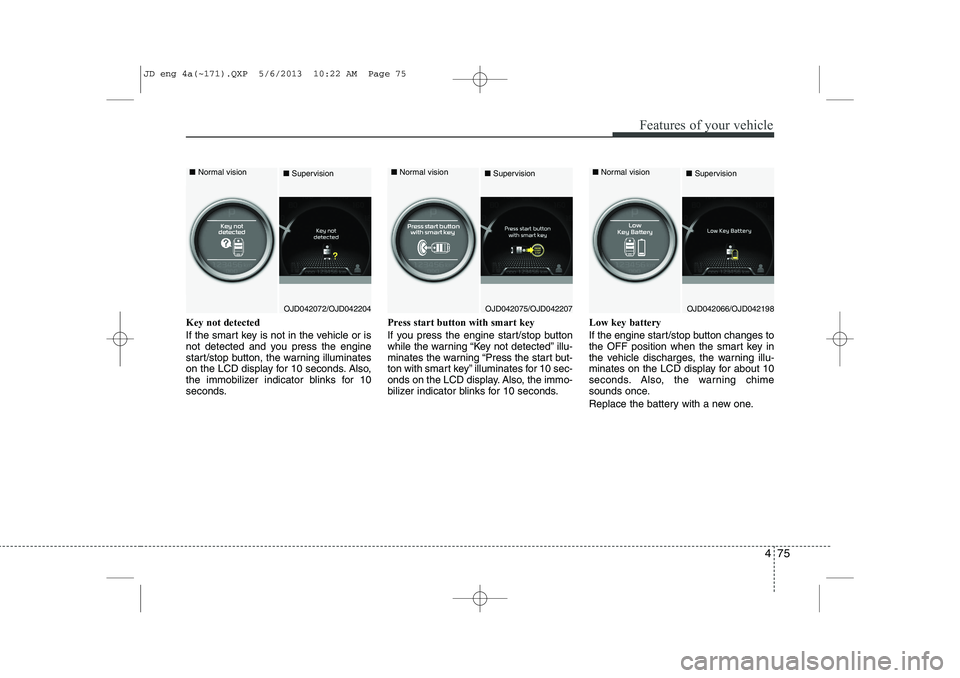
Key not detected
If the smart key is not in the vehicle or is
not detected and you press the engine
start/stop button, the warning illuminates
on the LCD display for 10 seconds. Also,
the immobilizer indicator blinks for 10
seconds.Press start button with smart key
If you press the engine start/stop button
while the warning “Key not detected” illu-
minates the warning “Press the start but-
ton with smart key” illuminates for 10 sec-
onds on the LCD display. Also, the immo-
bilizer indicator blinks for 10 seconds.Low key battery
If the engine start/stop button changes to
the OFF position when the smart key in
the vehicle discharges, the warning illu-
minates on the LCD display for about 10
seconds. Also, the warning chime
sounds once.
Replace the battery with a new one.
OJD042072/OJD042204
■
Normal vision
■SupervisionOJD042075/OJD042207
■
Normal vision
■SupervisionOJD042066/OJD042198
■
Normal vision
■Supervision
JD eng 4a(~171).QXP 5/6/2013 10:22 AM Page 75
Page 161 of 1206
Features of your vehicle
80
4
Immobilizer indicator
Without smart key system This indicator illuminates when the
immobilizer key is inserted and turned to
the ON position to start the engine.
At this time, you can start the engine. The
indicator goes out after the engine is run-ning.
If this indicator blinks when the ignition
switch is in the ON position before start-
ing the engine, we recommend that the
system be checked by an authorized Kia
dealer. With smart key system
If any of the following occurs in a vehicle
equipped with the smart key, the immobi-
lizer indicator illuminates, blinks or goes
off.
When the smart key is in the vehicle, if
the engine start/stop button is in the
ACC or ON position, the indicator will
illuminate for approximately 30 sec-
onds to indicate that you are able to
start the engine. However, when the
smart key is not in the vehicle, if the
engine start/stop button is pressed, the
indicator will blink for a few seconds to
indicate that you are not be able to
start the engine.
If the indicator illuminates only for 2 seconds and goes out when the
engine start/stop button is turned to
ON position with the smart key in the
vehicle, we recommend that the sys-
tem be checked by an authorized Kia
dealer.
When the battery is weak, if the engine start/stop button is pressed, the indi-
cator will blink and you are not able to
start the engine. However, you are able
to start the engine by pressing the
engine start/stop button directly with
the smart key. Also, if the smart key
system related parts have a problem,
the indicator will blink.
Tailgate open warning light
This warning light illuminates when the
tailgate is not closed securely.
Low fuel level warning
This warning light indicates the fuel tank
is nearly empty. When it comes on, you
should add fuel as soon as possible.
Driving with the fuel level warning light on
or with the fuel level below “O/E” cancause the engine to misfire and damage
the catalytic converter (if equipped).
JD eng 4a(~171).QXP 5/6/2013 10:23 AM Page 80
Page 170 of 1206

489
Features of your vehicle
Engine coolant tempera-ture warning light(if equipped)
The warning light illuminates if the tem-
perature of the engine coolant is above120±3°C (248±5.4°F).
Do not continue driving with an overheat-
ed engine. If your vehicle overheats, refer
to “Overheating” in chapter 6.
✽✽ NOTICE
If the engine coolant temperature warn- ing light illuminates, it indicates over-heating that may damage the engine.
Glow indicator (Diesel engine)
The indicator light illuminates when the
ignition switch is placed at the ON posi-
tion. The engine can be started after the
preheat indicator light goes off. The illu-
minating time varies with the water tem-
perature, air temperature and batterycondition.
✽✽ NOTICE
If the engine does not start within 10
seconds after the preheating is complet-
ed, turn the ignition key once more to
the LOCK/OFF position for 10 seconds,
and then to the ON position, in order to
preheat again.
Fuel filter warning light (Diesel engine)
This warning light illuminates for 3 sec-
onds after the ignition switch is set to the
ON position and then it will go out. If it
lights up while the engine is running, it
indicates that water has accumulated
inside the fuel filter. If this happens,
remove the water from the fuel filter.
For more details, refer to “Fuel filter” in chapter 7.
CAUTION
If the preheat indicator light contin-ues to illuminate or flash on and off after the engine has warmed up orwhile driving, we recommend that
the system be checked by an authorized Kia dealer.
CAUTION
When the fuel filter warning lightilluminates, engine power (vehiclespeed & idle speed) may decrease. If you keep driving with the warning
light on, you can damage your vehi-cle's engine parts and injection sys- tem of the Common Rail. If thisoccurs, we recommend that the
system be checked by an author-ized Kia dealer.
JD eng 4a(~171).QXP 5/6/2013 10:23 AM Page 89
Page 171 of 1206

Features of your vehicle
90
4
LCD DISPLAY WARNINGS AND INDICATORS (INSTRUMENT PANEL DISPLAY)
Calendar / Clock / Outside ambi-
ent Temperature (if equipped)
The monitor will display the outside ambi-
ent temperature, date and time. To change the date, time or temperatureunit(°C
↔ °F), press the SET (2) button
for more than 1 seconds.
Then you will enter the set-up mode and
mode changes in the following order as
you press the SET (2) button less than 1second. HOUR → MINUTE → YEAR → MONTH
→ DAY → 12H/24H → TEMPERATURE
UNIT CHANGE → Escape set-up mode
Press the SET (2) button less than 1 sec- ond to select the mode and set the data
using the UP (1, ) and DOWN (1, )
button while the selected setting mode
blinks.
To cancel the SET UP mode, do one of
the following :
- Press the SET button less than 1 sec- ond in set-up temperature unit change mode
- Press the SET button more than 1 sec- ond in any set-up mode
- After 15 seconds without any key press
- Ignition is On or OFF in Set-up mode
- Battery is disconnected Door and tailgate open display
The monitor will display the correspon- ding door or tailgate that is not closed
securely.
OJD042142
OJD042145
OJD042143
JD eng 4a(~171).QXP 5/6/2013 10:23 AM Page 90
Page 192 of 1206

4 111
Features of your vehicle
Battery saver function
The purpose of this feature is to pre-vent the battery from being dis-
charged. The system automatically
turns off the parking lights when the
driver removes the ignition key (Smart
key : turns off the engine) and opens
the driver- side door.
With this feature, the parking lights will be turned off automatically if the driver
parks on the side of road at night.
If necessary, to keep the lights on
when the ignition key is removed, per-
form the following :
1) Open the driver-side door.
2) Turn the parking lights OFF and ON again using the light switch on the
steering column. Headlamp delay function (if equipped) The headlamps (and/or taillights) remain
on for same minutes (Type A: 20 minutes,
Type B: 5 minutes) after the ignition key
is removed or turned to the ACC or
LOCK position. However, if the driver’sdoor is opened and closed, the head-
lights are turned off after 15 seconds.
The headlights can be turned off by
pressing the lock button on the transmit-
ter or smart key twice or turning off the
light switch from the headlight or Autolight position.
You can activate or deactivate the head-
lamp delay fuction. Refer to “User setting”
in this chapter.
Headlight (Headlamp) welcome function (if equipped)
When the headlight switch is in the ON or
AUTO position and all doors (and tail-
gate) are closed and locked, if you press
the door unlock button on the transmitter
or smart key, the headlights will come on
for about 15 seconds.
If the headlight switch is in the AUTO
position, the function can only operate atnight.
At this time, if you press the door unlock
button again or door lock button on the
transmitter or smart key, the headlights
will turn off immediately.
You can activate or deactivate the head-
lamp welcome fuction. Refer to “User set-
ting” in this chapter.
✽✽
NOTICE
There can be turned on front fog light and the fail light when you turn on the
headlight switch ON. In this case we rec-ommend that you the system checked by
an authorized Kia dealer.
LIGHTING
CAUTION
If the driver gets out of the vehicle through other doors (except driver’sdoor), the battery saver functiondoes not operate and the headlamp
delay function does not turn offautomatically. Therefore, it causes the battery to be discharged. In this case, make sure to turn off the lampbefore getting out of the vehicle.
JD eng 4a(~171).QXP 5/6/2013 10:25 AM Page 111
Page 204 of 1206
4 123
Features of your vehicle
Interior lamp AUTO cut
When all entrances are closed, if youlock the vehicle by using the transmit-
ter or the smart key, all interior lamp
will be off after a few seconds.
If you do not operate anything in the vehicle after turning off the engine, the
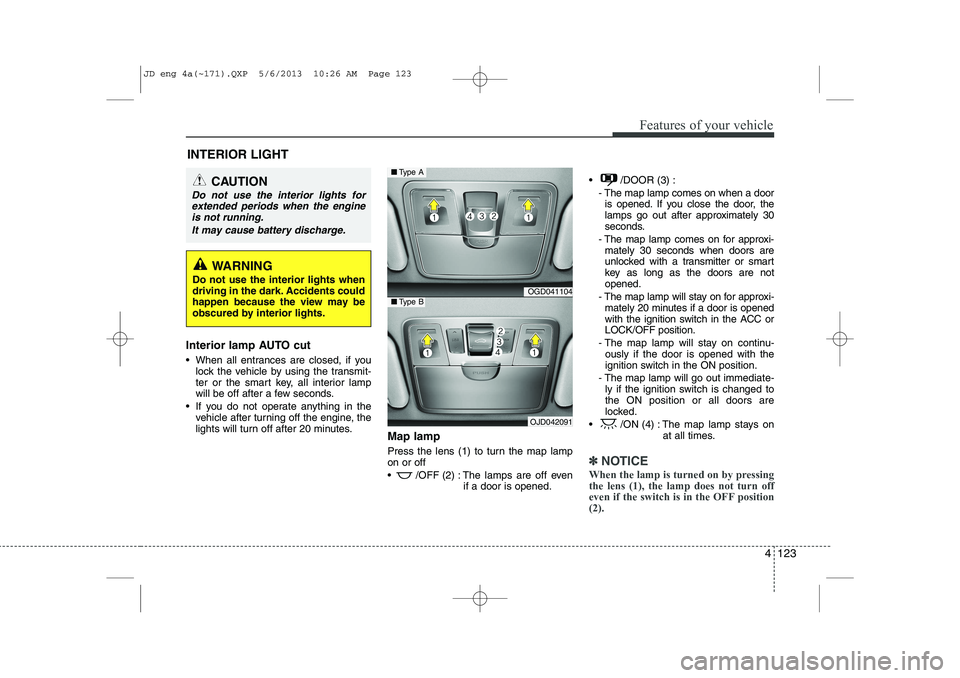
lights will turn off after 20 minutes. Map lamp
Press the lens (1) to turn the map lamp on or off
/OFF (2) : The lamps are off even
if a door is opened. /DOOR (3) :
- The map lamp comes on when a dooris opened. If you close the door, the
lamps go out after approximately 30
seconds.
- The map lamp comes on for approxi- mately 30 seconds when doors are
unlocked with a transmitter or smart
key as long as the doors are notopened.
- The map lamp will stay on for approxi- mately 20 minutes if a door is opened
with the ignition switch in the ACC orLOCK/OFF position.
- The map lamp will stay on continu- ously if the door is opened with the
ignition switch in the ON position.
- The map lamp will go out immediate- ly if the ignition switch is changed tothe ON position or all doors are
locked.
/ON (4) : The map lamp stays on at all times.
✽✽NOTICE
When the lamp is turned on by pressing the lens (1), the lamp does not turn off
even if the switch is in the OFF position(2).
INTERIOR LIGHT
CAUTION
Do not use the interior lights for extended periods when the engine
is not running.
It may cause battery discharge.
WARNING
Do not use the interior lights when
driving in the dark. Accidents could
happen because the view may be
obscured by interior lights.
OGD041104
OJD042091
■ Type A
■Type B
JD eng 4a(~171).QXP 5/6/2013 10:26 AM Page 123