warning KIA CEED 2014 Owners Manual
[x] Cancel search | Manufacturer: KIA, Model Year: 2014, Model line: CEED, Model: KIA CEED 2014Pages: 1206, PDF Size: 50.15 MB
Page 776 of 1206
Features of your vehicle
92
4
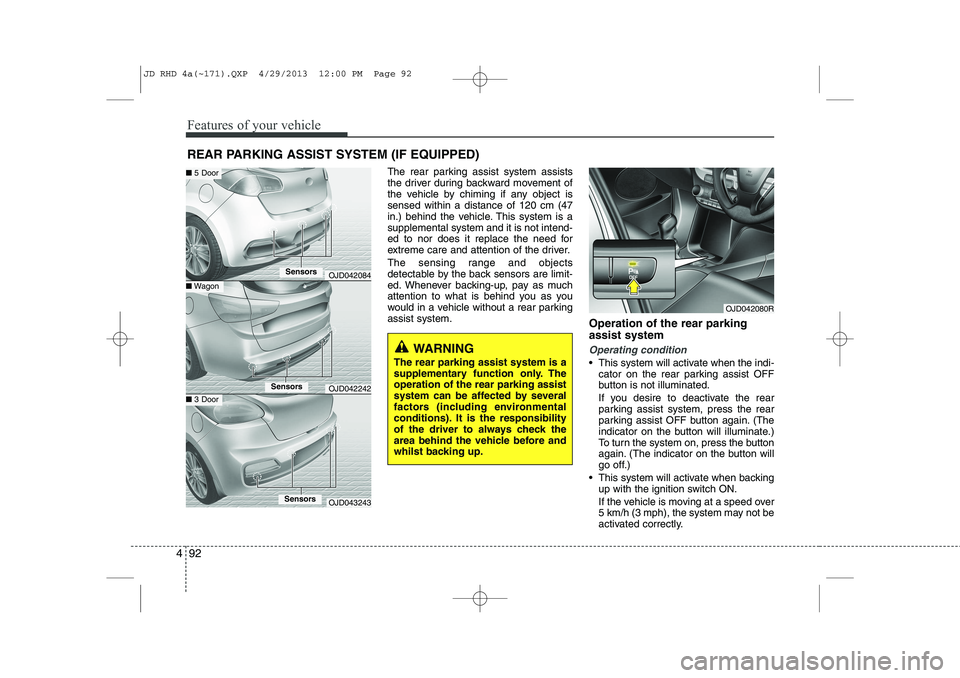
The rear parking assist system assists
the driver during backward movement of
the vehicle by chiming if any object issensed within a distance of 120 cm (47
in.) behind the vehicle. This system is asupplemental system and it is not intend-
ed to nor does it replace the need for
extreme care and attention of the driver.
The sensing range and objects
detectable by the back sensors are limit-
ed. Whenever backing-up, pay as much
attention to what is behind you as you
would in a vehicle without a rear parkingassist system.
Operation of the rear parking assist system
Operating condition
This system will activate when the indi-
cator on the rear parking assist OFF
button is not illuminated.
If you desire to deactivate the rear
parking assist system, press the rear
parking assist OFF button again. (The
indicator on the button will illuminate.)
To turn the system on, press the button
again. (The indicator on the button will
go off.)
This system will activate when backing up with the ignition switch ON.
If the vehicle is moving at a speed over
5 km/h (3 mph), the system may not be
activated correctly.
REAR PARKING ASSIST SYSTEM (IF EQUIPPED)
WARNING
The rear parking assist system is a
supplementary function only. Theoperation of the rear parking assist
system can be affected by several
factors (including environmental
conditions). It is the responsibility
of the driver to always check the
area behind the vehicle before and
whilst backing up.
OJD042080R
OJD042084
OJD042242
OJD043243
■ Wagon
■ 5 Door
■3 Door
Sensors
Sensors
Sensors
JD RHD 4a(~171).QXP 4/29/2013 12:00 PM Page 92
Page 777 of 1206

493
Features of your vehicle
The sensing distance whilst the rearparking assist system is in operation is
approximately 120 cm (47 in.).
When more than two objects are sensed at the same time, the closest
one will be recognized first.Types of warning sound
When an object is 120 cm to 61 cm (47in. to 23.6 in.) from the rear bumper:
Buzzer beeps intermittently
When an object is 60 cm to 31 cm (23.6 in. to 12.2 in.) from the rear
bumper: Buzzer beeps more frequent-ly
When an object is within 30 cm (11.8 in.) of the rear bumper:
Buzzer sounds continuously.
Type of the warning indicator
(if equipped)
*1: It indicates the range of sensed object by each sensor. (Left, Centre, Right)
❈ In case the object is between or close
to the sensors, the indicator could be
different.
Distance from
objectWarning indicator
61cm ~ 120 cm
(24 in. ~ 47 in.)
31cm ~ 60 cm
(12.2 in. ~ 23.6 in.)
Less than 30 cm (11.8 in.)
*1
* 1
* 1
JD RHD 4a(~171).QXP 4/29/2013 12:00 PM Page 93
Page 779 of 1206

495
Features of your vehicle
✽✽NOTICE
This system can only sense objects with- in the range and location of the sensors;
it can not detect objects in other areas
where sensors are not installed. Also,
small or slim objects, such as poles orobjects located between sensors may notbe detected by the sensors.Always visually check behind the vehi-cle when backing up.
Be sure to inform any drivers of the
vehicle that may be unfamiliar with the
system regarding the systems capabili-ties and limitations.Self-diagnosis
When you shift the gear to the R
(Reverse) position and if one or more of
the below occurs you may have a mal-
function in the rear parking assist sys-tem.
You don't hear an audible warning sound or if the buzzer sounds intermit-
tently.
If this occurs, we recommend that the
system be checked by an authorised Kia
dealer.
WARNING
Pay close attention when the vehi-
cle is driven close to objects on the
road, particularly pedestrians, and
especially children. Be aware that
some objects may not be detected
by the sensors, due to the object’s
distance, size or material, all of
which can limit the effectiveness of
the sensor. Always perform a visu-al inspection to make sure the vehi-
cle is clear of all obstructions
before moving the vehicle in anydirection.
WARNING
Your new vehicle warranty does not
cover any accidents or damage to
the vehicle or injuries to its occu-pants due to a rear parking assist
system malfunction. Always drive
safely and cautiously.
(blinks)
is displayed. (if equipped)
JD RHD 4a(~171).QXP 4/29/2013 12:00 PM Page 95
Page 780 of 1206

Features of your vehicle
96
4
The parking assist system assists the
driver during movement of the vehicle by
chiming or displaying the area an obsta-
cle is detected on the instrument cluster
if any object is sensed within the distanceof 100 cm (39.4 in.) in front and 120 cm
(47 in.) behind the vehicle. This system is a supplemental system and it is not intended to nor does it
replace the need for extreme care and
attention of the driver.
The sensing range and objects
detectable by the sensors are limited.
Whenever moving pay as much attention
to what is in front and behind of you as
you would in a vehicle without a parkingassist system. Operation of the parking assist system
Operating condition
This system activates when the park-
ing assist system button is pressed
with the ignition switch ON.
Type A
The indicator of the parking assist sys-
tem button turns on automatically and
activates the parking assist system
when you shift the gear to the
R(Reverse) position or press the SPAS
button. It will turn off automatically
when you drive above 40 km/h(24.8
mph) except in the case when the
parking assist system button is
pressed with the ignition switch ON.
PARKING ASSIST SYSTEM (IF EQUIPPED)
WARNING
The parking assist system should
only be considered as a supple-
mentary function. The driver must
check the front and rear view. Theoperational function of the parking
assist system can be affected by
many factors and conditions of the
surroundings, so the responsibility
rests always with the driver.
OJD042081R
OJD042085
OJD042084
OJD042242
■ Front
■Rear (Wagon)
SSSSeeeennnnssssoooorrrrssss
SSSSeeeennnnssssoooorrrrssss
SSSSeeeennnnssssoooorrrrssss
OJD043243
■Rear (3 Door)
SSSSeeeennnnssssoooorrrrssss
■Rear (5 Door)
JD RHD 4a(~171).QXP 4/29/2013 12:00 PM Page 96
Page 783 of 1206

499
Features of your vehicle
✽✽NOTICE
1. The warning may not sound sequen- tially depending on the speed and shapes of the objects detected.
2. The parking assist system may mal-
function if the vehicle bumper height
or sensor installation has been modi-
fied. Any non-factory installed equip-
ment or accessories may also interfere
with the sensor performance.
3. Sensor may not recognize objects less
than 30 cm from the sensor, or it may
sense an incorrect distance. Use withcaution.
4. When the sensor is frozen or stained
with snow or water, the sensor may be
inoperative until the stains are
removed using a soft cloth.
5. Do not push, scratch or strike the sen-
sor with any hard objects that could
damage the surface of the sensor.
Sensor damage could occur. ✽✽
NOTICE
This system can only sense objects with- in the range and location of the sensors,
it can not detect objects in other areas
where sensors are not installed. Also,
small or slim objects, or objects locatedbetween sensors may not be detected.
Always visually check in front andbehind the vehicle when driving.
Be sure to inform any drivers in the
vehicle that may be unfamiliar with the
system regarding the systems capabili-ties and limitations.Self-diagnosis
When you shift the gear to the R
(Reverse) position and if one or more of
the below occurs you may have a mal-
function in the parking assist system.
You don't hear an audible warning sound or if the buzzer sounds intermit-
tently.
If this occurs, we recommend that the
system be checked by an authorised Kia
dealer.
WARNING
Your new vehicle warranty does not
cover any accidents or damage to
the vehicle or injuries to its occu-pants related to a parking assist
system. Always drive safely and
cautiously.
WARNING
Pay close attention when the vehi-
cle is driven close to objects on the
road, particularly pedestrians, and
especially children. Be aware that
some objects may not be detected
by the sensors, due to the objects
distance, size or material, all of
which can limit the effectiveness of
the sensor. Always perform a visual
inspection to make sure the vehicle
is clear of all obstructions before
moving the vehicle in any direction.
(blinks)
is displayed. (if equipped)
JD RHD 4a(~171).QXP 4/29/2013 12:00 PM Page 99
Page 786 of 1206
Features of your vehicle
102
4
WARNING
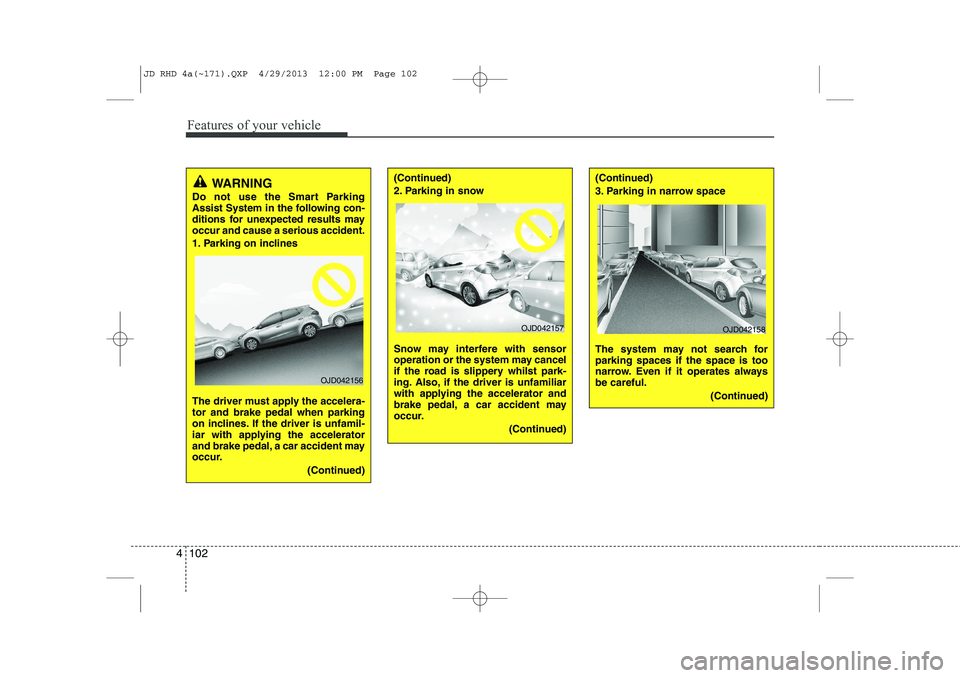
Do not use the Smart Parking
Assist System in the following con-
ditions for unexpected results mayoccur and cause a serious accident.
1. Parking on inclines
The driver must apply the accelera- tor and brake pedal when parking
on inclines. If the driver is unfamil-
iar with applying the accelerator
and brake pedal, a car accident may
occur.
(Continued)
OJD042156
(Continued)
2. Parking in snow
Snow may interfere with sensor
operation or the system may cancel
if the road is slippery whilst park-
ing. Also, if the driver is unfamiliar
with applying the accelerator and
brake pedal, a car accident may
occur.(Continued)(Continued)
3. Parking in narrow space
The system may not search for parking spaces if the space is too
narrow. Even if it operates alwaysbe careful.(Continued)
OJD042157OJD042158
JD RHD 4a(~171).QXP 4/29/2013 12:00 PM Page 102
Page 790 of 1206
Features of your vehicle
106
4
✽✽
NOTICE
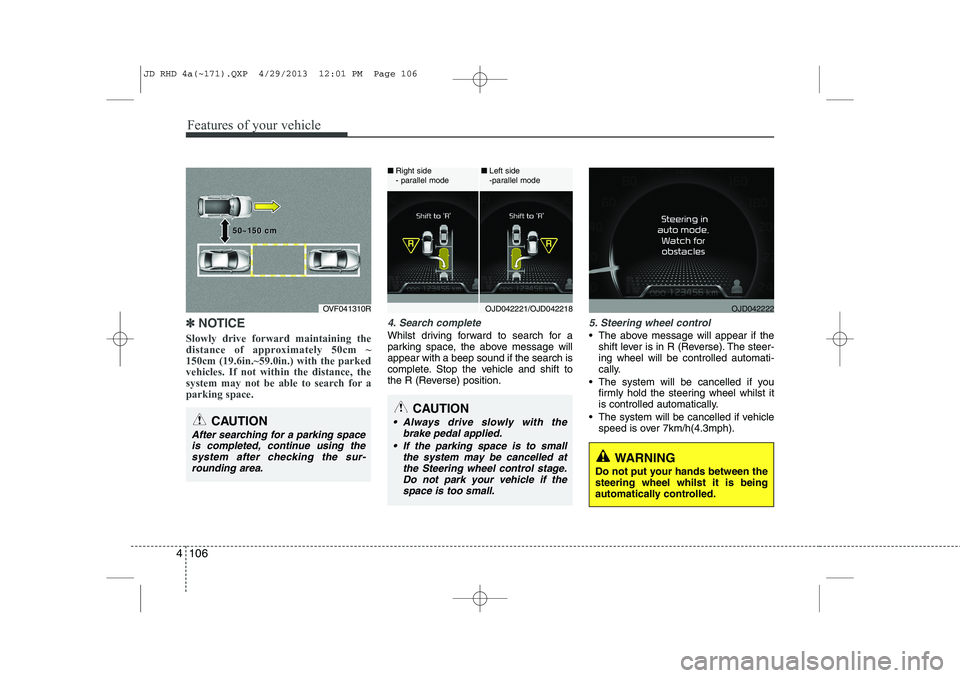
Slowly drive forward maintaining the
distance of approximately 50cm ~150cm (19.6in.~59.0in.) with the parkedvehicles. If not within the distance, the
system may not be able to search for aparking space.4. Search complete
Whilst driving forward to search for a
parking space, the above message willappear with a beep sound if the search is
complete. Stop the vehicle and shift to
the R (Reverse) position.
5. Steering wheel control
The above message will appear if the shift lever is in R (Reverse). The steer- ing wheel will be controlled automati-
cally.
The system will be cancelled if you firmly hold the steering wheel whilst it
is controlled automatically.
The system will be cancelled if vehicle speed is over 7km/h(4.3mph).
CAUTION
After searching for a parking space
is completed, continue using the system after checking the sur-rounding area.
OVF041310R
50~150 cm50~150 cm
CAUTION
Always drive slowly with the brake pedal applied.
If the parking space is to small the system may be cancelled atthe Steering wheel control stage.Do not park your vehicle if thespace is too small.
OJD042221/OJD042218
■
Right side
- parallel mode ■
Left side
-parallel modeOJD042222
WARNING
Do not put your hands between the steering wheel whilst it is being
automatically controlled.
JD RHD 4a(~171).QXP 4/29/2013 12:01 PM Page 106
Page 792 of 1206
Features of your vehicle
108
4
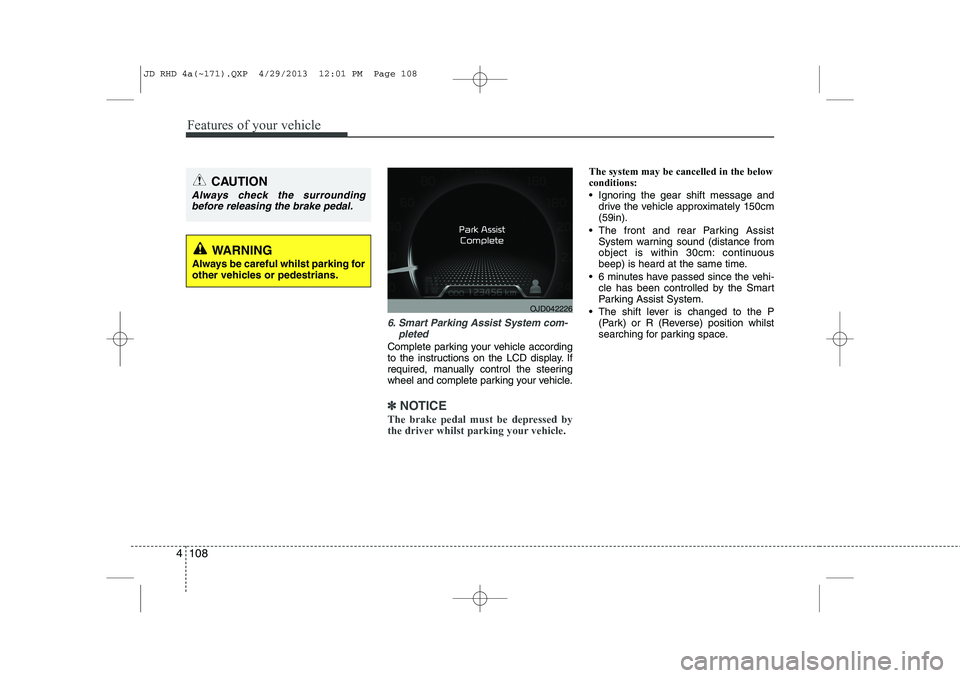
6. Smart Parking Assist System com-
pleted
Complete parking your vehicle according
to the instructions on the LCD display. If
required, manually control the steering
wheel and complete parking your vehicle.
✽✽NOTICE
The brake pedal must be depressed by
the driver whilst parking your vehicle.
The system may be cancelled in the below conditions:
Ignoring the gear shift message and drive the vehicle approximately 150cm (59in).
The front and rear Parking Assist System warning sound (distance from
object is within 30cm: continuous
beep) is heard at the same time.
6 minutes have passed since the vehi- cle has been controlled by the Smart
Parking Assist System.
The shift lever is changed to the P (Park) or R (Reverse) position whilst
searching for parking space.
WARNING
Always be careful whilst parking for
other vehicles or pedestrians.
CAUTION
Always check the surrounding before releasing the brake pedal.
OJD042226
JD RHD 4a(~171).QXP 4/29/2013 12:01 PM Page 108
Page 794 of 1206
Features of your vehicle
110
4
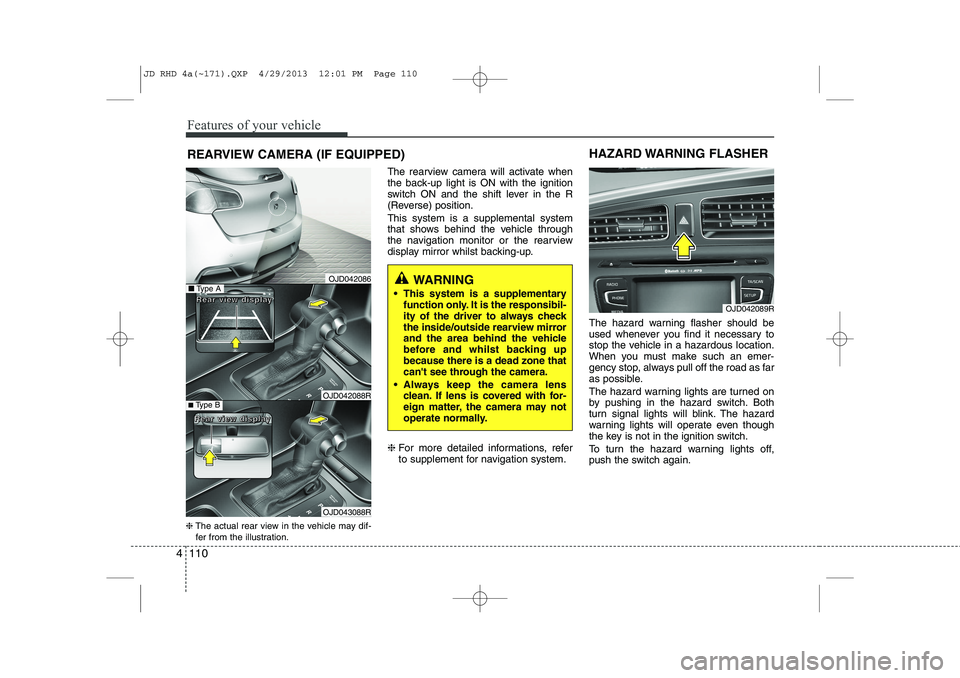
REARVIEW CAMERA (IF EQUIPPED)
❈ The actual rear view in the vehicle may dif-
fer from the illustration. The rearview camera will activate when
the back-up light is ON with the ignition
switch ON and the shift lever in the R
(Reverse) position. This system is a supplemental system
that shows behind the vehicle through
the navigation monitor or the rearview
display mirror whilst backing-up. ❈
For more detailed informations, refer
to supplement for navigation system. The hazard warning flasher should be
used whenever you find it necessary to
stop the vehicle in a hazardous location.
When you must make such an emer-
gency stop, always pull off the road as far
as possible.
The hazard warning lights are turned on
by pushing in the hazard switch. Both
turn signal lights will blink. The hazard
warning lights will operate even though
the key is not in the ignition switch.
To turn the hazard warning lights off,
push the switch again.
OJD042089R
HAZARD WARNING FLASHER
WARNING
This system is a supplementary function only. It is the responsibil-
ity of the driver to always check
the inside/outside rearview mirror
and the area behind the vehicle
before and whilst backing upbecause there is a dead zone that
can't see through the camera.
Always keep the camera lens clean. If lens is covered with for-
eign matter, the camera may not
operate normally.■Type A
■Type B
RRRReeeeaaaarrrr vvvviiiieeeewwww ddddiiiissssppppllllaaaayyyy
RRRReeeeaaaarrrr vvvviiiieeeewwww ddddiiiissssppppllllaaaayyyy
OJD042086
OJD042088R
OJD043088R
JD RHD 4a(~171).QXP 4/29/2013 12:01 PM Page 110
Page 798 of 1206
Features of your vehicle
114
4
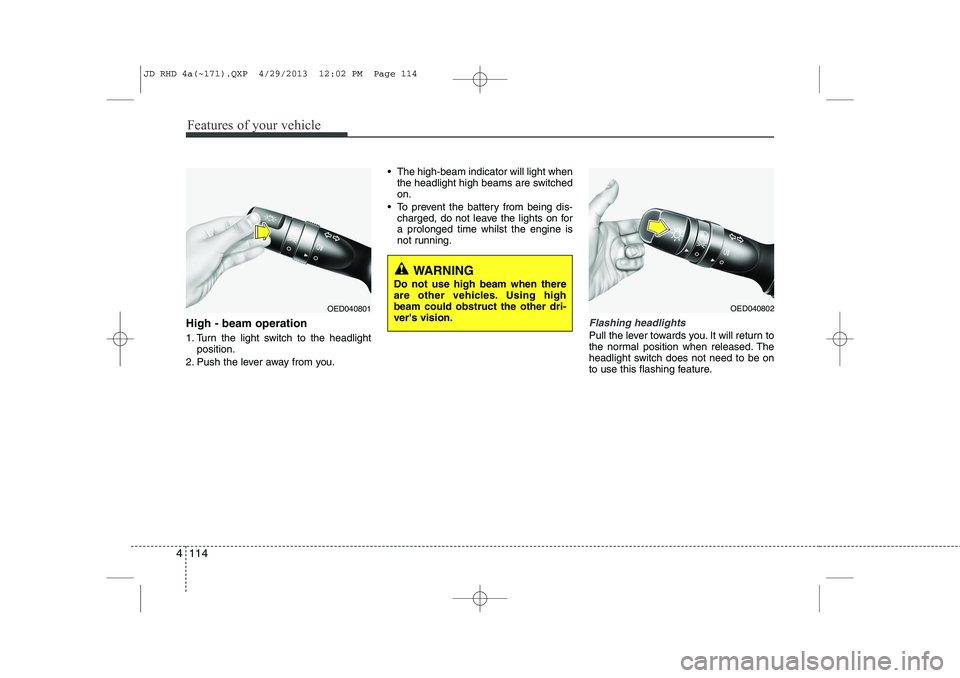
High - beam operation
1. Turn the light switch to the headlight
position.
2. Push the lever away from you. The high-beam indicator will light when
the headlight high beams are switched on.
To prevent the battery from being dis- charged, do not leave the lights on fora prolonged time whilst the engine is
not running.Flashing headlights
Pull the lever towards you. It will return to
the normal position when released. The
headlight switch does not need to be on
to use this flashing feature.
WARNING
Do not use high beam when there
are other vehicles. Using highbeam could obstruct the other dri-ver's vision.
OED040801OED040802
JD RHD 4a(~171).QXP 4/29/2013 12:02 PM Page 114