audio KIA CEED 2015 Owners Manual
[x] Cancel search | Manufacturer: KIA, Model Year: 2015, Model line: CEED, Model: KIA CEED 2015Pages: 1210, PDF Size: 35.92 MB
Page 932 of 1210
![KIA CEED 2015 Owners Manual 4 247
Features of your vehicle
Calling by Dialing a Number
Press the key Select [Dial Number]
(1) Dial Pad : Used to enter phone num-ber
(2) Call : If a number has been entered, calls the number If](/img/2/57940/w960_57940-931.png "KIA CEED 2015 Owners Manual 4 247
Features of your vehicle
Calling by Dialing a Number
Press the key Select [Dial Number]
(1) Dial Pad : Used to enter phone num-ber
(2) Call : If a number has been entered, calls the number If")
4 247
Features of your vehicle
Calling by Dialing a Number
Press the key Select [Dial Number]
(1) Dial Pad : Used to enter phone num-ber
(2) Call : If a number has been entered, calls the number If no number has
been entered, switches to call historyscreen
(3) End : Deletes the entered phone number
(4) Delete : Deletes entered numbers one digit at a time Answering Calls
Answering a Call
Answering a call with a Bluetooth®
Wireless Technology device connect-
ed will display the following screen. (1)
Caller : Displays the other part’s name when the incoming caller is
saved within your phone book
(2) Incoming Number : Displays the
incoming number
(3) Accept : Accept the incoming call
(4) Reject : Reject the incoming call
✽✽ NOTICE
When the incoming call pop-up is dis- played, most Audio and SETUP mode
features will not operate. Only the call
volume can be operated.
The telephone number may not be
properly displayed in some mobile
phones.
When a call is answered with the mobile phone, the call mode will auto-
matically convert to Private mode.
PHONE
JD RHD 4c(212~).QXP 2/17/2015 11:07 AM Page 247
Page 935 of 1210
Features of your vehicle
250
4
✽✽
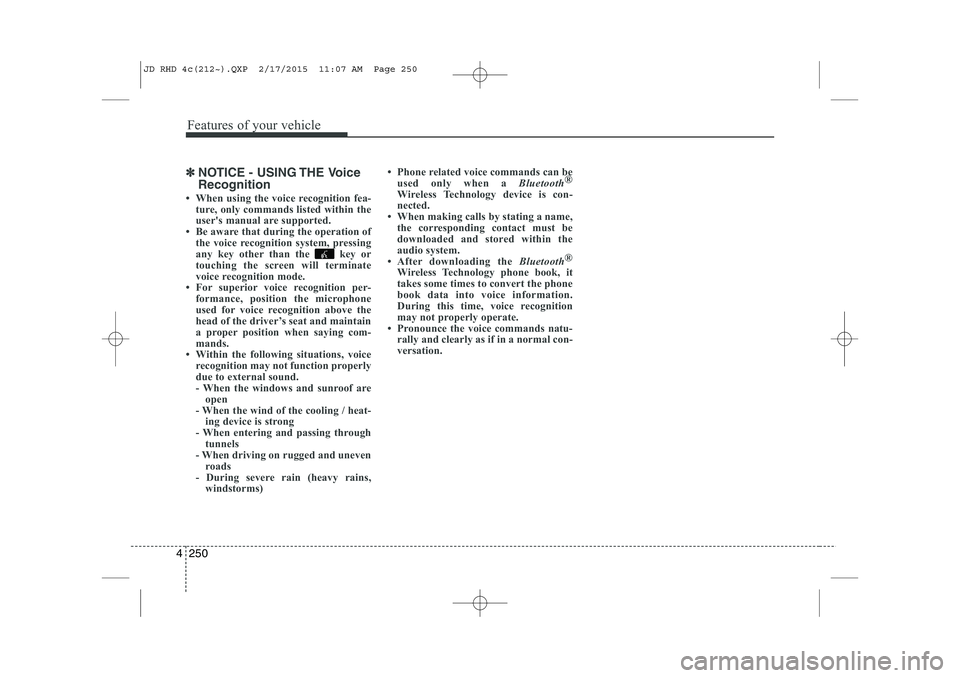
NOTICE - USING THE Voice Recognition
When using the voice recognition fea- ture, only commands listed within the
user's manual are supported.
Be aware that during the operation of the voice recognition system, pressing
any key other than the key or
touching the screen will terminate
voice recognition mode.
For superior voice recognition per-
formance, position the microphone
used for voice recognition above the
head of the driver’s seat and maintain
a proper position when saying com-
mands.
Within the following situations, voice
recognition may not function properly
due to external sound.
- When the windows and sunroof areopen
- When the wind of the cooling / heat- ing device is strong
- When entering and passing through tunnels
- When driving on rugged and uneven roads
- During severe rain (heavy rains, windstorms) Phone related voice commands can be
used only when a Bluetooth®
Wireless Technology device is con-
nected.
When making calls by stating a name, the corresponding contact must be
downloaded and stored within the
audio system.
After downloading the Bluetooth®
Wireless Technology phone book, it
takes some times to convert the phone
book data into voice information.
During this time, voice recognition
may not properly operate.
Pronounce the voice commands natu-
rally and clearly as if in a normal con-
versation.
JD RHD 4c(212~).QXP 2/17/2015 11:07 AM Page 250
Page 939 of 1210
![KIA CEED 2015 Owners Manual Features of your vehicle
254
4
Scroll Text
Press the key Select
[Display] Select [Scroll text]
This feature is used to scroll text dis-
played on the screen when it is too long
to be displayed at](/img/2/57940/w960_57940-938.png "KIA CEED 2015 Owners Manual Features of your vehicle
254
4
Scroll Text
Press the key Select
[Display] Select [Scroll text]
This feature is used to scroll text dis-
played on the screen when it is too long
to be displayed at")
Features of your vehicle
254
4
Scroll Text
Press the key Select
[Display] Select [Scroll text]
This feature is used to scroll text dis-
played on the screen when it is too long
to be displayed at once.
When turned on, the text is repeatedly
scrolled. When turned off, the text is
scrolled just once.
MP3 Information Display
Press the key Select
[Display] Select [Song Info]
This feature is used to change the infor-
mation displayed within USB and MP3
CD modes.
(1) Folder File : Displays file name and
folder name
(2) Album Artist Song : Displays album name/artist name/song Sound Settings
Sound Settings
Press the key Select
[Sound] Select [Audio Setting]
Use the , , , buttons to
adjust the Fader/Balance settings.
Use the , buttons to adjust the
Bass/Middle/Treble settings.
Press the button to reset.
Default
SETUP
SETUP
SETUP
JD RHD 4c(212~).QXP 2/17/2015 11:07 AM Page 254
Page 941 of 1210
![KIA CEED 2015 Owners Manual Features of your vehicle
256
4
Bluetooth®Wireless Technology
Setting
Pairing a New Device
Press the key Select
[Phone] Select [Pair Phone]
Bluetooth®Wireless Technology devices
can be paired with](/img/2/57940/w960_57940-940.png "KIA CEED 2015 Owners Manual Features of your vehicle
256
4
Bluetooth®Wireless Technology
Setting
Pairing a New Device
Press the key Select
[Phone] Select [Pair Phone]
Bluetooth®Wireless Technology devices
can be paired with")
Features of your vehicle
256
4
Bluetooth®Wireless Technology
Setting
Pairing a New Device
Press the key Select
[Phone] Select [Pair Phone]
Bluetooth®Wireless Technology devices
can be paired with the audio system.
For more information, refer to the “Pairing
through Phone Setup” section within
Bluetooth®Wireless Technology.
Viewing Paired Phone List
Press the key Select
[Phone] Select [Paired Phone List]
This feature is used to view mobile
phones that have been paired with the
audio system. Upon selecting a paired
phone, the setup menu is displayed.
For more information, refer to the “Setting
Bluetooth®Wireless Technology
Connection” section within
Bluetooth®
Wireless Technology. ( 1) : Moves to the previous screen
( 2) Connect/Disconnect Phone :
Connect/ disconnects currently selected phone
( 3) Delete : Deletes the currently select-
ed phone (
4) Change Priority : Sets currently select-
ed phone to highest connection priority
✽✽NOTICE BEFORE DOWN-
LOADING PHONE BOOKS
Only phone books within connected phones can be downloaded. Also
check to see that your mobile phone
supports the download feature.
To learn more about whether your mobile phone supports phone book
downloads, refer to your mobile
phone user’s manual.
The Phone book for only the connect- ed phone can be downloaded. Before
downloading, check to see whether
your phone supports the download
feature.
SETUP
SETUP
JD RHD 4c(212~).QXP 2/17/2015 11:07 AM Page 256
Page 942 of 1210
![KIA CEED 2015 Owners Manual 4 257
Features of your vehicle
Downloading Phone books
Press the key Select
[Phone] Select [Phone book
Download]
The Phone book is downloaded from the
mobile phone and the download
progress is dis](/img/2/57940/w960_57940-941.png "KIA CEED 2015 Owners Manual 4 257
Features of your vehicle
Downloading Phone books
Press the key Select
[Phone] Select [Phone book
Download]
The Phone book is downloaded from the
mobile phone and the download
progress is dis")
4 257
Features of your vehicle
Downloading Phone books
Press the key Select
[Phone] Select [Phone book
Download]
The Phone book is downloaded from the
mobile phone and the download
progress is displayed.
✽✽NOTICE
Up to 1,000 phone book entries can be copied into car phone book.
Up to 1,000 phone book entries can be
saved for each paired device.
Upon downloading phone book data,
previously saved phone book data will
be deleted. However, Phone book
entries saved to other paired phones
are not deleted.
Auto Download (Phone Book)
Press the key Select
[Phone] Select [Auto Download]
This feature is used to automatically
download mobile phone book entriesonce a
Bluetooth®Wireless Technology
phone is connected.
✽✽ NOTICE
The Auto Download feature will download mobile phone book entries
every time the phone is connected.
The download time may differ
depending on the number of saved
phone book entries and the communi-
cation state.
When downloading a phone book, first check to see that your mobile
phone supports the phone book down-
load feature.
Audio Streaming
Press the key Select
[Phone] Select [Audio Streaming]
When Audio Streaming is turned on, you
can play music files saved in your
Bluetooth®Wireless Technology device
from the car.
SETUP SETUP SETUP
JD RHD 4c(212~).QXP 2/17/2015 11:07 AM Page 257
Page 943 of 1210
![KIA CEED 2015 Owners Manual Features of your vehicle
258
4
Outgoing Volume
Press the key Select
[Phone] Select [Outgoing Volume]
Use the , buttons to adjust the
outgoing volume level.
Turning Bluetooth System Off
Press the](/img/2/57940/w960_57940-942.png "KIA CEED 2015 Owners Manual Features of your vehicle
258
4
Outgoing Volume
Press the key Select
[Phone] Select [Outgoing Volume]
Use the , buttons to adjust the
outgoing volume level.
Turning Bluetooth System Off
Press the")
Features of your vehicle
258
4
Outgoing Volume
Press the key Select
[Phone] Select [Outgoing Volume]
Use the , buttons to adjust the
outgoing volume level.
Turning Bluetooth System Off
Press the key Select
[Phone] Select [Bluetooth SystemOff] Once
Bluetooth®Wireless Technology
is turned off,
Bluetooth®Wireless
Technology related features will not be
supported within the audio system.
✽✽ NOTICE
To turn Bluetooth ®
Wireless Technology
back on, go to [Phone] and
press “Yes”.
SETUP SETUP SETUP
CAUTION
Bluetooth®Wireless Technologyaudio streaming may not be sup-
ported in some Bluetooth®
Wireless Technologyphones.
JD RHD 4c(212~).QXP 2/17/2015 11:07 AM Page 258
Page 944 of 1210
![KIA CEED 2015 Owners Manual 4 259
Features of your vehicle
System Setting
Memory Information
Press the key Select
[System] Select [Memory Information]
This feature displays information related
to system memory.
(1) Using : Di](/img/2/57940/w960_57940-943.png "KIA CEED 2015 Owners Manual 4 259
Features of your vehicle
System Setting
Memory Information
Press the key Select
[System] Select [Memory Information]
This feature displays information related
to system memory.
(1) Using : Di")
4 259
Features of your vehicle
System Setting
Memory Information
Press the key Select
[System] Select [Memory Information]
This feature displays information related
to system memory.
(1) Using : Displays capacity currently inuse
(2) Capacity : Displays total capacity
Voice Recognition Mode Setting
Press the key Select
[System] Select [Voice RecognitionSystem]
This feature is used to select the desired
prompt feedback option from Normal and
Expert. ( 1) Normal : When using voice recogni-
tion, provides detailed guidance prompts
( 2) Expert : When using voice recogni-
tion, omits some guidance prompts
✽✽NOTICE
Voice Recognition is depend on the Audio System.
Language
Press the key Select
[System] Select [Language]
This feature is used to change the sys-
tem and voice recognition language. If the language is changed, the system
will restart and apply the selected lan-
guage.SETUP SETUP
SETUP
JD RHD 4c(212~).QXP 2/17/2015 11:08 AM Page 259
Page 945 of 1210
Features of your vehicle
260
4
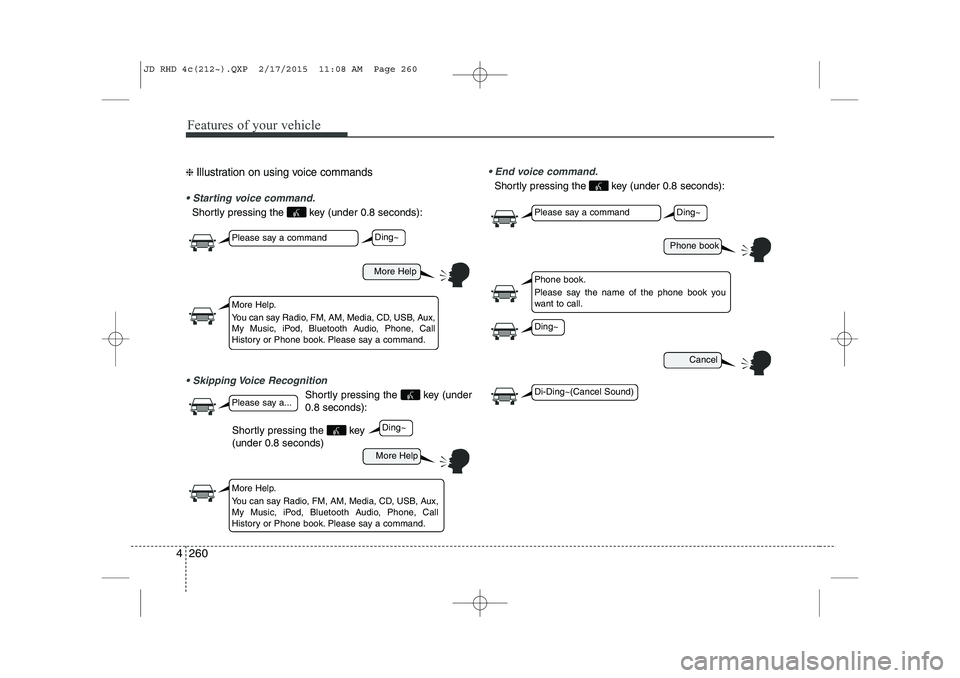
❈ Illustration on using voice commands
Starting voice command.
Shortly pressing the key (under 0.8 seconds):
Skipping Voice Recognition
Shortly pressing the key (under 0.8 seconds):
End voice command.
Shortly pressing the key (under 0.8 seconds):
More Help
Phone book
Cancel
More Help
Please say a command
Please say a command
Please say a...
More Help.
You can say Radio, FM, AM, Media, CD, USB, Aux,
My Music, iPod, Bluetooth Audio, Phone, Call
History or Phone book. Please say a command.
Phone book.
Please say the name of the phone book you
want to call.
More Help.
You can say Radio, FM, AM, Media, CD, USB, Aux,
My Music, iPod, Bluetooth Audio, Phone, Call
History or Phone book. Please say a command.
Ding~
Ding~
Ding~
Di-Ding~(Cancel Sound)
Ding~
Shortly pressing the key (under 0.8 seconds)
JD RHD 4c(212~).QXP 2/17/2015 11:08 AM Page 260
Page 947 of 1210
Features of your vehicle
262
4
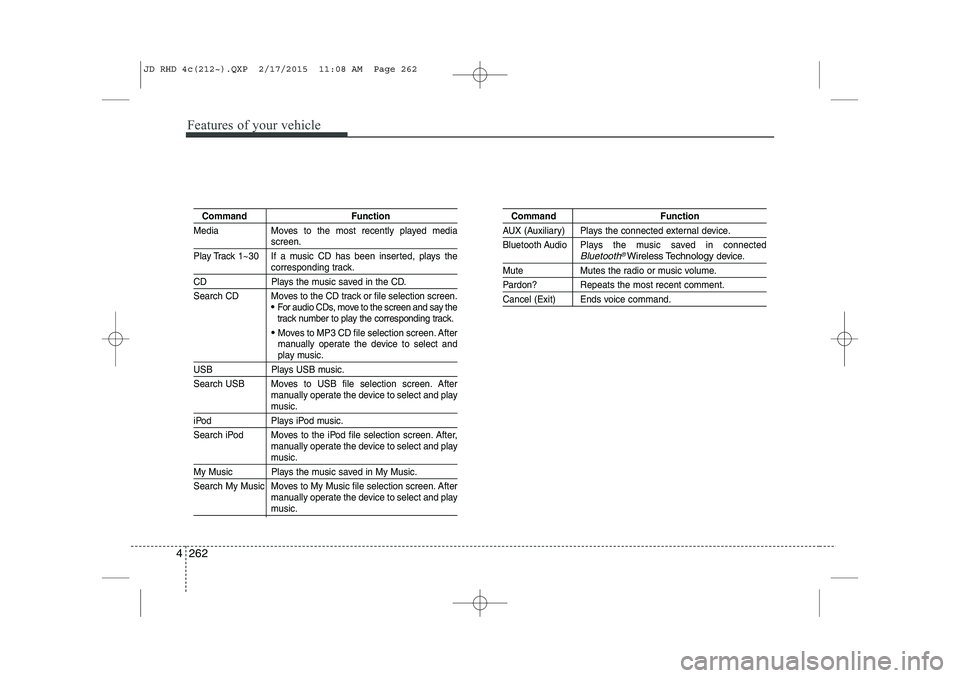
Command Function
Media Moves to the most recently played media
screen.
Play Track 1~30 If a music CD has been inserted, plays the
corresponding track.
CD Plays the music saved in the CD.
Search CD Moves to the CD track or file selection screen.
For audio CDs, move to the screen and say the
track number to play the corresponding track.
Moves to MP3 CD file selection screen. After
manually operate the device to select and
play music.
USB Plays USB music.
Search USB Moves to USB file selection screen. After manually operate the device to select and play
music.
iPod Plays iPod music.
Search iPod Moves to the iPod file selection screen. After,manually operate the device to select and play
music.
My Music Plays the music saved in My Music.
Search My Music Moves to My Music file selection screen. Aftermanually operate the device to select and play
music.
Command Function
AUX (Auxiliary) Plays the connected external device.
Bluetooth Audio Plays the music saved in connected
Bluetooth®Wireless Technologydevice.
Mute Mutes the radio or music volume.
Pardon? Repeats the most recent comment.
Cancel (Exit) Ends voice command.
JD RHD 4c(212~).QXP 2/17/2015 11:08 AM Page 262
Page 948 of 1210
4 263
Features of your vehicle
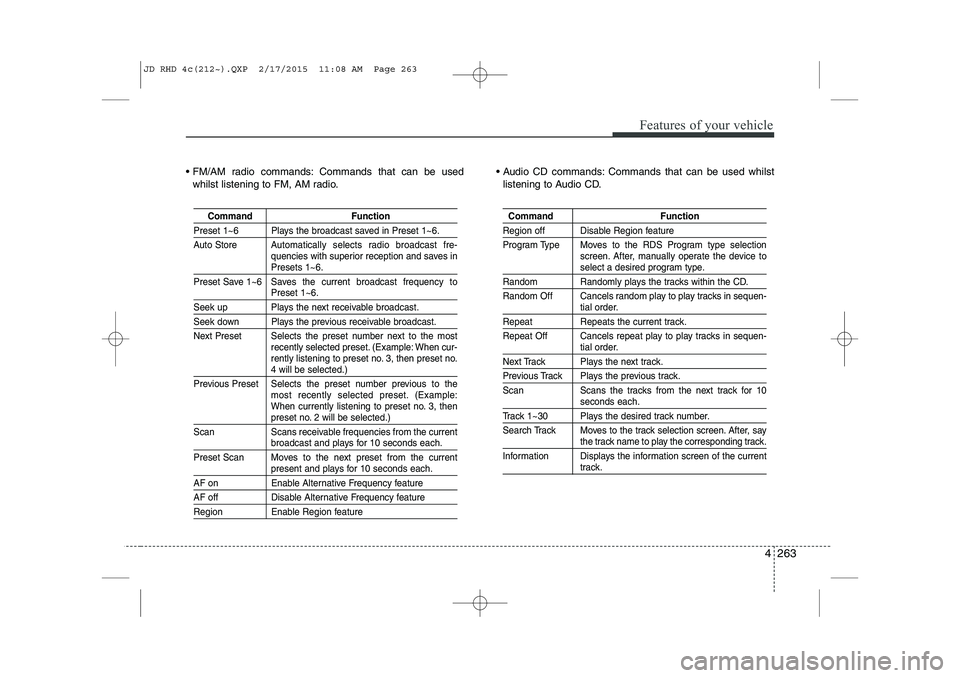
FM/AM radio commands: Commands that can be usedwhilst listening to FM, AM radio. Audio CD commands: Commands that can be used whilst
listening to Audio CD.
Command Function
Preset 1~6 Plays the broadcast saved in Preset 1~6.
Auto Store A utomatically selects radio broadcast fre-
quencies with superior reception and saves in
Presets 1~6.
Preset Save 1~6 Saves the current broadcast frequency to
Preset 1~6.
Seek up Plays the next receivable broadcast.
Seek down Plays the previous receivable broadcast.
Next Preset Selects the preset number next to the most recently selected preset. (Example: When cur-
rently listening to preset no. 3, then preset no.
4 will be selected.)
Previous Preset Selects the preset number previous to the most recently selected preset. (Example:
When currently listening to preset no. 3, then
preset no. 2 will be selected.)
Scan Scans receivable frequencies from the current
broadcast and plays for 10 seconds each.
Preset Scan Moves to the next preset from the current
present and plays for 10 seconds each.
AF on Enable Alternative Frequency feature
AF off Disable Alternative Frequency feature
Region Enable Region feature
Command Function
Region off Disable Region feature
Program Type Moves to the RDS Program type selection screen. After, manually operate the device to
select a desired program type.
Random Randomly plays the tracks within the CD.
Random Off Cancels random play to play tracks in sequen-
tial order.
Repeat Repeats the current track.
Repeat Off Cancels repeat play to play tracks in sequen-
tial order.
Next Track Plays the next track.
Previous Track Plays the previous track.
Scan Scans the tracks from the next track for 10
seconds each.
Track 1~30 Plays the desired track number.
Search Track Moves to the track selection screen. After, say
the track name to play the corresponding track.
Information Displays the information screen of the current
track.
JD RHD 4c(212~).QXP 2/17/2015 11:08 AM Page 263