key KIA CEED 2015 Owners Manual
[x] Cancel search | Manufacturer: KIA, Model Year: 2015, Model line: CEED, Model: KIA CEED 2015Pages: 1210, PDF Size: 35.92 MB
Page 796 of 1210
4 111
Features of your vehicle
Battery saver function
• The purpose of this feature is to pre-vent the battery from being dis-
charged. The system automatically
turns off the parking lights when the
driver removes the ignition key (Smart
key : turns off the engine) and opens
the driver- side door.
• With this feature, the parking lights will be turned off automatically if the driver
parks on the side of road at night.
If necessary, to keep the lights on
when the ignition key is removed, per-
form the following :
1) Open the driver-side door.
2) Turn the parking lights OFF and ON
again using the light switch on the
steering column. Headlamp delay function (if equipped) The headlamps (and/or taillights) remain
on for same minutes (Type A: 20 minutes,
Type B: 5 minutes) after the ignition key
is removed or turned to the ACC or
LOCK position. However, if the driver’s door is opened and closed, the head-
lights are turned off after 15 seconds.
The headlights can be turned off by
pressing the lock button on the transmit-
ter or smart key twice or turning off the
light switch from the headlight or Autolight position.
You can activate or deactivate the head-
lamp delay fuction. Refer to “User setting”in this section.
Headlight (Headlamp) welcome function (if equipped)
When the headlight switch is in the ON or
AUTO position and all doors (and tail-
gate) are closed and locked, if you press
the door unlock button on the transmitter
or smart key, the headlights will come on
for about 15 seconds.
If the headlight switch is in the AUTO
position, the function can only operate atnight.
At this time, if you press the door unlock
button again or door lock button on the
transmitter or smart key, the headlights
will turn off immediately.
You can activate or deactivate the head-
lamp welcome fuction. Refer to “User set-
ting” in this section.
✽NOTICE
There can be turned on front fog light
and the fail light when you turn on the
headlight switch ON. In this case we rec-
ommend that you the system checked by
an authorised Kia dealer.
LIGHTING
CAUTION
If the driver gets out of the vehicle through other doors (except driver’s
door), the battery saver functiondoes not operate and the headlampdelay function does not turn off
automatically. Therefore, it causesthe battery to be discharged. In this case, make sure to turn off the lamp
before getting out of the vehicle.
JD RHD 4a(~171).QXP 4/14/2015 7:02 PM Page 111
Page 808 of 1210
4 123
Features of your vehicle
Interior lamp AUTO cut
• When all entrances are closed, if youlock the vehicle by using the transmit-
ter or the smart key, all interior lamp
will be off after a few seconds.
• If you do not operate anything in the vehicle after turning off the engine, the
lights will turn off after 20 minutes. Map lamp
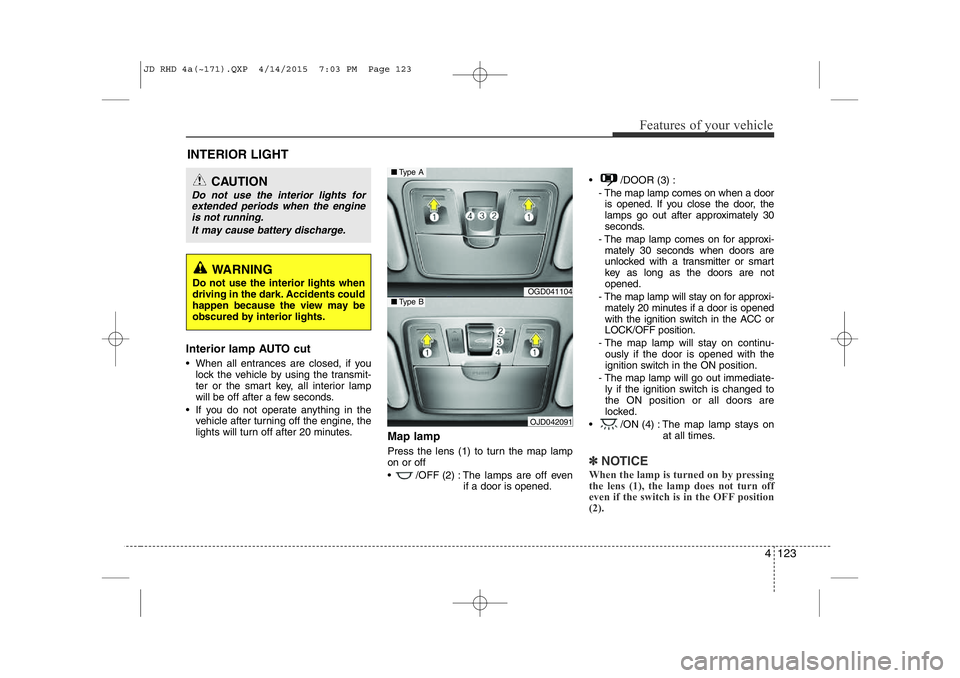
Press the lens (1) to turn the map lamp on or off
• /OFF (2) : The lamps are off even
if a door is opened. • /DOOR (3) :
- The map lamp comes on when a dooris opened. If you close the door, the
lamps go out after approximately 30
seconds.
- The map lamp comes on for approxi- mately 30 seconds when doors are
unlocked with a transmitter or smart
key as long as the doors are notopened.
- The map lamp will stay on for approxi- mately 20 minutes if a door is opened
with the ignition switch in the ACC orLOCK/OFF position.
- The map lamp will stay on continu- ously if the door is opened with the
ignition switch in the ON position.
- The map lamp will go out immediate- ly if the ignition switch is changed tothe ON position or all doors are
locked.
• /ON (4) : The map lamp stays on at all times.
✽NOTICE
When the lamp is turned on by pressing
the lens (1), the lamp does not turn off
even if the switch is in the OFF position (2).
INTERIOR LIGHT
CAUTION
Do not use the interior lights for extended periods when the engine is not running.
It may cause battery discharge.
WARNING
Do not use the interior lights when
driving in the dark. Accidents could
happen because the view may be
obscured by interior lights.
OGD041104
OJD042091
■ Type A
■Type B
JD RHD 4a(~171).QXP 4/14/2015 7:03 PM Page 123
Page 811 of 1210
Features of your vehicle
126
4
Headlamp welcome
When the headlight(light switch in the
headlight or AUTO position) is on and all
doors (and tailgate) are locked andclosed, the headlight, position light and
tail light will come on for 15 seconds if
any of the below is performed.
• Without smart key system
- When the door unlock button is pressed on the transmitter.
• With the smart key system - When the door unlock button is pressed on the smart key.
At this time, if you press the door lock but-
ton (on the transmitter or smart key), the
lights will turn off immediately. Interior light
When the interior light switch is in the DOOR position and all doors (and tail-
gate) are locked and closed, the room
lamp will come on for 30 seconds if any
of the below is performed.
• Without smart key system
- When the door unlock button is pressed on the transmitter.
• With the smart key system
- When the door unlock button is pressed on the smart key.
- When the button of the outside door handle is pressed.
At this time, if you press the door lock but-
ton, the lamps will turn off immediately. Puddle lamp (if equipped)
When all doors are locked and closed,
the puddle lamp will come on for 15 sec-
onds if any of the below is performed.
• Without smart key system
- When the door unlock button is pressed on the transmitter.
• With the smart key system
- When the door unlock button is pressed on the smart key.
- When the button of the outside door handle is pressed.
- When the vehicle is approached with the smart key in possession.
At this time, if you press the door lock but-
ton, the lamps will turn off immediately.
WELCOME SYSTEM (IF EQUIPPED)
JD RHD 4a(~171).QXP 4/14/2015 7:03 PM Page 126
Page 865 of 1210
Features of your vehicle
180
4
(Continued)
Charging through the USB may not
be supported in some mobile
devices.
USB HDD or USB types that liable to connection failures due to vehicle
vibrations are not supported. (i-sticktype)
Some non-standard USB devices (METAL COVER TYPE USB) can be
unrecognizable.
Some USB flash memory readers (such as CF, SD, micro SD, etc.) or
external-HDD type devices can be
unrecognizable.
Music files protected by DRM (DIGI- TAL RIGHTS MANAGEMENT) are
not recognizable.✽✽ NOTICE - USB Jack Damage
The data in the USB memory may be lost whilst using this audio.
Always back up important data on a
personal storage device.
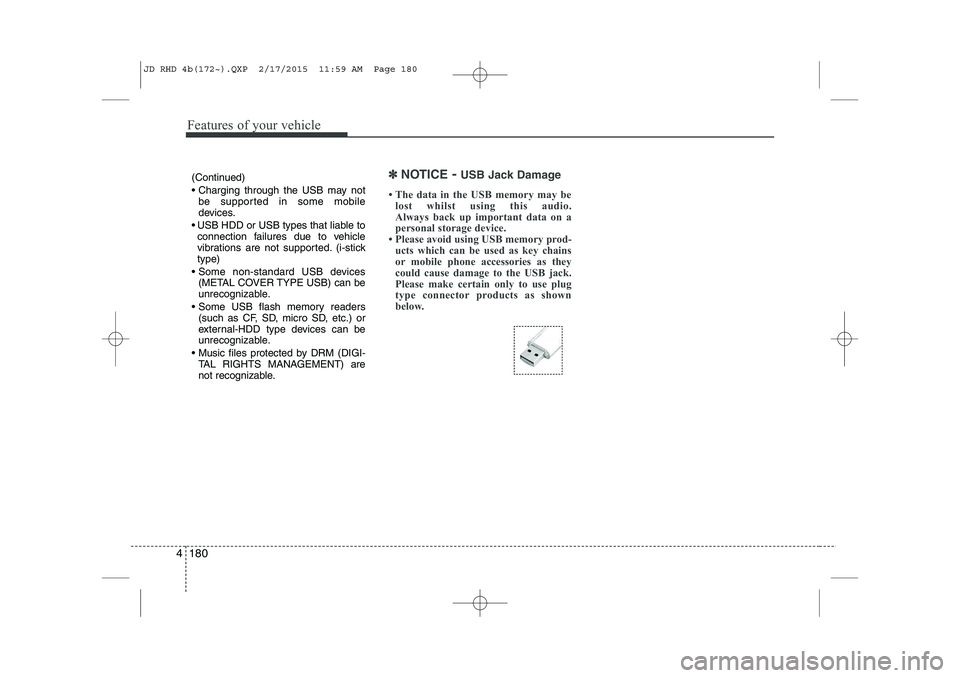
Please avoid using USB memory prod-
ucts which can be used as key chains
or mobile phone accessories as they
could cause damage to the USB jack.
Please make certain only to use plug
type connector products as shown
below.
JD RHD 4b(172~).QXP 2/17/2015 11:59 AM Page 180
Page 867 of 1210
Features of your vehicle
182
4
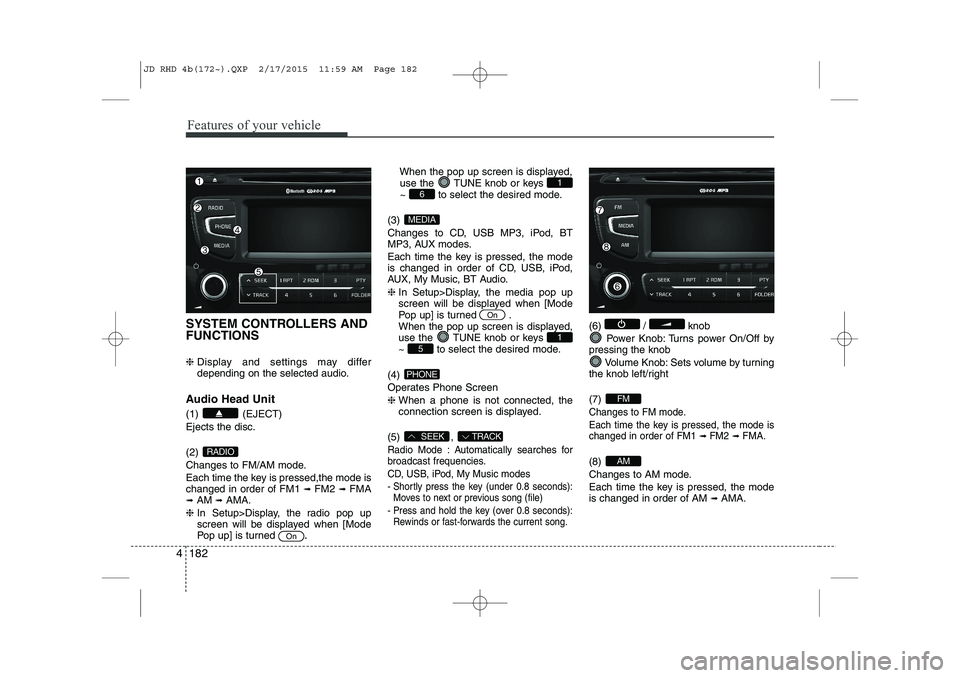
SYSTEM CONTROLLERS AND FUNCTIONS ❈ Display and settings may differ
depending on the selected audio.
Audio Head Unit (1) (EJECT) Ejects the disc. (2)
Changes to FM/AM mode.
Each time the key is pressed,the mode is changed in order of FM1 ➟
FM2 ➟FMA
➟ AM ➟AMA.
❈ In Setup>Display, the radio pop up
screen will be displayed when [Mode
Pop up] is turned .When the pop up screen is displayed,
use the TUNE knob or keys
~ to select the desired mode.
(3)
Changes to CD, USB MP3, iPod, BT
MP3, AUX modes.
Each time the key is pressed, the mode
is changed in order of CD, USB, iPod,
AUX, My Music, BT Audio. ❈ In Setup>Display, the media pop up
screen will be displayed when [Mode
Pop up] is turned .
When the pop up screen is displayed,
use the TUNE knob or keys
~ to select the desired mode.
(4)
Operates Phone Screen❈ When a phone is not connected, the
connection screen is displayed.
(5) ,
Radio Mode : Automatically searches for
broadcast frequencies.
CD, USB, iPod, My Music modes
- Shortly press the key (under 0.8 seconds): Moves to next or previous song (file)
- Press and hold the key (over 0.8 seconds): Rewinds or fast-forwards the current song.
(6) / knob
Power Knob: Turns power On/Off by
pressing the knob
Volume Knob: Sets volume by turning
the knob left/right (7)
Changes to FM mode.
Each time the key is pressed, the mode is changed in order of FM1
➟ FM2➟ FMA.
(8)
Changes to AM mode.
Each time the key is pressed, the mode is changed in order of AM ➟
AMA.AM
FM
TRACKSEEK
PHONE
51
On
MEDIA
61
On
RADIO
JD RHD 4b(172~).QXP 2/17/2015 11:59 AM Page 182
Page 868 of 1210
4 183
Features of your vehicle
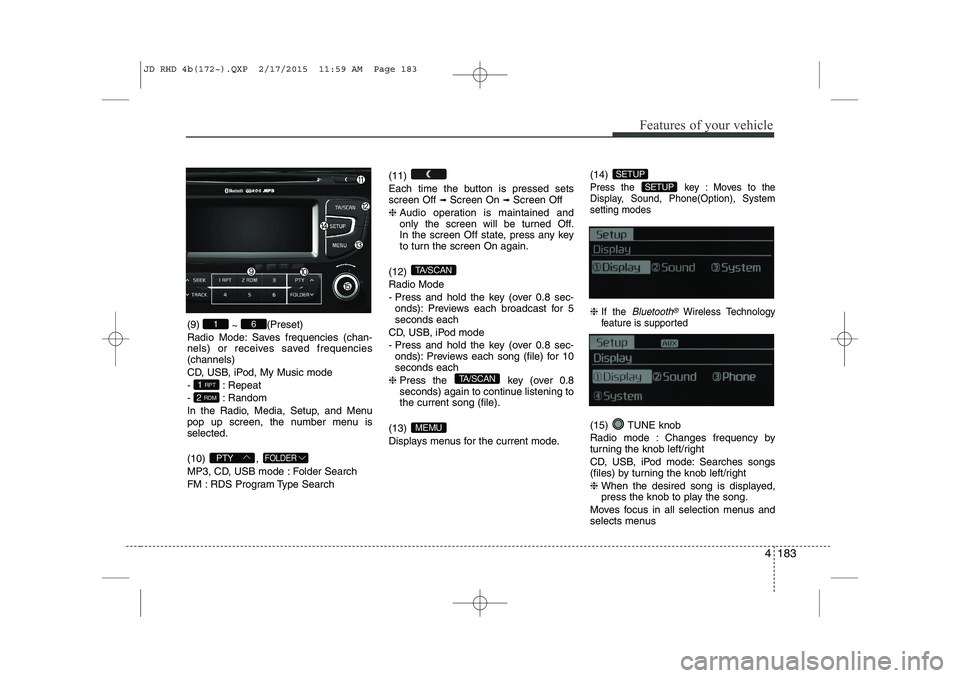
(9) ~ (Preset)
Radio Mode: Saves frequencies (chan-
nels) or receives saved frequencies(channels)
CD, USB, iPod, My Music mode
- : Repeat
- : Random
In the Radio, Media, Setup, and Menu
pop up screen, the number menu isselected. (10) ,
MP3, CD, USB mode : Folder Search
FM : RDS Program Type Search (11)
Each time the button is pressed sets screen Off
➟
Screen On ➟Screen Off
❈ Audio operation is maintained and
only the screen will be turned Off.
In the screen Off state, press any key
to turn the screen On again.
(12) Radio Mode
- Press and hold the key (over 0.8 sec- onds): Previews each broadcast for 5 seconds each
CD, USB, iPod mode
- Press and hold the key (over 0.8 sec- onds): Previews each song (file) for 10 seconds each
❈ Press the key (over 0.8
seconds) again to continue listening tothe current song (file).
(13)
Displays menus for the current mode. (14)
Press the key : Moves to the
Display, Sound, Phone(Option), Systemsetting modes
❈
If the Bluetooth®Wireless Technology
feature is supported
(15) TUNE knob
Radio mode : Changes frequency by
turning the knob left/right
CD, USB, iPod mode: Searches songs
(files) by turning the knob left/right ❈ When the desired song is displayed,
press the knob to play the song.
Moves focus in all selection menus and
selects menus
SETUP
SETUP
MEMU
TA/SCAN
TA/SCAN
FOLDERPTY
2 RDM
1 RPT
61
JD RHD 4b(172~).QXP 2/17/2015 11:59 AM Page 183
Page 869 of 1210
![KIA CEED 2015 Owners Manual Features of your vehicle
184
4
DISPLAY SETTINGS
Press the key Select [Display]
through TUNE knob or key
Select menu through TUNE knob
Mode Pop up
[Mode Pop up] Changes selection mode
During](/img/2/57940/w960_57940-868.png "KIA CEED 2015 Owners Manual Features of your vehicle
184
4
DISPLAY SETTINGS
Press the key Select [Display]
through TUNE knob or key
Select menu through TUNE knob
Mode Pop up
[Mode Pop up] Changes selection mode
During")
Features of your vehicle
184
4
DISPLAY SETTINGS
Press the key Select [Display]
through TUNE knob or key
Select menu through TUNE knob
Mode Pop up
[Mode Pop up] Changes selection mode
During On state, press the or
key to display the mode
change pop up screen.
Scroll Text
[Scroll Text] Set /
: Maintains scroll
: Scrolls only one (1) time.
Song Info
When playing an MP3 file, select the
desired display info from ‘Folder/File’ or
‘Album/Artist/Song’. SOUND SETTINGS
Press the key Select [Sound]
through TUNE knob or key
Select menu through TUNE knob
2
RDM
SETUP
Off
On
OffOn
MEDIA
RADIO
On
1 RPT
SETUP
JD RHD 4b(172~).QXP 2/17/2015 11:59 AM Page 184
Page 871 of 1210
![KIA CEED 2015 Owners Manual Features of your vehicle
186
4
PHONE SETUP (if equipped)
Press the key Select [Phone]
through TUNE knob or key
Select menu through TUNE knob
Pair Phone
To pair a
Bluetooth®Wireless Technology](/img/2/57940/w960_57940-870.png "KIA CEED 2015 Owners Manual Features of your vehicle
186
4
PHONE SETUP (if equipped)
Press the key Select [Phone]
through TUNE knob or key
Select menu through TUNE knob
Pair Phone
To pair a
Bluetooth®Wireless Technology")
Features of your vehicle
186
4
PHONE SETUP (if equipped)
Press the key Select [Phone]
through TUNE knob or key
Select menu through TUNE knob
Pair Phone
To pair a
Bluetooth®Wireless Technology
enabled mobile phone, authentication and connection processes are first
required. As a result, you cannot pair
your mobile phone whilst driving the vehi-
cle. First park your vehicle before use.
Select [Pair Phone] Set through TUNE knob
➀ Search for device names as displayed
on your mobile phone and connect.
➁ Input the passkey displayed on the
screen. (Passkey : 0000)
❈ The device name and passkey will be
displayed on the screen for up to 3
minutes. If pairing is not completed
within the 3 minutes, the mobile phone
pairing process will automatically becanceled.
➂ Pairing completion is displayed.
❈ In some mobile phones, pairing will
automatically be followed by connection. ❈
It is possible to pair up to five
Bluetooth®Wireless Technology
enabled mobile phones.
3
SETUP
JD RHD 4b(172~).QXP 2/17/2015 11:59 AM Page 186
Page 874 of 1210
![KIA CEED 2015 Owners Manual Bluetooth®Wireless Technology
System Off
This feature is used when you do not wish to use the
Bluetooth®Wireless
Technologysystem.
Select [Bluetooth®Wireless Technology
System Off] Set through T](/img/2/57940/w960_57940-873.png "KIA CEED 2015 Owners Manual Bluetooth®Wireless Technology
System Off
This feature is used when you do not wish to use the
Bluetooth®Wireless
Technologysystem.
Select [Bluetooth®Wireless Technology
System Off] Set through T")
Bluetooth®Wireless Technology
System Off
This feature is used when you do not wish to use the
Bluetooth®Wireless
Technologysystem.
Select [Bluetooth®Wireless Technology
System Off] Set through TUNE knob
❈ If a phone is already connected, dis- connect the currently connected phone
and turn the
Bluetooth®Wireless
Technologysystem off.
Using the
Bluetooth®Wireless
Technology System
To use
Bluetooth®Wireless Technologywhen the system is currently off, follow
these next steps.
Turning On
Bluetooth®Wireless
Technologythrough the Key
Press the key Screen Guidance
❈ Moves to the screen where Bluetooth®
Wireless Technology functions can be
used and displays guidance. Turning On
Bluetooth®Wireless
Technologythrough the Key
Press the key Select [Phone]
through TUNE knob or key
➀ A screen asking whether to turn onBluetooth®Wireless Technologywill be
displayed.
➁ On the screen, select to turn on
Bluetooth®Wireless Technologyand
display guidance.
❈ If the
Bluetooth®Wireless Technologysystem is turned on, the system will
automatically try to connect the mostrecently connected
Bluetooth®
Wireless Technologymobile phone.
Bluetooth®Wireless Technology connection may become intermittently
disconnected in some mobile phones.
Follow these next steps to try again.
1) Turn the Bluetooth®Wireless Technologyfunction within the mobile phone
ON/OFF and try to connect again.
2) Turn the mobile phone power ON/OFF and
try to connect again.
3) Completely remove the mobile phone
battery, reboot, and then try to connectagain.
4) Reboot the audio system and try to con-
nect again
5) Delete all paired devices in your mobile phone and the audio system and pair
again for use.
YES
3
SETUP
SETUP
PHONE
PHONE
4 189
Features of your vehicle
JD RHD 4b(172~).QXP 2/17/2015 11:59 AM Page 189
Page 875 of 1210
![KIA CEED 2015 Owners Manual Features of your vehicle
190
4
SYSTEM SETTINGS
If the Bluetooth®Wireless Technology
feature is supported
Press the key Select [ System] through tune knob or
key Select menu through TUNEknob
If the](/img/2/57940/w960_57940-874.png "KIA CEED 2015 Owners Manual Features of your vehicle
190
4
SYSTEM SETTINGS
If the Bluetooth®Wireless Technology
feature is supported
Press the key Select [ System] through tune knob or
key Select menu through TUNEknob
If the")
Features of your vehicle
190
4
SYSTEM SETTINGS
If the Bluetooth®Wireless Technology
feature is supported
Press the key Select [ System] through tune knob or
key Select menu through TUNEknob
If the Bluetooth®Wireless Technology
feature is not supported
Press the key Select [System] through tune knob or
key Select menu through TUNEknob Memory Information
Displays currently used memory and
total system memory.
Select [Memory Information] OK
The currently used memory is displayed on the left side whilst the total system
memory is displayed on the right side.VRS Mode
This feature is used to change voice
command feedback between Normal and
Expert modes.
Select [VRS Mode] Set through
TUNEknob
Normal : This mode is for beginner users and provides detailed instructions
during voice command operation.
Expert : This mode is for expert users and omits some information during
voice command operation. (When using
Expert mode, guidance instructions can
be heard through the [Help] or [Menu]
commands.
3
SETUP
4
SETUP
JD RHD 4b(172~).QXP 2/17/2015 11:59 AM Page 190