Security KIA CEED 2015 User Guide
[x] Cancel search | Manufacturer: KIA, Model Year: 2015, Model line: CEED, Model: KIA CEED 2015Pages: 1210, PDF Size: 35.92 MB
Page 699 of 1210
Features of your vehicle
14
4
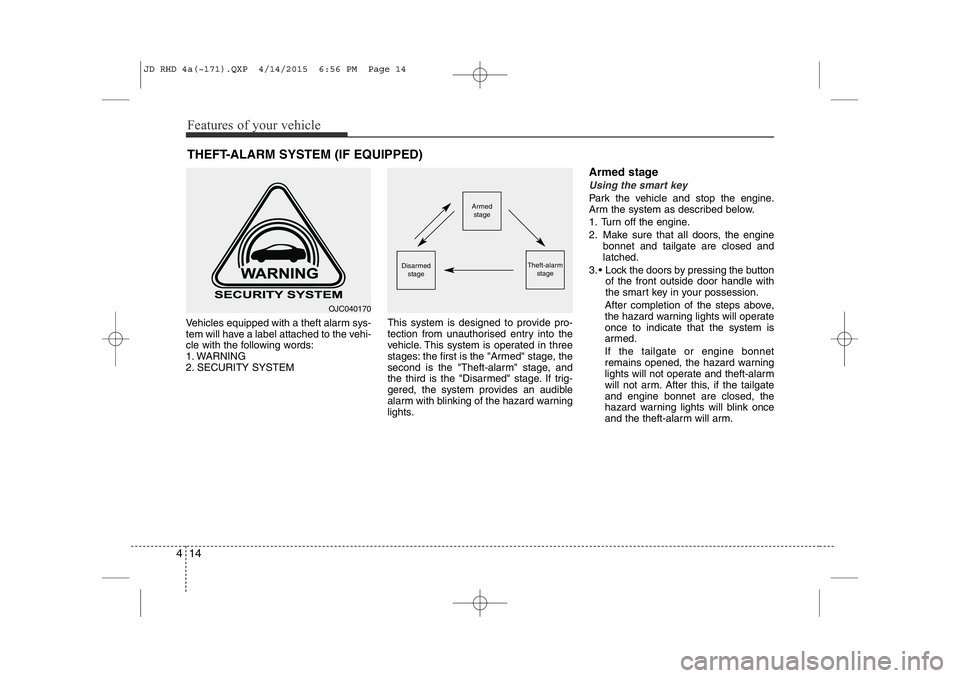
Vehicles equipped with a theft alarm sys-
tem will have a label attached to the vehi-
cle with the following words:
1. WARNING
2. SECURITY SYSTEM This system is designed to provide pro-
tection from unauthorised entry into the
vehicle. This system is operated in three
stages: the first is the "Armed" stage, the
second is the "Theft-alarm" stage, and
the third is the "Disarmed" stage. If trig-
gered, the system provides an audible
alarm with blinking of the hazard warning
lights.Armed stage
Using the smart key
Park the vehicle and stop the engine.
Arm the system as described below.
1. Turn off the engine.
2. Make sure that all doors, the engine
bonnet and tailgate are closed and latched.
3. • Lock the doors by pressing the button of the front outside door handle with
the smart key in your possession.
After completion of the steps above,
the hazard warning lights will operateonce to indicate that the system is
armed. If the tailgate or engine bonnet
remains opened, the hazard warning
lights will not operate and theft-alarm
will not arm. After this, if the tailgateand engine bonnet are closed, the
hazard warning lights will blink once
and the theft-alarm will arm.
THEFT-ALARM SYSTEM (IF EQUIPPED)Armed
stage
Theft-alarm stageDisarmed
stage
OJC040170
JD RHD 4a(~171).QXP 4/14/2015 6:56 PM Page 14
Page 705 of 1210
Features of your vehicle
20
4
Deadlocks (if equipped)
Some vehicles are equipped with a
deadlock system. Deadlocks preventopening of a door from either inside or
outside the vehicle once the deadlocks
have been activated providing an addi-
tional measure of vehicle security.
To lock the vehicle using the deadlock
function, the doors must be locked by
using the transmitter or smart key. To
unlock the vehicle, the transmitter or
smart key must be used again. Door lock/unlock features
Impact sensing door unlock system
All doors will automatically unlock when
an impact causes the air bags to deploy.
Speed sensing door lock system
(if equipped)
All doors will automatically lock after the
vehicle speed exceeds 15 km/h.
Engine off door unlock system (if equipped)
All doors will automatically unlock:
Without smart key system
When the key is removed from the igni-
tion switch.
With smart key system
When the engine start/stop button is in the OFF position.
Shift lever door lock/unlock system
• All doors will automatically lock when the shift lever is moved out of P (Park).
• All doors will automatically unlock when the shift lever is moved into P
(Park).
You can activate or deactivate the auto
door lock/unlock features in the vehicle.
Refer to "User setting" in this section.
WARNING
Do not lock the doors with the
transmitter or the smart key with
anybody left in the vehicle. The pas-
senger in the vehicle cannot unlock
the doors with the door lock button.
For example, if the door is locked
with the transmitter, the passenger
in the vehicle cannot unlock the
door without the transmitter.
WARNING - Unlocked
vehicles
Leaving your vehicle unlocked can
invite theft or possible harm to you
or others from someone hiding in
your vehicle whilst you are gone.
Always remove the ignition key,
engage the parking brake, close all
windows and lock all doors when
leaving your vehicle unattended.
WARNING - Unattended
children
An enclosed vehicle can become
extremely hot, causing death or
severe injury to unattended chil- dren or animals who cannot escape
the vehicle. Furthermore, children
might operate features of the vehi-
cle that could injure them, or they
could encounter other harm, possi-
bly from someone gaining entry to
the vehicle. Never leave children or
animals unattended in your vehicle.
JD RHD 4a(~171).QXP 4/14/2015 6:56 PM Page 20
Page 851 of 1210
Features of your vehicle
166
4
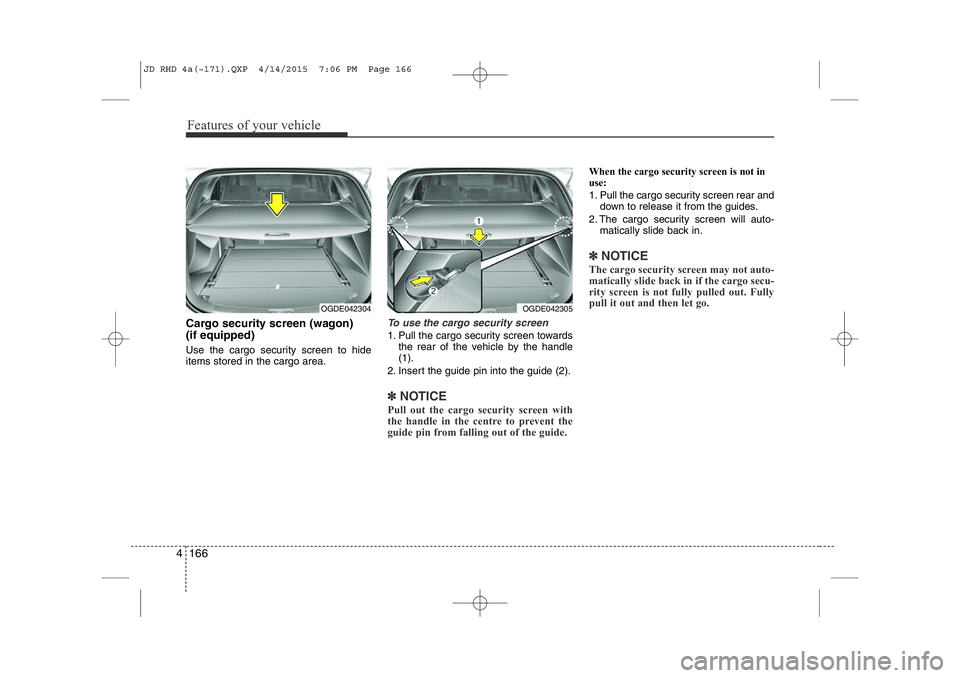
Cargo security screen (wagon) (if equipped)
Use the cargo security screen to hide items stored in the cargo area.To use the cargo security screen
1. Pull the cargo security screen towards
the rear of the vehicle by the handle (1).
2. Insert the guide pin into the guide (2).
✽NOTICE
Pull out the cargo security screen with
the handle in the centre to prevent the
guide pin from falling out of the guide.
When the cargo security screen is not in
use:
1. Pull the cargo security screen rear and down to release it from the guides.
2. The cargo security screen will auto- matically slide back in.
✽NOTICE
The cargo security screen may not auto-
matically slide back in if the cargo secu-
rity screen is not fully pulled out. Fully
pull it out and then let go.
OGDE042304OGDE042305
JD RHD 4a(~171).QXP 4/14/2015 7:06 PM Page 166
Page 852 of 1210
4 167
Features of your vehicle
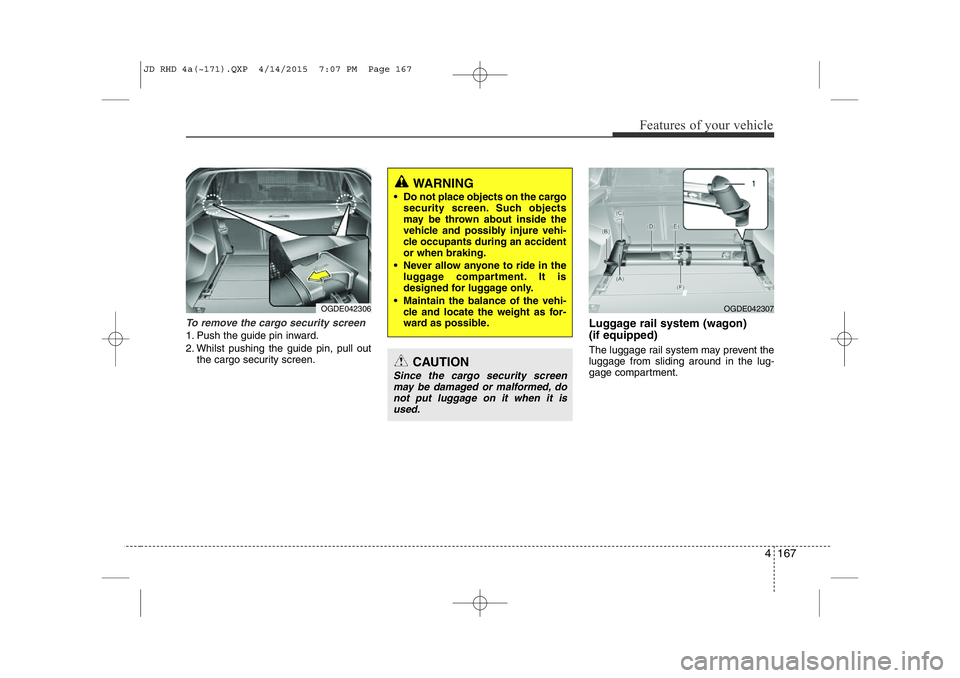
To remove the cargo security screen
1. Push the guide pin inward.
2. Whilst pushing the guide pin, pull outthe cargo security screen. Luggage rail system (wagon) (if equipped)
The luggage rail system may prevent the luggage from sliding around in the lug-
gage compartment.
WARNING
• Do not place objects on the cargo security screen. Such objects
may be thrown about inside the
vehicle and possibly injure vehi-
cle occupants during an accidentor when braking.
• Never allow anyone to ride in the luggage compartment. It is
designed for luggage only.
• Maintain the balance of the vehi- cle and locate the weight as for-
ward as possible.
CAUTION
Since the cargo security screen
may be damaged or malformed, do not put luggage on it when it isused.
OGDE042306OGDE042307
JD RHD 4a(~171).QXP 4/14/2015 7:07 PM Page 167
Page 1200 of 1210
I3
Index
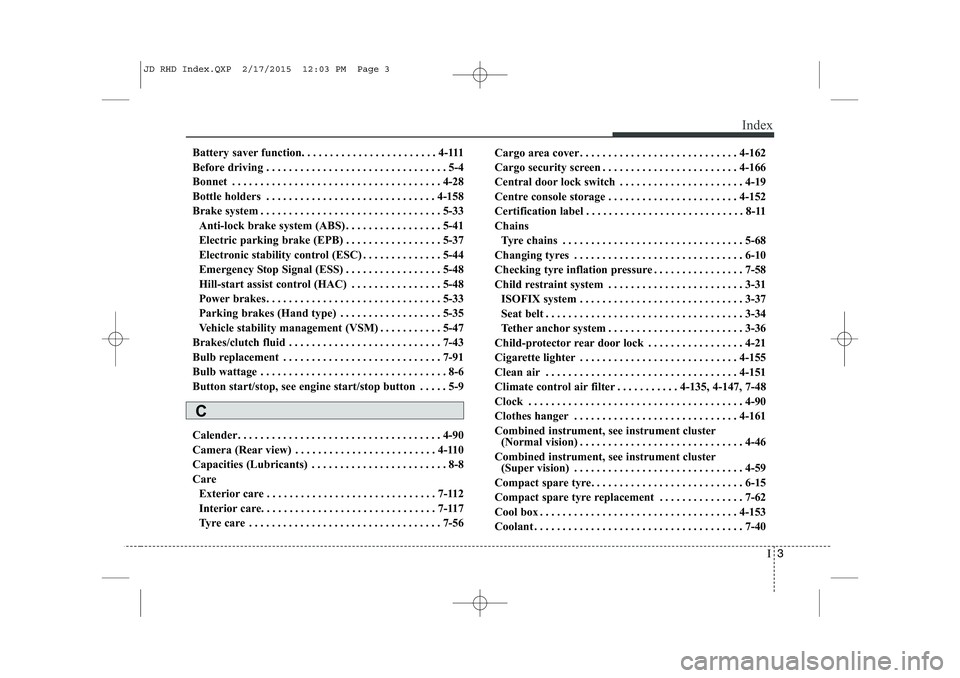
Battery saver function. . . . . . . . . . . . . . . . . . . . . . . . 4-111
Before driving . . . . . . . . . . . . . . . . . . . . . . . . . . . . . . . . 5-4
Bonnet . . . . . . . . . . . . . . . . . . . . . . . . . . . . . . . . . . . . . 4-28
Bottle holders . . . . . . . . . . . . . . . . . . . . . . . . . . . . . . 4-158
Brake system . . . . . . . . . . . . . . . . . . . . . . . . . . . . . . . . 5-33
Anti-lock brake system (ABS) . . . . . . . . . . . . . . . . . 5-41
Electric parking brake (EPB) . . . . . . . . . . . . . . . . . 5-37
Electronic stability control (ESC) . . . . . . . . . . . . . . 5-44
Emergency Stop Signal (ESS) . . . . . . . . . . . . . . . . . 5-48
Hill-start assist control (HAC) . . . . . . . . . . . . . . . . 5-48
Power brakes. . . . . . . . . . . . . . . . . . . . . . . . . . . . . . . 5-33
Parking brakes (Hand type) . . . . . . . . . . . . . . . . . . 5-35
Vehicle stability management (VSM) . . . . . . . . . . . 5-47
Brakes/clutch fluid . . . . . . . . . . . . . . . . . . . . . . . . . . . 7-43
Bulb replacement . . . . . . . . . . . . . . . . . . . . . . . . . . . . 7-91
Bulb wattage . . . . . . . . . . . . . . . . . . . . . . . . . . . . . . . . . 8-6
Button start/stop, see engine start/stop button . . . . . 5-9
Calender. . . . . . . . . . . . . . . . . . . . . . . . . . . . . . . . . . . . 4-90
Camera (Rear view) . . . . . . . . . . . . . . . . . . . . . . . . . 4-110
Capacities (Lubricants) . . . . . . . . . . . . . . . . . . . . . . . . 8-8
Care Exterior care . . . . . . . . . . . . . . . . . . . . . . . . . . . . . . 7-112
Interior care. . . . . . . . . . . . . . . . . . . . . . . . . . . . . . . 7-117
Tyre care . . . . . . . . . . . . . . . . . . . . . . . . . . . . . . . . . . 7-56 Cargo area cover . . . . . . . . . . . . . . . . . . . . . . . . . . . . 4-162
Cargo security screen . . . . . . . . . . . . . . . . . . . . . . . . 4-166
Central door lock switch . . . . . . . . . . . . . . . . . . . . . . 4-19
Centre console storage . . . . . . . . . . . . . . . . . . . . . . . 4-152
Certification label . . . . . . . . . . . . . . . . . . . . . . . . . . . . 8-11
Chains
Tyre chains . . . . . . . . . . . . . . . . . . . . . . . . . . . . . . . . 5-68
Changing tyres . . . . . . . . . . . . . . . . . . . . . . . . . . . . . . 6-10
Checking tyre inflation pressure . . . . . . . . . . . . . . . . 7-58
Child restraint system . . . . . . . . . . . . . . . . . . . . . . . . 3-31
ISOFIX system . . . . . . . . . . . . . . . . . . . . . . . . . . . . . 3-37
Seat belt . . . . . . . . . . . . . . . . . . . . . . . . . . . . . . . . . . . 3-34
Tether anchor system . . . . . . . . . . . . . . . . . . . . . . . . 3-36
Child-protector rear door lock . . . . . . . . . . . . . . . . . 4-21
Cigarette lighter . . . . . . . . . . . . . . . . . . . . . . . . . . . . 4-155
Clean air . . . . . . . . . . . . . . . . . . . . . . . . . . . . . . . . . . 4-151
Climate control air filter . . . . . . . . . . . 4-135, 4-147, 7-48
Clock . . . . . . . . . . . . . . . . . . . . . . . . . . . . . . . . . . . . . . 4-90
Clothes hanger . . . . . . . . . . . . . . . . . . . . . . . . . . . . . 4-161
Combined instrument, see instrument cluster (Normal vision) . . . . . . . . . . . . . . . . . . . . . . . . . . . . . 4-46
Combined instrument, see instrument cluster (Super vision) . . . . . . . . . . . . . . . . . . . . . . . . . . . . . . 4-59
Compact spare tyre. . . . . . . . . . . . . . . . . . . . . . . . . . . 6-15
Compact spare tyre replacement . . . . . . . . . . . . . . . 7-62
Cool box . . . . . . . . . . . . . . . . . . . . . . . . . . . . . . . . . . . 4-153
Coolant . . . . . . . . . . . . . . . . . . . . . . . . . . . . . . . . . . . . . 7-40
C
JD RHD Index.QXP 2/17/2015 12:03 PM Page 3
Page 1204 of 1210

I7
Index
Speedometer . . . . . . . . . . . . . . . . . . . . . . . . . . . . . . . 4-47
Tachometer . . . . . . . . . . . . . . . . . . . . . . . . . . . . . . . . 4-47
Trip computer . . . . . . . . . . . . . . . . . . . . . . . . . . . . . . 4-51
User Settings . . . . . . . . . . . . . . . . . . . . . . . . . . . . . . . 4-56
Instrument cluster (Super vision) . . . . . . . . . . . . . . . 4-59
Automatic transaxle shift position indicator . . . . . 4-65
Cluster display mode conversion . . . . . . . . . . . . . . 4-61
Double clutch transmission shift indicator . . . . . . 4-65
Engine torque gauge. . . . . . . . . . . . . . . . . . . . . . . . . 4-63
Fuel gauge . . . . . . . . . . . . . . . . . . . . . . . . . . . . . . . . . 4-62
Instrument panel illumination . . . . . . . . . . . . . . . . 4-61
Manual transaxle shift indicator. . . . . . . . . . . . . . . 4-64
Odometer . . . . . . . . . . . . . . . . . . . . . . . . . . . . . . . . . . 4-66
Speed limiter indicator. . . . . . . . . . . . . . . . . . . . . . . 4-66
Speedometer . . . . . . . . . . . . . . . . . . . . . . . . . . . . . . . 4-62
Tachometer . . . . . . . . . . . . . . . . . . . . . . . . . . . . . . . . 4-61
Trip computer . . . . . . . . . . . . . . . . . . . . . . . . . . . . . . 4-67
Turbo boost pressure gauge. . . . . . . . . . . . . . . . . . . 4-63
Inner panel fuse. . . . . . . . . . . . . . . . . . . . . . . . . . . . . . 7-69
Instrument panel illumination (Normal vision). . . . 4-46
Instrument panel illumination (Super vision) . . . . . 4-59
Instrument panel overview . . . . . . . . . . . . . . . . . . . . . 2-5
Interior care . . . . . . . . . . . . . . . . . . . . . . . . . . . . . . . . 7-117
Interior features . . . . . . . . . . . . . . . . . . . . . . . . . . . . 4-155
Ashtray . . . . . . . . . . . . . . . . . . . . . . . . . . . . . . . . . . 4-156
Aux, USB and iPod . . . . . . . . . . . . . . . . . . . . . . . . . 4-160 Barrier net . . . . . . . . . . . . . . . . . . . . . . . . . . . . . . . . 4-163
Bottle holder . . . . . . . . . . . . . . . . . . . . . . . . . . . . . . 4-158
Cargo area cover . . . . . . . . . . . . . . . . . . . . . . . . . . 4-162
Cargo security screen . . . . . . . . . . . . . . . . . . . . . . . 4-166
Cigarette lighter . . . . . . . . . . . . . . . . . . . . . . . . . . . 4-155
Clothes hanger . . . . . . . . . . . . . . . . . . . . . . . . . . . . 4-161
Cup holder. . . . . . . . . . . . . . . . . . . . . . . . . . . . . . . . 4-157
Floor mat anchor(s) . . . . . . . . . . . . . . . . . . . . . . . . 4-161
Luggage net (holder) . . . . . . . . . . . . . . . . . . . . . . . 4-162
Luggage rail system . . . . . . . . . . . . . . . . . . . . . . . . 4-167
Power outlet . . . . . . . . . . . . . . . . . . . . . . . . . . . . . . 4-159
Shopping bag holder . . . . . . . . . . . . . . . . . . . . . . . 4-168
Sunvisor . . . . . . . . . . . . . . . . . . . . . . . . . . . . . . . . . . 4-158
Interior light . . . . . . . . . . . . . . . . . . . . . . . . . . . . . . . 4-123 Glove box lamp . . . . . . . . . . . . . . . . . . . . . . . . . . . . 4-125
Luggage room lamp . . . . . . . . . . . . . . . . . . . . . . . . 4-125
Map lamp . . . . . . . . . . . . . . . . . . . . . . . . . . . . . . . . 4-123
Room lamp . . . . . . . . . . . . . . . . . . . . . . . . . . . . . . . 4-124
Vanity mirror lamp . . . . . . . . . . . . . . . . . . . . . . . . 4-124
Interior overview. . . . . . . . . . . . . . . . . . . . . . . . . . . . . . 2-4
ISG (Idle stop and go) system . . . . . . . . . . . . . . . . . . 5-15
ISOFIX system . . . . . . . . . . . . . . . . . . . . . . . . . . . . . . 3-35
Jack and tools . . . . . . . . . . . . . . . . . . . . . . . . . . . . . . . . 6-9
Jack label. . . . . . . . . . . . . . . . . . . . . . . . . . . . . . . . . . . 6-17
J
JD RHD Index.QXP 2/17/2015 12:03 PM Page 7