pairing phone KIA CEED 2015 User Guide
[x] Cancel search | Manufacturer: KIA, Model Year: 2015, Model line: CEED, Model: KIA CEED 2015Pages: 1210, PDF Size: 35.92 MB
Page 927 of 1210
Features of your vehicle
242
4
Bluetooth® Wireless Technology
Pairing a Bluetooth®Wireless
Technology wireless technology
Device What is
Bluetooth®Wireless
Technology Pairing?
Pairing refers to the process of syn-
chronizing your
Bluetooth®Wireless
Technology phone or device with the
car audio system for connection.
Pairing is necessary to connect anduse the
Bluetooth®Wireless
Technology feature. Pairing Key / Key on
the Steering Remote Controller
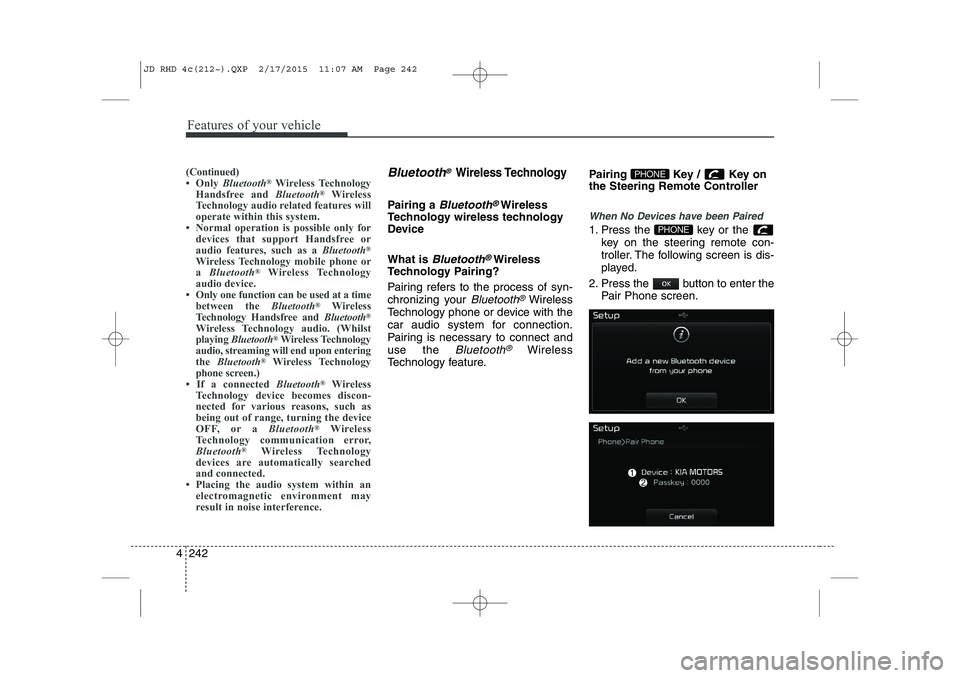
When No Devices have been Paired
1. Press the key or the
key on the steering remote con-
troller. The following screen is dis-
played.
2. Press the button to enter the Pair Phone screen.PHONE
PHONE(Continued)
Only Bluetooth ®
Wireless Technology
Handsfree and Bluetooth®
Wireless
Technology audio related features will
operate within this system.
Normal operation is possible only for
devices that support Handsfree or
audio features, such as a Bluetooth®
Wireless Technology mobile phone ora Bluetooth ®
Wireless Technology
audio device.
Only one function can be used at a time between the Bluetooth®
Wireless
Technology Handsfree and Bluetooth®
Wireless Technology audio. (Whilst
playing Bluetooth ®
Wireless Technology
audio, streaming will end upon entering
the Bluetooth ®
Wireless Technology
phone screen.)
If a connected Bluetooth®
Wireless
Technology device becomes discon-
nected for various reasons, such as
being out of range, turning the device
OFF, or a Bluetooth®
Wireless
Technology communication error,
Bluetooth ®
Wireless Technology
devices are automatically searched
and connected.
Placing the audio system within an electromagnetic environment may
result in noise interference.
JD RHD 4c(212~).QXP 2/17/2015 11:07 AM Page 242
Page 928 of 1210
4 243
Features of your vehicle
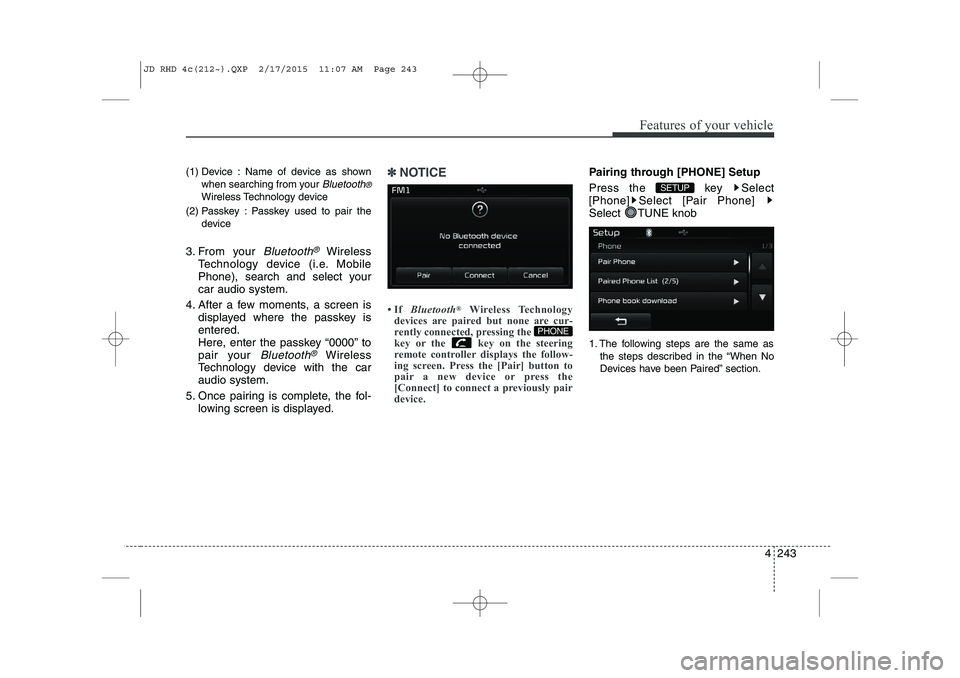
(1) Device : Name of device as shownwhen searching from your
Bluetooth®
Wireless Technology device
(2) Passkey : Passkey used to pair the device
3. From your
Bluetooth®Wireless
Technology device (i.e. Mobile
Phone), search and select yourcar audio system.
4. After a few moments, a screen is displayed where the passkey isentered.
Here, enter the passkey “0000” to
pair your
Bluetooth®Wireless
Technology device with the caraudio system.
5. Once pairing is complete, the fol- lowing screen is displayed.
✽✽NOTICE
If Bluetooth ®
Wireless Technology
devices are paired but none are cur-
rently connected, pressing the
key or the key on the steering
remote controller displays the follow-
ing screen. Press the [Pair] button to
pair a new device or press the
[Connect] to connect a previously pair
device.Pairing through [PHONE] Setup
Press the key Select
[Phone] Select [Pair Phone]
Select TUNE knob
1. The following steps are the same as
the steps described in the “When No
Devices have been Paired” section.
SETUP
PHONE
JD RHD 4c(212~).QXP 2/17/2015 11:07 AM Page 243
Page 929 of 1210
Features of your vehicle
244
4
✽✽
NOTICE
The waiting period during phone pair- ing will last for one minute. The pair-
ing process will fail if the device is not
paired within the given time. If the
pairing process fails, you must start
the process from the beginning.
Generally, most Bluetooth®
Wireless
Technology devices will automatically
connect once pairing is complete.
However, some devices may require a
separate verification process to con-
nect. Check to see whether Bluetooth®
Wireless Technology has been proper-
ly connected within your mobile
phone.
List of paired Bluetooth®
Wireless
Technology devices can be viewed at
[Phone] [Paired Phone
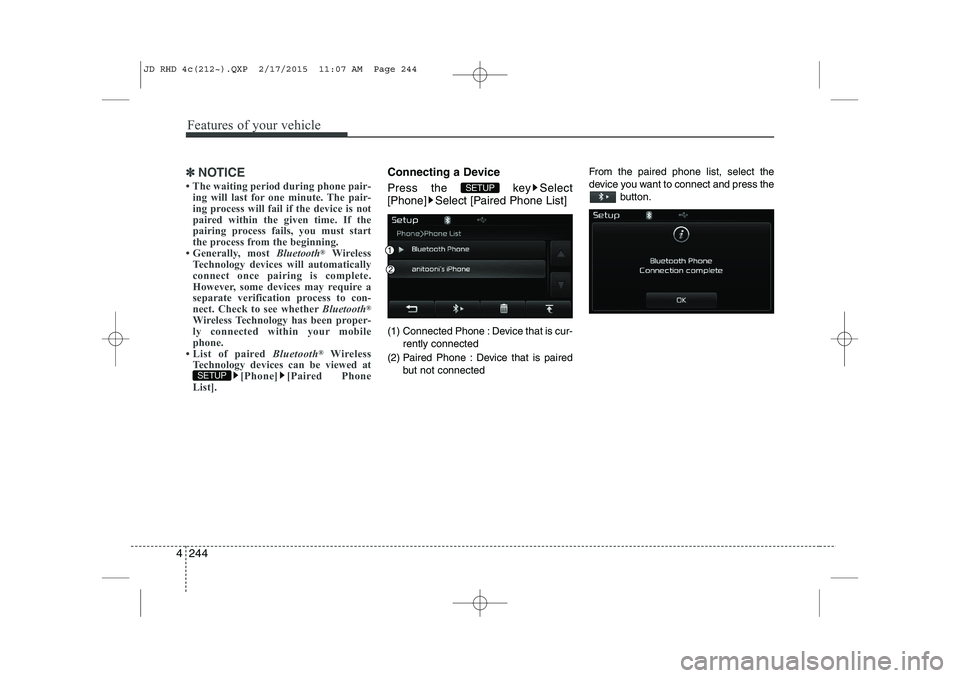
List].Connecting a Device
Press the key Select
[Phone] Select [Paired Phone List]
(1) Connected Phone : Device that is cur-
rently connected
(2) Paired Phone : Device that is paired but not connected From the paired phone list, select the
device you want to connect and press the
button.
SETUP
SETUP
JD RHD 4c(212~).QXP 2/17/2015 11:07 AM Page 244
Page 941 of 1210
![KIA CEED 2015 User Guide Features of your vehicle
256
4
Bluetooth®Wireless Technology
Setting
Pairing a New Device
Press the key Select
[Phone] Select [Pair Phone]
Bluetooth®Wireless Technology devices
can be paired with](/img/2/57940/w960_57940-940.png "KIA CEED 2015 User Guide Features of your vehicle
256
4
Bluetooth®Wireless Technology
Setting
Pairing a New Device
Press the key Select
[Phone] Select [Pair Phone]
Bluetooth®Wireless Technology devices
can be paired with")
Features of your vehicle
256
4
Bluetooth®Wireless Technology
Setting
Pairing a New Device
Press the key Select
[Phone] Select [Pair Phone]
Bluetooth®Wireless Technology devices
can be paired with the audio system.
For more information, refer to the “Pairing
through Phone Setup” section within
Bluetooth®Wireless Technology.
Viewing Paired Phone List
Press the key Select
[Phone] Select [Paired Phone List]
This feature is used to view mobile
phones that have been paired with the
audio system. Upon selecting a paired
phone, the setup menu is displayed.
For more information, refer to the “Setting
Bluetooth®Wireless Technology
Connection” section within
Bluetooth®
Wireless Technology. ( 1) : Moves to the previous screen
( 2) Connect/Disconnect Phone :
Connect/ disconnects currently selected phone
( 3) Delete : Deletes the currently select-
ed phone (
4) Change Priority : Sets currently select-
ed phone to highest connection priority
✽✽NOTICE BEFORE DOWN-
LOADING PHONE BOOKS
Only phone books within connected phones can be downloaded. Also
check to see that your mobile phone
supports the download feature.
To learn more about whether your mobile phone supports phone book
downloads, refer to your mobile
phone user’s manual.
The Phone book for only the connect- ed phone can be downloaded. Before
downloading, check to see whether
your phone supports the download
feature.
SETUP
SETUP
JD RHD 4c(212~).QXP 2/17/2015 11:07 AM Page 256