park assist KIA CEED 2015 User Guide
[x] Cancel search | Manufacturer: KIA, Model Year: 2015, Model line: CEED, Model: KIA CEED 2015Pages: 1210, PDF Size: 35.92 MB
Page 178 of 1210

497
Features of your vehicle
Ty p e B
The indicator of the parking assist sys-
tem button turns on automatically and
activates the parking assist system
when you shift the gear to the
R(Reverse) position or press the SPAS
button. It will turn off automatically when
you drive above 40 km/h(24.8 mph).
• If the vehicle speed is above 10km/h (6.2 mph), the parking assist system
will not operate.
• The sensing distance while moving for- ward is approximately 100 cm (39.4 in.)
when you are driving less than 10 km/h(6.2 mph).
• When more than two objects are sensed at the same time, the closest
one will be recognized first.
✽NOTICE
It may not operate if it’s distance from
the object is already less than approxi-
mately 25 cm when the system is ON.
✽NOTICE
• The actual warning sound and indicator may differ from the illustration accord- ing to objects or sensor status.
• Do not wash the vehicle's sensor with high pressure water.
Type of warning indicator and sound: with Warning sound
Distance from object
Warning indicator
Warning soundWhen driving forwardWhen driving rearward
100cm~61cmFront-Buzzer beeps intermittently
120cm~61cmRear-Buzzer beeps intermittently
60cm~31cm
FrontBuzzer beeps frequently
Rear-Buzzer beeps frequently
30cm
FrontBuzzer sounds continuously
Rear-Buzzer sounds continuously
JD eng 4a.QXP 3/4/2015 4:27 PM Page 97
Page 179 of 1210

Features of your vehicle
98
4
Non-operational conditions of parking assist system
Parking assist system may not oper-
ate normally when:
1. Moisture is frozen to the sensor. (It will operate normally when moisture
melts.)
2. Sensor is covered with foreign matter, such as snow or water, or the sensor
cover is blocked. (It will operate nor-
mally when the material is removed or
the sensor is no longer blocked.)
3. Sensor is stained with foreign matter such as snow or water. (Sensing range
will return to normal when removed.)
4.The parking assist button is off.
There is a possibility of parking assist system malfunction when:
1. Driving on uneven road surfaces such as unpaved roads, gravel, bumps, or
gradient.
2. Objects generating excessive noise such as vehicle horns, loud motorcycle
engines, or truck air brakes can inter-
fere with the sensor.
3. Heavy rain or water spray.
4. Wireless transmitters or mobile phones present near the sensor.
5. Sensor is covered with snow.
Detecting range may decrease when:
1. Outside air temperature is extremely hot or cold.
2. Undetectable objects smaller than 1 m and narrower than 14 cm in diameter.
The following objects may not be rec-
ognized by the sensor:
1. Sharp or slim objects such as ropes, chains or small poles.
2. Objects, which tend to absorb sensor frequency such as clothes, spongy
material or snow.
CAUTION
• This system can only sense
objects within the range and loca-tion of the sensors;
It can not detect objects in otherareas where sensors are not
installed. Also, small or slimobjects, such as poles or objects located between sensors may notbe detected by the sensors.
Always visually check behind thevehicle when backing up.
• Be sure to inform any drivers of the vehicle that may be unfamiliarwith the system regarding the systems capabilities and limita-
tions.
JD eng 4a.QXP 3/4/2015 4:27 PM Page 98
Page 180 of 1210

499
Features of your vehicle
✽NOTICE
1. The warning may not sound sequen- tially depending on the speed and
shapes of the objects detected.
2. The parking assist system may mal- function if the vehicle bumper height
or sensor installation has been modi-
fied. Any non-factory installed equip-
ment or accessories may also interfere
with the sensor performance.
3. Sensor may not recognize objects less
than 30 cm from the sensor, or it may
sense an incorrect distance. Use with
caution.
4. When the sensor is frozen or stained with snow or water, the sensor may be
inoperative until the stains are
removed using a soft cloth.
5. Do not push, scratch or strike the sen-
sor with any hard objects that could
damage the surface of the sensor.
Sensor damage could occur.✽NOTICE
This system can only sense objects with-
in the range and location of the sensors,
it can not detect objects in other areas
where sensors are not installed. Also,
small or slim objects, or objects located
between sensors may not be detected.
Always visually check in front and
behind the vehicle when driving.
Be sure to inform any drivers in the
vehicle that may be unfamiliar with the
system regarding the systems capabili-
ties and limitations.Self-diagnosis
When you shift the gear to the R
(Reverse) position and if one or more of
the below occurs you may have a mal-
function in the parking assist system.
• You don't hear an audible warning sound or if the buzzer sounds intermit-
tently.
If this occurs, we recommend that the
system be checked by an authorized Kia
dealer.
WARNING
Your new vehicle warranty does not
cover any accidents or damage to
the vehicle or injuries to its occu- pants related to a parking assist
system. Always drive safely and
cautiously.
WARNING
Pay close attention when the vehi-
cle is driven close to objects on the
road, particularly pedestrians, and
especially children. Be aware that
some objects may not be detected
by the sensors, due to the objects
distance, size or material, all of
which can limit the effectiveness of
the sensor. Always perform a visual
inspection to make sure the vehicle
is clear of all obstructions before
moving the vehicle in any direction.
(blinks)
• is displayed. (if equipped)
JD eng 4a.QXP 3/4/2015 4:27 PM Page 99
Page 181 of 1210
Features of your vehicle
100
4
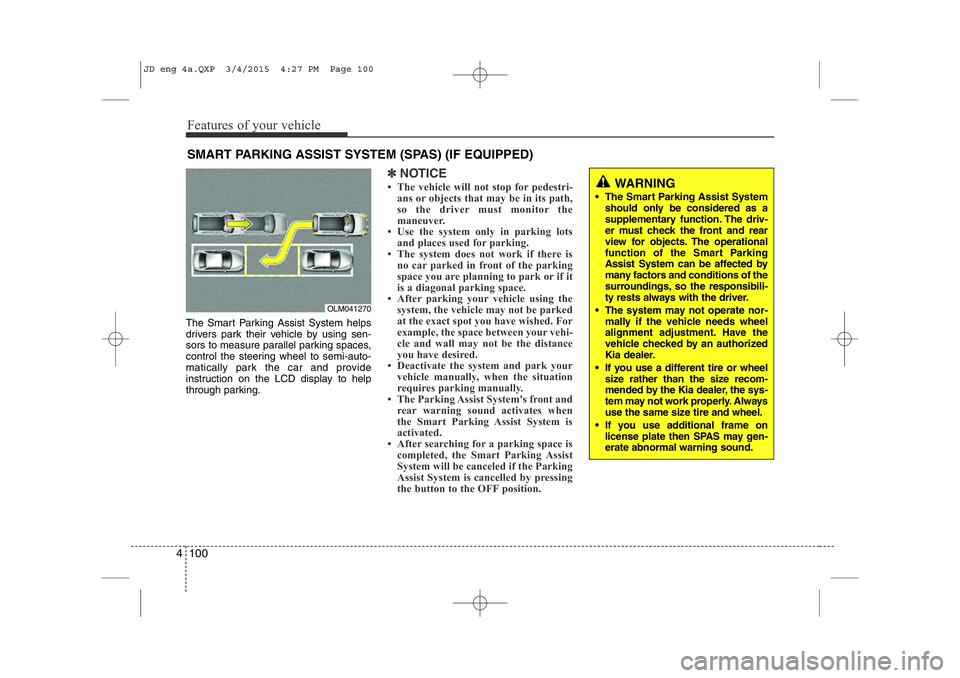
The Smart Parking Assist System helps
drivers park their vehicle by using sen-
sors to measure parallel parking spaces,
control the steering wheel to semi-auto-
matically park the car and provide
instruction on the LCD display to help
through parking.
✽NOTICE
• The vehicle will not stop for pedestri- ans or objects that may be in its path,
so the driver must monitor the
maneuver.
• Use the system only in parking lots
and places used for parking.
• The system does not work if there is no car parked in front of the parking
space you are planning to park or if it
is a diagonal parking space.
• After parking your vehicle using the
system, the vehicle may not be parked
at the exact spot you have wished. For
example, the space between your vehi-
cle and wall may not be the distance
you have desired.
• Deactivate the system and park your vehicle manually, when the situation
requires parking manually.
• The Parking Assist System's front and
rear warning sound activates when
the Smart Parking Assist System is
activated.
• After searching for a parking space is completed, the Smart Parking Assist
System will be canceled if the Parking
Assist System is cancelled by pressing
the button to the OFF position.
SMART PARKING ASSIST SYSTEM (SPAS) (IF EQUIPPED)
OLM041270
WARNING
• The Smart Parking Assist System should only be considered as a
supplementary function. The driv-
er must check the front and rear
view for objects. The operational
function of the Smart Parking
Assist System can be affected by
many factors and conditions of the
surroundings, so the responsibili-
ty rests always with the driver.
• The system may not operate nor- mally if the vehicle needs wheel
alignment adjustment. Have the
vehicle checked by an authorized
Kia dealer.
• If you use a different tire or wheel size rather than the size recom-
mended by the Kia dealer, the sys-
tem may not work properly. Always
use the same size tire and wheel.
• If you use additional frame on license plate then SPAS may gen- erate abnormal warning sound.
JD eng 4a.QXP 3/4/2015 4:27 PM Page 100
Page 182 of 1210

4 101
Features of your vehicle
Operating condition
The system will help park the vehicle in
the middle or back of a parked vehicle.
Use the system when all the below con-ditions are met.
• When the parking space is a straightline
• When parallel parking is required
• When there is a parked vehicle
• When there is enough space to move the vehicle Non-operating condition
Never use the Smart Parking Assist
System in the below conditions.
• Curved parking space
• Inclined roads
• A vehicle loaded with longer or wider
cargo compared to the vehicle
• Diagonal parking space
• Parking space with trash, grass or bar- riers
• Heavy snow or rain
• A pole close to the parking line
• Bumpy roads
• A vehicle equipped with a snow chain or spare tire
• Tire pressure lower or higher than the standard tire pressure
• A trailer connected to the vehicle
• Slippery or uneven road
• Big vehicles such as buses or trucks parked
• Sensor covered with foreign matter, such as snow or water
• Moisture frozen on the sensor.
• A motorcycle or bicycle parked
• A trash can or obstacle near • Heavy wind
• Wheel changed to an unauthorized
size
• A problem with the wheel alignment
• Next to a garden or bush
• A accessory installed on the detective area the of sensors (such as number plate holder)
• Vehicle leaned severely to one side
• Strong sunlight or very cold weather
• Ultrasonic interference other vehicle's. Such as horn sounds of other vehicles,
motorcycle's engine noise, air brake
noise of heavy vehicles and with the
other vehicle's parking assist system
working.
OLM041271
■Right side
- parallel mode■Left side
-parallel mode
JD eng 4a.QXP 3/4/2015 4:27 PM Page 101
Page 183 of 1210

Features of your vehicle
102
4
WARNING
Do not use the Smart Parking
Assist System in the following con-
ditions for unexpected results mayoccur and cause a serious accident.
1. Parking on inclines
The driver must apply the accelera- tor and brake pedal when parking
on inclines. If the driver is unfamil-
iar with applying the accelerator
and brake pedal, a car accident may
occur.
(Continued)
OJD042156
(Continued)
2. Parking in snow
Snow may interfere with sensor
operation or the system may cancel
if the road is slippery while parking.
Also, if the driver is unfamiliar with
applying the accelerator and brake
pedal, a car accident may occur.(Continued)(Continued)
3. Parking in narrow space
The system may not search for parking spaces if the space is too
narrow. Even if it operates alwaysbe careful.
(Continued)
OJD042157OJD042158
JD eng 4a.QXP 3/4/2015 4:27 PM Page 102
Page 184 of 1210
4 103
Features of your vehicle
(Continued)
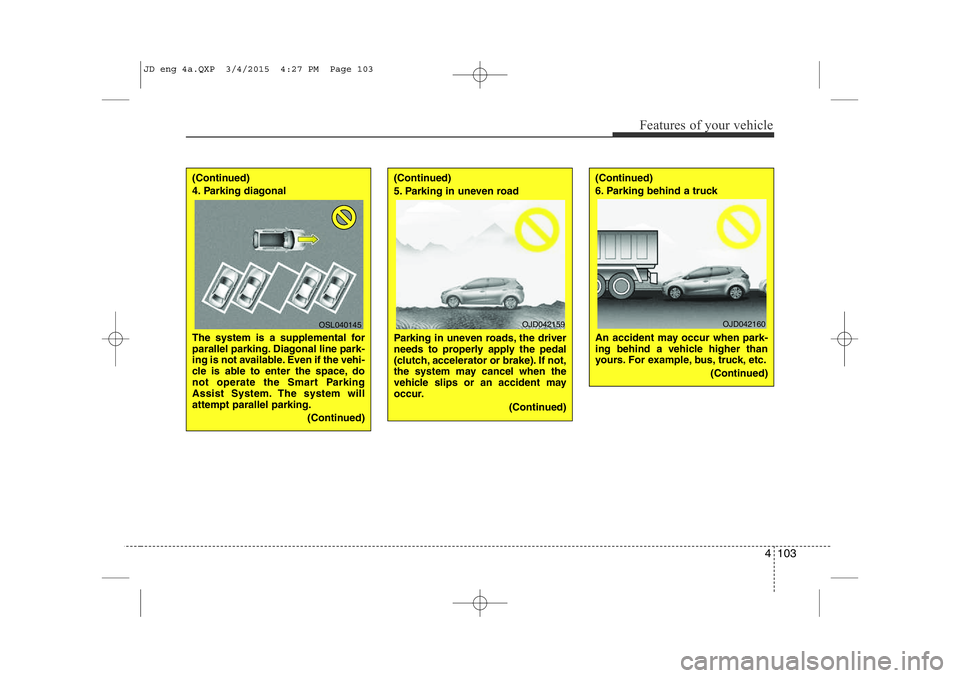
4. Parking diagonal
The system is a supplemental for
parallel parking. Diagonal line park-
ing is not available. Even if the vehi-
cle is able to enter the space, do
not operate the Smart Parking
Assist System. The system willattempt parallel parking.(Continued)(Continued)
5. Parking in uneven road
Parking in uneven roads, the driver
needs to properly apply the pedal
(clutch, accelerator or brake). If not,
the system may cancel when the
vehicle slips or an accident may
occur.(Continued)(Continued)
6. Parking behind a truck
An accident may occur when park-
ing behind a vehicle higher than
yours. For example, bus, truck, etc.
(Continued)
OSL040145OJD042159OJD042160
JD eng 4a.QXP 3/4/2015 4:27 PM Page 103
Page 185 of 1210

Features of your vehicle
104
4
How the system works
1. Activate the Smart Parking Assist
System
2. Select parking assist mode
3. Search for parking space (slowly move forward.)
4. Search complete (automatic search by sensor.)
5. Steering wheel control (1) Shift according to the instruction on the LCD display.
(2) Drive slowly with the brake pedal applied.
6. Smart Parking Assist System com- plete
7. If necessary, manually adjust position of vehicle.
✽NOTICE
• Before activating the system check if the conditions are possible to use the
system.
• For your safety, always apply the
brake pedal except for when driving.
1. Activate Smart Parking Assist
System
• Press the Smart Parking AssistSystem button (the button indicator will illuminate).
• The Parking Assist System will be acti- vated (the button indicator will illumi-nate).
A warning sound will be heard if an obstacle is detected.
• Press the Smart Parking Assist System button again for more than 2
seconds to turn off the system.
• The Smart Parking Assist System defaults to the OFF position whenever
the ignition switch is turned on.
(Continued)
7. Obstacle in parking space
The system may search for a park-
ing space even though an obstacle
is in the parking space. An accident
may occur if you continue to park
the vehicle with the system.
Do not solely rely on the Smart
Parking Assist System.
OLM041272
OJD042082
JD eng 4a.QXP 3/4/2015 4:27 PM Page 104
Page 186 of 1210

4 105
Features of your vehicle
2. Select parking assist mode
• Select the parking assist mode bypressing the Smart Parking Assist
System button with the shift lever in N
(Neutral) or D(Drive) and the brakepedal depressed.
• The right side parallel mode is select- ed automatically when the Smart
Parking Assist System is activated.
• To select the left side parallel mode press the Smart Parking Assist System
button once more.
• If the button is pressed again, the sys- tem will turn off.
3. Search for parking space
• Slowly drive forward maintaining thedistance of approximately 50cm ~ 150cm (19.6in.~59.0in.) with the
parked vehicles. The side sensors will
search for a parking space.
• If the vehicle speed is over 30km/h (18.6mph), a message will appear tonotify to reduce speed.
• If the vehicle speed is over 40km/h (24.8mph), the system will cancel.
✽NOTICE
• Turn on the hazard warning flasher if it is crowded with other vehicles.
• If the parking lot is small, slowly drive more nearer to the parking space.
• The search for a parking space will be
completed only when there is enough
space for the vehicle to move to park.
✽NOTICE
• When searching for a parking space, the system may not be able to find a
parking space if there is no vehicle
parked, a parking space is available
after driving by or a parking space is
available before driving by.
• The system may not operate normally
in the following conditions:
(1) When the sensors are frozen
(2) When the sensors are dirty
(3) When it snows or rains heavily
(4) When a pillar or object is near
OJD042219/OJD042216
■
Right side
- parallel mode ■
Left side
-parallel modeOJD042220/OJD042217
■
Right side
- parallel mode ■
Left side
-parallel mode
JD eng 4a.QXP 3/4/2015 4:27 PM Page 105
Page 188 of 1210
4 107
Features of your vehicle
✽NOTICE
• If you do not follow the instructions pro- vided, you may fail to park your vehicle.
However, if the Parking Assist System
warning sound (distance from object
is within 30cm: continuous beep)
occurs, slowly drive the vehicle to the
reverse direction of the detected
object after checking the surrounding.
• Always check the surrounding before driving your vehicle if the Parking
Assist System warning sound (dis-
tance from object is within 30cm: con-
tinuous beep) is heard for the object is
close to your vehicle.
To cancel the system while parking
Press the Smart Parking Assist System
button or turn the steering wheel to the
left or right.
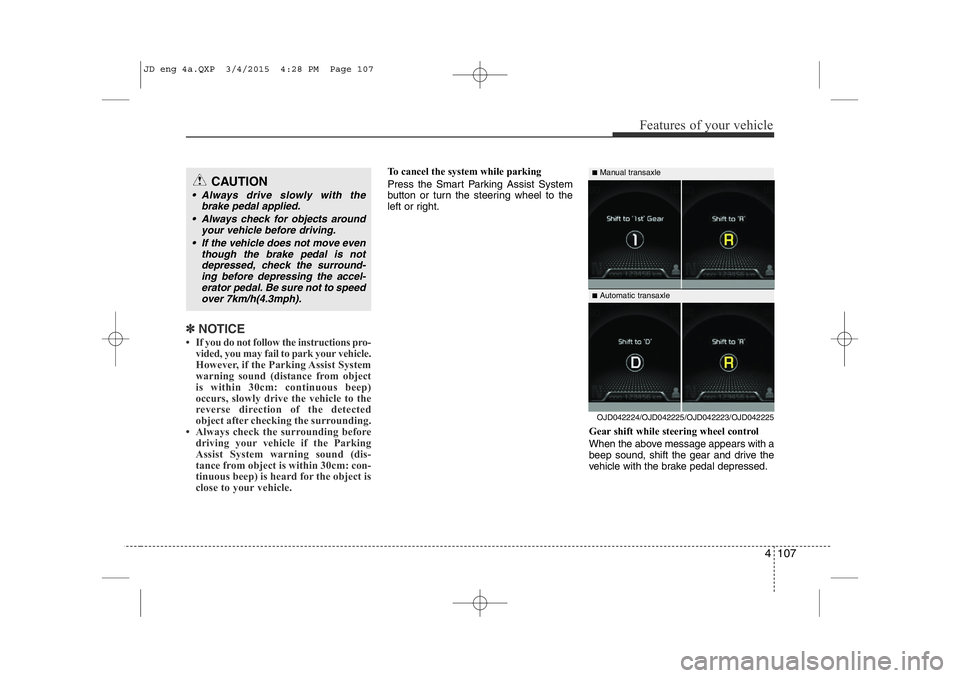
Gear shift while steering wheel control
When the above message appears with a
beep sound, shift the gear and drive the
vehicle with the brake pedal depressed.CAUTION
• Always drive slowly with thebrake pedal applied.
• Always check for objects around your vehicle before driving.
• If the vehicle does not move even though the brake pedal is notdepressed, check the surround-
ing before depressing the accel-erator pedal. Be sure not to speed over 7km/h(4.3mph).
OJD042224/OJD042225/OJD042223/OJD042225
■
Manual transaxle
■ Automatic transaxle
JD eng 4a.QXP 3/4/2015 4:28 PM Page 107