remote control KIA CEED 2015 Owner's Manual
[x] Cancel search | Manufacturer: KIA, Model Year: 2015, Model line: CEED, Model: KIA CEED 2015Pages: 1210, PDF Size: 35.92 MB
Page 889 of 1210
Features of your vehicle
204
4
NOTE:
If you need more information about
Kia’s
Bluetooth®
Wireless Technology.
Contact kia website “www.kia.com”
(OWNERS>General Info>
Bluetooth®
Wireless Technology
).
What is
Bluetooth® Wireless
Technology?
Bluetooth®Wireless Technology that
allows multiple devices to be connected
in a short range, low-powered devices
like hands-free, stereo headset, wireless
remote controller, etc. For more information,visit
the Bluetooth®Wireless Technologywebsite at www.Bluetooth.com
Bluetooth®Wireless Technology features
can be used only when the mobile phone has been paired and connected with the
device. For more information on pairingand connecting
Bluetooth®Wireless
Technology endbled mobile phones,
refer to the “Phone Setup” section.
When a
Bluetooth®Wireless
Technology mobile phone is connected,
a ( ) icon will appear at the top of the
screen. If a ( ) icon is not displayed,this indicates that a
Bluetooth®
Wireless Technology enabled device
has not been connected. Your must
connect the device before use. For
more information on
Bluetooth®
Wireless Technology mobile phones,
refer to the “Phone Setup” section.
Pairing and connecting a
Bluetooth®
Wireless Technology enabled mobile
phone will work only when the
Bluetooth®Wireless Technology option
within your mobile phone has been
turned on. (Methods of turning on the
Bluetooth®Wireless Technology
enabled feature may differ depending
on the mobile phone.)
In some mobile phones, starting the ignition whilst talking through
Bluetooth®Wireless Technology hands-
free call will result in the call becoming
disconnected. (Switch the call back to
your mobile phone when starting theignition.) Some features may not be supported in
some
Bluetooth®Wireless Technology
enabled mobile phone and devices.
Bluetooth®Wireless Technology func-
tions may operate unstably depending
on the communication state.
Do not use a mobile phone or perform
Bluetooth®Wireless Technologysettings
(e.g. pairing a phone) whilst driving.
Some
Bluetooth®Wireless Technology-
enabled phones ma y not be recognized
by the system or fully compatible withthe system.
Before using
Bluetooth®Wireless
Technologyrelated features of the audio
system, refer your phone’s User’s
Manual for phone-side
Bluetooth®
Wireless Technologyoperations.
The phone must be paired to the audiosystem to use Bluetooth®Wireless
Technologyrelated features.
You will not be able to use the hands- free feature when your phone (in the
car) is outside of the mobile service
area (e.g. in a tunnel, in a underground,in a mountainous area, etc.).
(Continued)
JD RHD 4b(172~).QXP 2/17/2015 11:59 AM Page 204
Page 891 of 1210
Features of your vehicle
206
4
VOICE COMMAND (if equipped)
The voice recognition feature of this
product supports recognition of the
commands listed within this user’s
manual.
Whilst using voice recognition, operating the steering remote control or the device
will terminate voice recognition and allow
you to manually operate desired func-
tions.
Position of the microphone is above the head of the driver’s seat.
Voice recognition may not function properly due to outside noise. The fol-
lowing conditions can affect the per-
formance of Voice Recognition:
- When the windows and sunroof are open
- When the heating/cooling system is on
- When passing a tunnel
- When driving on rugged and uneven roads
After downloading
Bluetooth®Wireless
Technology phone book, the system
requires some times to convert the
phone book into voice information.
During this time, voice recognition may
not operate properly. Upon inputting your phone book, spe-
cial symbols and numbers cannot be
recognized by voice. For example, “#
John Doe%&” will be recognized as“John Doe”. Starting Voice Command
To start voice command, shortly press
the key on the steering wheel
remote controller.
If voice command is in [Normal Mode], then the system will say “Please say a
command. Beep”
❈ If voice command is in [Expert Mode],
then the system will only say a “Beep-”
❈ Setting Voice command [Normal
Mode]/[Expert Mode]:
Press the key Select [ System]
through the TUNE knob or key
Select [Prompt Feedback] through
the TUNE knob Set [Normal
Mode]/[Expert Mode]
Say the voice command.
For proper voice recognition, say the
voice command after the guidance
message and the “Beep” sound.
4
SETUP
JD RHD 4b(172~).QXP 2/17/2015 11:59 AM Page 206
Page 892 of 1210
4 207
Features of your vehicle
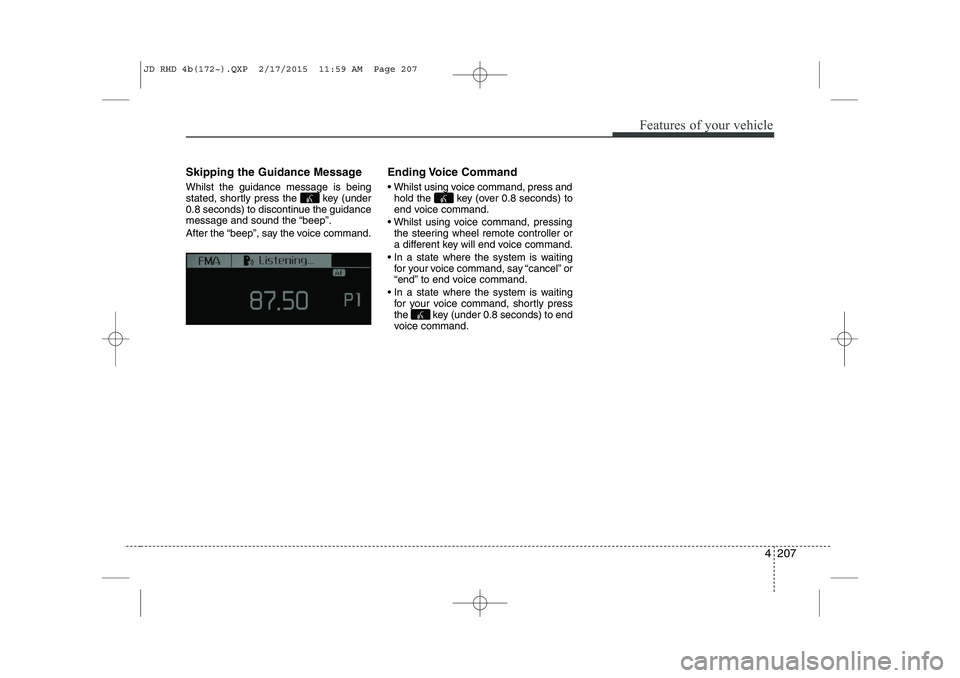
Skipping the Guidance Message Whilst the guidance message is being
stated, shortly press the key (under
0.8 seconds) to discontinue the guidance
message and sound the “beep”.
After the “beep”, say the voice command.Ending Voice Command
Whilst using voice command, press and
hold the key (over 0.8 seconds) to
end voice command.
Whilst using voice command, pressing the steering wheel remote controller or
a different key will end voice command.
In a state where the system is waiting for your voice command, say “cancel” or
“end” to end voice command.
In a state where the system is waiting for your voice command, shortly press
the key (under 0.8 seconds) to end
voice command.
JD RHD 4b(172~).QXP 2/17/2015 11:59 AM Page 207
Page 895 of 1210
Features of your vehicle
210
4
System?
activated
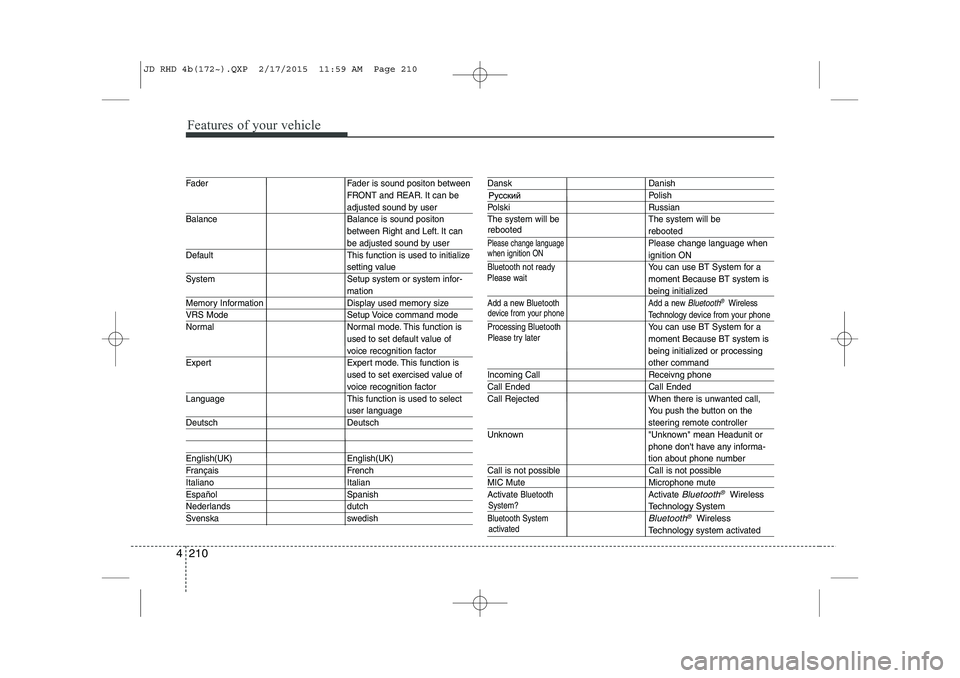
Fader Fader is sound positon between FRONT and REAR. It can be
adjusted sound by user
Balance Balance is sound positon between Right and Left. It can
be adjusted sound by user
Default This function is used to initialize
setting value
System Setup system or system infor-
mation
Memory Information Display used memory size
VRS Mode Setup Voice command mode
Normal Normal mode. This function is used to set default value of
voice recognition factor
Expert Expert mode. This function is used to set exercised value of
voice recognition factor
Language This function is used to select
user language
Deutsch Deutsch
English(UK) English(UK)
Français French
Italiano Italian
Español Spanish
Nederlands dutch
Svenska swedish
Dansk Danish
Polish
Polski Russian
The system will be The system will be
rebooted
Please change languagePlease change language when
ignition ON
Bluetooth not readyYou can use BT System for a moment Because BT system is
being initialized
Add a new Bluetooth Add a new Bluetooth®Wireless
Technology de vice from your phone
Processing Bluetooth
You can use BT System for a moment Because BT system is
being initialized or processing
other command
Incoming Call Receivng phone
Call Ended Call Ended
Call Rejected When there is unwanted call, You push the button on the
steering remote controller
Unknown "Unknown" mean Headunit or phone don't have any informa-
tion about phone number
Call is not possible Call is not possible
MIC Mute Microphone mute
Activate
BluetoothActivate Bluetooth®Wireless
TechnologySystem
Bluetooth SystemBluetooth®Wireless
Technologysystem activated
when ignition ON
device from your phone
Please try later
Please wait
rebooted
JD RHD 4b(172~).QXP 2/17/2015 11:59 AM Page 210
Page 900 of 1210
4 215
Features of your vehicle
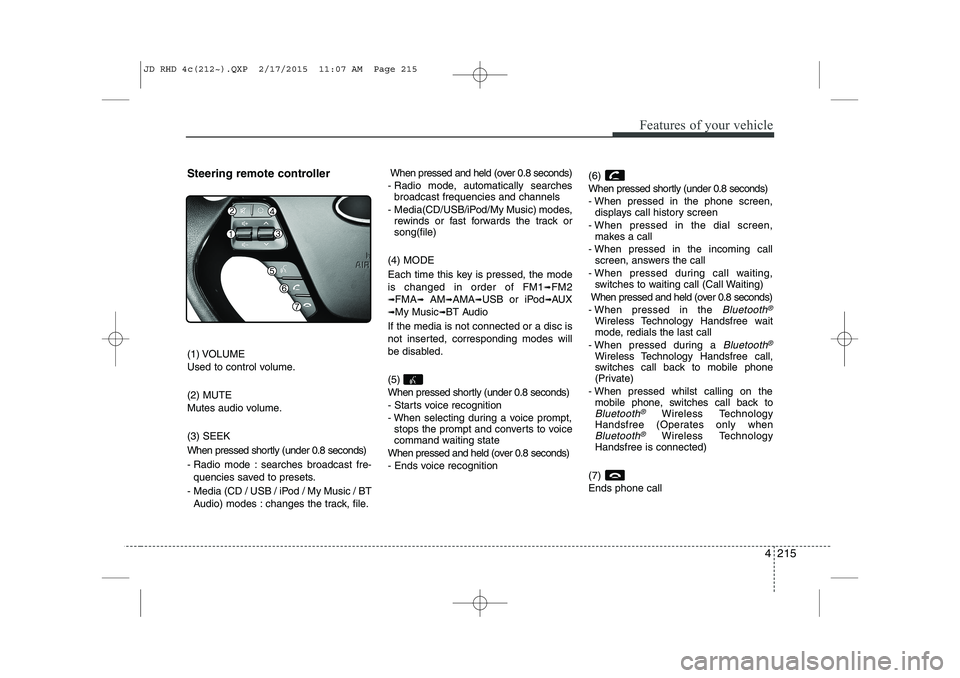
Steering remote controller
(1) VOLUME
Used to control volume. (2) MUTE
Mutes audio volume. (3) SEEK
When pressed shortly (under 0.8 seconds)
- Radio mode : searches broadcast fre-quencies saved to presets.
- Media (CD / USB / iPod / My Music / BT Audio) modes : changes the track, file. When pressed and held (over 0.8 seconds)
- Radio mode, automatically searches broadcast frequencies and channels
- Media(CD/USB/iPod/My Music) modes, rewinds or fast forwards the track or song(file)
(4) MODE
Each time this key is pressed, the mode is changed in order of FM1
➟FM2
➟FMA➟AM➟AMA➟USB or iPod➟AUX
➟My Music➟BT Audio
If the media is not connected or a disc is
not inserted, corresponding modes will
be disabled. (5)
When pressed shortly (under 0.8 seconds)
- Starts voice recognition
- When selecting during a voice prompt, stops the prompt and converts to voice
command waiting state
When pressed and held (over 0.8 seconds)
- Ends voice recognition (6)
When pressed shortly (under 0.8 seconds)
- When pressed in the phone screen,
displays call history screen
- When pressed in the dial screen, makes a call
- When pressed in the incoming call screen, answers the call
- When pressed during call waiting, switches to waiting call (Call Waiting)
When pressed and held (over 0.8 seconds)
- When pressed in the Bluetooth®
Wireless Technology Handsfree wait
mode, redials the last call
- When pressed during a
Bluetooth®
Wireless Technology Handsfree call,
switches call back to mobile phone
(Private)
- When pressed whilst calling on the mobile phone, switches call back to
Bluetooth®Wireless Technology
Handsfree (Operates only when
Bluetooth®Wireless Technology
Handsfree is connected)
(7) Ends phone call
JD RHD 4c(212~).QXP 2/17/2015 11:07 AM Page 215
Page 927 of 1210
Features of your vehicle
242
4
Bluetooth® Wireless Technology
Pairing a Bluetooth®Wireless
Technology wireless technology
Device What is
Bluetooth®Wireless
Technology Pairing?
Pairing refers to the process of syn-
chronizing your
Bluetooth®Wireless
Technology phone or device with the
car audio system for connection.
Pairing is necessary to connect anduse the
Bluetooth®Wireless
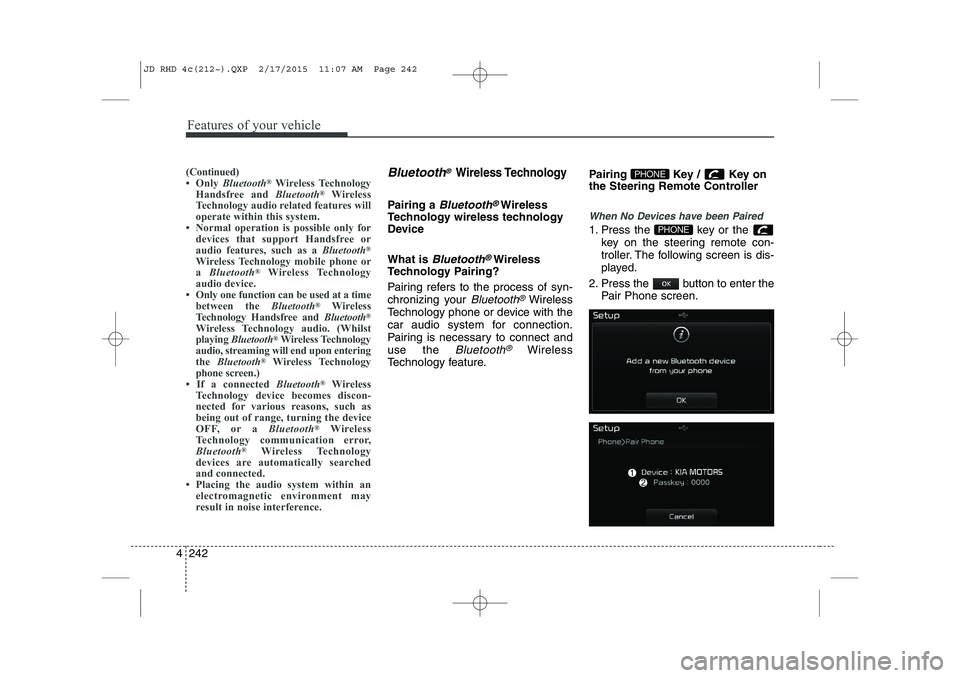
Technology feature. Pairing Key / Key on
the Steering Remote Controller
When No Devices have been Paired
1. Press the key or the
key on the steering remote con-
troller. The following screen is dis-
played.
2. Press the button to enter the Pair Phone screen.PHONE
PHONE(Continued)
Only Bluetooth ®
Wireless Technology
Handsfree and Bluetooth®
Wireless
Technology audio related features will
operate within this system.
Normal operation is possible only for
devices that support Handsfree or
audio features, such as a Bluetooth®
Wireless Technology mobile phone ora Bluetooth ®
Wireless Technology
audio device.
Only one function can be used at a time between the Bluetooth®
Wireless
Technology Handsfree and Bluetooth®
Wireless Technology audio. (Whilst
playing Bluetooth ®
Wireless Technology
audio, streaming will end upon entering
the Bluetooth ®
Wireless Technology
phone screen.)
If a connected Bluetooth®
Wireless
Technology device becomes discon-
nected for various reasons, such as
being out of range, turning the device
OFF, or a Bluetooth®
Wireless
Technology communication error,
Bluetooth ®
Wireless Technology
devices are automatically searched
and connected.
Placing the audio system within an electromagnetic environment may
result in noise interference.
JD RHD 4c(212~).QXP 2/17/2015 11:07 AM Page 242
Page 928 of 1210
4 243
Features of your vehicle
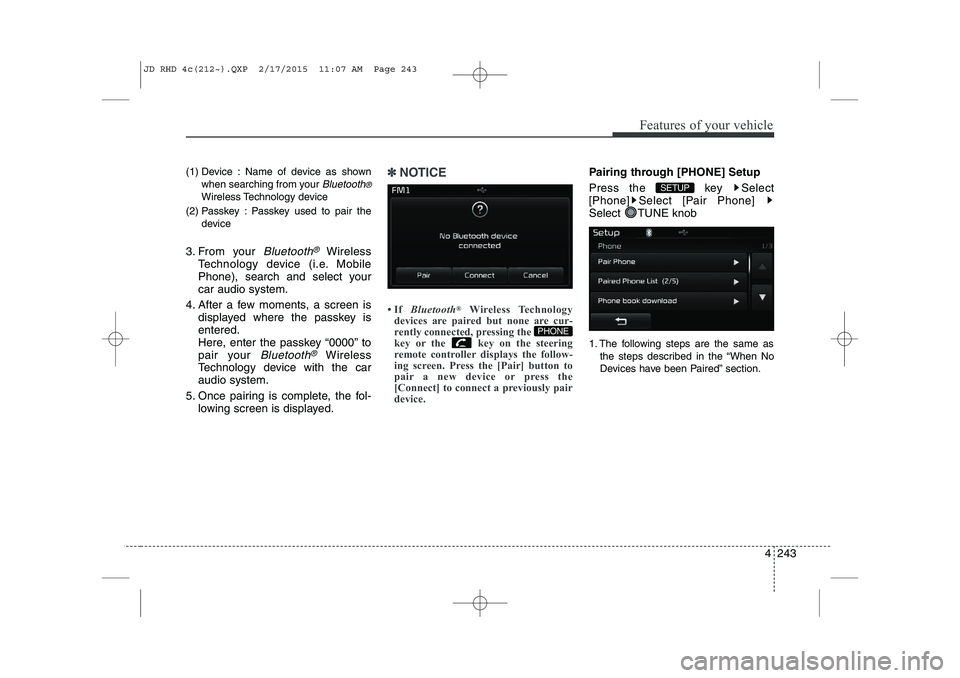
(1) Device : Name of device as shownwhen searching from your
Bluetooth®
Wireless Technology device
(2) Passkey : Passkey used to pair the device
3. From your
Bluetooth®Wireless
Technology device (i.e. Mobile
Phone), search and select yourcar audio system.
4. After a few moments, a screen is displayed where the passkey isentered.
Here, enter the passkey “0000” to
pair your
Bluetooth®Wireless
Technology device with the caraudio system.
5. Once pairing is complete, the fol- lowing screen is displayed.
✽✽NOTICE
If Bluetooth ®
Wireless Technology
devices are paired but none are cur-
rently connected, pressing the
key or the key on the steering
remote controller displays the follow-
ing screen. Press the [Pair] button to
pair a new device or press the
[Connect] to connect a previously pair
device.Pairing through [PHONE] Setup
Press the key Select
[Phone] Select [Pair Phone]
Select TUNE knob
1. The following steps are the same as
the steps described in the “When No
Devices have been Paired” section.
SETUP
PHONE
JD RHD 4c(212~).QXP 2/17/2015 11:07 AM Page 243
Page 936 of 1210
4 251
Features of your vehicle
VOICE RECOGNITION
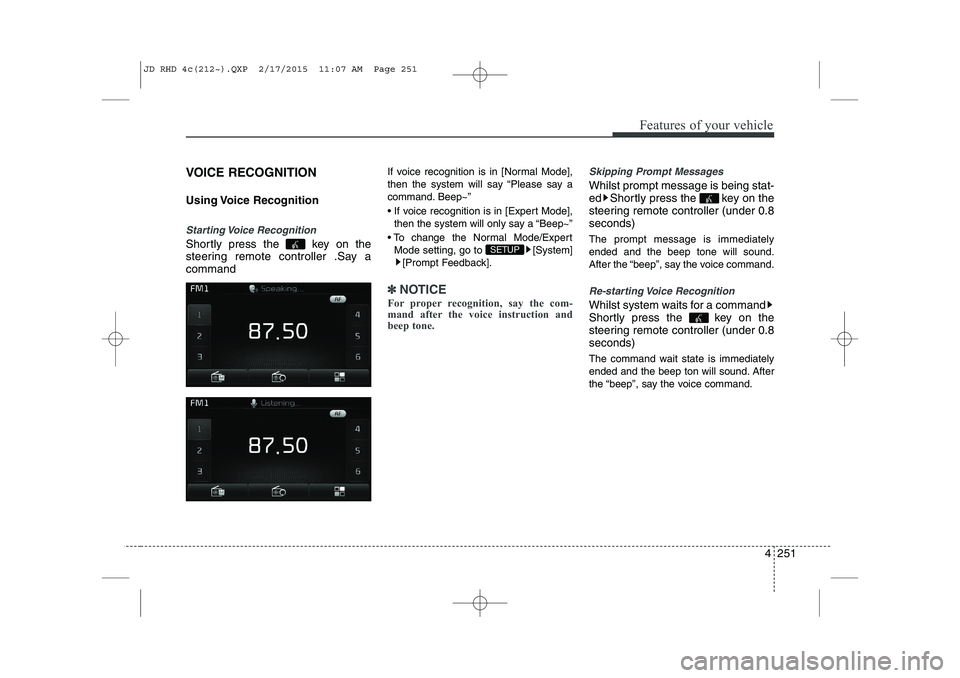
Using Voice Recognition
Starting Voice Recognition
Shortly press the key on the
steering remote controller .Say acommandIf voice recognition is in [Normal Mode],
then the system will say “Please say a
command. Beep~”
If voice recognition is in [Expert Mode],
then the system will only say a “Beep~”
To change the Normal Mode/Expert Mode setting, go to [System] [Prompt Feedback].
✽✽ NOTICE
For proper recognition, say the com-
mand after the voice instruction and
beep tone.
Skipping Prompt Messages
Whilst prompt message is being stat-
ed Shortly press the key on the
steering remote controller (under 0.8seconds) The prompt message is immediately ended and the beep tone will sound.
After the “beep”, say the voice command.
Re-starting Voice Recognition
Whilst system waits for a command
Shortly press the key on the
steering remote controller (under 0.8seconds)
The command wait state is immediately
ended and the beep ton will sound. After
the “beep”, say the voice command.
SETUP
JD RHD 4c(212~).QXP 2/17/2015 11:07 AM Page 251
Page 937 of 1210
Features of your vehicle
252
4
ENDING VOICE RECOGNITION
Whilst Voice Recognition is operating
Press and hold the key on the
steering remote controller (over 0.8 seconds)
✽✽ NOTICE
Whilst using voice command, pressing a steering wheel remote control or a
different key will end voice command.
In a state where the system is waiting for a voice command, say “cancel” or
“end” to end voice command.
In a state where the system is waiting
for a voice command, press and hold
the key on the steering remote
controller to end voice command.
JD RHD 4c(212~).QXP 2/17/2015 11:07 AM Page 252
Page 1199 of 1210

Index
2
I
Active ECO system . . . . . . . . . . . . . . . . . . . . . . . . . . . 5-32
Adaptive Front Lighting System (AFLS) . . . . . . . . 4-118
Air bag warning label . . . . . . . . . . . . . . . . . . . . . . . . . 3-65
Air bag warning light . . . . . . . . . . . . . . . . . . . . . . . . . 3-45
Air bags . . . . . . . . . . . . . . . . . . . . . . . . . . . . . . . . . . . . 3-42
Air bag warning label . . . . . . . . . . . . . . . . . . . . . . . 3-65
Air bag warning light . . . . . . . . . . . . . . . . . . . . . . . . 3-45
Curtain air bag . . . . . . . . . . . . . . . . . . . . . . . . . . . . . 3-56
Driver's and passenger's front air bag . . . . . . . . . . 3-50
Passenger’s front air bag ON/OFF indicator. . . . . 3-46
Passenger’s front air bag ON/OFF switch . . . . . . . 3-52
Side impact air bag. . . . . . . . . . . . . . . . . . . . . . . . . . 3-55
SRS components and functions . . . . . . . . . . . . . . . . 3-47
Air cleaner . . . . . . . . . . . . . . . . . . . . . . . . . . . . . . . . . . 7-46
Air conditioner compressor label . . . . . . . . . . . . . . . 8-12
Air conditioning system . . . . . . . . . . . . . . . . . . . . . . . . 8-4
Alarm system. . . . . . . . . . . . . . . . . . . . . . . . . . . . . . . . 4-14
Aiming . . . . . . . . . . . . . . . . . . . . . . . . . . . . . . . . . . . . . 7-96
Anti-lock brake system (ABS) . . . . . . . . . . . . . . . . . . 5-41
Appearance care Exterior care . . . . . . . . . . . . . . . . . . . . . . . . . . . . . . 7-112
Interior care. . . . . . . . . . . . . . . . . . . . . . . . . . . . . . . 7-117
Armrest (Rear seat) . . . . . . . . . . . . . . . . . . . . . . . . . . 3-15
Ashtray. . . . . . . . . . . . . . . . . . . . . . . . . . . . . . . . . . . . 4-156 Audio remote control . . . . . . . . . . . . . . . . . . . . . . . . 4-173
Audio system . . . . . . . . . . . . . . . . . . . . . . . . . . . . . . . 4-172
Audio remote control . . . . . . . . . . . . . . . . . . . . . . . 4-173
Roof antenna . . . . . . . . . . . . . . . . . . . . . . . . . . . . . . 4-172
Auto defogging system . . . . . . . . . . . . . . . . . . . . . . . 4-150
Auto light/AFLS position . . . . . . . . . . . . . . . . . . . . . 4-113
Automatic climate control system . . . . . . . . . . . . . . 4-137 Air conditioning . . . . . . . . . . . . . . . . . . . . . . . . . . . 4-146
Automatic heating and air conditioning . . . . . . . 4-138
Climate control air filter . . . . . . . . . . . . . . . . . . . . 4-147
Manual heating and air conditioning . . . . . . . . . . 4-140
Automatic transaxle / Double clutch transmission. . 5-23
DS mode. . . . . . . . . . . . . . . . . . . . . . . . . . . . . . . . . . . 5-27
Paddle shifter . . . . . . . . . . . . . . . . . . . . . . . . . . . . . . 5-28
Shift lock system . . . . . . . . . . . . . . . . . . . . . . . . . . . . 5-29
Sports mode. . . . . . . . . . . . . . . . . . . . . . . . . . . . . . . . 5-27
Automatic transaxle shift position indicator (Normal vision) . . . . . . . . . . . . . . . . . . . . . . . . . . . . . 4-49
Automatic transaxle shift position indicator (Super vision) . . . . . . . . . . . . . . . . . . . . . . . . . . . . . . 4-65
Aux, USB and iPod . . . . . . . . . . . . . . . . . . . . . . . . . . 4-160
Barrier net . . . . . . . . . . . . . . . . . . . . . . . . . . . . . . . . . 4-163
Battery . . . . . . . . . . . . . . . . . . . . . . . . . . . . . . . . . . . . . 7-53
Battery replacement (Remote keyless entry) . . . . . . . 4-9
A
B
JD RHD Index.QXP 2/17/2015 12:03 PM Page 2