wheel KIA CEED 2015 Owner's Manual
[x] Cancel search | Manufacturer: KIA, Model Year: 2015, Model line: CEED, Model: KIA CEED 2015Pages: 1210, PDF Size: 35.92 MB
Page 147 of 1210
Features of your vehicle
66
4
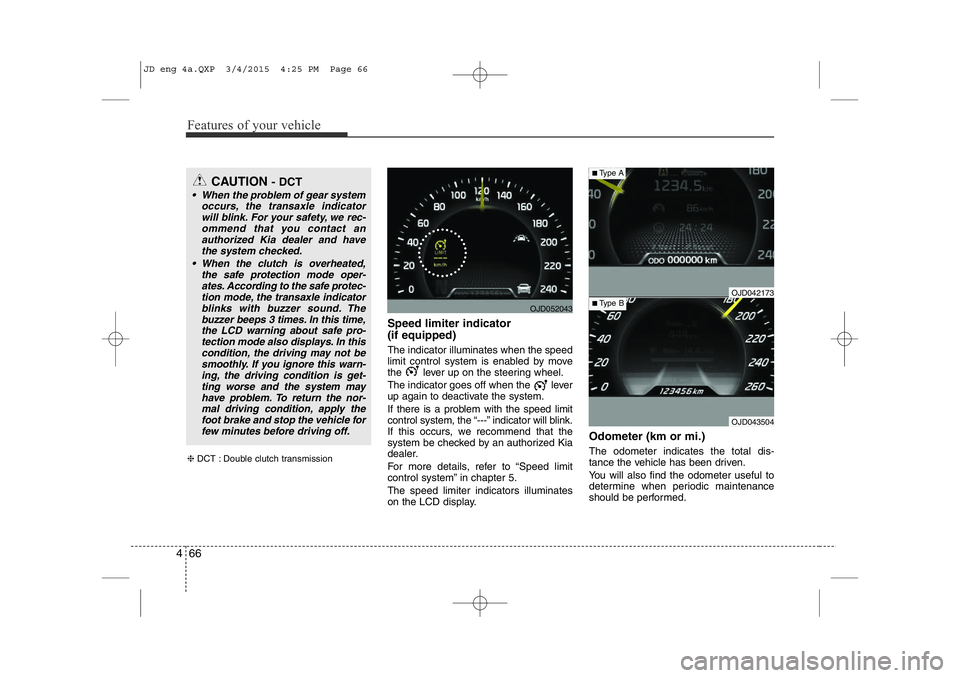
Speed limiter indicator (if equipped) The indicator illuminates when the speed
limit control system is enabled by move
the lever up on the steering wheel.
The indicator goes off when the lever
up again to deactivate the system.
If there is a problem with the speed limit
control system, the “---” indicator will blink.
If this occurs, we recommend that the
system be checked by an authorized Kia
dealer.
For more details, refer to “Speed limit
control system” in chapter 5. The speed limiter indicators illuminates
on the LCD display. Odometer (km or mi.) The odometer indicates the total dis-
tance the vehicle has been driven.
You will also find the odometer useful to
determine when periodic maintenance
should be performed.
CAUTION
- DCT
• When the problem of gear system
occurs, the transaxle indicatorwill blink. For your safety, we rec- ommend that you contact an authorized Kia dealer and have
the system checked.
• When the clutch is overheated, the safe protection mode oper-ates. According to the safe protec-
tion mode, the transaxle indicatorblinks with buzzer sound. The buzzer beeps 3 times. In this time, the LCD warning about safe pro-
tection mode also displays. In this
condition, the driving may not besmoothly. If you ignore this warn- ing, the driving condition is get-ting worse and the system may have problem. To return the nor-
mal driving condition, apply thefoot brake and stop the vehicle for few minutes before driving off.
❈ DCT : Double clutch transmission
OJD052043
OJD043504
■ Type B
■Type A
OJD042173
JD eng 4a.QXP 3/4/2015 4:25 PM Page 66
Page 153 of 1210

Features of your vehicle
72
4
Lamp Menu
• Headlamp delay (if equipped)
If the headlamp delay function is checked :
The Headlamp delay and Headlamp
Welcome function will be activated.
• Auto Triple Turn
(One-touch triple turn signal)
If the auto triple turn function is checked :
The lane change signals will blink 3 times
when the turn signal lever is moved
slightly.
• Welcome Light (if equipped)
If the welcome light function is checked :
The welcome light function of puddle
lamp will activate. Settings Menu
• Seat Easy Access (for Driver Position
Memory System equipped vehicle)
(if equipped)
If the seat easy access function is
checked:
The driver's seat will automatically move
forward or rearward for the driver to enter
or exit the vehicle comfortably.
• Welcome Sound
If the welcome sound function is checked :
The Welcome Sound function will be acti-
vated.
• Steering Position (if equipped)
If the steering position function is
checked:
The warning illuminates on the LCD dis-
play when the steering wheel is not
aligned with the ENGINE STRAT/STOP
button in the ON position. • AVG fuel ECO Reset
Auto Reset - The average fuel economy
will reset automatically
when you drive after refuel-ing.
Manual Reset - The average fuel econo- my will not reset auto-
matically when you drive
after refueling. You can
reset the average fuel
economy by pressing
the button for morethan 1 second when the
average fuel economy is
displayed.
• Speed Gauge Scale (if equipped)
- 100% : The size of the numbers on speed gauge is normal state.
- 110% : The size of the numbers on speed gauge will increase.
• Unit
You can choose the displayed unit in the
instrument cluster “km” or “mile”.
• Language
Choose the language you prefer within
the LCD display.
JD eng 4a.QXP 3/4/2015 4:25 PM Page 72
Page 154 of 1210

473
Features of your vehicle
LCD display information
Sunroof open
If driver removes the ignition key (Smart
key : turns off the engine) and opens the
driver-side door when the sunroof is not
fully closed, warning message will appear
on the LCD display. Also, the warning
chime sounds for approximately 7 sec-
onds.
Illumination intensity
The illumination intensity of the instru-
ment panel is shown when adjusting it
with the illumination control switch.
For more details, refer to “Instrument
panel illumination” in chapter 4.
Turn on "FUSE SWITCH" (mode switch)
The notice appears to inform the driver to
turn on the fuse switch in the instrument
panel under the steering wheel.
For more details, refer to “Fuses” in chap- ter 7.
OJD042078/OJD042215
■
Normal vision
■SupervisionOJD042079/OJD042214
■
Normal vision
■SupervisionOJD042240/OJD042188
■
Normal vision
■Supervision
JD eng 4a.QXP 3/4/2015 4:25 PM Page 73
Page 155 of 1210

Features of your vehicle
74
4
Parking assist warning (if equipped)
Displays the area an obstacle is detected
while moving forward or rearward.
For more details, refer to “Parking assist
system” in chapter 4.
Align steering wheel (if equipped)
If you start the engine when the steering
wheel is turned 90 degrees to the left (or
right) after a couple of seconds, “Align
steering wheel” illuminates on the LCD
display for 5 seconds.
Turn the steering wheel to the right (or left)
and make it turned to the left (or right) less
than 30 degrees.
For vehicle’s equipped with smart
key system
Key not in vehicle
If the smart key is not in the vehicle and
if any door is opened or closed with the
engine start/stop button in the ACC, ON,
or START position, the warning illumi-
nates on the LCD display. Also, the chime
sounds for 5 seconds when the smart
key is not in the vehicle and the door isclosed.
Always have the smart key with you.
OJD042163/OJD042196
■
Normal vision
■SupervisionOJD042164/OJD042211
■
Normal vision
■SupervisionOJD042073/OJD042205
■
Normal vision
■Supervision
JD eng 4a.QXP 3/4/2015 4:25 PM Page 74
Page 158 of 1210

477
Features of your vehicle
Press start button again
If you can not operate the engine
start/stop button when there is a problem
with the engine start/stop button system,
the warning illuminates for 10 seconds
and the chime sounds continuously to
indicate that you could start the engine
by pressing the engine start/stop button
once more. The chime will stop if the engine
start/stop button system works normally
or the theft alarm system is armed.
If the warning illuminates each time you
press the engine start/stop button, we
recommend that the system be checked
by an authorized Kia dealer.Shift to "P" or "N" to start engine
If you try to start the engine with the shift
lever not in the P(Park) or N(Neutral)
position, the warning illuminates for
about 10 seconds on the LCD display.
You can also start the engine with the
shift lever in the N(Neutral) position, but
for your safety start the engine with the
shift lever in the P(Park) position.
Press start button while turn steering
(if equipped)
If the steering wheel does not unlock nor-
mally when the engine start/stop button
is pressed, the warning illuminates for 10
seconds on the LCD display. Also, the
warning chime sounds once and the
engine start/stop button light blinks for 10
seconds.
When you are warned, press the engine
start/stop button while turning the steer-
ing wheel right and left.
OJD042074/OJD042206
■
Normal vision
■SupervisionOJD042077/OJD042209
■
Normal vision
■SupervisionOJD042067/OJD042199
■
Normal vision
■Supervision
JD eng 4a.QXP 3/4/2015 4:26 PM Page 77
Page 159 of 1210

Features of your vehicle
78
4
Check steering wheel lock system
(if equipped)
If the steering wheel does not lock nor-
mally when the engine start/stop button
changes to the OFF position, the warning
illuminates for 10 seconds on the LCD
display. Also, the warning chime sounds
for 3 seconds and the engine start/stop
button light blinks for 10 seconds. Check "BRAKE SWITCH" fuse
When the brake switch fuse is discon-
nected, the warning illuminates for 10
seconds on the LCD display.
Replace the fuse with a new one. If that
is not possible you can start the engine
by pressing the engine start/stop button
for 10 seconds in ACC.
Torque reduced due to overheating (for
T-GDI engine)
When the engine coolant temperature
exceeds 115°C, this message will be dis-
played and the torque will be reduced to
protect the engine.
OJD042069/OJD042201
■
Normal vision
■SupervisionOJD042076/OJD042208
■
Normal vision
■SupervisionOJD043509
JD eng 4a.QXP 3/4/2015 4:26 PM Page 78
Page 164 of 1210

483
Features of your vehicle
Your vehicle is equipped with dual-diago-
nal braking systems. This means you still
have braking on two wheels even if one
of the dual systems should fail. With only
one of the dual systems working, more
than normal pedal travel and greaterpedal pressure are required to stop the
car. Also, the car will not stop in as short
a distance with only a portion of the
brake system working. If the brakes fail
while you are driving, shift to a lower gear
for additional engine braking and stop the
car as soon as it is safe to do so.
To check bulb operation, check whether
the parking brake and brake fluid warning
light illuminates when the ignition switchis in the ON position.Electric Parking Brake(EPB) malfunction indicator (if equipped)
The EPB malfunction indicator will illumi-
nate when the ignition switch is turned
ON, but should go off after approximate-
ly 3 seconds. If the warning light does not
come on, or continuously remains on we
recommend that the system be checked
by an authorized Kia dealer.
Also, the EPB malfunction indicator may illuminate when the ESC indicator comes
on to indicate that the ESC is not working
properly, but if this occurs, it does notindicate the EPB has malfunctioned.
For more details, refer to "EPB" in chap- ter 5.
Anti-lock brake system
(ABS) warning light
This light illuminates if the ignition switch
is turned ON and goes off in approxi-
mately 3 seconds if the system is operat-
ing normally.
If the ABS warning light remains on,
comes on while driving, or does not
come on when the ignition switch is
turned to the ON position, this indicates
that there may be a problem with the
ABS.
If this occurs, we recommend that the
system be checked by an authorized Kia
dealer. The normal braking system will
still be operational, but without the assis-
tance of the anti-lock brake system.
WARNING
Driving the vehicle with a warning light on is dangerous. If the brakewarning light remains on, we recom-mend that the system be checked by an authorized Kia dealer.
EPB
JD eng 4a.QXP 3/4/2015 4:26 PM Page 83
Page 166 of 1210

485
Features of your vehicle
Auto stop indicator(if equipped)
This indicator will illuminate when the engine enters the Idle Stop mode of theISG (Idle Stop and Go) system.
When the automatic starting occurrs, the auto stop indicator on the cluster will
blink for 5 seconds.
For more details, refer to the ISG (Idle Stop and Go) system in chapter 5.
For vehicles equipped with instrument
cluster type B, the indicator illuminates
on the LCD display.
✽NOTICE
When the engine automatically starts by
the ISG system, some warning lights
(ABS, ESC, ESC OFF, EPS or Parking
brake warning light) may turn on for a
few seconds.
This happens because of low battery
voltage. It does not mean the system is
malfunctioning.
Cruise indicator (if equipped)
CRUISE indicator
The indicator illuminates when the cruise
control system is enabled.
The cruise indicator in the instrument
cluster is illuminated when the cruise
control ON-OFF button on the steer-ing wheel is pushed.
The indicator goes off when the cruise
control ON-OFF button is pushed
again. For more information about the
use of cruise control, refer to “Cruise
control system” in chapter 5.
Cruise SET indicator
The indicator illuminates when the cruise
control switch (SET- or RES+) is ON.
The cruise SET indicator in the instru-
ment cluster illuminats when the cruise
control switch (SET- or RES+) is pushed.
The cruise SET indicator does not illumi-
nate when the cruise control cancel but-ton O is pushed or the system is disen-gaged.
Charging system warning light
This warning light indicates a malfunction
of either the generator or electricalcharging system.
If the warning light comes on while the
vehicle is in motion:
1. Drive to the nearest safe location.
2. With the engine off, check the genera- tor drive belt for looseness or break-
age.
3. If the belt is adjusted properly, a prob- lem exists somewhere in the electrical
charging system. We recommend that
the system be checked by an author-
ized Kia dealer.
SET
JD eng 4a.QXP 3/4/2015 4:26 PM Page 85
Page 181 of 1210
Features of your vehicle
100
4
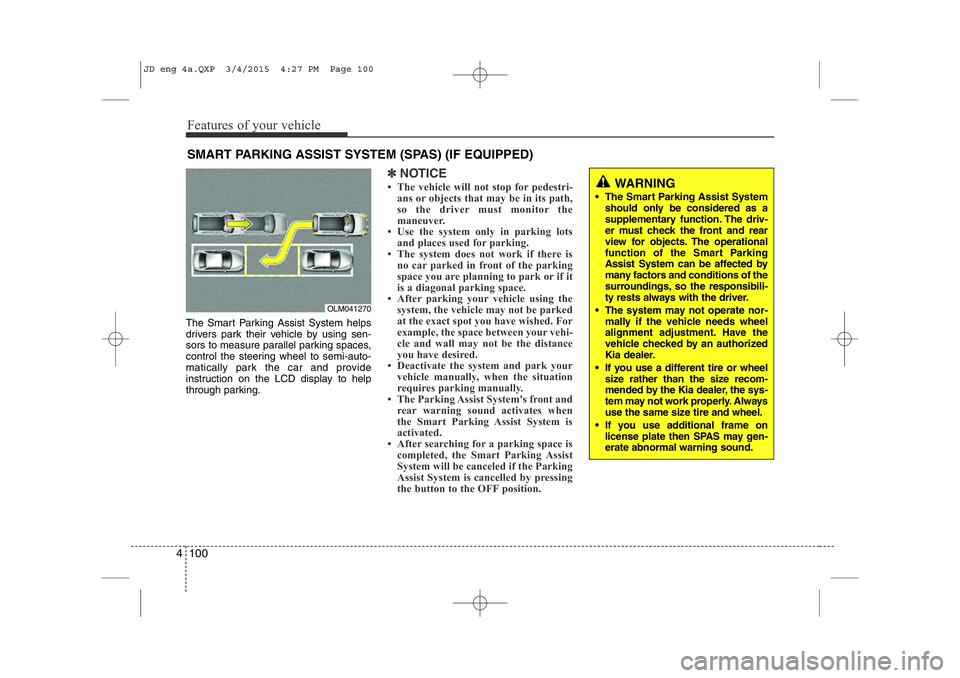
The Smart Parking Assist System helps
drivers park their vehicle by using sen-
sors to measure parallel parking spaces,
control the steering wheel to semi-auto-
matically park the car and provide
instruction on the LCD display to help
through parking.
✽NOTICE
• The vehicle will not stop for pedestri- ans or objects that may be in its path,
so the driver must monitor the
maneuver.
• Use the system only in parking lots
and places used for parking.
• The system does not work if there is no car parked in front of the parking
space you are planning to park or if it
is a diagonal parking space.
• After parking your vehicle using the
system, the vehicle may not be parked
at the exact spot you have wished. For
example, the space between your vehi-
cle and wall may not be the distance
you have desired.
• Deactivate the system and park your vehicle manually, when the situation
requires parking manually.
• The Parking Assist System's front and
rear warning sound activates when
the Smart Parking Assist System is
activated.
• After searching for a parking space is completed, the Smart Parking Assist
System will be canceled if the Parking
Assist System is cancelled by pressing
the button to the OFF position.
SMART PARKING ASSIST SYSTEM (SPAS) (IF EQUIPPED)
OLM041270
WARNING
• The Smart Parking Assist System should only be considered as a
supplementary function. The driv-
er must check the front and rear
view for objects. The operational
function of the Smart Parking
Assist System can be affected by
many factors and conditions of the
surroundings, so the responsibili-
ty rests always with the driver.
• The system may not operate nor- mally if the vehicle needs wheel
alignment adjustment. Have the
vehicle checked by an authorized
Kia dealer.
• If you use a different tire or wheel size rather than the size recom-
mended by the Kia dealer, the sys-
tem may not work properly. Always
use the same size tire and wheel.
• If you use additional frame on license plate then SPAS may gen- erate abnormal warning sound.
JD eng 4a.QXP 3/4/2015 4:27 PM Page 100
Page 182 of 1210

4 101
Features of your vehicle
Operating condition
The system will help park the vehicle in
the middle or back of a parked vehicle.
Use the system when all the below con-ditions are met.
• When the parking space is a straightline
• When parallel parking is required
• When there is a parked vehicle
• When there is enough space to move the vehicle Non-operating condition
Never use the Smart Parking Assist
System in the below conditions.
• Curved parking space
• Inclined roads
• A vehicle loaded with longer or wider
cargo compared to the vehicle
• Diagonal parking space
• Parking space with trash, grass or bar- riers
• Heavy snow or rain
• A pole close to the parking line
• Bumpy roads
• A vehicle equipped with a snow chain or spare tire
• Tire pressure lower or higher than the standard tire pressure
• A trailer connected to the vehicle
• Slippery or uneven road
• Big vehicles such as buses or trucks parked
• Sensor covered with foreign matter, such as snow or water
• Moisture frozen on the sensor.
• A motorcycle or bicycle parked
• A trash can or obstacle near • Heavy wind
• Wheel changed to an unauthorized
size
• A problem with the wheel alignment
• Next to a garden or bush
• A accessory installed on the detective area the of sensors (such as number plate holder)
• Vehicle leaned severely to one side
• Strong sunlight or very cold weather
• Ultrasonic interference other vehicle's. Such as horn sounds of other vehicles,
motorcycle's engine noise, air brake
noise of heavy vehicles and with the
other vehicle's parking assist system
working.
OLM041271
■Right side
- parallel mode■Left side
-parallel mode
JD eng 4a.QXP 3/4/2015 4:27 PM Page 101