instrument cluster KIA CEED 2015 Owners Manual
[x] Cancel search | Manufacturer: KIA, Model Year: 2015, Model line: CEED, Model: KIA CEED 2015Pages: 1210, PDF Size: 35.92 MB
Page 13 of 1210
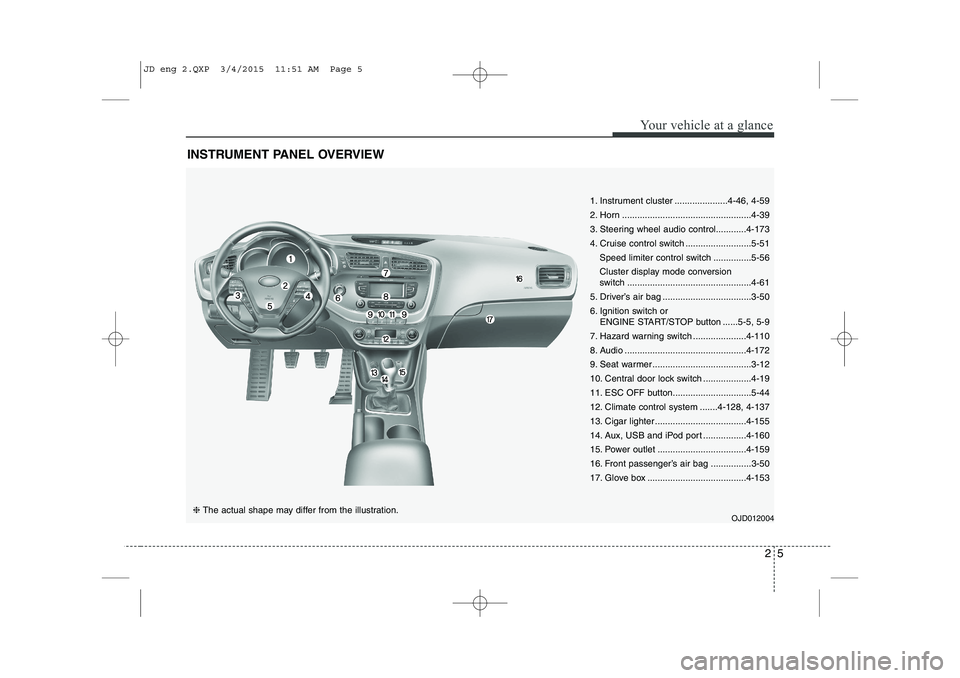
INSTRUMENT PANEL OVERVIEW
OJD012004
25
Your vehicle at a glance
❈ The actual shape may differ from the illustration.
1. Instrument cluster .....................4-46, 4-59
2. Horn ...................................................4-39
3. Steering wheel audio control............4-173
4. Cruise control switch ..........................5-51
Speed limiter control switch ...............5-56
Cluster display mode conversion
switch .................................................4-61
5. Driver’s air bag ...................................3-50
6. Ignition switch or ENGINE START/STOP button ......5-5, 5-9
7. Hazard warning switch .....................4-110
8. Audio ................................................4-172
9. Seat warmer .......................................3-12
10. Central door lock switch ...................4-19
11. ESC OFF button...............................5-44
12. Climate control system .......4-128, 4-137
13. Cigar lighter ....................................4-155
14. Aux, USB and iPod port .................4-160
15. Power outlet ...................................4-159
16. Front passenger’s air bag ................3-50
17. Glove box .......................................4-153
JD eng 2.QXP 3/4/2015 11:51 AM Page 5
Page 65 of 1210
349
Safety features of your vehicle
WARNING
If an air bag deploys, there may be a loud noise followed by a fine
dust released in the vehicle.These conditions are normal and
are not hazardous - the air bags
are packed in this fine powder.
The dust generated during air
bag deployment may cause skin
or eye irritation as well as aggra-
vate asthma for some persons.
Always wash all exposed skin
areas thoroughly with lukewarmwater and a mild soap after an
accident in which the air bags
were deployed.
(Continued)(Continued)
The SRS can function only whenthe ignition key is in the ON posi-
tion. If the SRS air bag warning
light does not illuminate, or con-
tinuously remains on after illumi-
nating for about 6 seconds when
the ignition key is turned to the
ON position, or after the engine is
started, comes on while driving,
the SRS is not working properly.
If this occurs, we recommend
that the system be inspected by
an authorized Kia dealer.
Before you replace a fuse or dis- connect a battery terminal, turn
the ignition switch to the LOCK
position and remove the ignition
key. Never remove or replace the
air bag related fuse(s) when the
ignition switch is in the ON posi-
tion. Failure to heed this warning
will cause the SRS air bag warn-
ing light to illuminate.
WARNING
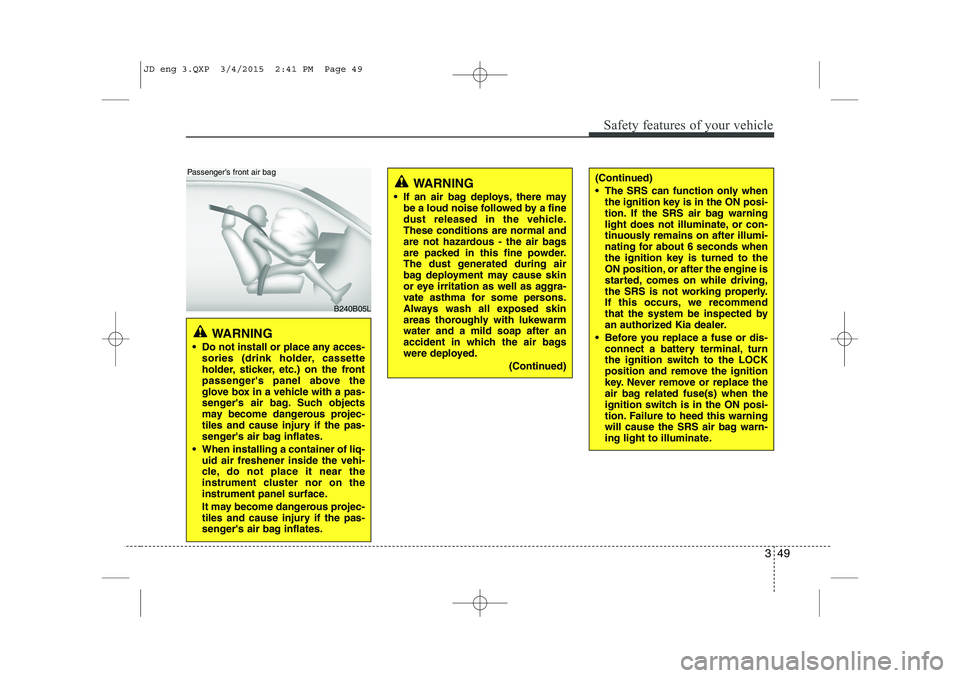
Do not install or place any acces- sories (drink holder, cassette
holder, sticker, etc.) on the front
passenger's panel above the
glove box in a vehicle with a pas-
senger's air bag. Such objects
may become dangerous projec-
tiles and cause injury if the pas-
senger's air bag inflates.
When installing a container of liq- uid air freshener inside the vehi-
cle, do not place it near the
instrument cluster nor on the
instrument panel surface.
It may become dangerous projec-
tiles and cause injury if the pas-
senger's air bag inflates.
B240B05L
Passenger’s front air bag
JD eng 3.QXP 3/4/2015 2:41 PM Page 49
Page 82 of 1210
Features of your vehicle
Keys . . . . . . . . . . . . . . . . . . . . . . . . . . . . . . . . . . . . . 4-4• Record your key number . . . . . . . . . . . . . . . . . . . . . 4-4
• Key operations . . . . . . . . . . . . . . . . . . . . . . . . . . . . . . 4-4
• Immobilizer system . . . . . . . . . . . . . . . . . . . . . . . . . . 4-4
Remote keyless entry . . . . . . . . . . . . . . . . . . . . . . . 4-6 • Remote keyless entry system operations . . . . . . . . . 4-6
• Transmitter precautions . . . . . . . . . . . . . . . . . . . . . . 4-8
• Battery replacement . . . . . . . . . . . . . . . . . . . . . . . . . 4-9
Smart key . . . . . . . . . . . . . . . . . . . . . . . . . . . . . . . . 4-11 • Smart key function . . . . . . . . . . . . . . . . . . . . . . . . . . 4-11
• Smart key precautions. . . . . . . . . . . . . . . . . . . . . . . . 4-13
• Door lock/unlock in an emergency situation . . . . . . 4-13
Theft-alarm system . . . . . . . . . . . . . . . . . . . . . . . . 4-14 • Armed stage . . . . . . . . . . . . . . . . . . . . . . . . . . . . . . . . 4-14
• Theft-alarm stage . . . . . . . . . . . . . . . . . . . . . . . . . . . . 4-15
• Disarmed stage . . . . . . . . . . . . . . . . . . . . . . . . . . . . . . 4-16
Door locks . . . . . . . . . . . . . . . . . . . . . . . . . . . . . . . . 4-17 • From outside. . . . . . . . . . . . . . . . . . . . . . . . . . . . . . . . 4-17
• From inside . . . . . . . . . . . . . . . . . . . . . . . . . . . . . . . . . 4-18
• Deadlocks . . . . . . . . . . . . . . . . . . . . . . . . . . . . . . . . . . 4-20
• Door lock/unlock features . . . . . . . . . . . . . . . . . . . . . 4-20
• Child-protector rear door lock . . . . . . . . . . . . . . . . . 4-21
Tailgate . . . . . . . . . . . . . . . . . . . . . . . . . . . . . . . . . . 4-22 • Opening the tailgate. . . . . . . . . . . . . . . . . . . . . . . . . . 4-22
• Closing the tailgate . . . . . . . . . . . . . . . . . . . . . . . . . . 4-22
• Emergency tailgate safety release . . . . . . . . . . . . . . 4-23
Windows . . . . . . . . . . . . . . . . . . . . . . . . . . . . . . . . . 4-24 • Power windows. . . . . . . . . . . . . . . . . . . . . . . . . . . . . . 4-25
• Manual windows . . . . . . . . . . . . . . . . . . . . . . . . . . . . 4-27 Hood . . . . . . . . . . . . . . . . . . . . . . . . . . . . . . . . . . . . 4-28
• Opening the hood . . . . . . . . . . . . . . . . . . . . . . . . . . . . 4-28
• Closing the hood. . . . . . . . . . . . . . . . . . . . . . . . . . . . . 4-29
Fuel filler lid . . . . . . . . . . . . . . . . . . . . . . . . . . . . . . 4-30 • Opening the fuel filler lid . . . . . . . . . . . . . . . . . . . . . 4-30
• Closing the fuel filler lid . . . . . . . . . . . . . . . . . . . . . . 4-30
Panorama sunroof . . . . . . . . . . . . . . . . . . . . . . . . . 4-33 • Sunroof open warning . . . . . . . . . . . . . . . . . . . . . . . . 4-33
• Sunshade . . . . . . . . . . . . . . . . . . . . . . . . . . . . . . . . . . . 4-34
• Sliding the sunroof . . . . . . . . . . . . . . . . . . . . . . . . . . . 4-34
• Tilting the sunroof . . . . . . . . . . . . . . . . . . . . . . . . . . . 4-34
• Closing the sunroof . . . . . . . . . . . . . . . . . . . . . . . . . . 4-35
• Resetting the sunroof . . . . . . . . . . . . . . . . . . . . . . . . . 4-36
Steering wheel . . . . . . . . . . . . . . . . . . . . . . . . . . . . 4-37 • Electronic power steering . . . . . . . . . . . . . . . . . . . . . 4-37
• Tilt and telescopic steering . . . . . . . . . . . . . . . . . . . . 4-38
• Heated steering wheel . . . . . . . . . . . . . . . . . . . . . . . . 4-38
• Horn . . . . . . . . . . . . . . . . . . . . . . . . . . . . . . . . . . . . . . 4-39
• Flex steering wheel. . . . . . . . . . . . . . . . . . . . . . . . . . . 4-40
Mirrors . . . . . . . . . . . . . . . . . . . . . . . . . . . . . . . . . . 4-42 • Inside rearview mirror . . . . . . . . . . . . . . . . . . . . . . . 4-42
• Outside rearview mirror . . . . . . . . . . . . . . . . . . . . . . 4-43
Instrument cluster (Normal vision) . . . . . . . . . . . 4-46 • Instrument panel illumination . . . . . . . . . . . . . . . . . 4-47
• Gauges . . . . . . . . . . . . . . . . . . . . . . . . . . . . . . . . . . . . . 4-47
• Manual transaxle shift indicator . . . . . . . . . . . . . . . 4-49
• Automatic transaxle shift position indicator . . . . . . 4-49
• Double clutch transmission shift indicator . . . . . . . 4-50
• Speed limiter indicator . . . . . . . . . . . . . . . . . . . . . . . 4-51
4
JD eng 4a.QXP 3/4/2015 4:21 PM Page 1
Page 83 of 1210
• Odometer . . . . . . . . . . . . . . . . . . . . . . . . . . . . . . . . . . 4-51
• Trip computer . . . . . . . . . . . . . . . . . . . . . . . . . . . . . . 4-51
• LCD display information . . . . . . . . . . . . . . . . . . . . . 4-73
• Warnings and indicators . . . . . . . . . . . . . . . . . . . . . . 4-79
Instrument cluster (Super vision) . . . . . . . . . . . . 4-59 • Instrument panel illumination . . . . . . . . . . . . . . . . . 4-61
• Cluster display mode conversion . . . . . . . . . . . . . . . 4-61
• Gauges . . . . . . . . . . . . . . . . . . . . . . . . . . . . . . . . . . . . . 4-61
• Manual transaxle shift indicator . . . . . . . . . . . . . . . 4-64
• Automatic transaxle shift position indicator . . . . . . 4-65
• Double clutch transmission shift indicator . . . . . . . 4-65
• Speed limiter indicator . . . . . . . . . . . . . . . . . . . . . . . 4-66
• Odometer . . . . . . . . . . . . . . . . . . . . . . . . . . . . . . . . . . 4-66
• Trip computer . . . . . . . . . . . . . . . . . . . . . . . . . . . . . . 4-67
• LCD display information . . . . . . . . . . . . . . . . . . . . . 4-73
• Warnings and indicators . . . . . . . . . . . . . . . . . . . . . . 4-79
LCD display warnings and indicators (instrument panel display) . . . . . . . . . . . . . . . . . 4-90
Rear parking assist system . . . . . . . . . . . . . . . . . . 4-92 • Operation . . . . . . . . . . . . . . . . . . . . . . . . . . . . . . . . . . 4-92
• Non-operational conditions . . . . . . . . . . . . . . . . . . . . 4-94
• Precautions . . . . . . . . . . . . . . . . . . . . . . . . . . . . . . . . . 4-94
• Self-diagnosis . . . . . . . . . . . . . . . . . . . . . . . . . . . . . . . 4-95
Parking assist system. . . . . . . . . . . . . . . . . . . . . . . 4-96 • Operation . . . . . . . . . . . . . . . . . . . . . . . . . . . . . . . . . . 4-96
• Non-operational conditions . . . . . . . . . . . . . . . . . . . . 4-98
• Self-diagnosis . . . . . . . . . . . . . . . . . . . . . . . . . . . . . . . 4-99
Smart Parking Assist System(SPAS) . . . . . . . . . . 4-100 • Operating condition . . . . . . . . . . . . . . . . . . . . . . . . . . 4-101 • Non-operating condition . . . . . . . . . . . . . . . . . . . . . . 4-101
• How the system works . . . . . . . . . . . . . . . . . . . . . . . . 4-104
• Additional instructions(messages) . . . . . . . . . . . . . . 4-109
• System malfunction . . . . . . . . . . . . . . . . . . . . . . . . . . 4-109
Rearview camera . . . . . . . . . . . . . . . . . . . . . . . . . . 4-110
Hazard warning flasher . . . . . . . . . . . . . . . . . . . . 4-110
Lighting. . . . . . . . . . . . . . . . . . . . . . . . . . . . . . . . . . 4-111 • Battery saver function . . . . . . . . . . . . . . . . . . . . . . . . 4-111
• Headlamp delay function . . . . . . . . . . . . . . . . . . . . . 4-111
• Headlight (Headlamp) welcome function . . . . . . . . 4-111
• Static bending light . . . . . . . . . . . . . . . . . . . . . . . . . . 4-112
• Lighting control . . . . . . . . . . . . . . . . . . . . . . . . . . . . . 4-112
• High - beam operation. . . . . . . . . . . . . . . . . . . . . . . . 4-114
• Turn signals and lane change signals . . . . . . . . . . . . 4-115
• Front fog light . . . . . . . . . . . . . . . . . . . . . . . . . . . . . . 4-116
• Rear fog light . . . . . . . . . . . . . . . . . . . . . . . . . . . . . . . 4-116
• Daytime running light . . . . . . . . . . . . . . . . . . . . . . . . 4-116
• Headlight leveling device. . . . . . . . . . . . . . . . . . . . . . 4-117
• Adaptive Front Lighting System (AFLS) . . . . . . . . 4-118
Wipers and washers . . . . . . . . . . . . . . . . . . . . . . . 4-119 • Windshield wipers (front) . . . . . . . . . . . . . . . . . . . . . 4-119
• Windshield washers (front) . . . . . . . . . . . . . . . . . . . . 4-121
• Rear window wiper and washer switch . . . . . . . . . . 4-122
Interior light . . . . . . . . . . . . . . . . . . . . . . . . . . . . . . 4-123 • Interior lamp AUTO cut . . . . . . . . . . . . . . . . . . . . . . 4-123
• Map lamp . . . . . . . . . . . . . . . . . . . . . . . . . . . . . . . . . . 4-123
• Room lamp . . . . . . . . . . . . . . . . . . . . . . . . . . . . . . . . . 4-124
• Vanity mirror lamp . . . . . . . . . . . . . . . . . . . . . . . . . . 4-124
• Luggage room lamp . . . . . . . . . . . . . . . . . . . . . . . . . . 4-125
4
JD eng 4a.QXP 3/4/2015 4:21 PM Page 2
Page 127 of 1210
Features of your vehicle
46
4
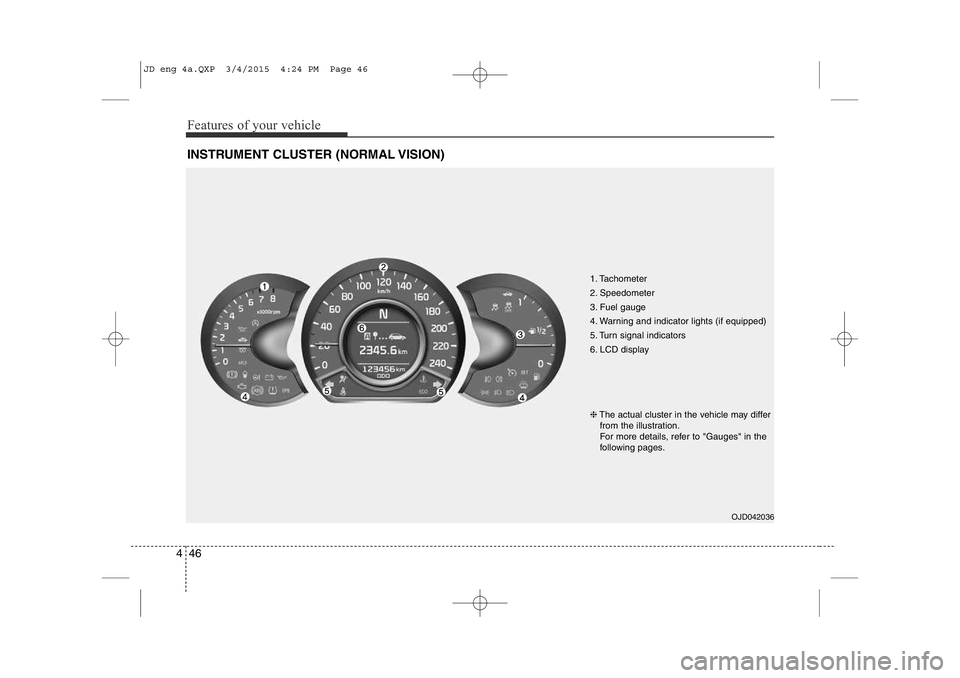
INSTRUMENT CLUSTER (NORMAL VISION)
1. Tachometer
2. Speedometer
3. Fuel gauge
4. Warning and indicator lights (if equipped)
5. Turn signal indicators
6. LCD display
OJD042036
❈
The actual cluster in the vehicle may differ
from the illustration.
For more details, refer to "Gauges" in the
following pages.
JD eng 4a.QXP 3/4/2015 4:24 PM Page 46
Page 128 of 1210
447
Features of your vehicle
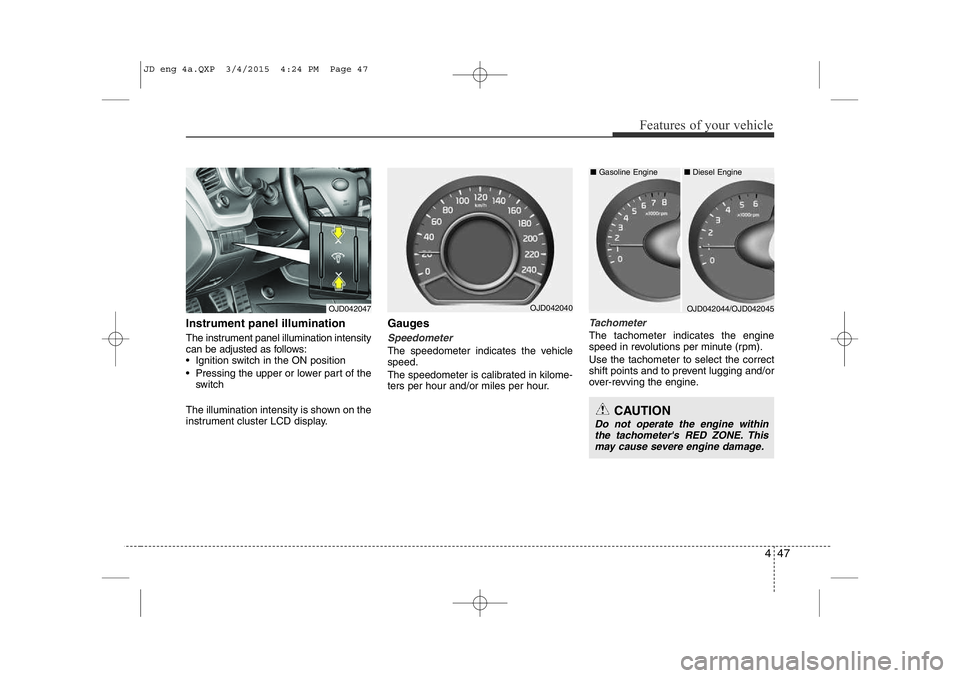
Instrument panel illumination
The instrument panel illumination intensity
can be adjusted as follows:
• Ignition switch in the ON position
• Pressing the upper or lower part of theswitch
The illumination intensity is shown on the
instrument cluster LCD display. Gauges
Speedometer
The speedometer indicates the vehicle speed.
The speedometer is calibrated in kilome-
ters per hour and/or miles per hour.
Tachometer
The tachometer indicates the engine
speed in revolutions per minute (rpm). Use the tachometer to select the correct
shift points and to prevent lugging and/or
over-revving the engine.
OJD042047OJD042044/OJD042045OJD042040■
Diesel Engine
■ Gasoline Engine
CAUTION
Do not operate the engine within
the tachometer's RED ZONE. This
may cause severe engine damage.
JD eng 4a.QXP 3/4/2015 4:24 PM Page 47
Page 140 of 1210
459
Features of your vehicle
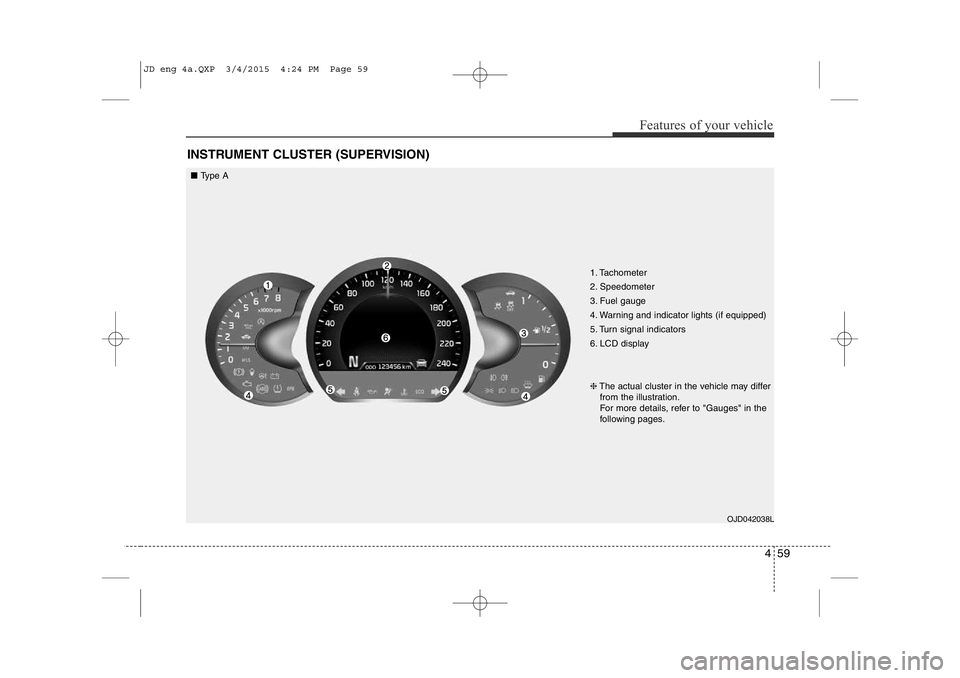
INSTRUMENT CLUSTER (SUPERVISION)
1. Tachometer
2. Speedometer
3. Fuel gauge
4. Warning and indicator lights (if equipped)
5. Turn signal indicators
6. LCD displayOJD042038L
❈
The actual cluster in the vehicle may differ
from the illustration.
For more details, refer to "Gauges" in the
following pages.
■ Type A
JD eng 4a.QXP 3/4/2015 4:24 PM Page 59
Page 142 of 1210
461
Features of your vehicle
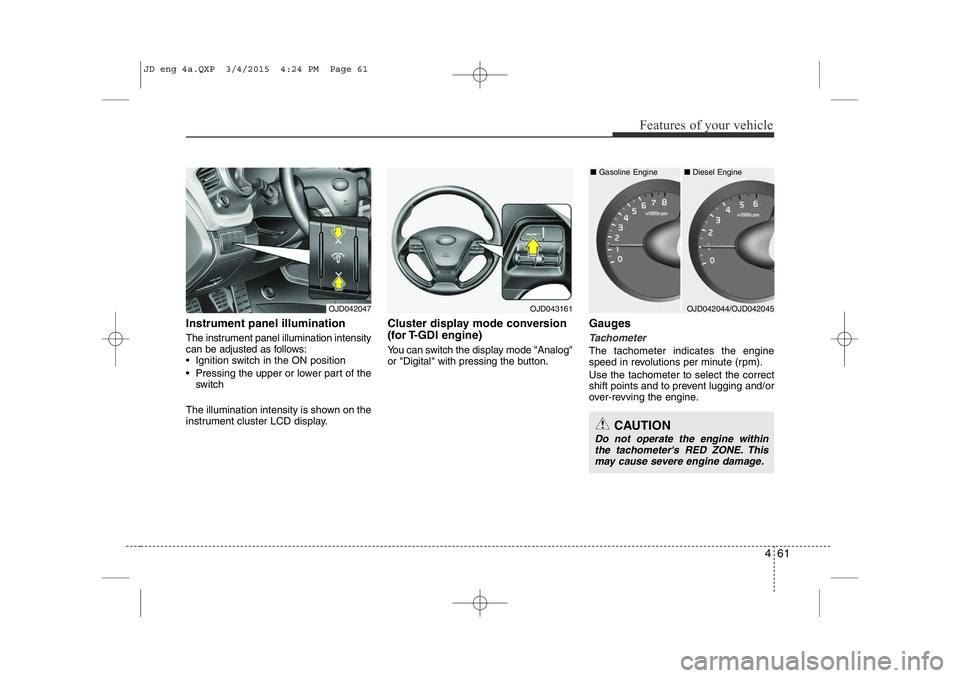
Instrument panel illumination
The instrument panel illumination intensity
can be adjusted as follows:
• Ignition switch in the ON position
• Pressing the upper or lower part of theswitch
The illumination intensity is shown on the
instrument cluster LCD display. Cluster display mode conversion
(for T-GDI engine)
You can switch the display mode "Analog"
or "Digital" with pressing the button.
Gauges
Tachometer
The tachometer indicates the engine
speed in revolutions per minute (rpm). Use the tachometer to select the correct
shift points and to prevent lugging and/or
over-revving the engine.
OJD042047OJD043161
CAUTION
Do not operate the engine within
the tachometer's RED ZONE. Thismay cause severe engine damage.
OJD042044/OJD042045
■
Diesel Engine
■ Gasoline Engine
JD eng 4a.QXP 3/4/2015 4:24 PM Page 61
Page 153 of 1210

Features of your vehicle
72
4
Lamp Menu
• Headlamp delay (if equipped)
If the headlamp delay function is checked :
The Headlamp delay and Headlamp
Welcome function will be activated.
• Auto Triple Turn
(One-touch triple turn signal)
If the auto triple turn function is checked :
The lane change signals will blink 3 times
when the turn signal lever is moved
slightly.
• Welcome Light (if equipped)
If the welcome light function is checked :
The welcome light function of puddle
lamp will activate. Settings Menu
• Seat Easy Access (for Driver Position
Memory System equipped vehicle)
(if equipped)
If the seat easy access function is
checked:
The driver's seat will automatically move
forward or rearward for the driver to enter
or exit the vehicle comfortably.
• Welcome Sound
If the welcome sound function is checked :
The Welcome Sound function will be acti-
vated.
• Steering Position (if equipped)
If the steering position function is
checked:
The warning illuminates on the LCD dis-
play when the steering wheel is not
aligned with the ENGINE STRAT/STOP
button in the ON position. • AVG fuel ECO Reset
Auto Reset - The average fuel economy
will reset automatically
when you drive after refuel-ing.
Manual Reset - The average fuel econo- my will not reset auto-
matically when you drive
after refueling. You can
reset the average fuel
economy by pressing
the button for morethan 1 second when the
average fuel economy is
displayed.
• Speed Gauge Scale (if equipped)
- 100% : The size of the numbers on speed gauge is normal state.
- 110% : The size of the numbers on speed gauge will increase.
• Unit
You can choose the displayed unit in the
instrument cluster “km” or “mile”.
• Language
Choose the language you prefer within
the LCD display.
JD eng 4a.QXP 3/4/2015 4:25 PM Page 72
Page 160 of 1210

479
Features of your vehicle
Warnings and indicators
(Instrument cluster)
All warning lights are checked by turning
the ignition switch ON (do not start the
engine). If any light that does not illumi-
nate, we recommend that the system be
checked by an authorized Kia dealer.
After starting the engine, check to make
sure that all warning lights are off. If anyare still on, this indicates a situation thatneeds attention.
The following warning and indicators are
introduced in the previous pages.
• Automatic transaxle/Double clutch trans-mission shift lever indicator
• Manual transaxle shift indicator
• Parking assist warning (LCD display)Active ECO indicator (if equipped)
When the active ECO is operating the
ECO indicator illuminates green. For
more detailed information, refer to
"Active ECO" in chapter 5.
Seat belt warning andchime light
As a reminder to the driver, the seat belt
warning light will blink or illuminate for
approximately 6 seconds each time you
turn the ignition switch ON regardless of
belt fastening.
For more details, refer to the “Seat belt” in chapter 3.
Air bag warning light
This warning light will illuminate for
approximately 6 seconds each time you
turn the ignition switch to the ON posi-tion. This light also comes on when the SRS
is not working properly. If the air bag
warning light does not come on, or con-
tinuously remains on after operating for
about 6 seconds when you turn the igni-
tion switch to the ON position or started
the engine, or if it comes on while driving,
we recommend that the system be
inspected by an authorized Kia dealer.
ECO
JD eng 4a.QXP 3/4/2015 4:26 PM Page 79