key KIA CEED 2016 Owners Manual
[x] Cancel search | Manufacturer: KIA, Model Year: 2016, Model line: CEED, Model: KIA CEED 2016Pages: 643, PDF Size: 38.19 MB
Page 349 of 643
Features of your vehicle
266
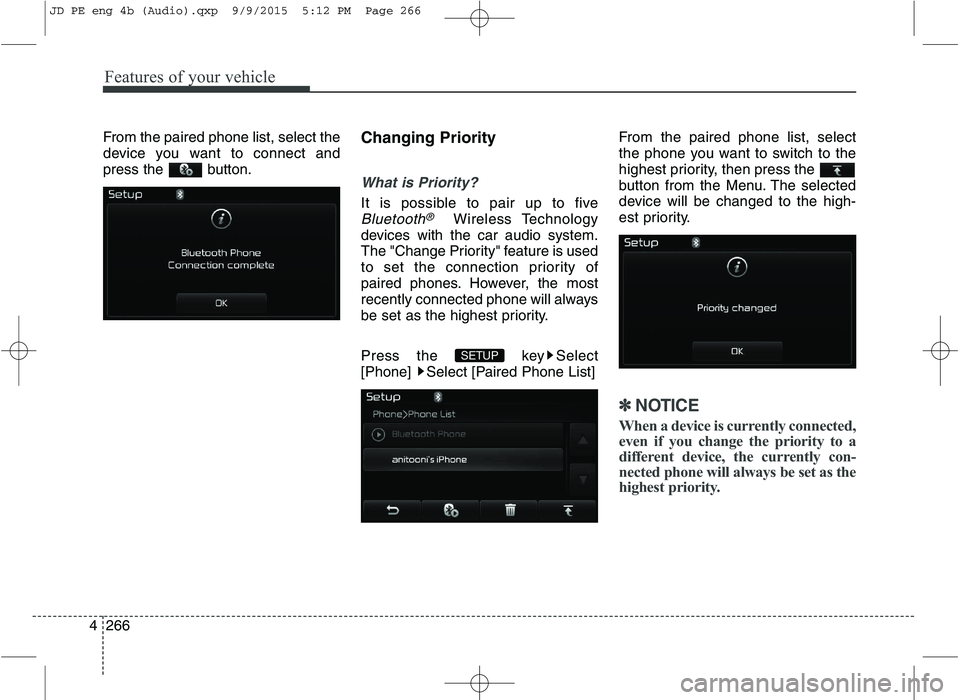
4 From the paired phone list, select the
device you want to connect and
press the button.
Changing Priority
What is Priority?
It is possible to pair up to five
Bluetooth®Wireless Technology
devices with the car audio system.
The "Change Priority" feature is used
to set the connection priority of
paired phones. However, the most
recently connected phone will always
be set as the highest priority.
Press the key Select
[Phone] Select [Paired Phone List] From the paired phone list, select
the phone you want to switch to the
highest priority, then press the
button from the Menu. The selected
device will be changed to the high-
est priority.
✽✽
NOTICE
When a device is currently connected,
even if you change the priority to a
different device, the currently con-
nected phone will always be set as the
highest priority.
SETUP
JD PE eng 4b (Audio).qxp 9/9/2015 5:12 PM Page 266
Page 350 of 643
![KIA CEED 2016 Owners Manual Features of your vehicle
4267
Disconnecting a Device
Press the key Select
[Phone] Select [Paired Phone List]
From the paired phone list, select the
currently connected device and
press the butt](/img/2/57945/w960_57945-349.png "KIA CEED 2016 Owners Manual Features of your vehicle
4267
Disconnecting a Device
Press the key Select
[Phone] Select [Paired Phone List]
From the paired phone list, select the
currently connected device and
press the butt")
Features of your vehicle
4267
Disconnecting a Device
Press the key Select
[Phone] Select [Paired Phone List]
From the paired phone list, select the
currently connected device and
press the button.
Deleting a Device
Press the key Select
[Phone] Select [Paired Phone List]
From the paired phone list, select the
device you want to delete and press
the button.
✽✽
NOTICE
When deleting the currently con- nected device, the device will auto-
matically be disconnected to pro-
ceed with the deleting process.
If a paired Bluetooth®
Wireless
Technology device is deleted, the
device’s call history and phone
book data will also be deleted.
To re-use a deleted device, you must pair the device again.
USING Bluetooth®Wireless
Technology
Phone Menu Screen
Phone Menus
With a Bluetooth®Wireless Technology
device connected, press the
key to display the Phone menuscreen.
(1) Dial Number : Displays the dial screen where numbers can be
dialed to make calls
(2) Call History : Displays the call his- tory list screen
PHONE
SETUPSETUP
JD PE eng 4b (Audio).qxp 9/9/2015 5:12 PM Page 267
Page 351 of 643
![KIA CEED 2016 Owners Manual Features of your vehicle
268
4 (3) Phone book : Displays the Phone
book list screen
(4) Setup : Displays Phone related settings
✽✽NOTICE
If you press the [Call History] but- ton but there is no](/img/2/57945/w960_57945-350.png "KIA CEED 2016 Owners Manual Features of your vehicle
268
4 (3) Phone book : Displays the Phone
book list screen
(4) Setup : Displays Phone related settings
✽✽NOTICE
If you press the [Call History] but- ton but there is no")
Features of your vehicle
268
4 (3) Phone book : Displays the Phone
book list screen
(4) Setup : Displays Phone related settings
✽✽NOTICE
If you press the [Call History] but- ton but there is no call history
data, a prompt is displayed which
asks whether to download call his-
tory data.
If you press the [Phone book] but- ton but there is no phone book
data, a prompt is displayed which
asks whether to download phone
book data.
This feature may not be supported in some mobile phones. For more
information on download support,
refer to your mobile phone user’s
manual.
Calling by Dialing a Number
Press the key Select [Dial Number]
(1) Dial Pad : Used to enter phone number
(2) Call : If a number has been entered, calls the number If no
number has been entered,
switches to call history screen
(3) End : Deletes the entered phone number
(4) Delete : Deletes entered numbers one digit at a time Answering Calls
Answering a Call
Answering a call with a Bluetooth®
Wireless Technology device connect-
ed will display the following screen.
(1) Caller : Displays the other party’s
name when the incoming caller is
saved within your phone book
(2) Incoming Number : Displays the incoming number
(3) Accept : Accepts the incoming call
(4) Reject : Rejects the incoming call
PHONE
JD PE eng 4b (Audio).qxp 9/9/2015 5:12 PM Page 268
Page 352 of 643
Features of your vehicle
4269
✽✽NOTICE
When an incoming call pop-up is displayed, most Audio and SETUP
mode features are disabled. Only
the call volume will operate.
The telephone number may not be properly displayed in some mobile
phones.
When a call is answered with the mobile phone, the call mode will
automatically revert to Private
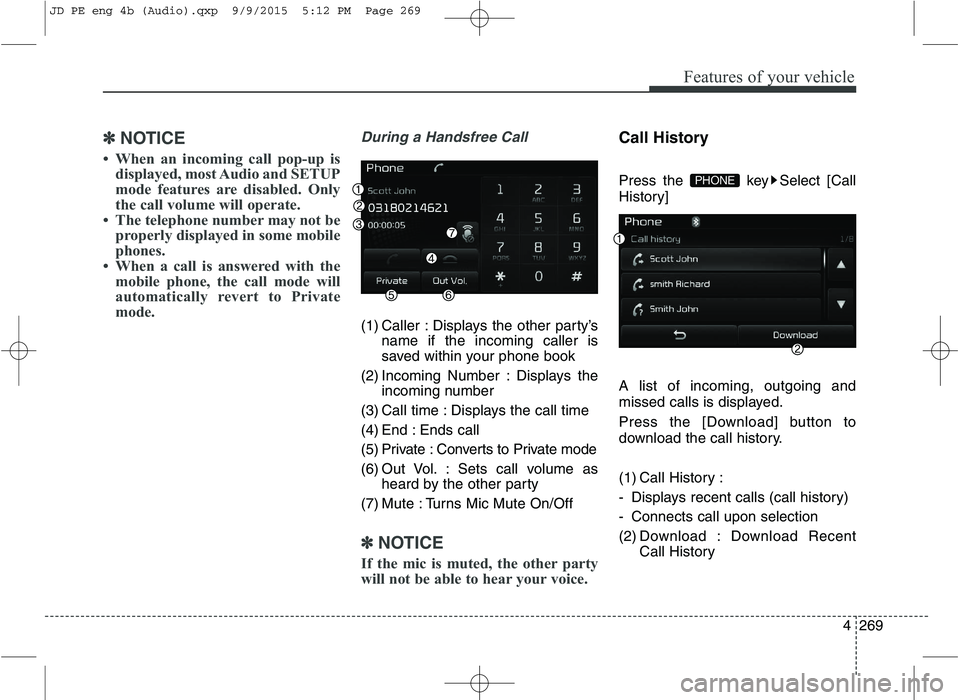
mode.During a Handsfree Call
(1) Caller : Displays the other party’s name if the incoming caller is
saved within your phone book
(2) Incoming Number : Displays the incoming number
(3) Call time : Displays the call time
(4) End : Ends call
(5) Private : Converts to Private mode
(6) Out Vol. : Sets call volume as heard by the other party
(7) Mute : Turns Mic Mute On/Off
✽✽ NOTICE
If the mic is muted, the other party
will not be able to hear your voice.
Call History
Press the key Select [Call
History] A list of incoming, outgoing and
missed calls is displayed.
Press the [Download] button to
download the call history.
(1) Call History :
- Displays recent calls (call history)
- Connects call upon selection
(2) Download : Download Recent Call History
PHONE
JD PE eng 4b (Audio).qxp 9/9/2015 5:12 PM Page 269
Page 353 of 643
Features of your vehicle
270
4
✽✽
NOTICE
The call history list will display up to 50 outgoing, incoming, and
missed calls.
Upon downloading call histories, previously saved histories are
deleted.
Incoming calls with hidden caller IDs will not be saved in the call
history list.
Previously saved phone book entries are stored even if a device
is disconnected and re-connected.
The download feature may not be supported in some mobile phones.
Check to see that the Bluetooth®
Wireless Technology device sup-
ports the download feature.Phone Book
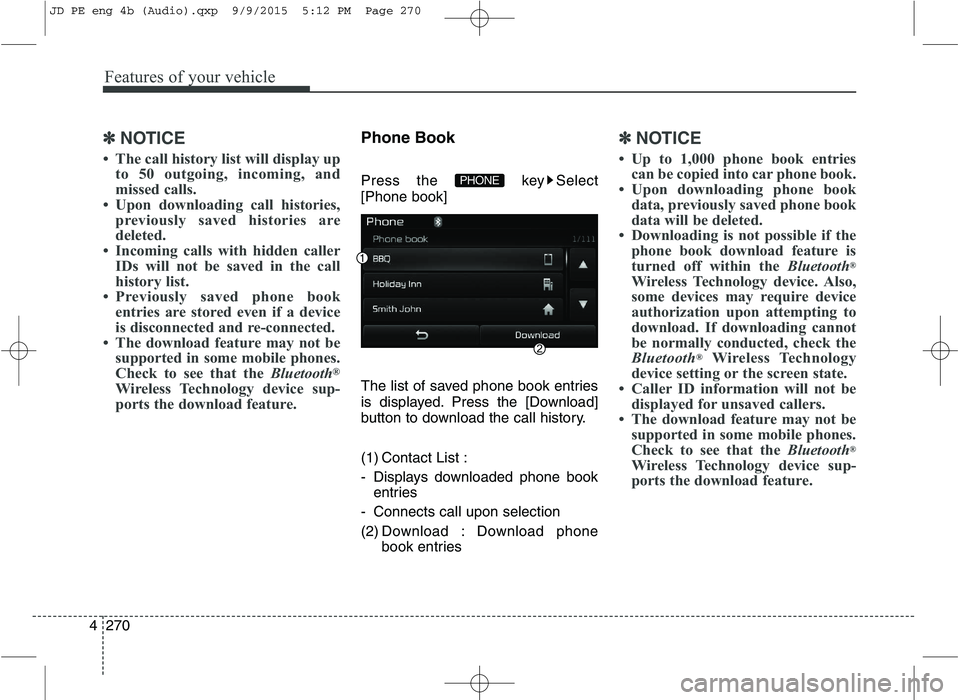
Press the key Select [Phone book]
The list of saved phone book entries
is displayed. Press the [Download]
button to download the call history.
(1) Contact List :
- Displays downloaded phone book entries
- Connects call upon selection
(2) Download : Download phone book entries✽✽NOTICE
Up to 1,000 phone book entries can be copied into car phone book.
Upon downloading phone book data, previously saved phone book
data will be deleted.
Downloading is not possible if the phone book download feature is
turned off within the Bluetooth®
Wireless Technology device. Also,
some devices may require device
authorization upon attempting to
download. If downloading cannot
be normally conducted, check the
Bluetooth ®
Wireless Technology
device setting or the screen state.
Caller ID information will not be displayed for unsaved callers.
The download feature may not be supported in some mobile phones.
Check to see that the Bluetooth®
Wireless Technology device sup-
ports the download feature.
PHONE
JD PE eng 4b (Audio).qxp 9/9/2015 5:12 PM Page 270
Page 354 of 643
Features of your vehicle
4271
✽✽NOTICE - USING THE VOICE
RECOGNITION
When using the voice recognition feature, only commands listed
within the user's manual are sup-
ported.
Be aware that during the opera- tion of the voice recognition sys-
tem, pressing any key other than
the key or touching the screen
will terminate voice recognition
mode.
For superior voice recognition performance, position the micro-
phone used for voice recognition
above the head of the driver’s seat
and maintain a proper position
when saying commands.
Within the following situations, voice recognition may not function
properly due to external sound.
- When the windows and sunroofare open
- When the wind of the cooling / heating device is strong
- When entering and passing through tunnels
- When driving on tgged and uneven roads (Continued)(Continued)
- During severe rain (heavy rains,windstorms)
Phone related voice commands can be used only when a
Bluetooth ®
Wireless Technology
device is connected.
When making calls by stating a name, the corresponding contact
must be downloaded and stored
within the audio system.
After downloading the Bluetooth®
Wireless Technology phone book,
it takes some times to convert the
phone book data into voice infor-
mation. During this time, voice
recognition may not properly
operate.
Pronounce the voice commands naturally and clearly as if in a nor-
mal conversation.
JD PE eng 4b (Audio).qxp 9/9/2015 5:12 PM Page 271
Page 355 of 643
Features of your vehicle
272
4 VOICE RECOGNITION (If equipped)
Using Voice Recognition
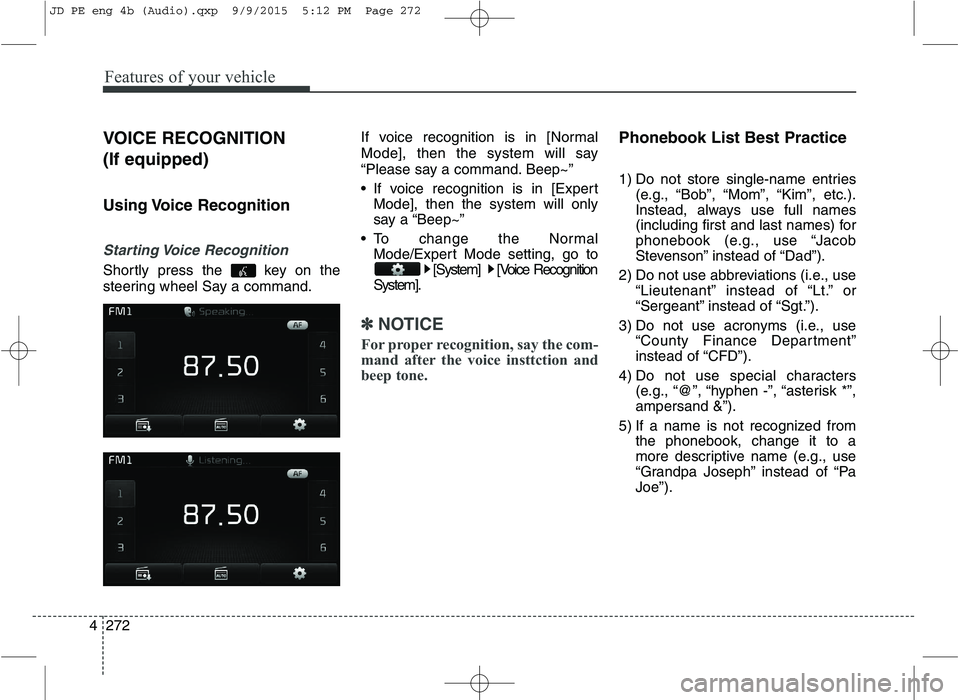
Starting Voice Recognition
Shortly press the key on the
steering wheel Say a command.
If voice recognition is in [Normal
Mode], then the system will say
“Please say a command. Beep~”
If voice recognition is in [Expert
Mode], then the system will only
say a “Beep~”
To change the Normal Mode/Expert Mode setting, go to [System] [Voice Recognition
System].
✽✽ NOTICE
For proper recognition, say the com-
mand after the voice insttction and
beep tone.
Phonebook List Best Practice
1) Do not store single-name entries (e.g., “Bob”, “Mom”, “Kim”, etc.).
Instead, always use full names
(including first and last names) for
phonebook (e.g., use “Jacob
Stevenson” instead of “Dad”).
2) Do not use abbreviations (i.e., use “Lieutenant” instead of “Lt.” or
“Sergeant” instead of “Sgt.”).
3) Do not use acronyms (i.e., use “County Finance Department”
instead of “CFD”).
4) Do not use special characters (e.g., “@”, “hyphen -”, “asterisk *”,ampersand &”).
5) If a name is not recognized from the phonebook, change it to a
more descriptive name (e.g., use
“Grandpa Joseph” instead of “PaJoe”).
JD PE eng 4b (Audio).qxp 9/9/2015 5:12 PM Page 272
Page 356 of 643
Features of your vehicle
4273
Skipping Prompt Messages
While prompt message is being stat-
ed Shortly press the key on the
steering remote controller. The prompt message is immediately ended and the beep tone will sound.
After the “beep”, say the voice com-mand.
Re-starting Voice Recognition
While system waits for a command
Shortly press the key on the
steering remote controller.
The command wait state is immedi- ately ended and the beep ton will
sound. After the “beep”, say the voicecommand.ENDING VOICE RECOGNITION
While Voice Recognition is operating
Press and hold the key on the
steering remote controller.
✽✽ NOTICE
While using voice command, pressing a steering wheel remote
control or a different key will end
voice command.
When the system is waiting for a voice command, say “cancel” or
“end” to end voice command.
When the system is waiting for a voice command, press and hold
the key on the steering wheel
to end voice command.
Voice Recognition and Phonebook Tips:
The Kia Voice Recognition System
may have difficulty understanding
some accents or uncommon names.
When using Voice Recognition to
place a call, speak in a moderate tone,
with clear pronunciation.
To maximize the use of Voice Recognition, consider these guide-
lines when storing contacts:
Do not store single-name entries(e.g., “Bob”, “Mom”, etc.). Instead,
always use full names (including first
and last names) for these contacts.
Do not use special characters (e.g., '@', '-', '*', '&', etc.).
Do not use abbreviations (i.e., use "Lieutenant" instead of "Lt.") or
acronyms (i.e., use "County Finance
Department" instead of "C. F. D."; Be
sure to say the name exactly as it isentered in the contacts list.
JD PE eng 4b (Audio).qxp 9/9/2015 5:12 PM Page 273
Page 357 of 643
Features of your vehicle
274
4
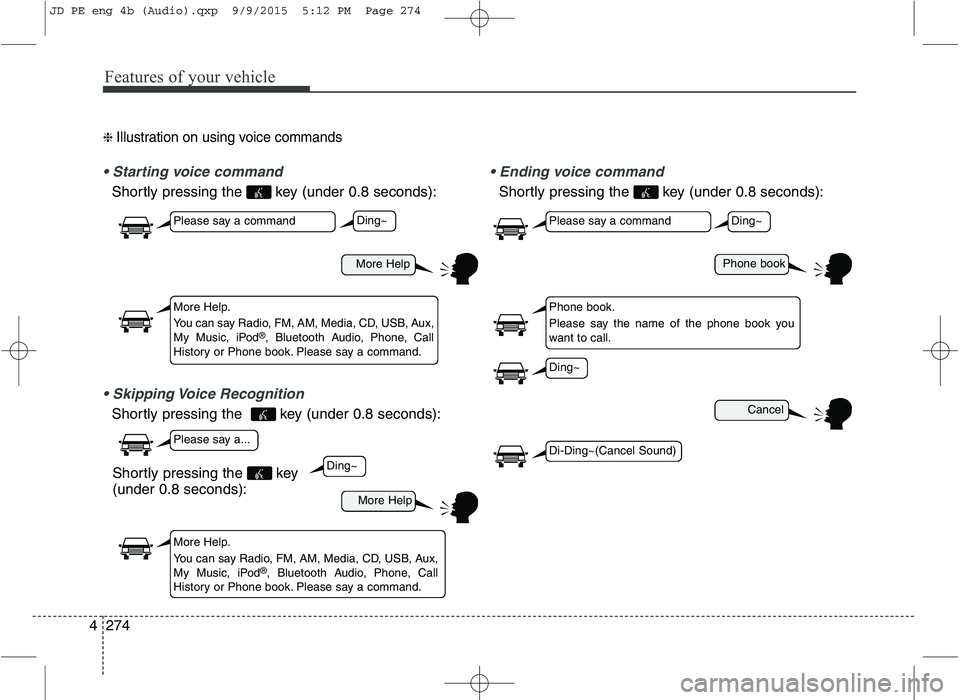
❈ Illustration on using voice commands
Shortly pressing the key (under 0.8 seconds):
Shortly pressing the key (under 0.8 seconds):
voice command
Shortly pressing the key (under 0.8 seconds):
More Help
More Help
Please say a command
Please say a...
More Help.
You can say Radio, FM, AM, Media, CD, USB, Aux,
My Music, iPod ®
, Bluetooth Audio, Phone, Call
History or Phone book. Please say a command.
More Help.
You can say Radio, FM, AM, Media, CD, USB, Aux,
My Music, iPod ®
, Bluetooth Audio, Phone, Call
History or Phone book. Please say a command.
Ding~
Ding~
Shortly pressing the key (under 0.8 seconds):
Phone book
Cancel
Please say a command
Phone book.
Please say the name of the phone book you
want to call.
Ding~
Di-Ding~(Cancel Sound)
Ding~
JD PE eng 4b (Audio).qxp 9/9/2015 5:12 PM Page 274
Page 363 of 643
![KIA CEED 2016 Owners Manual Features of your vehicle
280
4 SETUP
Starting Mode
Press the key to display the Setup screen.
You can select and control options
related to [Display], [Sound],[Phone] and [System].
Display Settin](/img/2/57945/w960_57945-362.png "KIA CEED 2016 Owners Manual Features of your vehicle
280
4 SETUP
Starting Mode
Press the key to display the Setup screen.
You can select and control options
related to [Display], [Sound],[Phone] and [System].
Display Settin")
Features of your vehicle
280
4 SETUP
Starting Mode
Press the key to display the Setup screen.
You can select and control options
related to [Display], [Sound],[Phone] and [System].
Display Settings
Adjusting the Brightness
Press the key Select
[Display] Select [Brightness]
Use the , buttons to adjust the
screen brightness or set the
Brightness on Automatic, Day, or
Night mode.
Press the button to reset.
(1) Automatic : Adjusts the bright-
ness automatically
(2) Day : Always maintains the bright- ness on high
(3) Night : Always maintains the brightness on low
Pop-up Mode
Press the key Select
[Display] Select [Pop-up Mode]
This feature is used to display the
Pop-up Mode screen when entering
radio and media modes.
When this feature is turned on, pressing the or key
will display the Pop-up Mode screen.
✽✽ NOTICE
The media Pop-up Mode screen can
be displayed only when two or more
media modes have been connected.
MEDIA RADIO
SETUP
Default
SETUP
SETUP
JD PE eng 4b (Audio).qxp 9/9/2015 5:12 PM Page 280