light KIA CEED 2016 Owners Manual
[x] Cancel search | Manufacturer: KIA, Model Year: 2016, Model line: CEED, Model: KIA CEED 2016Pages: 643, PDF Size: 38.19 MB
Page 425 of 643
Driving your vehicle
52
5
ESC operation
ESC ON condition
ON, ESC and ESC OFF indi-
cator lights illuminate for
approximately 3 seconds,
then ESC is turned on.
for at least half a second after
turning the ignition ON to turn
ESC off. (ESC OFF indicator
will illuminate). To turn theESC on, press the ESC OFF
button (ESC OFF indicatorlight will go off).
you may hear a slight ticking
sound. This is the ESC per-
forming an automatic system
self-check and does not indi-
cate a problem. When operating
When the ESC is in operation,
ESC indicator light blinks.
Control is operating properly,
you can feel a slight pulsation
in the vehicle. This is only the
effect of brake control and indi-
cates nothing unusual.
or slippery road, the engine
rpm (revolution per minute)
may not increase even if you
press the accelerator pedal
deeply. This is to maintain the
stability and traction of the
vehicle and does not indicate
a problem.
ESC operation off
ESC OFF state
This car has 2 kinds of ESC off
states.
If the engine stops when ESC is
off, ESC remains off. Upon
restarting the engine, the ESC
will automatically turn on again.
-
JD PE eng 5.QXP 9/30/2015 5:25 PM Page 52
Page 426 of 643
553
Driving your vehicle
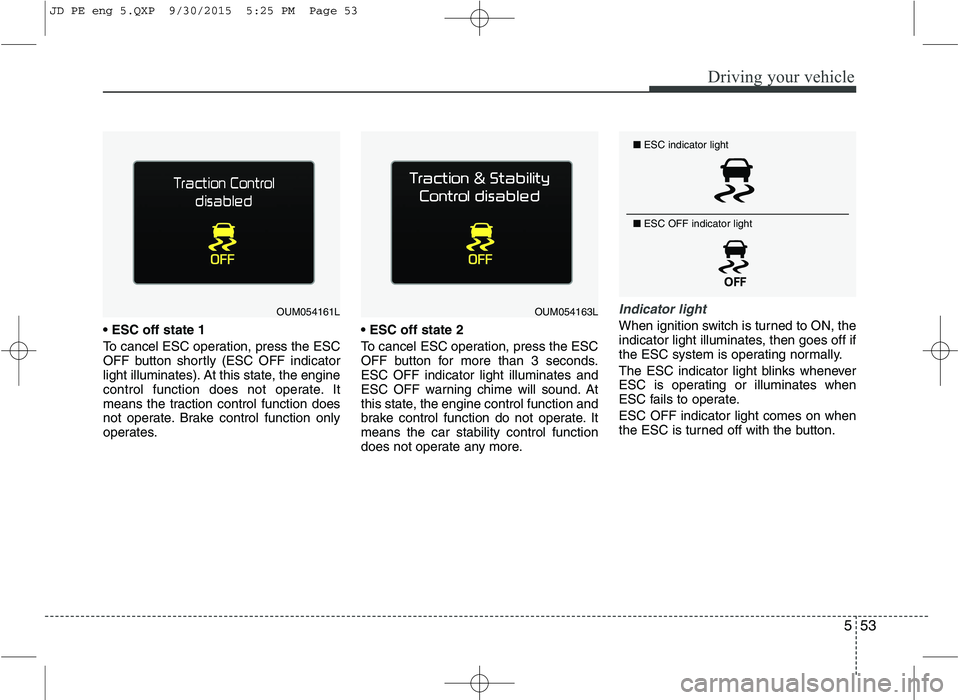
To cancel ESC operation, press the ESC
OFF button shortly (ESC OFF indicator
light illuminates). At this state, the engine
control function does not operate. It
means the traction control function does
not operate. Brake control function only
operates.
To cancel ESC operation, press the ESC
OFF button for more than 3 seconds.ESC OFF indicator light illuminates and
ESC OFF warning chime will sound. At
this state, the engine control function and
brake control function do not operate. Itmeans the car stability control function
does not operate any more.
Indicator light
When ignition switch is turned to ON, the
indicator light illuminates, then goes off if
the ESC system is operating normally.
The ESC indicator light blinks whenever
ESC is operating or illuminates when
ESC fails to operate. ESC OFF indicator light comes on when
the ESC is turned off with the button.
■
ESC indicator light
■ ESC OFF indicator light
OUM054161LOUM054163L
JD PE eng 5.QXP 9/30/2015 5:25 PM Page 53
Page 427 of 643

Driving your vehicle
54
5
ESC OFF usage
When driving
ESC should be turned on for daily driv-
ing whenever possible.
To turn ESC off while driving, press the ESC OFF button while driving on a flat
road surface.
✽✽ NOTICE
When operating the vehicle on a dynamometer, ensure that the ESC is
turned off by pressing the ESC OFF
button for more than 3 seconds (ESC
OFF light illuminated). If the ESC is
left on, it may prevent the vehicle
speed from increasing, and result in
false diagnosis.
Turning the ESC off does not affect ABS or brake system operation.
Vehicle stability management (VSM) (if equipped)
This system provides further enhance-
ments to vehicle stability and steering
responses when a vehicle is driving on a
slippery road or a vehicle detected
changes in coefficient of friction between
right wheels and left wheels when brak-ing.
VSM operation
When the VSM is operating:
ESC (Electronic Stability Control) ( )light will blink.
The steering wheel may be controlled.
When the vehicle stability management
is operating properly, you can feel a slight
pulsation in the vehicle. This is only the
effect of brake control and indicates noth-
ing unusual.
The VSM does not operate when:
Driving on bank road such as gradient or incline
Driving rearward
ESC OFF indicator light ( ) remains on the instrument cluster
EPS (Electronic Power Steering) indi- cator light remains on the instrument cluster
CAUTION
Driving with varying tire or wheel
sizes may cause the ESC system tomalfunction. When replacing tires, make sure they are the same size as
your original tires.
WARNING
The Electronic Stability Control sys-
tem is only a driving aid; use pre-
cautions for safe driving by slowing
down on curved, snowy, or icy
roads. Drive slowly and don’t
attempt to accelerate whenever the
ESC indicator light is blinking, or
when the road surface is slippery.WARNING
Never press the ESC OFF button while ESC is operating (ESC indica-
tor light blinks). If ESC is turned off while ESC is
operating, the vehicle may slip out
of control.
JD PE eng 5.QXP 9/30/2015 5:25 PM Page 54
Page 428 of 643
555
Driving your vehicle
VSM operation off
If you press the ESC OFF button to turn
off the ESC, the VSM will also cancel and
the ESC OFF indicator light ( ) illumi-
nates.
To turn on the VSM, press the button again. The ESC OFF indicator light goes out.
Malfunction indicator
The VSM can be deactivated even if you
don’t cancel the VSM operation by press-
ing the ESC OFF button. It indicates thata malfunction has been detected some-
where in the EPS (Electronic Power
Steering) system or VSM system. If the
ESC indicator light ( ) or EPS warning
light remains on, we recommend that the
system be checked by an authorized Kia
dealer.
✽✽NOTICE
The VSM is designed to function above approximately 15 km/h (9 mph)
on curves.
The VSM is designed to function
above approximately 30 km/h (18
mph) when a vehicle is braking on a
split-mu road. The split-mu road is
made of surfaces which have different
friction forces.
Hill-start assist control (HAC) (if equipped)
A vehicle has the tendency to slip back
on a steep hill when it starts to go after
stopping. The Hill-start Assist Control
(HAC) prevents the vehicle from slipping
back by operating the brakes automati-
cally for about 1~2 seconds. The brakes
are released when the accelerator pedal
is depressed or after about 1~2 seconds.
✽✽ NOTICE
The HAC does not operate when the transaxle shift lever is in the P (Park)
or N (Neutral) position.
The HAC activates even though the
ESC is off but it does not activate
when the ESC has malfunctioned.
WARNING
The HAC is activated only for about
1~2 seconds, so when the vehicle
is starting off always depress theaccelerator pedal.
WARNING
The Vehicle Stability Management system is not a substitute for
safe driving practices but a sup-
plementary function only. It is theresponsibility of the driver to
always check the speed and the
distance to the vehicle ahead.
Always hold the steering wheel
firmly while driving.
Your vehicle is designed to acti- vate according to the driver’s
intention, even with the VSM
installed. Always follow all the
normal precautions for driving at
safe speeds for the conditions –
including driving in inclement
weather and on a slippery road.
Driving with varying tire or wheel sizes may cause the VSM system
to malfunction. When replacing
tires, make sure they are the
same size as your original tires.
JD PE eng 5.QXP 9/30/2015 5:25 PM Page 55
Page 429 of 643

Driving your vehicle
56
5
Emergency Stop Signal (ESS) The Emergency Stop Signal system
alerts the driver behind by blinking the
stop light when the vehicle is braked rap-
idly and severely.
The system is activated when:
The vehicle suddenly stops (vehicle
speed is over 55km/h and the vehicle
deceleration at greater than 7 m/s 2
)
The ABS is activating
When the vehicle speed is under 40 km/h
and the ABS deactivates or the sudden
stop situation is over, the stop light blink-
ing will stop. Instead, the hazard warning
flasher will turn on automatically.
The hazard warning flasher will turn off
when vehicle speed is over 10km/h after
the vehicle has stopped. Also, it will turn
off when the vehicle is driven at low
speed for some time. You can turn it off
manually by pushing the hazard warning
flasher switch. Good braking practices
Check to be sure the parking brake is
not engaged and that the parking
brake indicator light is out before driv-
ing away.
Driving through water may get the brakes wet. They can also get wet
when the vehicle is washed. Wet
brakes can be dangerous! Your vehicle
will not stop as quickly if the brakes are
wet. Wet brakes may cause the vehicle
to pull to one side.
To dry the brakes, apply the brakes
lightly until the braking action returns to
normal, taking care to keep the vehicle
under control at all times. If the braking
action does not return to normal, stop
as soon as it is safe to do so and we
recommend that you call an authorized
Kia dealer.
Do not coast down hills with the vehicle out of gear. This is extremely haz-
ardous. Keep the vehicle in gear at all
times, use the brakes to slow down,
then shift to a lower gear so that
engine braking will help you maintain a
safe speed.
WARNING
Whenever you leave or park your vehicle, always set the parking
brake as far as possible and fully
engage the vehicle's transaxle
into the P (Park) position. If the
parking brake is not fully
engaged, the vehicle may move
inadvertently and injure yourself
and others.
All vehicles should always have the parking brake fully engaged
when parking to avoid inadver-
tent movement of the vehicle
which can injure occupants orpedestrians.
CAUTION
The Emergency Stop Signal (ESS)
system will not work if the hazardwarning flasher is already on.
JD PE eng 5.QXP 9/30/2015 5:25 PM Page 56
Page 431 of 643

Driving your vehicle
58
5
1. Cruise indicator
2. Cruise set indicator
The cruise control system allows you to
program the vehicle to maintain a con-stant speed without pressing the acceler-ator pedal. This system is designed to function
above approximately 30 km/h (20 mph).
✽✽
NOTICE
During normal cruise control opera- tion, when the SET switch is activated
or reactivated after applying the
brakes, the cruise control will ener-
gize after approximately 3 seconds.
This delay is normal.
To activate cruise control, depress the brake pedal at least once after turning
the ignition switch to the ON position
or starting the engine. This is to check
if the brake switch which is important
part to cancel cruise control is in nor-
mal condition.
CRUISE CONTROL SYSTEM (IF EQUIPPED)
WARNING
If the cruise control is left on, (cruise indicator light is illuminat-
ed), the cruise control can be
switched on accidentally. Keep
the cruise control system off
when the cruise control is not in
use, to avoid inadvertently set-ting a speed.
Use the cruise control system only when traveling on open
highways in good weather.
Do not use the cruise control when it may not be safe to keep
the vehicle at a constant speed,
for instance, driving in heavy or
varying traffic, or on slippery
(rainy, icy or snow-covered) or
winding roads or over 6% up-hill
or down-hill roads.
Pay particular attention to the driving conditions whenever
using the cruise control system.
Be careful when driving downhill using the cruise control system,
which may increase the vehiclespeed.
CAUTION
During cruise-speed driving of a
manual transaxle vehicle, do notshift into neutral without depress-ing the clutch pedal, since the engine will be overrevved. If thishappens, depress the clutch pedal
or release the cruise control ON- OFF switch.
OJD052015/OJD055048L
■ Supervision
■Normal vision
JD PE eng 5.QXP 9/30/2015 5:25 PM Page 58
Page 432 of 643
559
Driving your vehicle
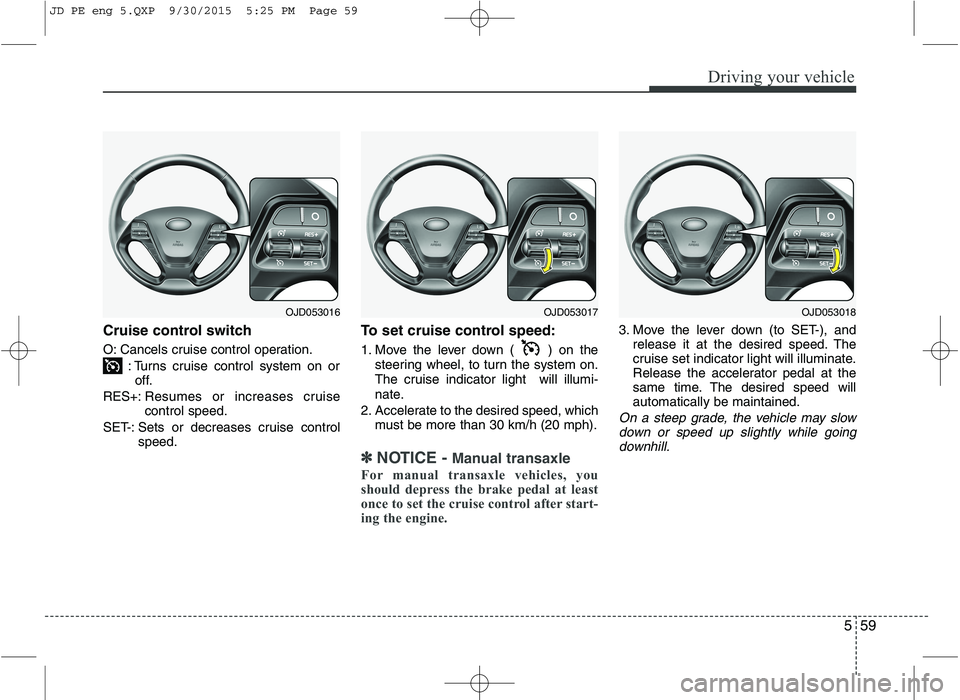
Cruise control switch
O: Cancels cruise control operation.: Turns cruise control system on oroff.
RES+: Resumes or increases cruise control speed.
SET-: Sets or decreases cruise control speed. To set cruise control speed:
1. Move the lever down ( ) on the
steering wheel, to turn the system on.
The cruise indicator light will illumi-
nate.
2. Accelerate to the desired speed, which must be more than 30 km/h (20 mph).
✽✽ NOTICE - Manual transaxle
For manual transaxle vehicles, you
should depress the brake pedal at least
once to set the cruise control after start-
ing the engine.
3. Move the lever down (to SET-), and release it at the desired speed. The
cruise set indicator light will illuminate.
Release the accelerator pedal at the
same time. The desired speed willautomatically be maintained.
On a steep grade, the vehicle may slow
down or speed up slightly while goingdownhill.
OJD053016OJD053017OJD053018
JD PE eng 5.QXP 9/30/2015 5:25 PM Page 59
Page 434 of 643
561
Driving your vehicle
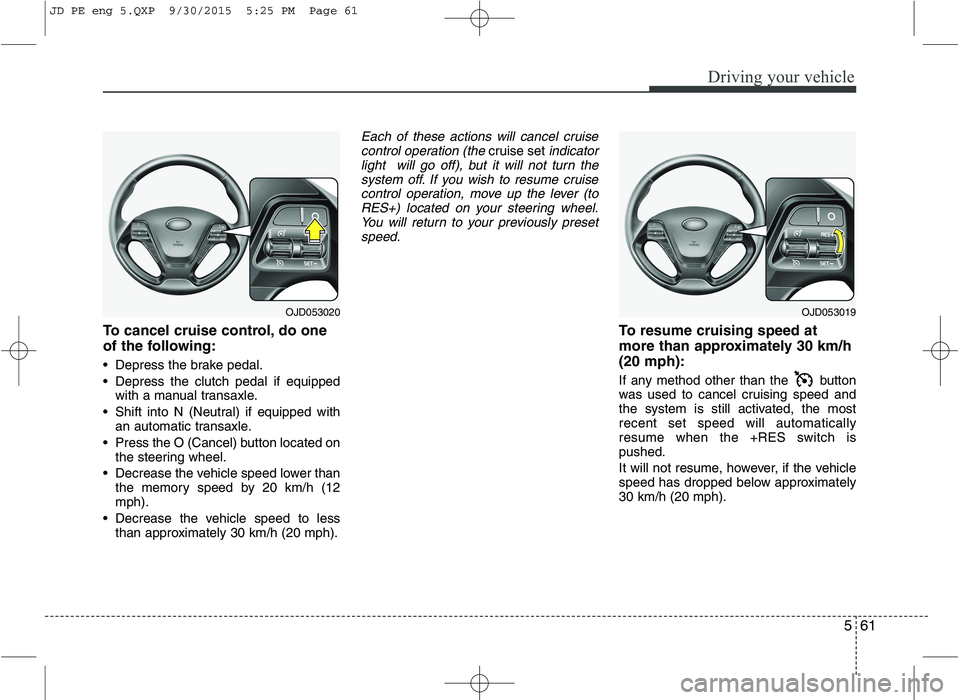
To cancel cruise control, do one
of the following:
Depress the brake pedal.
Depress the clutch pedal if equippedwith a manual transaxle.
Shift into N (Neutral) if equipped with an automatic transaxle.
Press the O (Cancel) button located on the steering wheel.
Decrease the vehicle speed lower than the memory speed by 20 km/h (12 mph).
Decrease the vehicle speed to less than approximately 30 km/h (20 mph).
Each of these actions will cancel cruise
control operation (the cruise setindicator
light will go off), but it will not turn the
system off. If you wish to resume cruisecontrol operation, move up the lever (toRES+) located on your steering wheel. You will return to your previously preset
speed.
To resume cruising speed at
more than approximately 30 km/h(20 mph):
If any method other than the button
was used to cancel cruising speed and
the system is still activated, the mostrecent set speed will automatically
resume when the +RES switch ispushed.
It will not resume, however, if the vehicle
speed has dropped below approximately30 km/h (20 mph).
OJD053020OJD053019
JD PE eng 5.QXP 9/30/2015 5:25 PM Page 61
Page 437 of 643
Driving your vehicle
64
5
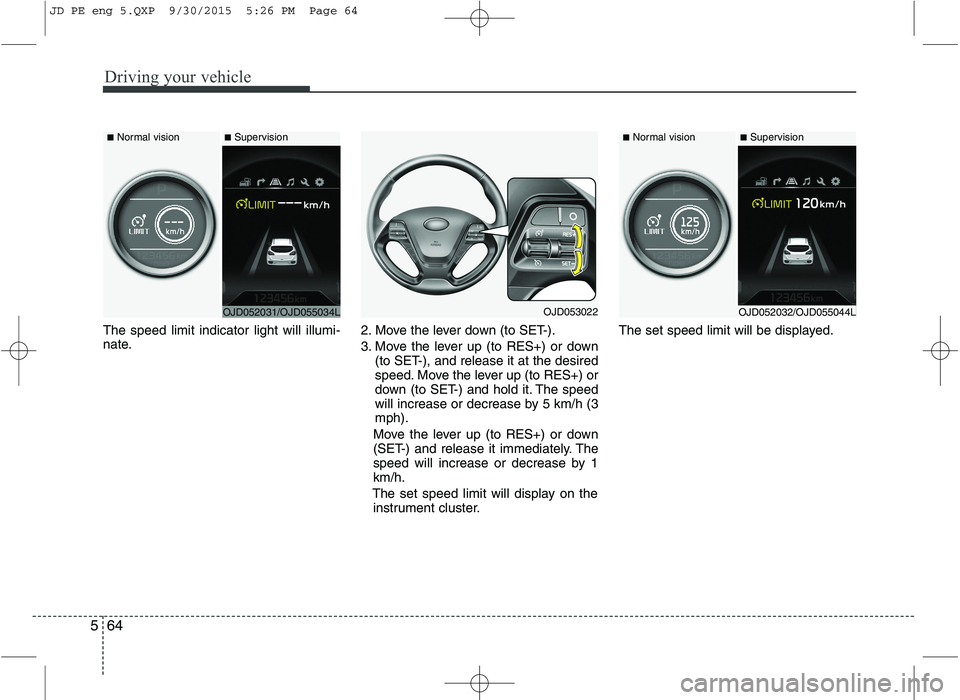
The speed limit indicator light will illumi-
nate. 2. Move the lever down (to SET-).
3. Move the lever up (to RES+) or down
(to SET-), and release it at the desired
speed. Move the lever up (to RES+) or
down (to SET-) and hold it. The speed
will increase or decrease by 5 km/h (3mph).
Move the lever up (to RES+) or down
(SET-) and release it immediately. The
speed will increase or decrease by 1km/h.
The set speed limit will display on the instrument cluster. The set speed limit will be displayed.
OJD052031/OJD055034L
■
Normal vision
■SupervisionOJD053022
■Normal vision
■Supervision
OJD052032/OJD055044L
JD PE eng 5.QXP 9/30/2015 5:26 PM Page 64
Page 439 of 643
Driving your vehicle
66
5
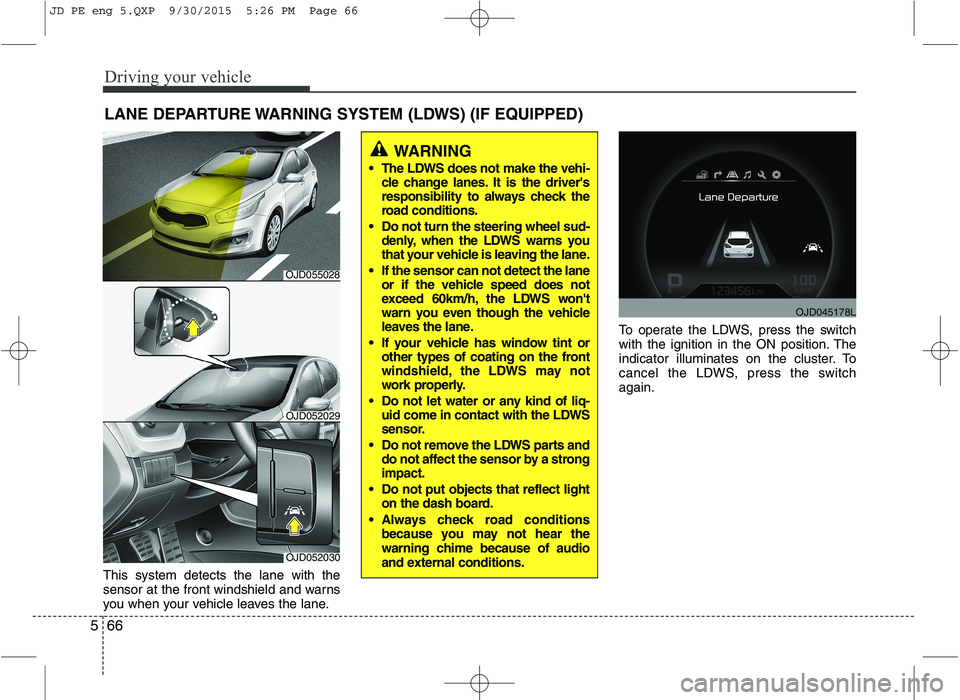
This system detects the lane with the
sensor at the front windshield and warns
you when your vehicle leaves the lane. To operate the LDWS, press the switch
with the ignition in the ON position. The
indicator illuminates on the cluster. To
cancel the LDWS, press the switchagain.
LANE DEPARTURE WARNING SYSTEM (LDWS) (IF EQUIPPED)
WARNING
The LDWS does not make the vehi- cle change lanes. It is the driver's
responsibility to always check the
road conditions.
Do not turn the steering wheel sud- denly, when the LDWS warns you
that your vehicle is leaving the lane.
If the sensor can not detect the lane or if the vehicle speed does not
exceed 60km/h, the LDWS won't
warn you even though the vehicle
leaves the lane.
If your vehicle has window tint or other types of coating on the front
windshield, the LDWS may not
work properly.
Do not let water or any kind of liq- uid come in contact with the LDWS
sensor.
Do not remove the LDWS parts and do not affect the sensor by a strongimpact.
Do not put objects that reflect light on the dash board.
Always check road conditions because you may not hear the
warning chime because of audio
and external conditions.
OJD052030
OJD052029
OJD045178L
OJD055028
JD PE eng 5.QXP 9/30/2015 5:26 PM Page 66