AUX KIA CEED 2016 User Guide
[x] Cancel search | Manufacturer: KIA, Model Year: 2016, Model line: CEED, Model: KIA CEED 2016Pages: 643, PDF Size: 38.19 MB
Page 306 of 643
Features of your vehicle
4223
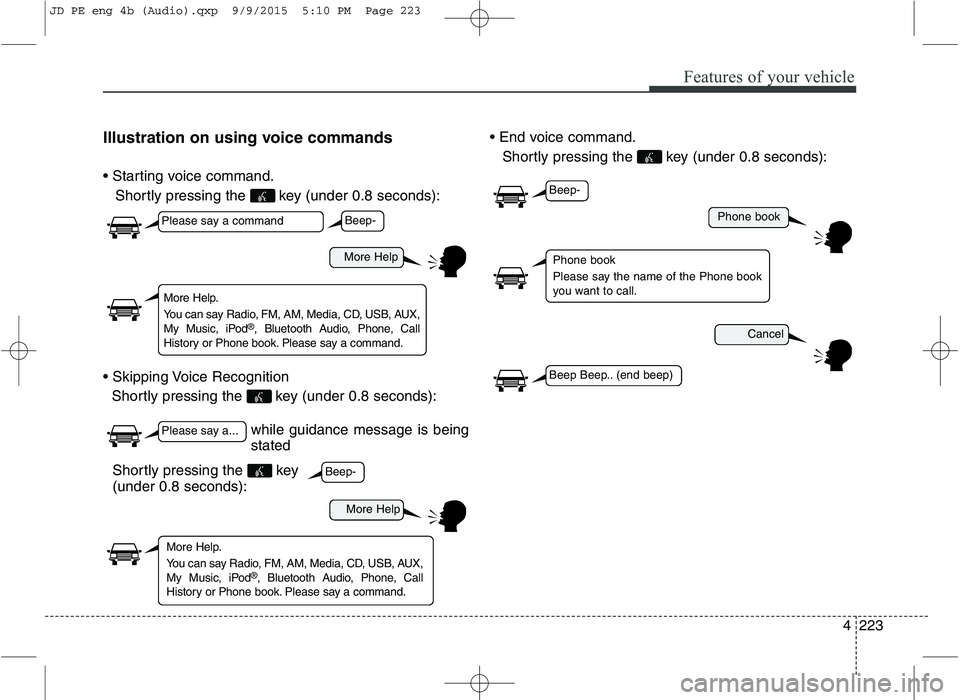
Illustration on using voice commands
Shortly pressing the key (under 0.8 seconds):
Shortly pressing the key (under 0.8 seconds):
Shortly pressing the key (under 0.8 seconds):
while guidance message is being stated
More Help
Phone book
Cancel
More Help
Please say a command
Please say a...
More Help.
You can say Radio, FM, AM, Media, CD, USB, AUX,
My Music, iPod ®
, Bluetooth Audio, Phone, Call
History or Phone book. Please say a command.
Phone book
Please say the name of the Phone book
you want to call.
More Help.
You can say Radio, FM, AM, Media, CD, USB, AUX,
My Music, iPod ®
, Bluetooth Audio, Phone, Call
History or Phone book. Please say a command.
Beep-
Beep-
Beep-
Beep Beep.. (end beep)
Shortly pressing the key (under 0.8 seconds):
JD PE eng 4b (Audio).qxp 9/9/2015 5:10 PM Page 223
Page 308 of 643
Features of your vehicle
4225
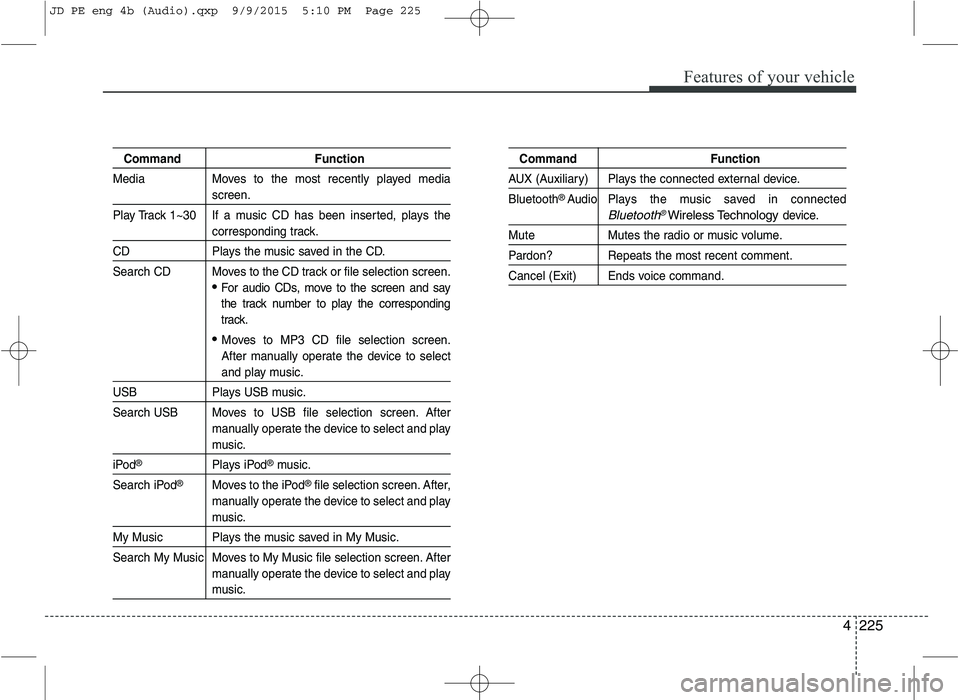
Command Function
Media Moves to the most recently played media
screen.
Play Track 1~30 If a music CD has been inserted, plays the
corresponding track.
CD Plays the music saved in the CD.
Search CD Moves to the CD track or file selection screen.
For audio CDs, move to the screen and say
the track number to play the corresponding
track.
Moves to MP3 CD file selection screen.
After manually operate the device to select
and play music.
USB Plays USB music.
Search USB Moves to USB file selection screen. After manually operate the device to select and play
music.
iPod®Plays iPod®music.
Search iPod
®Moves to the iPod®file selection screen. After,
manually operate the device to select and play
music.
My Music Plays the music saved in My Music.
Search My Music Moves to My Music file selection screen. After manually operate the device to select and play
music.
Command Function
AUX (Auxiliary) Plays the connected external device. Bluetooth
®Audio Plays the music saved in connected
Bluetooth®Wireless Technologydevice.
Mute Mutes the radio or music volume.
Pardon? Repeats the most recent comment.
Cancel (Exit) Ends voice command.
JD PE eng 4b (Audio).qxp 9/9/2015 5:10 PM Page 225
Page 313 of 643
Features of your vehicle
230
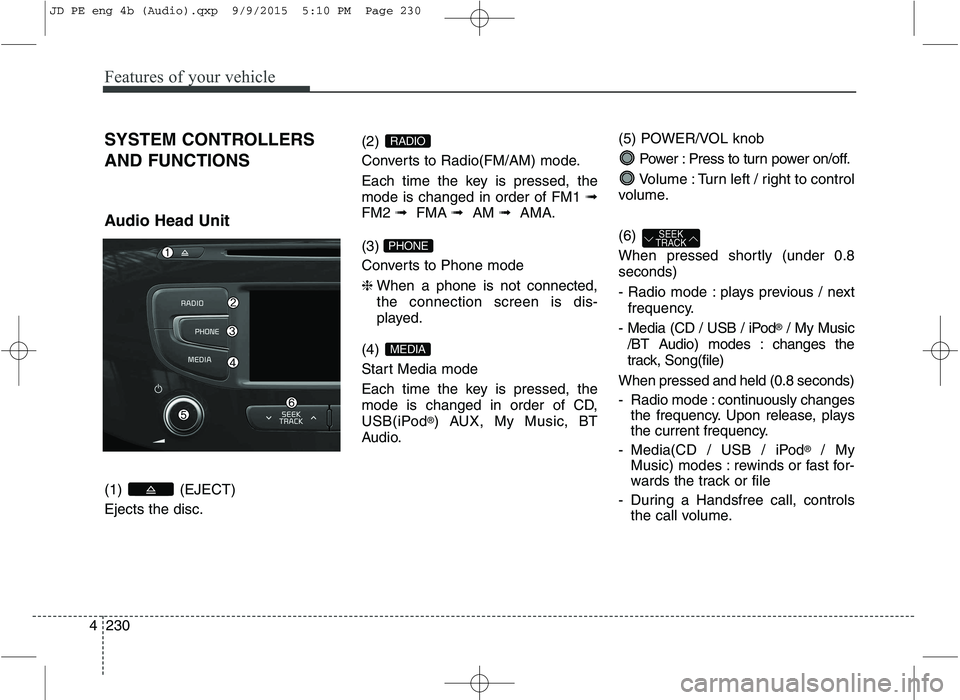
4 SYSTEM CONTROLLERS AND FUNCTIONS
Audio Head Unit (1) (EJECT) Ejects the disc.
(2)
Converts to Radio(FM/AM) mode.
Each time the key is pressed, the mode is changed in order of FM1
➟
FM2 ➟FMA ➟AM ➟AMA.
(3)
Converts to Phone mode ❈ When a phone is not connected, the connection screen is dis-
played.
(4)
Start Media mode
Each time the key is pressed, the
mode is changed in order of CD,
USB(iPod ®
) AUX, My Music, BT
Audio. (5) POWER/VOL knob
Power : Press to turn power on/off.
Volume : Turn left / right to control
volume. (6)
When pressed shortly (under 0.8 seconds)
- Radio mode : plays previous / next frequency.
- Media (CD / USB / iPod ®
/ My Music
/BT Audio) modes : changes the
track, Song(file)
When pressed and held (0.8 seconds)
- Radio mode : continuously changes the frequency. Upon release, plays
the current frequency.
- Media(CD / USB / iPod ®
/ My
Music) modes : rewinds or fast for-
wards the track or file
- During a Handsfree call, controls the call volume.
SEEK
TRACK
MEDIA
PHONE
RADIO
JD PE eng 4b (Audio).qxp 9/9/2015 5:10 PM Page 230
Page 319 of 643
Features of your vehicle
236
4 MEDIA MODE
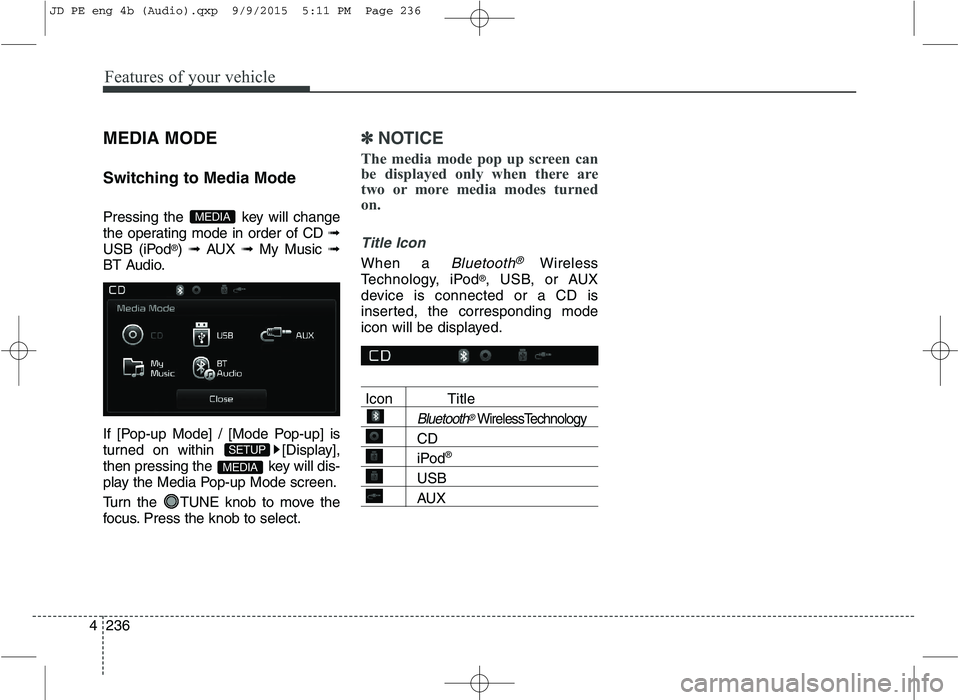
Switching to Media Mode
Pressing the key will change
the operating mode in order of CD
➟
USB (iPod ®
) ➟ AUX ➟ My Music ➟
BT Audio.
If [Pop-up Mode] / [Mode Pop-up] is
turned on within [Display],
then pressing the key will dis-
play the Media Pop-up Mode screen.
Turn the TUNE knob to move the
focus. Press the knob to select.
✽✽ NOTICE
The media mode pop up screen can
be displayed only when there are
two or more media modes turned
on.
Title Icon
When a Bluetooth®Wireless
Technology, iPod ®
, USB, or AUX
device is connected or a CD is
inserted, the corresponding mode
icon will be displayed.
Icon Title
Bluetooth®WirelessTechnology
CD
iPod ®
USB
AUX
MEDIA
SETUP
MEDIA
JD PE eng 4b (Audio).qxp 9/9/2015 5:11 PM Page 236
Page 328 of 643
Features of your vehicle
4245
(Continued)
Charging through the USB maynot work for some mobile devices.
The device may not support nor- mal operation when using a USB
memory type besides (Metal
Cover Type) USB Memory.
The device may not support nor- mal operation when using formats
such as HDD Type, CF, or SD
Memory.
The device will not support files locked by DRM (Digital Rights
Management.)
USB memory sticks used by con- necting an Adaptor (SD Type or
CF Type) may not be properly rec-
ognized.
The device may not operate prop- erly when using USB HDDs or
USBs subject to connection fail-
ures caused by vehicle vibrations.
(e.g. i-stick type) (Continued)(Continued)
Avoid use of USB
memory products that
can also be used as key
chains or mobile phone
accessories. Use of such products
may cause damage to the USB
jack.
Connecting an MP3 device or phone through various channels,
such as AUX/BT or Audio/USB
mode may result in pop noises or
abnormal operation.
JD PE eng 4b (Audio).qxp 9/9/2015 5:11 PM Page 245
Page 333 of 643
Features of your vehicle
250
4
✽✽
NOTICE - USING THE iPod ®
DEVICE
iPod ®
is a registered trademark of
Apple Inc.
In order to use the iPod ®
while
operating the keys, you must use a
dedicated iPod ®
cable. (the cable
that is supplied when purchasing
iPod ®
/iPhone ®
products)
If the iPod ®
is connected to the
vehicle while it is playing, a high
pitch sound could occur for
approximately 1-2 seconds imme-
diately after connecting. If possi-
ble, connect the iPod ®
to the vehi-
cle with the iPod ®
stopped/paused.
During ACC ON state, connecting the iPod ®
through the iPod ®
cable
will charge the iPod ®
through the
car audio system.
When connecting with the iPod ®
cable, make sure to fully insert the
jack to prevent communication
interference. (Continued)(Continued)
When the EQ features of an exter-
nal device, such as the iPod ®
, and
the audio system are both active,
EQ effects could overlap and cause
sound deterioration and distortion.
Whenever possible, turn off the EQ
feature within the external device
upon use by connecting with the
audio system.
Noise may occur when an iPod ®
or
AUX device is connected. When
such devices are not being used, dis-
connect the device for storage.
When the iPod ®
or AUX device
power is connected to the power
jack, playing the external device
may result in noise. In such cases,
disconnect the power connection
before use.
Skipping or improper operation may occur depending on the characteris-
tics of your iPod ®
/iPhone ®
device.
If your iPh one is connected to both
the Bluetooth ®
Wireless Technology
and USB, the sound may not be
properly played. In your iPhone,
select the Dock connector or
Bluetooth ®
Wireless Technology to
change the sound output (source). (Continued)(Continued)
iPod
®
mode cannot be operated
when the iPod ®
cannot be recog-
nized due to the playing of ver-
sions that do not support commu-
nication protocols, cases of iPod ®
abnormalities and defects.
For fifth generation iPod ®
Nano
devices, the iPod ®
may not be rec-
ognized when the battery level is
low. Please charge the iPod ®
for
use.
Search/play orders shown within the iPod ®
device may differ with
the orders shown within the audio
system.
If the iPod ®
malfunctions due to an
iPod ®
device defect, reset the iPod ®
and try again. (To learn more,
refer to your iPod ®
manual)
Some iPod ®
s may not sync with the
System depending on its version.
If the Media is removed before the
Media is recognized, then the sys-
tem may not properly restore the
previously operated mode. (iPad
charging is not supported.)
Beside support 1M cable when purchasing iPod/iPhone products,
Long Cable cannot be recognized.
JD PE eng 4b (Audio).qxp 9/9/2015 5:11 PM Page 250
Page 337 of 643
Features of your vehicle
254
4
List
Press the button to display the
Category Menu.
Turn the TUNE knob left/right to
search for the desired category.
Once you find the desired category,
press the TUNE knob to select
and play. AUX MODE
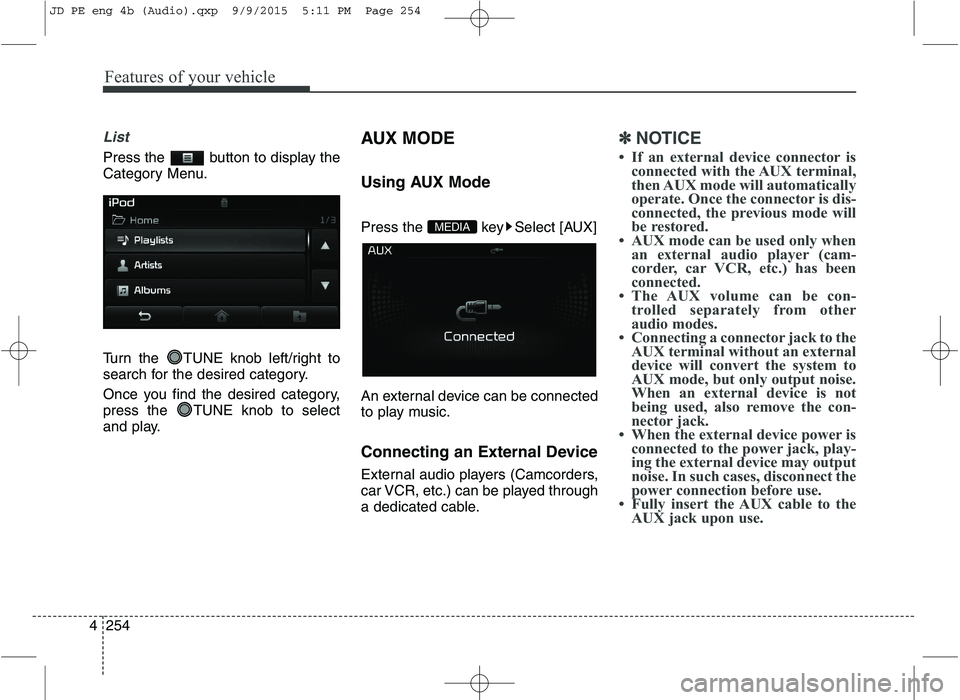
Using AUX Mode
Press the key Select [AUX]
An external device can be connected
to play music.
Connecting an External Device
External audio players (Camcorders,
car VCR, etc.) can be played through
a dedicated cable.
✽✽
NOTICE
If an external device connector is connected with the AUX terminal,
then AUX mode will automatically
operate. Once the connector is dis-
connected, the previous mode will
be restored.
AUX mode can be used only when an external audio player (cam-
corder, car VCR, etc.) has been
connected.
The AUX volume can be con- trolled separately from other
audio modes.
Connecting a connector jack to the AUX terminal without an external
device will convert the system to
AUX mode, but only output noise.
When an external device is not
being used, also remove the con-
nector jack.
When the external device power is connected to the power jack, play-
ing the external device may output
noise. In such cases, disconnect the
power connection before use.
Fully insert the AUX cable to the AUX jack upon use.
MEDIA
JD PE eng 4b (Audio).qxp 9/9/2015 5:11 PM Page 254
Page 357 of 643
Features of your vehicle
274
4
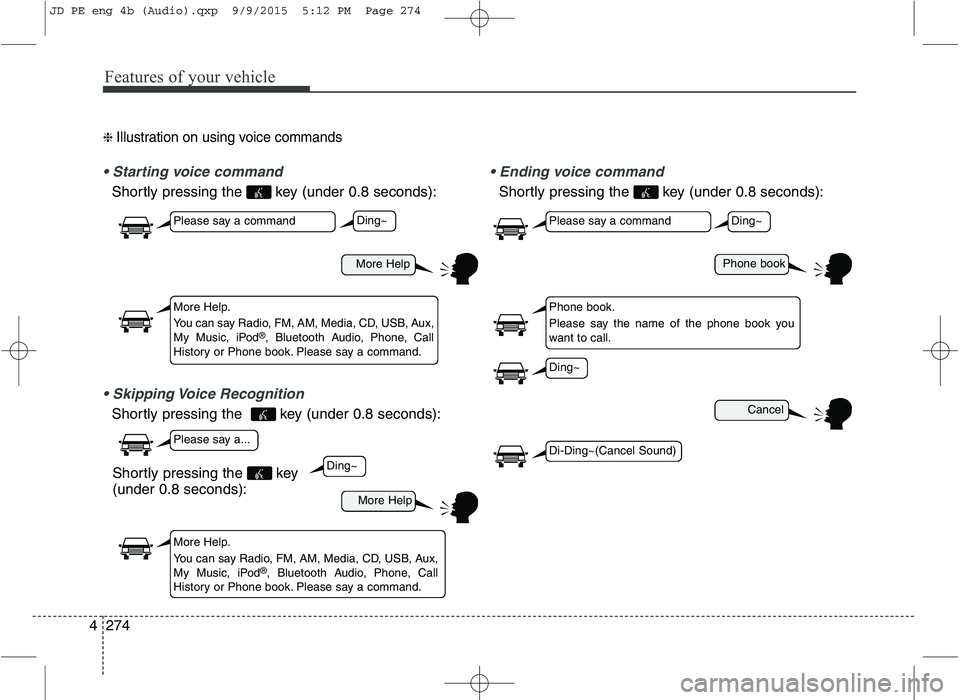
❈ Illustration on using voice commands
Shortly pressing the key (under 0.8 seconds):
Shortly pressing the key (under 0.8 seconds):
voice command
Shortly pressing the key (under 0.8 seconds):
More Help
More Help
Please say a command
Please say a...
More Help.
You can say Radio, FM, AM, Media, CD, USB, Aux,
My Music, iPod ®
, Bluetooth Audio, Phone, Call
History or Phone book. Please say a command.
More Help.
You can say Radio, FM, AM, Media, CD, USB, Aux,
My Music, iPod ®
, Bluetooth Audio, Phone, Call
History or Phone book. Please say a command.
Ding~
Ding~
Shortly pressing the key (under 0.8 seconds):
Phone book
Cancel
Please say a command
Phone book.
Please say the name of the phone book you
want to call.
Ding~
Di-Ding~(Cancel Sound)
Ding~
JD PE eng 4b (Audio).qxp 9/9/2015 5:12 PM Page 274
Page 359 of 643
Features of your vehicle
276
4
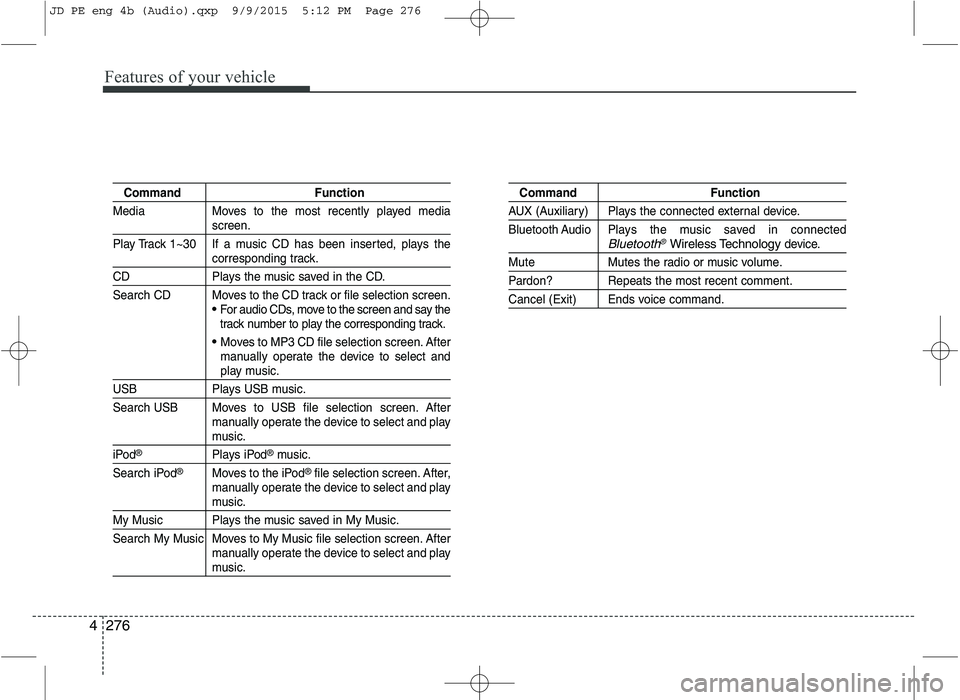
Command Function
Media Moves to the most recently played media
screen.
Play Track 1~30 If a music CD has been inserted, plays the
corresponding track.
CD Plays the music saved in the CD.
Search CD Moves to the CD track or file selection screen.
For audio CDs, move to the screen and say the
track number to play the corresponding track.
Moves to MP3 CD file selection screen. After
manually operate the device to select and
play music.
USB Plays USB music.
Search USB Moves to USB file selection screen. After manually operate the device to select and play
music.
iPod®Plays iPod®music.
Search iPod
®Moves to the iPod®file selection screen. After,
manually operate the device to select and play
music.
My Music Plays the music saved in My Music.
Search My Music Moves to My Music file selection screen. After manually operate the device to select and play
music.
Command Function
AUX (Auxiliary) Plays the connected external device.
Bluetooth Audio Plays the music saved in connected
Bluetooth®Wireless Technologydevice.
Mute Mutes the radio or music volume.
Pardon? Repeats the most recent comment.
Cancel (Exit) Ends voice command.
JD PE eng 4b (Audio).qxp 9/9/2015 5:12 PM Page 276
Page 637 of 643
I7
Index
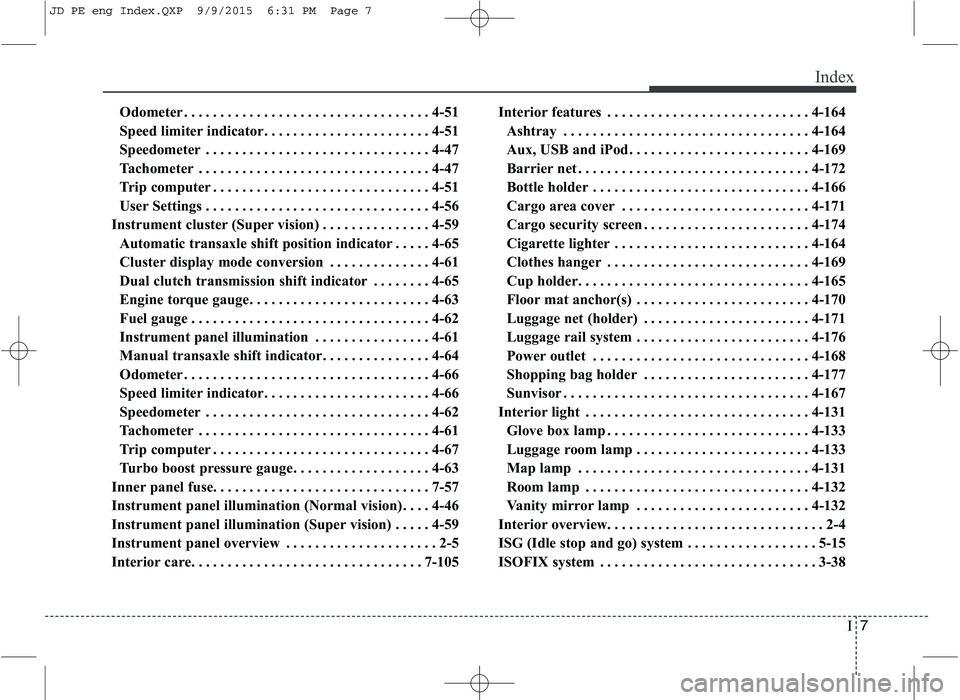
Odometer . . . . . . . . . . . . . . . . . . . . . . . . . . . . . . . . . . 4-51
Speed limiter indicator. . . . . . . . . . . . . . . . . . . . . . . 4-51
Speedometer . . . . . . . . . . . . . . . . . . . . . . . . . . . . . . . 4-47
Tachometer . . . . . . . . . . . . . . . . . . . . . . . . . . . . . . . . 4-47
Trip computer . . . . . . . . . . . . . . . . . . . . . . . . . . . . . . 4-51
User Settings . . . . . . . . . . . . . . . . . . . . . . . . . . . . . . . 4-56
Instrument cluster (Super vision) . . . . . . . . . . . . . . . 4-59 Automatic transaxle shift position indicator . . . . . 4-65
Cluster display mode conversion . . . . . . . . . . . . . . 4-61
Dual clutch transmission shift indicator . . . . . . . . 4-65
Engine torque gauge. . . . . . . . . . . . . . . . . . . . . . . . . 4-63
Fuel gauge . . . . . . . . . . . . . . . . . . . . . . . . . . . . . . . . . 4-62
Instrument panel illumination . . . . . . . . . . . . . . . . 4-61
Manual transaxle shift indicator. . . . . . . . . . . . . . . 4-64
Odometer . . . . . . . . . . . . . . . . . . . . . . . . . . . . . . . . . . 4-66
Speed limiter indicator. . . . . . . . . . . . . . . . . . . . . . . 4-66
Speedometer . . . . . . . . . . . . . . . . . . . . . . . . . . . . . . . 4-62
Tachometer . . . . . . . . . . . . . . . . . . . . . . . . . . . . . . . . 4-61
Trip computer . . . . . . . . . . . . . . . . . . . . . . . . . . . . . . 4-67
Turbo boost pressure gauge. . . . . . . . . . . . . . . . . . . 4-63
Inner panel fuse. . . . . . . . . . . . . . . . . . . . . . . . . . . . . . 7-57
Instrument panel illumination (Normal vision). . . . 4-46
Instrument panel illumination (Super vision) . . . . . 4-59
Instrument panel overview . . . . . . . . . . . . . . . . . . . . . 2-5
Interior care. . . . . . . . . . . . . . . . . . . . . . . . . . . . . . . . 7-105 Interior features . . . . . . . . . . . . . . . . . . . . . . . . . . . . 4-164
Ashtray . . . . . . . . . . . . . . . . . . . . . . . . . . . . . . . . . . 4-164
Aux, USB and iPod . . . . . . . . . . . . . . . . . . . . . . . . . 4-169
Barrier net . . . . . . . . . . . . . . . . . . . . . . . . . . . . . . . . 4-172
Bottle holder . . . . . . . . . . . . . . . . . . . . . . . . . . . . . . 4-166
Cargo area cover . . . . . . . . . . . . . . . . . . . . . . . . . . 4-171
Cargo security screen . . . . . . . . . . . . . . . . . . . . . . . 4-174
Cigarette lighter . . . . . . . . . . . . . . . . . . . . . . . . . . . 4-164
Clothes hanger . . . . . . . . . . . . . . . . . . . . . . . . . . . . 4-169
Cup holder. . . . . . . . . . . . . . . . . . . . . . . . . . . . . . . . 4-165
Floor mat anchor(s) . . . . . . . . . . . . . . . . . . . . . . . . 4-170
Luggage net (holder) . . . . . . . . . . . . . . . . . . . . . . . 4-171
Luggage rail system . . . . . . . . . . . . . . . . . . . . . . . . 4-176
Power outlet . . . . . . . . . . . . . . . . . . . . . . . . . . . . . . 4-168
Shopping bag holder . . . . . . . . . . . . . . . . . . . . . . . 4-177
Sunvisor . . . . . . . . . . . . . . . . . . . . . . . . . . . . . . . . . . 4-167
Interior light . . . . . . . . . . . . . . . . . . . . . . . . . . . . . . . 4-131 Glove box lamp . . . . . . . . . . . . . . . . . . . . . . . . . . . . 4-133
Luggage room lamp . . . . . . . . . . . . . . . . . . . . . . . . 4-133
Map lamp . . . . . . . . . . . . . . . . . . . . . . . . . . . . . . . . 4-131
Room lamp . . . . . . . . . . . . . . . . . . . . . . . . . . . . . . . 4-132
Vanity mirror lamp . . . . . . . . . . . . . . . . . . . . . . . . 4-132
Interior overview. . . . . . . . . . . . . . . . . . . . . . . . . . . . . . 2-4
ISG (Idle stop and go) system . . . . . . . . . . . . . . . . . . 5-15
ISOFIX system . . . . . . . . . . . . . . . . . . . . . . . . . . . . . . 3-38
JD PE eng Index.QXP 9/9/2015 6:31 PM Page 7