coolant temperature KIA CEED 2016 Owners Manual
[x] Cancel search | Manufacturer: KIA, Model Year: 2016, Model line: CEED, Model: KIA CEED 2016Pages: 643, PDF Size: 38.19 MB
Page 131 of 643
Features of your vehicle
48
4
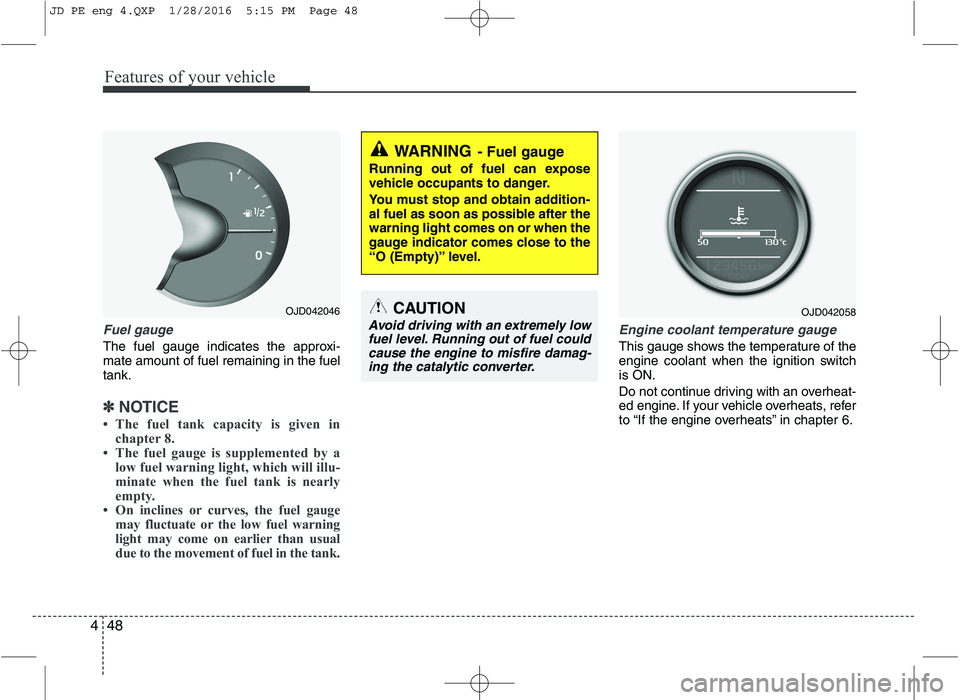
Fuel gauge
The fuel gauge indicates the approxi- mate amount of fuel remaining in the fueltank.
✽✽
NOTICE
The fuel tank capacity is given in chapter 8.
The fuel gauge is supplemented by a low fuel warning light, which will illu-
minate when the fuel tank is nearly
empty.
On inclines or curves, the fuel gauge may fluctuate or the low fuel warning
light may come on earlier than usual
due to the movement of fuel in the tank.
Engine coolant temperature gauge
This gauge shows the temperature of the
engine coolant when the ignition switchis ON.
Do not continue driving with an overheat-
ed engine. If your vehicle overheats, refer
to “If the engine overheats” in chapter 6.
WARNING - Fuel gauge
Running out of fuel can expose
vehicle occupants to danger.
You must stop and obtain addition-
al fuel as soon as possible after thewarning light comes on or when the
gauge indicator comes close to the
“O (Empty)” level.
CAUTION
Avoid driving with an extremely low fuel level. Running out of fuel could cause the engine to misfire damag-ing the catalytic converter.
OJD042046OJD042058
JD PE eng 4.QXP 1/28/2016 5:15 PM Page 48
Page 135 of 643
Features of your vehicle
52
4
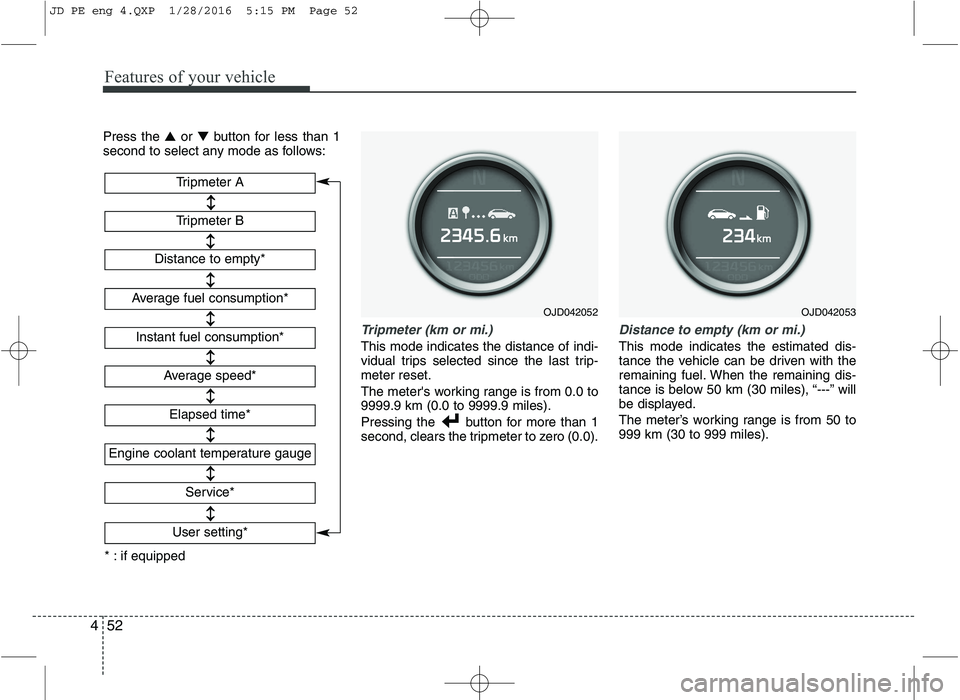
Press the ▲or ▼ button for less than 1
second to select any mode as follows:
Tripmeter (km or mi.)
This mode indicates the distance of indi-
vidual trips selected since the last trip-meter reset.
The meter's working range is from 0.0 to 9999.9 km (0.0 to 9999.9 miles).
Pressing the button for more than 1
second, clears the tripmeter to zero (0.0).
Distance to empty (km or mi.)
This mode indicates the estimated dis-
tance the vehicle can be driven with the
remaining fuel. When the remaining dis-
tance is below 50 km (30 miles), “---” will
be displayed.
The meter’s working range is from 50 to 999 km (30 to 999 miles).
OJD042052
Tripmeter B
Instant fuel consumption*
Tripmeter A
Distance to empty*
Average fuel consumption*
Engine coolant temperature gauge
* : if equipped Elapsed time*
Average speed*
Service*
User setting*
OJD042053
JD PE eng 4.QXP 1/28/2016 5:15 PM Page 52
Page 143 of 643
Features of your vehicle
60
4
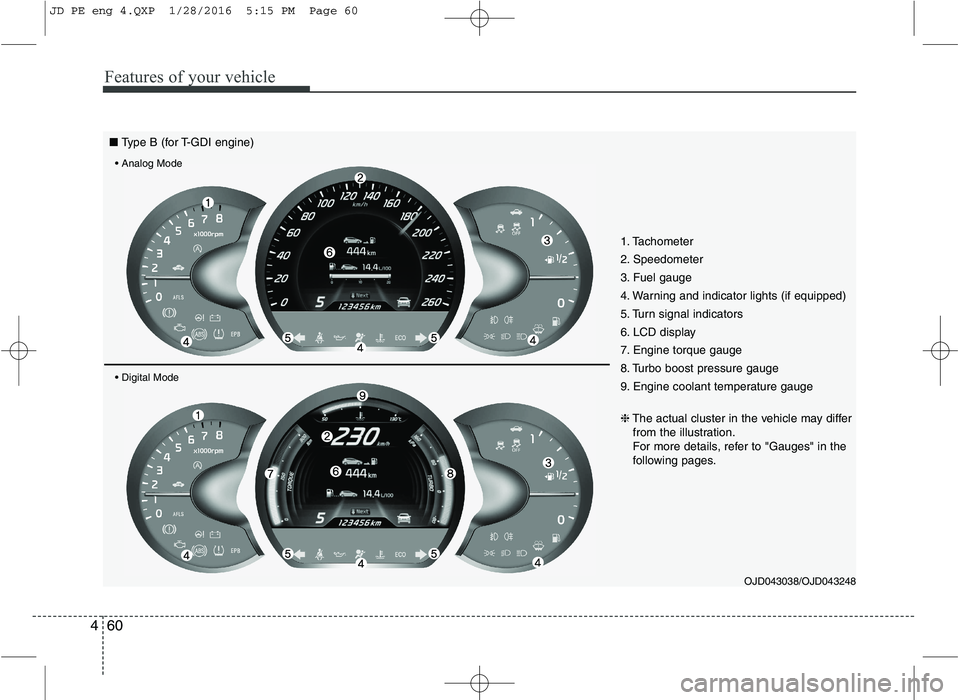
1. Tachometer
2. Speedometer
3. Fuel gauge
4. Warning and indicator lights (if equipped)
5. Turn signal indicators
6. LCD display
7. Engine torque gauge
8. Turbo boost pressure gauge
9. Engine coolant temperature gauge
OJD043038/OJD043248
❈
The actual cluster in the vehicle may differ
from the illustration.
For more details, refer to "Gauges" in the
following pages.
■ Type B (for T-GDI engine)
JD PE eng 4.QXP 1/28/2016 5:15 PM Page 60
Page 147 of 643

Features of your vehicle
64
4
Engine coolant temperature gauge
This gauge shows the temperature of the
engine coolant when the ignition switchis ON.
Do not continue driving with an overheat-
ed engine. If your vehicle overheats, refer
to “If the engine overheats” in chapter 6. Manual transaxle shift indicator
This indicator informs you which gear is
desired while driving to save fuel.
For example
: Indicates that shifting up to the 3rdgear is desired (currently the shift
lever is in the 2nd or 1st gear).
: Indicates that shifting down to the 3rd gear is desired (currently the
shift lever is in the 4th or 5th gear).
OJD042236/OJD042237
CAUTION
If the gauge pointer moves beyond
the normal range area toward the“130°C” position, it indicates over-heating that may damage the engine.
WARNING
Never remove the radiator cap
when the engine is hot. The enginecoolant is under pressure and
could cause severe burns. Wait
until the engine is cool before
adding coolant to the reservoir.
OJD043250
■ Type B
■Type A
OJD045176L
JD PE eng 4.QXP 1/28/2016 5:16 PM Page 64
Page 150 of 643
467
Features of your vehicle
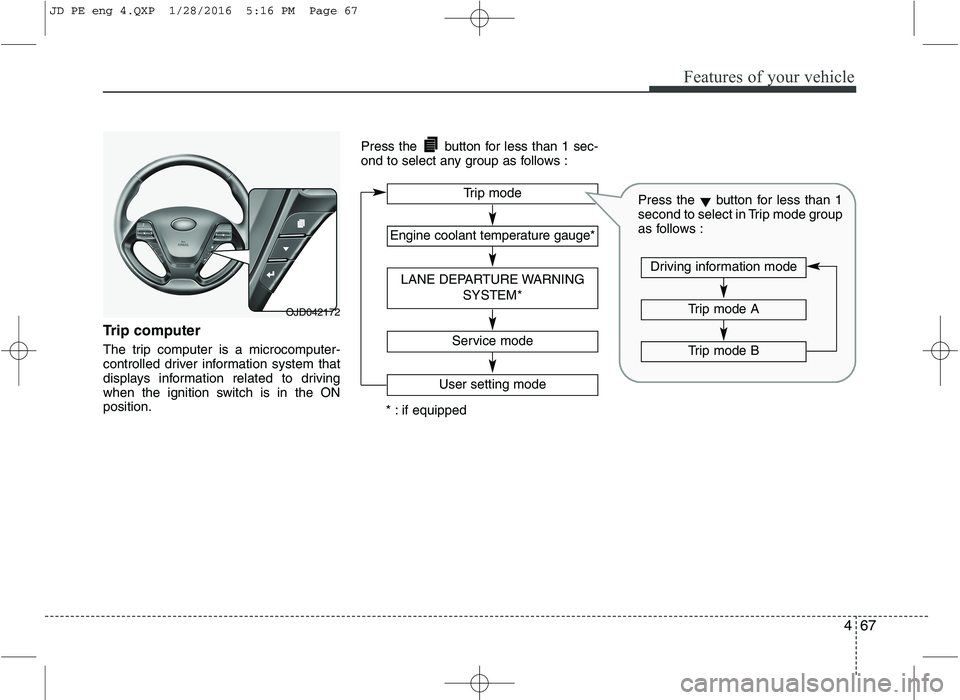
Trip computer
The trip computer is a microcomputer-
controlled driver information system that
displays information related to driving
when the ignition switch is in the ONposition.Press the button for less than 1 sec-
ond to select any group as follows :
OJD042172
Engine coolant temperature gauge*
User setting mode
Service mode
LANE DEPARTURE WARNING
SYSTEM*
Trip mode
* : if equipped
Trip mode A
Trip mode B
Driving information mode
Press the▼button for less than 1
second to select in Trip mode group
as follows :
JD PE eng 4.QXP 1/28/2016 5:16 PM Page 67
Page 162 of 643

479
Features of your vehicle
Check steering wheel lock system
(if equipped)
If the steering wheel does not lock nor-
mally when the engine start/stop button
changes to the OFF position, the warning
illuminates for 10 seconds on the LCD
display. Also, the warning chime sounds
for 3 seconds and the engine start/stop
button light blinks for 10 seconds.Check "BRAKE SWITCH" fuse
When the brake switch fuse is discon-
nected, the warning illuminates for 10
seconds on the LCD display.
Replace the fuse with a new one. If that
is not possible you can start the engine
by pressing the engine start/stop button
for 10 seconds in ACC.Torque reduced due to overheating
(for T-GDI engine)
When the engine coolant temperature
exceeds 115°C, this message will be dis-
played and the torque will be reduced to
protect the engine.
■
Normal vision
■Supervision
OJD042076/OUM044131L
■
Normal vision
■SupervisionOJD042069/OUM044275L
JD PE eng 4.QXP 1/28/2016 5:17 PM Page 79
Page 173 of 643

Features of your vehicle
90
4
Engine coolant tempera-
ture warning light(if equipped)
The warning light illuminates if the tem-
perature of the engine coolant is above120±3°C (248±5.4°F).
Do not continue driving with an overheat-
ed engine. If your vehicle overheats, refer
to “Overheating” in chapter 6.
✽✽ NOTICE
If the engine coolant temperature warn-
ing light illuminates, it indicates over-
heating that may damage the engine.
Glow indicator (Diesel engine)
The indicator light illuminates when the
ignition switch is placed at the ON posi-
tion. The engine can be started after the
preheat indicator light goes off. The illu-
minating time varies with the water tem-
perature, air temperature and batterycondition.
✽✽ NOTICE
If the engine does not start within 10
seconds after the preheating is complet-
ed, turn the ignition key once more to
the LOCK/OFF position for 10 seconds,
and then to the ON position, in order to
preheat again.
Fuel filter warning light (Diesel engine)
This warning light illuminates for 3 sec-
onds after the ignition switch is set to the
ON position and then it will go out. If it
lights up while the engine is running, it
indicates that water has accumulated
inside the fuel filter. If this happens,
remove the water from the fuel filter.
For more details, refer to “Fuel filter” in chapter 7.
CAUTION
If the preheat indicator light contin- ues to illuminate or flash on and offafter the engine has warmed up or
while driving, we recommend thatthe system be checked by an authorized Kia dealer.
CAUTION
When the fuel filter warning lightilluminates, engine power (vehiclespeed & idle speed) may decrease.
If you keep driving with the warning light on, you can damage your vehi-cle's engine parts and injection sys- tem of the Common Rail. If this
occurs, we recommend that the system be checked by an author-ized Kia dealer.
JD PE eng 4.QXP 1/28/2016 5:18 PM Page 90
Page 391 of 643

Driving your vehicle
18
5
Condition of ISG system opera- tion
The ISG system will operate under
the following condition:
- The driver’s seat belt is fastened.
- The driver’s door and engine hood are closed.
- The brake vaccum pressure is ade- quate.
- The battery is sufficiently charged.
- The outside temperature is between -2°C to 35°C (28.4°F to 95°F).
- The engine coolant temperature is not too low.
✽✽ NOTICE
If the ISG system does not meet the operation condition, the ISG system is
deactivated. The light on the ISG OFF
button will illuminate and a message
“Auto Stop conditions not met” will
appear on the LCD display.
If the light or notice comes on contin- uously, please check the operation
condition.ISG system deactivation
If you wish to deactivate the ISG system,
press the ISG OFF button. The light on
the ISG OFF button will illuminate and a
message “Auto Stop System OFF” will
appear on the LCD display.
If you press the ISG OFF button again, the system will be activated and the
light on the ISG OFF button will turn off.
■Normal vision ■
Supervision
OJD055003/OJD055191/OUM054159L
■ Normal vision ■
Supervision
OJD055003/OJD055190/OUM054116L
JD PE eng 5.QXP 9/30/2015 5:32 PM Page 18
Page 412 of 643
539
Driving your vehicle
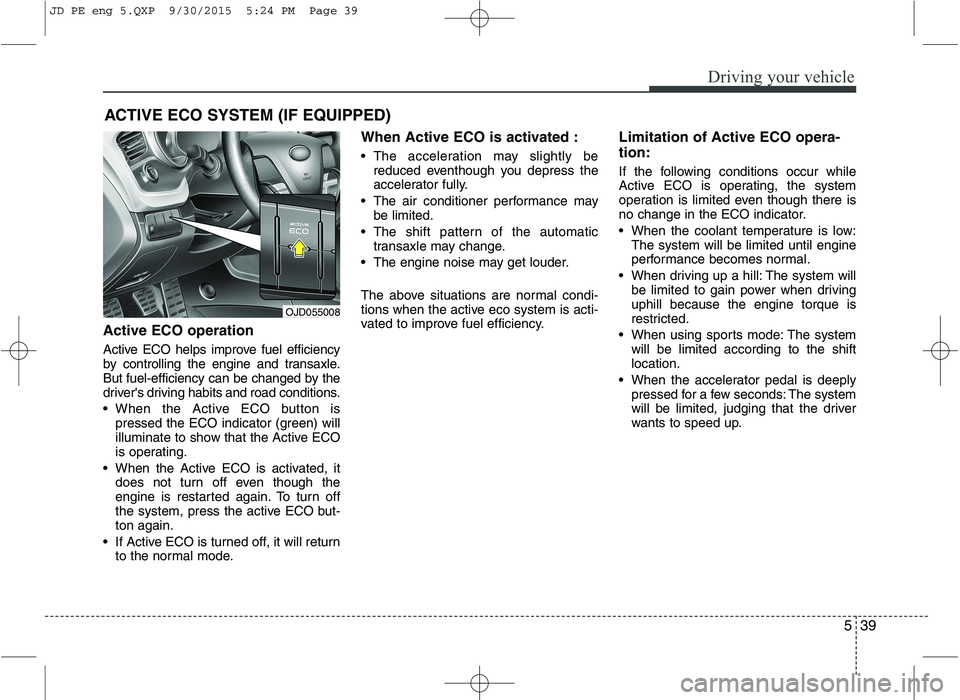
Active ECO operation
Active ECO helps improve fuel efficiency
by controlling the engine and transaxle.
But fuel-efficiency can be changed by the
driver's driving habits and road conditions.
When the Active ECO button ispressed the ECO indicator (green) will
illuminate to show that the Active ECO
is operating.
When the Active ECO is activated, it does not turn off even though the
engine is restarted again. To turn off
the system, press the active ECO but-ton again.
If Active ECO is turned off, it will return to the normal mode. When Active ECO is activated :
The acceleration may slightly be
reduced eventhough you depress the
accelerator fully.
The air conditioner performance may be limited.
The shift pattern of the automatic transaxle may change.
The engine noise may get louder.
The above situations are normal condi-
tions when the active eco system is acti-
vated to improve fuel efficiency. Limitation of Active ECO opera- tion:
If the following conditions occur while
Active ECO is operating, the system
operation is limited even though there is
no change in the ECO indicator.
When the coolant temperature is low:
The system will be limited until engine
performance becomes normal.
When driving up a hill: The system will be limited to gain power when drivinguphill because the engine torque is
restricted.
When using sports mode: The system will be limited according to the shiftlocation.
When the accelerator pedal is deeply pressed for a few seconds: The system
will be limited, judging that the driver
wants to speed up.
ACTIVE ECO SYSTEM (IF EQUIPPED)
OJD055008
JD PE eng 5.QXP 9/30/2015 5:24 PM Page 39
Page 467 of 643
Driving your vehicle
94
5
Driving on grades
Reduce speed and shift to a lower gear
before you start down a long or steep
downgrade. If you don’t shift down, you
might have to use your brakes so much
that they would get hot and no longer
operate efficiently.
On a long uphill grade, shift down and
reduce your speed to around 70 km/h (45mph) to reduce the possibility of engine
and transaxle overheating.
If your trailer weighs more than the max-
imum trailer weight without trailer brakes
and you have an automatic transaxle,
you should drive in D (Drive) when tow-
ing a trailer.
Operating your vehicle in D (Drive) when
towing a trailer will minimize heat build up
and extend the life of your transaxle.CAUTION
When towing a trailer on steep
grades (in excess of 6%) pay closeattention to the engine coolanttemperature gauge to ensure the
engine does not overheat.
If the coolant temperature redwarning light illuminates or thecoolant temperature gaugemoves towards “130”, pull over
and stop as soon as it is safe todo so, and allow the engine to idle until it cools down. You may pro-ceed once the engine has cooled
sufficiently.
You must decide driving speed depending on trailer weight anduphill grade to reduce the possi-bility of engine and transaxle
overheating.
(Continued)
(Continued) For vehicles equipped with a dual clutch transmission when towing
a trailer on steep grades, theclutch in the transmission could overheat.
When the clutch is overheated,the safe protection mode
engages. If the safe protectionmode engages, the gear position indicator on the cluster blinks
with a chime sound.
At this time, a warning messagewill appear on the LCD displayand driving may not be smooth.
If you ignore this warning, the driv-ing condition may become worse.
To return to normal driving condi-tion, stop the vehicle on a flatroad and apply the foot brake for a few minutes before driving off.
JD PE eng 5.QXP 9/30/2015 5:28 PM Page 94