display KIA CEED 2017 Owners Manual
[x] Cancel search | Manufacturer: KIA, Model Year: 2017, Model line: CEED, Model: KIA CEED 2017Pages: 653, PDF Size: 54.59 MB
Page 342 of 653

Features of your vehicle
258
4
List
Press the button to display the
Category Menu.
Turn the TUNE knob left/right to
search for the desired category.
Once you find the desired category,
press the TUNE knob to select
and play. AUX MODE
Using AUX Mode
Press the key Select [AUX]
An external device can be connected
to play music.
Connecting an External Device
External audio players (Camcorders,
car VCR, etc.) can be played through
a dedicated cable.
✽✽
NOTICE
If an external device connector is connected with the AUX terminal,
then AUX mode will automatically
operate. Once the connector is dis-
connected, the previous mode will
be restored.
AUX mode can be used only when an external audio player (cam-
corder, car VCR, etc.) has been
connected.
The AUX volume can be con- trolled separately from other
audio modes.
Connecting a connector jack to the AUX terminal without an external
device will convert the system to
AUX mode, but only output noise.
When an external device is not
being used, also remove the con-
nector jack.
When the external device power is connected to the power jack, play-
ing the external device may output
noise. In such cases, disconnect the
power connection before use.
Fully insert the AUX cable to the AUX jack upon use.
MEDIA
Page 343 of 653

Features of your vehicle
4 259
MY MUSIC MODE Basic Mode Screen
(1) Mode
Displays currently operating mode.
(2) Operation State
From Repeat/Random/Scan, displays
the currently operating function.
(3) File Index
Displays the current file/total number
of files.
(4) File Info
Displays information about the cur-
rent file.
(5) Play/Pause
Changes the play/pause state.
(6) Play Time
Displays the current play time.(7) Info
Displays detailed information for the
current file. (8) Random
Turns the Random feature on/off. (9) Repeat
Turns the Repeat feature on/off. (10) Delete
Deletes the current file. (11) List
Moves to the list screen.
Page 345 of 653

Features of your vehicle
4 261
My Music Mode Menu
Within this mode, you will have
access to the Info, Random, Repeat,
Delete and List features.
Info
Press the button to display
details about the current file.
✽✽
NOTICE
The title, artist and album info are
displayed only when such informa-
tion is recorded within the MP3 file
ID3 tag.
Random
Press the button to play files in
random order. Press the button again
to turn the Random feature off.
Repeat
Press the button to repeat the
current song. Press the button again
to turn the repeat feature off.
Deleting Files
Press the button to delete the
current file.
List
Press the button to display the file list screen.
Turn the TUNE knob left/right to
search for files. Once the desired file
is displayed, press the knob to select
and play.
Page 347 of 653

Features of your vehicle
4 263
(Continued)
When returning to Bluetooth®
Wireless Technology Audio mode
after ending a call, the mode may
not automatically restart in some
mobile phones.
Receiving an incoming call or making an outgoing call while
playing Bluetooth®
Wireless
Technology Audio may result in
audio interference.Bluetooth®Wireless
Technology AUDIO MODE Using
Bluetooth®Wireless
Technology Audio Mode
Playing/Pausing Bluetooth®
Wireless TechnologyAudio
Once a Bluetooth®Wireless Technology
device is connected, the mode will
automatically start.
While playing, press the button
to pause and press button to
play.
✽✽ NOTICE
The play/pause feature may operate
differently depending on the mobile
phone.
Changing Files
Press the key to move to
the previous or next file.
Setting Connection
If a Bluetooth®Wireless Technology
device has not been connected,
press the key [Phone] but-
ton to display the
Bluetooth®Wireless
Technology connection screen.
It is possible to use the pair phone,
connect/disconnect and delete fea-
tures from your
Bluetooth®Wireless
Technology phone.
SETUP
SEEK
TRACK
Page 352 of 653

Features of your vehicle
268
4 (1) Device : Name of device as
shown when searching from your
Bluetooth®Wireless Technology
device
(2) Passkey : Passkey used to pair the device
3. From your
Bluetooth®Wireless
Technology device (i.e. Mobile
Phone), search and select yourcar audio system.
[Non SSP supported device]
(SSP: Secure Simple Pairing)
4. After a few moments, a screen is displayed where the passkey is entered.
Enter the passkey “0000” to pair
your
Bluetooth®Wireless
Technology device with the caraudio system. [SSP supported device]
4. After a few moments, a screen is dis-
played 6 digits passkey.
Check the passkey on your
Bluetooth®Wireless Technology
device and confirm.
5. Once pairing is complete, the fol- lowing screen is displayed.
Some phones (i.e., iPhone ®
, Android
and Blackberry phones) may offer an
option to allow acceptance of allfuture Bluetooth connection requests
by default." and "Visit http://www.kia.
com/#/bluetooth for additional infor-
mation on pairing your Bluetooth-
enabled mobile phone, and to view aphone compatibility list.
✽✽ NOTICE
If Bluetooth ®
Wireless Technology
devices are paired but none are cur-
rently connected, pressing the key or the key on the
steering wheel displays the following
screen. Press the [Pair] button to
pair a new device or press the
[Connect] to connect a previously
paired device.
PHONE
Page 355 of 653
![KIA CEED 2017 Owners Manual Features of your vehicle
4 271
Disconnecting a Device
Press the key Select
[Phone] Select [Paired Phone List]
From the paired phone list, select the
currently connected device and
press the but](/img/2/57941/w960_57941-354.png "KIA CEED 2017 Owners Manual Features of your vehicle
4 271
Disconnecting a Device
Press the key Select
[Phone] Select [Paired Phone List]
From the paired phone list, select the
currently connected device and
press the but")
Features of your vehicle
4 271
Disconnecting a Device
Press the key Select
[Phone] Select [Paired Phone List]
From the paired phone list, select the
currently connected device and
press the button.
Deleting a Device
Press the key Select
[Phone] Select [Paired Phone List]
From the paired phone list, select the
device you want to delete and press
the button.
✽✽
NOTICE
When deleting the currently con- nected device, the device will auto-
matically be disconnected to pro-
ceed with the deleting process.
If a paired Bluetooth®
Wireless
Technology device is deleted, the
device’s call history and phone
book data will also be deleted.
To re-use a deleted device, you must pair the device again.
USING Bluetooth®Wireless
Technology
Phone Menu Screen
Phone Menus
With a Bluetooth®Wireless Technology
device connected, press the
key to display the Phone menuscreen.
(1) Dial Number : Displays the dial screen where numbers can be
dialed to make calls
(2) Call History : Displays the call his- tory list screen
PHONE
SETUPSETUP
Page 356 of 653
![KIA CEED 2017 Owners Manual Features of your vehicle
272
4 (3) Phone book : Displays the Phone
book list screen
(4) Setup : Displays Phone related settings
✽✽NOTICE
If you press the [Call History] but- ton but there is no](/img/2/57941/w960_57941-355.png "KIA CEED 2017 Owners Manual Features of your vehicle
272
4 (3) Phone book : Displays the Phone
book list screen
(4) Setup : Displays Phone related settings
✽✽NOTICE
If you press the [Call History] but- ton but there is no")
Features of your vehicle
272
4 (3) Phone book : Displays the Phone
book list screen
(4) Setup : Displays Phone related settings
✽✽NOTICE
If you press the [Call History] but- ton but there is no call history
data, a prompt is displayed which
asks whether to download call his-
tory data.
If you press the [Phone book] but- ton but there is no phone book
data, a prompt is displayed which
asks whether to download phone
book data.
This feature may not be supported in some mobile phones. For more
information on download support,
refer to your mobile phone user’s
manual.
Calling by Dialing a Number
Press the key Select [Dial Number]
(1) Dial Pad : Used to enter phone number
(2) Call : If a number has been entered, calls the number If no
number has been entered,
switches to call history screen
(3) End : Deletes the entered phone number
(4) Delete : Deletes entered numbers one digit at a time Answering Calls
Answering a Call
Answering a call with a Bluetooth®
Wireless Technology device connect-
ed will display the following screen.
(1) Caller : Displays the other party’s
name when the incoming caller is
saved within your phone book
(2) Incoming Number : Displays the incoming number
(3) Accept : Accepts the incoming call
(4) Reject : Rejects the incoming call
PHONE
Page 357 of 653

Features of your vehicle
4 273
✽✽NOTICE
When an incoming call pop-up is displayed, most Audio and SETUP
mode features are disabled. Only
the call volume will operate.
The telephone number may not be properly displayed in some mobile
phones.
When a call is answered with the mobile phone, the call mode will
automatically revert to Private
mode.During a Handsfree Call
(1) Caller : Displays the other party’s name if the incoming caller is
saved within your phone book
(2) Incoming Number : Displays the incoming number
(3) Call time : Displays the call time
(4) End : Ends call
(5) Private : Converts to Private mode
(6) Out Vol. : Sets call volume as heard by the other party
(7) Mute : Turns Mic Mute On/Off
✽✽ NOTICE
If the mic is muted, the other party
will not be able to hear your voice.
Call History
Press the key Select [Call
History] A list of incoming, outgoing and
missed calls is displayed.
Press the [Download] button to
download the call history.
(1) Call History :
- Displays recent calls (call history)
- Connects call upon selection
(2) Download : Download Recent Call History
PHONE
Page 358 of 653

Features of your vehicle
274
4
✽✽
NOTICE
The call history list will display up to 50 outgoing, incoming, and
missed calls.
Upon downloading call histories, previously saved histories are
deleted.
Incoming calls with hidden caller IDs will not be saved in the call
history list.
Previously saved phone book entries are stored even if a device
is disconnected and re-connected.
The download feature may not be supported in some mobile phones.
Check to see that the Bluetooth®
Wireless Technology device sup-
ports the download feature.Phone Book
Press the key Select [Phone book]
The list of saved phone book entries
is displayed. Press the [Download]
button to download the call history.
(1) Contact List :
- Displays downloaded phone book entries
- Connects call upon selection
(2) Download : Download phone book entries✽✽NOTICE
Up to 1,000 phone book entries can be copied into car phone book.
Upon downloading phone book data, previously saved phone book
data will be deleted.
Downloading is not possible if the phone book download feature is
turned off within the Bluetooth®
Wireless Technology device. Also,
some devices may require device
authorization upon attempting to
download. If downloading cannot
be normally conducted, check the
Bluetooth ®
Wireless Technology
device setting or the screen state.
Caller ID information will not be displayed for unsaved callers.
The download feature may not be supported in some mobile phones.
Check to see that the Bluetooth®
Wireless Technology device sup-
ports the download feature.
PHONE
Page 363 of 653
Features of your vehicle
4 279
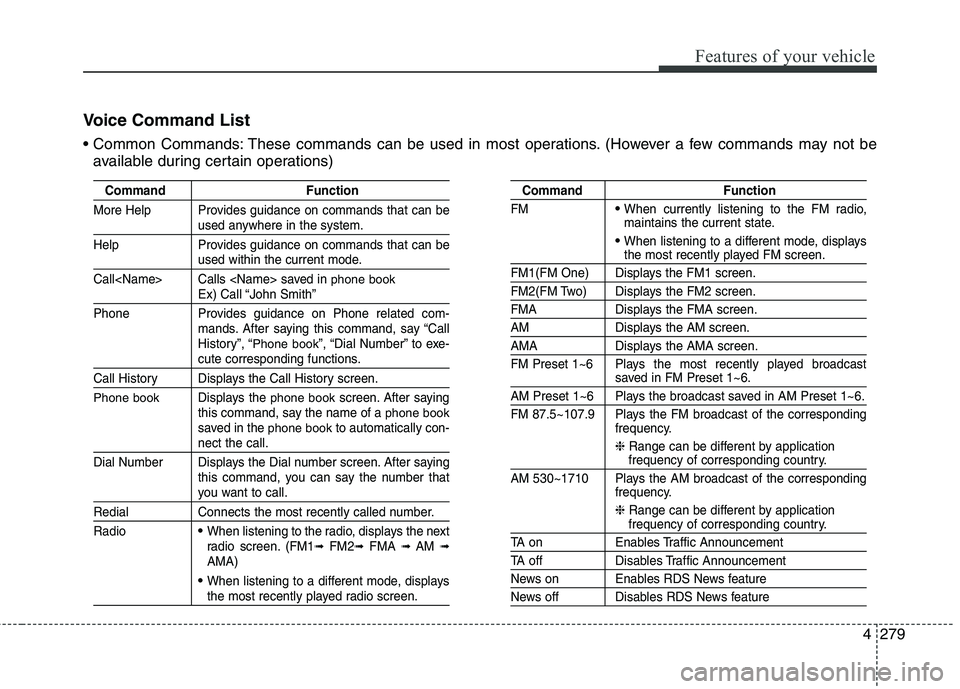
Voice Command List
These commands can be used in most operations. (However a few commands may not be
available during certain operations)
Command Function
More Help Provides guidance on commands that can be
used anywhere in the system.
Help Provides guidance on commands that can be
used within the current mode.
Call
phone bookEx) Call “John Smith”
Phone Provides guidance on Phone related com- mands. After saying this command, say “Call
History”, “
Phone book”, “Dial Number” to exe-cute corresponding functions.
Call History Displays the Call History screen.
Phone bookDisplays the phone bookscreen. After saying
this command, say the name of a phone booksaved in the phone bookto automatically con-nect the call.
Dial Number Displays the Dial number screen. After saying this command, you can say the number that
you want to call.
Redial Connects the most recently called number. Radio
When listening to the radio, displays the next
radio screen. (FM1 ➟FM2 ➟FMA ➟ AM ➟
AMA)
When listening to a different mode, displaysthe most recently played radio screen.
Command Function
FM
When currently listening to the FM radio,
maintains the current state.
When listening to a different mode, displaysthe most recently played FM screen.
FM1(FM One) Displays the FM1 screen.
FM2(FM Two) Displays the FM2 screen.
FMA Displays the FMA screen.
AM Displays the AM screen.
AMA Displays the AMA screen.
FM Preset 1~6 Plays the most recently played broadcast
saved in FM Preset 1~6.
AM Preset 1~6 Plays the broadcast saved in AM Preset 1~6.
FM 87.5~107.9 Plays the FM broadcast of the corresponding frequency.
❈ Range can be different by application
frequency of corresponding country.
AM 530~1710 Plays the AM broadcast of the corresponding frequency.
❈ Range can be different by application
frequency of corresponding country.
TA on Enables Traffic Announcement
TA off Disables Traffic Announcement
News on Enables RDS News feature
News off Disables RDS News feature