key KIA CEED 2017 Owners Manual
[x] Cancel search | Manufacturer: KIA, Model Year: 2017, Model line: CEED, Model: KIA CEED 2017Pages: 653, PDF Size: 54.59 MB
Page 368 of 653
![KIA CEED 2017 Owners Manual Features of your vehicle
284
4 SETUP
Starting Mode
Press the key to display the Setup screen.
You can select and control options
related to [Display], [Sound],[Phone] and [System].
Display Settin](/img/2/57941/w960_57941-367.png "KIA CEED 2017 Owners Manual Features of your vehicle
284
4 SETUP
Starting Mode
Press the key to display the Setup screen.
You can select and control options
related to [Display], [Sound],[Phone] and [System].
Display Settin")
Features of your vehicle
284
4 SETUP
Starting Mode
Press the key to display the Setup screen.
You can select and control options
related to [Display], [Sound],[Phone] and [System].
Display Settings
Adjusting the Brightness
Press the key Select
[Display] Select [Brightness]
Use the , buttons to adjust the
screen brightness or set the
Brightness on Automatic, Day, or
Night mode.
Press the button to reset.
(1) Automatic : Adjusts the bright-
ness automatically
(2) Day : Always maintains the bright- ness on high
(3) Night : Always maintains the brightness on low
Pop-up Mode
Press the key Select
[Display] Select [Pop-up Mode]
This feature is used to display the
Pop-up Mode screen when entering
radio and media modes.
When this feature is turned on, pressing the or key
will display the Pop-up Mode screen.
✽✽ NOTICE
The media Pop-up Mode screen can
be displayed only when two or more
media modes have been connected.
MEDIA RADIO
SETUP
Default
SETUP
SETUP
Page 369 of 653
![KIA CEED 2017 Owners Manual Features of your vehicle
4 285
Scroll Text
Press the key Select
[Display] Select [Scroll text]
This feature is used to scroll text dis-
played on the screen when it is too
long to be displayed at](/img/2/57941/w960_57941-368.png "KIA CEED 2017 Owners Manual Features of your vehicle
4 285
Scroll Text
Press the key Select
[Display] Select [Scroll text]
This feature is used to scroll text dis-
played on the screen when it is too
long to be displayed at")
Features of your vehicle
4 285
Scroll Text
Press the key Select
[Display] Select [Scroll text]
This feature is used to scroll text dis-
played on the screen when it is too
long to be displayed at once.
When turned on, the text is repeat-
edly scrolled. When turned off, the
text is scrolled just once.
MP3 Information Display
Press the key Select
[Display] Select [Song Info]
This feature is used to change the
information displayed within USB
and MP3 CD modes.
(1) Folder File : Displays file nameand folder name
(2) Album Artist Song : Displays album name/artist name/song Sound Settings
Audio Settings
Press the key Select
[Sound] Select [Audio Settings]SETUP
SETUPSETUP
Page 370 of 653
Features of your vehicle
286
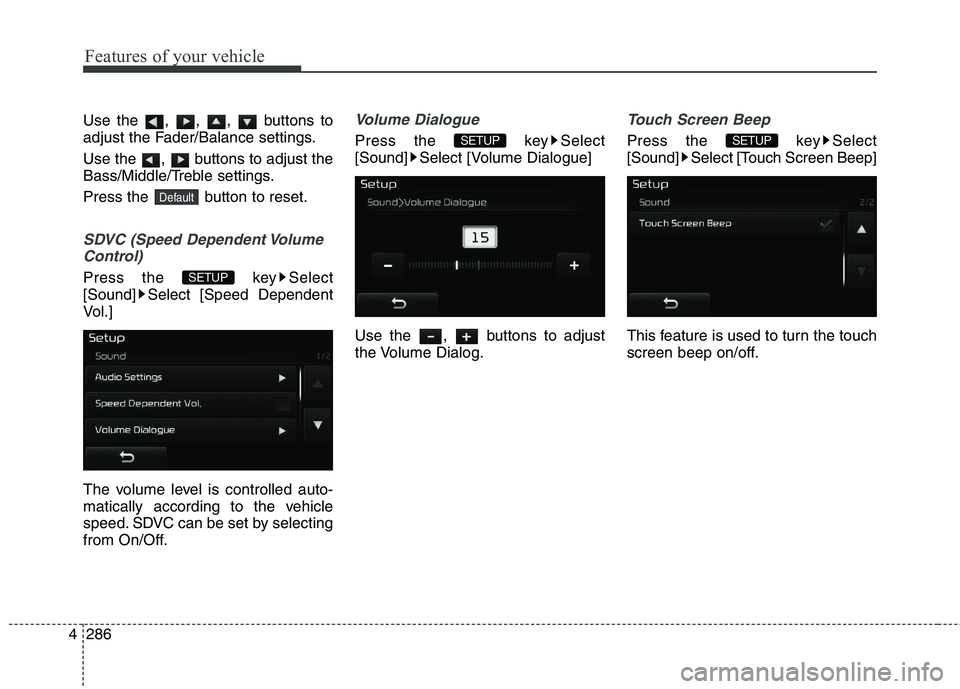
4 Use the , , , buttons to
adjust the Fader/Balance settings.
Use the , buttons to adjust the
Bass/Middle/Treble settings.
Press the button to reset.
SDVC (Speed Dependent Volume
Control)
Press the key Select
[Sound] Select [Speed Dependent
Vol.]
The volume level is controlled auto-
matically according to the vehicle
speed. SDVC can be set by selecting
from On/Off.
Volume Dialogue
Press the key Select
[Sound] Select [Volume Dialogue]
Use the , buttons to adjust
the Volume Dialog.
Touch Screen Beep
Press the key Select
[Sound] Select [Touch Screen Beep]
This feature is used to turn the touch
screen beep on/off.SETUPSETUP
SETUP
Default
Page 371 of 653

Features of your vehicle
4 287
Bluetooth®Wireless Technology
Setting The Bluetooth ®
word mark and logos
are registered trademarks owned by
Bluetooth SIG, Inc. and any use of
such marks by Kia is under license.
Other trademarks and trade names
are those of their respective owners.A Bluetooth ®
enabled cell phone is
required to use
Bluetooth®Wireless
Technology.
Pairing a New Device
Press the key Select
[Phone] Select [Pair Phone]
Bluetooth®Wireless Technology
devices can be paired with the audiosystem.
For more information, refer to the
“Pairing through Phone Setup” sec-tion within
Bluetooth®Wireless
Technology.
SETUPWARNING
Driving while distracted can
result in a loss of vehicle control
that may lead to an accident,
severe personal injury, and
death. The driver’s primary
responsibility is in the safe and
legal operation of a vehicle, and
use of any handheld devices,
other equipment, or vehicle sys-
tems which take the driver’s
eyes, attention and focus away
from the safe operation of a vehi-
cle or which are not permissible
by law should never be used dur-
ing operation of the vehicle.
Page 372 of 653
![KIA CEED 2017 Owners Manual Features of your vehicle
288
4
Viewing Paired Phone List
Press the key Select
[Phone] Select [Paired Phone List]
This feature is used to view mobile
phones that have been paired with
the audio sys](/img/2/57941/w960_57941-371.png "KIA CEED 2017 Owners Manual Features of your vehicle
288
4
Viewing Paired Phone List
Press the key Select
[Phone] Select [Paired Phone List]
This feature is used to view mobile
phones that have been paired with
the audio sys")
Features of your vehicle
288
4
Viewing Paired Phone List
Press the key Select
[Phone] Select [Paired Phone List]
This feature is used to view mobile
phones that have been paired with
the audio system. Upon selecting a
paired phone, the setup menu is dis-
played.
For more information, refer to the“Setting
Bluetooth®Wireless Technology
Connection” section within
Bluetooth®
Wireless Technology.
1) : Moves to the previous screen.
2) Connect/Disconnect Phone : Connect/ Disconnects currently selected phone.
3) Delete : Deletes the currentlyselected phone
4) Change Priority : Sets currently selected phone to highest connec-
tion priority
✽✽NOTICE - BEFORE
DOWNLOADING PHONE BOOKS
Only phone books within connect- ed phones can be downloaded.
Also check to see that your mobile
phone supports the download fea-
ture.
To learn more about whether your mobile phone supports phone
book downloads, refer to your
mobile phone user’s manual.
The Phone book for only the con- nected phone can be downloaded.
Before downloading, check to see
whether your phone supports the
download feature.
Downloading Phone books
Press the key Select [Phone]
Select [Phone book Download]
The Phone book is downloaded from
the mobile phone and the download
progress is displayed.
✽✽ NOTICE
Up to 1,000 phone book entries can be copied into car phone book.
Up to 1,000 phone book entries can be saved for each paired
device.
Upon downloading phone book data, previously saved phone book
data will be deleted. However,
Phone book entries saved to other
paired phones are not deleted.
SETUPSETUP
Page 373 of 653
![KIA CEED 2017 Owners Manual Features of your vehicle
4 289
Auto Download (Phone Book)
Press the key Select
[Phone] Select [Auto Download]
This feature is used to automatically
download mobile phone book entriesonce a
Blueto](/img/2/57941/w960_57941-372.png "KIA CEED 2017 Owners Manual Features of your vehicle
4 289
Auto Download (Phone Book)
Press the key Select
[Phone] Select [Auto Download]
This feature is used to automatically
download mobile phone book entriesonce a
Blueto")
Features of your vehicle
4 289
Auto Download (Phone Book)
Press the key Select
[Phone] Select [Auto Download]
This feature is used to automatically
download mobile phone book entriesonce a
Bluetooth®Wireless Technology
phone is connected.
✽✽ NOTICE
The Auto Download feature will download mobile phone book
entries every time the phone is
connected. The download time
may differ depending on the num-
ber of saved phone book entries
and the communication state.
When downloading a phone book, first check to see that your mobile
phone supports the phone book
download feature.
Outgoing Volume
Press the key Select
[Phone] Select [Outgoing Volume]
Use the , buttons to adjust
the outgoing volume level.
Turning Bluetooth System Off
Press the key Select
[Phone] Select [Bluetooth SystemOff] Once
Bluetooth®Wireless Technology
is turned off,
Bluetooth®Wireless
Technology related features will not
be supported within the audio system.
SETUPSETUPSETUP
Page 374 of 653
![KIA CEED 2017 Owners Manual Features of your vehicle
290
4
✽✽
NOTICE
To turn Bluetooth®
Wireless
Technology back on, go to
[Phone] and press “Yes”.System Setting
Memory Information
Press the key Select
[System] Se](/img/2/57941/w960_57941-373.png "KIA CEED 2017 Owners Manual Features of your vehicle
290
4
✽✽
NOTICE
To turn Bluetooth®
Wireless
Technology back on, go to
[Phone] and press “Yes”.System Setting
Memory Information
Press the key Select
[System] Se")
Features of your vehicle
290
4
✽✽
NOTICE
To turn Bluetooth®
Wireless
Technology back on, go to
[Phone] and press “Yes”.System Setting
Memory Information
Press the key Select
[System] Select [Memory Information]
This feature displays information
related to system memory.
(1) Using : Displays capacity current- ly in use
(2) Capacity : Displays total capacity❈ May differ depending on the
selected audio.
Voice Recognition Mode Setting
(If equipped)
Press the key Select
[System] Select [Voice RecognitionSystem]
This feature is used to select the
desired prompt feedback option from
Normal and Expert.
(1) Normal : When using voice recog- nition, provides detailed guidance prompts
(2) Expert : When using voice recog- nition, omits some guidanceprompts
✽✽NOTICE
Voice Recognition is depend on the
Audio System.
SETUP
SETUP
SETUP
CAUTION
Bluetooth ®
Wireless Technology
audio streaming may not be sup- ported in some Bluetooth ®
Wireless Technology phones.
Page 375 of 653
![KIA CEED 2017 Owners Manual Features of your vehicle
4 291
Language
Press the key Select
[System] Select [Language]
This feature is used to change the
system and voice recognition lan-
guage. If the language is changed, the](/img/2/57941/w960_57941-374.png "KIA CEED 2017 Owners Manual Features of your vehicle
4 291
Language
Press the key Select
[System] Select [Language]
This feature is used to change the
system and voice recognition lan-
guage. If the language is changed, the")
Features of your vehicle
4 291
Language
Press the key Select
[System] Select [Language]
This feature is used to change the
system and voice recognition lan-
guage. If the language is changed, the sys-
tem will restart and apply the select-
ed language. ❈Language support by region REAR VIEW CAMERA (If equipped)
The system has been equipped
with a rear view camera for user
safety by allowing a wider rear
range of vision.
The rear view camera will automat- ically operate when the ignition key
is turned ON and the transmission
lever is set to R.
The rear view camera will automat- ically stop operating when set to a
different lever.SETUP
CAUTION
The rear view camera has been
equipped with an optical lens toprovide a wider range of vision and may appear different fromthe actual distance. For safety,directly check the rear andleft/right sides.
Page 379 of 653

Driving your vehicle
Before driving . . . . . . . . . . . . . . . . . . . . . . . . . . . . . . 5-4• Before entering vehicle . . . . . . . . . . . . . . . . . . . . . . . . . 5-4
. . . . . . . . . . . . . . . . . . . . . . . . . . 5-4
. . . . . . . . . . . . . . . . . . . . . . . . . . . . . . . . 5-4
Key positions . . . . . . . . . . . . . . . . . . . . . . . . . . . . . . . 5-5 . . . . . . . . . . . . . . . . . . . . . . 5-5
. . . . . . . . . . . . . . . . . . . . . . . . . 5-6
. . . . . . . . . . . . . . . . . . . . . . . . . . . . 5-7
Engine start/stop button . . . . . . . . . . . . . . . . . . . . . 5-9 . . . . . . . . . . . . . . 5-9
. . . . . . . . . . . . . . . . . . . . . . . . . . . 5-12
ISG (Idle Stop and Go) system . . . . . . . . . . . . . . . 5-15 . . . . . . . . . . . . . . . . . . . . . . . . . . . . . . . . . . . 5-15
. . . . . . . . . . . . . . . . . . . . . . . . . . . . . . . . . . . 5-17
. . . . . . . . . . . . . . 5-18
. . . . . . . . . . . . . . . . . . . . . . . 5-18
. . . . . . . . . . . . . . . . . . . . . . . 5-19
Manual Transaxle . . . . . . . . . . . . . . . . . . . . . . . . . . 5-20 . . . . . . . . . . . . . . . . . . . . 5-20
. . . . . . . . . . . . . . . . . . . . . . . . 5-22
Automatic transaxle . . . . . . . . . . . . . . . . . . . . . . . . 5-23 . . . . . . . . . . . . . . . . . . 5-23
. . . . . . . . . . . . . . . . . . . . . . . . 5-28 Dual Clutch Transmission (DCT) . . . . . . . . . . . . . 5-30
. . . . . . . . . . . . . . 5-30
. . . . . . . . . . . . . . . . . . . . . . . . 5-37
Active ECOsystem . . . . . . . . . . . . . . . . . . . . . . . . . 5-39
. . . . . . . . . . . . . . . . . . . . . . . . . 5-39
. . . . . . . . . . . . . . . . . . 5-39
. . . . . . . . . . . . . 5-39
Brake system . . . . . . . . . . . . . . . . . . . . . . . . . . . . . . 5-40 . . . . . . . . . . . . . . . . . . . . . . . . . . . . . . . . 5-40
. . . . . . . . . . . . . . . . . . 5-44
. . . . . . . . . . . . . . . . . . 5-48
. . . . . . . . . . . . . . . 5-51
. . . . . . . . . . . . 5-54
. . . . . . . . . . . . . . . . . . 5-55
. . . . . . . . . . . . . . . . . . 5-56
Cruise Control system . . . . . . . . . . . . . . . . . . . . . . 5-58
Speed limit control system. . . . . . . . . . . . . . . . . . . 5-63
Lane departure warning system (LDWS) . . . . . . 5-66
Speed Limit Information Function (SLIF) . . . . . 5-69 . . . . . . . . . . . . . . . . . . 5-69
. . . . . . . . . . . . . . . . . . . . . . . . . . . . . . . . . . . 5-70
. . . . . . . . . . . . . . . . . . . . . . . . . . . . . . . . . . . . . 5-70
. . . . . . . . . . . . . . . . . . . . . . . . . . . . . 5-72
5
Page 383 of 653

55
Driving your vehicle
Illuminated ignition switch
Whenever a front door is opened, the
ignition switch will be illuminated for your
convenience, provided the ignition switch
is not in the ON position. The light will go
off immediately when the ignition switch
is turned on or go off after about 30 sec-onds when the door is closed.KEY POSITIONS
WARNING
- Driving under
the influence of alcohol or drugs
Drinking and driving is dangerous.
Drunk driving is the number one
contributor to the highway death
toll each year. Even a small amount
of alcohol will affect your reflexes,
perceptions and judgement.Driving while under the influence of
drugs is as dangerous or more dan-
gerous than driving drunk.
You are much more likely to have a
serious accident if you drink or
take drugs and drive.
If you are drinking or taking drugs,
don’t drive. Do not ride with a driv-er who has been drinking or taking
drugs. Choose a designated driveror call a cab.WARNING
When you intend to park or stop the vehicle with the engine on, be careful not to depress the accel-
erator pedal for a long period of
time. It may overheat the engine
or exhaust system and cause fire.
When you make a sudden stop or turn the steering wheel rapidly,
loose objects may drop on the
floor and it could interfere with
the operation of the foot pedals,
possibly causing an accident.
Keep all things in the vehicle
safely stored.
If you do not focus on driving, it may cause an accident. Be care-
ful when operating what may dis-
turb driving such as audio or
heater. It is the responsibility of
the driver to always drive safely.
OGDE051055
ACC
ON
START
LOCK